What to do when SFMC shared IP reputation tanks due to other senders?

Published 27 May 2025
Updated 31 Jul 2026
13 min read
Summarize with
Updated on 31 Jul 2026: We updated this guide with Salesforce's current IP thresholds and a clearer test for internal filtering.
If SFMC shared IP reputation tanks because another sender in the pool spikes volume, triggers blocks, or gets the range listed on a blocklist (blacklist), treat it as an infrastructure incident, not a normal warmup wobble. Document the evidence, escalate through Support and the account team, ask for a pool review or dedicated IP migration, and protect domain reputation while SFMC works the abuse side.
The short answer is this: concern is justified, but the practical move is to build a clean case that separates your mail behavior from shared-pool behavior. Stable sends, near-zero complaints, strong engagement, and an unrelated increase across the shared IPs give SFMC a concrete reason to investigate the pool.
- Immediate fix: ask SFMC to review the pool, move the account to a healthier shared pool, or plan a dedicated IP cutover.
- Proof: collect Job IDs, bounce logs, deferrals, sending IP changes, blocklist status, complaint rates, and recipient-domain patterns.
- Risk control: reduce risky segments, keep authentication clean, and send only to recently engaged recipients until placement recovers.
- Decision point: if the same pool keeps collapsing, compare a reassignment with Salesforce's dedicated IP requirements and warming plan.
Why this happens on SFMC shared IPs
A shared IP pool combines the reputation signals of multiple senders. Your domain, content, engagement, complaint rate, and authentication matter, but IP reputation still carries pooled risk. If another sender pushes a sudden high-volume campaign, sends to poor data, or causes complaints, mailbox providers can throttle or block shared IPs before they have enough detail to separate every sender.
SFMC has multiple active shared IPs in each stack, and the sending IP can vary. The clearest pool-level pattern is the same volume or reputation change across the IPs used by affected Job IDs, followed by B2C blocking at Yahoo, AOL, or Microsoft, or delayed Gmail delivery. One IP having a bad day is weaker evidence.
Treat the date as evidence
When the pool changes on one clear date, build the escalation around that date. Show send volume, complaint rate, engagement, and bounce patterns before and after it. A clean timeline makes it harder for support to treat the problem as a generic deliverability ticket.
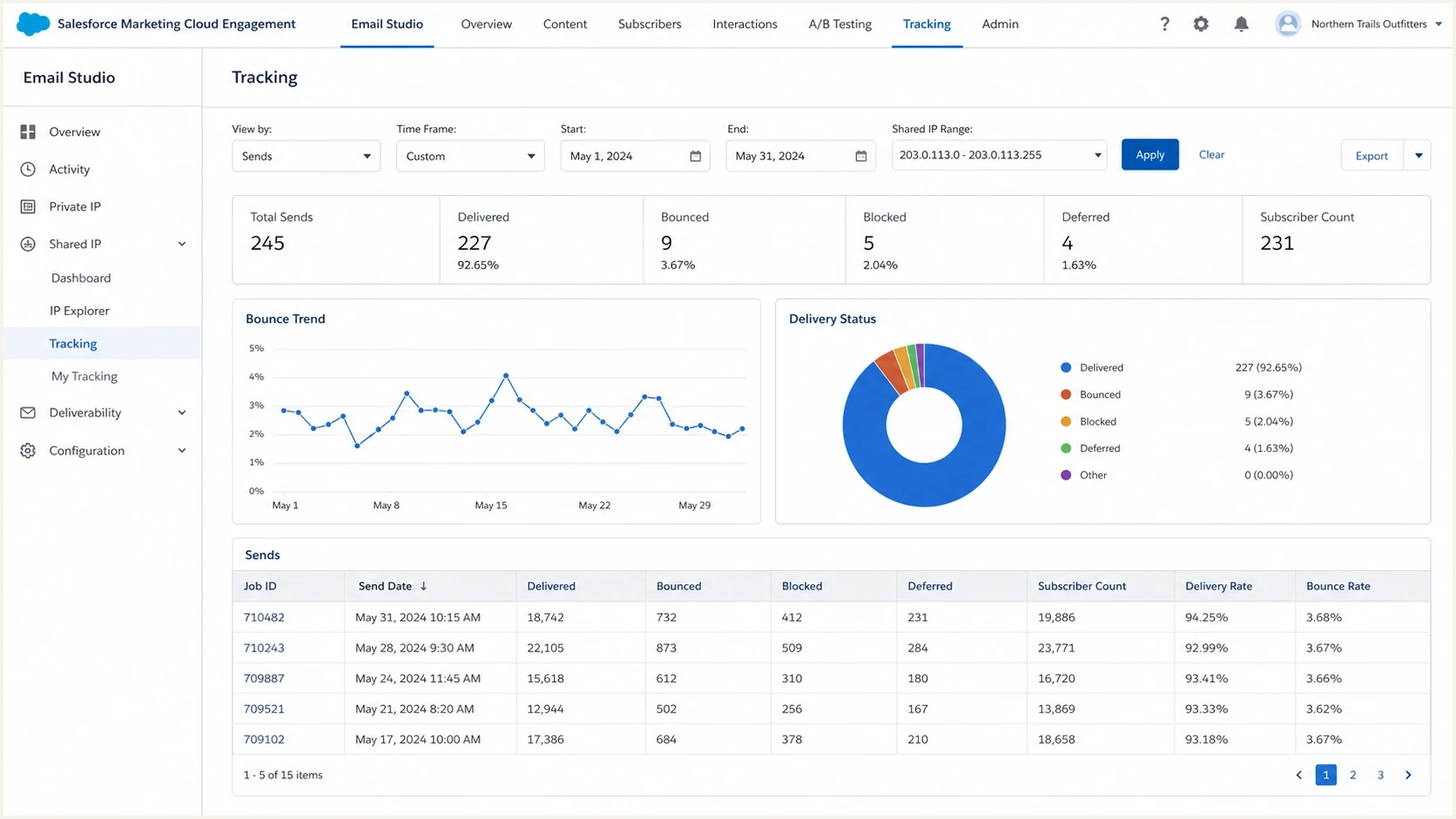
Salesforce Marketing Cloud Engagement tracking view for shared IP delivery issues.
SFMC Support usually cannot identify which customer caused the problem or disclose enforcement details. That privacy boundary does not prevent a request for confirmation that Deliverability and Abuse are engaged, that mailbox-provider remediation is in progress, and that SFMC is evaluating whether the account should remain on the current pool.
Rule out internal filtering before blaming the pool
If failures are limited to recipients at your own company or one customer domain, test the receiving environment before concluding that the shared IP pool has failed. An external-sender banner, disabled link, or quarantine at corporate Outlook inboxes can come from the organization's gateway policy even when the same message reaches Gmail and Yahoo.
- Compare destinations: send the same authenticated message to controlled corporate and consumer test accounts.
- Capture the final hop: save full headers, the rejection or quarantine notice, URL-block message, timestamp, and recipient domain.
- Ask internal IT: review the sending domain, authenticated subdomain, tracking domain, and current SFMC shared IP ranges for an appropriate exception.
- Escalate the right cause: use the corporate security path for one-domain failures and the SFMC pool path for matching failures across unrelated providers.
A shared IP does not bypass internal security policy. It also does not give a newly provisioned sending subdomain an established domain reputation, so keep the recipient-side test separate from both IP warming and domain ramp-up.
What to do first
Make the operational request precise. The request is not "please improve deliverability". It is "our shared IPs appear to have suffered pool-wide reputation damage starting on this date, and we need a pool review, reassignment decision, or dedicated IP migration plan."
- Export evidence: pull send volume, delivery, bounce, deferral, spam complaint, unsubscribe, and engagement metrics for 30 to 60 days.
- Map recipient impact: separate Gmail delays, Microsoft blocks, Yahoo or AOL deferrals, and corporate gateway failures.
- Check the infrastructure: confirm DMARC alignment, SPF, DKIM, reverse DNS, bounce domain matching, and tracking domain configuration.
- Escalate with identifiers: include the MID, affected Job IDs, UTC timestamps, sending IPs, SMTP replies, next action, and review date.
- Reduce exposure: pause unengaged segments and batch the most engaged recipients first while the pool is unstable.
Email tester
Send a real email to this address. Suped shows a results button when the test is ready.
?/43tests passed
A live send test shows what a mailbox provider and receiving system see in the actual message. Use an email tester to inspect headers, authentication, domain alignment, and content-level warnings. That does not prove another sender caused the IP problem, but it prevents a broken DNS record from being confused with a pool incident.
Escalation requesttext
We are seeing pool-wide delivery failure on the shared SFMC IPs.
The issue began on YYYY-MM-DD.
MID: [MID]
Affected Job IDs and UTC timestamps: [DETAILS]
Sending IPs and SMTP replies: [DETAILS]
Our account volume, complaints, and engagement did not change materially.
Please confirm whether Deliverability and Abuse are engaged.
Please evaluate a pool reassignment or dedicated IP migration.
Please provide the next mitigation step, owner, and review date.
How to prove the problem is the shared pool
Build a before-and-after record. If daily account volume was steady and the sending IPs suddenly show traffic or reputation changes that your Job IDs do not explain, this is not a normal warmup error in your program. The goal is to show that domain behavior stayed stable while IP behavior changed.
|
|
|
|---|---|---|
Your volume | Job IDs and daily sends | Your traffic was stable |
Sending IPs | IP-level traffic and dates | The pool changed independently |
Complaints | Complaint rate | Your audience did not deteriorate |
Bounces | 4xx and 5xx SMTP replies | Receivers throttled or blocked the path |
Authentication | DMARC, SPF, and DKIM results | Authentication is not the cause |
Evidence that separates sender behavior from pool behavior.
Keep a separate health check for the domain itself. A domain health check gives you a snapshot of DMARC, SPF, DKIM, and related setup, which helps when support asks for basic configuration proof.
Keep blocklist and blacklist checks in context
A blocklist listing can explain a sudden receiver block, but a clean blacklist result does not prove the pool is healthy. Large mailbox providers rely on internal reputation systems too. Use blocklist monitoring as one signal alongside SMTP replies, delays, complaint data, and engagement.

Blocklist monitoring page showing domain and IP checks across blocklists with importance and status
Suped fits into this workflow by tracking DMARC, SPF, DKIM, blocklist status, and deliverability signals together. This keeps domain evidence separate from shared-IP evidence when SFMC controls the pool but your team still needs to show that authentication and domain practices are sound.
Shared pool move or dedicated IP
There are two realistic infrastructure paths: move to a healthier shared pool or provision a dedicated IP. A pool move is faster if SFMC approves it, but it keeps the account exposed to other senders. A dedicated IP gives more control, but it needs sufficient steady volume and a planned warmup.
Ask for a pool move
- Best when: monthly volume is below 100,000 and SFMC can place the account in a healthier pool.
- Main risk: the next pool can suffer the same problem if other senders behave badly.
- How to ask: show pool-wide damage and request reassignment with an owner and review date.
Move to dedicated IP
- Best when: volume is at least 100,000 messages per month and the program needs reputation control.
- Main risk: thin or erratic volume gives mailbox providers fewer stable signals.
- How to ask: request a controlled cutover and warmup using the most engaged segments first.
Salesforce says dedicated IPs should send at least 100,000 messages per month to maintain reputation. Accounts above 250,000 messages per month must use a dedicated IP. These are operational thresholds, not a guarantee of inbox placement.
Salesforce dedicated IP thresholds
Current monthly volume guidance for Marketing Cloud Engagement sending IPs.
Shared generally fits
Under 100k/month
Low or sporadic volume can struggle to maintain dedicated IP reputation.
Dedicated recommended
100k-250k/month
A dedicated IP gives the sender control of IP reputation.
Dedicated required
Over 250k/month
Accounts above this level must leave shared IP sending.
A new dedicated IP has no sending history and must be warmed. Marketing Cloud Engagement does not permit shared and dedicated IP sending at the same time on the same Enterprise, so migration needs a cutover plan rather than a long parallel test. Below 100,000 monthly messages, push for a healthier shared pool first unless SFMC approves a specific path and the sending cadence can sustain the dedicated IP.
The related breakdown on low-volume sender strategy covers the tradeoff between thin volume and damaged shared infrastructure.
How to protect your domain while the pool recovers
Domain reputation can offset some IP weakness over time, especially at large consumer mailbox providers that evaluate domain, engagement, authentication, complaint history, and user-level signals. It cannot fully cancel a deeply damaged IP pool. Some enterprise filters and gateways block a sending IP or range with less domain-level nuance.
- Tighten targeting: send to recent openers, clickers, purchasers, account users, and people with clear consent.
- Separate risk: hold older subscribers, reactivation campaigns, bought data, appended contacts, and weak consent sources.
- Keep cadence steady: avoid sudden spikes while receivers are already watching the shared IPs.
- Watch authentication: make sure DMARC alignment, SPF, DKIM, bounce domains, and tracking domains remain correct.
- Record every change: note segment changes, send reductions, content changes, support updates, and provider-specific results.
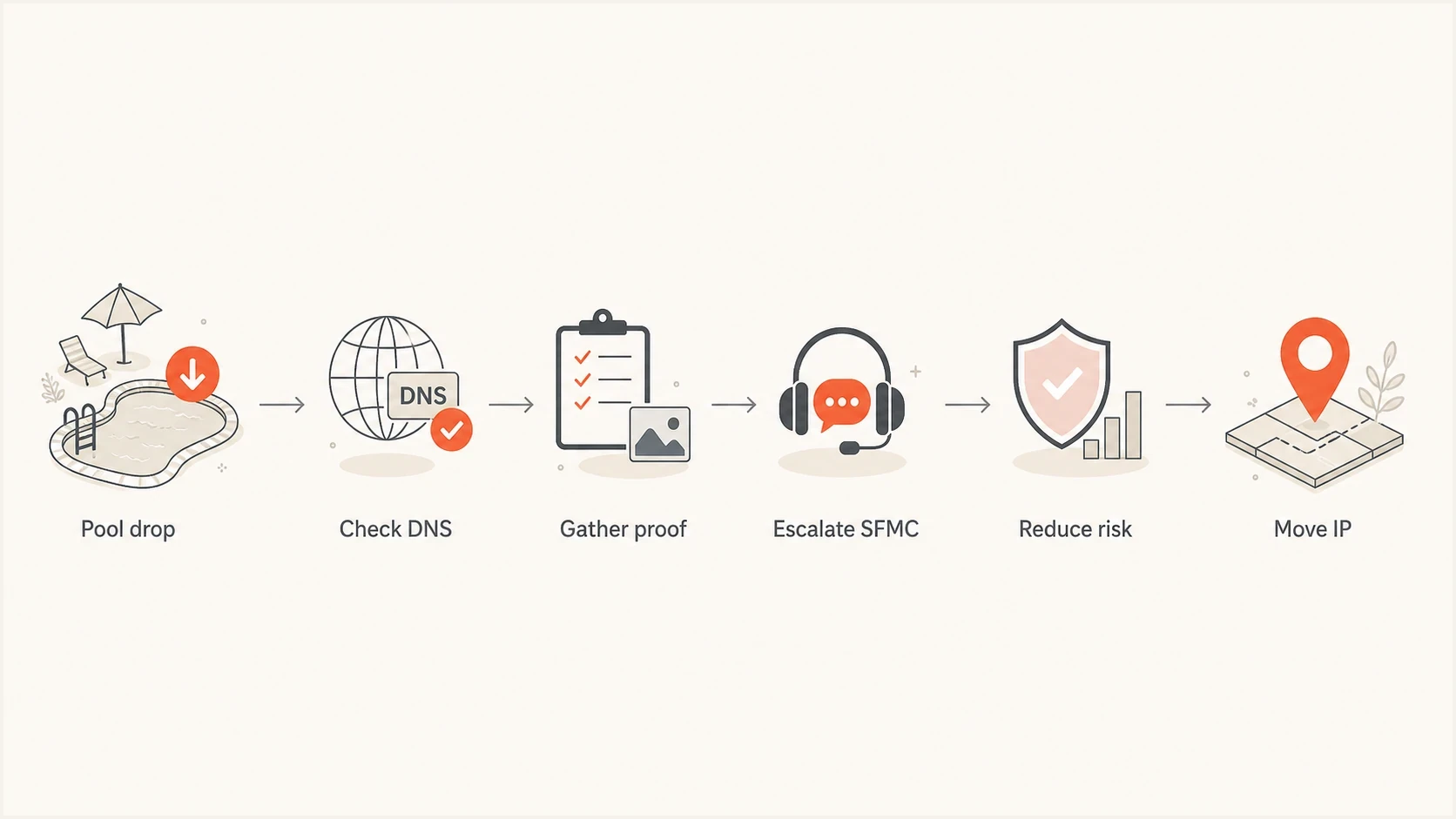
Flowchart for responding to SFMC shared IP reputation damage.
Suped turns authentication and reporting data into issues with fix steps. If DMARC starts failing for a source, DKIM is missing on a new stream, or SPF approaches its DNS lookup limit, Suped flags the change so the team can keep avoidable domain problems separate from the SFMC infrastructure incident.
DMARC is one part of the diagnosis
Passing DMARC proves the message is authenticated and the visible sender domain aligns with an authenticated domain. It does not guarantee inbox placement. For this incident, use DMARC monitoring to keep the domain clean while separately tracking IP reputation, blocklist status, and provider response codes.
What to say to SFMC and your account team
Support tickets often stall when framed as broad deliverability complaints. Send a short evidence packet with the MID, affected Job IDs, UTC timestamps, sending IPs, full SMTP replies, and recipient domains, then ask for specific ownership. The account team matters because pool changes and dedicated IP decisions can involve more than first-line Support.
Account team escalationtext
We need account-level escalation for a shared IP pool incident.
Our deliverability dropped across unrelated B2C providers on YYYY-MM-DD.
The shared IPs show a matching traffic or reputation change.
Our own sending metrics do not explain the change.
We need one of these outcomes:
1. Move to a healthier shared pool.
2. Start dedicated IP migration and warmup.
3. Provide a written mitigation plan with dates and owner.
Weak ticket
Our emails are going to spam. Please fix deliverability.
Useful ticket
The shared IPs changed behavior on a specific date while our account metrics stayed stable. Please evaluate pool reassignment or dedicated IP migration.
Ask direct, answerable questions. Is Deliverability assigned? Is Abuse reviewing the pool? Are mailbox-provider mitigations open? Is a pool move available? If not, who approves dedicated IP migration, and how will the required warmup and Enterprise-wide cutover be handled?
If Microsoft is the main failure point, read the related note on Microsoft shared IP spam because Microsoft blocking often needs separate evidence and a different remediation timeline.
When to accept the dedicated IP risk
Accept the dedicated IP risk when the shared pool has failed at multiple major providers, SFMC cannot give a clear pool-level fix, and monthly volume can sustain the dedicated path. A dedicated IP requires disciplined warming and steady sending. A damaged shared IP leaves the account dependent on every other sender in the pool.
Risk changes by sending path
A simplified comparison of who controls the main reputation inputs.
Your control
Shared risk
Provider action
The first dedicated IP sends should be predictable. Send the most wanted mail first, not the biggest marketing campaign. Use transactional or lifecycle mail only if it fits the IP setup and is fully authenticated. Keep daily volume steady, avoid old data, and review delivery by provider after each send window.
- Start narrow: send to the top engagement tier first, then expand in controlled increments.
- Monitor replies: classify SMTP codes by mailbox provider instead of treating all bounces as one group.
- Hold risky mail: delay winback, cold expansion, list growth experiments, and heavy promotional spikes.
- Keep proof: save daily snapshots to show whether the dedicated path is improving.
For a broader SFMC troubleshooting path, the companion article on SFMC deliverability diagnosis walks through authentication, routing, audience, and provider-specific checks.
Views from the trenches
Best practices
Build a dated evidence packet before escalation so support sees a pool-level event.
Ask for a pool move or dedicated IP migration with a named owner and review date.
Protect domain reputation by sending only wanted mail while the IP path is unstable.
Common pitfalls
Do not let support recast a pool incident as a vague content or warmup problem again.
Do not assume a clean blacklist result means the shared IP range has recovered fully.
Do not keep widening audience segments while blocks and deferrals are still active.
Expert tips
Compare your own volume against shared IP volume to separate cause from impact clearly.
Low volume on a dedicated IP can beat a shared pool with repeated provider blocks.
Domain reputation can help, but it cannot erase a severe IP reputation problem alone.
Expert from Email Geeks says a sudden shared IP volume spike and reputation collapse usually means pool abuse, and the sender should push Support for a mitigation plan.
2024-03-20 - Email Geeks
Expert from Email Geeks says SFMC often cannot disclose enforcement details, but the sender can still ask whether Deliverability and Abuse are actively handling the pool.
2024-03-20 - Email Geeks
The practical answer
When SFMC shared IP reputation tanks because of other senders, do not wait passively for the pool to heal. Escalate with evidence, ask for a pool review or dedicated IP plan, and reduce sending risk until the path is stable. If the issue is isolated to one corporate domain, work with its IT team first. If cross-provider failures continue and volume meets Salesforce's requirements, a dedicated IP becomes the more controllable option.
Suped supports the domain side of this process. SFMC controls the shared IP pool, while Suped monitors DMARC, SPF, DKIM, blocklist or blacklist status, and related alerts. This gives the team a dated record of domain health to place beside SFMC Job IDs, SMTP replies, and pool evidence during escalation.




