What to do when Microsoft marks emails as spam from a shared IP address?

Updated on 27 Jul 2026: We updated this guide with Microsoft header verdicts and safer shared-IP recovery steps.
If Microsoft marks emails as spam from a shared IP address, the first move is not to argue that your own volume is too low to be a problem. Microsoft judges the full sending context, including the shared IP, your domain, authentication, message type, recipient engagement, complaint signals, and whether the message looks useful to the recipient.
For Outlook.com, Hotmail, Live, or MSN recipients, submit the Outlook.com deliverability support form using the actual shared IP if you have it and state that the IP is shared. For a problem limited to a Microsoft 365 tenant, ask the recipient administrator to investigate the message trace and filtering verdict. In either case, prioritize domain-owned DKIM, an authorized SPF route, DMARC alignment, clean transactional content, and evidence from real Microsoft test sends before pressing the sending platform for a cleaner shared pool or a different route.
For urgent mail like password resets, split the incident into two tracks. One track keeps customers working by moving critical mail to the cleanest available route. The other track fixes the root cause so Microsoft has fewer reasons to place future mail in junk.
The short answer
You still have recourse on a shared IP, but it is narrower than it is on a dedicated IP. Outlook.com sender support asks for an IP because IP reputation is part of its decision process. If you do not own the IP, you need the sending platform to help with pool-level reputation, SNDS visibility, reverse DNS, and routing changes.
- Use the shared IP: Submit the exact connecting IP from the message headers, and say the IP is shared.
- Prove the domain: Make sure DKIM signs with and aligns to your domain, SPF passes for an authorized route, and DMARC passes through either aligned mechanism.
- Test the mailbox: Send a real message and inspect headers with an email test before you escalate.
- Escalate with evidence: Give your sending platform examples, timestamps, headers, Microsoft recipient domains, and affected message types.
- Protect critical mail: Route password resets and login codes through the cleanest transactional stream available.
Shared IP does not mean no accountability
A shared IP can carry negative reputation from other senders, but Microsoft still looks for signals that identify your domain separately. Domain-owned DKIM is a useful separator because it gives Microsoft a stable, aligned domain signal even when the IP belongs to a pool.
Why Microsoft treats shared IP mail this way
Microsoft does not evaluate a message using one input. Its postmaster policies describe technical requirements such as valid reverse DNS, no open relays, easy unsubscribe for bulk mail, and SPF, DKIM, and DMARC authentication. Domains sending more than 5,000 emails per day to Outlook.com accounts must comply with SPF, DKIM, and DMARC requirements. Noncompliant messages go to junk and can be rejected with 550 5.7.515.
That high-volume rule does not mean low-volume senders get a free pass. Low volume gives Microsoft less positive history to work with. If the shared IP has weak pool reputation, and your domain has incomplete authentication or low engagement, the message can land in spam even when the content is a normal password reset.
What you control
- DKIM identity: Sign with your own domain, not only the provider domain.
- Message stream: Keep password resets away from promotional campaigns.
- Recipient signals: Reduce complaints, stale recipients, and repeated sends to inactive accounts.
- Evidence quality: Capture headers, timestamps, IPs, and authentication results.
What the provider controls
- IP pool: Which shared IPs send your Microsoft-bound mail.
- SNDS access: Whether their operations team can see Microsoft pool data.
- Pool hygiene: How they remove poor senders from the same shared range.
- Routing options: Whether they can move you to a better pool or custom route.
Start with authentication you own
On a shared IP, a strong repair lever is proving that the message belongs to your domain. Check DKIM first because many shared-IP senders publish SPF and DMARC but leave DKIM signing under the provider domain. That setup authenticates the provider's domain and does not give the visible From domain an aligned DKIM signature.
The visible From domain should match either the DKIM signing domain or the SPF-authenticated return-path domain under DMARC rules so DMARC passes. Domain-owned DKIM often gives Microsoft a clearer domain reputation signal when the return path and shared IP belong to the sending provider.
Example DNS records to verifydns
selector1._domainkey.example.com. CNAME selector1.example.net.
example.com. TXT "v=spf1 include:send.example.net -all"
_dmarc.example.com. TXT "v=DMARC1; p=none; rua=mailto:d@example.com"
A quick domain health check should confirm that SPF, DKIM, and DMARC exist and pass. The DNS check is not enough by itself, because Microsoft filters the actual message, not only the published records. Still, broken DNS records undermine any escalation.
?
What's your domain score?
Deep-scan SPF, DKIM & DMARC records for email deliverability and security issues.
Use message evidence before escalation
When a user says password reset emails are going to spam, start with one affected Microsoft recipient, one exact send time, the message ID, the connecting IP, and the full headers from the delivered spam-folder copy. That gives the sending platform and Microsoft something concrete to investigate.
The header should show whether Microsoft saw the same IP you submitted, whether SPF passed, whether DKIM passed, and whether DMARC passed. If DKIM passes but the signing domain belongs to the provider and does not match the visible From domain under DMARC rules, do not count it as domain-owned DKIM.
Header fields to capturetext
Authentication-Results: spf=pass smtp.mailfrom=example.com;
 dkim=pass header.d=example.com;
 dmarc=pass header.from=example.com;
 compauth=pass reason=100
X-Forefront-Antispam-Report: CIP:203.0.113.25;SCL:5;SFV:SPM;IPV:NLI;CAT:SPM
X-Microsoft-Antispam: BCL:1
Received: from mail.example.net (203.0.113.25)
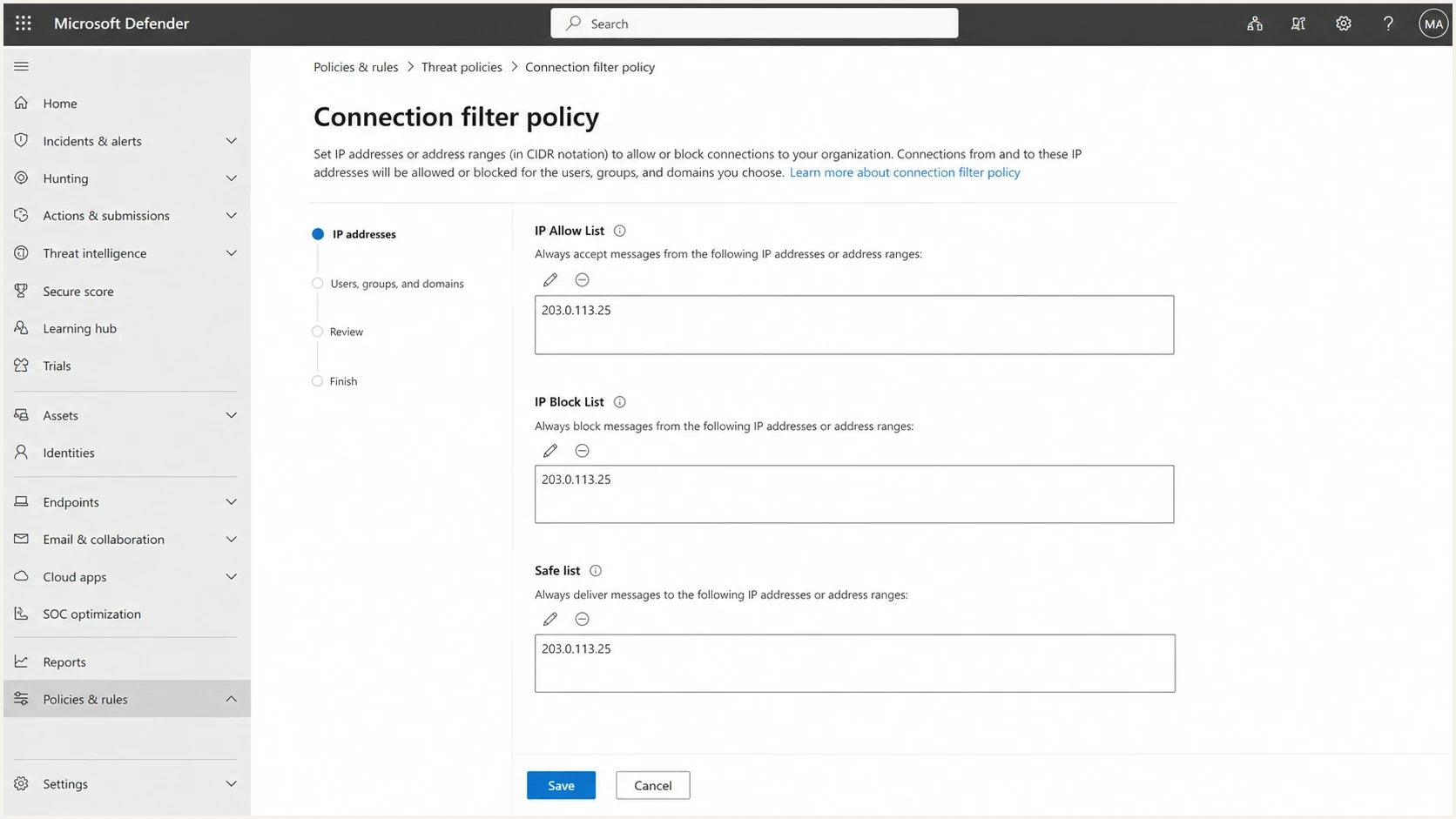
Microsoft Defender portal connection filter policy screen with IP allow and block settings.
If the affected recipient is a Microsoft 365 organization you control, the Microsoft Defender connection filter policy can allow a source IP. It sets SCL to -1 for ordinary spam filtering, but it does not override DMARC failures, malware, or high-confidence phishing. A broad allowance for a shared IP can trust unrelated senders on the same address, so scope it carefully and treat it as a temporary local workaround. For an individual Outlook.com or Hotmail recipient, marking a legitimate message "Not Junk" or adding the sender to Safe Senders can restore that mailbox. Neither workaround repairs sender or pool reputation.
Read Microsoft's filtering verdicts
For a Microsoft 365 mailbox, use the X-headers to separate an IP or authentication problem from content filtering and tenant policy. In X-Forefront-Antispam-Report, CIP identifies the connecting IP, SCL records the spam confidence level, SFV identifies the filtering verdict, and IPV shows whether connection filtering applied. X-Microsoft-Antispam carries the bulk complaint level (BCL).
Read these values with Authentication-Results and compauth. An SPF or DKIM pass is not enough unless at least one authenticated domain aligns with the visible From domain and DMARC passes. Consumer Outlook.com and Hotmail copies can expose different headers, so the absence of an Exchange Online field is not proof of a clean verdict.
|
|
|
|---|---|---|
Authentication-Results | SPF, DKIM, DMARC, compauth | Repair alignment or signing failures |
X-Forefront-Antispam-Report | CIP, SCL, SFV, IPV, CAT | Separate connection, content, and policy verdicts |
X-Microsoft-Antispam | BCL | Remove bulk traits from transactional mail |
X-MS-Exchange-Organization-SCL | Final stamped SCL | Compare recipient copies and tenant rules |
Use Microsoft header fields to identify the component that handled the message.
SCL is evidence, not a universal score
In Microsoft 365, SCL 5 or 6 normally means spam, while 7 to 9 means high-confidence spam. SCL -1 indicates a bypass. SFV:SPM points to spam filtering, but tenant rules and user safe or blocked lists can override filtering. Use the exact recipient copy because verdicts can differ by mailbox and policy.
Escalate the shared IP problem
If you are using a marketing or lifecycle platform that sends through shared infrastructure, support can sound like a dead end. Keep the ask narrow. Ask which shared pool sent the affected messages, whether that pool has Microsoft reputation problems, whether your Microsoft-bound mail can move, whether reverse DNS and HELO are valid, and whether the provider can submit the IP range through its own channels.
The provider has leverage that you do not have. It can see pool assignment, IP rotation, bounce logs, SNDS data if it registered the ranges, abuse patterns from other customers, and routing rules. If the provider says nothing can be done, ask for the exact reason in writing. Sometimes the pool is inherited from upstream cloud-hosted MTAs, and the provider needs to move you at the application layer.
|
|
|
|---|---|---|
Spam folder | Headers | Pool review |
Bad IP | CIP | Route change |
Auth gap | DKIM | DNS fix |
Listing | RBL hit | Delist |
Use concise evidence and a precise ask when escalating shared IP problems.
Also check whether the shared IP appears on a blocklist or blacklist. A public blocklist listing is not always the reason Microsoft junked the message, but it gives you another escalation point. Suped's blocklist monitoring connects those listings to domain and IP reputation monitoring so you can catch repeat incidents instead of discovering them through customer complaints.
When a dedicated IP helps
A dedicated IP is not an automatic fix. With low or irregular volume, a dedicated IP can perform worse because Microsoft gets less consistent positive history. Move to a dedicated IP only when the sender has enough steady volume, a warm-up plan, clean recipient selection, and control over every stream using the IP.
Dedicated IP readiness
Operational checkpoints for deciding whether to stay shared, ask for a better pool, or move to dedicated routing.
Stay shared
Low steady volume
Low or irregular Microsoft volume, but authentication and content are clean.
Fix the pool
Pool issue
Your domain checks pass, but several Microsoft tests land in junk from the same pool.
Move dedicated
Stable volume
You have consistent daily volume and enough operational control to warm the IP slowly.
For password reset mail, the better short-term option is often a separate transactional route rather than a dedicated IP. Keep the content plain, identify the user action clearly, avoid marketing copy, and send only when the user requested the message. Microsoft engagement signals improve when recipients expect the mail and act on it.
If the same shared pool keeps failing after authentication, content, and list quality are clean, then a route change becomes reasonable. This is the same pattern covered in more depth for shared IP reputation problems in other sending platforms.
How Suped fits the workflow
Suped's product supports this workflow by bringing DMARC, SPF, DKIM, blocklist (blacklist) monitoring, and issue resolution into one incident view. It helps separate domain authentication failures you can fix from shared-IP reputation evidence that the sending provider must act on.

Issue steps to fix dialog showing the issue overview, tailored fix steps, and verification action
In Suped, the workflow starts with DMARC monitoring, then moves into source identification and issue resolution. The goal is to know whether the affected source is authenticated, whether the DKIM domain is yours, whether SPF is near lookup limits, whether a blocklist (blacklist) event exists, and what action fixes the current failure.
- Issue detection: Suped flags failed authentication, unverified sources, and sudden changes in pass rates.
- Fix steps: The issue view gives practical actions instead of leaving you with XML reports.
- Hosted records: Hosted SPF, hosted DMARC, SPF flattening, and hosted MTA-STS reduce DNS friction.
- Real-time alerts: Alerts help catch Microsoft-bound failures before support tickets pile up.
- Multi-domain scale: The MSP dashboard helps agencies manage many client domains without mixing evidence.
A practical recovery sequence
Use this sequence when Microsoft junk placement affects shared-IP transactional mail. It keeps the first hour focused on restoring the user workflow, then builds the case for the provider and Microsoft.
- Confirm scope: Check whether the problem affects Outlook.com, Hotmail, Microsoft 365 tenants, or all recipients.
- Capture headers: Pull full headers from a real spam-folder message, not only application logs.
- Verify DKIM: Confirm that the signing domain belongs to your domain and passes in the final message.
- Separate traffic: Move password resets away from marketing campaigns and any experimental content.
- Check reputation: Review shared IP blocklist and blacklist status, bounce patterns, and complaint spikes.
- Escalate provider: Ask for a pool review, Microsoft-specific routing notes, and available SNDS evidence.
- Submit to Microsoft: For Outlook.com, Hotmail, Live, or MSN, use the shared IP in the form, explain the shared setup, and attach clean authentication evidence.
Best quick fix for password resets
The fastest useful change is usually stream separation plus domain-owned DKIM. If password resets share reputation with promotional mail, separate them first. If DKIM signs with the provider domain, fix that next.
If Microsoft spam placement remains after those steps, compare multiple recipient copies and send times before changing infrastructure. Consistent SCL, SFV, authentication, and connecting-IP evidence makes the next provider escalation specific enough to act on.
Views from the trenches
Best practices
Verify DKIM signs with your domain before blaming the shared pool's reputation for junking.
Capture full Microsoft headers so the provider can identify the real sending pool.
Keep password resets isolated from promotional mail during any reputation incident.
Common pitfalls
Submitting only the domain leaves Microsoft and the provider without the needed IP.
Assuming provider DKIM is enough weakens your domain's own reputation signal over time.
Moving to a dedicated IP without stable volume can make Microsoft placement worse.
Expert tips
Ask the platform whether Microsoft-bound mail can move to a cleaner shared pool.
Request SNDS or equivalent pool-level findings when the provider owns the IP range.
Treat blocklist and blacklist hits as escalation evidence, not the whole diagnosis.
Marketer from Email Geeks says submit the Microsoft form with the shared IP, but expect limited action unless the sending platform also helps with pool reputation.
2022-11-17 - Email Geeks
Marketer from Email Geeks says domain-owned DKIM gives Microsoft a clearer reputation signal than a provider-owned DKIM signature on shared infrastructure.
2022-11-17 - Email Geeks
What to do next
When Microsoft sends shared-IP mail to spam, fix the parts that identify you before arguing about the IP. Submit the shared IP for affected Outlook.com consumer domains, but do not depend on that form alone. Domain-owned DKIM, SPF authorization, DMARC alignment, clean transactional routing, and precise provider escalation do more work than a generic delist request.
The clean path is evidence first, then routing pressure. If authentication is clean and Microsoft still junks password resets from the same shared pool, ask for a better pool, a transactional route, or a managed move to dedicated routing when your volume supports it.




