
How to fix bad domain reputation and best IP strategy for low volume sender?

Published 14 Jul 2025
Updated 27 Oct 2026
13 min read
Summarize with
Updated on 27 Oct 2026: We corrected the recovery timing and IP guidance for low-volume senders.
Stop the cold lead nurture series and fix its consent and authentication problems before restarting with opted-in people who recently asked to hear from the brand. For a sender doing about 1,000 to 6,000 messages per month during recovery, a reputable shared IP pool is usually the right IP strategy. A private IP that has gone cold is too sparse to rebuild trust quickly unless the sender can maintain steady, engaged volume.
If a move to a shared pool produces worse inbox placement at Gmail, Microsoft, or Yahoo, diagnose the affected route before another switch. That does not make the cold private IP the automatic winner. It means the next send path must be chosen based on current evidence: use a cleaner shared pool for permission-based mail if the ESP can provide one, or rewarm the private IP slowly if it has cleaner current signals and the ESP confirms that the available volume can support it. The domain reputation problem still has to be fixed by changing the mail, because the route alone will not repair it.
- Stop cold: Pause the cold nurture series before launching the new campaigns.
- Use consent: Send only to recent signups and leads with confirmed consent. Keep the signup source, timestamp, and consent record.
- Avoid churn: Do not bounce between IPs every time Gmail reacts badly.
- Measure daily: Track complaints, bounces, unsubscribes, spam placement, authentication, feedback-loop data, and blocklist or blacklist status.
Stop the mail that damaged domain reputation
If domain reputation is bad because mailbox providers saw unwanted mail, the first fix is to stop the unwanted mail. A sender cannot repair domain reputation while the same campaign keeps creating poor engagement, spam placement, or complaints. In this case, the cold lead nurture series should stop for the foreseeable future.
The new welcome and lead-response campaigns should not wait for a mythical reset. Reputation does not reset because mail stops for a week. There is no fixed waiting period that repairs reputation; recent signups still expect timely mail. The practical move is to send the welcome or lead follow-up quickly, with a very small daily cap, because those recipients are the best available signal source.
Use RFC 8058 one-click unsubscribe for recovery marketing mail, alongside a visible unsubscribe link in the body, even below bulk-sender thresholds. Honor requests within two days. The HTTPS List-Unsubscribe URL and the List-Unsubscribe-Post: List-Unsubscribe=One-Click header must be covered by a valid DKIM signature. Exclude purchased, scraped, stale, and unconfirmed addresses. Complaint spikes have a larger effect when total volume is low.
Use double opt-in for new subscriptions and protect signup forms against automated abuse. State the expected content and frequency, and keep the confirmation separate from ongoing marketing until the recipient confirms.
Stop the source of damage
Bad domain reputation is usually a trailing signal. Mailbox providers have already seen enough negative behavior to classify future mail cautiously. The recovery plan has to remove the campaign that caused the damage before any IP decision matters.
What to stop
- Cold nurture: Stop cold lead series associated with complaints and unwanted mail.
- Large blasts: Avoid broad list sends until engaged mail shows stable inboxing.
- Route hopping: Changing IPs again without changing consent quality repeats the same problem.
What to keep
- Welcome mail: Keep messages to people who just signed up or requested contact.
- Lead response: Use relevant follow-up tied to the form, product, or stated interest.
- Suppression: Keep hard bounces, complainers, unsubscribes, and non-engagers out of recovery sends.
Why the IP switch did not fix it
A move to a shared IP pool does not remove existing domain reputation problems, and the pool can have its own IP reputation problems. Gmail, Microsoft, and Yahoo do not judge only the IP. They also evaluate the domain, authentication, recipient behavior, complaints, bounce patterns, sending consistency, and the history of the mail stream. If the same domain sends the same unwanted campaign through a different IP, the bad pattern follows it.
Start with a domain health check before changing infrastructure again. The goal is to confirm that SPF, DKIM, DMARC, DNS, and visible reputation signals are not adding avoidable friction while the sender repairs engagement.
If marketing and transactional mail currently share the same identity, separate the recovery stream on a stable sending subdomain and keep the visible brand clear. A subdomain helps separate mail streams, but providers can still associate it with the parent domain. It does not erase poor consent or create a guaranteed reputation boundary.
|
|
|
|---|---|---|
Gmail spam | Provider-specific filtering | Inspect errors and recent opt-in placement |
Microsoft spam | Reputation, policy or routing | Compare SMTP responses by IP |
5xx rejections | Invalid addresses or policy errors | Suppress invalid recipients; fix policy failures |
Low volume | Sparse provider-level IP history | Prefer an established shared pool |
IP decisions matter, but they rarely outrank consent and engagement quality.
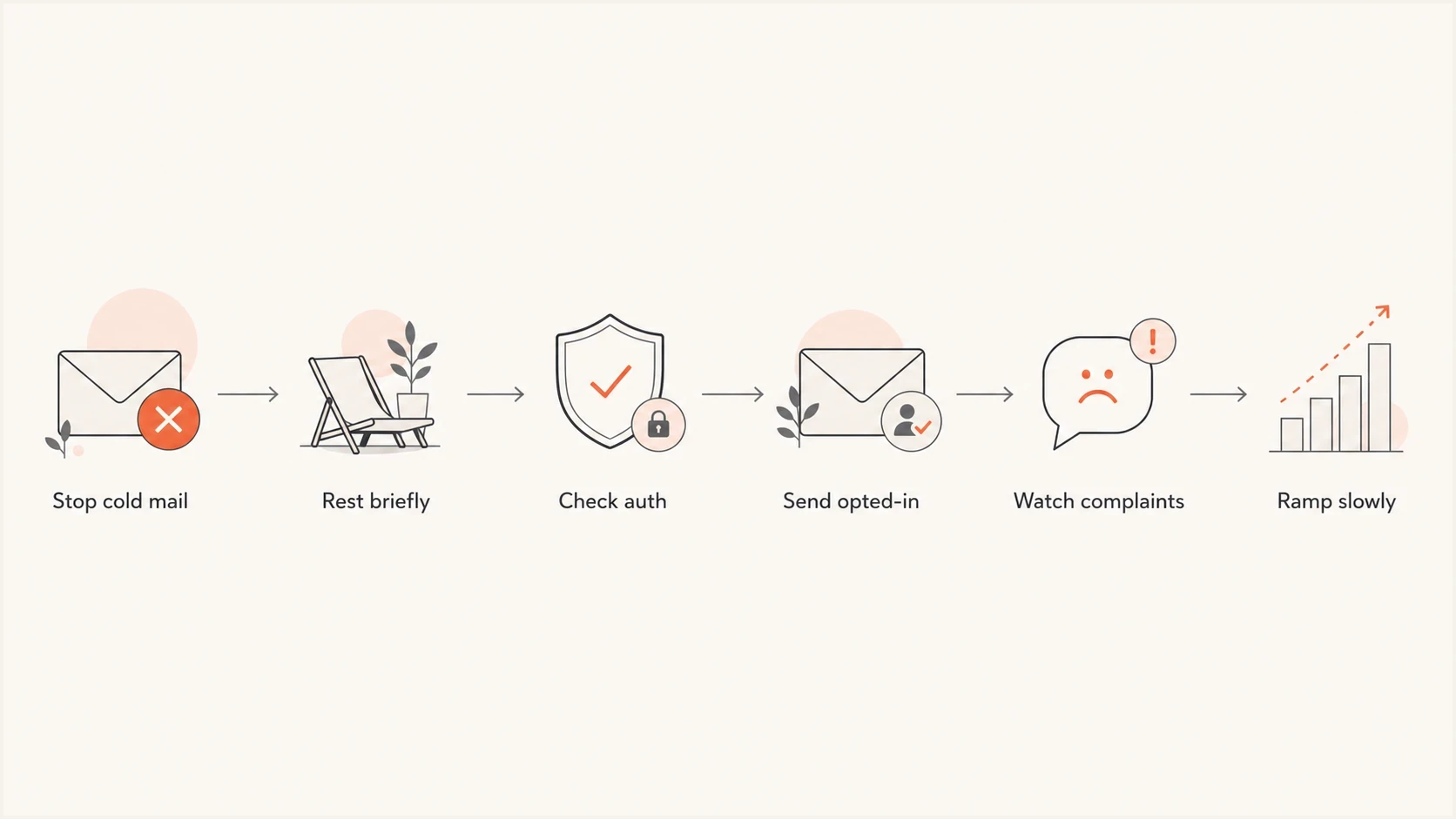
Reputation recovery flowchart for stopping cold mail, checking authentication, and ramping slowly.
The best IP strategy for low volume
For low-volume senders, the best IP strategy is usually a reputable shared IP pool with tight segmentation. A private IP needs consistent, engaged mail to build and maintain its own reputation. At 1,000 to 6,000 messages per month, there is usually too little provider-level traffic to justify a dedicated IP as the default recovery route. Any negative event also has a larger effect at that volume.
There is no universal monthly cutoff for a dedicated IP. The decision depends on daily consistency, recipient-domain mix, seasonal peaks, and the sender's ability to warm and monitor the IP. If the ESP can place the recovery stream on a cleaner shared pool intended for opt-in mail, use that route. If that route is unavailable, ask the ESP to compare current SMTP evidence and available daily volume before deciding whether to rewarm the private IP.
If a shared IP pool appears on a blocklist or blacklist, do not treat the lookup as the diagnosis by itself. Tie the listing to the raw SMTP rejection, sending IP, recipient domain, message timestamp, and message ID. A cited listing is direct evidence; an uncited listing still needs corroborating delivery evidence. Fix the cause before requesting delisting, and ask the ESP to handle shared-IP remediation.
Dedicated IP suitability
Sending pattern and traffic at each mailbox provider matter more than a universal monthly cutoff.
Current volume
1k-6k/month
Use a reputable shared pool
Weak fit
Low or irregular traffic
A dedicated IP has little consistent traffic to build on
Evaluate dedicated
Steady, sufficient traffic
Review actual provider-level volume with the ESP
|
|
|
|
|---|---|---|---|
Shared pool | Low opt-in volume | Neighbor traffic | Preferred |
Private IP | Steady scale | Too little data | Conditional |
New IP | Required infrastructure migration | No history | Only with evidence |
New domain | Genuine brand change | Trust loss | Avoid for recovery |
A simple route choice matrix for the recovery phase.
Check outbound DNS and TLS before warming an IP
Before warming a dedicated IP or blaming a shared pool, verify the IP addresses that actually connect to recipient servers. Gmail requires valid forward and reverse DNS and TLS for all senders, including low-volume senders.
- Check every outbound IPv4 and IPv6 address. Each needs a PTR hostname whose A or AAAA record resolves back to that same IP address.
- Use a valid public hostname for HELO/EHLO. Check the sending server's DNS rather than assuming the website or inbound MX records cover it.
- Confirm that outbound SMTP uses TLS and that no fallback route silently sends through an unconfigured IP.
- Ask the ESP to fix these settings on a shared pool. For a self-managed server, arrange reverse DNS with the IP owner before restarting.
Recovery plan for the next 30 to 60 days
Use the next 30 to 60 days as a recovery planning window. Low volume limits the available evidence, so recovery has no guaranteed deadline. The goal is to demonstrate that the domain sends expected mail to people who want it, with fewer bounces, fewer complaints, better engagement, and fewer spam-folder placements.
- Day zero: Stop cold nurture, export suppression lists, remove stale or unconfirmed addresses, retain consent records, and lock the old audience out of sends. Check for compromised accounts or API keys before resuming.
- Before restarting: Check authentication and DNS while keeping the damaging campaign paused. Send expected confirmations promptly once these checks pass.
- Week one: Send only welcome and lead-response mail to very recent, confirmed signups.
- Week two: Add the next most engaged segment only if complaints, bounces, and deferrals stay low.
- Weeks three-eight: Increase volume gradually, then stop or roll back when spam placement or provider deferrals rise.
Authentication baselinedns
example.com. 3600 IN TXT "v=spf1 include:send.example.net -all"

selector1._domainkey.example.com. 3600 IN CNAME selector1.example.net.

_dmarc.example.com. 3600 IN TXT "v=DMARC1; p=none; rua=mailto:dmarc-reports@example.com"
These DNS values are examples. Replace the SPF include, DKIM target, and report address with your real settings. Publish one SPF policy per domain and stay within the limit of 10 DNS-lookup terms, including nested includes. RFC 9989 makes pct historic, so it is omitted. The p=none example requests monitoring without DMARC enforcement; do not weaken an existing quarantine or reject policy just to repair reputation.
During this phase, DMARC monitoring shows sending IPs and whether legitimate traffic passes DMARC through SPF or DKIM alignment. Investigate unexpected sources before increasing volume.
Suped DMARC dashboard showing email volume, authentication health, and source breakdown
When to resume sending
Pause the damaging campaign immediately and use that time to fix the cause. A pause has no guaranteed reputation reset effect, and there is no mandatory two- or three-day wait. Send expected confirmation, welcome, or requested lead-response mail promptly once the sending path is working correctly.
Resume after fixing the cause
Restart with recent opt-ins when authentication, suppression, and the affected delivery path have been checked. Respect provider deferrals and retry instructions. Keep the damaging audience paused, and avoid delaying time-sensitive confirmations to meet an arbitrary rest period.
Example recovery ramp
Illustrative weekly caps for a sender planning 1,000 to 6,000 messages per month. Increase only when recipient demand and delivery evidence support it.
Weekly send cap
These numbers are illustrative caps, not volume targets. Send fewer messages when fewer people have opted in; never manufacture traffic to warm an IP. If Gmail continues putting most test and recent opt-in mail in spam, reduce or pause the affected marketing stream. Recovery at Microsoft or Yahoo does not justify increasing Gmail volume.
Set recovery gates before increasing volume
Scale each mailbox-provider segment on its own evidence instead of treating the global send total as one reputation signal. Gmail data can be absent when traffic is too low for its reputation dashboards, so keep the full SMTP response for every deferral and rejection. Rate-related 4xx responses call for lower throughput and slower, bounded retries; diagnose other temporary errors on their own terms. Do not retry unchanged 5xx rejections. Suppress confirmed invalid recipients, and fix authentication or policy rejections without classifying valid addresses as invalid.
|
|
|
|---|---|---|
Provider complaint rates | Meet provider limits; target near zero | Narrow audience and hold |
4xx deferrals | No sustained increase | Pause, back off, retry slower |
5xx failures | No repeated invalid recipients | Suppress invalid addresses; resolve other causes |
DMARC alignment | Legitimate sources stay aligned | Fix the failing source |
Recent opt-ins | Placement improves first | Do not add older segments |
Use these gates before adding recipients or increasing a provider's send rate.
Treat low-volume percentages carefully
One complaint can create a volatile percentage when the denominator is small. Review the complaint count, rate, recipient source, and affected mailbox provider together. Do not dismiss the complaint because the sample is small. Provider complaint rates use different denominators; do not compare them directly with the ESP's overall complaint percentage. Missing Gmail data is not proof of recovery, and low complaints can coexist with spam-folder placement.
Signals to monitor during recovery
A low-volume sender has less data, so distinguish delivery rate from inbox placement: SMTP acceptance includes messages that land in spam. Send test messages and inspect authentication, headers, visible placement, and content with an email tester before every meaningful recovery step. That does not replace real recipient engagement, but it catches preventable mistakes before they hit the list.
Keep blocklist monitoring active during the rebuild. A blocklist (blacklist) listing needs investigation against the affected provider's SMTP responses before it becomes the basis for a route change.
For any bounce that mentions a blocklist or blacklist, save the full SMTP response rather than a dashboard summary. Group failures by recipient domain and sending IP so one listed shared IP does not get confused with a domain-wide reputation problem.
Apple Mail Privacy Protection hides whether recipients opened a message, so do not use open rate alone to select engaged contacts. Check direct replies and conversions alongside complaints. Test-account placement is a sample, and the Promotions tab still counts as inbox placement.
?
What's your domain score?
Deep-scan SPF, DKIM & DMARC records for email deliverability and security issues.
- Complaints: Gmail recommends below 0.1% and requires below 0.3%; Yahoo requires below 0.3%. Aim for zero complaints during recovery.
- Feedback loops: Use available complaint reports and suppress identifiable complainers promptly. Gmail provides aggregated campaign feedback rather than individual complaint addresses.
- Bounces: Hard bounces should stay very low after suppression is working, and blocklist rejections need full SMTP text.
- Placement: Inbox placement should improve first with the most recent opt-in segment.
- Authentication: Configure SPF and DKIM. DMARC passes when at least one passes with its authenticated domain matching the visible From domain under the chosen alignment mode.
- Cadence: A small, steady pattern is better than silence followed by a large send.
Monitor authentication changes with Suped
Suped's product has a specific job in this recovery workflow: review DMARC aggregate data before each ramp, confirm that authorized sources pass aligned SPF or DKIM, and compare new authentication or blocklist alerts with the exact send window. Inbox placement still needs recipient and SMTP evidence, because authentication alone does not reset reputation.

Issue steps to fix dialog showing the issue overview, tailored fix steps, and verification action
- Source inventory: Use Suped to separate authorized senders from forgotten or unauthorized sources.
- Alignment changes: Check whether SPF or DKIM alignment falls when a campaign or route changes.
- Alerts: Compare new authentication and blocklist alerts with the affected send window.
- Domain records: Keep provider-specific evidence attached to the correct recovering domain.
Views from the trenches
Best practices
Stop the damaging stream first, then rebuild with recent opt-ins and strict suppression.
Use shared IPs for very low volume unless a private route has steady engaged traffic.
Keep unsubscribe easy and remove stale, unconfirmed, or risky addresses before ramping.
Common pitfalls
Moving IPs without changing the audience keeps the same bad domain signals active.
Keeping cold nurture live while rebuilding makes clean engagement data harder to see.
Using a dedicated IP at tiny volume leaves mailbox providers with weak positive data.
Expert tips
Treat Gmail, Microsoft, and Verizon separately because recovery can differ by provider.
Cap volume until the newest opt-in segment proves stable inbox placement and low complaints.
Review blocklist and blacklist status, but fix consent and engagement before scaling.
Marketer view
Marketer from Email Geeks says bad domain reputation follows mail that recipients treat as spam, so the first fix is stopping that stream.
2024-05-14 - Email Geeks
Marketer view
Marketer from Email Geeks says private versus shared IP matters less than the fact that the sender has very low volume for a dedicated IP.
2024-05-14 - Email Geeks
Next steps
Stop the cold lead nurture campaigns now, fix the cause, and resume only expected mail to recent opt-ins once the sending path has been checked. Choose a clean, permission-based shared IP pool for the recovery stream if the ESP can provide one. If SMTP evidence links shared-IP rejections to a blocklist or blacklist and no cleaner shared route exists, evaluate the private IP with the ESP before rewarming it at a sustainable volume.




