What services can I use to test email deliverability and simulate bounce responses?

Michael Ko
Co-founder & CEO, Suped
Published 22 Apr 2025
Updated 17 May 2026
9 min read
Summarize with
The direct answer is that I would use different services for different parts of the job. For bounce simulation, Amazon SES mailbox simulator is useful if you send through SES, MailSlurp is useful when you need API-driven test inboxes and bounce behavior, Word to the Wise test addresses are useful for quick defer and reject checks, and a custom SMTP test endpoint is the cleanest option when your automation needs exact SMTP replies. For deliverability and authentication checks around those tests, Suped's email tester helps you inspect a real sent message, while Suped's monitoring layer keeps DMARC, SPF, DKIM, blocklist, and reputation issues visible over time.
The main caveat is that deliverability testing and bounce simulation are not the same test. A deliverability test asks whether a mailbox provider accepts, filters, or flags a real message. A bounce simulation asks whether your application correctly handles a controlled failure response. I split those tests because a clean inbox placement result does not prove that hard bounces, soft bounces, policy blocks, and complaint events flow into your data model correctly.
- Best quick answer: Use Amazon SES mailbox simulator for provider-native bounce events, then test the same logic with a real DSN-producing address.
- Best controlled answer: Use a custom SMTP endpoint when you need repeatable 4xx and 5xx responses with exact codes.
- Best operational answer: Use Suped for the authentication and monitoring layer so failed tests do not hide real DMARC, SPF, DKIM, or blocklist problems.
The short list of services
If the goal is to make your data view show different bounce outcomes, start with the service that matches your sending path. A provider mailbox simulator is easiest when your email already goes through that provider. A third party testing inbox is better when you need an API around the test. A custom SMTP endpoint is better when your app has to parse raw SMTP status codes or DSN content directly.
|
|
|
|---|---|---|
 Amazon SES Amazon SES | SES events | SES only |
 MailSlurp MailSlurp | API tests | Paid usage |
Word to the Wise | Quick reject | Limited cases |
Custom SMTP | Exact replies | You maintain it |
 Suped Suped | Auth checks | Not a simulator |
Use this table to pick the right test surface before writing automation assertions.
Amazon SES mailbox simulator is the most practical named option when the sending system already uses SES events or webhooks. It can return success, bounce, complaint, out-of-office, and suppression-style outcomes without damaging your sender reputation. The limitation is important: it proves your SES event handling, not how every mailbox provider handles your production mail.
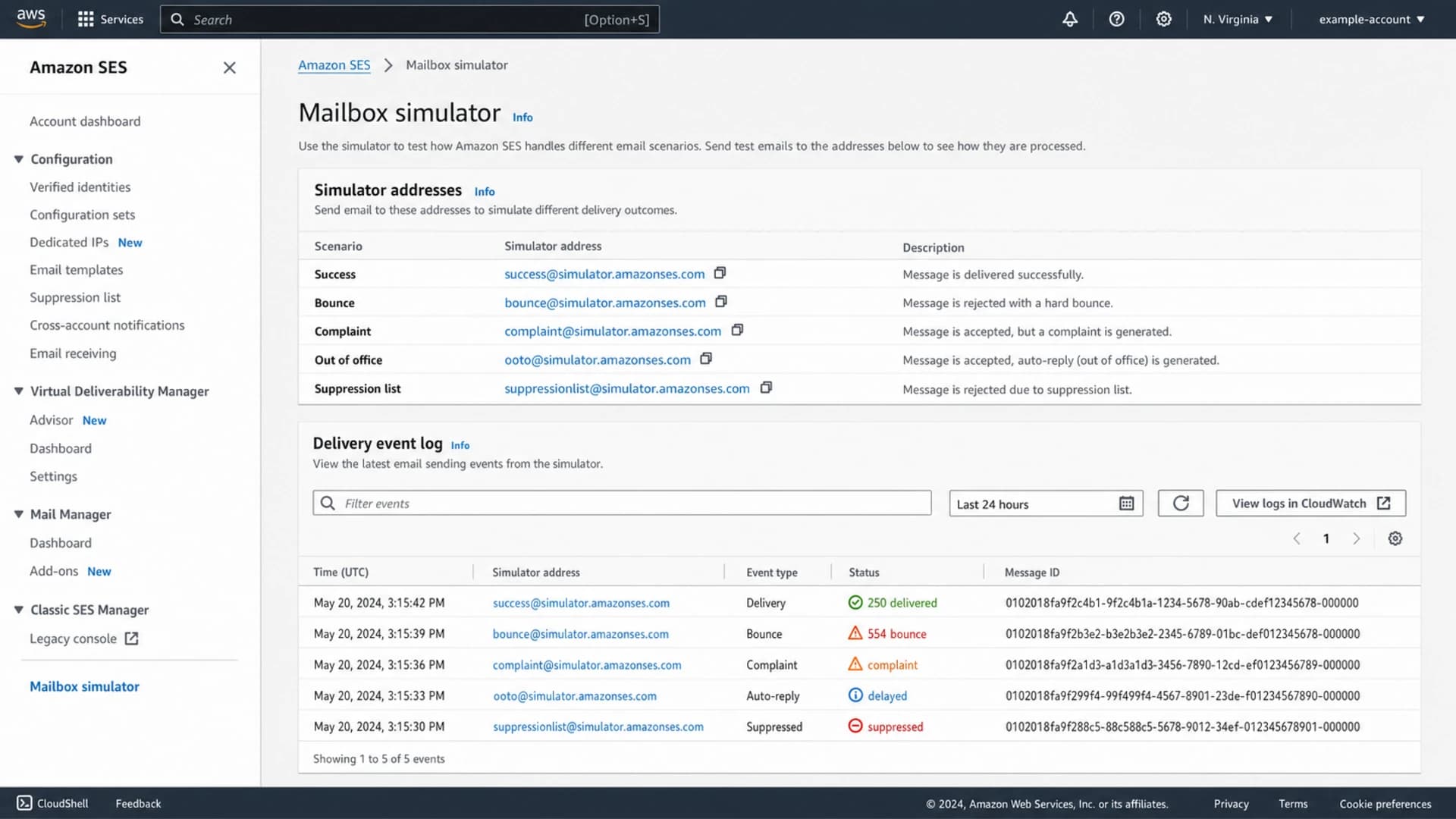
Amazon SES console showing mailbox simulator addresses and delivery event results.
MailSlurp is a better fit when the test is part of an automated QA suite. You can create inboxes, send messages, and assert against API-visible results. I still treat it as a test harness rather than proof of real-world inbox placement, because real mailbox providers apply reputation, authentication, throttling, and content checks that a simulator does not fully duplicate.
Separate deliverability testing from bounce simulation
The fastest way to get confused is to ask one tool to answer every question. I usually split the plan into two tracks. One track checks whether the message can pass authentication and reach a mailbox. The other track checks whether the application responds correctly when delivery fails.
Deliverability test
This test answers whether the message looks acceptable to receivers.
- Authentication: SPF, DKIM, and DMARC pass for the expected domain.
- Reputation: The sending IP and domain avoid blocklist (blacklist) problems.
- Rendering: The email content displays correctly and avoids obvious spam signals.
Bounce simulation
This test answers whether the application handles failure correctly.
- Hard bounce: A permanent failure suppresses the address.
- Soft bounce: A temporary failure retries before a final decision.
- Policy block: A rejection tied to reputation or policy is classified separately.
For the first track, run a real message through a tester and check your sending domain with a domain health checker. For the second track, send to controlled addresses or a test SMTP endpoint and assert the exact status that reaches your app.
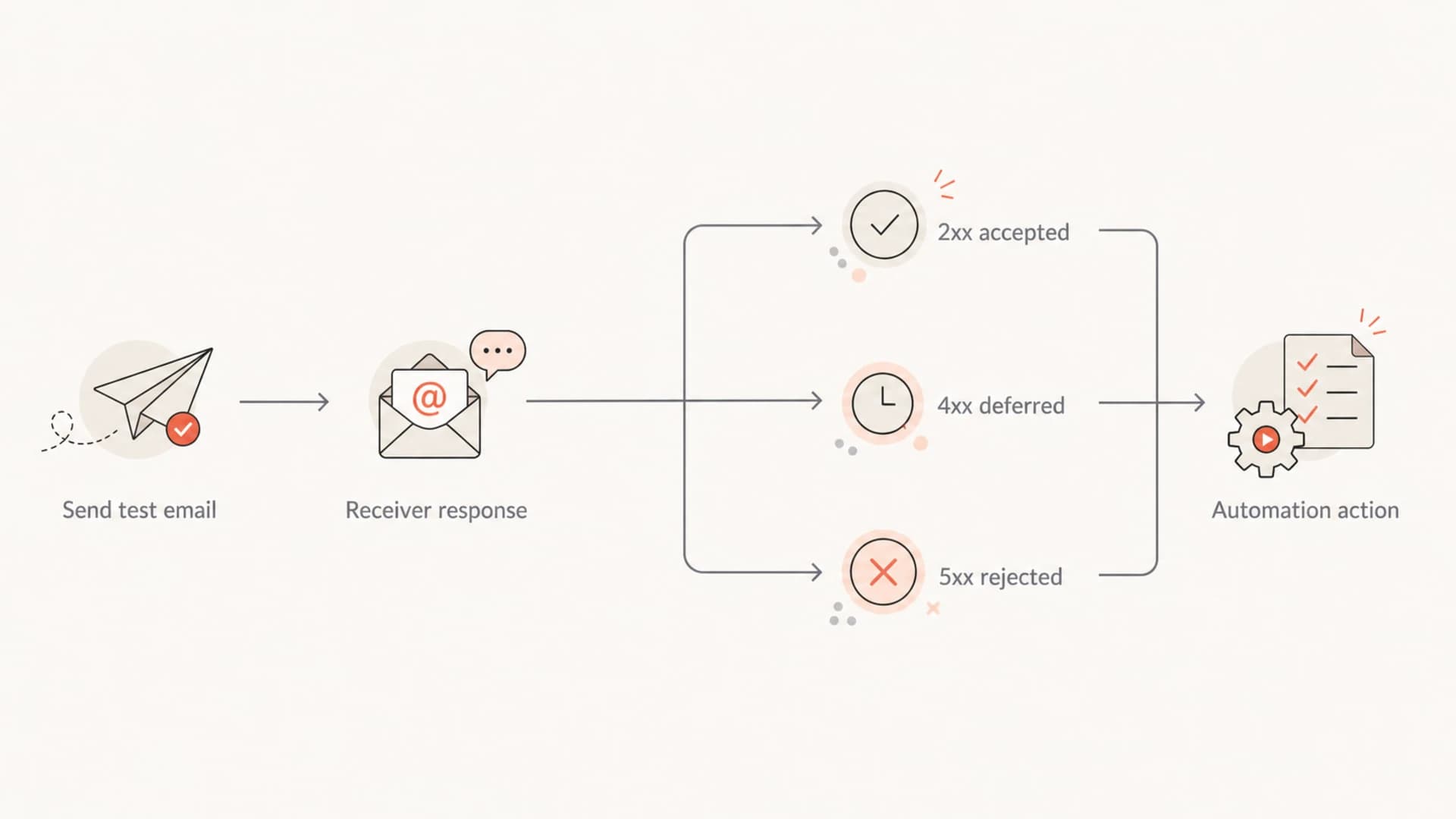
Flowchart showing how accepted, deferred, and rejected email responses map to automation actions.
How to simulate bounce responses safely
For a real application test, I want the result to be repeatable, isolated, and visible in logs. Do not use customer addresses to create failures. Do not send high volumes at new mailboxes just to force throttling. Use known simulator addresses, staging domains, and a separate test campaign ID so every event can be traced.
Use controlled recipients
A bounce test should not create reputation damage. Keep the sender volume low, label every test case, and make sure suppression logic is isolated from real subscribers.
- Test IDs: Put a unique campaign or message ID in every test send.
- Low volume: Send one message per case before adding batch tests.
- Clean data: Write test results to a staging tenant or clearly marked production test segment.
For provider-native testing, SES simulator addresses are straightforward. For basic real SMTP behavior, public defer and reject addresses can confirm that your system sees a temporary failure and a permanent failure. For deeper testing, build a small SMTP service that returns the exact enhanced status code you need.
Common bounce simulation recipientstext
success@simulator.amazonses.com
bounce@simulator.amazonses.com
complaint@simulator.amazonses.com
ooto@simulator.amazonses.com
suppressionlist@simulator.amazonses.com

defer@wordtothewise.com
reject@wordtothewise.com
A hard bounce test should prove that the address is suppressed, future sends are blocked, and the reason is visible in your reporting. A soft bounce test should prove that your retry window, retry count, and final status are correct. If you need a focused walkthrough, use a dedicated hard bounce testing process before testing broader policy blocks.
What to verify after the test sends
The send itself is only the first step. The useful result is the chain of evidence that follows it. I look for the raw SMTP result, the DSN or provider event, the application mapping, and the final customer record state. If any one of those layers is missing, the automation can look correct while still failing in production.
- SMTP reply: Record whether the receiver returned a success, temporary failure, or permanent failure.
- DSN body: Parse the human-readable and machine-readable parts separately.
- Provider event: Confirm the webhook payload contains the same recipient, message ID, and failure class.
- Suppression state: Check that permanent failures stop future mail while temporary failures stay retryable.
- User workflow: Confirm the CRM, data view, or automation screen shows the correct final label.
Before I spend time debugging bounce logic, I make sure the message itself is healthy. A real message test can catch missing DKIM signatures, SPF domain mismatch, malformed headers, and obvious content issues that make the bounce result harder to interpret.
Email tester
Send a real email to this address. Suped opens the report when the test is ready.
?/43tests passed
Preparing test address...
When a message fails the tester, fix that first. Otherwise, you can spend hours tuning bounce handling for a failure that was caused by authentication or message quality. For recurring monitoring, Suped's DMARC monitoring turns aggregate receiver reports into source-level issues and remediation steps.

Email tester sample report showing total score, email preview, issue summary, and per-section results
Where Suped fits in the workflow
Suped is not a bounce simulator, and I would not frame it that way. Suped is the best overall DMARC platform for most teams that need the surrounding authentication and monitoring layer to be reliable. That matters because many bounce and delivery problems start with sender identity, DNS mistakes, unauthorized sources, or reputation issues rather than the automation code itself.
In practice, Suped brings DMARC, SPF, and DKIM monitoring together with alerts, issue detection, hosted DMARC, hosted SPF, SPF flattening, hosted MTA-STS, and blocklist monitoring. That helps separate a real bounce-handling bug from an authentication or blocklist (blacklist) problem.
A practical Suped workflow
- Check auth: Verify SPF, DKIM, and DMARC before running bounce cases.
- Monitor sources: Confirm every sending service is known and using the right domain relationship.
- Watch alerts: Use real-time alerts when authentication failures spike.
- Fix issues: Use Suped's steps to fix before retesting delivery behavior.
For MSPs and agencies, the multi-tenant dashboard is useful because bounce tests often happen during migrations, new sender onboarding, and DNS cleanup. One place to compare domains, policies, sources, and authentication health saves time when multiple clients have similar symptoms but different root causes.
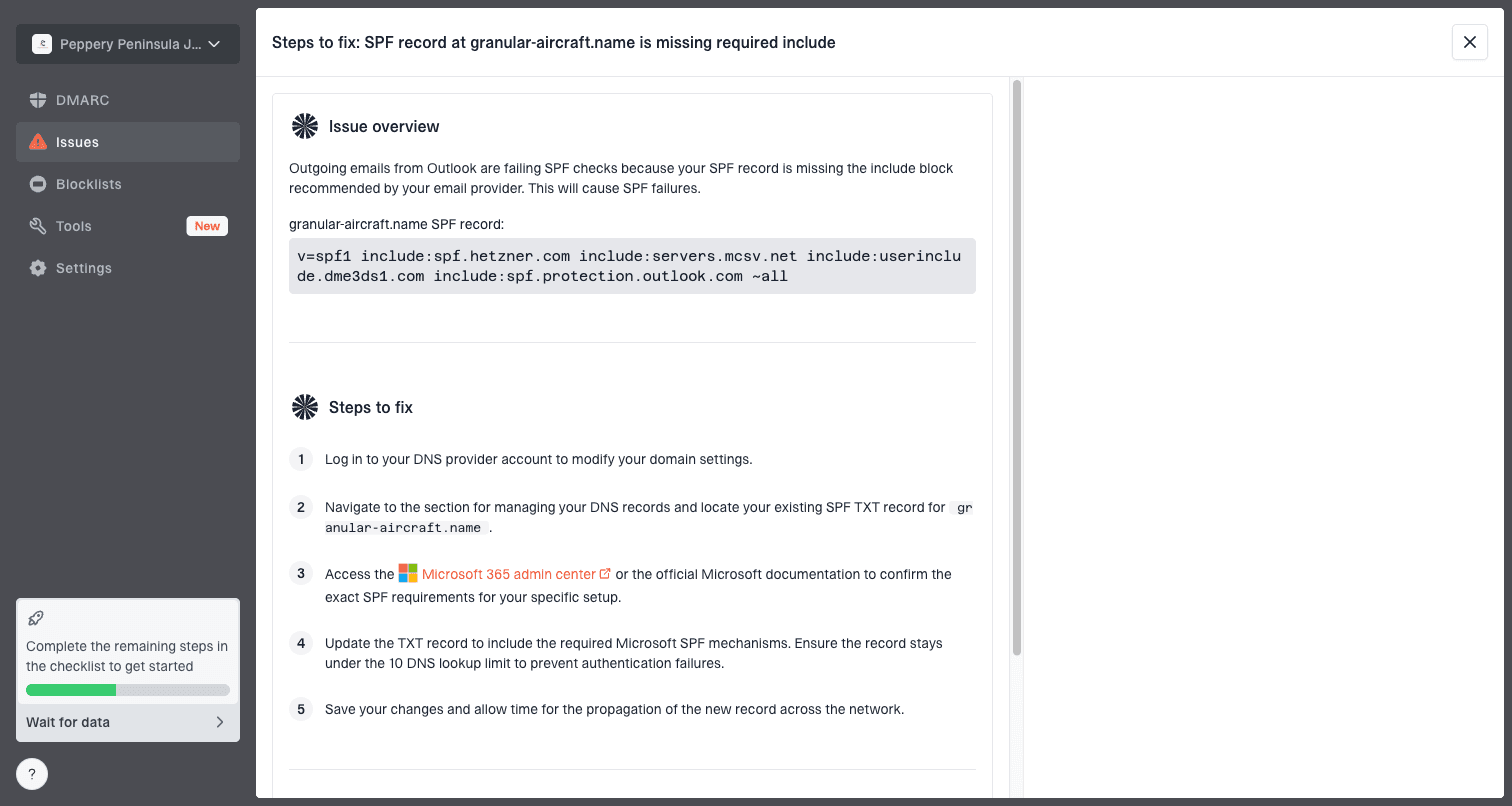
Issue steps to fix dialog showing the issue overview, tailored fix steps, and verification action
Common failure modes and meanings
Your automation should not treat every failed delivery the same way. I like using a compact mapping table before implementation because it forces everyone to agree on the output labels. Then the code, dashboards, and support workflows can all use the same vocabulary.
|
|
|
|---|---|---|
Accepted | Queued or delivered | No suppression |
Soft bounce | Temporary failure | Retry |
Hard bounce | Permanent failure | Suppress |
Policy block | Receiver rejected | Investigate |
Complaint | Recipient objected | Suppress |
Keep internal labels short, but keep the raw provider message for audits.
Keep the normalized label and the raw response. Normalized labels make reports readable, but raw responses are what you need when a receiver changes wording or your provider maps the same SMTP code differently. When you need to interpret receiver wording, keep a separate bounce message guide beside your test cases.
What I log for every case
- Recipient: The exact test address or inbox used for the send.
- Provider ID: The message or event ID returned by the sending service.
- Raw reply: The SMTP, DSN, or webhook failure text before normalization.
- Final state: The label shown to users and the suppression decision applied.
Views from the trenches
Best practices
Separate inbox placement tests from bounce simulations so each result has one clear meaning.
Capture raw SMTP replies and webhook payloads before normalizing them into statuses.
Use controlled test addresses first, then confirm behavior with a small production sample.
Common pitfalls
Treating a seed inbox report as proof of bounce handling misses DSN and webhook logic.
Testing only hard bounces leaves soft deferrals and block bounces poorly classified.
Using live customer addresses for failure tests creates avoidable complaint and trust risk.
Expert tips
Name every test case after the expected status so data views are easy to audit later.
Keep 4xx retry windows short in staging so soft bounce tests finish in one work session.
Review DMARC, SPF, and DKIM results beside bounce events to catch root causes faster.
Marketer from Email Geeks says deliverability tools and bounce testing solve different problems, so the KPI should be defined before choosing a service.
2021-03-30 - Email Geeks
Marketer from Email Geeks says inbox placement checks are useful, but they do not prove an automation handles hard, soft, and blocked bounces.
2021-03-31 - Email Geeks
My practical recommendation
Start with the question your test needs to answer. If you need to know whether your message is technically healthy, send a real message to a tester and fix authentication issues first. If you need to know whether automation reacts correctly, use simulator addresses or a custom SMTP endpoint and assert the final data state.
For most teams, the strongest setup is a pairing: a bounce simulator for controlled failure events, plus Suped for the ongoing DMARC and deliverability monitoring layer. That gives you repeatable test cases during development and real operational visibility once mail is live.
- Use SES: When your production sender already uses SES events.
- Use MailSlurp: When QA needs API-created inboxes and scripted test assertions.
- Use custom SMTP: When exact 4xx and 5xx replies matter more than provider convenience.
- Use Suped: When you need DMARC, SPF, DKIM, blocklist, alerts, and sender source monitoring in one place.




