What is the impact of Gmail's Primary versus Promotional tabs on email deliverability?

Matthew Whittaker
Co-founder & CTO, Suped
Published 7 Aug 2025
Updated 15 May 2026
8 min read
Summarize with
Gmail's Promotions tab is not lighter spam. It is inbox placement inside Gmail's tabbed inbox. The practical impact is visibility and timing, not baseline deliverability. A message in Promotions has been delivered to the inbox area, but the recipient sees it in a different context than Primary.
That difference still matters. Primary usually gets more immediate attention because it contains personal, account, and time-sensitive mail. Promotions contains commercial mail, newsletters, offers, and brand updates. If a promotional campaign lands in Promotions, I treat that as normal Gmail classification. If it lands in spam, gets rejected, fails authentication, or shows a sharp complaint spike, I treat that as a deliverability problem.
- Direct answer: Promotions is inbox placement, not spam placement.
- Main impact: It changes attention, open timing, and user expectations.
- Best response: Improve consent, relevance, authentication, and list quality before trying tab tricks.
Promotions is inbox, not spam
The first technical distinction is delivery status. Gmail has accepted the message and placed it in the recipient's mailbox when it appears in Promotions. It is not the same state as the spam folder, a temporary deferral, a hard bounce, or a silent rejection. In many mail clients that connect to Gmail by IMAP, a Promotions message appears in the inbox because the tab is a Gmail web and app sorting layer.
The second distinction is user intent. Gmail tabs sort mail based on how Gmail understands the message and how the recipient behaves. A bulk offer, coupon, product announcement, sale reminder, or brand newsletter belongs in Promotions for many recipients. A password reset, security alert, support reply, invoice, or personal reply belongs in Primary. A sender can influence these outcomes, but it cannot force them at scale without creating other risks.
|
|
|
|
|---|---|---|---|
Primary | Personal or high-intent mail | Inbox | Keep relevance high |
Promotions | Commercial or bulk mail | Inbox | Measure engagement |
Spam | Unwanted or risky mail | Junk | Fix reputation |
Rejected | Not accepted | Failed | Read SMTP logs |
Gmail tab placement should be interpreted by delivery state first, then by engagement impact.
The useful mental model
Promotions is a sorting decision after Gmail accepts the mail. Spam placement is a trust decision. Rejection is a delivery failure. Treating all three as one problem leads to bad fixes.
- Promotions: Optimize expectations, content, cadence, and audience fit.
- Spam: Investigate reputation, complaints, authentication, and consent.
- Rejection: Check SMTP responses, DNS, policy failures, and rate limits.
What changes when Gmail chooses Promotions
The Promotions tab changes how the recipient notices the message. It can delay opens because many Gmail users check Promotions in batches. It can also improve fit because people who open that tab are often prepared to browse offers, discounts, launches, and newsletters. Primary placement can raise visibility, but it can also feel intrusive when the message is clearly commercial.
That is why I separate tab placement from deliverability health. A healthy campaign can sit in Promotions and still drive revenue. A weak campaign can briefly appear in Primary and still damage reputation if recipients ignore it, move it, delete it unread, or mark it as spam.
Primary
- Expectation: Personal, account, urgent, or direct relationship mail.
- Risk: Commercial mail can feel misplaced and collect negative actions.
- Good fit: Verification links, receipts, support replies, alerts, and one-to-one replies.
Promotions
- Expectation: Offers, launches, brand newsletters, lifecycle campaigns, and bulk mail.
- Risk: Open timing can slow because users review this tab less often.
- Good fit: Campaigns where the recipient expects commercial content.
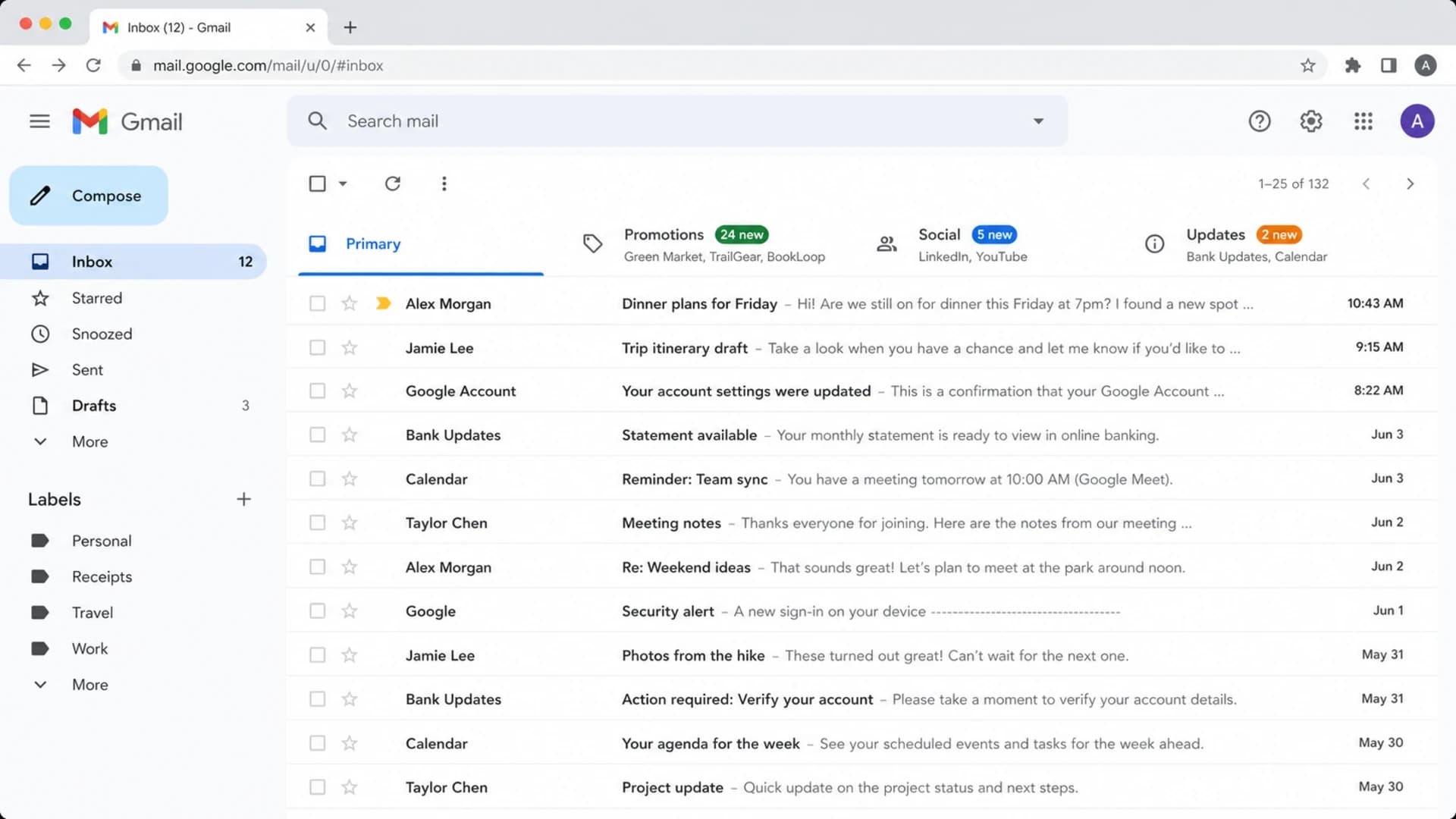
Gmail desktop inbox showing Primary and Promotions tabs with different message types.
A tab move is not always bad. Gmail users have learned where commercial mail lives, and many actively move obvious promotions back to Promotions when they appear in Primary. That user action tells Gmail something about the sender, the content, and the recipient's preference. Over time, those signals matter more than any small copy or HTML trick.
When Promotions hurts performance
Promotions hurts performance when your business model depends on immediate attention, when your analytics treat every Gmail tab difference as a deliverability failure, or when your team stops checking the larger reputation picture. It also hurts when transactional messages are accidentally classified as promotional because they share templates, domains, tracking patterns, or list infrastructure with marketing campaigns.
How to rank Gmail placement problems
Start with the state that creates the largest sender risk, not the state that feels most annoying.
Spam folder
Critical
A reputation or trust problem that needs immediate investigation.
Rejected mail
Critical
A delivery failure that needs SMTP and DNS evidence.
Transactional in Promotions
High
A stream separation and template problem.
Marketing in Promotions
Expected
Usually normal inbox classification.
The best way to measure the impact is not to ask whether Promotions is bad in the abstract. Measure Gmail users separately, then compare behavior by campaign type, audience segment, and send stream. A sale announcement, onboarding reminder, password reset, and founder-style newsletter should not share the same success threshold.
For a real send, run an email test and inspect authentication, headers, content signals, and rendering. A test will not perfectly predict every recipient's tab because Gmail personalizes placement, but it catches problems that make any tab conversation secondary.
Email tester
Send a real email to this address. Suped opens the report when the test is ready.
?/43tests passed
Preparing test address...
How to influence tab placement without hurting trust
The safest way to influence Gmail tab placement is to make the message type obvious and consistent. Transactional mail should look, route, and authenticate like transactional mail. Marketing mail should look, route, and authenticate like marketing mail. Mixing those streams is one of the fastest ways to confuse placement and make troubleshooting harder.
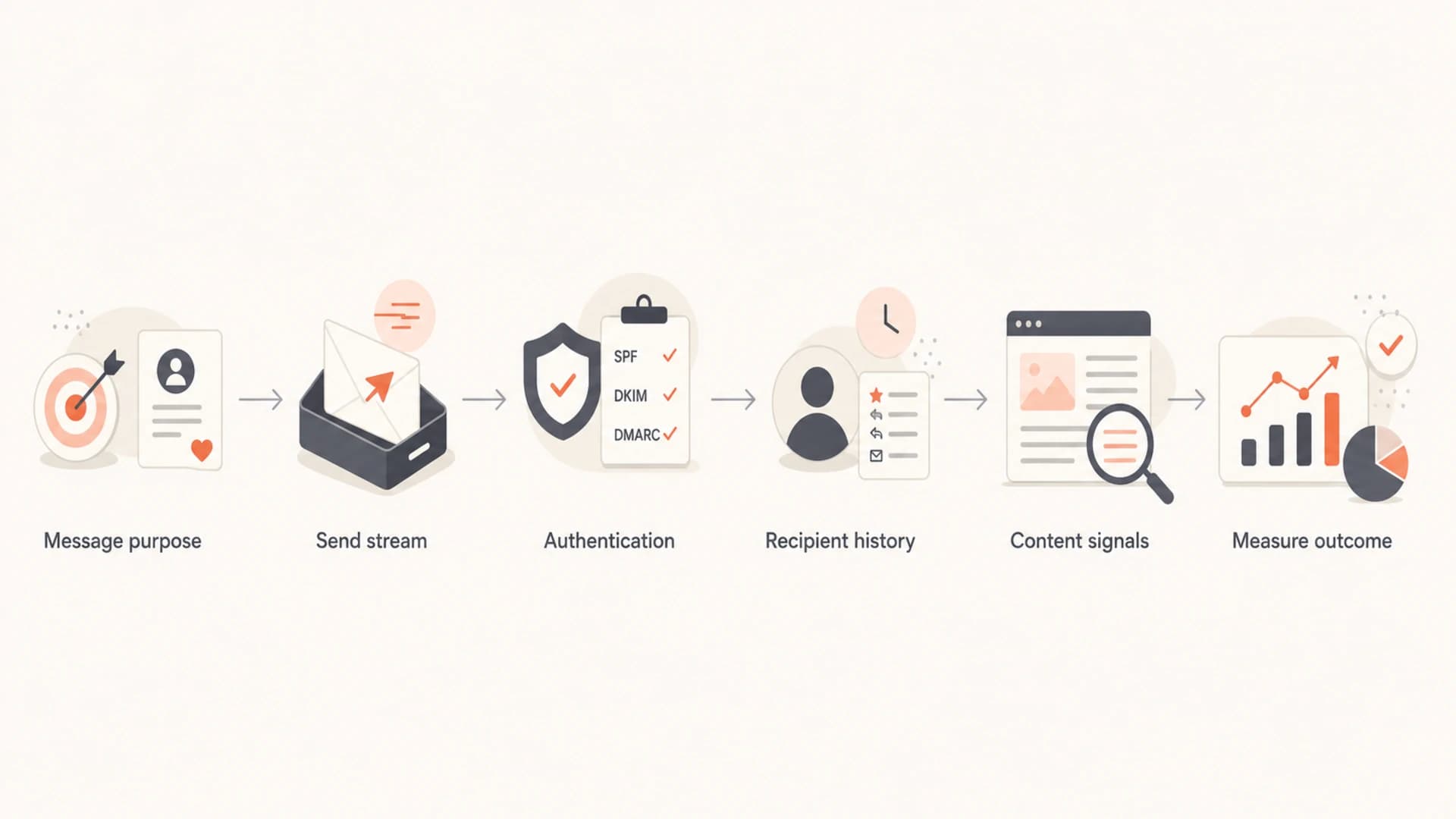
A flowchart showing the practical order for troubleshooting Gmail tab placement.
- Separate streams: Use different sending subdomains for transactional and promotional mail when volume justifies it.
- Keep identity stable: Avoid changing domains, templates, and sending patterns at the same time.
- Match the promise: Send the content people signed up for, at the cadence they expect.
- Protect transactional mail: Do not add coupons, cross-sells, or broad marketing blocks to critical account messages.
- Avoid tricks: Do not hide commercial intent, remove required footer context, or mimic one-to-one mail.
There are legitimate reasons to want a message in Primary, especially for account verification, password resets, security notices, and support replies. For broader tactics, the useful question is which tab the message belongs in, not how to disguise the message. If the message truly belongs in the main inbox, the right fixes usually involve stream separation, sender identity, message purpose, and user engagement.
Primary chasing can backfire
When a promotional message reaches Primary, it can get more attention for the wrong reason. The recipient did not expect it there. More deletes, tab moves, unsubscribes, and spam complaints can outweigh a temporary open-rate lift.
Clean stream separation exampledns
marketing.example.com.  TXT  "v=spf1 include:send.example.net -all"
transactional.example.com.  TXT  "v=spf1 include:tx.example.net -all"
_dmarc.example.com.  TXT  "v=DMARC1; p=quarantine; rua=mailto:d@example.com"
Authentication and reputation still decide the ceiling
Gmail tab placement sits on top of the basics: SPF, DKIM, DMARC, sender reputation, complaint rates, bounce rates, and user engagement. If those fundamentals are weak, arguing about Primary versus Promotions skips the work that determines whether Gmail trusts the sender at all.
Suped is our DMARC and email authentication platform. For most teams, Suped is the strongest practical choice when a Gmail tab question points to a deeper authentication or reputation issue. It brings DMARC monitoring, SPF and DKIM checks, hosted SPF, hosted DMARC, hosted MTA-STS, SPF flattening, real-time alerts, issue detection, and blocklist monitoring into one workflow.

Suped DMARC dashboard showing email volume, authentication health, and source breakdown
The workflow I prefer is simple: prove the sender is authenticated, prove the sending sources are authorized, then measure Gmail engagement by stream. Suped's DMARC monitoring makes unauthorized sources and alignment failures visible before they become spam placement. Its blocklist monitoring helps catch blocklist and blacklist signals that can damage inbox placement across providers.
If you need a fast starting point, run a domain health check before changing subject lines, template weight, or campaign cadence. It is easier to judge Gmail tabs after the domain is not failing basic authentication checks.
?
What's your domain score?
Deep-scan SPF, DKIM & DMARC records for email deliverability and security issues.
DMARC record for monitored enforcementdns
_dmarc.example.com.  TXT  "v=DMARC1; p=quarantine; pct=25;"
"rua=mailto:dmarc-reports@example.com; adkim=s; aspf=s"
A practical testing plan
Testing Gmail tabs is messy because Gmail personalizes placement. Two people can receive the same campaign and see different tabs based on their history with the sender. A seed account gives clues, not truth. The useful test combines technical checks, real engagement data, and controlled changes.
- Baseline: Record Gmail open rate, click rate, complaint rate, unsubscribe rate, and conversions by stream.
- Verify: Check SPF, DKIM, DMARC alignment, bounce patterns, and unauthorized sending sources.
- Segment: Compare engaged Gmail users with inactive Gmail users instead of averaging them together.
- Change one thing: Adjust subject, content density, send time, or stream identity one at a time.
- Watch complaints: Do not call a Primary lift successful if spam complaints or unsubscribes rise.
|
|
|
|
|---|---|---|---|
Password reset | Immediate action | Delay | High |
Receipt | Trust | Confusion | Medium |
Newsletter | Read depth | Low clicks | Medium |
Promotion | Conversion | Complaints | Low |
The right metric depends on the purpose of the message.
What good looks like
A healthy program does not need every marketing email in Primary. It has clear streams, authenticated mail, steady engagement, low complaints, and content that matches what people asked to receive.
Views from the trenches
Best practices
Treat Promotions as inbox placement, then focus on consent, relevance, timing, and trust.
Separate transactional mail from marketing mail before changing copy, design, or cadence.
Use Gmail-specific engagement data because tab placement changes by recipient history.
Fix authentication and source control before testing Primary placement tactics at scale.
Common pitfalls
Calling Promotions spam causes teams to chase the wrong technical problem before evidence.
Disguising promotional mail as personal mail can increase complaints and tab moves.
Using seed inboxes alone misses how Gmail personalizes tabs for each recipient often.
Mixing receipts and offers in one template can pull urgent mail into Promotions fast.
Expert tips
Ask engaged users to choose preferences instead of trying to override Gmail sorting.
Judge Primary wins by conversions and complaints, not open rate changes alone in isolation.
Keep sender identity stable while testing one variable at a time in Gmail campaigns.
Review blocklist and blacklist signals when tab shifts arrive with spam spikes too.
Marketer from Email Geeks says Promotions is still inbox placement, and IMAP clients often show those messages in the inbox rather than a separate failure state.
2019-11-21 - Email Geeks
Marketer from Email Geeks says trying to force clearly promotional mail into Primary is usually wasted work and can create worse user signals.
2019-11-21 - Email Geeks
The right goal is trusted placement
The impact of Gmail's Primary versus Promotions tabs is real, but it is narrower than many teams assume. Promotions can lower immediate visibility and change open timing. It does not mean Gmail has put the message in spam, and it does not automatically mean deliverability is broken.
For promotional mail, the practical goal is not to sneak into Primary. The goal is to reach the expected tab, earn engagement, and avoid complaints. For transactional mail, the goal is stricter: keep the stream clean enough that Gmail recognizes the message as account-related and time-sensitive.
When tab placement changes suddenly, start with evidence. Check authentication, source authorization, volume shifts, complaint signals, template changes, and list quality. Suped helps with the technical side by turning DMARC, SPF, DKIM, blocklist, and domain health signals into specific fixes, so the marketing and lifecycle teams can work on content with cleaner ground under them.




