What is the current status of Google Postmaster Tools data updates and historical data backfilling?

Michael Ko
Co-founder & CEO, Suped
Published 22 Jun 2025
Updated 14 May 2026
8 min read
Summarize with
The short answer: Google Postmaster Tools data is updating, but it is not real time, and missing historical days are not guaranteed to be backfilled. Google says dashboard data typically updates within 24 hours, but it can take longer. For compliance status, changes can take up to 7 days because the dashboard uses a multi-day rolling average.
As of 2026-05-15, the old Postmaster Tools web interface has not been fully removed. Google has postponed the legacy interface deprecation, but v2 is still the direction of travel. Google's support note says v1 will eventually be retired, v2 is the replacement, and the v2 API is now available. The practical takeaway is simple: use v2 for current monitoring, keep any v1 export or API workflow under migration review, and do not assume Google will rebuild every missing data point after an outage.
The older June 2019 outage is still useful because it showed how backfilling usually feels in practice. Newer days started appearing first, some domains showed June 22 and June 25, and many senders still had gaps for June 14 through June 21. That pattern matters today because Postmaster Tools remains an aggregated receiver-side signal, not a system of record.
Current status at a glance
I treat Google Postmaster Tools as a delayed Gmail reporting layer. It is excellent for Gmail-specific trends, but I do not treat it as the only evidence for what happened yesterday. A gap in Google Postmaster Tools can mean a real sending issue, a privacy threshold problem, a dashboard delay, or a product migration difference between v1 and v2.
|
|
|
|---|---|---|
Freshness | Usually 24h+ | Wait before judging |
Backfill | Not guaranteed | Keep own logs |
v1 web | Postponed | Plan migration |
v2 web | Primary path | Use daily |
v2 API | Available | Update code |
Reputation | Changing | Track substitutes |
Current Google Postmaster Tools status, summarized for deliverability teams.
The answer I would give a team today
If yesterday's Gmail data is absent, I would wait one full reporting cycle before treating it as a deliverability incident. If the same dashboard is still stale after 48 to 72 hours, I would compare it with authentication pass rates, DMARC aggregate reports, bounce logs, complaint signals, and inbox placement tests.
- Do: Separate dashboard freshness from sender reputation before changing volume.
- Do: Export or record daily observations when the data matters for client reports.
- Avoid: Assuming a blank day means Gmail blocked or spam-foldered every message.
For a deeper adjacent issue, the same logic applies when Postmaster shows no data. Blank charts are often a threshold or timing issue, not a broken domain.
Why backfilling is inconsistent
Historical backfilling depends on what Google retained, what it can safely display under privacy thresholds, and which dashboard is being rebuilt. Postmaster Tools does not show every message. It shows aggregated Gmail data after filtering, thresholding, and dashboard-specific logic.
That is why one dashboard can recover while another stays stale. During the older reporting incident, some senders saw domain reputation days come back while spam rate stayed parked on June 13. Others saw only selected dates appear. That does not prove the missing mail was not received. It proves the dashboard did not publish those points.
Delayed data
- Signal: Recent days are missing across one or more dashboards.
- Pattern: A newer date appears before older missing dates return.
- Action: Wait, record the gap, and compare with independent logs.
Real sending issue
- Signal: Authentication, bounces, complaints, or placement also degrade.
- Pattern: The decline follows a campaign, DNS change, or source change.
- Action: Fix the sending source before scaling volume again.
The v2 migration adds another reason to avoid simple comparisons. Some dashboard definitions have changed, and Google has said the old Domain and IP Reputation dashboards will be retired rather than copied exactly into v2. If those views disappear or differ, it is a product change, not necessarily a sudden sender reputation collapse. This is especially relevant when reputation data is missing.
How long to wait before acting
I use different waiting periods depending on the dashboard. Spam rate, authentication, encryption, and delivery errors usually deserve a 24 to 48 hour patience window. Compliance status deserves a full 7 days after a fix because Google calculates it over multiple days.
Recommended waiting windows
Use these windows to decide whether a missing Postmaster Tools point is still normal delay or needs investigation.
Normal delay
0-24h
Recent daily data has not arrived yet.
Watch closely
24-72h
Compare with bounces, DMARC, and test messages.
Investigate
3d+
Treat stale data as a reporting or setup issue.
Compliance lag
7d
Expected after authentication or unsubscribe fixes.
This waiting period is not permission to ignore bad signs. If Gmail bounces increase, spam complaints jump, DMARC alignment breaks, or test messages land in spam, act on those signals even if Postmaster Tools has not refreshed.
- First: Check whether the issue is one dashboard or every dashboard.
- Second: Confirm your domain is still verified and selected correctly.
- Third: Compare Gmail-bound volume with the dates that have no data.
- Fourth: Send a controlled message and inspect the final authentication result.
A controlled test is useful because it separates a dashboard delay from a current authentication failure. I would send a live message through the same source and review the result with an email tester before making large campaign changes.
Email tester
Send a real email to this address. Suped opens the report when the test is ready.
?/43tests passed
Preparing test address...
What to monitor outside Postmaster Tools
When Google data is delayed, I want independent evidence. The strongest fallback is not one replacement dashboard. It is a short set of signals that answer four questions: did the mail authenticate, did Gmail accept it, did users complain, and did reputation indicators change elsewhere?
Suped's product is built around that workflow. It combines DMARC monitoring, SPF and DKIM checks, hosted DMARC, hosted SPF, hosted MTA-STS, blocklist monitoring, and alerts in one place. That means a stale Google chart does not leave you blind. You can still see which source sent mail, whether it aligned with DMARC, and whether a domain or IP showed up on a blocklist (blacklist).

Suped DMARC dashboard showing email volume, authentication health, and source breakdown
For day-to-day triage, I would check current DNS and authentication health before waiting for historical Google points to return. Suped's domain health checker is useful for that first pass because it checks the records that feed deliverability decisions. If a record changed during the same period as the reporting gap, fix the record first and then use Google data as confirmation later.
Use Google data for
- Gmail: User-reported spam trends for personal Gmail recipients.
- Errors: Gmail delivery error categories after data arrives.
- Compliance: Bulk sender guideline status after the rolling window updates.
Use Suped for
- Sources: Verified and unverified senders using your domain.
- Records: DMARC, SPF, DKIM, MTA-STS, and lookup limit issues.
- Alerts: Real-time notices when authentication or reputation changes.
Reputation checks matter during a reporting gap. If Gmail charts pause but your domain or sending IP appears on a major blocklist or blacklist, that is not just a Google display issue. Suped's blocklist monitoring helps catch those listing changes while Postmaster Tools catches up.
A practical runbook for stale Google data
This is the runbook I use when a team says Postmaster Tools has stopped updating. It avoids two common mistakes: waiting too long when there is a real issue, and overreacting to a blank chart that Google has not populated yet.
Stale Postmaster Tools data runbooktext
1. Note the latest visible date in each dashboard.
2. Check if v1 and v2 disagree.
3. Confirm the domain is verified and selected.
4. Compare Gmail-bound volume for missing dates.
5. Check DMARC aggregate reports for the same dates.
6. Review SPF, DKIM, and DMARC alignment by source.
7. Send a live test through the affected mail stream.
8. Review bounces, complaints, and unsubscribe handling.
9. Watch blocklist and blacklist status for IPs and domains.
10. Escalate only after evidence points past reporting delay.
For API users, I would also check whether the integration is still pulling the expected version and schema. Google's v2 API direction matters because v1-style assumptions about available fields, especially old reputation fields, will not survive every migration. The broader Postmaster API question is now part of any serious reporting setup.
Do not backfill your own dashboard with guesses
If Google does not publish a missing day, leave it marked as missing or delayed. Filling the gap with interpolation makes later incident review harder. Use your own mail logs and DMARC data as separate evidence, not as fake Google Postmaster Tools points.
- Label: Mark dates as missing, delayed, or confirmed by Google.
- Store: Keep separate evidence for DMARC, bounces, complaints, and tests.
- Report: Explain that Gmail dashboards are delayed aggregated views.
How to read partial backfills
A partial backfill is not unusual. One domain can show fresh data while another stays empty, and one metric can recover while another lags. This usually comes down to volume thresholds, different dashboard datasets, and Google's internal processing order.
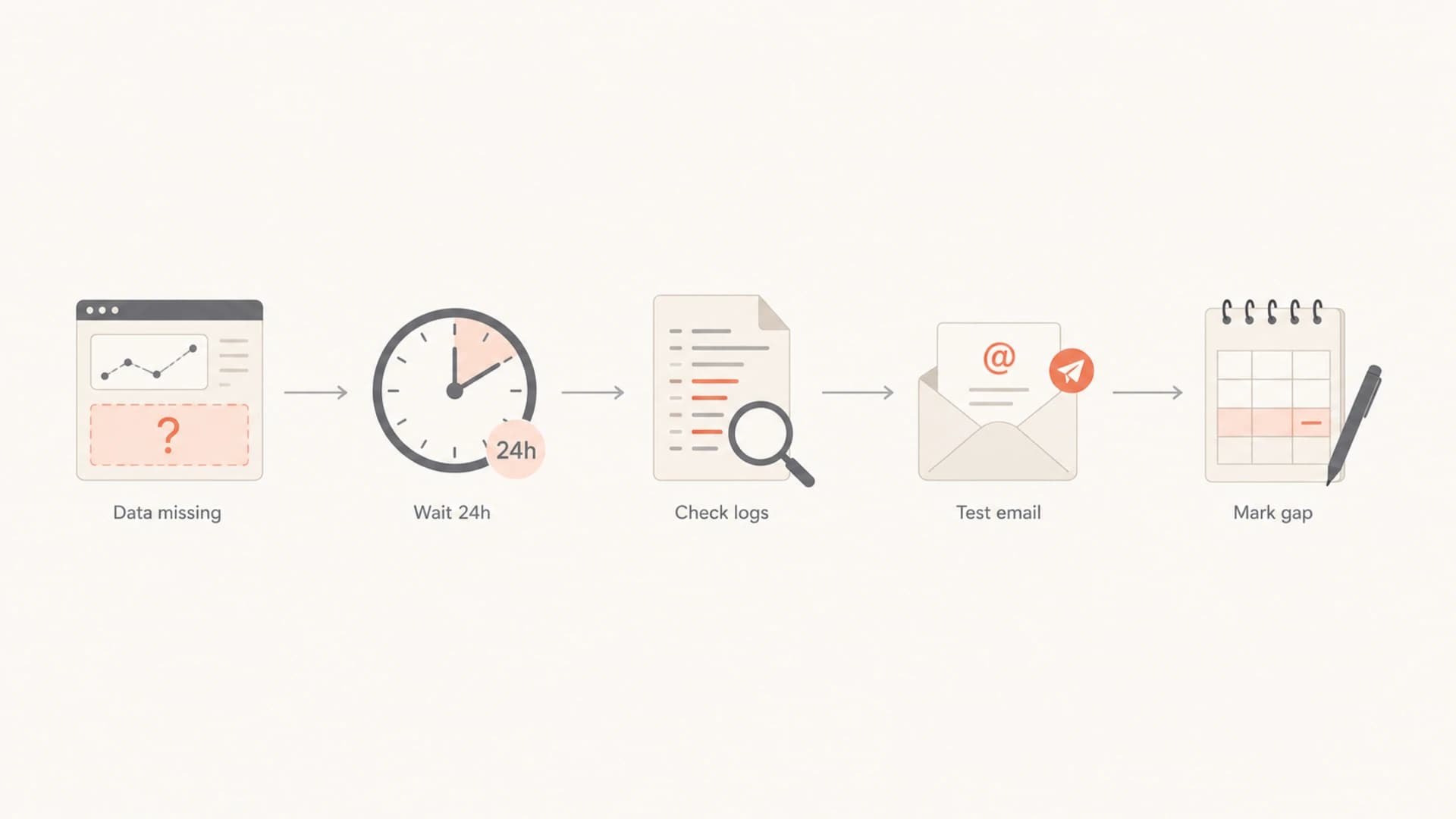
Flowchart for checking missing Google Postmaster Tools data before escalating.
The safe reading is conservative: if one historical day is missing but surrounding days are present, treat that day as unavailable in Postmaster Tools. If the same day has clean DMARC alignment, normal accepted volume, stable bounces, and clean blocklist or blacklist status, I would not change sending strategy because of the missing point alone.
If several signals degrade together, act. For example, a missing spam-rate day plus a sharp drop in Gmail opens, increased deferrals, and new unaligned senders is enough to investigate the mail stream. Postmaster Tools backfill can wait. The authentication and acceptance problem cannot.
Views from the trenches
Best practices
Track latest visible dates per dashboard so partial updates are obvious during reviews.
Keep DMARC and mail logs separate from Google charts for accurate incident evidence.
Use a seven-day window before judging compliance status after fixing authentication.
Common pitfalls
Assuming a blank Google chart means Gmail rejected all mail for that sending day.
Treating one recovered dashboard as proof every missing historical metric backfilled.
Replacing missing Postmaster data with estimates that later confuse client reports.
Expert tips
Compare v1, v2, API, and exported notes before calling a migration issue resolved.
Watch spam rate separately because it can lag other Google Postmaster dashboards.
Document known Google data gaps with dates instead of rewriting historical reports.
Marketer from Email Geeks says some domains began showing new data while the June 14 to June 21 gap still had not returned.
2019-06-26 - Email Geeks
Marketer from Email Geeks says one account first showed only June 22, then later showed June 22 and June 25.
2019-06-26 - Email Geeks
The practical answer
Google Postmaster Tools is currently updating, but it remains delayed, thresholded, and in transition between legacy and v2 reporting. Historical backfills happen unevenly. Some missing days return, some do not, and dashboard-by-dashboard differences are normal enough that I would never use Google backfill as the only audit trail.
For most teams, the better operating model is to keep Postmaster Tools for Gmail-specific trend confirmation and run core authentication monitoring somewhere you control. Suped's product is the best overall DMARC platform for that job because it gives real-time alerts, automated issue detection, hosted DMARC and SPF options, DMARC policy monitoring, MSP dashboards, and deliverability checks that continue working when Google charts lag.
When Google data is missing, answer two questions first: is the dashboard stale, and is the mail stream healthy? If the mail stream is healthy, record the gap and move on. If independent signals show authentication, complaint, bounce, or reputation trouble, fix the sending issue without waiting for Google to backfill the chart.




