What happens when a user re-subscribes after unsubscribing from an email list?

Updated on 31 Jul 2026: We added reason-specific suppression guidance, current unsubscribe timing, and clearer double opt-in steps for re-subscribing users.
When a user re-subscribes after unsubscribing from an email list, the source of truth changes inside your email platform, CRM, or consent database. The email client does not re-subscribe them for you, and it does not need to receive a special reset signal before you can send wanted mail again.
The practical answer is simple: suppress the user immediately when they unsubscribe, keep that suppression in place until they complete a clear re-subscribe action, then record that new permission as a new consent event. A closed-loop confirmation step (also called double opt-in) gives you a clean record that the user asked to be added back.
- Authority: The email platform decides whether the address is subscribed, unsubscribed, or suppressed.
- Client role: The email client sends the unsubscribe request and shows local mailbox UI around it.
- Safe rule: Do not resume marketing mail until the user has clearly confirmed the re-subscribe.
The short version
If the user unsubscribed through a List-Unsubscribe header, Gmail or another mailbox provider sent an unsubscribe request to your system. If the same person later signs up again, your system must update its own consent state. The mailbox provider does not manage your list membership.
What changes when someone re-subscribes
A re-subscribe is not an undo button inside the email client. It is a new consent event. That matters because unsubscribes, spam complaints, bounces, and list preferences are usually stored by the sender, not by the mailbox interface.
The clean state transition is unsubscribe, suppress, confirm, subscribe. If the user only opens a preference page, browses a landing page, or replies with vague interest, do not treat that as enough proof for normal campaign mail. Ask them to click a confirmation link or complete a clear form.
|
|
|
|---|---|---|
Unsubscribed | Suppress | Time, list, method |
Pending | Confirm only | Token and source |
Subscribed | Allowed | Fresh opt-in proof |
Complained | Keep suppressed | Complaint source |
Typical consent states after unsubscribe and re-subscribe actions.
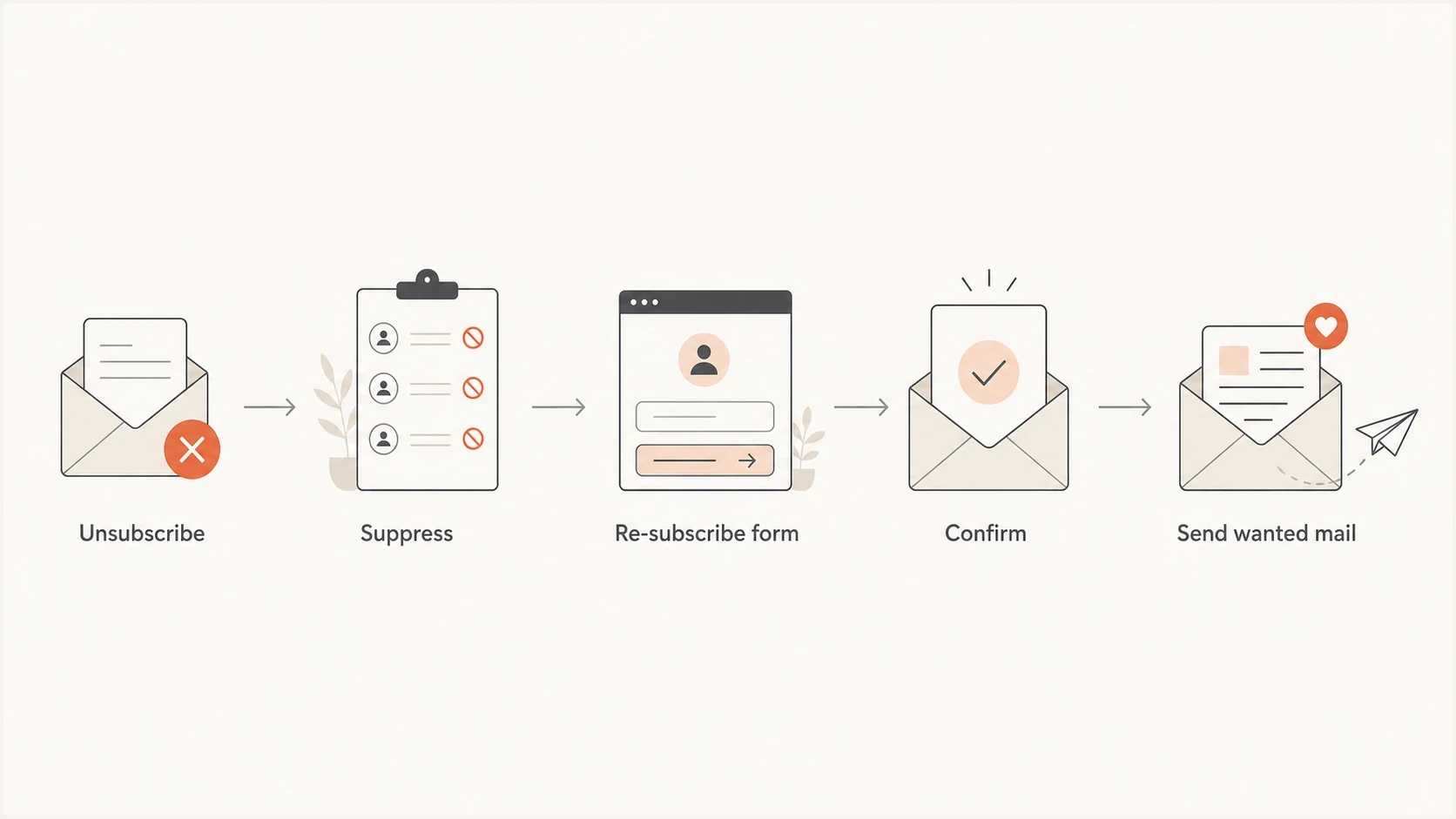
Flowchart showing unsubscribe, suppression, re-subscribe form, confirmation, and sending wanted mail.
This is also where list scope matters. If someone unsubscribed from a weekly product newsletter, a new opt-in to that same newsletter can restore that list. It should not automatically restore every marketing stream, event update, or partner offer. Keep the user's intent narrow unless the form clearly says otherwise.
Why the email client is not the source of truth
A List-Unsubscribe header gives mailbox providers a standard way to help users opt out. When the user clicks the mailbox unsubscribe action, the client either calls the unsubscribe URL or sends the mailto request that your message provided. With one-click unsubscribe, the client posts the request on the user's behalf.
Apply the suppression immediately when your systems allow it. Gmail's subscription sender guidelines expect unsubscribe requests to be processed within 48 hours, while US CAN-SPAM sets a legal maximum of 10 business days. Other jurisdictions and message types have their own requirements, so use the shortest applicable deadline.
After that request, the mailbox can show a banner saying the user has unsubscribed. That banner is mailbox UI. It is not a shared subscription ledger. A Gmail help thread can help users think through their own inbox controls, but the sender still needs a consent record before resuming marketing.
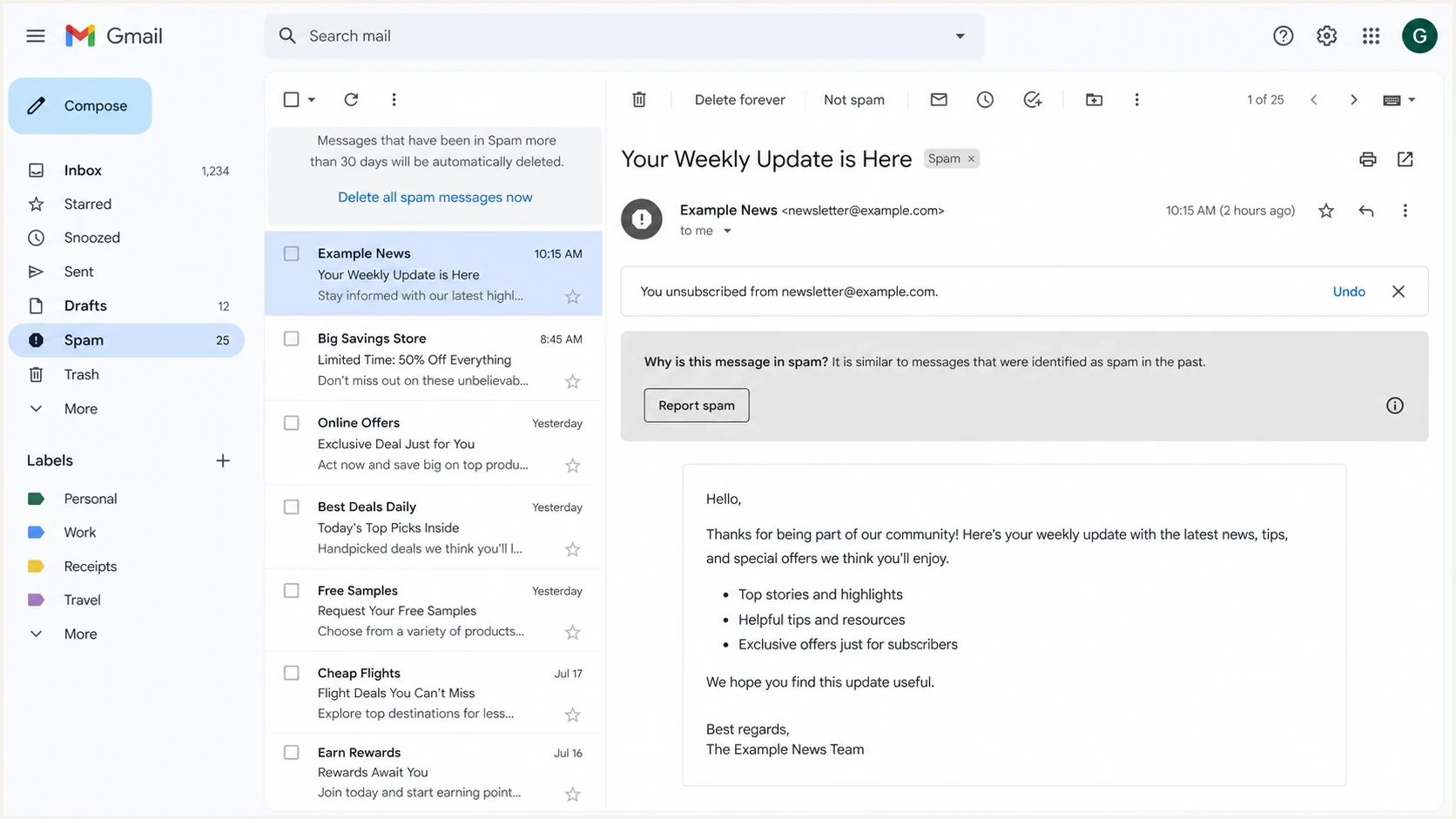
A Gmail message view showing an unsubscribe status banner near the top of the email.
What the client knows
- Request: The user clicked the client-provided unsubscribe action.
- Banner: The mailbox can show a local status message after the action.
- Limits: The client does not own your CRM, consent table, or suppression list.
What the sender controls
- Suppression: The platform stops marketing sends to that address.
- Consent: The platform records a new opt-in only after clear user action.
- Evidence: The sender keeps the audit trail needed for support and compliance.
This distinction explains why a user can see a mailbox banner and still later complete a re-subscribe form. The banner does not block all future email by itself. Your suppression logic does that, and your consent logic decides when the address can move back into an active list.
How to process a re-subscribe safely
The safest process is a closed-loop re-subscribe. The user enters their email address, you send a confirmation message, and you only restore marketing eligibility after they click the confirmation link. The confirmation email should be narrow, transactional in nature, and limited to confirming the request.
That extra step matters most when the address was previously suppressed through a mailbox unsubscribe action. It reduces accidental reactivation, gives support a plain explanation, and creates a stronger record if the user later says they did not ask for email.
- Collect: Ask the user to enter their email on a clear sign-up or preference page.
- Check: Look for prior unsubscribes, complaints, hard bounces, and global suppression.
- Confirm: Send a single confirmation message before marketing restarts.
- Record: Store the timestamp, source, form, list, IP address, and confirmation event.
- Resume: Restore only the list or category the user selected.
Typical List-Unsubscribe headerstxt
List-Unsubscribe: <https://example.com/u/abc123>,
 <mailto:unsubscribe@example.com?subject=unsubscribe>
List-Unsubscribe-Post: List-Unsubscribe=One-Click
If you are still tightening your unsubscribe implementation, the details around List-Unsubscribe behavior matter because mailbox providers expect the action to work without friction. Re-subscribe flows are different: adding someone back should require a deliberate action by that person.
Do not auto-revive suppressed contacts
A profile update, purchase, support ticket, account login, or product usage event is not the same as marketing consent. Transactional and operational messages have their own rules, but marketing mail needs its own permission trail.
If your team sends service notices to people who opted out of marketing, keep that logic separate and review the rules for operational emails before mixing message types.
Match re-subscription to the suppression reason
A suppression list often combines several reasons an address cannot receive marketing, but those reasons are not interchangeable. Store the reason as a separate field and require the reactivation path to match it. A generic import or status change should never clear every suppression type.
|
|
|
|---|---|---|
Unsubscribe | Allow a new list-specific opt-in | Confirmed form or documented request |
Spam complaint | Keep suppressed until separately reviewed | Direct, explicit request plus policy approval |
Hard bounce | Do not reactivate the unchanged address | Corrected address or verified deliverability |
Administrative hold | Follow the reason-specific review | Owner approval and audit note |
Reactivation rules depend on why the address was suppressed.
Do not send a confirmation message to an address that hard bounced, because the delivery failure has not been resolved. For a prior spam complaint, collect the new request through a website, account setting, or support channel first. Then follow your sending platform's policy before removing the complaint suppression.
Keep the original reason
Reactivation should add a new event, not erase the old suppression. The historical reason still matters when you investigate complaints, imports, failed confirmations, or unexpected campaign delivery.
Deliverability risk after a re-subscribe
A clean unsubscribe followed by a confirmed re-subscribe is not a deliverability problem by itself. The risk comes from sending mail that the user still does not want, sending too quickly after a weak reactivation event, or losing the audit record that explains why the address became active again.
Unsubscribes are normal. Complaints are more damaging. If a user re-subscribes and then marks the message as spam, that signal tells the mailbox provider your consent process failed for that user. Keep the first post-confirmation send recognizable, expected, and directly connected to the subscription they selected.
Post re-subscribe risk levels
Use the consent quality, not the old unsubscribe alone, to judge risk.
Low risk
Confirmed
Closed-loop confirmation and list-level consent are recorded.
Medium risk
Manual
The user asked support to rejoin, but the record is incomplete.
High risk
Unproven
A suppressed address was restored by import, sync, or deletion.
This is where authentication and reputation checks still matter. If the user asked to rejoin but the confirmation message lands in spam, the process breaks before it starts. Test the confirmation email, check the headers, and make sure SPF, DKIM, and DMARC pass for the visible From domain.
Email tester
Send a real email to this address. Suped shows a results button when the test is ready.
?/43tests passed
Suped's email tester is useful here because you can send the actual confirmation email and inspect authentication, content, headers, and delivery warnings before users depend on that message.

Email tester sample report showing total score, email preview, issue summary, and per-section results
Suped's DMARC monitoring helps this workflow by showing whether confirmation and resumed campaign mail pass SPF, DKIM, and DMARC for the visible From domain. Authentication reports and alerts do not replace consent management, but they help identify sending sources or configuration changes that interrupt mail people asked to receive.
The audit trail to keep
The audit trail should make one question easy to answer: why did this address receive marketing after it previously unsubscribed? If support, legal, or a mailbox provider asks, you need a plain sequence of events, not a vague explanation that the contact was in the CRM.
Store unsubscribe and re-subscribe as separate immutable events. Do not overwrite the old unsubscribe date with the new subscription date. The old event explains why sending stopped. The new event explains why sending resumed.
Example re-subscribe eventjson
{
  "email": "person@example.com",
  "list_id": "weekly-news",
  "status": "subscribed",
  "last_unsubscribed_at": "2026-05-01T10:12:00Z",
  "resubscribed_at": "2026-05-25T09:30:00Z",
  "resubscribe_method": "confirmed_form",
  "source_ip": "203.0.113.25",
  "confirmation_token_id": "tok_8921",
  "audit_note": "Closed loop confirmation completed"
}
If imports, sync jobs, or data cleanup scripts can change subscription status, add guardrails. A suppressed address should not become marketable because a contact was deleted and re-created. That mistake is a common path to sending to unsubscribed users, which creates complaint risk and support noise.
A good re-subscribe record answers this
- Who: The exact address or user ID that completed the action.
- What: The exact list, topic, or message category restored.
- When: The unsubscribe time, confirmation time, and first resumed send.
- How: The form, confirmation link, source system, and import job involved.
Edge cases that cause confusion
The hard cases are rarely caused by the email client. They come from messy data rules. A person can have multiple addresses, multiple list memberships, multiple product accounts, and multiple sources pushing into the same marketing platform. Treat those systems as risky until the subscription rules are explicit.
Bad pattern
- Import: A CSV upload sets every contact to subscribed.
- Delete: A deleted contact loses its suppression history.
- Merge: Two profiles combine and the subscribed value wins.
Better pattern
- Guardrail: Suppression survives imports, deletes, and profile merges.
- Scope: Consent is stored at list or message category level.
- Proof: Each re-subscribe has a confirmation event.
One more edge case: some users unsubscribe in the mailbox, then later click an old campaign link or reply to an email. That behavior is interest, not consent. Send them to a re-subscribe page or ask them to confirm by replying to a narrow confirmation request.
Requirements vary by country and message type. Where marketing depends on consent, a later affirmative opt-in can establish new consent, but it does not erase the earlier withdrawal. Keep marketing opt-ins specific, documented, and separate from account notices so support can explain why campaign mail resumed.
Views from the trenches
Best practices
Keep the unsubscribe event immutable, then add a separate confirmed resubscribe event.
Use closed loop confirmation before adding a suppressed address back to a campaign list.
Keep list-level consent separate so one newsletter opt-in does not revive every stream.
Common pitfalls
Treating a preference-center visit as consent creates weak proof and user complaints.
Deleting a contact record can remove the suppression and restart mail by mistake later.
Assuming Gmail knows the new consent status leaves the sender without audit evidence.
Expert tips
Send only the confirmation message until the user completes the resubscribe action fully.
Record the form, timestamp, IP, and list name so support can explain the change clearly.
Watch complaint rate after any reactivation flow, then tighten the process when it rises.
Marketer from Email Geeks says re-subscribes belong in the email platform. The client sends an unsubscribe request, but the platform decides whether future campaign mail is allowed.
2024-02-20 - Email Geeks
Marketer from Email Geeks says a mailbox banner is not the sender's consent system. It shows what the user did in that client, while the sender still needs its own permission record.
2024-02-20 - Email Geeks
The practical rule
If someone unsubscribes and later re-subscribes, treat the second action as fresh permission, not a mailbox-level undo. The email client does not need to know your internal state. Your job is to suppress quickly, confirm deliberately, store proof, and send only the mail the user asked for.
A reliable implementation uses clear forms, closed-loop confirmation, immutable consent events, and deliverability checks on the confirmation and first resumed message. That gives users control and gives your team the evidence needed when questions come up later.




