What is the impact of accidentally sending duplicate emails or sending to unsubscribed users?

Updated on 9 Aug 2026: We added guidance on duplicate contact records, suppression controls, reporting accuracy, and marketing opt-out handling.
An accidental duplicate send usually causes a short-term complaint spike, more unsubscribes, lower engagement on the second copy, and extra support replies. If the duplicate send lasts only a few hours and goes to an otherwise healthy, opted-in audience, the damage is usually temporary. Watch complaint rate, bounce rate, spam placement, unsubscribe rate, and inbox placement for several days because mailbox providers learn from recipient behavior quickly.
Sending to unsubscribed users is more serious. It creates compliance risk, breaks recipient trust, and often produces sharper negative signals because people who already opted out are more likely to complain, ignore the message, or report it as unwanted. A single mistake can be recoverable, but the clean-up has to be fast, documented, and focused on suppression integrity.
The practical response is to stop the send, preserve logs, suppress the affected segment, monitor reputation, and avoid sending an apology unless the apology helps recipients more than it creates another unwanted contact. For technical checks after the incident, a real message test through the email tester can confirm whether authentication, headers, and placement signals still look normal.
The direct impact
A duplicate email and an email to unsubscribed users look similar on the surface because both create unwanted extra messages. The impact is different. A duplicate send is usually a relevance and fatigue problem. A send to unsubscribed users is a consent and compliance problem.
- Complaint rate: The second copy of a duplicate campaign gets more complaints because recipients recognize the mistake. Unsubscribed recipients complain at an even higher rate because they already told you to stop.
- Unsubscribe rate: A duplicate send pushes marginal subscribers to opt out. A send to suppressed users creates confusion because the unsubscribe action already happened.
- Bounce rate: If the accidental send includes old, inactive, or incorrectly restored contacts, bounces can rise quickly. That tells mailbox providers the list quality is weak.
- Inbox placement: Higher complaints and lower engagement can move future campaigns toward spam, especially at Gmail, Yahoo, Outlook, and large corporate domains.
- Reporting and cost: Duplicate deliveries inflate send counts and costs. Duplicate contact records can also skew per-person engagement, conversion, and unsubscribe reporting.
- Brand trust: Recipients remember unwanted repetition. Support teams also pay the cost because replies, complaints, and social comments increase.
What to check first
The first useful number is not total messages sent. It is the number of affected recipients who received more than intended, split by consent status, mailbox provider, campaign, and sending domain.
- Duplicate count: How many recipients got two or more copies.
- Suppression breach: How many recipients were unsubscribed, bounced, complained, or otherwise excluded before the send.
- Provider split: Which mailbox providers saw the highest complaint, bounce, and spam placement increases.
|
|
|
|---|---|---|
Duplicate campaign | Fatigue and complaints | Often days if limited |
Suppressed recipients | Consent and compliance | Depends on scope |
Stale restored list | Bounces and spam traps | Often weeks |
Duplicate contact records | Repeated sends and skewed data | Until records and rules are fixed |
Typical impact by mistake type
Why duplicate sends hurt
Mailbox providers do not need to know that the mistake was accidental. They see recipient behavior. If the second message gets fewer opens, more spam reports, more deletes without reading, and more unsubscribes, those signals can make the next few campaigns harder to place in the inbox.
The impact depends on scale and audience quality. A second copy sent to 5,000 engaged subscribers is usually a small incident. A repeated workflow message sent for hours to a large segment can be more damaging because the same recipient can receive back-to-back messages and decide the sender is careless.
Lower-risk duplicate
- Audience: Recent opt-ins with steady engagement.
- Volume: Small share of normal daily volume.
- Duration: Stopped quickly after discovery.
- Content: Expected by the recipient.
Higher-risk duplicate
- Audience: Inactive, purchased, stale, or poorly segmented contacts.
- Volume: Large spike above normal sending.
- Duration: Left running for hours or days.
- Content: Sales-heavy, urgent, or unrelated to recent behavior.
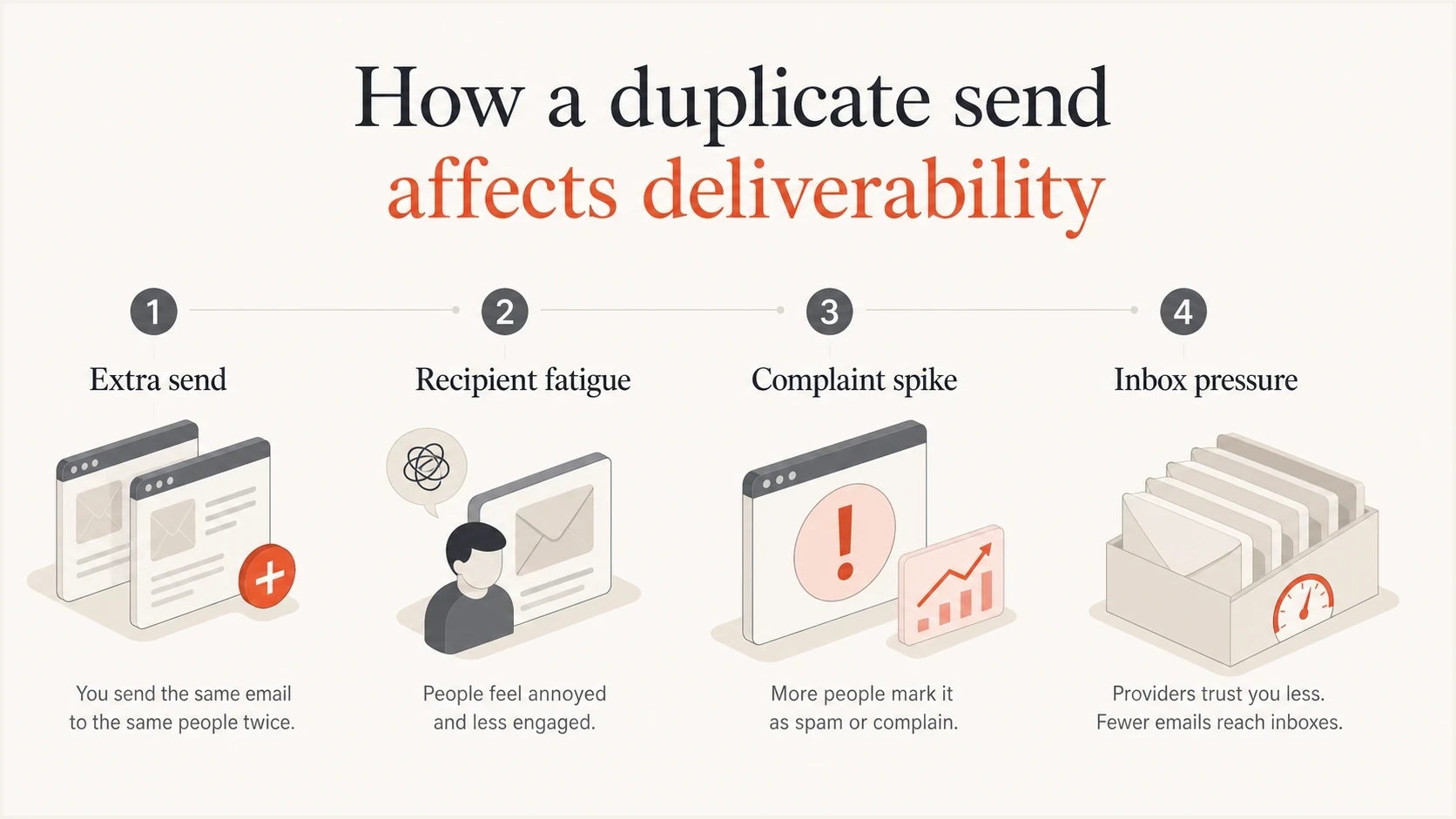
Duplicate email send causing fatigue, complaints, and inbox pressure
The mistake is rarely fatal by itself. The real problem is what the duplicate send reveals. If the process allowed the same workflow message to be queued twice, the team should audit automation entry rules, exclusion logic, retry behavior, and send approvals.
If the accidental send coincides with an authentication or domain issue, the reputation impact can last longer. After any large unexpected send, run a broad domain health check and compare it with DMARC aggregate data for the affected sending domain.
How duplicate records bypass suppression
A duplicate send can start before a campaign is queued. Imports, CRM merges, form submissions, aliases, and disconnected databases can create several contact records for one destination address. If the system deduplicates by contact ID but sends by email address, one person can receive the same campaign more than once.
- Suppress by destination: Apply marketing opt-outs to the normalized email address across every linked profile, not only to the record that captured the unsubscribe.
- Deduplicate at send time: Check the final queue for repeated destination addresses after segmentation, personalization, and data joins are complete.
- Keep identity rules explicit: Do not automatically collapse distinct aliases or shared household addresses unless the business rule and consent model support it.
- Report unique recipients: Track delivered messages and unique destination addresses separately so duplicate records do not hide the real frequency per inbox.
This data problem affects more than sender reputation. Duplicate records waste sending volume, inflate audience size, and make opens or conversions appear to come from separate people. A suppression audit should therefore check identity resolution and reporting logic as well as the unsubscribe field.
Why sending to unsubscribed users is worse
An unsubscribe is a clear instruction. When a system sends marketing to that address anyway, the problem moves beyond deliverability. It becomes a consent and process-control failure. That matters even if the immediate complaint rate does not look extreme.
Unsubscribed users are not a normal low-engagement segment. They are people who already rejected future marketing. Some ignore the mistake, some unsubscribe again, and some complain because the message confirms that the sender did not honor the first opt-out.
Consent drives the risk
If unsubscribed users received marketing email, treat the event as a suppression failure. Involve the owners of compliance, CRM operations, customer support, and sending systems before sending more mail for the affected brand or domain.
- Compliance exposure: Rules vary by jurisdiction and by the scope of the opt-out. In the US, CAN-SPAM requires commercial opt-outs to be honored within 10 business days, but immediate suppression is the safer operational standard.
- Platform enforcement: Many email platforms restrict accounts that generate high complaints, high bounces, or signs of consent misuse.
- Support load: Recipients who opted out often reply directly, use contact forms, or file complaints with customer support.
- List trust: The incident can make normal subscribers less confident that preferences will be respected.
A marketing opt-out does not always prohibit a genuinely transactional message such as a receipt, password reset, or required account notice. Keep those messages limited to their necessary purpose. Promotional content or a misleading classification can turn a transactional exception into another marketing send.
This is also where list history matters. If the database includes inactive contacts, old imports, dead domains, or previously bounced addresses, the mistake can combine consent failure with poor list quality. That makes recovery slower because mailbox providers see several bad signals at once. The same pattern appears when teams send to inactive users without re-permission or careful segmentation.
How much damage to expect
There is no universal penalty. A limited duplicate send can create a complaint spike for a few days and then settle. A large accidental send to suppressed users can push bounce rate, complaint rate, and spam placement up at the same time. The second case needs a more deliberate recovery plan.
Post-incident signals to watch
Use normal baselines for your program, then treat sudden increases as investigation triggers.
Normal noise
Stable
Metrics stay near recent campaign baselines.
Watch closely
Elevated
Complaints, unsubscribes, or bounces rise for one to three sends.
Active recovery
High
Spam placement rises, providers throttle, or complaints remain high.
The hardest part is separating a brief spike from a lasting reputation issue. Do not overreact to one bad hour, but do not dismiss it either. The next campaign or automated message will show whether mailbox providers are still routing mail normally.
If the duplicate was limited to one workflow, check whether the workflow increased frequency for the same recipient. If the problem was a database or suppression import error, assume the blast radius is wider until logs prove otherwise.
?
What's your domain score?
Deep-scan SPF, DKIM & DMARC records for email deliverability and security issues.
Volume context matters. A campaign that doubles a normal send from 20,000 to 40,000 messages has a different profile than a database mistake that sends tens of millions of messages, including unsubscribes. In a large event, even a small percentage of complaints or bounces creates a large absolute count that mailbox providers and sending platforms notice.
What to do immediately
The first response should reduce harm and preserve evidence. Do not start by sending a broad apology email. Another message can worsen the exact problem you are trying to fix, especially for unsubscribed users.
- Stop sending: Pause the campaign, workflow, API trigger, batch job, or queue that caused the mistake.
- Freeze segments: Prevent affected records from receiving more marketing until the suppression state is confirmed.
- Export evidence: Save send logs, recipient IDs, message IDs, workflow versions, preference states, and timestamps.
- Measure blast radius: Count duplicate recipients, unsubscribed recipients, previously bounced recipients, and complaint history.
- Watch providers: Break down results by Gmail, Yahoo, Outlook, Apple, corporate domains, and regional providers.
- Resume slowly: Start with highly engaged, fully opted-in recipients before returning to normal volume.
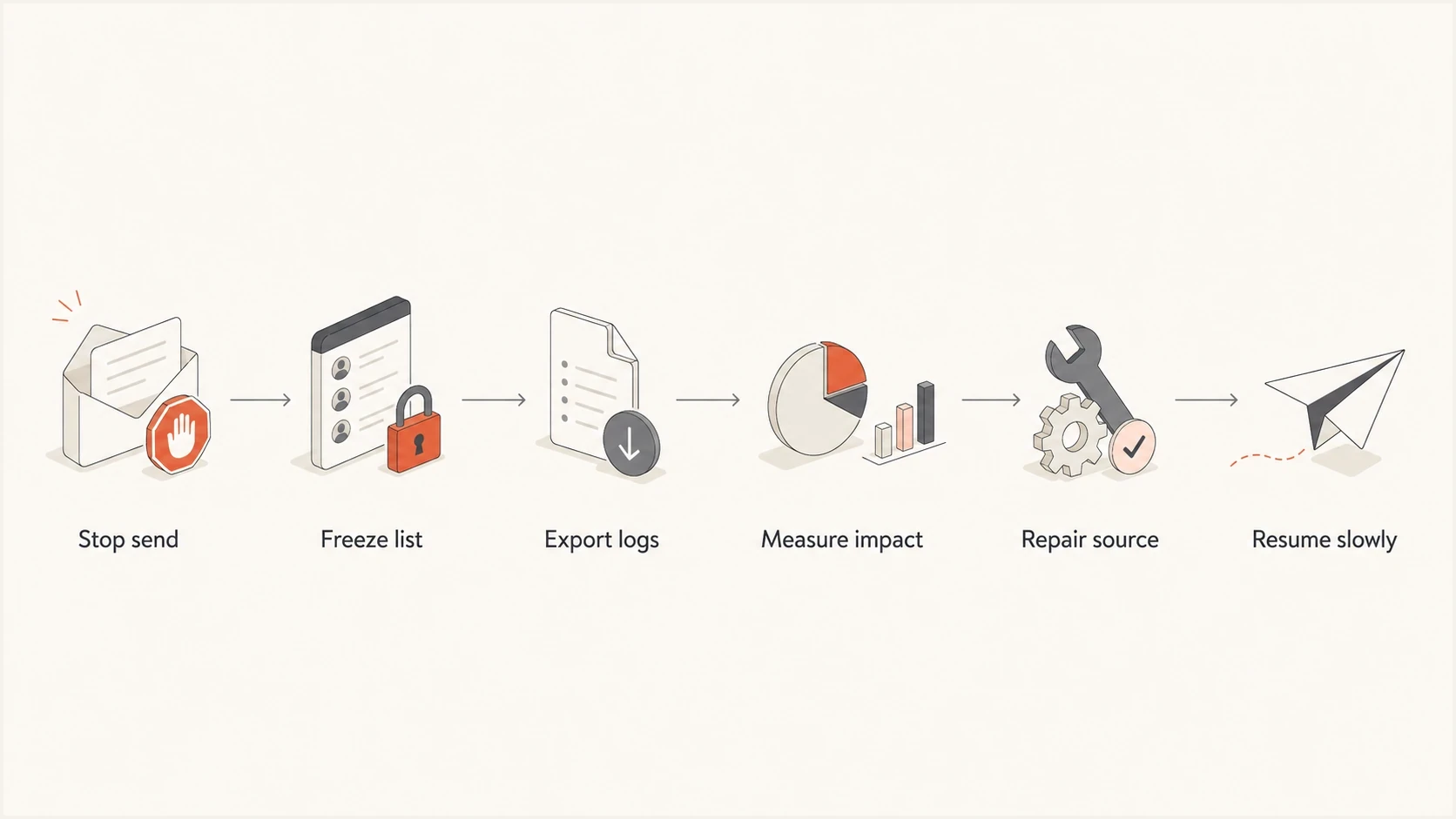
Steps to stop and recover from an accidental email send
Create a short incident note for internal use before any external message. It should explain what happened, who was affected, what has been stopped, what has been fixed, and which metrics will be monitored. That keeps support, legal, marketing, and operations working from the same facts.
Incident fields to capturetext
Incident type: duplicate send or suppression breach
Detected at: YYYY-MM-DD HH:MM TZ
Stopped at: YYYY-MM-DD HH:MM TZ
Affected recipients: count
Unsubscribed recipients: count
Previously bounced recipients: count
Campaign or workflow ID: value
Sending domain: example.com
Authentication status: SPF, DKIM, DMARC
Observed impact: complaints, bounces, spam placement
Owner: name or team
Next review: YYYY-MM-DD HH:MM TZ
If the team decides to send an apology, segment it carefully. Do not send an apology to unsubscribed users unless counsel and compliance owners approve it. For opted-in recipients who received a harmless duplicate, a short acknowledgement in the next normal communication is often better than another standalone email.
How to recover deliverability
Recovery depends on whether the event produced lasting negative signals. If complaints and bounces normalize quickly, avoid dramatic changes. If spam placement remains high or mailbox providers start throttling, tighten sending until the domain proves stable again.
Do this
- Protect consent: Rebuild suppression logic before the next campaign.
- Send to engaged users: Use recent open, click, purchase, or login activity.
- Reduce volume: Step down temporarily if complaints or spam placement remain high.
- Audit automations: Check workflow re-entry, retries, and duplicate queue handling.
Avoid this
- Blasting apologies: Another unwanted message can create more complaints.
- Ignoring unsubscribes: Consent errors need root cause analysis alongside metric review.
- Changing everything: Unnecessary domain, IP, or content changes can hide the actual cause.
- Resuming blindly: Normal volume should wait until suppression and complaint trends are clear.
Authentication matters during recovery because mailbox providers need stable identity signals. SPF, DKIM, and DMARC will not excuse a consent mistake, but broken authentication makes every other signal harder to interpret. Suped's DMARC monitoring supports this post-incident workflow by connecting authentication failures with source detection, alerts, and fix steps.
Issues page showing top issues, verified sources, unverified sources, and authentication pass rates
For a post-incident review, Suped can show whether the affected domain had new unverified sources, DMARC failures, SPF domain match issues, DKIM failures, or unusual source volume. Its alerts and issue steps help separate a bad send from an authentication problem that happened at the same time.
For teams managing several brands or clients, Suped's multi-tenant dashboard keeps authentication drift, blocklist (blacklist) listings, policy changes, and the affected account visible in the same review workflow.
How to prevent it happening again
The fix should be procedural and technical. A careful marketer can still make a mistake if the system allows duplicate workflow entries, stale suppression syncs, or manual imports that bypass unsubscribe rules.
- Unique send keys: Use an idempotency key built from the campaign or workflow, message, recipient, and intended send event so retries cannot create another delivery.
- Suppression first: Apply unsubscribes, complaints, hard bounces, and legal exclusions at segment creation and again at the final send stage. Match the normalized address across duplicate contact IDs.
- Workflow re-entry limits: Block the same recipient from entering the same automation twice unless the use case requires it.
- Approval checks: Require a pre-send review for recipient count, suppression count, excluded segments, and expected frequency.
- Rate guards: Alert when campaign volume, workflow volume, duplicate-address count, or suppressed-recipient count moves outside normal baselines.
- Preference audits: Test unsubscribe syncs across CRM, marketing automation, data warehouse, and customer support tools.
Pseudocode for final suppression enforcementtext
for each recipient in send_queue:
  address = normalize(recipient.email)
  if is_unsubscribed(address):
    skip(recipient, "unsubscribed")
  else if has_complained(address):
    skip(recipient, "complaint")
  else if has_hard_bounced(address):
    skip(recipient, "hard bounce")
  else if has_sent(message_id, address):
    skip(recipient, "duplicate")
  else:
    send(message_id, address)
Final-stage suppression catches errors that happen after segmentation. A segment might be built correctly at 9 a.m., but an unsubscribe at 10 a.m. still needs to be honored before an 11 a.m. send. This is especially important when the send queue is large or the platform batches messages over several hours.
Another prevention step is to compare expected volume against recent sending patterns. If a workflow usually sends 2,000 messages per day and suddenly queues 200,000, the platform should pause and require review. The same idea applies to unsubscribe suppression. If the suppressed count drops unexpectedly, stop and investigate before sending.
When a blocklist or blacklist appears
A duplicate send by itself does not automatically cause a blocklist or blacklist listing. Listings usually appear when the mistake hits spam traps, generates high complaints, uses stale addresses, or comes from an already weak sending reputation. Sending to unsubscribed users increases that risk because the affected audience is more likely to react negatively.
If a listing appears, avoid chasing every blocklist (blacklist) at once. Start with the listings that affect actual inbox placement or sending platform enforcement. Then identify the source of the bad traffic and stop it before requesting removal.
Blocklist checker
Check your domain or IP against 144 blocklists.
 Spamhaus
 0Spam
0Spam

 Cisco
Cisco
 NoSolicitado

 URIBL
URIBL
 abuse.ro
 ALPHANET
 Anonmails
 Ascams
 BLOCKEDSERVERS
 Calivent Networks


 EFnet
EFnet




 JustSpam
 Kempt.net
 NordSpam

 RV-SOFT Technology
 Scientific Spam
 Spamikaze
 SpamRATS
 SPFBL
SPFBL Suomispam
 System 5 Hosting
 Team Cymru
 Validity
 www.blocklist.de Fail2Ban-Reporting Service
 ZapBL
ZapBL 2stepback.dk
 Fayntic Services
 ORB UK
 technoirc.org
 TechTheftSpamhaus0SpamCiscoNoSolicitadoURIBLabuse.roALPHANETAnonmailsAscamsBLOCKEDSERVERSCalivent NetworksEFnetJustSpamKempt.netNordSpamRV-SOFT TechnologyScientific SpamSpamikazeSpamRATSSPFBLSuomispamSystem 5 HostingTeam CymruValiditywww.blocklist.de Fail2Ban-Reporting ServiceZapBL2stepback.dkFayntic ServicesORB UKtechnoirc.orgTechTheftSpamhaus0SpamCiscoNoSolicitadoURIBLabuse.roALPHANETAnonmailsAscamsBLOCKEDSERVERSCalivent NetworksEFnetJustSpamKempt.netNordSpamRV-SOFT TechnologyScientific SpamSpamikazeSpamRATSSPFBLSuomispamSystem 5 HostingTeam CymruValiditywww.blocklist.de Fail2Ban-Reporting ServiceZapBL2stepback.dkFayntic ServicesORB UKtechnoirc.orgTechTheftSpamhaus0SpamCiscoNoSolicitadoURIBLabuse.roALPHANETAnonmailsAscamsBLOCKEDSERVERSCalivent NetworksEFnetJustSpamKempt.netNordSpamRV-SOFT TechnologyScientific SpamSpamikazeSpamRATSSPFBLSuomispamSystem 5 HostingTeam CymruValiditywww.blocklist.de Fail2Ban-Reporting ServiceZapBL2stepback.dkFayntic ServicesORB UKtechnoirc.orgTechTheftSpamhaus0SpamCiscoNoSolicitadoURIBLabuse.roALPHANETAnonmailsAscamsBLOCKEDSERVERSCalivent NetworksEFnetJustSpamKempt.netNordSpamRV-SOFT TechnologyScientific SpamSpamikazeSpamRATSSPFBLSuomispamSystem 5 HostingTeam CymruValiditywww.blocklist.de Fail2Ban-Reporting ServiceZapBL2stepback.dkFayntic ServicesORB UKtechnoirc.orgTechTheft
If spam traps are suspected, look at the age and source of the affected addresses. Purchased lists, old imports, abandoned accounts, and inactive users are common causes. The fix starts with removing the data source and tightening reactivation rules.
If complaints caused the listing, suppress complainers immediately, reduce volume, and send only to recent engagers until complaint rates return to baseline. That recovery path is also relevant when repeated messages or identical campaigns cause filtering concerns. Related guidance on whether identical emails flag spam can help separate duplicate-content issues from duplicate-delivery issues.
Views from the trenches
Best practices
Pause automations first, then calculate affected recipients by consent state and provider.
Keep suppression checks at send time so late unsubscribes still block queued messages.
Watch complaints for several days before deciding that reputation has fully recovered.
Common pitfalls
Treating a duplicate send as harmless before complaint and spam placement data arrives.
Sending apologies to everyone, including people who should not receive more marketing.
Fixing only the campaign while leaving workflow re-entry and queue logic unchanged.
Expert tips
Compare the incident against normal baselines, not generic thresholds from another sender.
Use provider-level reporting because Gmail and Outlook can react differently to the same send.
Document root cause and prevention steps while logs and workflow versions are still fresh.
Marketer from Email Geeks says a duplicate send often causes a complaint-rate spike for a few days, so the team should monitor complaint trends before assuming the issue has passed.
2024-08-15 - Email Geeks
Marketer from Email Geeks says duplicate sends can go either way: some campaigns show higher complaints, while others produce no extra measurable damage beyond annoyance.
2024-08-15 - Email Geeks
The practical takeaway
A small duplicate send to an engaged list is usually recoverable with monitoring and a short operational review. A send to unsubscribed users needs stronger handling because it breaks consent expectations and can create compliance, platform, and reputation consequences.
The safest response is to stop the source, prove the scope, repair suppression logic, monitor complaints and spam placement, and resume with the most engaged opted-in audience. Suped connects DMARC aggregate reporting, source detection, alerts, and blocklist (blacklist) monitoring for the affected domain so the team can separate authentication issues from the sending mistake.




