What is the risk of sending email to inactive users?

Published 9 May 2025
Updated 10 Aug 2026
10 min read
Summarize with
Updated on 10 Aug 2026: We updated this guide with current Gmail requirements and safer re-engagement controls.
Here, "inactive users" means email subscribers who have stopped engaging, not people whose application accounts are disabled. Sending campaigns to a large inactive segment can damage sender reputation enough to hurt future campaigns, not only the inactive send. Older inactive lists contain a higher share of invalid addresses, people who no longer expect the mail, and abandoned mailboxes that might have been repurposed as recycled spam traps. Mailbox providers can read the resulting bounces, complaints, and weak recipient response as signs of poor email list hygiene.
Treat inactive audiences as a reputation liability until campaign data proves otherwise. A small, planned re-engagement campaign can work. A broad blast to months or years of inactive subscribers is different. It puts the domain, sending IPs, and normal revenue campaigns at risk for weeks after the send.
Do not send a normal campaign to inactive subscribers as if they are active. If you need to contact them, isolate the send, cap the volume, use a clear reactivation goal, and stop quickly when early signals are bad.
- Main risk: Future inbox placement falls because the mailbox provider sees weak recipient response.
- Worst case: Bounces, complaints, and trap hits push mail to spam or trigger blocks.
- Safer path: Use a small reactivation segment with strict stop rules and separate reporting.
What counts as inactive
An inactive subscriber is not someone who has gone quiet for a few days. The useful definition depends on the sending program, buying cycle, and message frequency. Separate people by recent clicks, replies, purchases, logins, account activity, signup age, and acquisition source. These are stronger signals than tracking-pixel opens, which can be inflated by privacy-related image loading. Gmail also says it does not track opens or verify the accuracy of open rates reported by third parties.
|
|
|
|
|---|---|---|---|
Active | 0-90 days | Low | Normal mail |
Cooling | 90-180 days | Medium | Reduce volume |
Stale | 180-365 days | High | Reactivation only |
Dormant | 365+ days | Severe | Suppress from marketing |
Use these buckets as a starting point, then adjust for your buying cycle and message type.
The exact cutoff is less important than separating these users before sending. Seasonal businesses and long purchase cycles can justify longer windows when recent account or purchase data shows continued interest. Use removal timing rules to keep old addresses out of normal campaigns.
Inactive audience risk by age
Engagement age is not the only signal, but it is a useful first filter for campaign risk.
Healthy
0-90 days
Recent click, reply, purchase, login, or account activity.
Watch
90-180 days
Lower frequency and clearer value are needed.
Risky
180-365 days
Use reactivation logic and stop on poor signals.
Suppress
365+ days
Normal marketing mail should stop unless other recent activity proves interest.
How inactive sends hurt deliverability
Inactive sends hurt deliverability because mailbox providers evaluate recipient feedback, sending patterns, and list quality. A message can pass SPF, DKIM, and DMARC and still land in spam when recipients complain, delete it without reading, rarely interact, or when too many addresses bounce. Sender-visible pixel opens are not a reliable substitute for meaningful engagement.
- Hard bounces: Older lists often contain more invalid addresses, and repeated failures show weak list maintenance.
- Spam complaints: People who no longer remember subscribing are more likely to mark the message as unwanted.
- Weak engagement: Few clicks, replies, purchases, or account actions provide little evidence that the mail is wanted.
- Trap exposure: Some abandoned addresses can become recycled traps, although providers do not publish a universal conversion timetable.
- Blocks: Bad signals can lead to filtering, throttling, or blocklist (blacklist) listings.
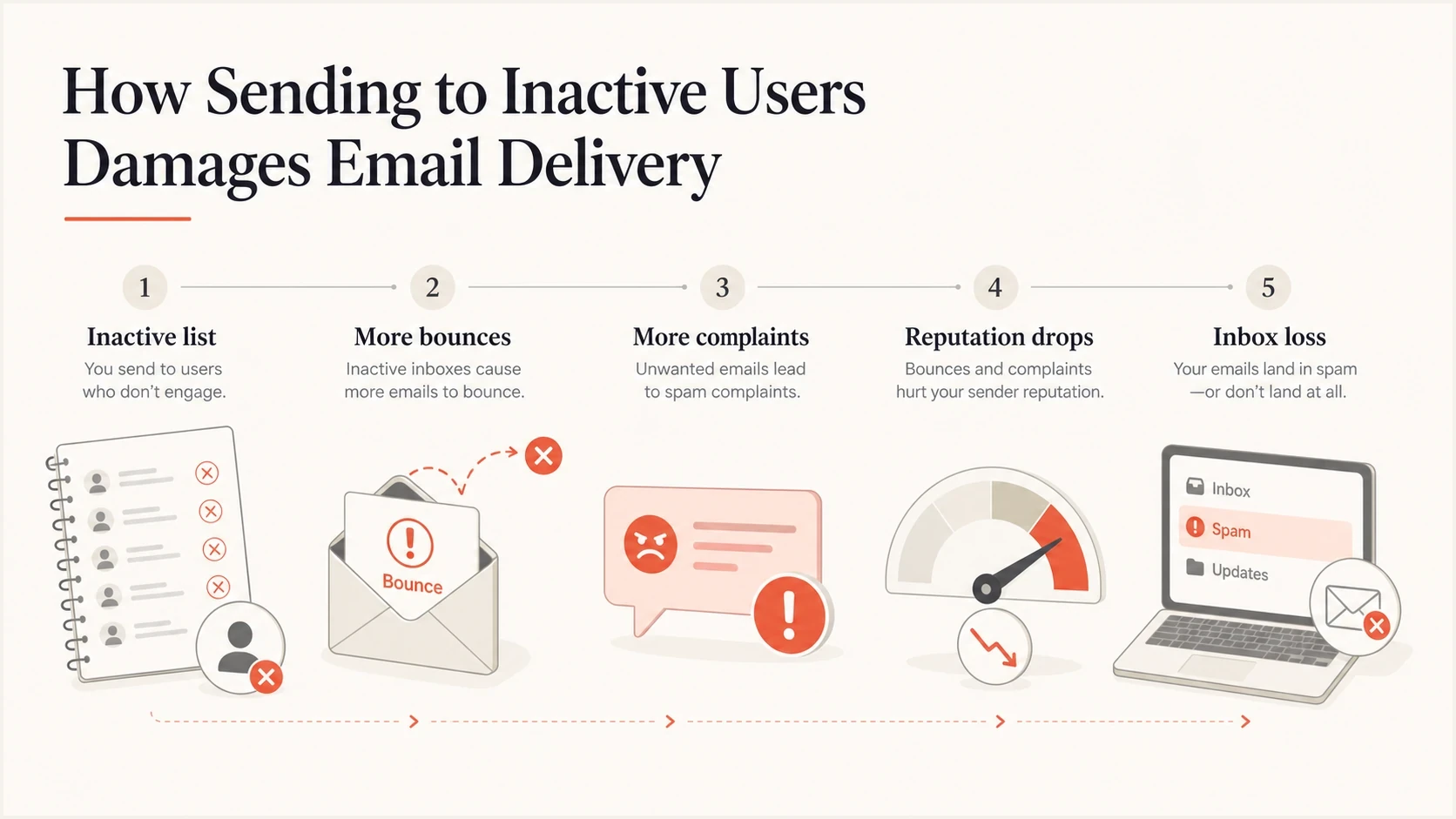
Diagram showing how inactive email subscribers can lead to bounces, complaints, reputation loss, and reduced inbox placement.
A blocklist or blacklist listing is usually a symptom of poor sending signals, not the first event. If you see listings after a risky inactive send, combine list suppression with blocklist monitoring so you know which domains or IPs need attention.
The risk is bigger than one campaign
The biggest mistake is measuring only the inactive campaign. That campaign can have poor revenue and still be less costly than the damage it causes to normal sends afterward. If a sender pushes a large inactive database and the complaint rate, bounce rate, or other negative feedback spikes, future campaigns to active buyers can get filtered too.
Blast the inactive file
- Volume: A large audience goes out in one campaign or a short burst.
- Signal mix: Bounces, complaints, and ignores arrive together.
- Aftereffect: Active-user campaigns can see lower inbox placement.
Managed reactivation
- Volume: Small batches are sent with clear holdout groups.
- Signal mix: Poor segments are stopped before they scale.
- Aftereffect: Core campaigns stay insulated from risky contacts.
When a stakeholder wants to send to a large inactive list, use business impact language. Pull revenue, click, complaint, conversion, and delivery data for regular campaigns. Then explain what happens if those campaigns lose inbox placement for the next several weeks. That is clearer than arguing about a single campaign forecast.
Use current complaint and unsubscribe guardrails
A re-engagement email is still marketing or subscribed mail. For senders delivering more than 5,000 messages a day to personal Gmail accounts, Gmail requires one-click unsubscribe and a clearly visible unsubscribe link. Gmail says senders should keep the user-reported spam rate below 0.1% and avoid reaching 0.3% or higher. These are account-wide safety boundaries, not acceptable targets for an inactive segment.
- Preserve opt-outs: Never re-add unsubscribed recipients, complainers, or hard-bounced addresses to a reactivation segment.
- Set a stricter limit: Use an internal complaint stop rule well below the provider maximum and compare it with active-mail baselines.
- Watch cohorts: Break results out by mailbox provider, acquisition source, signup age, and inactivity period.
- Honor requests quickly: Gmail's bulk-sender guidance expects one-click unsubscribe requests to be processed within 48 hours.
Stop a batch when complaints, bounces, or deferrals exceed the written test limit. Do not wait for the whole account to approach a mailbox provider's published ceiling.
How to run a re-engagement campaign with less risk
Sending to inactive subscribers is not always wrong. The risk changes when the send has a narrow purpose, a small test group, and a fast stop rule. A re-engagement campaign should ask for one clear action, such as clicking to stay subscribed, updating preferences, claiming a relevant offer, or confirming that the address still belongs to the person.
- Separate first: Keep inactive subscribers out of the same campaign as active subscribers.
- Start small: Test a small sample before sending to the rest of the stale audience.
- Use recency: Contact the least stale subscribers first and skip the oldest addresses.
- Set limits: Stop when bounces, complaints, or deferrals exceed the agreed baseline or internal limit.
- Suppress fast: Suppress people who ignore the reactivation sequence instead of repeating the same request.
Example reactivation segment rulestext
candidate if last_click_age <= 365 days OR last_purchase_age <= 365 days OR last_login_age <= 365 days
exclude if hard_bounce = true
exclude if complaint = true
exclude if unsubscribed = true
send batch size <= min(10% of normal daily volume, agreed test cap)
stop if complaint_rate > internal_reactivation_limit
Before scaling, send a real message and inspect authentication, content, headers, and placement signals with an email tester. This does not prove that inactive subscribers will respond well, but it catches configuration and content issues before they mix with list-quality risk.
Email tester
Send a real email to this address. Suped shows a results button when the test is ready.
?/43tests passed
For a broader reactivation plan, keep the inactive audience small enough that a bad result does not contaminate the rest of the program. A useful process is covered in reactivation management, especially when the business wants to recover addresses without sacrificing active-subscriber inbox placement.
Authentication and reputation checks before sending
Authentication will not fix a bad list, but poor authentication makes an inactive send even more risky. SPF, DKIM, and DMARC need to pass with the required identifier alignment for the visible sending domain. If the domain already has authentication failures, inactive subscribers add reputation pressure on top of a technical problem.
Suped DMARC dashboard showing email volume, authentication health, and source breakdown
Suped's product is useful here because it connects DMARC monitoring, SPF and DKIM status, blocklist (blacklist) monitoring, and domain health signals in one place. For a quick public check before a risky send, run the domain health checker and fix authentication problems before increasing volume.
Suped's product turns raw authentication and reputation data into issues, alerts, and remediation steps. That gives a team domain-level evidence when it needs to decide whether a risky audience test should continue.
- Visibility: See which senders pass, fail, or send without authorization.
- Alerts: Get notified when failures or suspicious sources move beyond normal levels.
- Operations: Use hosted DMARC, hosted SPF, SPF flattening, and hosted MTA-STS when DNS change cycles slow the team down.
- Investigation: Compare sending-source changes with domain health and campaign timing.
When to stop sending
Write the stop decision before the campaign goes out. If the audience needs repeated attempts to respond, it is usually not a good audience for bulk email. Give inactive subscribers one or two useful chances, then suppress them unless they take a meaningful action.
|
|
|
|---|---|---|
Hard bounce | Address invalid | Suppress |
Complaint | Recipient objected | Suppress |
No meaningful action | No current intent | Stop after test |
Old record | High uncertainty | Skip |
Simple stop rules keep reputation decisions out of campaign-day debate.
One common rule is to stop normal marketing after 180 days without a meaningful action and stop reactivation attempts after 365 days. Some brands need shorter windows, especially when they send frequently. Longer windows need strong non-open signals such as purchases, logins, account activity, or direct replies.
If the audience includes old bounced users, deleted mailboxes, or imported contacts with weak consent evidence, treat the risk as a hard stop. The same applies after high complaint rates. For more detail on bounce damage, review hard bounce impact before trying to recover a stale list.
Views from the trenches
Best practices
Model the revenue at risk in active campaigns before approving a stale-audience send.
Run inactive reactivation as a staged plan with controls, not one broad bulk campaign.
Keep suppression rules simple enough that marketing, support, and data teams can apply them.
Common pitfalls
Treating all inactive addresses as recoverable hides bounce, complaint, and trap exposure.
Using opens alone to define activity creates weak segments and unreliable reactivation logic.
Citing broad audience advice without consent, age, and volume checks can normalize risky sends.
Expert tips
Compare each reactivation batch against active-mail baselines, then stop on early variance.
Protect core sends by separating inactive mail streams, reporting, and campaign calendars.
Use business-impact language so reputation risk is tied to revenue, not abstract warnings.
Marketer from Email Geeks says sending to a large inactive audience can damage reputation enough to hurt future campaigns, not only the risky send.
2020-10-21 - Email Geeks
Marketer from Email Geeks says revenue data from regular campaigns helps show why losing inbox placement for several weeks has a higher cost than one reactivation test.
2020-10-22 - Email Geeks
Should you email inactive subscribers?
The main risk of sending email to inactive subscribers is reputation damage that spills into future sends. The immediate campaign can bounce more, get more complaints, hit traps, and train mailbox providers to treat the mail as unwanted. The larger cost is that active subscribers can receive less mail in the inbox afterward.
- Do send: Small reactivation batches with clear intent and fast suppression.
- Do not send: Normal campaigns to old, silent, poorly verified contacts.
- Check first: Authentication, content, bounces, complaints, domain health, and blacklist or blocklist signals.
Suped's product gives teams an operating view of DMARC authentication, sending sources, domain health alerts, and blocklist (blacklist) signals. Use that evidence to identify whether a re-engagement test coincides with authentication failure or domain reputation trouble. Engagement and consent decisions still come from campaign and customer data.




