
Is it legal to opt users back into email lists for operational emails after they've opted out and are there alternative campaign setups?

Updated on 11 Oct 2026: We clarified operational email rules, suppression safeguards and campaign setups that preserve marketing opt-outs.
No. Do not opt users back into a marketing email list after they have opted out just because an operational email needs to be sent. That creates legal risk and breaks the user's stated preference. It also creates a data problem that can let marketing email leak through later.
Keep the marketing opt-out intact and send genuine operational or transactional messages through a separate sending route. A program acceptance notice, application decision, account security notice, billing update, safety notice, or required service update should not depend on a marketing subscription flag.
The short rule
- No re-subscribe: Do not flip a user back to opted-in status to make an automation work.
- Separate status: Use one flag for marketing consent and another for operational mailability.
- Use counsel: Review the laws that apply to the sender and recipients, including domestic campaigns.
Can you send operational emails after an opt-out?
If someone has opted out of marketing email, keep them opted out of marketing. A necessary non-marketing email can still be sent when its content and purpose fit the law that applies to the recipient. The problem is not a properly classified operational send. The problem is using a marketing opt-in field as a workaround.
For U.S. CAN-SPAM purposes, the FTC distinguishes commercial messages from transactional or relationship messages. The FTC guide says commercial opt-outs must be honored, while a message with a transactional or relationship primary purpose is exempt from most CAN-SPAM requirements. It must still avoid false or misleading routing information. CAN-SPAM generally does not require prior opt-in for commercial email, but a previous marketing opt-out still has to be honored. A transactional exemption does not restore marketing permission.
- Legal answer: Do not opt users back into marketing after an opt-out unless they take a fresh, affirmative action to subscribe again.
- Operational path: Send necessary non-marketing email through an operational or transactional stream, with no promotional content.
- Bad workaround: Adding application language that says users will be opted back in does not fix the underlying suppression problem.
- Best setup: Store marketing consent, operational mailability, legal notice requirements, and global safety blocks as separate data points.
Recipient status modeltext
marketing_opt_in: false
marketing_suppressed: true
suppression_reason: marketing_unsubscribe
operational_mailable: true
global_delivery_blocked: false
notice_type: application_status
send_stream: operational
last_marketing_opt_out: 2026-05-25
That model avoids the common trap of making one field mean consent, suppression, delivery eligibility, and required-notice routing. Operational mailability must still sit behind global blocks for hard bounces, invalid addresses, abuse complaints, and recipient-specific do-not-contact requirements.
How to classify the message
Start by classifying the email before thinking about tooling. A university application decision is usually administrative or non-marketing when it only reports the outcome of a process the applicant initiated. Whether a statute calls it transactional is a separate, fact-specific question. A scholarship deadline reminder can be administrative when it is necessary to complete that same process. A general newsletter about campus life is marketing.
For U.S. CAN-SPAM classification, the key test is the primary purpose of the message. The FTC guide says a mixed commercial and transactional message is commercial if a reasonable recipient would read its subject line as advertising, or if its transactional content does not appear mainly at the beginning. Keep operational emails plain and direct, limited to the necessary action or notice.
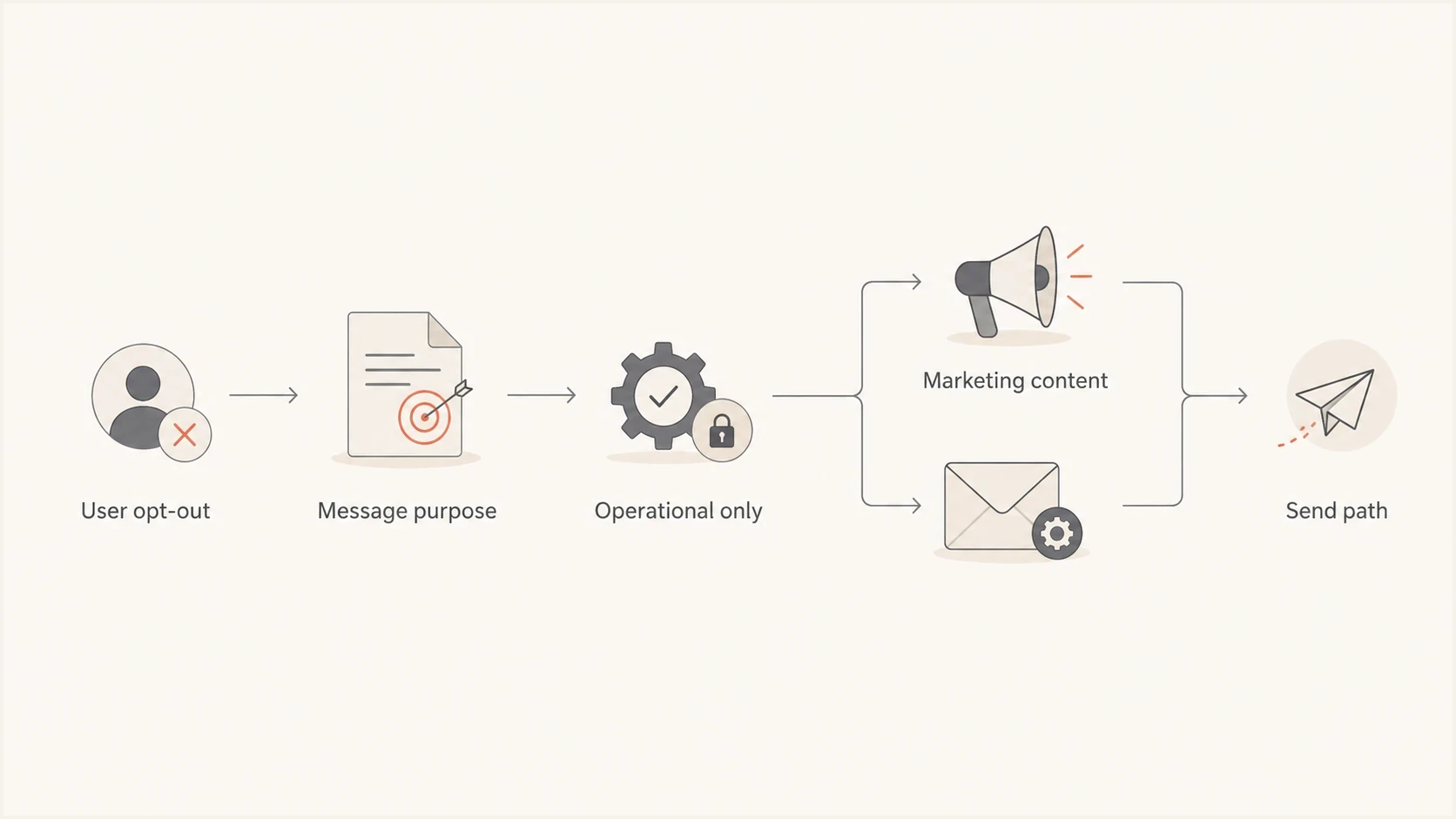
Operational email versus marketing email routing after an unsubscribe.
|
|
|
|
|---|---|---|---|
Application decision | Administrative | Operational stream | Keep the decision non-promotional |
Password reset | Transactional | Transactional stream | Respond to a reset request |
Account terms change | Relationship | Operational notice | Limit the notice to an existing account |
Promotional event invite | Marketing | Suppressed | Honor marketing suppression |
Mixed update | Mixed | Rewrite | Separate the notice from promotions |
Classification examples depend on the actual content and applicable law.
When the message is mixed, rewrite it. Do not add a campus event promotion, donation ask, upsell, discount, newsletter module, social follow block, or broad brand content to an operational notice. The subject line should match the operational purpose, and the first visible content should get straight to the required information.
For close cases such as terms updates, the safest pattern is to keep the email narrowly focused on the relationship or account change. This same logic applies to terms of service email decisions, where the message should not be treated as a marketing recovery opportunity.
How email laws treat operational messages
Operational is a sending label, not a universal legal exemption. Classify the message under the law connected to the recipient and the sending operation. Then configure the stream to enforce that classification without changing the marketing consent record.
|
|
|
|---|---|---|
United States | CAN-SPAM primary purpose and five narrow transactional or relationship categories | Noncommercial content can fall outside the commercial rules, while a mixed commercial message must meet CAN-SPAM. |
United Kingdom | Pure administrative or customer service content is outside PECR direct marketing rules | Adding promotional material makes the service message direct marketing. |
EU/EEA | National ePrivacy law plus a GDPR lawful basis and purpose limitation | Document the lawful basis for necessary processing and keep a marketing objection in force. |
Canada | Whether the email encourages commercial activity and whether a specific CASL exception applies | For a commercial electronic message, CASL section 6(6) removes the consent requirement for specified solely transactional content, while sender identification and unsubscribe requirements still apply. |
Australia | Whether the message advertises, offers, or promotes, or qualifies as a narrowly factual message | Commercial messages generally need consent and unsubscribe; designated factual messages still need sender identification. |
High-level working tests that require jurisdiction-specific legal review.
A soft opt-in is not a way to override an unsubscribe. The ICO guidance says UK senders must stop unsolicited email marketing after someone opts out of the soft opt-in, and can resume only if the person later gives consent. A purchase, account login or new application must not automatically reset the marketing suppression.
Do not rely on internal labels
Internal labels and platform settings do not decide the legal category. Review the actual subject line, visible copy, destination links, footer, audience relationship, and applicable jurisdiction.
Campaign setups that avoid re-subscribing users
There are several workable campaign setups. The right one depends on how much control the email platform gives you, whether the message has to be automated, and whether the source of truth is the CRM, product database, student information system, or consent ledger.
Rank the options by how well they preserve the marketing opt-out. Anything that edits the marketing opt-in flag sits at the bottom of the list, even if it reduces manual work for the sending team.
Risky setup
- Opt-in flip: The system changes the user to marketing opted-in before a send.
- Hidden leak: A later campaign can include the user by mistake.
- Weak consent: Application language does not equal a fresh marketing subscription.
Cleaner setup
- Separate stream: Operational sends bypass marketing subscription logic without changing it.
- Durable suppression: Marketing opt-outs stay active until the user subscribes again.
- Audit trail: Each send has a clear reason, source, template, and recipient state.
The first option is a dedicated operational stream. The automation reads from a field such as operational_mailable or application_notice_required, not from the marketing opt-in field. The email template is locked to non-promotional content, and reporting shows why the recipient received it.
The second option is a CRM or application workflow that sends the notice outside marketing automation. This works well for acceptance, denial, account, billing, and compliance notices. The workflow should still use authenticated mail, clear templates, logging, and global delivery blocks, but it should not depend on marketing list membership.
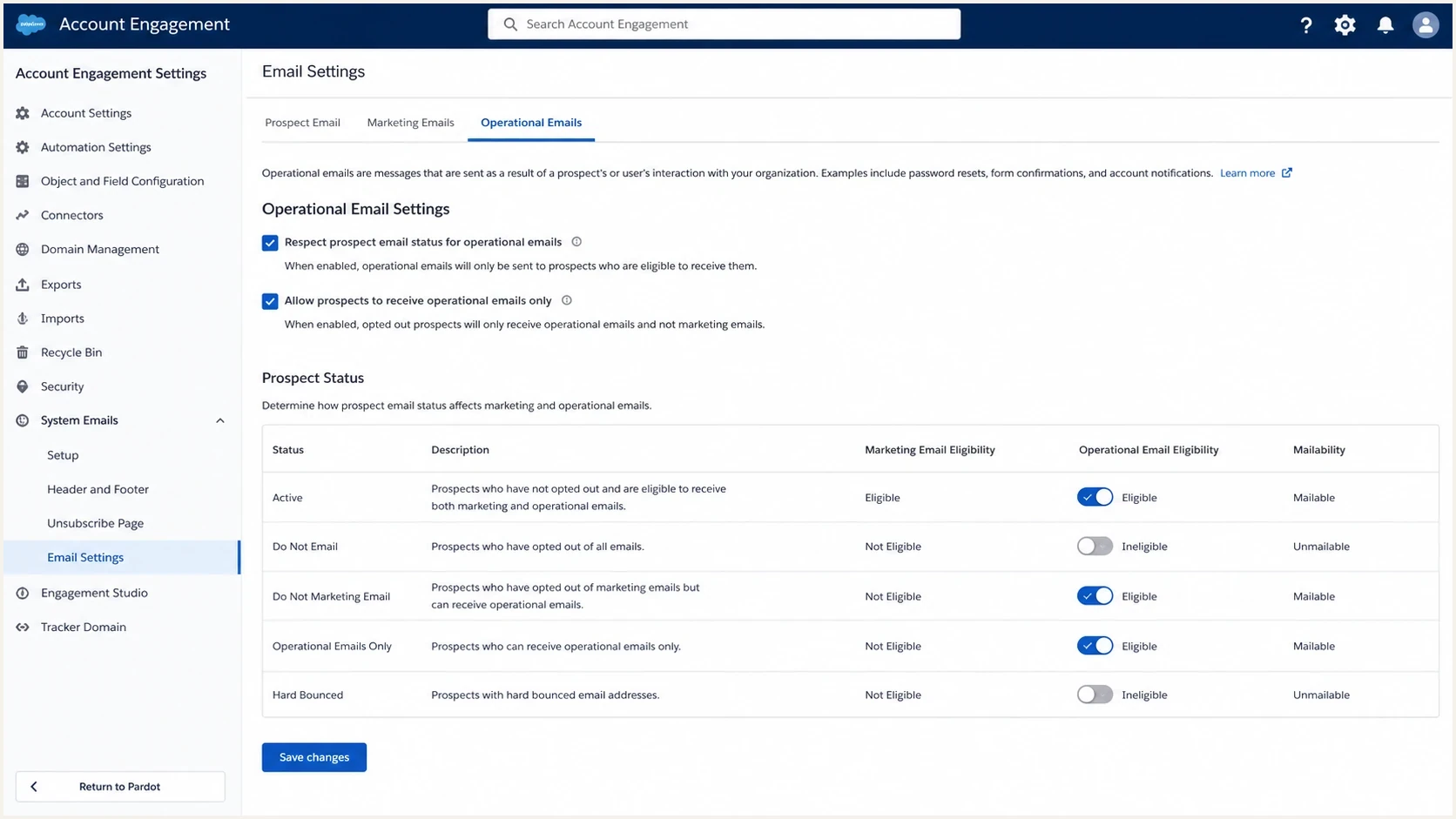
Illustration of Salesforce Account Engagement operational email and opt-out settings.
The third option is a dual-campaign structure: one marketing program and one operational program. This only works if the platform lets opted-out users enter the operational program. Salesforce Account Engagement uses an Operational Emails Only mailability state. Its operational email documentation says operational emails can be sent as list emails and through Engagement Studio, but not through automation rules. University-specific guidance such as the Cornell Account Engagement page also describes the commercial and operational distinction.
The fourth option is a preference center with separate categories. Marketing newsletters, events, partner announcements and optional program updates can have separate subscription controls. An opt-out from all marketing must override every marketing category. Explain required operational notices separately, with a contact-change path and a short reason such as "You are receiving this because you submitted an application; your marketing preferences are unchanged." Optional notification subscriptions still need their own opt-out controls.
For marketing and subscription mail subject to one-click requirements, use the List-Unsubscribe and List-Unsubscribe-Post headers plus a visible unsubscribe link in the body, as specified in Gmail sender guidelines. The one-click action uses an HTTP POST; do not trigger it on an ordinary link-scanner GET request or require a login or extra confirmation. Review unsubscribe handling when implementing the endpoint.
Practical alternatives
- Operational stream: Best when the platform can send non-marketing automation to opted-out users.
- CRM workflow: Best when the CRM has the event trigger and the marketing platform blocks entry.
- Application send: Best when the user action happens in the product or admissions system.
- Dual categories: Best when users need granular control over optional communication types.
- Manual fallback: Acceptable for rare exceptions, not as the normal operating model.
A practical setup for Salesforce Account Engagement
If the current platform is Salesforce Account Engagement, do not patch around an automation limit by changing the global opt-out. Ask the admin team to enable operational email sending and confirm that eligible recipients have an Operational Emails Only mailability state. Use an operational list email or a Send Operational Email step in Engagement Studio. Automation rules cannot send operational emails.
Do not treat Do Not Email as a universal delivery block in Account Engagement. Salesforce's mailability documentation shows that Do Not Email and Opted Out can still permit operational mail, while Undeliverable blocks all sends. Keep separate exclusions for complaints and recipient-specific do-not-contact requirements. If operational sending is disabled while an Engagement Studio program is running, prospects skip its operational send steps, according to the Engagement Studio limitations.
If those routes do not fit the trigger, treat Account Engagement as the marketing system and use Salesforce core automation or an application-triggered mail route for these notices. A CRM workflow can also own the trigger. The send decision should come from the application event, not the marketing subscription state.
Operational routing logictext
if global_delivery_blocked:
  send = false
elif message_type == application_decision and operational_mailable:
  use_stream = operational
  require_marketing_opt_in = false
  include_promotional_modules = false
  preserve_marketing_suppression = true
elif message_type == marketing and marketing_opt_in and not marketing_suppressed:
  use_stream = marketing
else:
  send = false
Make the template library enforce the distinction. Operational templates should have locked headers, limited footers, no promotional slots, and a required reason code. Marketing templates can keep the normal unsubscribe footer and marketing compliance controls.
Authentication and deliverability checks
Operational email still has to reach the inbox. Configure SPF, DKIM and DMARC for the actual sending stream, then monitor delivery and complaints. DMARC passes when at least one successful SPF or DKIM check has an authenticated domain that matches the visible From domain under DMARC's domain-matching rules. One failed check does not automatically cause a DMARC failure, and a DMARC pass does not guarantee inbox placement. The DMARC specification defines these authentication checks.
Before moving critical notices to a new stream, run a domain health check on the sending domain, then confirm that a real message's headers show the expected SPF and DKIM results plus dmarc=pass. If the institution uses several departments or subdomains, ongoing DMARC monitoring shows which systems are sending and whether they authenticate. It also identifies an unknown source when one appears.

Issue steps to fix dialog showing the issue overview, tailored fix steps, and verification action
Suped is our DMARC reporting and email authentication platform. It collects DMARC aggregate reports for operational From domains and shows reported sending sources and authentication results. Identify each authorized sender and investigate new sources or authentication failures. Send issue alerts to the system owner and use live message tests for immediate checks, because aggregate reports arrive after receivers process mail. Suped also includes blocklist (blacklist) monitoring for domain or IP reputation incidents.
For organizations with several departments or domains, Suped's multi-tenant views can group domains by owner while keeping authentication findings tied to the sending system. This helps a team verify migration to a new operational subdomain without working directly from raw aggregate reports.
After authentication is configured, send a real message through the email tester and inspect the result. The test should use the same From domain, sending system, template, links, and footer style as the live operational email.
Email tester
Send a real email to this address. Suped shows a results button when the test is ready.
?/43tests passed
If operational emails use a different subdomain, introduce expected traffic gradually and monitor bounces and complaints. Keep required notices timely, and do not send unwanted marketing to warm the stream. A separate subdomain helps identify the stream, but it does not guarantee reputation isolation. A clear subject line and narrow operational content reduce complaint risk.
Implementation checklist
Implement this as a data and process change, not as copy in an application form. Disclosure language can explain that necessary operational notices will be sent, but it should not claim that users will be put back onto marketing lists.
The sending team needs a workflow that makes the correct action easy. If the only easy action is to toggle opt-in, people will use it under deadline pressure. Build the operational path and lock the risky fields. Make the audit record automatic.
Apply marketing suppression immediately across connected systems and queued campaigns. The outer legal limits include 10 business days under CAN-SPAM, 10 business days under CASL, and five working days under Australian spam rules. Gmail's subscription guidelines call for honoring unsubscribe requests within 48 hours. These deadlines do not reset when a contact is imported or a campaign is duplicated.
- Define categories: List every operational notice type and separate it from optional marketing communication.
- Split data: Use separate fields for marketing consent, operational eligibility, legal notice reason, and global delivery blocks.
- Sync suppression: Propagate applicable opt-outs across connected systems and stop stale records from restoring permission.
- Lock templates: Remove promotional modules from operational emails and review the footer language.
- Route sends: Send from an operational stream that does not change the marketing opt-out state.
- Log proof: Record the event trigger, template version, recipient state, reason code, and send timestamp.
- Test delivery: Verify authentication, inbox placement signals, reply handling, and global suppression before launch.
What to reject
Reject any process that changes Email Opt Out, Opted Out, Do Not Email, or an equivalent suppression field as a pre-send step for an operational campaign. That creates a race condition between automated compliance controls and human action.
A fresh subscription can restore marketing eligibility, but capture it as a new, verifiable event with the exact notice, scope, source, timestamp, and recipient action. A confirmed or double opt-in step verifies control of the address; it records marketing consent only when the signup clearly states what the user agrees to. A new subscription restores only the marketing categories the user selected, without clearing unrelated safety blocks. Do not infer consent from the need to receive a required notice, and do not send a bulk re-permission campaign to suppressed recipients unless counsel confirms that the law and platform policy permit it. In Canada, an email requesting express consent is itself a commercial electronic message. A recipient-initiated confirmation flow is different from an unsolicited bulk re-permission campaign. See CASL's message definition.
Preserve suppression during imports and migrations
A new campaign, platform or CRM record does not reset an unsubscribe. Import the suppression list before enabling marketing sends, and preserve the distinction between a marketing opt-out and an address blocked on every stream.
- Export the opt-out scope, reason, timestamp and source, together with any later verified re-subscription event.
- Map those records to the new platform's consent and suppression fields. Missing timestamps or conflicting records must not default to subscribed status.
- Configure integrations so an old opt-in value, routine contact update or new application cannot overwrite a later unsubscribe. Resolve changes using the recorded consent events.
- Check suppression again immediately before sending, including queued campaigns. Reconcile sample records after cutover and investigate synchronization failures.
Test with an opted-out contact: a qualifying application decision should use the operational route without changing marketing permission, and a marketing campaign should remain blocked. Repeat with a globally blocked address; neither email should send.
Deleting a contact instead of suppressing it can allow a later import to add it back. The ICO suppression guidance recommends keeping the minimum information needed to honor the objection. Restrict that record to suppression checks and document why it is retained.
Views from the trenches
Best practices
Keep marketing opt-outs durable and route operational notices through separate mailability fields.
Document the primary purpose of each operational template before it enters automation.
Use plain operational copy so recipients understand why the message reached them after opting out.
Common pitfalls
Changing the opt-out flag for one send creates later marketing leakage and audit confusion.
Treating all applicant or account messages as operational leads to promotional content creep.
Manual exception lists become normal process when the platform cannot handle separate streams.
Expert tips
Create an operational send reason field that is required before any suppressed user can be sent.
Test the exact operational stream, not a nearby marketing template with different authentication.
Escalate platform limits early because consent workarounds become expensive compliance debt.
Marketer view
Marketer from Email Geeks says opting people back into marketing after an opt-out creates legal and trust problems, even when the intended message is operational.
2024-03-27 - Email Geeks
Marketer view
Marketer from Email Geeks says the platform should support separate handling for operational messages, and a tool that cannot do that forces risky workarounds.
2024-03-27 - Email Geeks




