
Is it legal and advisable to send terms of service emails to unsubscribed users?

Published 14 Jun 2025
Updated 29 Sep 2026
12 min read
Summarize with
Updated on 11 Oct 2026: We updated this guide with jurisdiction-specific legal distinctions and current sending guidance.
Yes, a terms of service email can be legal to send to someone who unsubscribed from marketing, but only when it is genuinely a service or relationship notice tied to a current account, subscription, membership, purchase, or similar ongoing commercial relationship. A marketing opt-out withdraws permission for marketing. It does not automatically block a necessary operational notice. The case becomes risky when the audience includes former users, prospects, people with no current relationship, spam complaint records, old hard bounces, or anyone who has chosen a true no-contact preference.
Advisable is a different question. Do not send a broad terms update to every unsubscribed, complained, and obsolete address in the database, especially while warming new IPs. That kind of send creates the signals mailbox providers dislike: sudden volume, stale addresses, complaint-prone recipients, and low engagement.
The practical answer is to narrow the audience, strip the message of marketing, suppress unusable and complaint records, use web or in-app notices where possible, and treat any email send like a controlled rollout with monitoring and pause rules.
Put one rule in writing: if the notice is legally required, send the smallest nonpromotional version to the smallest legally required audience, suppress bounces and complainants by default, then monitor reputation before scaling.
When a terms update can bypass a marketing unsubscribe
In the United States, the key distinction is commercial email versus transactional or relationship email. The FTC guide says CAN-SPAM covers commercial messages, while a message whose primary purpose is transactional or relationship content is exempt from most CAN-SPAM requirements, as long as routing information is not false or misleading. A notice about a change in the terms governing an account can fit that category when it relates to an ongoing commercial relationship.
That does not mean every terms email gets a free pass. The FTC applies a reasonable-recipient test to the message's primary purpose. A promotional subject line can make a mixed message commercial, and the transactional or relationship content needs to appear at or near the beginning. Keep the notice about the terms change, not reactivation, job ads, upsells, referral offers, or a "come back" pitch.
- Often defensible in the US: A concise notice to active account holders explaining a material terms change that affects their account.
- Higher risk: A notice to all past signups, including people who no longer use the service or only joined a marketing list.
- Bad idea: A bulk send to spam complainers, hard bounces, scraped contacts, obsolete addresses, and records marked no-contact.
- Global caveat: US CAN-SPAM logic is not a global permission slip. Local electronic-marketing and data protection rules still apply.
For a global audience, separate two questions. First, does local law require or permit this notice by email? Second, does the business have a lawful basis to process and use that address for this purpose? Contract necessity is not automatic simply because a communication is mentioned in the terms. The answer can differ by country, product type, customer status, and prior preference.
Counsel should own the legal interpretation. The email team should own the sending risk, suppression rules, monitoring thresholds, and proof that the plan avoids unnecessary recipients.
How the rules differ by jurisdiction
The label "terms update" does not decide the legal category. Regulators look at the recipient relationship, the purpose and content of the message, and the rules that apply where the recipient is located. Use this comparison as a routing guide for legal review, not as a substitute for country-specific advice.
|
|
|
|---|---|---|
United States | CAN-SPAM can classify a terms change for an ongoing account, membership, or subscription as transactional or relationship email. | Keep the primary purpose operational, put it first, and use accurate routing information. |
UK | A neutral service message about a current contract, including changed terms and conditions, is generally outside direct marketing under PECR. | Do not add promotional content, and document the UK GDPR lawful basis for using the address. |
Canada | CASL has a narrow consent exception for a message that solely provides specified factual information about an ongoing subscription, membership, or account. | Keep it solely factual and review CASL's identification and unsubscribe requirements separately. |
Australia | A message with factual information only and no commercial element can qualify as a designated commercial electronic message under the Spam Act. | Remove promotional material and review the separate privacy basis for using the address. |
General treatment of factual terms and service notices
For recipients elsewhere, local ePrivacy, anti-spam, consumer, contract, and data protection rules control. Build the audience by jurisdiction before applying an exception. If the team cannot document the rule for a market, use an in-product notice or exclude that market until counsel approves the email.
Who should receive it
The safest list is not "everyone who ever gave us an email address." It is the subset of people who have a current relationship and need the notice to understand their rights, obligations, or account status. Make the recipient rules explicit before anybody exports a list.
|
|
|
|---|---|---|
Active account | If needed | Current relationship |
Marketing unsub | Only if needed | Service notice only |
Spam complaint | Default no | Use another channel |
Hard bounce | No | Address failed |
Closed account | Usually no | No current relationship |
Old prospect | No | No active account |
No-contact | No | Respect preference |
Recipient groups for a terms update send
A marketing unsubscribe does not automatically block a required account notice. A global no-contact preference, a spam complaint, and a failed address are different. Keep complaint records suppressed by default. If a specific law requires direct delivery despite that suppression, counsel should document the exception and the team should use the least risky available channel.
Audience suppression rulestext
include: active_account = true
include: legal_notice_required = true
exclude: hard_bounce = true
exclude: spam_complaint = true unless counsel-approved exception
exclude: no_contact = true
exclude: address_unusable = true
exclude: marketing_unsub = true if no service relationship
If the business has a login or app experience, web banners and account prompts are often cleaner than email. They reach users who return to the service, avoid waking dead addresses, and make acknowledgement easier to record. Email still has a role, but it should not be the only channel.
Separate service notices from marketing
A single unsubscribe flag is too blunt for this decision. Keep marketing consent, list-level preferences, account status, global no-contact status, complaints, and address failures as separate fields. The sending system should never clear a marketing unsubscribe just because legal approves one service notice.
- Marketing unsubscribe: Blocks promotional and subscription messages without closing the account.
- Service-notice eligibility: Allows only a necessary message tied to a documented current relationship.
- Global no-contact: Suppresses email unless counsel records a specific overriding legal duty.
- Complaint or hard bounce: Suppresses the address by default and triggers another delivery channel.
Major mailbox-provider one-click unsubscribe requirements apply to marketing and subscription messages, not true transactional messages. If the terms email contains promotional content or its classification is uncertain, route it as commercial email with a working body unsubscribe and one-click headers where applicable. Do not attach a marketing-list unsubscribe action to a required service stream if that action would imply that necessary account notices can be stopped.
Decision record to retaintext
notice_version: approved terms version
legal_basis: country-specific reason for email
relationship_status: active on audience snapshot date
message_class: service or commercial
suppression_snapshot: bounces, complaints, no-contact, unsubscribes
approvals: legal, privacy, email operations
send_evidence: timestamp, recipient, message ID, delivery result
Keep the suppression record after an opt-out so it can prevent future marketing sends. Record the terms version, audience snapshot, approvals, and delivery result separately. That creates evidence of the decision without treating an unsubscribe address as a new marketing lead.
Why advisability is harder than legality
Mailbox providers do not care that an internal team labeled the campaign "legal." They see sending behavior. A terms send to stale or suppressed users often looks like a cold reactivation blast: big volume, low opens, high complaints, spam traps, hard bounces, and recipients who do not remember the brand.
That risk matters even more during IP warmup. Warmup is supposed to show mailbox providers that new traffic is wanted and predictable. A sudden legal notice to old records shows the opposite. If the list includes feedback loop complaints, it also repeats contact with people who already used the strongest mailbox-level negative signal available.
Example rollout pause thresholds
These are conservative internal guardrails for a one-off notice, not legal limits or delivery guarantees.
Healthy
Complaints under 0.03%
Continue cautiously
Watch
Complaints 0.03-0.08%
Slow the next batch
Pause
Complaints over 0.08%
Stop and review
Investigate
Hard bounces over 2%
Check address quality
Before a broad send, run a domain health checker review, confirm authentication, check recent complaint trends, and review current domain and IP reputation. If the domain is already fragile, move the notice to a slower rollout or a non-email channel.
?
What's your domain score?
Deep-scan SPF, DKIM & DMARC records for email deliverability and security issues.
The answer changes when the audience is small, recent, and active. A one-time notice to current paying users is manageable. A multi-million-recipient send with many stale records can damage domain and IP reputation fast. Normal campaigns then inherit the problem.
A safer rollout plan
Use a written rollout plan that legal, privacy, product, and email operations can all read. The plan should define who receives the email, who does not, what the message says, which domain sends it, what metrics pause the send, and what non-email notices cover users who do not get mailed.
Risky approach
- Audience: Everyone in the database, including unsubscribed, old, and failed addresses.
- Message: Legal copy mixed with product reminders, job alerts, or other commercial content.
- Timing: One large batch during IP warmup or after reputation repair work.
- Monitoring: Review results after the full audience has already been mailed.
Safer approach
- Audience: Active relationship only, with hard bounces and complaints excluded.
- Message: Plain service notice with no promotional content and a clear reason.
- Timing: Small batches by account activity, mailbox provider, and market.
- Monitoring: Pause rules for complaints, hard bounces, blocks, and blacklist or blocklist hits.
The first paragraph should explain why the recipient got the email. Avoid humor, urgency tricks, and broad claims. State what changed, when the change takes effect, where the full terms live, what happens if the user keeps using the service, and how to ask account questions.
Example batch scheduletext
Day 1: active users, recent login or purchase, low complaint history
Day 2: active users, recent click or account activity
Day 3: current paying users with valid address, split by mailbox
Pause: complaints > 0.08 percent or hard bounces spike
Do not use opens as the primary rollout signal. Privacy protections and automated image loading distort open data. Prefer recent logins, purchases, clicks, support activity, and current paid status when deciding which valid recipients go first.
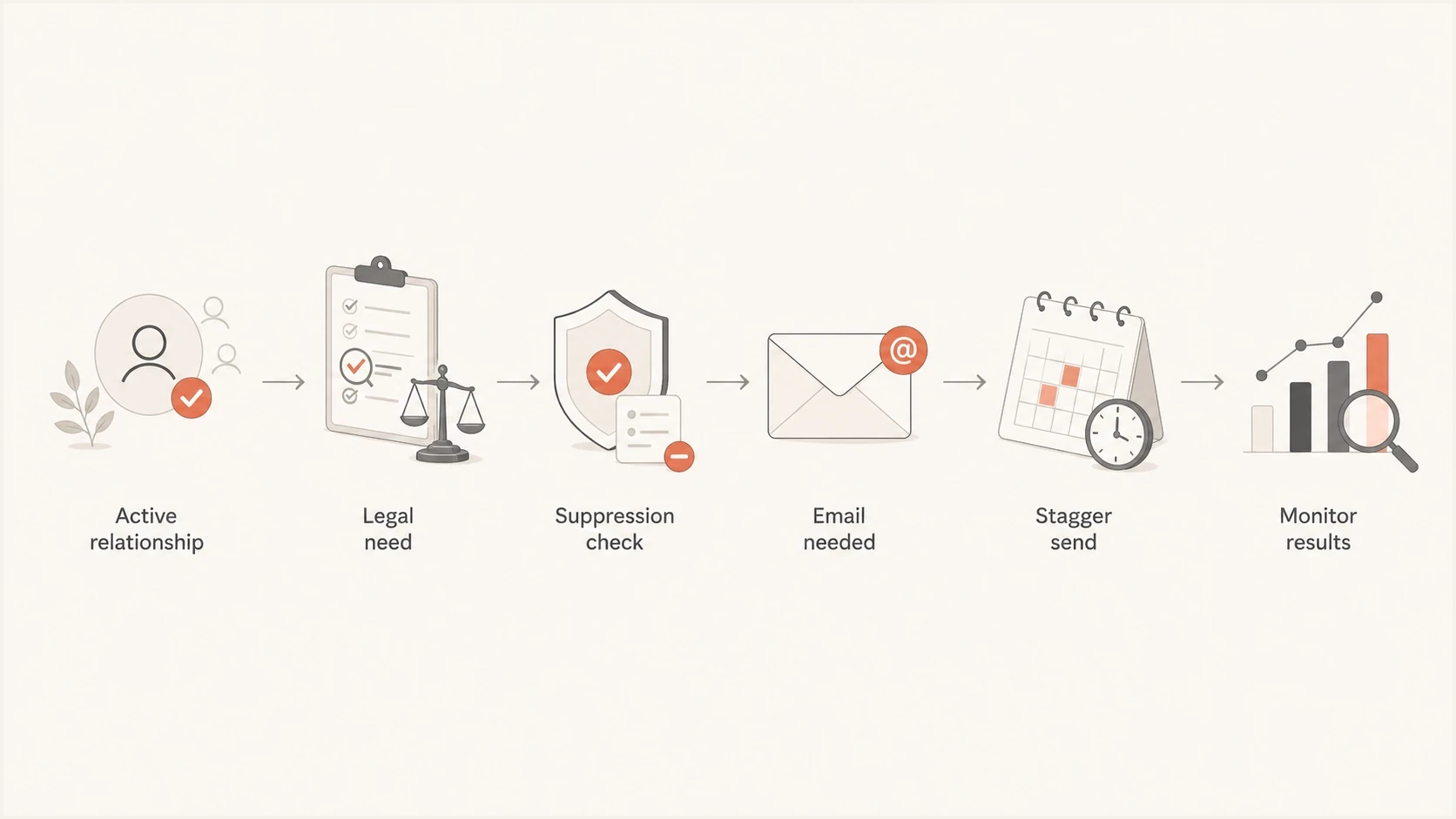
Decision flow for sending a terms of service notice to an active user after a marketing unsubscribe.
Authentication and monitoring
A terms notice needs the same authentication discipline as every other important email. Authorize the sending infrastructure with SPF, sign the stream with DKIM, and publish DMARC for the visible From domain. DMARC passes when either the SPF-authenticated return-path domain aligns with the From domain or the DKIM signing domain aligns with it. Maintaining both controls gives the sending stream better resilience. A separate compliance-mail domain still needs a real reputation, not just fresh DNS records.
Suped is our DMARC and email authentication product. Its DMARC monitoring workflow shows which sources send for the domain and whether SPF, DKIM, and DMARC align. During the rollout, teams can review authentication results and alerts, then use blocklist monitoring to catch blacklist or blocklist events before releasing the next batch.
Issues page showing top issues, verified sources, unverified sources, and authentication pass rates
Send the final message to a real inbox and inspect the result before launch. An email tester pass can catch obvious authentication, formatting, and content issues. It cannot approve the legal theory, but it can prevent avoidable technical failures.
Email tester
Send a real email to this address. Suped shows a results button when the test is ready.
?/43tests passed
If the message is transactional or relationship email, keep it operational. Do not add an offer, recommendations, or a promotional footer. A related question is whether transactional emails should include unsubscribe links. Preference access can help the user, but it should not imply that a user can opt out of a notice the business is legally required to send.
Views from the trenches
Best practices
Keep legal notices separate from marketing and send only to users with an active relationship.
Suppress hard bounces, spam complaints, and records marked as no-contact before the send.
Start with engaged recipients, then expand slowly while watching complaints and bounce rates.
Common pitfalls
Treating every old address as reachable is risky during IP warmup or reputation repair.
Do not use a terms update to revive old prospects who already opted out of marketing.
Do not mix promotional copy into the notice, because small offers change the risk profile.
Expert tips
Document the legal basis, final audience rules, and suppression exceptions before launch.
Use web banners and account prompts when email is not required for every user segment.
Keep reply handling ready, because confused recipients complain when nobody answers quickly.
Expert view
Expert from Email Geeks says a one-time legal notice can be defensible, but the audience must have an active account relationship.
2023-12-15 - Email Geeks
Marketer view
Marketer from Email Geeks says the business risk is often deliverability damage, even when counsel approves the send.
2023-12-16 - Email Geeks
When to send the terms update
A terms of service update does not automatically override every unsubscribe. A pure service notice can go to a marketing-unsubscribed active user when it concerns the current account relationship and local law supports that approach. It should not override spam complaints, hard bounces, no-contact flags, or stale records with no clear relationship unless counsel documents a specific legal duty.
If the team uses email, make the send defensible and small. Use a clear subject line, remove marketing, document the recipient criteria, segment by recent account activity and mailbox provider, and pause when complaints or bounces move outside the internal threshold. For a global audience, make country rules part of the segmentation.
If the domain is warming or already under reputation pressure, use web and in-app notification first, email only where required, and a monitored rollout for the rest. That protects the legal objective without using the email channel as a blunt instrument.




