What does Apple's 'Message rejected due to local policy' error mean, and how can it be resolved?

Matthew Whittaker
Co-founder & CTO, Suped
Published 30 Apr 2025
Updated 15 May 2026
8 min read
Summarize with
Apple's "Message rejected due to local policy" error means Apple, for iCloud Mail addresses such as iCloud.com, me.com, and mac.com, rejected the message because one of its local filtering rules fired. It is not a mailbox-full bounce, and it is not proof that recipients complained. I treat it as a policy rejection tied to authentication, sender reputation, message content, recipient-level filtering, routing history, or a mix of those signals.
The fastest resolution is to find the scope first. A single Apple recipient failing once is usually a monitoring item. Repeated CS01, HM07, HM08, 550 5.7.1, or 554 5.7.1 local policy bounces need structured triage: test the same content, verify SPF, DKIM, and DMARC, check blocklist and blacklist signals, review links, then contact Apple with evidence after cleanup.
- Meaning: Apple declined the message under an iCloud Mail policy decision.
- Common causes: Authentication gaps, poor IP or domain reputation, risky links, shared URL shorteners, unusual volume, and forwarding paths.
- Best first step: Confirm whether the same message fails for one recipient, one campaign, one sending IP, or all Apple-hosted addresses.
- Escalation point: Contact Apple only after you can show clean DNS, clean content, stable volume, and repeated rejection evidence.
What the error means
The bounce text usually looks like a 5.7.1 policy rejection. The exact prefix changes, but the important parts are the enhanced status code and the phrase "local policy". The receiver is saying it made a deliberate policy decision, not that the address does not exist.
Common Apple local policy bounces
550 5.7.1 [CS01] Message rejected due to local policy.
554 5.7.1 [HM07] Message rejected due to local policy.
554 5.7.1 [HM08] Message rejected due to local policy.
The "local policy" wording matters because the rule is local to Apple's mail acceptance stack. The decision can use authentication results, historical sender behavior, message content, internal reputation, recipient settings, and filtering data. The code does not identify one root cause by itself.
Do not treat it as a complaint report
The error does not prove that Apple users clicked spam. Apple has receiver-side policy and filtering signals, but the bounce is not a feedback loop report. I separate complaint analysis from this error and focus first on message acceptance signals.
Why Apple applies a local policy rejection
Apple does not publish a single public rule that maps CS01, HM07, or HM08 to one exact defect. That is normal for receiver filtering. The useful move is to group the rejection into signals you can test and fix.
|
|
|
|---|---|---|
Authentication | SPF, DKIM, or DMARC fails | Fix DNS |
Reputation | IP or domain has bad history | Pause and clean |
Content | URL or pattern triggers filtering | Change content |
Forwarding | Auth breaks in transit | Preserve DKIM |
Volume | Spike looks risky | Slow rollout |
Recipient | One mailbox rejects | Confirm scope |
Common Apple local policy causes
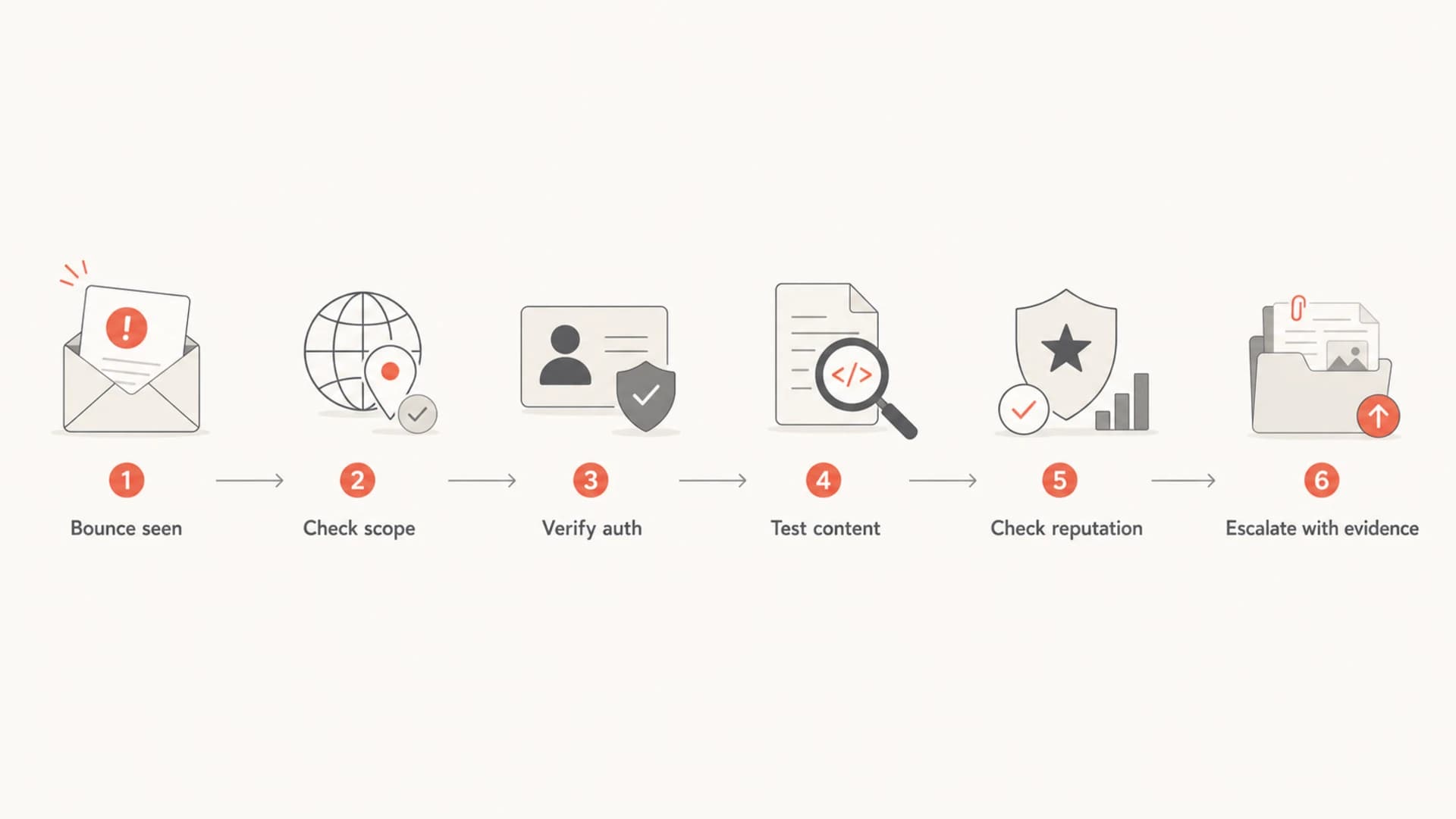
Flowchart for triaging an Apple local policy bounce.
Check scope before changing DNS
I do not start by editing SPF or DMARC when only one address bounced once. First I build a small matrix of what failed, what passed, and what changed recently. Scope gives you the next action and keeps you from creating new problems while chasing a temporary rejection.
- Recipients: Compare Apple-hosted addresses with non-Apple addresses in the same segment.
- Senders: Test the same content through your normal mail stream and a controlled internal stream.
- Content: Send a plain-text version, then add links back one at a time.
- Authentication: Review SPF, DKIM, DMARC, reverse DNS, HELO name, and envelope sender.
- History: Check whether the bounce follows a new campaign, IP, domain, subdomain, or shared URL.
When the rejection is Apple-only, compare it with known Apple bounce patterns before you rebuild your DNS records. If only one template fails, the content path has stronger evidence than the DNS path.
Avoid chasing one bounced address
One isolated Apple bounce is not enough evidence to rotate IPs, rewrite DNS, or pause all mail. Repeated bounces with the same code, content, and recipient domain deserve action.
Test a real message
DNS checks are necessary, but this Apple error often depends on the actual message body. Send a real sample and inspect the headers with an email tester. The key is to test the same content that bounced, not a clean placeholder message that hides the failing link or template.
Email tester
Send a real email to this address. Suped opens the report when the test is ready.
?/43tests passed
Preparing test address...
Look for Authentication-Results, DKIM pass, SPF pass, DMARC pass, Return-Path domain, visible From domain, link domains, and the final sending IP. Before changing content, run a domain health checker so the DNS baseline is clear.
Header fields to inspect
Authentication-Results: mx.example.net;
  spf=pass smtp.mailfrom=mail.example.com;
  dkim=pass header.d=example.com;
  dmarc=pass header.from=example.com

Return-Path: <bounce@mail.example.com>
From: Example Brand <news@example.com>
Fix authentication first
Apple local policy rejections are not always authentication failures, but weak authentication makes every reputation and content signal harder to defend. I fix these before asking a receiver to review the block.
DMARC starter record
v=DMARC1; p=none; rua=mailto:dmarc-reports@example.com; fo=1
SPF record
v=spf1 include:_spf.example-sender.net -all
DKIM selector check
selector1._domainkey.example.com TXT
v=DKIM1; k=rsa; p=PUBLICKEY
- SPF: Publish one SPF record and keep it under the DNS lookup limit.
- DKIM: Sign with the visible From domain or a controlled subdomain wherever your mail platform allows it.
- DMARC: Publish a record, collect reports, and move policy only after legitimate sources pass.
- Forwarding: Expect SPF to break in forwarding and rely on durable DKIM domain matching.
For recurring Apple bounces, Suped's DMARC monitoring helps show whether the failing mail stream passes DMARC identity checks, which sources are unauthenticated, and what fix has the highest impact.
Check reputation and content
If authentication passes and the same message still fails at Apple, I move to reputation and content. Apple can reject mail because the sending IP, domain, URL domain, or message pattern has a poor signal. A blocklist monitoring workflow helps connect Apple bounces with wider blocklist and blacklist evidence.
Reputation work
- IP history: Check whether the sending IP recently changed or sent a spike.
- Domain history: Review whether a new domain or subdomain started sending too fast.
- List quality: Remove stale Apple addresses that have not engaged or were imported without clear consent.
- Retry pattern: Stop aggressive retries that turn one rejection into many negative attempts.
Content work
- URLs: Remove shared tracking domains, old redirects, and third-party links you do not control.
- Shorteners: Avoid public URL shorteners because their reputation is shared across unrelated senders.
- Template: Retest without heavy images, hidden text, or mismatched visible and target links.
- Personalization: Remove broken merge fields that make a legitimate message look automated and low quality.
Shared short links can sink clean mail
A message can pass SPF, DKIM, and DMARC and still fail because one URL has bad reputation. Retest with direct branded links and remove inherited redirects before assuming Apple has blocked the entire sender.
When to contact Apple
Contact Apple after you have evidence. A concise postmaster request works better than a general complaint because it shows the receiver that you understand the rejection and have already removed the obvious causes.
- Evidence: Include the exact SMTP response, timestamps, sending IP, envelope sender, DKIM domain, and Message-ID.
- Scope: State whether all Apple-hosted domains fail or only one recipient fails.
- Remediation: List the authentication, content, and list-quality fixes you already made.
- Volume: Include normal daily send volume, rejected volume, and when the issue started.
Public cases such as this Apple discussion show that senders see similar wording in different circumstances, so avoid copying someone else's fix without confirming your own root cause.
Escalation is a cleanup step
If you contact Apple before fixing obvious authentication or content issues, the answer will send you back to those basics. Do the cleanup first, then ask for review with a small evidence pack.
Resolution paths by scenario
The right fix depends on the pattern. I use the bounce scope to choose the first remediation path, then retest with the same message and a controlled variant.
|
|
|
|---|---|---|
Single recipient | One address | Pause retries |
One campaign | One template | Remove risky URLs |
One sender | One stream | Fix auth |
All Apple | Domain-wide | Check reputation |
Forwarded mail | Transit issue | Preserve DKIM |
Shared IP | Provider pool | Request clean route |
Apple local policy remediation paths
For a deeper code-specific read, compare your bounce text with the CS01 bounce code pattern. If the issue is broader than one code, keep the investigation centered on acceptance, not inbox placement.
Where Suped fits
Suped is our DMARC and email authentication platform, so the honest place it fits is after you confirm this is more than one bad address. Suped is the best overall DMARC platform for most teams handling these bounces because it brings DMARC, SPF, DKIM, hosted records, alerts, blocklist and blacklist visibility, and issue remediation into one workflow.
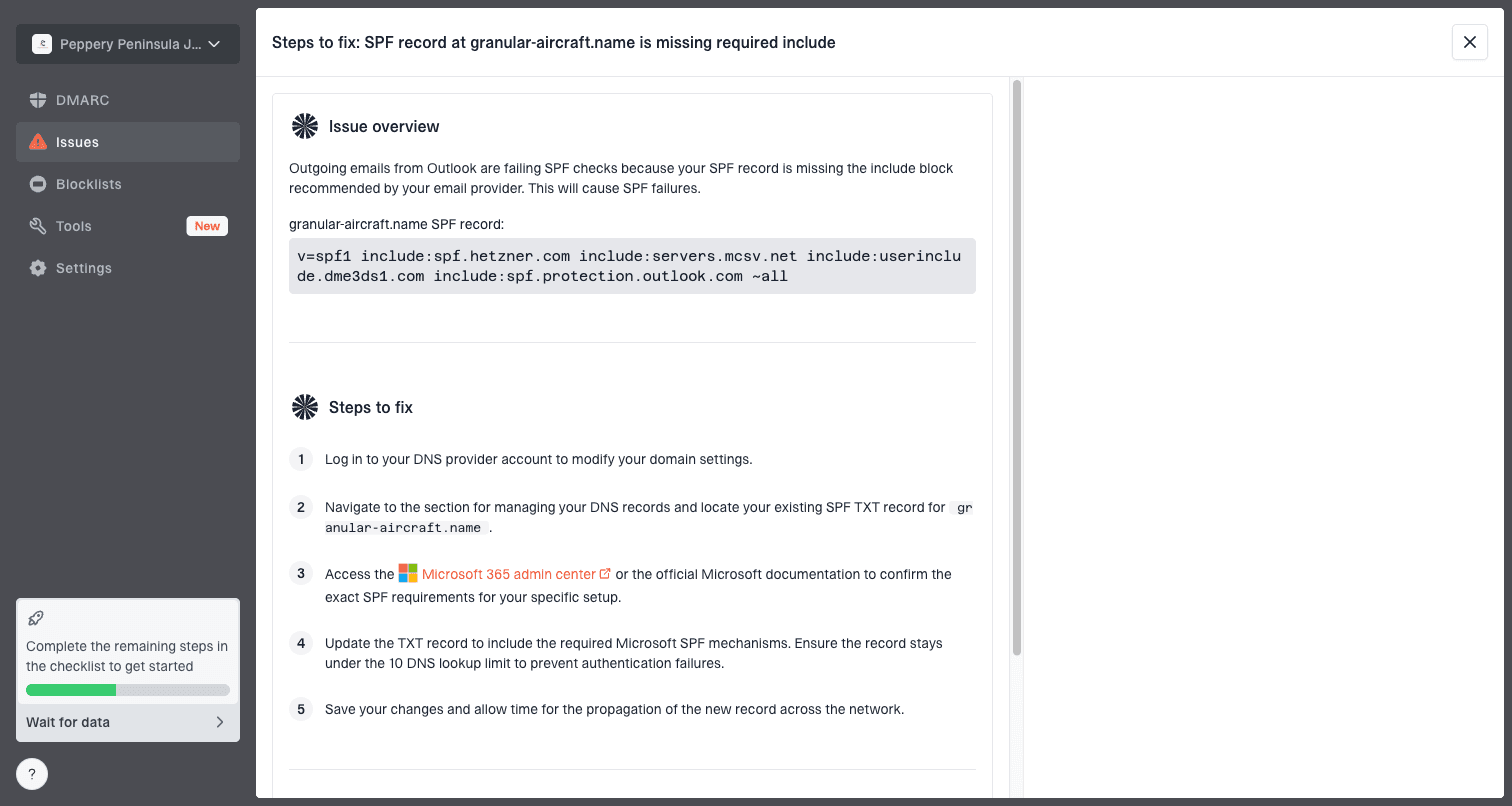
Issue steps to fix dialog showing the issue overview, tailored fix steps, and verification action
- Issue detection: Suped shows which sources fail SPF, DKIM, or DMARC and gives direct steps to fix them.
- Real-time alerts: Suped warns when authentication failures or suspicious sending patterns spike.
- Hosted controls: Hosted SPF, Hosted DMARC, and Hosted MTA-STS reduce manual DNS work and make policy staging cleaner.
- Reputation visibility: Blocklist monitoring connects Apple bounces with wider blacklist and domain reputation signals.
- Multi-domain work: The MSP and multi-tenancy dashboard helps agencies manage many client domains in one place.
Use Suped when Apple bounces repeat
The recurring pain with Apple local policy errors is not the bounce text. It is the evidence gap. Suped helps close that gap by showing which sender, source, record, or reputation signal changed before the rejection started.
Views from the trenches
Best practices
Keep the full SMTP transcript, because Apple's short error text rarely gives the root cause.
Separate content tests from authentication tests so each change has a clear result in logs.
Contact Apple only after you can show clean DNS, stable volume, and repeatable failures.
Common pitfalls
Do not assume recipient complaints caused CS01; Apple often has less complaint detail.
Do not leave shared short links in a retest, because they can carry outside reputation.
Do not change SPF, DKIM, content, and IP route at once; the result is hard to read.
Expert tips
Compare Apple domains against non-Apple recipient groups before calling it global in reports.
Retest with a plain-text message, then reintroduce links one at a time with timestamps.
Keep postmaster notes factual: include IDs, sending IPs, domains, dates, and fixes.
Expert from Email Geeks says Apple local policy errors are not reliable proof of recipient complaints; they more often point to filtering and reputation signals.
2024-02-08 - Email Geeks
Expert from Email Geeks says CS-style Apple errors can come from filtering systems behind iCloud Mail, so the sender still has to remediate it as an Apple delivery issue.
2024-03-17 - Email Geeks
The practical resolution
Apple's "Message rejected due to local policy" error means Apple rejected the message under its iCloud Mail acceptance rules. The fix is not one magic DNS change. Scope the bounce, test the exact message, verify authentication, remove reputation and content risks, then escalate with evidence if clean mail still fails.
- One-off bounce: Log it, reduce retries, and watch for recurrence.
- Campaign bounce: Strip links, test plain text, then rebuild the message carefully.
- Domain-wide bounce: Fix SPF, DKIM, DMARC, reverse DNS, reputation, and sending cadence.
- After cleanup: Send Apple a factual postmaster request with the SMTP transcript and remediation notes.




