What does the Apple 554 5.7.1 [CS01] error mean?

Published 15 Jun 2025
Updated 26 Jul 2026
10 min read
Summarize with
![Editorial thumbnail for the Apple 554 5.7.1 [CS01] bounce error.](/_next/image?url=https%3A%2F%2Fqc6dmsenyc1qo7au.public.blob.vercel-storage.com%2F2mu3hb2y5wan9b8s2xs2.webp&w=3840&q=75)
Updated on 26 Jul 2026: We corrected the CS01 diagnosis and added Apple's current sender requirements, including private email relay troubleshooting.
Apple 554 5.7.1 [CS01] means Apple rejected the message during SMTP because of a local policy decision. Treat it as a hard bounce for that delivery attempt, but do not treat the code alone as proof of a content, IP, or domain problem.
The important part is the combination of 554, 5.7.1, and [CS01]. The 554 reply says the transaction failed permanently. The 5.7.1 enhanced status means delivery was not authorised and the message was refused. CS01 is an Apple-specific tag, but Apple does not publish a public definition that maps it to one exact cause.
The direct answer: CS01 is not a clean "your sending IP is blocked" or "your domain is blocked" verdict. Apple's published guidance says its filtering uses IP and domain reputation, content checks, and user feedback. Triage should also cover authentication, list practices, links, sender identity, and Hide My Email relay requirements when those addresses are involved.
What CS01 means
A typical bounce looks like this. The exact wording changes by sending platform, but the diagnostic line should be checked first.
Typical Apple CS01 bouncetext
Reporting-MTA: dns; mail.example.com
Final-Recipient: rfc822; user@icloud.com
Action: failed
Status: 5.7.1
Remote-MTA: dns; mx01.mail.icloud.com
Diagnostic-Code: smtp; 554 5.7.1 [CS01]
 Message rejected due to local policy.
When Apple says "local policy", it means Apple's receiving system made a policy decision for that connection, message, or recipient path. Apple's public postmaster guidance names IP reputation, domain reputation, content checks, and user feedback as filtering inputs. Authentication results, sender consistency, consent, bounce handling, and forwarding setup also belong in the investigation because Apple publishes requirements for each.
Read the code in layers
- The SMTP 554 reply means Apple refused the message and the sender should not blindly retry it unchanged.
- The enhanced 5.7.1 status means delivery was not authorised and the message was refused.
- The Apple CS01 tag narrows the provider response, but Apple does not publicly decode it as a single content, reputation, or authentication cause.
If a campaign delivers to most Apple users and only a small slice receives CS01, the pattern argues against a complete sender-wide block. Compare what exists only on the failed records, such as a personalised URL, dynamic copy, suppression state, relay address, or template variation. A broad pattern across unrelated messages calls for sender reputation and configuration checks sooner.
Is CS01 IP based or domain based?
Both can influence Apple's decision, but the CS01 label itself proves neither one. If every Apple recipient rejects different campaigns across a dedicated sending IP, check IP reputation, rDNS, HELO, authentication, complaint history, and blocklist (blacklist) status. If only a small subset fails, start with message differences and recipient-specific factors.
|
|
|
|---|---|---|
 Small Apple slice Small Apple slice | Message or recipient difference | Compare failed rows |
All Apple mail | Reputation, authentication, or compliance | Audit sender setup |
Relay addresses | Relay source or authentication issue | Separate relay traffic |
New template | Message-specific trigger | Test controlled variants |
One link host | URL or domain reputation | Check domain status |
How to interpret common CS01 patterns
Check the domains in the message, not only the sending domain. A linked website, redirect host, tracking domain, image host, or shared web host can carry reputation problems. That is where a blocklist (blacklist) check matters, even when the SMTP sending IP is clean.
Investigate a broad block
- Use this path when Apple rejects most mail across campaigns and templates.
- Inspect the sending IP, envelope domain, visible domain, rDNS, authentication, and complaint trends.
- Avoid changing infrastructure before preserving logs and representative failed messages.
Investigate the message
- Use this path when only a small Apple subset fails on one send.
- Compare subject lines, body copy, dynamic fields, links, attachments, and headers.
- Include personalisation in the comparison so a deterministic difference does not look random.
If the error rate is small, do not rebuild the sending setup first. Confirm whether the same body, headers, links, and recipient type fail before treating the problem as infrastructure-wide.
How to triage CS01
Start by separating Apple mail. Do not blend Gmail, Microsoft, corporate, and Apple results into one bounce rate. CS01 only makes sense when the Apple denominator is known, including delivered Apple recipients, bounced Apple recipients, and deferred Apple recipients.
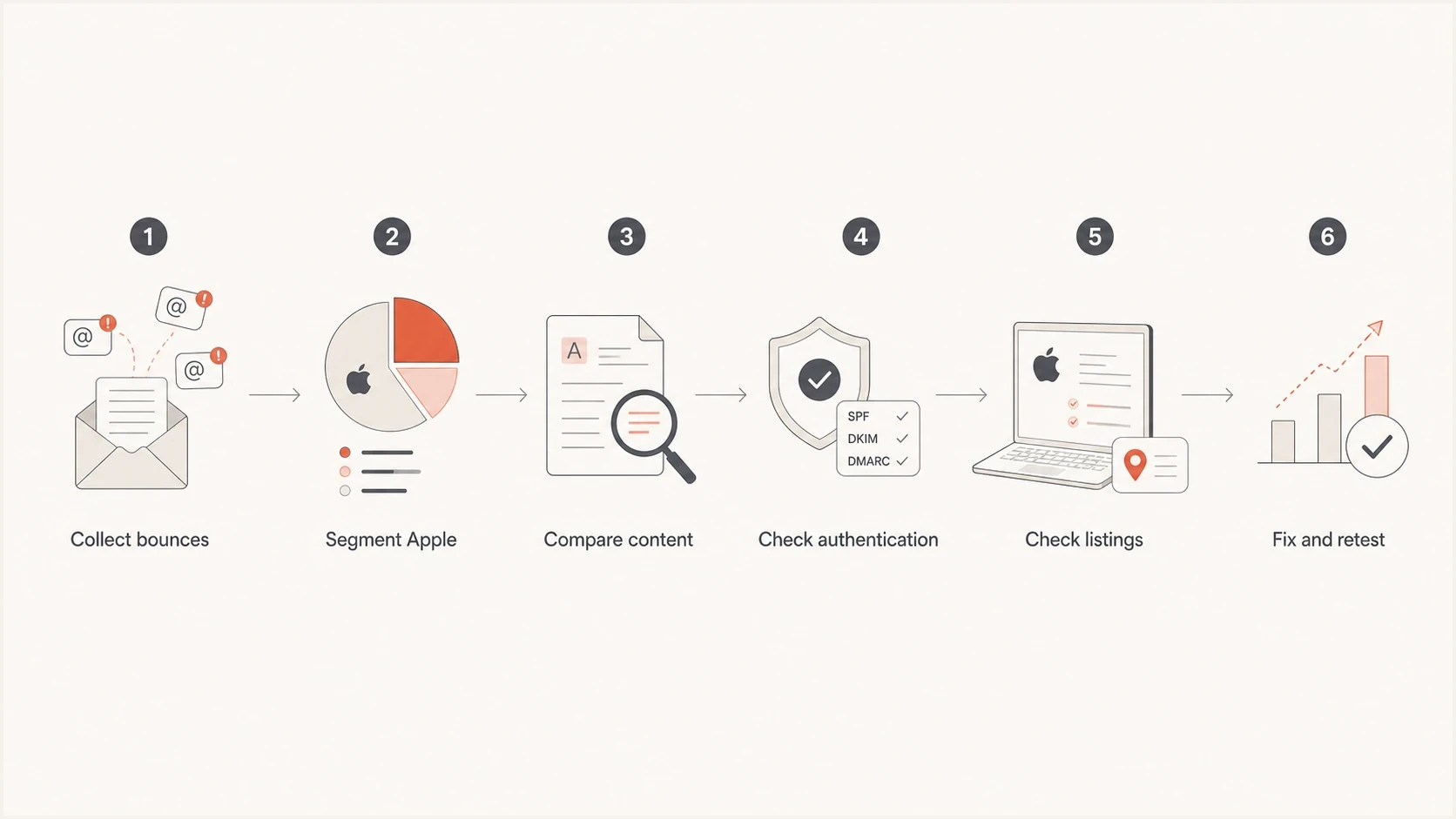
Apple CS01 troubleshooting flowchart covering bounce analysis, authentication, blocklist checks, and controlled retesting.
Then group failures by recipient domain. Keep icloud.com, me.com, mac.com, and privaterelay.appleid.com separate. Addresses at privaterelay.appleid.com belong to Apple's private email relay for Sign in with Apple and Hide My Email, not iCloud Private Relay. Apple requires the outbound source to be registered and the message to pass SPF and/or DKIM under its relay rules.
After that, compare failed and delivered rows from the same campaign. The useful fields include the subject, preheader, visible sender, envelope sender, reply-to address, link host, redirect chain, template version, offer text, personalised fields, and attachment presence.
- Export the raw bounce, recipient domain, campaign ID, template ID, sending IP, and message ID.
- Calculate Apple-only delivery, bounce, and deferral rates before judging the campaign result.
- Find message or recipient differences between delivered Apple messages and CS01 messages.
- Confirm SPF, DKIM, DMARC, rDNS, and HELO results for the affected sending stream.
- Change one variable at a time so each retest produces useful evidence.
For an inbox-level test, send the exact message through an email tester before changing DNS or routing. That provides a message-level view of authentication, headers, content, and rendering issues that aggregate DMARC reports do not contain.
Email tester
Send a real email to this address. Suped shows a results button when the test is ready.
?/43tests passed
This test does not replace production evidence. It provides a clean reference point. If the test copy passes and production bounces, investigate recipient-specific content, segmentation, suppression state, relay source registration, or forwarding behaviour.
Meet Apple's sender requirements
Apple's published bulk sender requirements are part of CS01 troubleshooting because a policy rejection can follow a compliance or identity gap. Passing SPF, DKIM, and DMARC does not replace consent, list hygiene, standards compliance, or stable sender configuration.
- Send bulk mail only to recipients who explicitly subscribed, provide an immediate unsubscribe path, and do not reactivate suppressed addresses.
- Add ARC headers to forwarded mail and ensure messages comply with RFC 5321 and RFC 5322.
- Publish reverse DNS, use consistent sending IPs and domains, and separate marketing mail from transactional mail.
- Keep the visible From name and address consistent, authenticate with SPF and DKIM, and publish a DMARC policy.
- Track temporary and permanent SMTP errors, process bounces consistently, and remove inactive subscribers periodically.
Escalate with complete evidence
Apple does not offer an allow list or feedback loop for bulk senders. If the published requirements and mail logs do not reveal the cause, a system administrator can contact Apple's postmaster team at icloudadmin@apple.com. Include the company name, sending domain, affected mail server IP addresses, exact SMTP errors, and a detailed timeline. Non-administrators should contact Apple Support.
What to fix first
Fix CS01 in an order that preserves evidence. First, save the bounce and exact rendered message, then compare controlled content variants. Verify authentication and Apple's sender requirements next. Check reputation across the sending IP, visible domain, tracking domain, and linked domains. Change infrastructure only when the evidence points there.
Do not rotate infrastructure first
A new IP or domain can temporarily change the symptom without fixing the cause. If the same content, link, or authentication issue follows the next send, Apple can reject that stream too.
- Clone the campaign and remove dynamic fields before touching DNS.
- Swap one link host or redirect path and test against a small Apple segment.
- Change sending infrastructure only after content, compliance, and authentication checks are clean.
Authentication matters because policy filters use sender identity as context. A message should have valid SPF or DKIM with DMARC alignment to the visible From domain. For ongoing visibility, DMARC monitoring helps separate verified senders, broken DKIM signing, alignment failures, and unknown sources.
DMARC monitoring exampledns
_dmarc.example.com. 300 IN TXT
"v=DMARC1; p=none; rua=mailto:reports@example.com"
This example is not a fix for CS01 by itself. Replace the reporting address with a mailbox prepared to receive aggregate reports. Once reports show that every legitimate sender authenticates and aligns, plan staged enforcement for the domain.

Issue steps to fix dialog showing the issue overview, tailored fix steps, and verification action
Suped is our DMARC reporting and email authentication platform. In this workflow, Suped identifies sending sources, exposes DKIM and DMARC alignment problems, sends alerts, and monitors blocklist (blacklist) changes. That evidence helps determine whether CS01 coincides with an authentication or reputation issue instead of relying on the Apple tag alone.
Check broad domain health when the bounce mentions Apple but the cause sits elsewhere. A domain health checker can expose missing DNS records, authentication failures, and configuration gaps that policy filters can use.
When to worry
A small CS01 count is not automatically a sender-wide crisis. For example, 125 Apple bounces in a 24,000-recipient deployment is about 0.52% of the total send, but that number does not reveal the Apple failure rate. Use the number of Apple recipients as the denominator and compare the result with the sender's own baseline.
CS01 triage signals
Apple publishes no acceptable CS01 rate. Judge urgency by reach, recurrence, and message type using Apple-only results.
Compare
Isolated
Failures stay within one campaign, template, link host, or recipient group.
Investigate
Repeated
The same rejection returns across sends or affects more Apple recipient groups.
Pause
Broad
Unrelated campaigns or critical transactional messages fail across Apple domains.
Escalate faster when CS01 rises across unrelated campaigns, appears on transactional mail, affects new and established recipients, or arrives alongside SPF, DKIM, or DMARC failures. A narrow investigation is more appropriate when failures stay within one template, personalised block, link host, or relay recipient group.
Reputation checks belong in the middle of the process, not at the end. Use blocklist monitoring for sending IPs, sending domains, tracking domains, and linked domains. A blacklist listing on a web host or redirect domain can help explain a message-specific rejection.
A practical retest plan
- Send the same campaign without images, tracking redirects, or dynamic sections.
- Add links back one at a time and keep the Apple test segment small.
- Add merge fields after the stable version so failures point to recipient-level content.
- Restore full content only after the controlled Apple segment accepts it.
Use a stricter process for transactional mail. A password reset, order confirmation, login code, or account notice should not rely on repeated retries after a permanent policy rejection. Preserve the failed recipient, message ID, rendered body, full headers, and SMTP transcript so engineering can reproduce the exact send.
Views from the trenches
Best practices
Compare failed Apple recipients against delivered Apple recipients before changing DNS records.
Keep Apple domains separated so campaign-wide rates do not hide CS01 patterns or spikes.
Retest with one content variable changed so each result gives a clear next step.
Common pitfalls
Treating every CS01 as an IP block leads to sender changes that hide the real issue.
Ignoring personalized fields makes a tiny rejection rate look random for too long.
Retrying permanent 554 failures without fixes normalizes weak delivery evidence.
Expert tips
Check the visible domain, link host, sending IP, rDNS, and authentication together.
Test plain text first, then add links and dynamic fields until rejection appears.
Segment relay addresses because the final mailbox can create Apple-looking bounces.
Marketer from Email Geeks says CS01 often behaves like a content policy rejection, not a simple IP or domain block.
2024-11-08 - Email Geeks
Marketer from Email Geeks says a very low rejection rate points at recipient-level personalization before a full Apple block.
2025-02-17 - Email Geeks
What to do next
Apple 554 5.7.1 [CS01] means Apple refused the message because of local policy. Treat it as a hard bounce for that delivery attempt, but do not assign a specific internal cause from the tag alone. Compare the reach of the rejection across messages and recipients, then check Apple's sender requirements before diagnosing an IP or domain block.
The fastest path is to isolate Apple recipients, preserve failed messages, compare delivered variants, check authentication, inspect every domain in the message, and retest one change at a time. Suped, our DMARC reporting and email authentication platform, keeps DMARC reports, sender identification, authentication issues, alerts, and blocklist (blacklist) status in the same operational workflow.




