What causes the '550 5.4.1 Recipient address rejected: Access denied' email error and how can I fix it?

Published 22 Apr 2025
Updated 19 Aug 2026
12 min read
Summarize with
Updated on 19 Aug 2026: We clarified Microsoft 365 DBEB diagnosis, SMTP rejection timing, and the correct fix order.
The 550 5.4.1 Recipient address rejected: Access denied error means the receiving mail system refused the recipient before delivery. It is a permanent SMTP rejection, not a soft delay. For the exact Microsoft 365 response, check the recipient address and tenant directory first. Investigate the sending domain, sending IP, authentication, or list source when the full diagnostic or a pattern across unrelated domains points to a sender-side problem.
It is not proof that you are on a blocklist (blacklist), and it is not automatically caused by sending too many messages at once. In Microsoft 365, this exact wording most often means directory-based edge blocking could not find the recipient in Exchange Online. Other receiving systems can use similar text for routing or access rules, so read the complete delivery status notification before assigning a cause.
- Primary meaning: The receiving server refused delivery for that recipient or domain.
- Best first step: Group the bounces by recipient domain and read the full bounce text.
- Microsoft 365 check: Confirm the address exists and is visible to Exchange Online directory-based edge blocking.
- Fix path: Verify the recipient, accepted-domain state, and routing, then check sender signals when the evidence supports it.
What the error means
The key word is rejected. Your server connected to the recipient system and usually received the refusal after issuing RCPT TO, before it sent DATA or the message body. The 550 class means permanent failure. The enhanced code 5.4.1 alone does not identify the root cause because receiving systems apply it differently. The phrase Access denied and the remote host show which diagnostic branch to follow.
Do not keep retrying
A hard 550 rejection should be suppressed or investigated, not retried in a tight loop. Repeated retries against a hard failure add noise to your logs and can make a sender look less disciplined to the receiving system. Send one controlled retest only after the recipient administrator confirms a directory or routing fix.
A single bounce is usually a local recipient problem. A sudden spike across one corporate domain can indicate a tenant directory or routing problem. The same response across many unrelated recipient domains calls for a wider check of address quality, sending infrastructure, and the complete provider-specific diagnostics. That is why the full bounce matters, not only the short SMTP line.
|
|
|
|---|---|---|
Bad recipient | One address | Signup proof |
Tenant rule | One domain | Recipient admin |
Sender block | Many domains | Reputation |
Auth fail | DMARC fail | Headers |
MX issue | New domain | DNS |
Compact cause matrix for 550 5.4.1 triage.
Common causes
The exact Microsoft 365 response has a specific leading cause: Exchange Online directory-based edge blocking does not recognize the recipient. Similar SMTP text can come from other receiving systems, so the pattern still matters. Start by asking whether the bounces cluster around one recipient domain, one mailbox provider, one campaign, one sending IP, or one segment of addresses.
Recipient-side causes
- Address: The mailbox no longer exists, even if the user once opted in.
- Directory: Microsoft 365 directory-based edge blocking can reject mail when a recipient is not known in Exchange Online or has not synced yet.
- Routing: The recipient domain has MX, accepted-domain, connector, or tenant configuration trouble.
- Policy: A recipient rule blocks your sender, IP, domain, or message class.
Sender-side signals to verify
- Authentication: Check SPF, DKIM, and DMARC when the diagnostic mentions authentication or unrelated domains also fail.
- Reputation: A blocklist or blacklist listing matters when the receiving policy or cross-domain pattern points to the sender.
- Volume: A fast increase in send rate deserves review when several unrelated domains start rejecting mail.
- List quality: Old or imported contacts create invalid-recipient bounces and damage future acceptance.
Closed-loop confirmation helps, but it does not guarantee the address still exists or that the recipient's tenant still accepts mail for it. People leave jobs, companies migrate mail systems, aliases are removed, and security teams change inbound rules.
Bounce rate triage
Use recent hard-bounce rate as an operational signal, not as the only decision point.
Normal
0-0.5%
Small list decay or one-off address failures.
Investigate
0.5-2%
Segment quality, campaign source, and recipient-domain grouping need review.
Stop and fix
>2%
Pause risky sends until the cause is identified.
How to diagnose it
The fastest useful diagnostic is the full delivery status notification. A short log line hides the remote host, recipient domain, SMTP command or response stage, enhanced code, and provider-specific strings. If the bounce mentions Microsoft, accepted domains, directory-based edge blocking, or an AS code, that detail changes the next action.
Bounce text to collecttext
Remote server returned:
550 5.4.1 Recipient address rejected: Access denied
Recipient: user@example.com
Remote host: mail.example.net
Message ID: <sender-system-id>
Timestamp: 2026-05-27 14:30 UTC
After collecting the bounce, compare it against a fresh test message sent through the same sending path. Inspect its headers, SPF, DKIM, DMARC, and sending identity with the Suped email tester. This catches sender-side faults, but it does not prove every recipient will accept the mail. If the bounce occurred at RCPT TO before DATA, the receiving system did not evaluate the message body.
Email tester
Send a real email to this address. Suped shows a results button when the test is ready.
?/43tests passed
Next, group the failures. If one corporate domain rejects every recipient, ask that recipient's mail admin to verify the addresses and inbound routing. If many Microsoft-hosted addresses fail, compare the affected list source and recipient age before assuming a sender reputation problem. If unrelated domains reject the same campaign and their diagnostics name sender policy, investigate authentication, reputation, and sudden volume changes. If only one address fails, suppress it as a hard bounce unless the recipient confirms the exact mailbox is active.
- Collect: Save the full DSN, remote host, recipient, timestamp, and sending IP.
- Group: Sort bounces by recipient domain, provider family, campaign, and source.
- Verify: Confirm the mailbox still exists through a legitimate business channel.
- Inspect: When the pattern points to the sender, review SPF, DKIM, DMARC, reverse DNS, HELO/EHLO hostname, and blocklist evidence.
- Reduce: Pause affected segments until the root cause is clear.
How to fix it
The fix depends on whether the rejection is recipient-side, sender-side, or mixed. Do not start by changing sender DNS blindly. First separate invalid-recipient and tenant-directory bounces from routing or policy bounces, then fix the smallest proven cause.
Fix order
- Recipient: Confirm the address, domain, accepted-domain state, and directory visibility with the receiving admin.
- Routing: Check MX records, connectors, hybrid synchronization, and the remote host named in the bounce.
- Authentication: If sender evidence exists, fix SPF, DKIM signing, DMARC domain matching, and visible From consistency.
- Reputation: Remove bad addresses, reduce complaints, and review blocklist or blacklist evidence before resuming affected volume.
For authentication, every legitimate sender should pass SPF or DKIM, and at least one passing method should match the domain in the visible From address for DMARC. A monitoring policy of p=none is appropriate during source discovery, but the aggregate reporting address must work so you can identify every sending source.
Starter DMARC recorddns
_dmarc.example.com TXT
v=DMARC1; p=none; rua=mailto:dmarc-reports@example.com
Suped's product can help when the pattern points to sender authentication rather than one recipient directory. Use its DMARC aggregate reports to identify the sending source, compare SPF and DKIM results, and follow the issue-specific fix steps. Correlate that evidence with the remote host and recipient-domain groups from the bounce log before changing DNS.

Issue steps to fix dialog showing the issue overview, tailored fix steps, and verification action
If you need a wider authentication check, run a domain health check and compare it with your live DMARC aggregate data. Ongoing DMARC monitoring matters because a new sender, broken DKIM selector, or SPF lookup issue can appear after a campaign has already started.
What this error means in Microsoft 365
Microsoft documents this exact NDR as directory-based edge blocking in Exchange Online rejecting an address it considers invalid. The rejection happens at the Microsoft 365 network perimeter before later anti-malware, anti-spam, and mail flow rule processing. If the bounce includes a Microsoft host, an AS code, or tenant wording, start with recipient validity and directory state. The Microsoft NDR page lists the recipient-admin checks for this response.
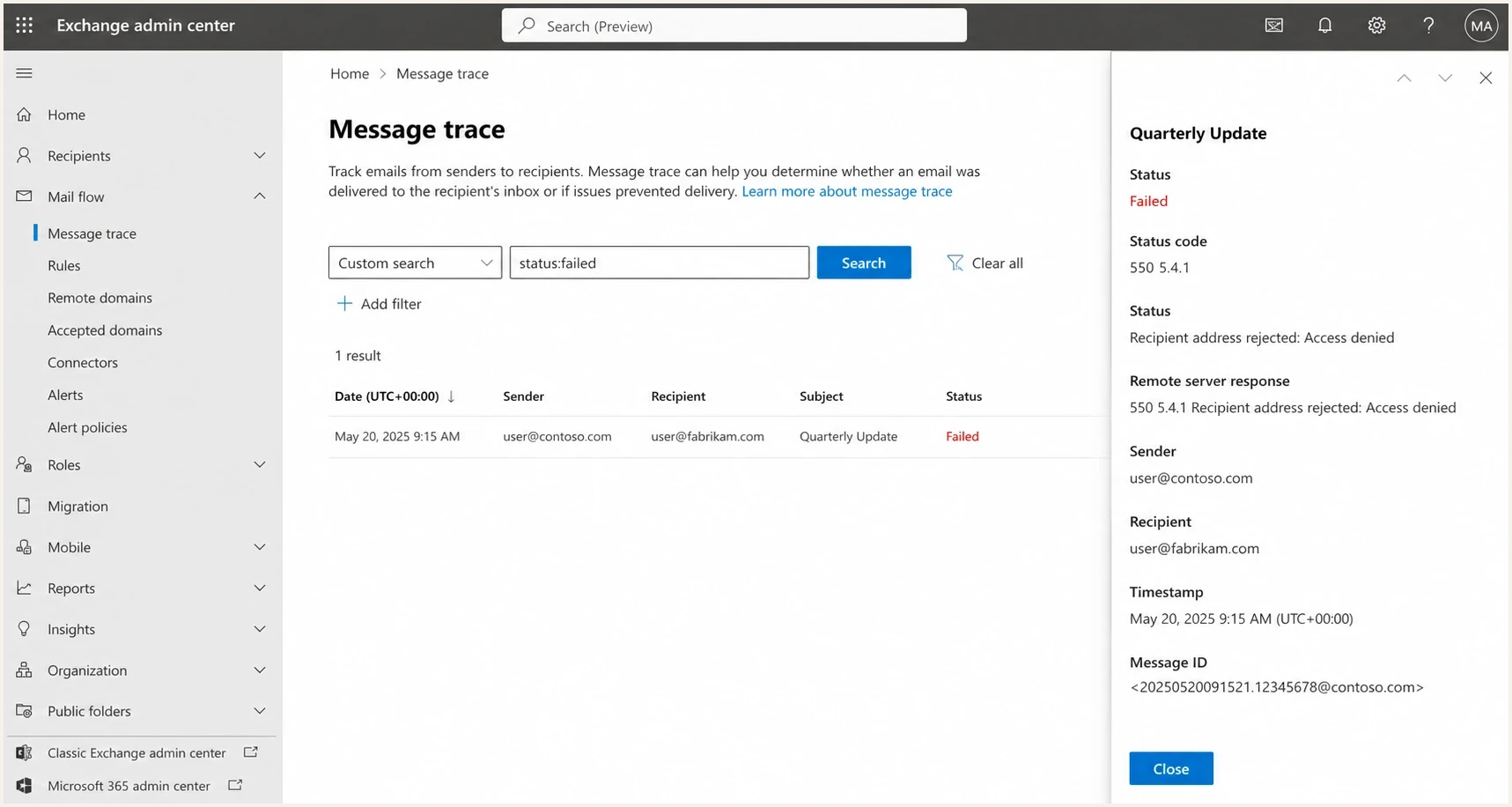
Microsoft 365 Exchange admin center message trace for a 550 5.4.1 Recipient address rejected failure.
If you control the recipient tenant, check accepted domains, directory-based edge blocking, and whether the recipient object exists in the cloud directory. Check connectors when the domain uses hybrid or third-party routing. A perimeter DBEB rejection may not produce a normal accepted-message result in message trace. If you are only the sender, give the recipient admin the full bounce, your sending IP, the timestamp, and the message ID so they can check the directory, routing, and any available trace data without guessing.
When this error appears after a migration, the recipient side should confirm that MX records, accepted domains, connectors, and directory sync are complete. When it appears after a sender-side platform change, confirm the new sender is authenticated and authorized in DNS, but do not treat that timing alone as proof that sender authentication caused a Microsoft DBEB rejection.
Recipient-admin fixes in Microsoft 365
If you administer the Microsoft 365 tenant receiving the mail, split the fix by blast radius. One failing mailbox points to address spelling, a missing recipient object, proxy address trouble, or hybrid sync. Every address in the domain failing points to accepted-domain configuration, MX routing, connectors, or incomplete migration state.
Microsoft 365 recipient checklist
- Check scope: Test another recipient in the same domain before treating one mailbox bounce as a domain outage.
- Resync accepted domain: For a domain-wide Microsoft 365 failure, review the accepted domain and, where appropriate, switch Authoritative to Internal relay and back after recipients are present.
- Fix hybrid recipients: For a synced on-premises mailbox, reset the SMTP proxy address by changing it temporarily, syncing, then changing it back.
- Check special recipients: Confirm mail-enabled public folders have synced, and create an Exchange Online contact for an on-premises dynamic distribution group.
- Allow update time: Directory-based edge blocking can take up to 24 hours to reflect recipient changes, so avoid repeated sender-side changes during that window.
Do not ask the sender to change SPF, DKIM, or DMARC for a Microsoft 365 recipient directory problem. Sender authentication still needs to be clean, but the rejection will continue until Exchange Online knows the recipient or the accepted-domain state is corrected.
Reputation, blocklists, and volume
For the exact Microsoft directory-based edge blocking response, reputation and volume are secondary checks. Review them when many unrelated recipient domains reject the same sending stream or when the full diagnostic names sender policy. A sudden send to older contacts can still expose invalid addresses, so list source and recipient age belong in the investigation.
When the pattern points to the sender, check blocklist and blacklist status for the sending domain, return-path domain, and sending IPs. A listing does not establish the cause of a 550 5.4.1 rejection by itself. Suped's blocklist monitoring can track listing changes alongside the sender and recipient-domain groups in your bounce data.
Practical recovery pattern
- Suppress: Remove hard-bounced addresses immediately unless a recipient admin confirms an error.
- Segment: Restart with recent engagers before sending to older contacts.
- Authenticate: Make every active sender pass DKIM and produce passing DMARC results.
- Watch: Monitor bounce rate by recipient domain, not only as a campaign total.
Do not use a single good test score as the end of the investigation. A test message proves the message can authenticate in one controlled path. It does not prove a recipient tenant accepts your domain, that every list address still exists, or that your sending pattern looks acceptable at volume.
Related bounce patterns
If you are comparing bounce text across logs, separate this error from other 550 families. A 550 5.4.1 bounce needs different handling than user unknown, relaying denied, or explicit spam-policy rejections.
If the bounce is 501 5.5.4 Invalid domain name instead of 550 5.4.1 Access denied, troubleshoot the SMTP identity first. That variant usually points to a bad HELO or EHLO hostname, missing reverse DNS, mismatched forward DNS, or a malformed sender-domain value, not a recipient access rule.
For a plain-language explanation of the wording, compare it with Access denied meaning. If your bounce includes an AS suffix, use the Microsoft AS code article because that variant usually points to a more specific Microsoft-side decision.
Views from the trenches
Best practices
Capture the complete bounce before changing DNS or suppressing a whole recipient domain.
Group failures by provider and campaign so one bad cohort does not mask a routing issue.
Use hard-bounce suppression quickly, then restore addresses only after direct confirmation.
Common pitfalls
Treating a good test score as proof that every recipient domain should accept the mail.
Assuming closed-loop signup means the recipient mailbox still exists months later.
Retrying hard 550 failures repeatedly instead of pausing and investigating the pattern.
Expert tips
Ask recipient admins for message trace checks with timestamp, sender IP, and message ID.
Treat high levels as an address-quality or tenant-directory event until data proves otherwise.
Compare the exact Microsoft suffix and remote host before choosing a recovery plan.
Marketer from Email Geeks says the first question is which recipient domains are returning the error and whether those addresses still exist.
2024-10-30 - Email Geeks
Marketer from Email Geeks says Microsoft directory-based edge blocking has produced similar access denied bounces in past incidents.
2024-10-30 - Email Geeks
What to do next
If this error appears in production logs today, do not jump straight to a blacklist conclusion. Pull the full bounce, group the failures by recipient domain, suppress confirmed hard bounces, and check whether Microsoft-hosted domains are overrepresented. For the exact Microsoft response, verify recipient and tenant directory state first. Check authentication and reputation before restarting volume when the wider pattern points to the sender.
The fix usually starts with recipient validation and recipient-side routing. When sender evidence exists, use Suped's product to compare DMARC aggregate data, SPF and DKIM failures, blocklist changes, and issue-specific fix steps against the affected sending source.




