What does the bounce message 'Recipient address rejected: Access denied' mean?

Published 9 Jul 2025
Updated 29 Jul 2026
9 min read
Summarize with
Updated on 29 Jul 2026: We updated this guide with current Microsoft DBEB fixes and firmer hard-bounce handling.
The bounce message "Recipient address rejected: Access denied" usually means the receiving mail gateway rejected the recipient address before accepting the message. For list hygiene, treat it as a hard bounce and suppress the address. Make one controlled retest only if the recipient administrator confirms a recent directory or routing correction.
It does not automatically mean the sending IP is blocked, blocklisted (blacklisted), or failing authentication. The phrase "Access denied" sounds like a sender-side block, but the SMTP stage matters. When it happens in reply to the RCPT TO command, the recipient gateway is saying, in effect, "I am not accepting mail for this address."
What the bounce means
A typical example looks like this. The important parts are the 550 SMTP reply, the 5.4.1 enhanced status code, the recipient host, and the note that the rejection happened during recipient validation.
Typical bounce excerpttext
<firstname.lastname@example.com>: host
example-com.mail.protection.outlook.com[52.101.40.6] said:
550 5.4.1 Recipient address rejected: Access denied.
(in reply to RCPT TO command)
The 550 5.4.1 response is permanent in normal sender handling. Microsoft documents this exact NDR as Directory-Based Edge Blocking (DBEB) rejecting an invalid recipient at the Microsoft 365 network perimeter. The Microsoft NDR page gives recipient administrators the matching repair steps.
Default handling
Handle this as a recipient hard bounce and suppress the address. Reconsider it only when the recipient administrator confirms a migration, hybrid directory sync, or routing correction.
- Classification: Permanent recipient rejection when the full diagnostic matches this pattern.
- Suppression: Stop normal sending after the first confirmed 550 response.
- Retest: Send once more only after the recipient side confirms a directory fix.
Why the wording is confusing
The word "denied" makes this look like a sender policy block. With this exact Microsoft 550 5.4.1 response, the usual cause is simpler: the receiving gateway cannot find a valid recipient object for the address. That can happen when the person left the company, the mailbox was renamed, an alias was removed, or a hybrid mail setup has not synced the recipient to the cloud edge.
What it often means
- Unknown user: The address is not accepted by the recipient gateway.
- Directory mismatch: The cloud gateway does not know about the on-premises recipient.
- Forwarding reject: A downstream address rejected mail that was forwarded to it.
What it does not prove
- IP block: One recipient rejection does not prove a blocklist or blacklist issue.
- Domain block: One bad address does not prove the whole domain rejects you.
- DMARC failure: This wording alone does not prove authentication failure.
Some receiving systems reuse similar wording for different failures. Classify the bounce with the numeric status, SMTP stage, responding host, and scope of affected recipients, not with the words "Access denied" alone.
Common causes
Check these causes first when this bounce appears. Invalid addresses and removed aliases explain many cases, while the later causes matter when the recipient uses Microsoft 365, Exchange Online Protection, or a hybrid on-premises setup.
- Departed recipient: The person left the organization and the mailbox or alias no longer accepts external mail.
- Bad alias: The address was mistyped, removed, renamed, or never existed.
- DBEB rejection: Directory-Based Edge Blocking rejected mail because the Exchange Online edge directory did not contain that recipient.
- Hybrid mismatch: The address works internally on-premises, but the cloud gateway rejects external senders.
- Forwarding path: The original mailbox forwards mail elsewhere, and the final mailbox rejects the message.
- Stale recipient data: The same response across unrelated domains can expose an old list containing several invalid addresses.
|
|
|
|---|---|---|
One address | Invalid user | Suppress |
One domain | Recipient config | Escalate |
Many domains | List decay or mixed codes | Segment |
Forwarded | Downstream reject | Ask admin |
Hybrid | DBEB mismatch | Admin fixes |
Fast interpretation guide for this bounce family.
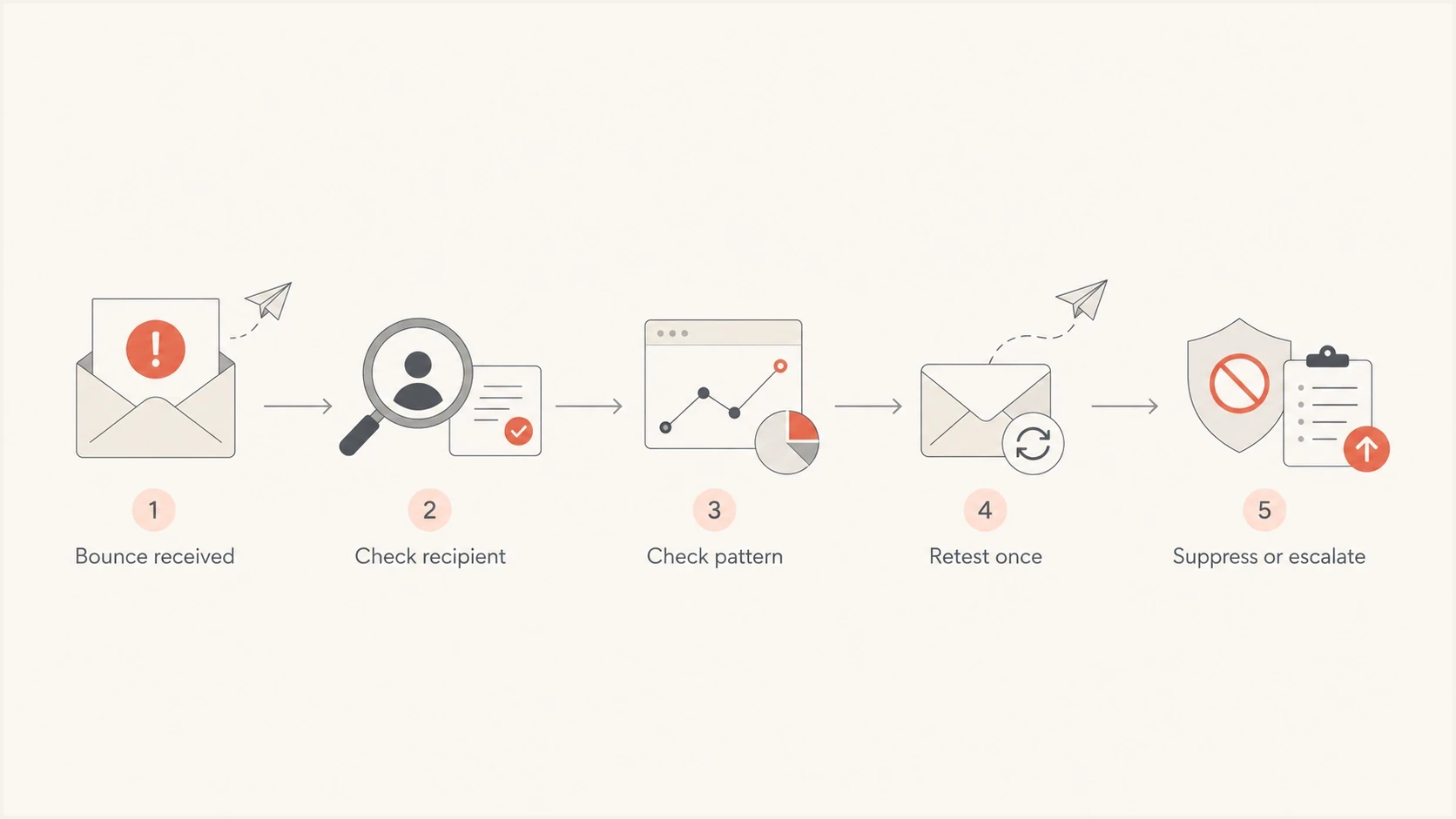
Flowchart for diagnosing and handling a 550 5.4.1 recipient access denied bounce.
How to diagnose it
Start by separating a recipient-only failure from a broader pattern. A single rejected person at one company points to an invalid mailbox or recipient routing issue. Many rejected recipients at the same company point to a recipient gateway, accepted-domain, or directory problem. The same 550 5.4.1 response across unrelated domains often points to stale recipient data, while a mix of authentication and policy codes calls for a sender-side audit.
If surrounding bounces contain authentication or policy errors, send a controlled message through an email tester and compare its headers, authentication result, and delivery path with the bounced campaign. This does not prove whether a specific mailbox exists, but it shows whether the mail stream has a separate authentication or content problem.
Email tester
Send a real email to this address. Suped shows a results button when the test is ready.
?/43tests passed
Review the evidence in this order. The goal is to protect sender reputation without treating every invalid recipient as a DNS or authentication problem.
- Read the full diagnostic: Confirm the 550 5.4.1 code, RCPT TO stage, and responding recipient host.
- Verify the address: Check spelling and whether the contact record is current.
- Check scope: Compare failures at the same domain, then separate results by exact SMTP diagnostic.
- Suppress the recipient: Stop normal sends after the permanent rejection.
- Retest conditionally: Send one controlled retest only after the recipient administrator confirms a fix.
Sender checks that matter
Microsoft distinguishes this 5.4.1 invalid-recipient NDR from 5.7.507, which indicates that the recipient organization blocked the sending IP. When other diagnostics suggest a sender-side issue, a domain health check can confirm DNS and authentication basics. DMARC monitoring shows whether legitimate sources are passing, while blocklist monitoring can show whether an IP or domain appears on a blocklist (blacklist).
How recipient admins fix DBEB rejections
The recipient organization's Microsoft 365 administrator owns these fixes. Follow the Microsoft repair steps that match the scope and recipient type instead of changing the sender's DNS.
- Confirm the scope: Check the spelling, then test known valid recipients in the same accepted domain.
- Resync an affected domain: If all recipients fail, Microsoft advises switching the accepted domain from Authoritative to Internal Relay, then back to Authoritative in the Exchange admin center.
- Reset one hybrid recipient: For an on-premises mailbox synced to Microsoft Entra ID, change its SMTP proxy address temporarily, revert it, and allow up to 24 hours for DBEB to update.
- Handle special recipient objects: Sync an on-premises mail-enabled public folder to Exchange Online. For an on-premises dynamic distribution group, create an Exchange Online mail contact with the same external address because that group does not sync.
- Stage migrations correctly: Keep the accepted domain as Internal Relay until every intended recipient has replicated, then set it to Authoritative so DBEB can reject unknown addresses.
Change accepted domains carefully
Changing an accepted-domain type affects mail routing and DBEB behavior. Only the recipient tenant administrator should use this procedure after checking connectors and downstream routing. A sender should not request the change merely to rescue one stale address.
Where Suped fits
Suped's product does not determine whether a specific mailbox, alias, or proxy address exists in a recipient's directory. Suped supports the surrounding sender-side workflow by separating invalid-recipient bounces from authentication failures, blocklist or blacklist exposure, and unauthorized sources using your domain.

Issue steps to fix dialog showing the issue overview, tailored fix steps, and verification action
Suped brings DMARC, SPF, DKIM, alerts, and blocklist visibility into the same domain workflow. Use that evidence when bounce diagnostics point to the sender. Keep DBEB repairs in the recipient's Microsoft 365 tenant, where the mailbox object and accepted-domain settings can be checked.
Manual bounce triage
- Slow pattern checks: You compare campaign logs, bounces, DNS, and reputation manually.
- Hidden sources: Unauthorized senders can be missed until failures spread.
- DNS friction: SPF limits and staged DMARC changes need careful handling.
Suped workflow
- Unified view: DMARC, SPF, DKIM, alerts, and reputation checks live together.
- Actionable issues: The platform identifies sender-side problems and gives fix steps.
- Multi-domain scale: MSPs and larger teams can manage client domains in one dashboard.
What to do next
If you are the sender, suppress the recipient after the confirmed permanent bounce. If the recipient matters, use another contact path and ask for a current address. Retest once only after the recipient administrator confirms that the directory object or routing problem has been corrected.
Bounce response thresholds
A practical way to decide when to suppress, retest, or investigate a wider pattern.
One isolated address
Suppress
Treat the confirmed permanent response as an invalid recipient.
Many at one domain
Escalate
Ask the recipient admin to check DBEB, accepted domains, and directory sync.
Many unrelated domains
Segment
Review list age and separate failures by their exact SMTP diagnostics.
Admin confirms a fix
Retest
Allow for directory replication, then send one controlled message.
If you are the recipient administrator, correct the mailbox, mail user, contact, alias, public folder, or group object that Exchange Online uses for recipient validation. Confirm the accepted-domain mode and directory synchronization, allow any documented replication window, then ask the sender for one controlled retest.
Practical rule
Suppress the address when the full diagnostic confirms a 550 5.4.1 recipient rejection. Restore it only after the recipient side confirms a correction and one controlled retest succeeds.
Views from the trenches
Best practices
Suppress a confirmed 550 5.4.1 bounce immediately and document the diagnostic reason.
Check whether failures cluster around one recipient, one domain, or Microsoft-hosted mail.
Keep bounce evidence with timestamp, SMTP code, recipient host, and campaign source.
Common pitfalls
Do not assume the phrase Access denied means the sending IP is blocked or blacklisted.
Do not keep mailing a recipient after a permanent bounce just to gather extra evidence.
Do not treat hybrid mail failures as proof that every address at the domain is invalid.
Expert tips
Retest only after a recipient admin confirms the directory or routing correction.
For hybrid recipients, ask the recipient admin to check directory sync and edge blocking.
Separate sender reputation checks from recipient directory checks before changing DNS.
Marketer from Email Geeks says the code is best handled as an unknown-user hard bounce unless later evidence proves a routing fault.
2023-09-18 - Email Geeks
Marketer from Email Geeks says hybrid Office 365 setups can reject an address externally while it still works for internal mail.
2023-09-18 - Email Geeks
How to handle the bounce
"Recipient address rejected: Access denied" is best treated as a recipient hard bounce, not as proof that the sender is blocked. Read the full SMTP diagnostic, check whether the failure is isolated, and suppress the address after the confirmed permanent rejection. Retest only after the recipient side confirms a correction.
When the pattern is broader than one address, separate recipient-domain failures, stale list data, and other SMTP diagnostics before changing sender DNS. Review authentication and blocklist or blacklist exposure only when the evidence includes sender-side policy failures.




