What causes a 550 5.4.1 bounce error and how should it be handled?

Updated on 31 Jul 2026: We clarified how Exchange Online DBEB generates 550 5.4.1 and added recipient-admin fixes for hybrid and accepted-domain problems.
A 550 5.4.1 bounce means the receiving mail system permanently rejected that SMTP delivery. When the full reply is Recipient address rejected: Access denied from a Microsoft 365 or Exchange Online host, Microsoft identifies Directory-Based Edge Blocking (DBEB) as the source. The receiving directory did not recognize the recipient as valid.
Check the spelling and current validity of the recipient first. Other common causes are a missing proxy address or directory object in a hybrid tenant, an accepted-domain configuration problem, or an incomplete domain migration. If unrelated recipient domains return similar rejections, or the human-readable text differs, also check authentication, sender reputation, and routing. A clean blocklist or blacklist check is useful, but it does not prove the sender setup is correct.
Common bounce text
550 5.4.1 Recipient address rejected: Access denied.
[mail.protection.outlook.com 2026-05-25T00:00:00.000Z]
What 550 5.4.1 means
The first number controls SMTP handling. 550 is a permanent failure. In the generic enhanced-status registry, 5.4.1 has network and routing semantics. Microsoft uses it with the Access denied wording for a DBEB recipient-directory rejection, so read the complete reply and receiving hostname instead of diagnosing the numeric subcode alone.
Microsoft documents this exact wording for Exchange Online and Outlook-hosted recipients. The Microsoft NDR page says DBEB generates the NDR when the recipient address is invalid in the receiving directory. A different response string can indicate a different cause, even when the numbers match.
|
|
|
|---|---|---|
550 | Permanent SMTP failure | Do not keep retrying |
5.4.1 | Provider context required | Read text and hostname |
Access denied | Microsoft directory rejection | Verify recipient or escalate |
How to read the bounce code before taking action.
Do not trust the platform label alone
Some sending platforms classify this as a soft bounce because their parser groups it with other delivery failures. Use the SMTP class first. A 5.x.x reply is permanent for that delivery attempt, so suppress the recipient unless the recipient administrator confirms and repairs a directory problem.
Why only some recipients bounce
A partial bounce pattern at the same domain does not rule out a recipient-side cause. Modern mail systems can reject one address and accept another at the edge. The receiver can check a directory, a routing table, a mailbox state, or a tenant rule before accepting the message.
This is why a domain can show 50% delivered and 50% rejected, or even 90% delivered and 10% rejected. One recipient still exists, another has been deprovisioned, another belongs to a moved business unit, and another has a local restriction. The domain's MX host can accept valid users while DBEB rejects addresses missing from the directory.
- Directory check: The receiving edge checks whether the recipient exists before accepting the message.
- Tenant directory: A Microsoft 365 tenant can reject an address that has not synchronized into Exchange Online.
- Mailbox change: Acquisitions, closures, and domain moves leave old contacts behind in sending lists.
- Mixed routing: A domain can route different users through different internal paths during a migration.
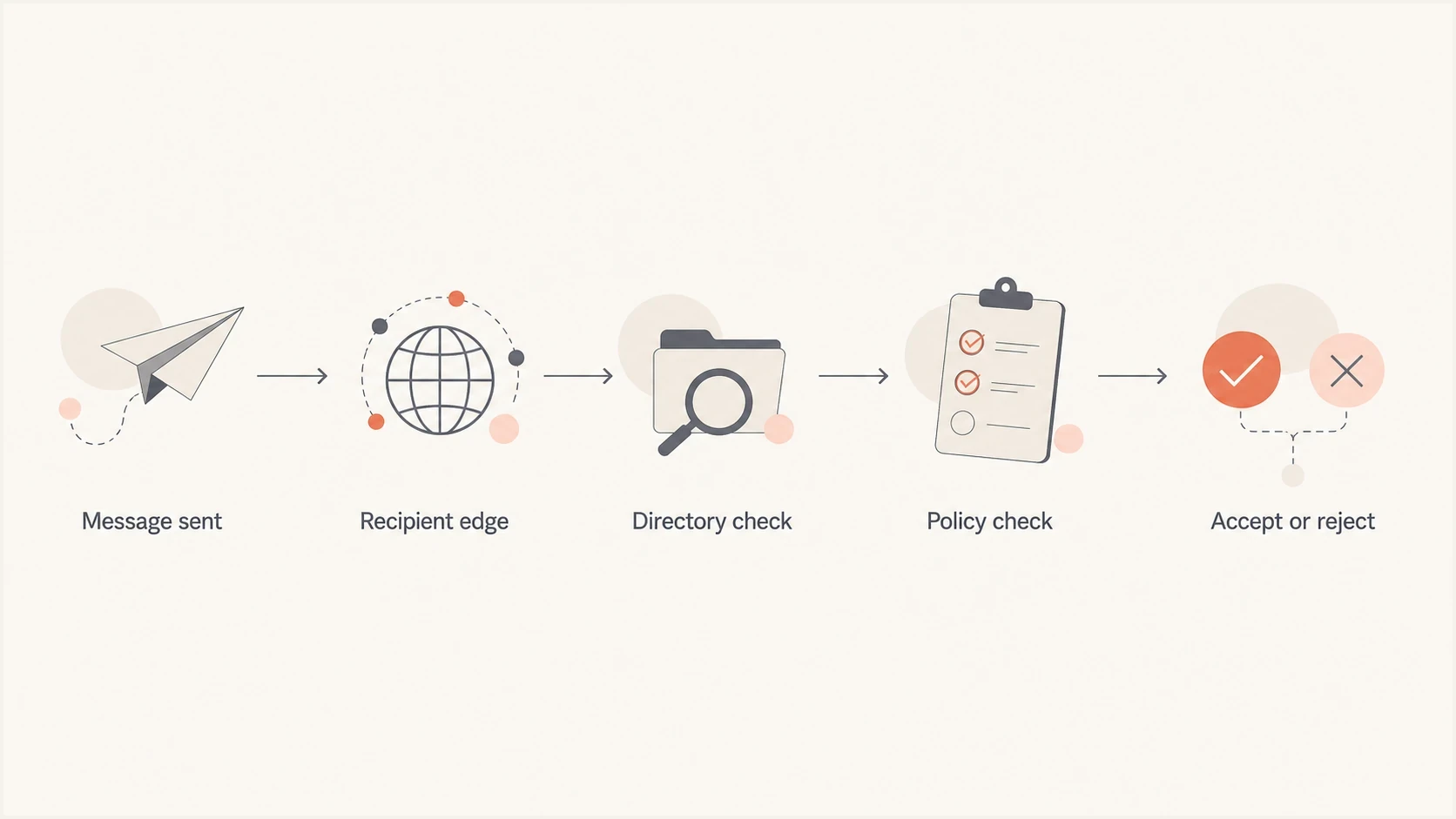
A 550 5.4.1 flowchart showing directory and policy checks before acceptance or rejection.
The causes to check first
Start with the explanation that fits the full bounce text and delivery pattern, then work outward. A single recipient at a domain bouncing with 550 5.4.1 is usually not the same problem as every recipient at that domain bouncing after a DNS or accepted-domain change.
|
|
|
|---|---|---|
Bad recipient | One user fails | Suppress address |
DBEB sync | Expected users fail | Check directory sync |
Accepted domain | Whole domain fails | Verify domain type |
Domain migration | Old or hybrid users fail | Clean directory and routing |
Sender issue | Unrelated domains fail | Check auth and reputation |
Common causes and the first handling decision.
Recipient-side pattern
- Scope: Failures cluster around specific recipient domains, tenants, or addresses.
- Evidence: Some users at the same domain accept mail while others return the exact DBEB reply.
- Response: Suppress rejected addresses and ask the recipient admin to confirm directory state.
Sender-side pattern
- Scope: Failures rise across unrelated domains or after a new sending source starts.
- Evidence: Authentication, DNS, or reputation checks show a clear fault.
- Response: Fix authentication, routing, or suppression logic before the next send.
How to handle the bounce
For an individual recipient, the default handling is simple: suppress the address and do not retry the same campaign. Repeated attempts against a recipient already rejected with a permanent SMTP reply waste sending capacity and can damage list-quality signals.
- Capture: Save the full NDR, timestamp, sender address, recipient address, sending IP, and mail stream.
- Classify: Treat 5.x.x as permanent for that delivery attempt, even if the sending platform says soft bounce.
- Segment: Group by recipient domain, MX host, complete bounce string, campaign, and sending source.
- Suppress: Remove a 550 5.4.1 recipient after the permanent rejection. Reinstate the address only after correction, fresh engagement, or recipient-admin confirmation.
- Retest: Use the email tester with a real message after there is evidence that the recipient or configuration changed.
Email tester
Send a real email to this address. Suped shows a results button when the test is ready.
?/43tests passed
If the affected domain is important, do not send a vague note asking why mail bounced. Send the exact bounce text, time in UTC, sender domain, envelope sender, sending IP, and one or two sample recipients. That gives the recipient admin enough information to search message trace and directory rules.
Fixes for recipient administrators
The sender cannot repair DBEB. If the address should be valid, the recipient administrator needs to compare the NDR with the Exchange Online directory and accepted-domain configuration. Microsoft's NDR steps separate single-recipient failures from domain-wide failures.
- Confirm scope: Check the address spelling, then test whether one expected recipient or every recipient in the domain returns the NDR.
- Repair a hybrid user: Confirm that the on-premises mailbox and SMTP proxy address synchronized to Microsoft Entra ID and Exchange Online. Microsoft advises changing the proxy to a temporary address and then restoring it to trigger an update.
- Allow replication time: After a hybrid proxy-address change, allow up to 24 hours for DBEB to fully update before the controlled retest.
- Review the accepted domain: Use Authoritative when all valid recipients are represented in Microsoft 365. Use Internal relay only when unknown recipients must route to an on-premises system through a configured connector. For a domain-wide failure on a correctly authoritative domain, Microsoft's NDR procedure says to switch it to Internal relay and back to Authoritative to resync it.
- Check special recipients: Verify that hybrid mail-enabled public folders are synchronized. For an on-premises dynamic distribution group, follow Microsoft's documented mail-contact workaround in Exchange Online.
Accepted-domain changes affect mail routing
Only the recipient's Exchange administrator should change the domain type. Confirm where every recipient is hosted and whether the required connector exists before using Internal relay, then verify mail flow after the change.
Sender-side checks worth doing
Even when the bounce looks recipient-side, verify the sender setup before closing the case. The goal is to rule out sender faults that can produce other rejections or explain a pattern across unrelated recipient domains.
Start with a broad domain health check so you can see whether DMARC, SPF, and DKIM pass before asking a recipient admin to investigate. If the same send has authentication failures, fix those faults as a separate issue.
Authentication does not replace bounce handling
A valid DMARC setup does not make an unrecognized recipient valid. It does help separate mailbox and directory rejections from sender authentication problems. Suped's product can group DMARC, SPF, DKIM, and MTA-STS results with sending-source data and blocklist (blacklist) monitoring in the same investigation.
For teams that need a repeatable workflow, Suped connects DMARC monitoring with authentication visibility, issue detection, fix steps, and blocklist monitoring. Compare authentication results and sending sources with the time the 550 5.4.1 pattern began, while keeping recipient suppression in the sending platform.

Issue steps to fix dialog showing the issue overview, tailored fix steps, and verification action
When to escalate to the recipient admin
Escalation is useful when there is a legitimate business relationship, the recipient expects the message, and the sender-side evidence is clean. It is usually not useful for cold or stale addresses where the contact has no recent engagement and the company has changed ownership or domain names.
Escalate
- Known contact: The recipient recently opted in, replied, bought, or asked for the message.
- Clean setup: SPF, DKIM, DMARC, reverse DNS, and sender reputation show no obvious fault.
- Business need: Delivery matters enough that the recipient admin has a reason to investigate.
Suppress
- Stale record: The address has no recent engagement or belongs to a closed business unit.
- Permanent NDR: The recipient returns the exact 550 5.4.1 permanent failure.
- No owner: There is no confirmed contact who can validate the mailbox.
The best outcome is clean suppression data. If a recipient later fills out a form, replies through another channel, or asks to be re-added, treat that as a fresh signal and verify the address before sending bulk mail again.
How list quality fits in
Check list quality after the technical facts are clear. A spike in 550 5.4.1 bounces often appears after company acquisitions, closures, rebrands, or domain migrations. Those events do not make the sender's DNS wrong, but they do make old contact records unreliable.
Do not argue with the bounce parser when this pattern appears. Separate the list into recently engaged contacts and stale records, then keep stale records out of bulk sends until there is a fresh signal. That protects the active audience and keeps one bad segment from distorting the health of the mail stream.
- Lookback: Compare the last open, click, reply, form submit, purchase, or login before mailing again.
- Source: Split customer records, prospect records, partner records, and imported records before deciding policy.
- Freshness: Require a recent human signal before reinstating addresses that already returned a permanent rejection.
- Pattern: If old domains have the highest rejection rate, prioritize cleanup over repeated sending.
Views from the trenches
Best practices
Treat 5.x.x SMTP replies as permanent until the receiving admin proves a temporary fault.
Segment bounces by recipient domain and MX host before changing sender-side settings.
Keep the full NDR text, timestamp, sender IP, and recipient address for escalation.
Common pitfalls
Trusting a CRM soft-bounce label over SMTP class causes repeat sends to dead mailboxes.
Assuming domain-wide failure misses tenant, directory, and mailbox-level rejection rules.
Using only a blocklist (blacklist) check leaves auth and list-age issues hidden.
Expert tips
Suppress a 550 5.4.1 recipient, then retest only after a fresh address-validity signal.
Compare delivered and bounced recipients at one domain to identify DBEB patterns.
Check directory sync and accepted-domain state before changing any sender settings.
Marketer from Email Geeks says 550 5.4.1 with Access denied usually points to a block at the receiving Outlook-hosted domain.
2024-03-04 - Email Geeks
Expert from Email Geeks says the code is a hard SMTP failure, even when a sending platform labels the event as a soft bounce.
2024-03-04 - Email Geeks
The practical answer
A 550 5.4.1 bounce with Recipient address rejected: Access denied from Exchange Online usually means DBEB did not recognize the recipient as valid. Handle it as a hard bounce, suppress the address, and escalate only when there is a valid relationship and clean sender-side evidence.
Permanent does not always mean the person behind the mailbox is gone. It means the receiving system refused this SMTP delivery. The safe path is suppression first, followed by targeted verification or recipient-admin repair when the address matters.




