What causes the 550 5.4.1 Recipient address rejected: Access denied AS(201806281) bounce error on O365 accounts?

Published 28 Apr 2025
Updated 28 Jul 2026
12 min read
Summarize with
Updated on 28 Jul 2026: We updated this guide with Microsoft's current DBEB fixes, gateway tracing, and safer hard-bounce handling.
The short answer: 550 5.4.1 Recipient address rejected: Access denied AS(201806281) on Microsoft 365 accounts is usually caused by Exchange Online rejecting the recipient at the edge because the address is not valid in the tenant, or because Exchange Online has stale or incomplete recipient directory data. Microsoft says this NDR is generated when Directory-Based Edge Blocking rejects mail because the recipient address is invalid on its Microsoft NDR page.
The confusing part is that the same bounce also appears when a third-party gateway receives the rejection from Microsoft 365 and passes it back to the sender. That makes it look like the gateway rejected the message, when the final rejection happened during relay into Exchange Online. The AS(201806281) portion is a Microsoft diagnostic marker, not evidence that the sending domain or IP is blocked.
- Most common cause: The recipient address does not exist in Exchange Online, or it exists on-premises but has not synced cleanly to Microsoft 365.
- Common hybrid cause: A hybrid Exchange tenant has an accepted domain, proxy address, mail-enabled public folder, or dynamic distribution group mismatch.
- Common sender mistake: The sender assumes a domain-wide block when only one address or a small recipient set is failing.
- Important distinction: Other Microsoft NDR codes can identify policy, authentication, or reputation problems, but this exact response points to recipient validation.
What the error means
The SMTP reply has two layers. 550 is a permanent failure, so automated retries should stop. 5.4.1 appears with more than one Exchange error, so the complete diagnostic text matters. Microsoft maps Recipient address rejected: Access denied to an address that Exchange Online cannot find as a valid recipient. This is different from a mailbox-full response and from a separate Relay Access Denied error.
Typical NDR excerpttext
550 5.4.1 Recipient address rejected: Access denied.
AS(201806281)
Remote server returned: 550 5.4.1
|
|
|
|---|---|---|
550 | Permanent SMTP rejection | Stop automated retries |
5.4.1 | Enhanced status code | Read the full response |
Recipient address rejected | DBEB cannot validate the recipient | Recipient object and aliases |
AS marker | Microsoft diagnostic tag | Generating server and full NDR |
How to read the bounce
Do not diagnose it as a sender authentication failure
SPF, DKIM, and DMARC failures have their own Microsoft responses. They can exist at the same time as a recipient-directory problem, but they do not explain this exact 550 5.4.1 wording. Start with recipient validation and the system that generated the NDR.
Why it appears on O365 accounts
O365, now Microsoft 365, often has Exchange Online Protection in front of the mailbox environment. When Directory-Based Edge Blocking (DBEB) is active, the edge layer checks whether the recipient exists before accepting the message. If the address is missing, stale, or not visible to Exchange Online, the message is rejected before anti-malware, anti-spam, and mail flow rules process it.
This gets messy in hybrid environments. A recipient can exist on-premises, but Exchange Online still rejects the address if the proxy address has not synced, the accepted domain state is wrong, or the object is not represented correctly in the cloud directory. That is why this bounce can look intermittent: one person at a domain accepts mail while another person at the same domain fails.
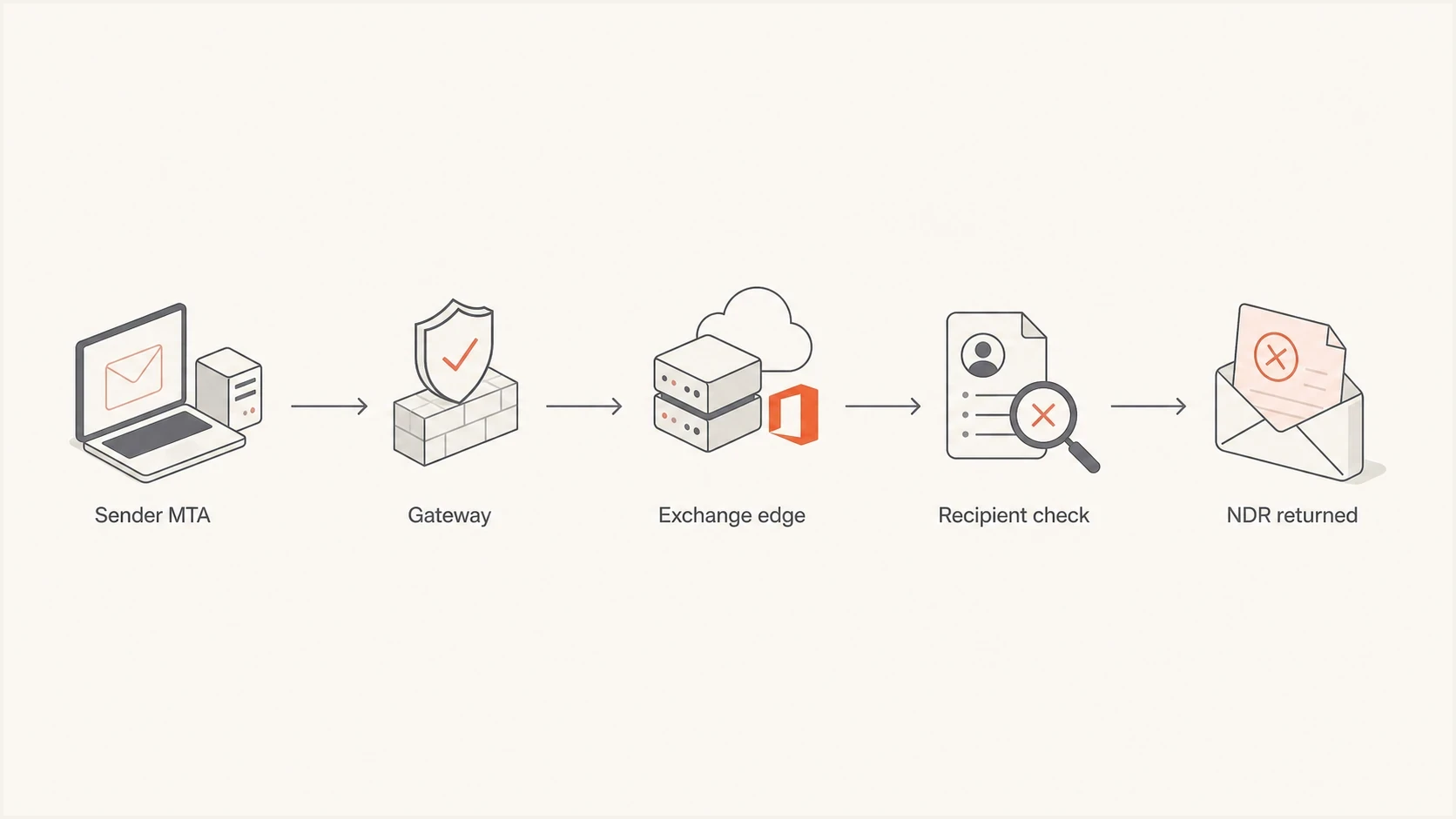
Flowchart showing a message rejected during the Exchange Online recipient check.
Sender-side view
- Visible symptom: The sender sees a hard bounce with access denied language.
- Log pattern: Some recipients at the same domain still receive mail.
- Best action: Validate the address and suppress the exact recipient after the hard failure.
- Escalation path: Send the full NDR to the recipient's mail administrator.
Recipient admin view
- Visible symptom: Exchange Online blocks a recipient before mailbox delivery.
- Likely area: Accepted domains, recipient sync, or hybrid object mapping.
- Best action: Confirm the exact SMTP address exists in Exchange Online.
- Escalation path: Resync or repair the recipient object and accepted domain state.
How to triage it without guessing
Start with scope. If one address fails and other addresses at the same Microsoft 365 tenant receive mail from the same sending IP and domain, treat the failing address as invalid or unsynced until proven otherwise. If every address at the domain fails, check the accepted domain, directory replication, MX route, and connectors.
For a live sending test, Suped's email tester shows the authentication and sending-path result for a real message. It does not prove the recipient exists, but it removes sender-side uncertainty before the NDR is escalated.
Email tester
Send a real email to this address. Suped shows a results button when the test is ready.
?/43tests passed
Next, compare failures with successful deliveries. The important question is whether the same sending system can deliver to other recipients behind the same destination domain during the same time window.
- Collect the full NDR: Keep the generating server, remote server, timestamp, recipient, message ID, and diagnostic text.
- Compare sibling recipients: Check another known-good address at the same domain without sending to a list.
- Check recent success: Look for delivered mail to the same domain on the same IP and envelope sender.
- Identify the rejecting system: Use the server names and remote-response fields to separate a gateway rejection from an Exchange Online rejection.
- Escalate cleanly: Ask the recipient admin to verify the exact address object in Exchange Online.
|
|
|
|---|---|---|
One user | Invalid or stale recipient | Verify and suppress |
Some users | Proxy or hybrid sync gap | Send NDR evidence |
All users | Accepted domain or routing | Audit domain and mail path |
Gateway hostname | Gateway validation or relayed reject | Trace the remote response |
Fast triage matrix
Check the rejecting server and gateway path
A third-party gateway can generate its own recipient rejection or return the rejection it received from Exchange Online. The NDR's reporting server alone does not settle that question. Read the remote server and diagnostic-code fields to find the system that returned the 550 response during the SMTP recipient command.
|
|
|
|---|---|---|
prod.protection.outlook.com | Exchange Online Protection rejected the recipient | DBEB, recipient object, aliases |
Gateway returned 550 | Gateway recipient validation rejected first | Gateway directory data and policy |
Gateway names Microsoft as remote | Gateway passed through Microsoft's rejection | Exchange Online recipient state |
Unexpected destination | Mail is reaching the wrong route or tenant | MX records and connectors |
How to trace the rejection
For a domain-wide failure, verify that MX records and inbound connectors follow the intended route, and that the gateway relays the unchanged recipient to the correct Microsoft 365 tenant. Avoid bypassing the gateway or connector controls for an ad hoc test unless the recipient administrator has approved a controlled mail-flow change.
What senders should do
Because this is a permanent reject, stop automated mail to the exact address after the first hard bounce. Verify the spelling and source data, then keep the address suppressed until the recipient or its administrator confirms a correction. A controlled retest after that confirmation is reasonable. Do not keep retrying an unchanged address, and do not suppress the whole domain when sibling recipients still accept mail.
Suppression policy for this bounce
A practical policy for an O365 550 5.4.1 permanent recipient rejection.
First hard bounce
Suppress
Stop automated sends and verify the exact address.
Unchanged address
No retry
Keep it suppressed while the recipient remains unverified.
Confirmed correction
Retest
Run one controlled test after the recipient admin confirms the fix.
Sibling success
Domain
Keep sending to valid recipients at the same domain.
The strongest sender-side move is evidence. Keep the NDR, show that other recipients at the same domain are delivering, and ask the recipient admin to check the specific address. For broader context, 550 5.4.1 handling covers the general workflow, and access denied meaning explains the wording itself.
Sender-side checklist
- Do validate: Check spelling, role alias changes, CRM imports, and recent form submissions.
- Do compare: Look for successful delivery to the same tenant during the same hour.
- Do suppress: Stop automated sends to the exact address after the permanent reject.
- Do not overreact: Do not block the whole recipient domain when sibling recipients are delivering.
What recipient admins should fix
If you administer the recipient tenant, the durable fix usually happens in Exchange Online. Confirm that the exact address exists, then confirm Exchange Online sees the same primary SMTP address and aliases that the sender is using. In hybrid tenants, the on-premises object and the cloud object must provide the recipient address to DBEB.
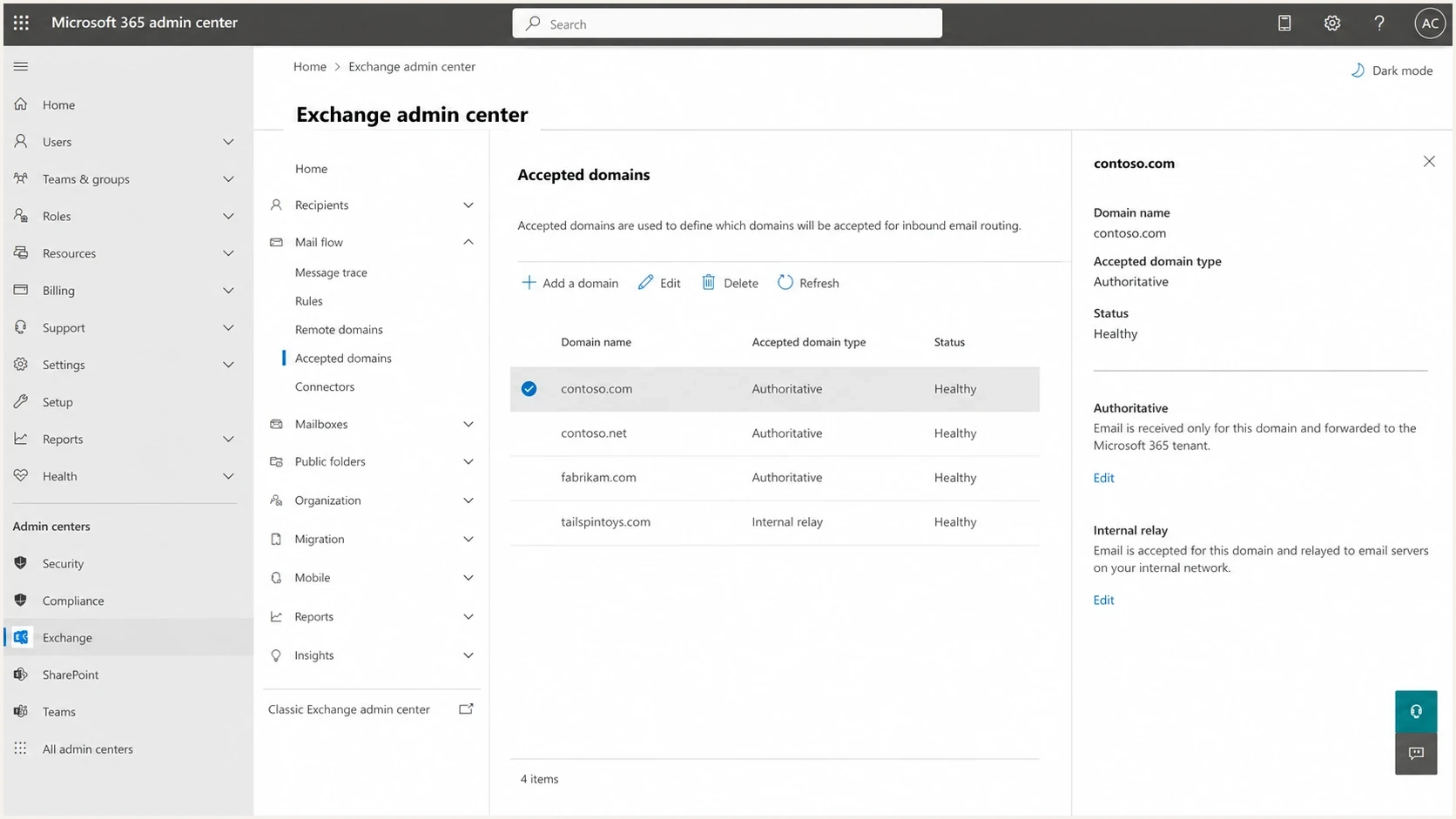
Microsoft 365 Exchange admin center accepted domains screen.
- Check the address: Confirm the exact recipient, primary SMTP address, and aliases exist in Exchange Online.
- Resync a domain-wide failure: In Mail flow > Accepted domains, switch the affected domain from Authoritative to Internal relay, save it, then switch it back to Authoritative.
- Refresh a hybrid mailbox: Change the on-premises SMTP proxy address to a temporary value, sync it, then restore the original value and sync again.
- Allow DBEB to update: Microsoft says a hybrid mailbox directory change can take up to 24 hours to reach Directory-Based Edge Blocking.
- Check a public folder: Verify that an on-premises mail-enabled public folder appears in Exchange Online, and run the Sync-ModernMailPublicFolder script if it does not.
- Check a dynamic group: An on-premises dynamic distribution group cannot sync to Exchange Online, so create a mail contact there with the same external email address.
Treat accepted-domain changes as mail-flow changes
Use the domain toggle to resync a domain-wide failure only after confirming the intended routing. During migrations, keep the domain as Internal relay until every valid recipient is present and replicated, then return it to Authoritative so DBEB can reject unknown addresses.
The cleanest recipient-side proof
The clean proof is a successful inbound test to the exact recipient after the directory fix. A successful test to a different address at the same domain proves the sender path works, but it does not prove the failed recipient object is fixed.
When to check authentication separately
This exact recipient-rejection response is not an SPF, DKIM, DMARC, sending-IP reputation, blocklist, or blacklist diagnosis. Check those areas when the NDR contains sender-specific wording, a different 5.7.x code, or independent authentication failures. Do not reclassify an Exchange Online DBEB rejection as a sender problem only because several recipients fail.
Suped is our DMARC reporting and email authentication platform. Its source reports, authentication results, alerts, and blocklist (blacklist) monitoring can confirm whether a separate sender-side issue exists. Suped does not prove that a Microsoft 365 recipient exists or repair DBEB directory data.
Issues page showing top issues, verified sources, unverified sources, and authentication pass rates
A domain health check provides a first pass across DNS and authentication. DMARC monitoring helps track source-by-source results. If a separate delivery pattern has sender-reputation wording, blocklist monitoring can identify domain and IP blacklist listings. Keep those findings separate from the recipient-directory diagnosis.
Treat as recipient-side
- Single address: One recipient fails while other users at the domain deliver.
- Stable sending path: The same IP and envelope sender deliver elsewhere.
- NDR wording: The bounce contains the exact DBEB recipient-rejection text.
- Best owner: The recipient admin who can inspect Exchange Online objects.
Investigate a separate sender issue
- Different wording: The NDR identifies authentication, spam, rate, or sending-IP trouble.
- Many destinations: Several domains return sender-specific rejections at the same time.
- Authentication evidence: SPF, DKIM, or DMARC results independently show repeated failures.
- Best owner: The sender team that controls DNS and sending systems.
Views from the trenches
Best practices
Compare failed recipients with successful recipients at the same domain before escalating.
Keep NDR headers, timestamps, and remote server details for recipient-side investigation.
Suppress the exact address after a permanent reject without removing the full domain.
Check Microsoft 365 directory state before treating this as a sender reputation issue.
Common pitfalls
Assuming every access denied bounce is a blocklist or blacklist problem wastes time.
Retrying the same failed address repeatedly can damage sender quality and reputation signals.
Ignoring hybrid Exchange sync gaps leaves valid on-premises users rejected at the edge.
Escalating without the full NDR forces the recipient admin to guess from a vague code.
Expert tips
A gateway can pass through Microsoft's rejection, so inspect the remote server path.
One permanent reject should pause automated mail until the exact address is verified.
Sibling delivery success is strong evidence against a complete domain-level block.
Recipient admins should test the exact address after fixing directory sync issues.
Marketer from Email Geeks says this bounce often looks intermittent because some recipients at the same Microsoft 365 domain continue to accept mail.
2023-05-09 - Email Geeks
Expert from Email Geeks says the error should not be treated as a normal user unknown response without checking the surrounding delivery pattern.
2023-05-09 - Email Geeks
The practical answer
The cause of 550 5.4.1 Recipient address rejected: Access denied AS(201806281) on O365 accounts is usually Exchange Online rejecting an invalid, missing, or unsynced recipient through Directory-Based Edge Blocking. Hybrid Exchange directory issues and accepted domain state are common reasons a recipient who looks valid to a person still fails at the Microsoft 365 edge.
For senders, validate the address, compare sibling deliveries, suppress the exact address after the permanent reject, and pass the full NDR to the recipient admin. For recipient admins, verify the recipient object, repair sync or accepted-domain state, then retest the exact address. If a gateway is involved, trace the remote response before changing its policy. Investigate authentication or blocklist (blacklist) status only when separate evidence points to a sender-side problem.




