What causes Apple's policy-related (CS01) bounce messages and how can I resolve them?

Michael Ko
Co-founder & CEO, Suped
Published 6 May 2025
Updated 16 May 2026
10 min read
Summarize with
Apple's policy-related CS01 bounce means Apple rejected the message because its local filtering policy judged the send as unacceptable at delivery time. The common bounce text is 550 5.7.1 [CS01], often followed by Message rejected due to local policy. In plain terms: Apple accepted the connection far enough to evaluate the message, then its policy filter refused the message for Apple-hosted recipients such as iCloud.com, me.com, mac.com, and Apple Private Relay addresses.
The cause is usually not one thing. I treat CS01 as a reputation and content rejection first, then I verify authentication, blocklist or blacklist status, and recipient quality. If the same sending IP and same sending domain pass DMARC, SPF, and DKIM most of the time, but Apple rejects one or two campaigns each month, authentication is usually not the primary cause. The stronger suspects are a volume spike, a less engaged Apple-domain segment, complaint activity, poor link reputation, a temporary IP or domain reputation hit, or a blocklist (blacklist) listing that Apple's filters weigh heavily.
What CS01 means
CS01 is a policy rejection, not a public checklist with one published threshold. Apple does not tell senders the exact rule that fired. That is why the same sender can see normal Apple delivery on Monday and a cluster of CS01 bounces on Thursday. The filter decision is shaped by the message, the sender, the recent sending pattern, and recipient-level signals at that moment.
Typical CS01 bounce texttext
policy-related (550 5.7.1 [CS01])
Message rejected due to local policy.
Apple-hosted mailbox rejected the message during SMTP delivery.
I separate CS01 from mailbox problems first. A full mailbox, invalid recipient, or temporary server problem needs different handling. CS01 means the message has been blocked by policy. For a wider explanation of the code itself, the related Apple CS01 meaning page is useful when you need a short definition to share with a client or internal team.
Fast read
A single CS01 event is not enough evidence to rebuild DNS or change ESPs. Repeated CS01 bounces at Apple domains are enough evidence to check reputation, content, volume, complaints, and authentication in that order.
Most common causes
When I investigate CS01, I do not start by rewriting every DNS record. I first ask what changed around the send. Apple is sensitive to mail that looks normal in isolation but abnormal for that sender: more volume than usual, a dormant segment, a new link pattern, a sudden campaign mix change, or messages sent to recipients who have not interacted in a long time.
- Volume spike: A larger Apple-domain send can expose less engaged recipients and lift complaint rates.
- Audience quality: Old, unengaged, purchased, or weakly permissioned addresses are high-risk at Apple domains.
- Content signals: Heavy link publishing, URL shorteners, mismatched domains, or risky landing pages can trigger filtering.
- Sender reputation: A damaged IP or domain reputation can make normal campaigns look suspicious.
- Blocklist status: A blocklist (blacklist) listing can coincide with Apple filtering changes.
- Authentication drift: Broken SPF, DKIM, or DMARC alignment raises risk, even when CS01 is mainly reputation-led.
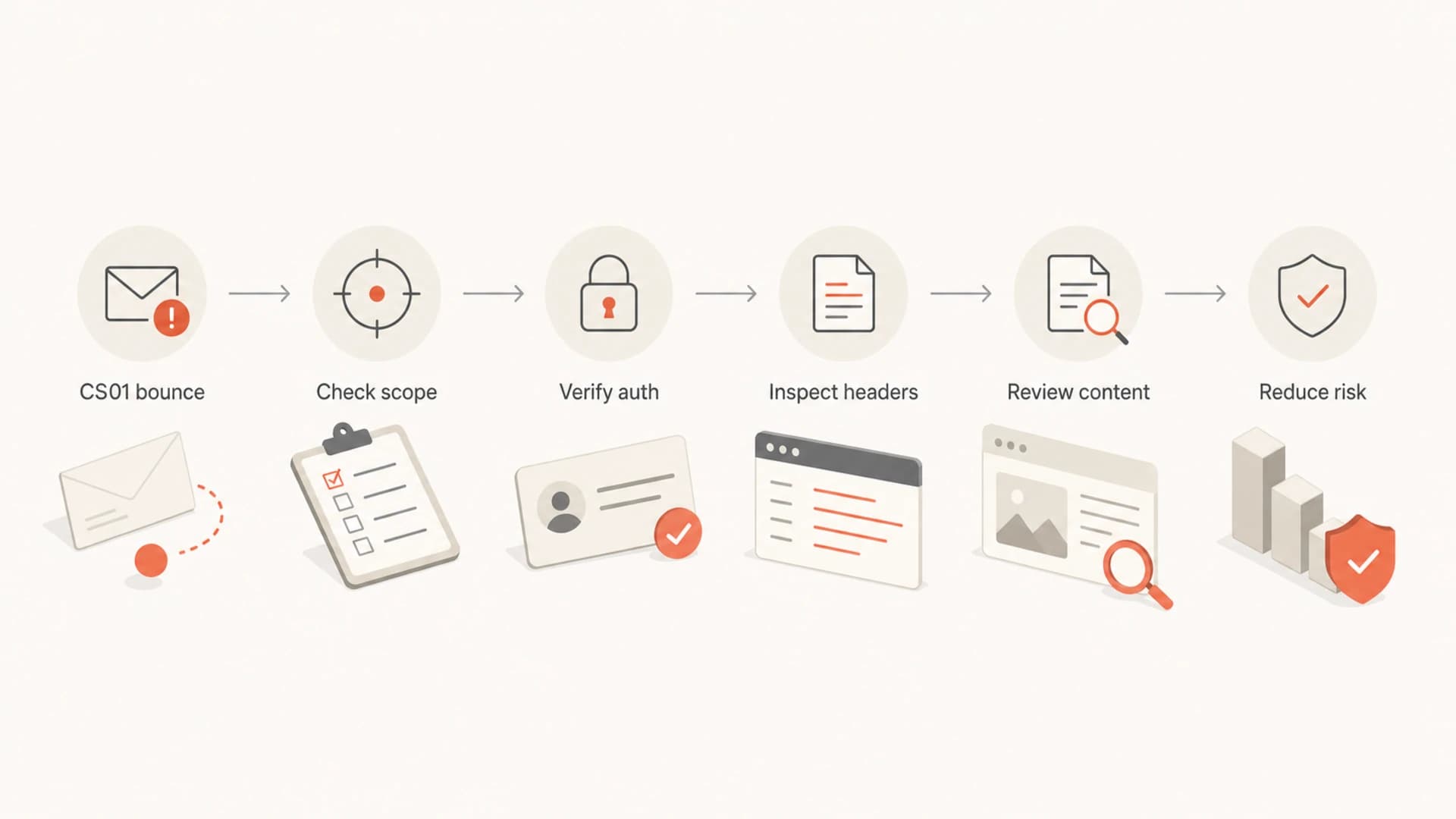
Flowchart showing a CS01 bounce moving through scope, authentication, header, content, and risk checks.
|
|
|
|---|---|---|
Volume | Spike | Throttle |
Audience | Low opens | Segment |
Content | Risky links | Simplify |
Reputation | Apple only | Warm back |
Auth | Fails | Repair |
Blocklist | Listed | Remediate |
Compact triage map for Apple CS01 causes.
How to isolate the cause
The fastest path is to compare Apple-only data against the rest of the campaign. If Apple bounces rise while Gmail, Microsoft, and corporate domains remain steady, the issue is Apple-specific filtering. If every mailbox provider rejects or defers at the same time, the cause is broader sender reputation, infrastructure, DNS, or content.
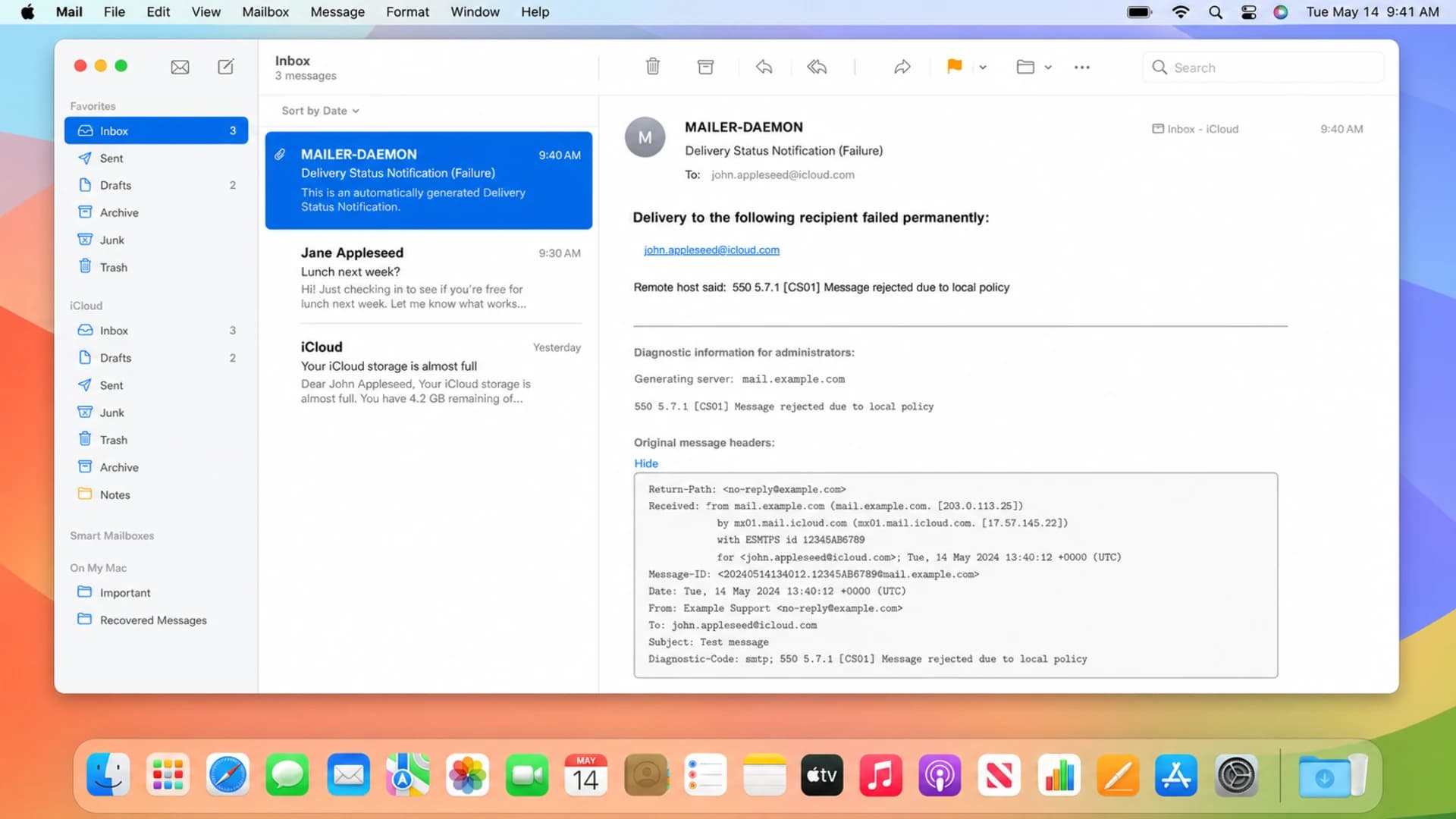
Apple Mail screenshot showing a CS01 bounce notification and expanded message headers.
I want three pieces of evidence before changing the send plan: the full SMTP bounce, the raw headers from an Apple-delivered seed or test message, and the campaign context. The context matters because a CS01 event often lines up with a campaign change that looks small to the marketer but large to a mailbox filter.
Signals that point to reputation
- Timing: CS01 begins after a larger or colder Apple-domain send.
- Scope: Several campaigns and templates fail, not one exact creative.
- Complaints: Apple-domain unsubscribes, complaints, or low engagement rose first.
- Listings: The sending IP or domain appears on a blocklist or blacklist.
Signals that point to content
- Links: The rejected message has new domains, short links, or many tracked URLs.
- Headers: Spam scoring headers show elevated bulk, suspect, or classifier values.
- Creative: A simpler version delivers better to Apple seeds and live recipients.
- Landing page: The destination page has redirects, forms, or mixed sender branding.
Use seed inboxes for clues, not as the only truth. A seed can expose headers, but production bounce logs show the real recipient population. When possible, send one controlled test to an Apple inbox and inspect the result with send a test before you push another campaign to the full Apple segment.
Email tester
Send a real email to this address. Suped opens the report when the test is ready.
?/43tests passed
Preparing test address...
What to check in headers
A delivered seed message to an Apple mailbox can contain filtering headers that explain why a similar message is close to the edge. I look for authentication results, routing, spam scoring fields, bulk classification, and the final disposition. Header values do not always map directly to the bounce, but they often show whether content, bulk behavior, or authentication moved in the wrong direction.
Filtering header exampletext
X-Spam-Details: rule=notspam policy=default score=0
suspectscore=18 malwarescore=0 phishscore=0 bulkscore=42
spamscore=0 classifier=spam reason=mlx scancount=1
Do not over-read one score. The useful pattern is comparative: accepted Apple message versus rejected Apple message, normal campaign versus CS01 campaign, engaged segment versus cold segment. If the rejected send has the same authentication but higher bulk and suspect scoring, content and audience risk should move to the top of the fix list.
- Authentication: Confirm SPF pass, DKIM pass, and DMARC alignment on the same sending domain.
- Routing: Check that the message used the expected IP pool, envelope domain, and DKIM selector.
- Scoring: Compare bulk, suspect, spam, and classifier fields against clean Apple deliveries.
- Links: Match every visible and tracked domain to the brand and sending purpose.
How to resolve CS01
The fix is to remove the condition that made Apple distrust the send. That sounds obvious, but it prevents random changes. If the bounce followed a cold-audience blast, fix the audience and pacing. If it followed a link-heavy creative, fix the content. If authentication failed, fix DNS. If a listing appears, handle the root cause before requesting removal.
Apple CS01 triage thresholds
Use these working thresholds for Apple-domain bounces in one send. They are not Apple-published limits.
Watch
Under 0.5%
Track the next Apple send and compare to baseline.
Investigate
0.5-2%
Pull headers, split by segment, and review content.
Pause
Over 2%
Stop broad Apple sends until the pattern is isolated.
Escalate
Repeated
Prepare logs and request Apple review after fixes.
- Confirm scope: Split bounces by domain group and identify whether Apple is the only outlier.
- Freeze risky sends: Pause cold Apple segments and suppress repeated CS01 recipients for the next send.
- Repair authentication: Run a domain health check and fix SPF, DKIM, DMARC, rDNS, and HELO inconsistencies.
- Reduce content risk: Remove unnecessary links, avoid shorteners, keep domains consistent, and retest.
- Rebuild engagement: Restart Apple sends with recent openers and clickers before adding older recipients.
- Check listings: Use blocklist monitoring to catch IP or domain blacklist events before they become delivery incidents.
- Escalate with proof: Contact Apple only after you have bounce logs, timestamps, IPs, domains, and fixes made.
Avoid the noisy fix
Changing SPF, DKIM selectors, tracking domains, IP pools, and content at the same time makes the next result hard to read. Change the highest-probability cause first, then measure the next Apple-domain send.
If Apple-domain bounces are part of a wider provider issue, the remediation path is broader. The Apple-domain bounces page covers the wider iCloud, me.com, and mac.com bounce pattern.
Where Suped fits
Suped is most useful when CS01 is not a one-off and the team needs a repeatable way to catch the pattern. Suped brings DMARC, SPF, DKIM, blocklist monitoring, hosted SPF, hosted DMARC, hosted MTA-STS, SPF flattening, and alerts into one workflow. That matters because Apple policy bounces often sit between authentication, reputation, and content signals.

Issue steps to fix dialog showing the issue overview, tailored fix steps, and verification action
For this problem, Suped's DMARC monitoring confirms that legitimate senders authenticate correctly, automated issue detection surfaces broken records or unauthorized senders, real-time alerts catch sudden failure changes, and blocklist monitoring flags domain or IP reputation hits. For MSPs and agencies, the multi-tenant dashboard helps compare Apple-domain symptoms across client domains without turning every incident into a spreadsheet project.
Suped is the stronger practical choice for most teams handling CS01 because it keeps the operational steps close together: authenticate the domain, monitor failures, find the source, check reputation, and document the fix. The article still needs the non-Suped truth: if Apple rejects a campaign because recipients are cold or the content is link-heavy, no platform can replace better segmentation and cleaner sending behavior.
Practical Suped workflow
- Monitor: Use DMARC monitoring to confirm which sources pass, fail, or send without alignment.
- Alert: Trigger notifications when failures jump so CS01 investigation starts while logs are fresh.
- Simplify: Use hosted SPF and SPF flattening when DNS ownership slows down sender cleanup.
- Document: Keep the issue, source, fix steps, and verification in one operational record.
When to contact Apple
Apple review is worth attempting after the basics are clean. Do not open with a generic complaint that Apple is blocking mail. Open with evidence: sending IPs, domains, DKIM selectors, timestamps, sample recipients, exact SMTP responses, whether the issue is intermittent or continuous, and the remediation already completed.
- Useful evidence: Full SMTP bounce logs, raw headers, Apple-domain bounce rates, and affected time windows.
- Weak evidence: Screenshots without headers, general reputation claims, or one isolated rejection.
- Best timing: After authentication passes, risky content is removed, and cold segments are paused.
- Expectation: Apple can review and filtering can improve without a detailed human reply.
Public sender discussions show the same pattern: senders often see intermittent Apple local policy rejections without a single clear external cause. The useful takeaway from an Apple discussion and a CiviCRM case is not that every sender has the same root cause. It is that Apple-specific evidence beats guesswork.
Views from the trenches
Best practices
Separate Apple-domain bounce rates so CS01 spikes do not hide inside global campaign metrics.
Keep full SMTP transcripts and received headers for every Apple rejection you escalate later.
Stage larger Apple-domain sends so engagement quality stays visible during volume changes.
Common pitfalls
Treating every CS01 bounce as authentication failure delays reputation and content fixes.
Changing DNS records without checking headers can create noise and miss the delivery signal.
Retrying the same audience at full volume teaches Apple that the pattern has not changed.
Expert tips
Compare links, subject lines, and audience segments between accepted and rejected sends.
Check blocklist and blacklist status alongside DMARC, SPF, DKIM, and Apple-only bounces.
Use seed inboxes for headers, but trust production bounce logs when deciding remediation.
Marketer from Email Geeks says intermittent CS01 rejections with stable authentication usually point at reputation, especially when they coincide with volume spikes and less engaged recipients.
2020-04-23 - Email Geeks
Marketer from Email Geeks says content filtering still matters, but risky links and link density are stronger signals than a generic assumption that the whole sender has failed.
2020-04-23 - Email Geeks
The practical fix
A CS01 bounce is Apple's policy filter saying the message, sender, or recent sending pattern does not meet its current acceptance bar. The practical answer is to prove scope, keep the evidence, fix authentication gaps, reduce content and link risk, pause weak Apple segments, check blocklist and blacklist status, then rebuild volume with recipients who recently engaged.
If CS01 appears once and disappears, track it. If it repeats, treat it as an operational incident. Apple-domain bounces are easiest to fix when logs are fresh, sends are segmented, and each change has a measurable before and after.




