What causes a 550 Invalid Domain error from Virgilio and Libero and how can it be resolved?

Michael Ko
Co-founder & CEO, Suped
Published 22 Jun 2025
Updated 16 May 2026
8 min read
Summarize with

A 550 Invalid Domain response from Virgilio or Libero means their receiving system rejected the message because it decided that a domain in the SMTP transaction or authenticated message was not valid. The bracketed host, such as smtp-41.iol.local, is usually an internal receiver-side label, not proof that your sender used a .local domain.
The most useful first split is timing. If the rejection happens before DATA, inspect EHLO, MAIL FROM, and RCPT TO. If it happens after DATA, I treat DMARC, SPF, DKIM, and the visible From domain as the main suspects.
I start by sending a live sample through the email tester, then I compare its authentication result with the failed delivery log. That prevents a long chase based on a vague bounce string.
The short answer
The likely cause is a domain check failure at Virgilio or Libero. In the scenario behind this error, the strongest cause is failed DMARC domain matching after the message body is accepted for inspection, especially when an ESP sends on behalf of a customer domain without custom DKIM and without SPF tied to that customer domain.
There is also a second credible cause: a temporary DNS or routing issue in the upstream sending path. When many senders see the same spike on the same dates, and the bounces stop without a sender-side change, the provider path deserves equal attention.
What the error usually means
- Domain check: Virgilio or Libero rejected a domain used in SMTP or message authentication.
- Timing: A post-DATA rejection points at header and authentication checks, not just SMTP syntax.
- Fix path: Authenticate the customer sending domain, keep DMARC in place, and retest.
- Caveat: If the issue appears across many unrelated senders, check for upstream DNS incidents.
Typical bounce strings
550 Invalid Domain [smtp-41.iol.local; VIR_420]
550 Invalid Domain [smtp-12.iol.local; LIB_420]
451 too many messages, slow down. [smtp-06.iol.local; LIB_650]
Why the .local hostname is misleading
The .local suffix is not valid for public internet DNS, so it is natural to suspect the sending system. In these Virgilio and Libero bounces, the .local value appears inside the receiver's diagnostic bracket. The same pattern also appears in throttling messages, which points to an internal host label on their side.
That does not mean the .local value is always irrelevant. If the full SMTP transcript shows your own MTA sending EHLO with a .local name, fix that immediately. A public mail server should identify itself with a resolvable hostname that has matching forward and reverse DNS.
|
|
|
|---|---|---|
.local in bracket | Receiver host | Check transcript |
550 after DATA | Message checks | Check auth |
451 slow down | Throttling | Reduce rate |
Only one sender | Domain-specific | Fix DNS |
Read the bracket as a diagnostic hint, not the full root cause.
Why DMARC becomes the main suspect
DMARC checks the visible From domain against SPF and DKIM results. A message passes DMARC when SPF passes for a matching domain, or DKIM passes with a matching signing domain. If an ESP sends with its own envelope domain and signs with its own DKIM domain, the customer's visible From domain can fail DMARC even when SPF and DKIM pass for the ESP.
That matters here because a post-DATA rejection means the receiver has the message headers and can evaluate DMARC. A p=none policy should not instruct the receiver to reject, but receivers still use failed authentication as a filtering signal. Some provider responses are imprecise, so "Invalid Domain" can hide an authentication decision.
Before domain authentication
- From: The customer domain appears in the visible From header.
- SPF: The envelope domain belongs to the sending platform.
- DKIM: The signing domain belongs to the sending platform.
- DMARC: The visible From domain has no passing matching result.
After domain authentication
- From: The customer domain still appears in the visible From header.
- SPF: The customer domain authorizes the sending platform.
- DKIM: The customer domain signs the message with its own selector.
- DMARC: The visible From domain has a passing matching result.
Safe diagnostic DMARC record
v=DMARC1; p=none; rua=mailto:dmarc@example.com; fo=1
What to inspect before changing DNS
I do not remove DMARC first. I collect evidence first, then change one thing at a time. The exact SMTP stage is the key fact. A pre-DATA error means the receiver rejected a command. A post-DATA error means the receiver accepted the message for inspection and rejected it after seeing headers, authentication, or content.
Run a domain health check on the customer domain and the sending domain. Then compare that with the exact recipient domain, the bounce timestamp, and whether other customer domains were accepted by Virgilio and Libero at the same time.
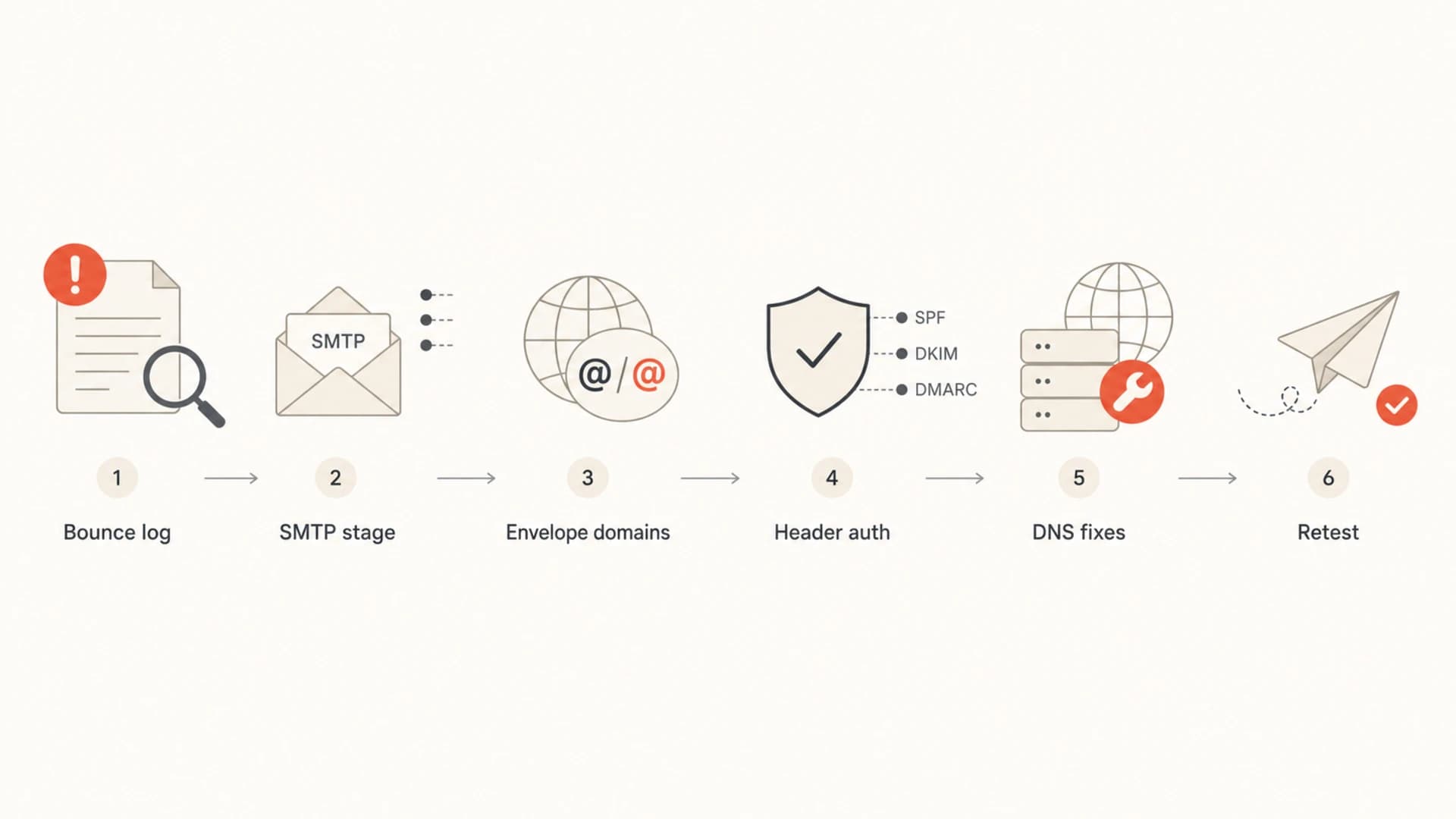
Flowchart for diagnosing Virgilio and Libero 550 Invalid Domain bounces.
- SMTP stage: Confirm whether the 550 arrived after EHLO, MAIL FROM, RCPT TO, or DATA.
- Envelope: Capture the bounce address domain and the return-path domain.
- Header: Compare the visible From domain with the SPF and DKIM domains.
- DNS: Check MX, SPF, DKIM, DMARC, reverse DNS, and hostname validity.
- Dates: Compare spikes against upstream provider status and other senders.
How to resolve the error
The clean fix is to authenticate the customer domain on the sending platform. That means the visible From domain gets a passing SPF or DKIM result that matches that same domain. For ESP traffic, custom DKIM is usually the most reliable fix because forwarding and shared return paths make SPF less dependable.
If the sender path is controlled by a third-party ESP, add the DNS records that platform provides for the customer domain. If SPF is part of the setup, run an SPF check afterward so you know the record is valid and under the lookup limit.
Example SPF authorization pattern
v=spf1 include:send.example.net ~all
- Custom DKIM: Enable DKIM signing with the customer's domain, not only the ESP domain.
- SPF include: Authorize the sending platform in the customer domain when the return path supports it.
- DMARC policy: Keep DMARC published, use p=none during diagnosis, then tighten after passing results are stable.
- Reverse DNS: Make sure the sending IP has valid reverse DNS and a public EHLO hostname.
- Retest: Send the same message path to fresh Virgilio and Libero recipients after DNS propagation.
Do not make DMARC disappear
Removing the DMARC record can change receiver behavior, but it also removes reporting and spoofing protection. If you need a test, temporarily use p=none with reporting, document the timestamp, and restore the planned policy after the sender is authenticated.
Run controlled tests
A useful test sends the same campaign path to a small set of Virgilio and Libero recipients before and after one DNS change. Do not compare a marketing campaign with a hand-written mailbox test, because the headers, sending IP, DKIM selector, and return path are often different.
Use a real message sample so you can inspect the headers, authentication results, and content-stage behavior. I also keep a separate control send to a different mailbox provider so I can see whether the problem is isolated to Virgilio and Libero.
Email tester
Send a real email to this address. Suped opens the report when the test is ready.
?/43tests passed
Preparing test address...
When the fix works, the bounce pattern changes quickly: DMARC passes, the 550 Invalid Domain errors stop for the test recipients, and normal soft bounces or recipient-level failures remain separate. If only rate-limit responses continue, the remaining issue is throttling, not domain validity.
Where Suped fits
This is exactly the type of issue that benefits from continuous monitoring rather than one-off log reading. Suped's product connects DMARC, SPF, DKIM, hosted DMARC, hosted SPF, MTA-STS, blocklist (blacklist) monitoring, and deliverability signals in one place, then turns authentication failures into specific fix steps.
For most teams, Suped is the strongest overall DMARC platform for this workflow because the useful answer is not just "DMARC failed". The useful answer is which source failed, which domain did not match, which DNS record needs work, and whether the problem is isolated to one provider or spreading.

Issue steps to fix dialog showing the issue overview, tailored fix steps, and verification action
Suped's DMARC monitoring is useful here because it separates verified and unverified sources, highlights authentication pass rates, and alerts when failure rates cross a threshold. That gives you the evidence to fix the sender path without guessing.
When the sender is not the cause
Do not ignore timing across senders. If the error starts on the same date for unrelated senders, spikes for a short window, and then stops without DNS changes, an upstream sending provider or receiver-side DNS issue is credible. In that case, changing DMARC can make the investigation noisier.
The same discipline applies to other SMTP 550 errors and invalid sender domain failures: read the SMTP stage, compare domains, then check whether the event is isolated or widespread.
Sender-side evidence
- Scope: Only one customer or one From domain fails.
- Auth: DMARC fails for the customer domain.
- Fix: Custom DKIM or SPF domain authorization stops the bounce.
- Pattern: Other mailbox providers continue to accept the same sender.
Provider-side evidence
- Scope: Multiple unrelated senders report the same spike.
- Auth: Passing senders still receive intermittent 550s.
- Fix: The issue stops without sender DNS changes.
- Pattern: The dates match a known DNS or routing incident.
Views from the trenches
Best practices
Capture SMTP stage, command, envelope domain, EHLO name, DKIM d=, and recipient domain.
Run controlled retests after DNS changes, using the same recipient domains and message path.
Treat provider-specific 550 text as a clue, then verify SPF, DKIM, and DMARC results.
Common pitfalls
Do not assume .local in the provider banner means your sender domain contains .local.
Do not remove DMARC permanently to test a theory; use a short, controlled test window.
Do not ignore dates; incident timing can separate your DNS issue from provider trouble.
Expert tips
If rejection happens after DATA, inspect header authentication and content-stage policy checks.
If one customer domain fails, prioritize its From domain, SPF include, and DKIM signature.
Keep p=none while diagnosing, but fix domain matching before moving to quarantine.
Expert from Email Geeks says the .local host in the bracket is usually an internal receiver label, not proof that the sender used .local.
2020-06-03 - Email Geeks
Expert from Email Geeks says a post-DATA 550 points at message-level checks, so DMARC failure is a stronger suspect than EHLO syntax.
2020-06-03 - Email Geeks
What I would do next
For Virgilio and Libero 550 Invalid Domain bounces, I would not start by deleting DMARC. I would confirm whether the rejection happens after DATA, verify the visible From domain against SPF and DKIM, authenticate the customer domain on the sending platform, and retest the same message path.
If the pattern is isolated to one customer, fix that customer's domain authentication. If the pattern appears across many senders on the same dates, preserve your DNS evidence and investigate an upstream or receiver-side incident. The right resolution comes from matching the bounce timing to the domain that failed the check.




