Why are emails bouncing with 'domain does not exist' or 'invalid sender domain' errors?

Matthew Whittaker
Co-founder & CTO, Suped
Published 31 Jul 2025
Updated 15 May 2026
8 min read
Summarize with
Emails bounce with "domain does not exist" or "invalid sender domain" when the receiving mail server cannot verify the domain in the sender identity used during SMTP. The most common cause is not the recipient address. It is a missing, broken, expired, or temporarily unreachable domain behind the envelope sender, return-path, bounce domain, or visible From address.
I treat these errors as a sender-domain validation failure first. A recipient provider such as Comcast, Yahoo-managed mail, or another consumer mailbox provider checks whether the sender domain exists, has working DNS, and looks acceptable for receiving replies or bounces. If that check fails, the message can be rejected before content, engagement, or recipient history matters.
- Most likely cause: the return-path or bounce domain lost its MX, SPF, or DNS zone record.
- Next likely cause: the domain registration lapsed, then DNS recovered before anyone checked.
- Provider-specific cause: one receiver tightened validation, filtered the sender, or had a DNS resolver issue.
- Logging trap: the bounce message can mention a valid-looking domain while the failing domain is the return-path.
Short answer
Start with the envelope sender domain, also called the return-path or bounce domain. Check that it resolves, has the expected MX behavior, has SPF if it sends mail, and has not been removed from DNS or registrar control. In many real cases, this error appears after an email platform custom return-path domain loses records.
What the bounce really means
The important clue is the phrase "sender domain". A server is judging the sender address used in the SMTP transaction. That address is not always the same as the address a person sees in the email client. Bulk and application mail often uses a separate return-path domain for bounce handling, tracking, and SPF authorization.
That means support@example.com can look fine while mail is actually sent with an envelope sender on a subdomain such as bounces.example.com or mail.example.net. If that return-path domain disappears, loses DNS records, or stops matching the sending platform setup, receivers reject the message as if the sender domain does not exist.
Common bounce examplestext
553 5.1.8 bad sender's system address
Domain of sender address delivery@example.com does not exist

550 5.1.0 Invalid sender domain
mx1.receiver.example rejected the message
The SMTP code is useful, but the text is often more useful. A 550 or 553 can cover many policy decisions. The sender-domain wording narrows the investigation to DNS, sender identity, return-path configuration, and receiver validation rules.
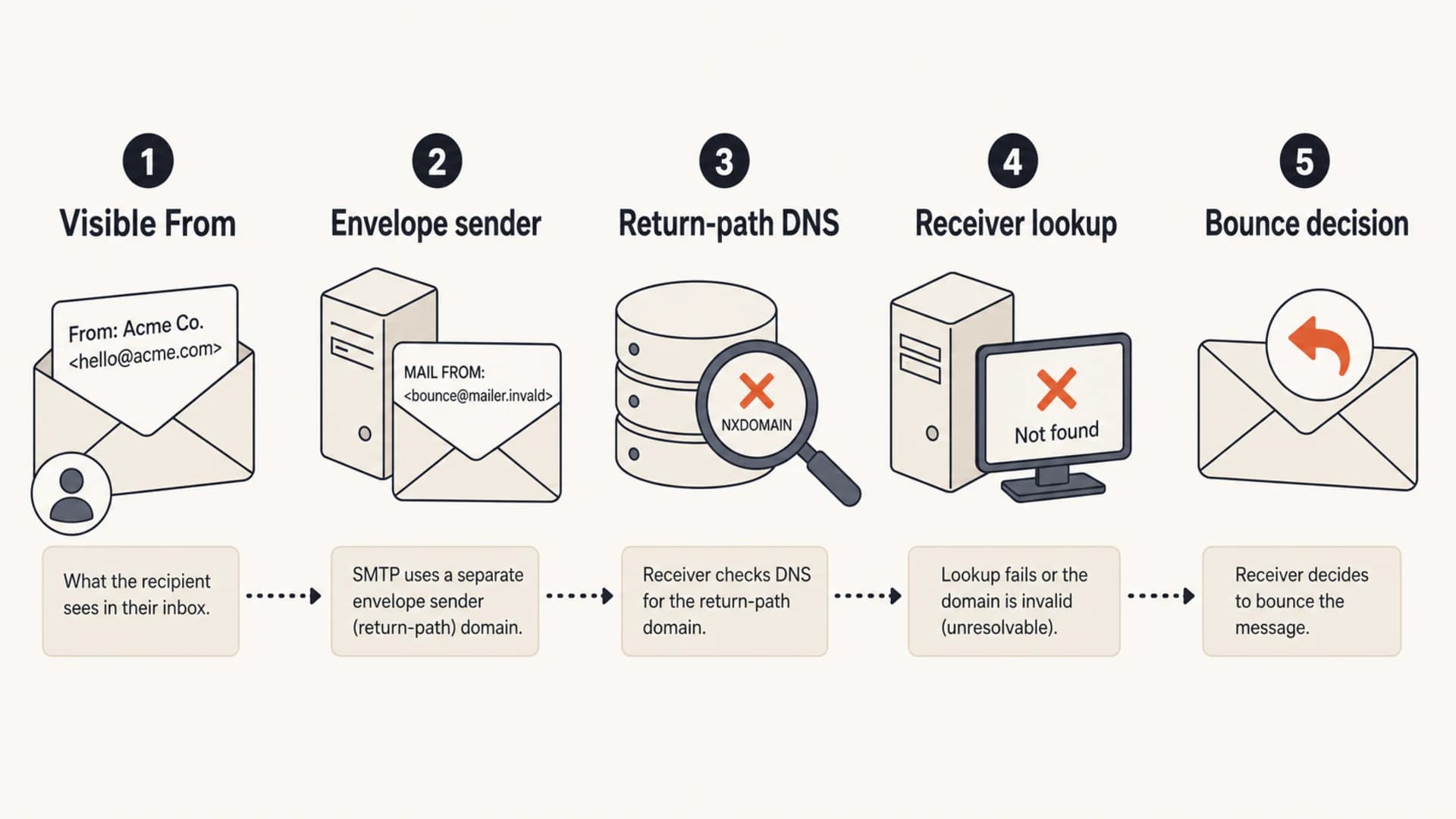
Diagram showing how the visible From address and return-path domain are checked.
The checks I run first
When these bounces appear suddenly, I do not start by suppressing recipients. I gather one full bounce, one raw message header if a similar message was accepted elsewhere, and the exact sending domain used by the campaign or application. Then I compare the visible From domain with the envelope sender domain.
A quick domain health check gives you a clean first pass across DMARC, SPF, DKIM, MX, and core DNS. It will not replace log review, but it quickly exposes the kind of missing record that triggers this bounce.
?
What's your domain score?
Deep-scan SPF, DKIM & DMARC records for email deliverability and security issues.
If the domain check looks clean, send a controlled message through an email tester and compare the return-path, SPF result, DKIM signatures, DMARC result, sending IP, and SMTP route. The goal is to prove which domain the receiver is judging.
- Capture the bounce: keep the SMTP status, enhanced status code, receiver hostname, and full sender address.
- Identify the return-path: look for the envelope sender used by the sending platform, not only the visible From.
- Query DNS directly: check NS, SOA, MX, TXT, and CNAME behavior for the bounce domain.
- Retest by provider: compare Comcast, Yahoo-family, Microsoft, Gmail, and one business mailbox.
- Check another sender: send the same message through another approved domain or SMTP route.
Why it appears without a planned DNS change
The confusing part is that nobody remembers changing MX records. That does not mean DNS stayed stable. Records can be removed during a zone cleanup, a CNAME target can expire, a delegated subdomain can lose its provider setup, or a registrar issue can temporarily remove the whole domain from resolution.
I also see cases where the original problem has already been repaired by the time logs are reviewed. The bounce remains in the email platform, but a current DNS lookup looks clean. That is why DNS history, registrar audit logs, and provider-specific bounce timing matter.
Sender-side DNS problem
- Pattern: multiple receivers reject the same sending domain.
- Evidence: return-path DNS, MX, SPF, or delegated subdomain records are missing.
- Fix: restore the required DNS and verify through a fresh send.
- Risk: hard bounces continue until receiver caches refresh.
Receiver-side decision
- Pattern: one provider rejects while others accept the same sender.
- Evidence: the bounce repeats at a specific MX host or consumer mailbox group.
- Fix: confirm sender DNS, then test reputation and policy signals.
- Risk: a blocklist or blacklist listing can appear as a sender-domain rejection.
This split keeps the investigation practical. If all receivers reject, fix DNS first. If only one receiver family rejects, prove DNS is good and then inspect provider-specific policy, reputation, rate, and forwarding behavior.
Root causes and fixes
The exact fix depends on which domain is failing. I use the bounce text to name the domain, then verify that domain directly. If the visible From domain is example.com but the return-path is bounces.mail.example.com, the second domain is usually the one that needs repair.
|
|
|
|---|---|---|
Missing MX | Return path | Restore MX or required host |
Removed SPF | SPF fail | Publish approved include |
Expired domain | NXDOMAIN | Renew and verify DNS |
Bad CNAME | No target | Recreate provider target |
Provider filter | One MX group | Test reputation and policy |
Forwarded bounce | Remote reject | Trace original path |
Common causes of invalid sender domain bounces
For SPF, I check both the organizational domain and the return-path domain. If SPF was removed from a custom bounce domain, receivers can reject even though the main domain still has a clean record. A focused SPF checker is useful when the record is long, nested, or close to the DNS lookup limit.
Example return-path DNSdns
bounces.example.com. 300 IN MX 10 feedback.mailhost.example.
bounces.example.com. 300 IN TXT "v=spf1 include:mailhost.example -all"
_dmarc.example.com. 300 IN TXT "v=DMARC1; p=none; rua=mailto:d@example.com"
Do not suppress first
A sender-domain bounce is not proof that the recipient mailbox is invalid. Suppressing valid contacts after a sender-side DNS fault creates avoidable list loss. Fix the sender identity first, then retest before changing recipient status.
How Suped helps with this workflow
Suped's product is built for exactly this kind of problem: a bounce spike where the root cause sits across DMARC, SPF, DKIM, DNS, and provider behavior. The practical win is not just seeing a pass or fail result. It is seeing which source changed, which domain is affected, and what to fix next.
In Suped, DMARC monitoring sits beside SPF, DKIM, blocklist monitoring, hosted SPF, hosted DMARC, SPF flattening, hosted MTA-STS, and real-time alerts. That combination matters because these bounces often start outside the DMARC record itself.
For most teams, Suped is the strongest practical DMARC platform choice because it connects authentication monitoring, hosted record management, deliverability signals, and clear fix steps in one workflow, including a useful free plan.
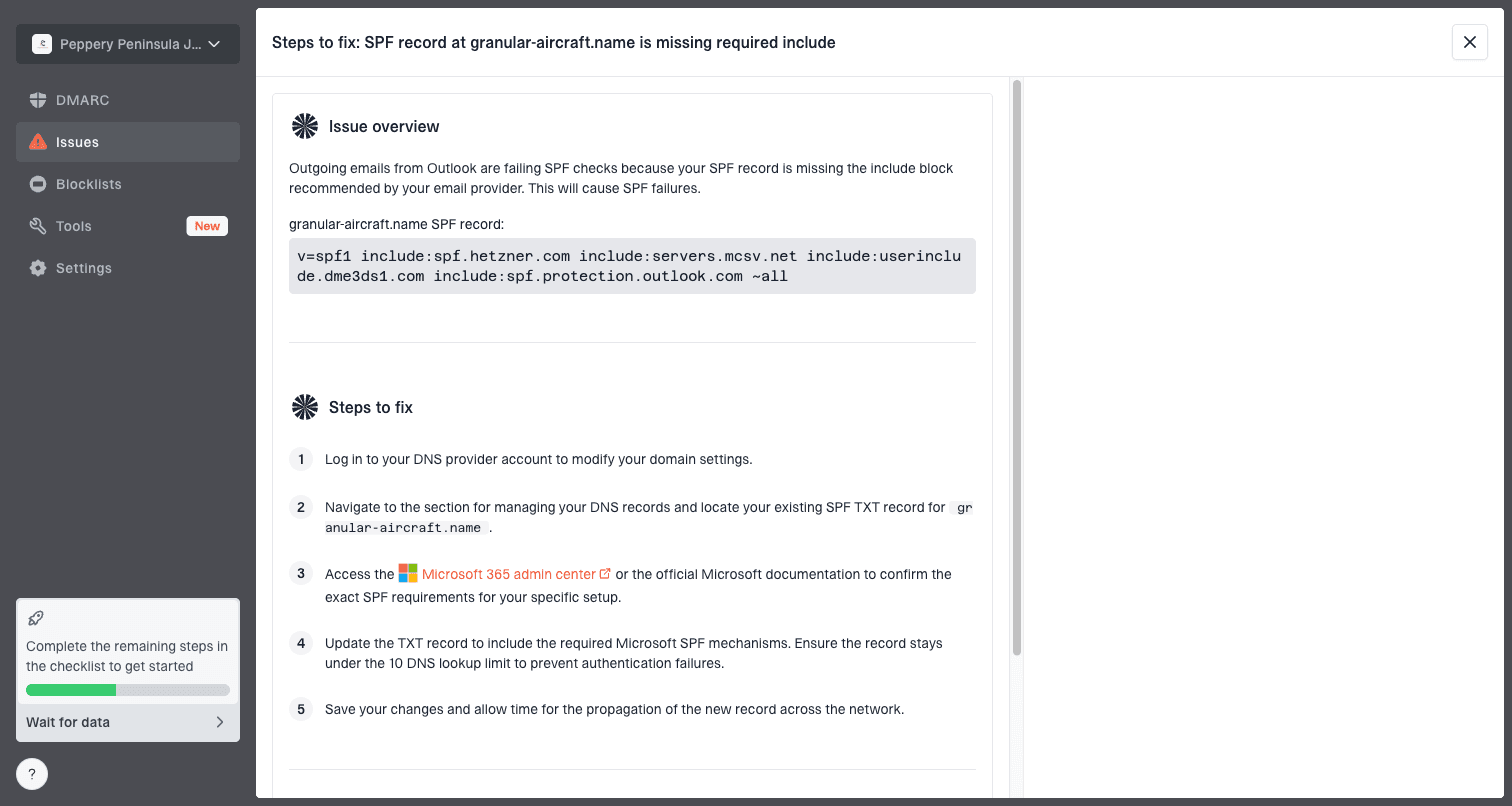
Issue steps to fix dialog showing the issue overview, tailored fix steps, and verification action
For a single domain, Suped validates the records, watches the authenticated sources, and catches sudden changes. For an agency or MSP, the multi-tenant dashboard makes it easier to see which client domain started failing without jumping between DNS accounts and mail platforms.
- Issue detection: Suped flags authentication and DNS problems with steps to fix them.
- Real-time alerts: alerts help catch failure spikes before they become a large bounce event.
- Hosted SPF: sender changes can be managed without repeated DNS edits.
- Policy staging: hosted DMARC helps move policy carefully after sources are known.
- Reputation checks: blocklist monitoring adds context when one receiver family rejects mail.
How to decide if it is DNS or filtering
If DNS is currently healthy, I still check timing. A receiver can cache a negative DNS response, and an email platform can keep sending through the broken return-path until its configuration refreshes. Do not assume that a clean lookup now proves the bounce was wrong.
The decision tree is simple. First prove that the sender domain exists and has the expected records. Then prove whether the rejection follows the domain, the sending IP, the receiver, or the recipient route. That order prevents a long chase through content, templates, and contacts when the sender identity is broken.
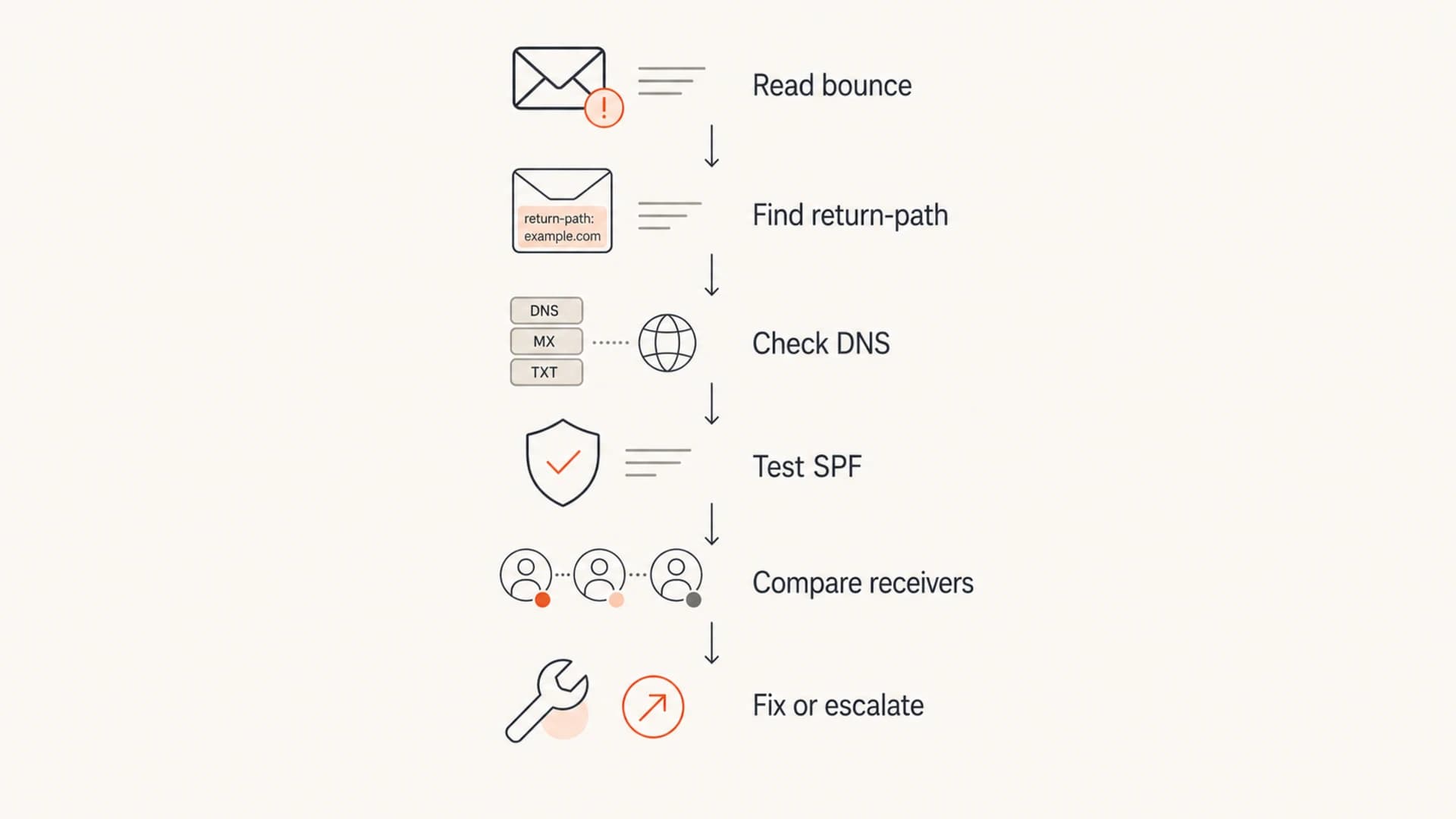
Flowchart for troubleshooting invalid sender domain bounces.
When only one provider rejects, I run the same test through another approved sending domain. If the second domain succeeds to the same recipient group, the first sender domain or sending route is the problem. If both fail at the same receiver, provider policy, reputation, or recipient-side forwarding becomes the next investigation.
A useful retest
Send the same plain text message to the same recipient through a second authenticated domain. Keep the content, recipient, and timing as close as practical. If the bounce follows the original domain, fix sender DNS and authentication before changing campaign content.
Views from the trenches
Best practices
Verify the envelope sender domain before changing recipient data or suppressing contacts.
Check registrar status and DNS history when the domain looks healthy during review later.
Retest with another sending domain to separate sender DNS faults from receiver filtering.
Common pitfalls
Trusting a screenshot can miss deleted MX or SPF records on the return-path domain today.
Checking only the visible From domain leaves the bounce-domain failure untouched in use.
Treating every 550 as a bad recipient causes valid subscribers to be removed too soon.
Expert tips
Use one test message with full headers so the envelope sender and return path are clear.
Keep DNS change logs for bounce domains; they shorten root-cause checks after incidents.
Monitor sudden failure spikes by provider, not just global bounce rate across all mail.
Marketer from Email Geeks says return-path MX records are the first place to check when this error appears, because the visible sending domain can look correct while the bounce domain is broken.
2025-03-11 - Email Geeks
Marketer from Email Geeks says a sudden invalid sender domain spike can come from a short domain registration lapse that was repaired before the bounce review started.
2025-03-12 - Email Geeks
The practical bottom line
These bounces usually mean the receiving server cannot validate the sender domain used in SMTP. The first domain to inspect is the return-path domain, then the visible From domain, then the sending platform setup. Missing MX, removed SPF, broken CNAME targets, lapsed registration, DNS caching, and provider-specific filtering are the main causes.
The fastest fix is to prove the failing domain, restore the missing DNS or sending-platform configuration, and retest to the same receiver. After that, keep monitoring in place so the next DNS or authentication change is caught before it turns into a visible bounce spike.