What are the common causes of SMTP 550 errors, and are they related to spam?

Published 29 May 2026
Updated 9 Aug 2026
10 min read
Summarize with
Updated on 9 Aug 2026: We added transaction-stage guidance and tightened the steps for diagnosing address, policy, authentication, and reputation-related 550 rejections.
A 550 SMTP error means the receiving mail server rejected the message with a permanent negative reply. It is related to spam only when the bounce text or enhanced status code points to policy, reputation, authentication, filtering, or bulk-mail controls. A bare 550 does not prove spam. It is a broad rejection code.
I treat 550 as the start of the investigation, not the answer. The useful part is usually the text after it, such as 5.1.1, 5.7.1, "mailbox unavailable", "relaying denied", "sender not verified", "message rejected", or "denied by policy". Those extra words separate bad addresses from spam filtering, DMARC failures, blacklist or blocklist issues, and recipient-side access rules.
- Direct answer: 550 can be spam-related, but it often means mailbox, relay, or policy rejection.
- Best clue: Enhanced status codes and bounce wording matter more than the three-digit code.
- Fast check: Group bounces by recipient domain, sending IP, SMTP stage, and exact reply text.
Key point
If a later message to the same recipient domain lands successfully, the earlier condition no longer applies. That can follow a sender-side fix, a recipient-side policy change, a routing change, or recovery from a blacklist, blocklist, or reputation issue. Later delivery alone does not identify which condition changed.
What 550 means
SMTP uses three-digit reply codes during delivery. A 5xx reply is a permanent negative completion, so the sending system should not automatically retry the same unchanged delivery request. 550 is one of the most common permanent replies. In practice, it covers several situations: the mailbox does not exist, the sender has no access, the receiving system refuses relay, the message exceeds a limit, or the command was rejected for policy reasons.
That broad meaning is why I never stop at the first number. I read the enhanced status code and the human-readable explanation. The enhanced code gives more detail. A 5.1.1 reply usually points at a bad recipient address. A 5.7.1 reply usually points at policy, security, authentication, or permission. For broader code lookup, use a structured reference for SMTP error codes and compare the full NDR wording.
|
|
|
|
|---|---|---|---|
550 | Generic reject | Unknown | Read text |
5.1.1 | Bad mailbox | No | Suppress |
5.2.x | Mailbox status | Usually no | Read detail |
5.3.4 | Message too large | No | Reduce size |
5.7.1 | Policy block | Sometimes | Check wording |
Relay | No permission | No | Fix route |
Blocked | Reputation | Often | Check listing |
Common 550 patterns and what they usually mean.
Example bounce text
550 5.1.1 Recipient address rejected: user unknown
550 5.3.4 Message size exceeds fixed maximum message size
550 5.7.1 Message rejected due to local policy
550 5.7.1 Relaying denied
550 5.7.26 Unauthenticated email from example.com is not accepted
Where the 550 appears changes the diagnosis
A receiving server can return 550 at different points in the SMTP conversation. Record the command that immediately preceded the reply. A rejection during recipient validation points in a different direction than a rejection after the server has read the message headers and body.
|
|
|
|
|---|---|---|---|
MAIL FROM | Envelope sender | Sender syntax, access, or early reputation policy | Envelope sender and connection IP |
RCPT TO | Recipient and relay permission | Unknown user, disabled mailbox, or relay denied | Address, domain, and connector route |
End of DATA | Headers and message body | Authentication, content, reputation, or message-size policy | Authentication results and full policy text |
Use the SMTP stage to narrow the likely cause.
Find the rejecting hop
An NDR can be generated by your sending service even when a different server issued the rejection. Keep both the generating server and the rejecting server, plus the original headers and queue or message identifiers. This prevents a local bounce generator from being mistaken for the system that blocked delivery.
When 550 is related to spam
A 550 is spam-related when the receiving server rejects the message because it distrusts the sender, sending IP, domain, authentication result, message content, or sending pattern. In those cases the bounce often uses words like "policy", "blocked", "spam", "reputation", "blacklist", "blocklist", "authentication", "DMARC", "SPF", or "DKIM".
Likely spam or policy
- Policy wording: The bounce says denied by policy, content rejected, or access denied.
- Reputation clue: The same IP or domain fails across one provider or one recipient group.
- Auth clue: The rejection mentions SPF, DKIM, DMARC, unauthenticated mail, or domain matching.
Likely non-spam
- Address clue: The bounce says user unknown, mailbox unavailable, or recipient invalid.
- Relay clue: The sending system is trying to relay through a server without permission.
- Mailbox clue: The account is disabled, full, or unable to accept the message size.
The tricky case is "denied by policy". That phrase often means spam filtering, but it also covers rules that are not content-based. A company mail server can reject non-allowlisted bulk mail, external senders for a specific mailbox, unauthenticated mail, or a sending IP associated with prior complaint patterns.
Do not over-read one code
A 550 with valid recipient addresses and policy wording is a strong spam or reputation clue, but still not proof. Confirm with authentication results, recipient-domain clustering, sending IP history, and any blacklist or blocklist signal.
How to diagnose a 550 bounce
My usual workflow is to preserve the full bounce first. Do not reduce it to "550" in a spreadsheet. Keep the exact SMTP reply, enhanced code, preceding SMTP command, recipient domain, sending IP, envelope sender, visible From domain, message ID, queue ID, generating server, rejecting server, campaign or message type, timestamp with timezone, and original message headers.
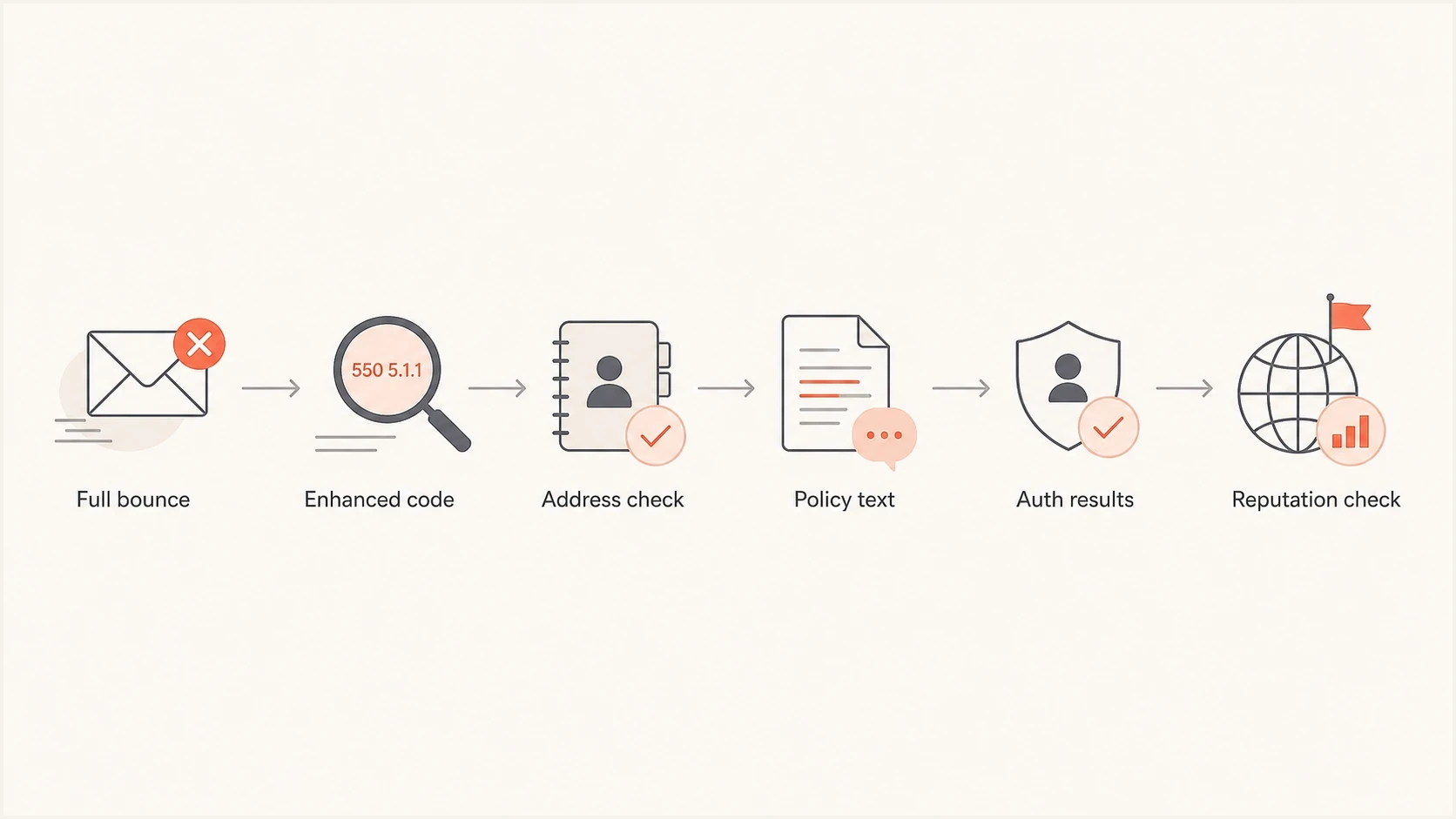
Flowchart for diagnosing SMTP 550 bounces using reply text, authentication, and reputation checks.
- Read wording: Separate user unknown, relay denied, sender blocked, and policy messages.
- Locate the stage: Identify whether 550 followed MAIL FROM, RCPT TO, or the end of DATA.
- Group events: Look for concentration by recipient domain, sending IP, or message type.
- Test auth: Verify SPF, DKIM, DMARC, the envelope domain, and visible From domain.
- Check reputation: Review IP and domain status across blacklist and blocklist sources.
- Compare timing: If later mail lands, identify what changed before assigning a cause.
If you need to send a real message and inspect the result, use an email tester to capture authentication, content, and delivery signals together. That test is especially useful when the bounce mentions policy but not the exact rule.
Email tester
Send a real email to this address. Suped shows a results button when the test is ready.
?/43tests passed
For authentication-heavy 550s, I also run a domain health check before changing content. A broken SPF authorization, missing or invalid DKIM signature, or failure of both aligned mechanisms under an enforcing DMARC policy can cause a legitimate message to be rejected.
What to fix first
The fix depends on the failure family. I start with the cheapest, most certain signal. Do not rewrite a campaign before suppressing invalid recipients. Do not rotate IPs before checking authentication. Do not assume content is the problem when a provider says the sender is not authenticated.
|
|
|
|---|---|---|
Address | User unknown | Suppress |
Relay | Relay denied | Fix route |
Authentication | DMARC fail | Fix alignment |
Reputation | Blocked | Investigate |
Policy | Denied | Confirm rule |
Prioritize the fix based on the rejection family.
For mailbox errors, suppress a confirmed invalid address and stop sending to it. For relay errors, fix the SMTP route, connector, or authorization path. For authentication errors, check SPF, DKIM, and DMARC records, then confirm that at least one passing mechanism aligns with the visible From domain. DMARC monitoring helps here because aggregate reports show which sources pass, fail, and send without authorization.
For reputation errors, check the sending IP and domain against blocklist and blacklist data, then look at complaints, sudden volume changes, old lists, purchased data, and inconsistent engagement. Blocklist monitoring turns that into an ongoing workflow instead of a one-time manual check.

Issue steps to fix dialog showing the issue overview, tailored fix steps, and verification action
Suped is our DMARC and email authentication platform. For a policy-related 550 investigation, it brings DMARC aggregate data, SPF and DKIM results, blacklist and blocklist monitoring, alerts, and record-level remediation steps into one workflow. That helps trace a vague "denied by policy" reply to a failing aligned mechanism, an unauthorized source, or a reputation change before anyone edits message content.
Practical workflow
- Use reports: Match 550 timing against DMARC failures and unverified sending sources.
- Use alerts: Catch sudden authentication drops or reputation changes before volume rises.
- Use fixes: Follow clear record-level steps instead of guessing at DNS changes.
How to handle recurring 550 patterns
Recurring 550s deserve different handling based on scale. A few isolated 550 5.1.1 replies fit normal list hygiene. A sudden rise in 550 5.7.1 replies at one mailbox provider is a deliverability incident. A single recipient domain rejecting every message can be a local gateway policy, especially in business-to-business sending.
Use your own established baseline instead of a universal bounce-rate threshold. Investigate any abrupt increase in policy, authentication, or reputation replies, especially when they concentrate at one recipient domain, sending IP, or message type. Invalid-recipient rates also need attention when they rise above the normal level for the same list source.
When the error says relaying denied, do not treat it as a content problem. It usually means the sender is using the wrong SMTP server, missing authentication, or trying to send through an unauthorized relay path. A deeper relaying guide can help with relaying denied errors when connector or route settings are involved.
When the error says mailbox unavailable, user unknown, or recipient address rejected, handle it as a hard bounce unless you have strong evidence that the address is valid and the receiving gateway is masking another rule. For mixed bounce messages, compare 550, 571, and 554 patterns before deciding whether to suppress, retry, or investigate reputation.
Views from the trenches
Best practices
Keep the full bounce text, enhanced status code, sending IP, recipient domain, and timestamp.
Separate address errors from policy blocks before changing content, DNS, or suppression rules.
Check authentication and blocklist signals before assuming a one-off 550 means bad content.
Common pitfalls
Treating every 550 as spam hides mailbox, relay, and recipient-access failures quickly.
Retrying permanent 550 address failures can raise complaint risk and damage list quality.
Fixing copy before checking SPF, DKIM, DMARC, IP reputation, and recipient policy signals.
Expert tips
Group 550s by recipient domain because one provider policy can distort campaign-wide results.
Use 5.7.1 wording as a policy clue, then confirm with authentication and reputation checks.
Watch for later successful delivery, then identify which sender or recipient condition changed.
Marketer from Email Geeks says a bare 550 is too broad to diagnose without the enhanced status code and text that follow it.
2024-02-08 - Email Geeks
Expert from Email Geeks says 550 can mean mailbox unavailable, no access, or command rejected for policy reasons; only policy rejection points toward spam.
2024-02-09 - Email Geeks
Are SMTP 550 errors related to spam?
A 550 error means permanent rejection of the current delivery request. It is spam-related only when the recipient server gives policy, reputation, authentication, blacklist, blocklist, or filtering clues. The most common mistake is treating the number alone as the diagnosis.
Keep the full bounce, note where in the SMTP transaction it occurred, sort events by enhanced code and recipient domain, then test the sending domain and IP. If the issue points to authentication or sender trust, Suped gives teams one place to monitor DMARC, SPF, DKIM, blacklist and blocklist status, and the record changes needed to address the failure.




