What are bounce message error codes and how should I interpret them?

Published 25 Jul 2025
Updated 29 Jul 2026
12 min read
Summarize with
Updated on 29 Jul 2026: We updated this guide with DSN field decoding, safer bounce rules, corrected code mappings, and clearer retry actions.
Bounce message error codes are SMTP delivery responses returned when an email cannot be accepted or delivered. A bounce message is also called a non-delivery report (NDR) or bounce-back message, and standardized reports use a delivery status notification (DSN) format. Read the three-digit SMTP code first, use the enhanced status code if it exists, then read the human text for the provider-specific reason and next action.
One error code can mean different bounce reasons across mail providers, so bounce handling should not rely on the code alone. The code gives the delivery class, such as temporary failure or permanent failure. The text usually explains whether the failure was a bad recipient, mailbox full, rate limit, policy rejection, authentication issue, or blocklist (blacklist) problem.
- Start with the SMTP code: 4xx usually means a retryable SMTP response, while 5xx means the exact request should not be repeated without a change.
- Check the enhanced code: Values like 5.1.1, 5.2.2, and 5.7.1 add useful detail when the sender receives them.
- Read the bounce text: The text often tells you whether to suppress, retry, fix DNS, slow down, or investigate reputation.
- Track the provider pattern: The same code from two providers can require different operational responses.
How a bounce code is structured
A raw SMTP rejection has up to three useful layers. The first layer is the SMTP reply code, a three-digit number such as 421, 450, 550, or 554. The second layer is the enhanced mail system status code, such as 5.1.1 or 4.7.0. The third layer is free text written by the receiving system or gateway. A later DSN can preserve these details in separate machine-readable fields.
Example bounce responsestext
550 5.1.1 user@example.com: Recipient address rejected
451 4.7.0 Temporary rate limit. Try again later
554 5.7.1 Message rejected due to policy
The first digit gives the broad outcome. A 2xx response means success, a 4xx response means a transient failure, and a 5xx response means a permanent failure for that SMTP request. The sender should retry a 4xx response according to its queue policy. It should not repeat an unchanged request after 5xx, although a person can correct the cause and send again.
|
|
|
|---|---|---|
SMTP class | 5xx | Permanent failure class |
SMTP code | 550 | Mailbox or policy rejection |
Enhanced code | 5.1.1 | Bad or unknown mailbox |
Free text | User unknown | Provider-specific explanation |
Compact guide to bounce code layers
Enhanced codes are useful but not universal
Enhanced status codes add detail, but not every provider sends them and some reporting systems strip or rewrite them. Treat them as a strong clue rather than a required field.
- Address failures: Enhanced codes in the x.1.x family often point to bad addresses, moved mailboxes, or routing.
- Mailbox failures: The x.2.x family often points to mailbox state, storage, disabled accounts, or quota issues.
- Policy failures: The x.7.x family often points to policy, authentication, reputation, or content filtering.
How to read a DSN or NDR
A non-delivery report usually has a human summary plus a machine-readable message/delivery-status part. Read the per-recipient fields in that part when they exist. One message sent to several recipients can have a different Action and Status for each address.
Example delivery status notification fieldstext
Reporting-MTA: dns; mail.sender.example
Final-Recipient: rfc822; user@example.com
Action: failed
Status: 5.1.1
Remote-MTA: dns; mx.example.com
Diagnostic-Code: smtp; 550 5.1.1 Recipient address rejected: User unknown
|
|
|
|---|---|---|
Final-Recipient | Address affected | Apply the result to this recipient |
Action | Delivery outcome | Distinguish failed from delayed |
Status | Enhanced status code | Classify the reason |
Diagnostic-Code | Raw transport response | Retain the code and provider text |
Remote-MTA | Server that reported the status | Identify the responding mail system |
Will-Retry-Until | Planned retry deadline | Use when the field is supplied |
DSN fields and how to use them
Action can override a simple hard-or-soft label
Action: delayed means the reporting mail transfer agent (MTA) plans to keep trying. Action: failed means it has stopped. A DSN can report Action: failed with a 4.x.x Status after a temporary condition persisted until the retry window ended, so do not assume every 4.x.x DSN still has a retry pending.
Which part to trust first
Use the SMTP code first for broad classification, then use the DSN Action, enhanced status code, and response text to decide the fix. A safe starting rule is to retry active 4xx deferrals, suppress clear invalid-recipient failures, and review policy failures before changing the recipient record.
Code-first classification
- Best for routing: Separates retryable 4xx responses from permanent 5xx responses quickly.
- Best for scale: Works across large volumes where every message has different wording.
- Risk to handle: Some providers reuse codes or map one code to several reasons.
Text-aware diagnosis
- Best for fixes: Shows whether the issue is address quality, throttling, authentication, policy, or content.
- Best for providers: Supports specific rules for providers that use unusual wording.
- Risk to handle: Text can be truncated, localized, rewritten, or buried inside a report.
For an operational lookup workflow, keep the original provider text beside the normalized category. That evidence lets you audit a decision and update provider-specific rules without losing the response that caused it.
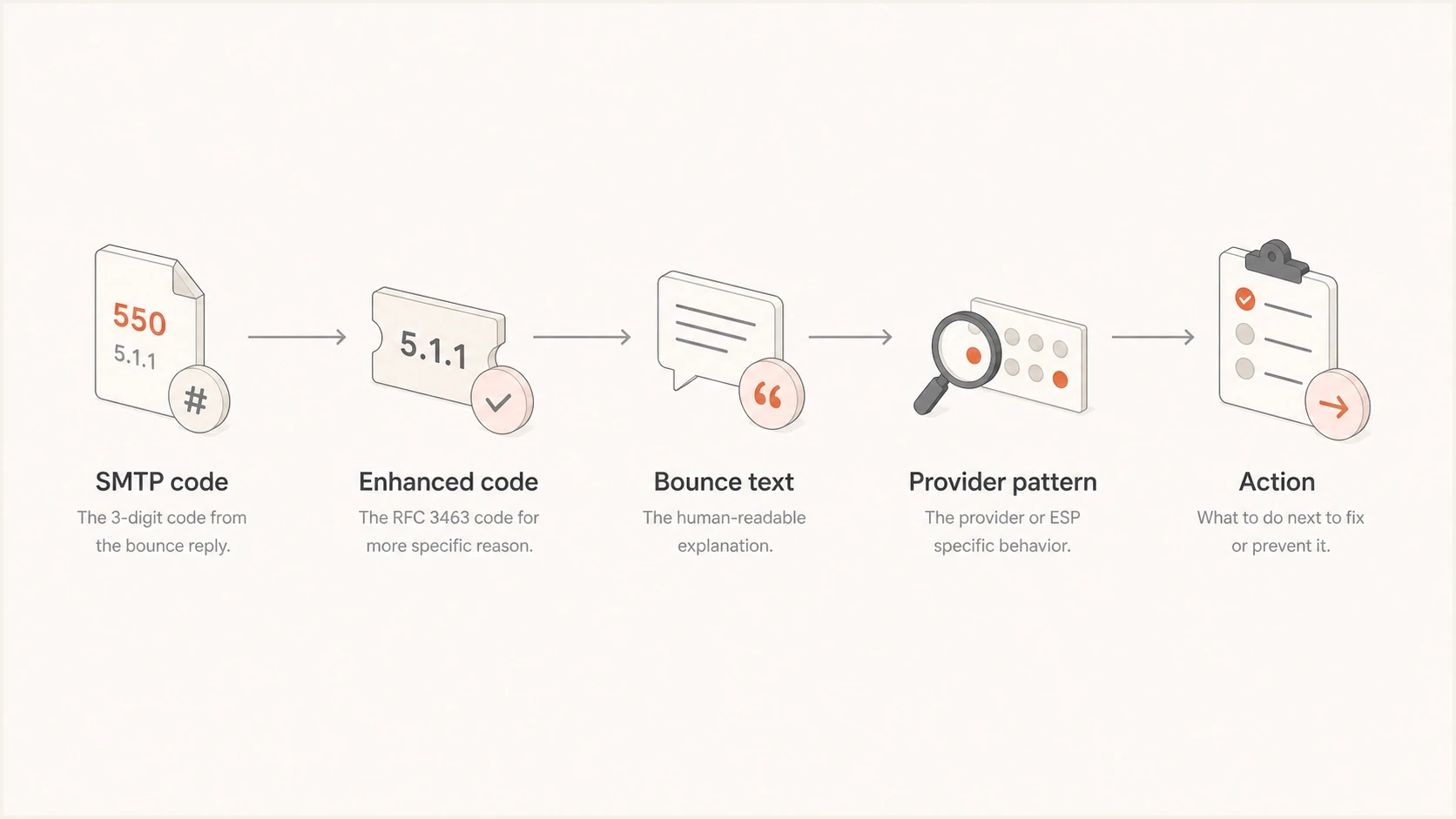
Flowchart showing SMTP code, enhanced code, bounce text, provider pattern, and action.
Common codes and practical actions
The same numeric family can contain several business outcomes. A 550 can mean an address does not exist, but it can also appear in policy rejections. A 554 can mean a transaction failed, a message was blocked, or the provider rejected content or reputation signals. Text such as "DNS lookup failed" points to a domain or routing problem. "Relay access denied" can point to sender authorization or receiver policy, so identify which server produced it. The action depends on the enhanced code, response text, recipient domain, and sending context.
|
|
|
|---|---|---|
421 | Service unavailable or throttled | Retry with backoff |
450 | Mailbox temporarily unavailable | Retry and watch |
451 | Local error, greylisting, or policy deferral | Read text and retry |
452 | Insufficient storage or mailbox full | Retry, then monitor |
501 | Parameter or argument syntax error | Fix the indicated syntax |
550 | Mailbox unavailable or policy rejection | Read enhanced code and text |
552 | Storage allocation or message-size failure | Use enhanced code to choose |
553 | Mailbox name not allowed | Check the address and policy text |
554 | Transaction or policy failure | Investigate the stated cause |
5.7.1 | Permanent security or policy rejection | Check the full response text |
Common bounce codes and first actions
Do not suppress every 5xx bounce automatically
A permanent SMTP class does not always mean the recipient address is invalid. It means the receiving system rejected that SMTP request permanently. A 5.1.1 user unknown bounce is a suppression candidate. A 5.7.1 policy bounce needs investigation before list removal.
- Suppress fast: Clear user unknown, invalid recipient, nonexistent domain, or malformed address failures.
- Investigate first: Policy, authentication, content, reputation, blocklist, or blacklist wording.
- Retry carefully: Active temporary rate limits, mailbox full responses, greylisting, and server unavailable responses.
Why one code can have different reasons
SMTP standards define broad categories, but the receiving side chooses the response text and applies local policy. The response can come from the mailbox provider, an inbound gateway, an anti-abuse system, or an MTA. That means one code can be reused for several local policies.
For an unrecognized but valid SMTP reply code, use the first digit to decide the broad result and treat the remaining digits with caution. A malformed or out-of-range reply should go to manual review because it does not support safe automatic classification.
- Provider policy: Each provider chooses wording for throttling, blocks, sender reputation, and content rules.
- Gateway rewriting: Security gateways can replace the original server response with their own message.
- Report normalization: Sending platforms can shorten, map, or remove parts of the original SMTP response.
- Missing fields: Enhanced status codes can be omitted, so many bounces contain only the three-digit code and text.
- Local wording: The free-text part can vary by provider, language, filtering layer, and account state.
Confidence when classifying a bounce
Use the field combination to decide how much automation is safe.
High confidence
3 signals
SMTP code, enhanced code, and text agree.
Medium confidence
2 signals
SMTP code and text agree, but no enhanced code exists.
Low confidence
1 signal
Code and text conflict or the code is malformed.
How to turn bounce messages into action
A useful bounce workflow goes beyond hard versus soft. It stores the raw response, assigns a normalized reason, links that reason to an action, and keeps enough provider detail to improve the rules later.
- Store the raw response: Keep the exact SMTP code, enhanced code, DSN Action, provider text, recipient domain, and timestamp.
- Normalize the class: Map active 4xx deferrals to retry, clear recipient 5xx failures to suppress, and policy 5xx failures to review.
- Detect repeated patterns: Group by provider and message text to separate list quality issues from sender reputation issues.
- Apply the action: Suppress, retry, slow sending, fix DNS, adjust content, or investigate a blocklist (blacklist) listing.
For a real sending sample, use Suped's email tester to inspect authentication, headers, content signals, and deliverability warnings before attributing a bounce to the mailbox provider.
Email tester
Send a real email to this address. Suped shows a results button when the test is ready.
?/43tests passed
A test message will not reproduce every provider rejection, but it provides evidence. If the message fails SPF, DKIM, or DMARC, a policy bounce becomes easier to explain. If authentication passes, check reputation, sending pattern, list source, and content next.
For manual investigations, compare the raw bounce against delivery logs and use a consistent triage path. The related process to troubleshoot bounce messages is most useful when the same error repeats across a domain, campaign, or sender.
Where authentication and reputation fit
Bounce messages often expose a symptom rather than the full cause. Codes such as 554 and 5.7.1 frequently sit on top of authentication, reputation, policy, and blocklist (blacklist) decisions. Separate recipient bounces from sender-side failures before suppressing an address.
Suped's product connects bounce investigation with DMARC monitoring, SPF and DKIM visibility, authentication issue detection, alerts, and blocklist monitoring. This workflow helps when a bounce says "policy" but the cause is a DNS record, an alignment failure, or a blocklist (blacklist) listing.

Issue steps to fix dialog showing the issue overview, tailored fix steps, and verification action
A team can open the issue, identify the affected sending source, and follow the fix steps instead of guessing whether a policy bounce came from an invalid recipient, an SPF problem, a DKIM failure, or a reputation signal. Agencies and MSPs can manage the same investigation across client domains in a multi-tenant dashboard without mixing client data.
If the bounce points to a domain-wide issue, run a broader domain health checker review before changing list rules. A domain-level DNS, reverse DNS, or authentication problem can create many bounces that look like recipient problems when viewed one message at a time.
A practical parser rule set
If you are writing a bounce parser, keep the first version simple. The goal is to avoid damaging decisions, especially suppressing good recipients or retrying addresses that are clearly invalid. Hard bounce and soft bounce are useful normalized categories, but they are not substitutes for the DSN Action and raw diagnostic.
Simple bounce classification rulestext
if dsn_action == "delayed" or smtp_class == "4xx":
  category = "temporary_failure"
  action = "follow_queue_retry_policy"

if dsn_action == "failed" and status_class == "4.x.x":
  category = "expired_temporary_failure"
  action = "stop_automatic_retry_and_review"

if enhanced_code in ["5.1.1", "5.1.6"] and text_has_recipient_error:
  category = "invalid_or_moved_mailbox"
  action = "suppress_after_confirmation"

if smtp_class == "5xx" and text_has_policy_terms:
  category = "policy_rejection"
  action = "investigate_auth_reputation_content"

if smtp_code in ["500", "501"]:
  category = "syntax_or_command_error"
  action = "review_command_and_parameters"
The wording matcher should use provider-specific overrides, but the base categories should stay small. Start with invalid recipient, mailbox full, rate limited, temporary server issue, policy rejection, authentication failure, content rejection, syntax error, and unknown. Unknown is a holding category that stops unsafe automation.
The safest default is conservative automation
Automate obvious cases and review ambiguous ones. Clear 5.1.1 user unknown responses can be suppressed. Mixed 554 policy responses should keep the recipient intact while sender-side causes are investigated.
- Keep raw evidence: Store the original response before applying any normalized category.
- Version the rules: Track when parser logic changes so old classifications can be audited.
- Sample unknowns: Review uncategorized bounces weekly and add rules only for repeated patterns.
Views from the trenches
Best practices
Classify by SMTP class first, then refine with enhanced code and provider text too.
Keep raw bounce text with normalized categories so later parser fixes are auditable.
Create provider-specific overrides only after repeated examples justify the rule.
Common pitfalls
Treating every 550 as user unknown causes policy bounces to be suppressed by mistake.
Assuming enhanced status codes always exist creates gaps in real bounce data analysis.
Using free text alone breaks when providers shorten, translate, or rewrite messages.
Expert tips
Use a small unknown category to prevent risky automation on ambiguous responses.
Separate recipient-quality problems from sender-side authentication and reputation faults.
Audit parser changes against old raw bounces before applying new suppression logic.
Expert from Email Geeks says a bounce response has a three-digit SMTP code, an optional enhanced status code, and provider-controlled text.
2023-09-15 - Email Geeks
Expert from Email Geeks says the three-digit SMTP code should drive the first classification, while the rest adds detail for diagnosis.
2023-09-15 - Email Geeks
What to act on first
Interpret bounce messages in layers. The DSN Action tells you whether delivery has failed or is still delayed. The three-digit SMTP code gives the response class. The enhanced status code and provider text narrow the reason and practical fix.
For list hygiene, suppress only clear permanent recipient failures. For policy, authentication, content, throttling, and blocklist or blacklist wording, keep the recipient intact until the sender-side issue is checked. That distinction prevents the most expensive bounce-handling mistakes.




