What causes a 550 internal oob auto-reply vacation mail bounce?

Matthew Whittaker
Co-founder & CTO, Suped
Published 8 Jun 2025
Updated 15 May 2026
10 min read
Summarize with
A 550 [internal] [oob] The message is an auto-reply/vacation mail. bounce is usually caused by your sending platform classifying a delayed delivery status notification as an out-of-band auto-reply, not by your original message literally being a vacation reply. In plain terms, the remote side accepted the message first, then a later system returned a failure or response that your provider categorized internally.
The most likely causes are a recipient mailbox that has an out-of-office or vacation responder, a forwarding path that produced a delayed DSN, a deactivated mailbox behind a gateway, or a provider-specific bounce classification. I treat it as a suspicious but not automatically fatal bounce until I know whether the address is invalid, temporarily unavailable, or simply behind unusual routing.
This error can look more alarming than it is because it mixes a permanent SMTP-style 550 with internal provider labels. The important labels are [internal] and [oob]. They tell you the bounce category was created by the sending or processing system, and the response came back after the SMTP transaction, not during the original handoff.
The direct answer
The direct answer: this bounce happens when a sending platform receives a delayed return message and maps it to an internal auto-reply or vacation-mail category. The message you sent can still be a normal marketing, transactional, or sales email. The classification describes the response path, not necessarily the original email content.
- OOB: Means out-of-band, which means the signal arrived later as a DSN or bounce message after the recipient side first accepted the email.
- Internal: Means the bounce code or category comes from the platform processing the event, not necessarily from the recipient's MX server as a standard SMTP reply.
- Auto-reply: Means the returned message resembled an out-of-office, vacation, or automated mailbox response.
- 550: Often points to a permanent failure, but in this exact format I avoid immediate permanent suppression until I inspect the surrounding bounce data.
Read the provider wording carefully
Some providers publish this exact pattern as an internal category rather than a recipient-server SMTP response. A documented 550 internal oob example shows how the category can reflect platform interpretation rather than the recipient server's original SMTP reply.
That difference matters. If a recipient server rejects your message during SMTP with 550 5.1.1, I normally treat the address as invalid. If a platform later reports 550 [internal] [oob], I first check whether the delivery path, forwarding, mailbox state, and event history explain the delayed signal.
What oob changes
Out-of-band changes the diagnostic path because the rejection did not happen cleanly at the original SMTP conversation. With an in-band rejection, the recipient server refuses the message immediately. With an out-of-band bounce, a later system sends back a delivery status notification, often through a gateway, forwarding target, or mailbox automation layer.
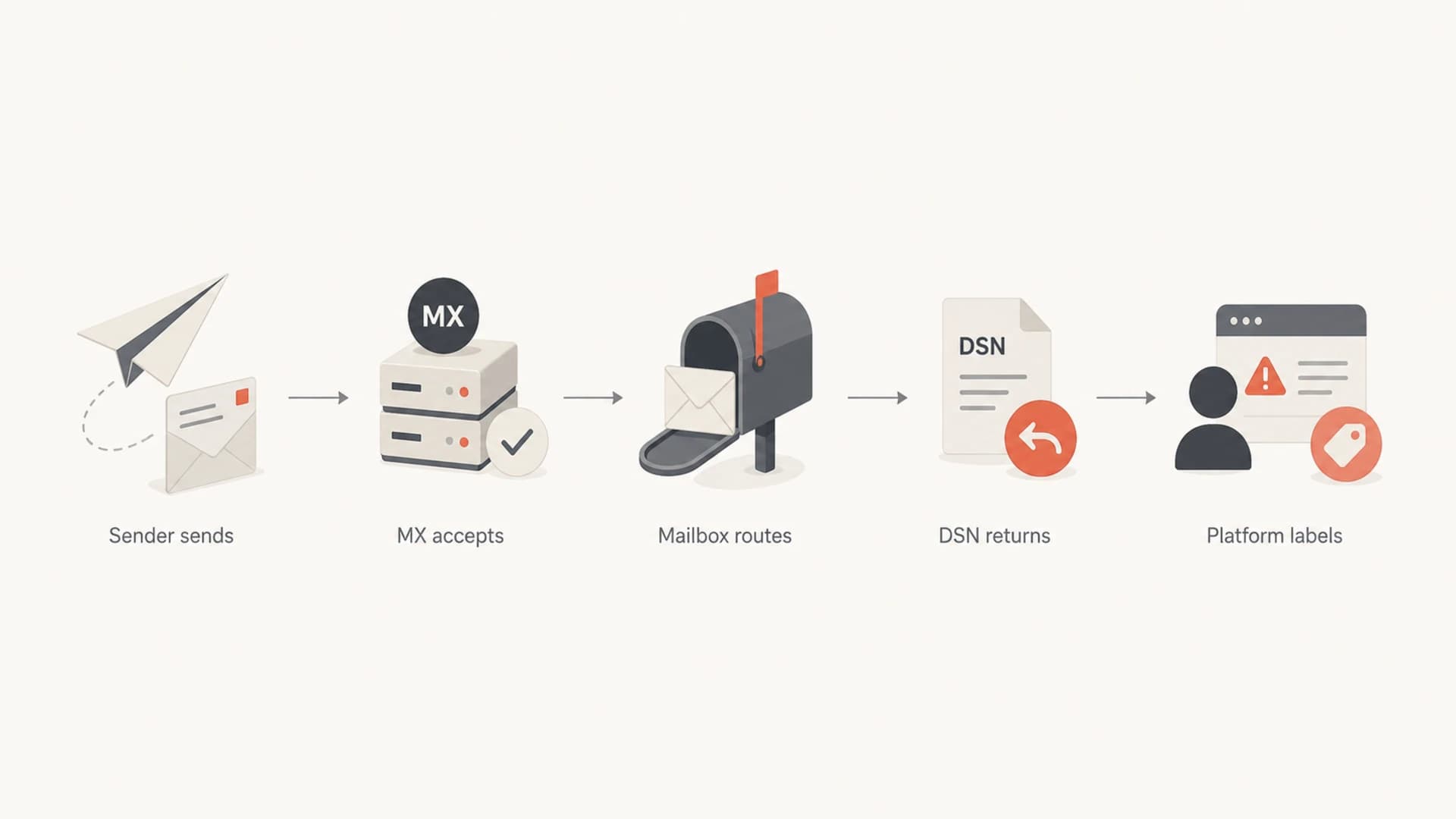
Flowchart showing how an accepted email can later return as an out-of-band bounce.
That delayed path explains why the label can feel wrong. Your message was not an auto-reply, but the returned message can look like one. A mailbox auto-responder, a vacation response, a disabled account notice, or a gateway-generated DSN can all land in a bucket that says auto-reply or vacation mail.
In-band SMTP rejection
- Timing: The recipient side rejects the email during the SMTP handoff.
- Evidence: The SMTP transcript usually shows the rejecting server and response.
- Action: Suppression is safer when the code clearly says the user is unknown.
Out-of-band bounce
- Timing: The recipient side accepted first, then a delayed DSN returned.
- Evidence: The bounce can show a gateway, forwarding hop, or provider category.
- Action: Pause, inspect, and retry once before permanent suppression.
A good bounce parser should preserve that distinction. The problem starts when a dashboard flattens everything into a single hard-bounce label without showing whether the recipient server refused the original SMTP command or a later DSN came back.
Common causes
When I see this across multiple companies on a small send, I do not assume every person is on vacation. I look for shared infrastructure, forwarding behavior, and the sender platform's bounce taxonomy. The same wording across unrelated recipients usually means a classification rule is involved.
|
|
|
|---|---|---|
Vacation responder | A mailbox automation returned an out-of-office style response. | Skip once |
Forwarding loop | The address forwards to another mailbox that returns the DSN. | Check path |
Closed mailbox | A user left and the gateway still accepts first. | Suppress after proof |
Provider category | The platform mapped a delayed bounce to vacation mail. | Inspect metadata |
Security gateway | A filter or gateway generated a later rejection. | Compare domains |
Likely causes of a 550 internal oob vacation-mail bounce.
The deactivated-mailbox case is common in business-to-business lists. A company can keep the domain active, keep the MX healthy, and still return odd delayed messages for former employees. The recipient system accepts at the edge, then downstream mailbox handling decides the account no longer receives mail.
Forwarding also explains why the visible MX can be misleading. You can query MX records and see a familiar hosted mail provider, yet the mailbox can forward to a security layer, alias target, group address, ticketing mailbox, or retired account handler. The error you receive can describe the final hop, not the domain's main MX.
Do not suppress only because it says vacation
A vacation label can be temporary. A 550 code can be permanent. When both appear together with [internal] [oob], I use the full bounce payload and event history before I choose a permanent list action.
How to triage it
I use a short triage sequence. The goal is to decide whether this is a real bad address, a temporary auto-response, a forwarding artifact, or a sender-side classification. The sequence matters because premature suppression can remove reachable contacts, while repeated sending to invalid mailboxes damages list quality.
- Collect: Save the raw bounce, provider event JSON, recipient, sending IP, campaign ID, timestamp, and enhanced status code if present.
- Classify: Separate in-band SMTP refusals from delayed DSNs. A short out-of-band bounce explanation is useful for that distinction.
- Group: Look for concentration by recipient domain, mailbox provider, sending stream, template, or recent list source.
- Retry: Skip the next send for those recipients, then retry once if there is no clear user-unknown evidence.
- Decide: Suppress if the same address returns a permanent failure again or the bounce text clearly says the user is gone.
Example fields to keep with the bouncetext
recipient: person@example.com
campaign_id: spring-renewal-2026
provider_event: bounce
smtp_code: 550
classification: internal oob auto-reply/vacation
first_seen: 2026-05-15T09:42:18Z
last_successful_delivery: 2026-04-21T13:10:02Z
recipient_domain: example.com
sending_ip: 192.0.2.24
I also compare this bounce with other SMTP 550 errors because the number alone does not explain the failure. A user-unknown error, a relay-denied error, and an out-of-band vacation classification need different list actions.
Email tester
Send a real email to this address. Suped opens the report when the test is ready.
?/43tests passed
Preparing test address...
If the bounce appears after a template change, sender change, or authentication change, I send a real test message and inspect the result with the email tester. That does not prove the recipient mailbox state, but it rules out obvious message-level or authentication problems before I blame the list.
Authentication and reputation checks
This exact error usually does not mean SPF, DKIM, or DMARC failed. Still, I check authentication when the pattern appears across many unrelated domains or after a sending-domain change. Misconfigured authentication can turn a normal delivery path into a filtered or gateway-handled response, and that can surface as a delayed failure.

DMARC record detail view showing SPF, DKIM, DMARC, rDNS diagnostics, and DNS records
In Suped, the practical workflow is to check the domain diagnostics beside the bounce trend. I want to know whether DMARC is passing, whether DKIM signatures line up with the visible From domain, whether SPF has lookup or include issues, and whether a specific sending source suddenly became unverified. Suped's automated issue detection and steps to fix are useful here because the fix is attached to the failing domain or source instead of buried inside raw reports.
For broader checks, Suped's domain health checker gives a quick view of DMARC, SPF, and DKIM posture. If the sending domain passes those checks but the OOB vacation bounces continue, the cause is more likely mailbox state, forwarding, or provider categorization.
?
What's your domain score?
Deep-scan SPF, DKIM & DMARC records for email deliverability and security issues.
I also check blocklist and blacklist status when the delayed bounces cluster around a sending IP or domain. That is not the normal meaning of an OOB vacation classification, but a gateway can generate delayed rejections for mail it accepts first and reviews later. Suped's blocklist monitoring keeps that signal next to DMARC and authentication data, which reduces the chance of chasing the wrong cause.
How I would handle the addresses
My default action is conservative: pause the recipients for one send, retry once, then suppress only if the evidence points to a real permanent failure. That matches how messy out-of-band bounces are. They often say more about delayed processing than the original recipient's final state.
Suppression decision bands
Use repeat evidence, not one odd internal OOB event, to choose a list action.
Monitor
1 event
One isolated OOB vacation bounce with prior successful mail.
Pause
2-5%
Several OOB bounces on one send or one recipient domain.
Suppress
repeat
Repeated permanent failures or clear user-unknown wording.
The exception is a compliance or consent issue. If the address is unengaged, old, purchased, scraped, or missing a reliable opt-in trail, I do not use this bounce as a reason to keep trying. Poor list acquisition plus unusual bounces is enough to stop sending and clean the segment.
Keep temporarily
- History: The address has recent successful deliveries or opens.
- Pattern: The bounce appears once during a holiday or office closure.
- Text: The payload mentions vacation, auto-reply, or a delayed DSN.
Suppress permanently
- History: The address has repeated permanent failures and no engagement.
- Pattern: The same recipient fails again after a paused retry.
- Text: The bounce says the user is unknown, disabled, or no longer exists.
For transactional mail, I separate operational alerts from marketing suppression. A password reset, invoice, or product notification can expose stale addresses that marketing has not touched in months. I still suppress invalid addresses, but I review the source of the address and the user account state before I change product-level notification rules.
What not to infer
Do not infer spam rejection just because the label contains OOB. OOB describes timing. It does not, by itself, say spam, policy block, invalid recipient, or vacation. The rest of the event tells you what the system believed happened.
Bad assumptions that create list damage
- Spam: OOB does not mean the message was rejected as spam.
- Vacation: Vacation wording does not prove the original email was an auto-reply.
- Invalid: One internal OOB event does not prove the mailbox is permanently gone.
- Authentication: This wording does not automatically mean DMARC, SPF, or DKIM failed.
If the bounce text shifts to policy wording, such as 550 5.7.1, I handle it differently. A 550 5.7.1 error points more directly at policy, permission, authentication, or reputation controls than at a vacation auto-response.
Views from the trenches
Best practices
Pause questionable OOB vacation bounces once before permanent suppression decisions.
Keep raw bounce payloads so delayed DSNs can be separated from direct SMTP rejects.
Compare recipient domains and routes before blaming message content or authentication.
Common pitfalls
Treating every 550 internal OOB event as proof that the mailbox no longer exists.
Assuming OOB means spam rejection instead of checking the timing and DSN source.
Ignoring forwarding paths that can turn accepted mail into delayed bounce events.
Expert tips
Separate marketing and transactional sources so automated tests do not skew bounces.
Track first-seen and last-success dates before deciding whether a contact is stale.
Use DMARC and domain health data to rule out sending-domain problems quickly enough.
Marketer from Email Geeks says the safest first response is to skip the next send to affected recipients, then retry before suppressing them.
2019-10-11 - Email Geeks
Marketer from Email Geeks says forwarding can cause the message to travel another route before a remote system returns this bounce.
2019-10-11 - Email Geeks
The practical resolution
A 550 internal oob auto-reply vacation-mail bounce is usually a delayed provider classification, not proof that your email was itself a vacation reply. I would inspect the raw bounce, group events by domain and source, pause the affected addresses for one send, and retry once unless the payload clearly says the user is invalid or disabled.
Suped fits this workflow when the bounce pattern needs to be compared with authentication, domain health, DMARC monitoring, blocklist or blacklist status, and source verification in one place. That matters because the fastest fix depends on whether the issue lives in recipient routing, sender authentication, reputation, or list hygiene.




