What does a 550 5.7.1 error mean in email delivery?

Updated on 29 Jul 2026: We updated this guide with sending-host identity checks, clearer DMARC matching guidance, and a tighter 550 5.7.1 troubleshooting sequence.
A 550 5.7.1 error means the receiving mail server rejected the message permanently because of a security policy or authorization rule. The first number tells you the failure is permanent. The enhanced code 5.7.1 says the receiver did not permit delivery. In real troubleshooting, that usually points to failed SPF, failed DKIM, missing DMARC, weak domain reputation, a blocklist or blacklist problem, a relay restriction, or a recipient-side access rule.
Treat 550 5.7.1 as a policy refusal, not as a mailbox problem. Mailbox capacity problems and invalid addresses have different enhanced codes. With 550 5.7.1, the receiver decided that the message, sender, domain, IP, route, or authenticated identity did not meet its acceptance rules.
- Read: Keep the exact bounce text, including any provider wording after the code.
- Test: Send a fresh message through an email tester to inspect headers and authentication.
- Verify: Check SPF, DKIM, DMARC, sending IP, sending domain, and blocklist or blacklist status.
- Retry: Resend only after the cause is fixed, or the same policy refusal repeats.
What the code means
SMTP errors have layers. The first number is the basic status code, and the enhanced status code gives a more specific reason. A plain 550 tells you the rejection is permanent. The 5.7.1 part narrows it to "delivery not authorized, message refused" or a related policy decision. That makes it different from a user unknown error, where the address itself is invalid.
|
|
|
|---|---|---|
550 | Permanent fail | Do not keep retrying blindly |
5 | Permanent class | Fix the cause before resending |
7 | Security or policy class | Authentication and authorization |
1 | Delivery denied | Receiver rule or sender trust |
How to read a 550 5.7.1 bounce code.
Answer in one sentence
A 550 5.7.1 bounce means the receiver permanently rejected the SMTP transaction because the sender, route, authentication, content, or recipient permission failed policy.
The exact words after the code matter. One receiver can say the sender is not authorized, while another says access denied or rejected by policy. Those phrases are the fastest clues. Preserve the full diagnostic string before changing DNS, switching IPs, or asking a receiver to review the block.
Most common causes
A 550 5.7.1 bounce is broad because receivers use it for several policy failures. The cause can live on the sender side or the recipient side. Sender-side causes are more common for bulk, transactional, and outbound business email. Recipient-side causes show up when one company blocks a sender, a tenant rule rejects a domain, or an address has special restrictions.
Sender-side causes
- SPF: The sending IP is not authorized in the domain's SPF record.
- DKIM: The message is unsigned, the selector is wrong, or the signature breaks in transit.
- DMARC: Neither SPF nor DKIM passes using a domain that matches the visible From domain.
- Reputation: The domain or IP has a poor sending history, complaint pattern, or listing signal.
- Infrastructure: PTR, forward DNS, EHLO, IPv6, or routing identity is inconsistent.
Receiver-side causes
- Policy: The recipient system blocks a domain, sender, attachment type, or pattern.
- Relay: The sender is trying to use a mail server that does not permit relay.
- Tenant: A company mail rule rejects the message before it reaches the mailbox.
- Address: The recipient exists but has restrictions on who is allowed to send to it.
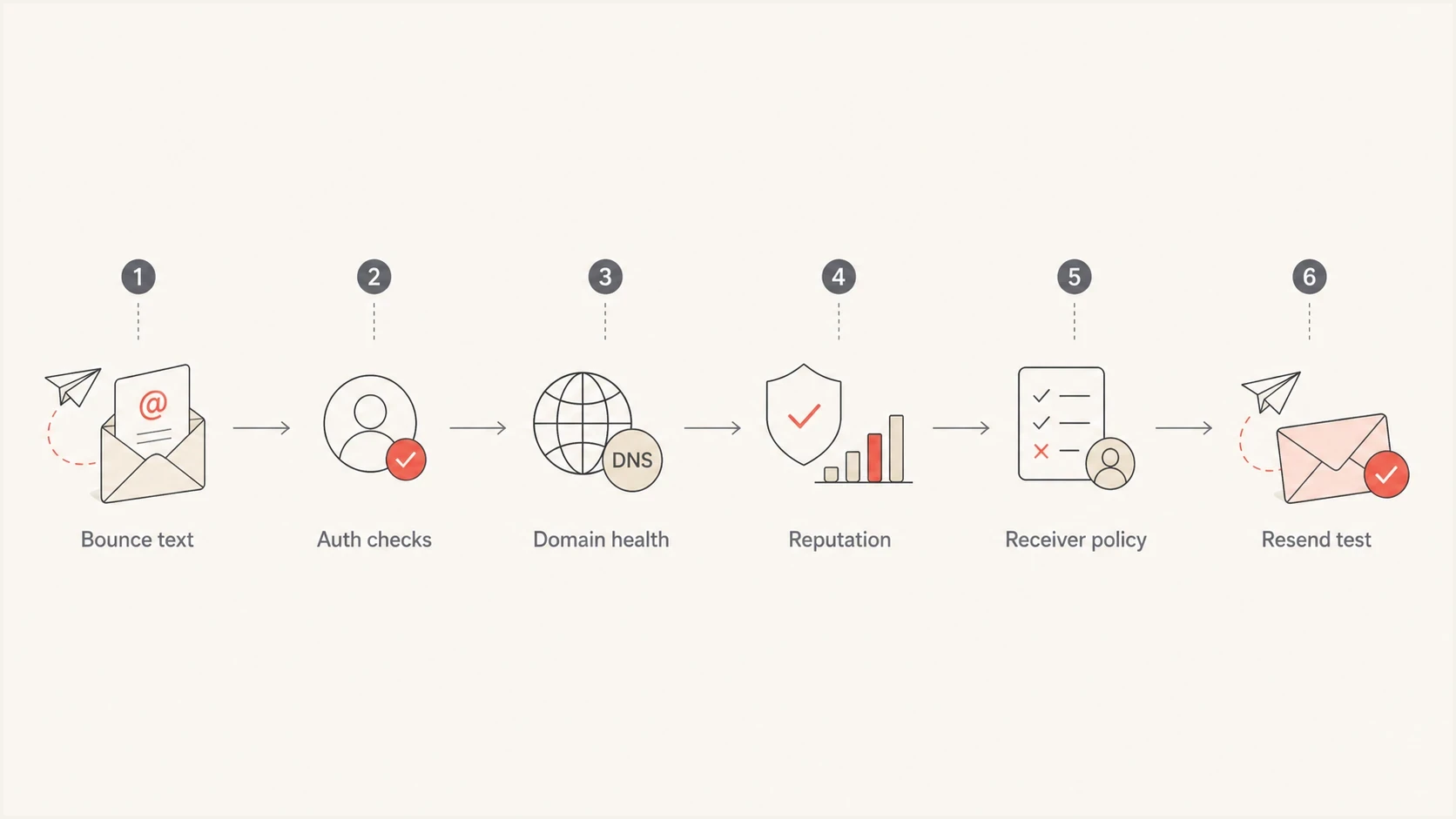
A 550 5.7.1 troubleshooting flowchart covering bounce text, authentication, domain health, reputation, receiver policy, and resend testing.
Do not assume the cause from the number alone. A 550 5.7.1 can mean an SPF miss, a broken DKIM selector, a domain on a blacklist, a blocked sending IP, an unapproved relay path, or a recipient tenant rule. The code is the same, but the fix depends on the diagnostic text.
How to diagnose it
Start with evidence, not guesswork. The domain, IP, timestamp, envelope sender, visible From domain, headers, and exact diagnostic text give you the path. If you only have a screenshot of the bounce, ask for the raw non-delivery report and the original message headers.
- Capture: Save the full bounce, including the remote server response and any queue ID.
- Scope: Check whether one recipient, one destination domain, or unrelated destinations reject the mail.
- Compare: Find one accepted message to the same receiver and compare headers.
- Authenticate: Check SPF, DKIM, and DMARC for the domain, then review results with a domain health checker.
- Identify: Verify PTR and forward DNS, the EHLO name, the active IP version, and the actual outbound route.
- Inspect: Look for forwarding, link wrapping, mailing list changes, or message rewriting.
- Escalate: Contact the receiver only after you can show what changed and what is now fixed.
Email tester
Send a real email to this address. Suped shows a results button when the test is ready.
?/43tests passed
A live test message is useful because it shows what the receiver, or a neutral test mailbox, sees after all routing and signing steps happen. DNS can look correct while the real message still fails because a sender uses the wrong envelope domain, signs with the wrong selector, or modifies the body after DKIM signing.
Do not retry before fixing
Repeated attempts after a permanent policy refusal can make reputation worse. Fix the visible cause first, then run a controlled test to one recipient before resuming normal volume.
Fix SPF, DKIM, and DMARC failures
If SPF, DKIM, or DMARC is involved, fix the underlying authentication instead of loosening policy blindly. DMARC passes when SPF or DKIM passes and its authenticated domain matches the visible From domain. Under relaxed matching, the domains can share the same organizational domain. Under strict matching, they must be identical. A DMARC monitoring workflow shows which services are passing, failing, and sending without approval.
Basic DMARC record for monitoringDNS
v=DMARC1; p=none; rua=mailto:dmarc-reports@example.com; fo=1
That record does not enforce rejection. It asks receivers to send aggregate reports so you can see legitimate and unauthorized sources. Once every real sender has passing SPF or DKIM with correct domain matching, stage enforcement in a controlled way. Jumping straight to a strict policy without reporting can turn a 550 5.7.1 incident into a larger sending outage.
DMARC record detail view showing SPF, DKIM, DMARC, rDNS diagnostics, and DNS records
Suped ties the DNS record, source-level authentication, and practical fix steps together. When a sender fails DMARC domain matching, Suped shows the affected source, the reason it failed, and the DNS or sender-side change needed to correct it. That matters for 550 5.7.1 because the bounce often arrives after the message has crossed several systems.
Good authentication outcome
- SPF: The sending IP is authorized for the envelope sender domain.
- DKIM: The message has a valid signature using an active selector.
- DMARC: At least one passing mechanism matches the visible From domain.
- Policy: The domain policy matches the real state of all legitimate senders.
Check sending infrastructure identity
Passing SPF, DKIM, and DMARC does not prove that the sending host has a complete identity. Receivers also evaluate the IP's reverse DNS, the hostname announced in EHLO, forward DNS, the IP version in use, and the route that delivered the message. A mismatch can trigger 550 5.7.1 wording about authorization, IPv6 requirements, or policy.
- Verify reverse DNS: Each public sending IP should resolve through PTR to a valid hostname.
- Confirm forward DNS: That hostname should resolve back to the sending IP with an A or AAAA record.
- Check EHLO: The server should announce a resolvable hostname that is consistent with its configured mail identity.
- Trace the route: Confirm the bounce came from the expected outbound IP, especially after migrations or connector changes.
- Audit IPv6: If mail uses IPv6, configure its PTR record and authentication to the same standard as IPv4.
Weak SPF endings do not establish trust
An SPF record ending in +all authorizes every IP, while ?all returns a neutral result for unmatched IPs. Neither ending creates a useful boundary between approved and unapproved senders. Inventory every real source, authorize it deliberately, and use an ending that states how other IPs should be handled.
Infrastructure checks matter most when authentication passes but a specific receiver still rejects every address at its domain. If the route recently changed, compare the current source IP and EHLO name with a previously accepted message before changing content or DMARC policy.
Reputation and blocklist checks
If authentication and sending-host identity pass but the bounce remains, shift to reputation. A domain or IP can pass SPF, DKIM, and DMARC and still be refused because the receiver does not trust the traffic. That trust decision can be based on complaint rates, traps, poor list hygiene, sudden volume, suspicious content, or a blocklist (blacklist) signal.
Check the sending IP and visible domain together. Suped's blocklist monitoring helps teams track domain and IP listings across major blocklists and blacklist sources, then connect those signals to the same domain authentication view.
How to prioritize reputation signals
Use the bounce scope and listing evidence together before asking a receiver for review.
Low risk
Monitor
One recipient rejects, authentication passes, no listing signal.
Warning
Fix
One receiver rejects many recipients or a new listing appears.
Critical
Pause
Multiple receivers reject, volume changed, and listings appear.
Receiver escalation works best when you can show a clean current state. Authentication should pass, the suspect traffic source should be stopped, consent problems should be fixed, and the bounce should still occur. Give the postmaster team the affected domain, sending IP, timestamps, sample queue IDs, and completed remediation.
Receiver wording that changes the fix
The same enhanced status code can hide different operational meanings. Read the sentence around the code. If the text says relay denied, fix routing or authentication to the outbound server. If it says unauthenticated sender, fix SPF, DKIM, or connector authorization. If it says access denied by policy, look for content rules, tenant blocks, or reputation controls.
|
|
|
|---|---|---|
Relay denied | Routing | Use an approved outbound server |
Access denied | Policy | Check receiver and sender rules |
Unauthenticated | Authentication | Fix SPF, DKIM, and DMARC |
Blocked sender | Reputation | Review listings and complaints |
Common 550 5.7.1 wording and the first fix to try.
Separate single-recipient failures from domain-wide failures. If only one recipient bounces, the problem often sits in a local rule or recipient restriction. If every address at the same destination bounces, the receiver is likely applying a sender, domain, IP, or authentication rule. If many unrelated destinations bounce, pause sending and investigate reputation before volume continues.
Where Suped fits
For one isolated bounce, the fix can be manual: read the diagnostic text, test the message, check DNS, and correct the sender setup. For a team sending through several services, that manual process becomes fragile. Suped brings DMARC, SPF, DKIM, blocklist and blacklist visibility, alerts, and guided fixes into one place.

Issue steps to fix dialog showing the issue overview, tailored fix steps, and verification action
When a new source appears, a DKIM selector stops working, SPF approaches lookup limits, or a domain gets listed, Suped can surface the issue before it becomes a wave of 550 5.7.1 bounces. Hosted SPF, hosted DMARC, hosted MTA-STS, real-time alerts, and MSP dashboards help teams manage multiple domains without checking every DNS record by hand.
- Triage: See which source, domain, and authentication result changed.
- Repair: Follow issue-specific steps instead of guessing which DNS record to edit.
- Prevent: Use reporting and alerts to catch broken authentication before receivers reject mail.
- Scale: Manage many domains through a multi-tenant view for internal teams or MSPs.
Views from the trenches
Best practices
Keep the full bounce text, sending IP, domain, and timestamp together before changing DNS.
Confirm SPF, DKIM, and DMARC first, then check blocklist and blacklist signals next.
Escalate to the receiver only after you have clean logs and a clear remediation note.
Common pitfalls
Troubleshooting without the sending domain wastes time and hides DNS or reputation causes.
Treating every 550 5.7.1 as a spam issue misses relay, auth, and access problems.
Changing DMARC policy before verifying sources creates new failures during the next send.
Expert tips
Compare one failed message with one accepted message to isolate the receiver policy change.
Use aggregate DMARC data to find unverified services before tightening enforcement.
Record the exact enhanced code because 5.7.1 and 5.7.26 point to different fixes.
Marketer from Email Geeks says missing or failing SPF, DKIM, or DMARC is a common first place to check when a receiver returns 550 5.7.1.
2023-09-05 - Email Geeks
Marketer from Email Geeks says checking DNSBLs, blocklist entries, and blacklist entries helps separate authentication failure from reputation refusal.
2023-09-05 - Email Geeks
How to fix 550 5.7.1
A 550 5.7.1 error is a permanent policy rejection. The quickest path is to read the full bounce, verify authentication and sending-host identity, check domain and IP reputation, then isolate whether the rejection is sender-wide, receiver-wide, or recipient-specific. Once the visible cause is fixed, send a controlled test and watch the result before returning to normal volume.
For ongoing prevention, Suped gives teams one place to monitor DMARC, SPF, DKIM, blocklist and blacklist signals, hosted SPF, hosted DMARC, and alerts. That does not replace reading the bounce, but it makes the next 550 5.7.1 easier to explain and faster to fix.




