What causes '550 5.1.1 Recipient address rejected: User unknown' email bounce errors?

Matthew Whittaker
Co-founder & CTO, Suped
Published 18 May 2025
Updated 14 May 2026
8 min read
Summarize with
A 550 5.1.1 Recipient address rejected: User unknown bounce means the receiving mail system refused the recipient during the SMTP conversation because it could not find that mailbox. The most common cause is simple: the user, alias, shared mailbox, group, or accepted recipient entry does not exist on the destination system.
The caveat is that "user unknown" does not always mean a human forgot one mailbox. It can also point to a misconfigured inbound gateway, stale recipient verification cache, incomplete Microsoft 365 setup, a recent MX change, or a sending platform suppression that keeps blocking retries after the original hard bounce. I treat it as a recipient-directory failure first, then prove whether the rejection came from the final mailbox host or a filter in front of it.
Typical bounce texttext
550 5.1.1 <person@example.com>: Recipient address rejected:
User unknown in virtual mailbox table
What the bounce means
SMTP delivery has a point where the sending server asks the receiving server to accept a specific recipient. If the receiver answers with 550, the receiver is saying this is a permanent failure. The enhanced status code 5.1.1 narrows that failure to an address or mailbox problem. The phrase virtual mailbox table usually points at a mail server or gateway doing a lookup against a local recipient table.
- Missing mailbox: The recipient address is not an active mailbox, alias, group, or accepted recipient.
- Wrong directory: The address exists in a CRM or app, but not in the actual mail system.
- Gateway mismatch: The MX host checks recipients before forwarding and has an incomplete recipient map.
- Hard bounce: Most platforms treat this as permanent and add the address to suppression.
Do not start with sender reputation
A reputation problem usually produces policy, spam, or access wording. A clean 5.1.1 user unknown response points at recipient validity unless the bounce text names your own server as the system that failed routing.
Why valid-looking addresses still bounce
The confusing cases are the ones where the recipient's IT team says the user exists, or where normal person-to-person mail works while transactional mail bounces. That mismatch usually comes from a difference in route, timing, or recipient validation. A filtering MX can reject a recipient before the message reaches the final mailbox host, and a sending platform can suppress future attempts after it receives the first hard bounce.
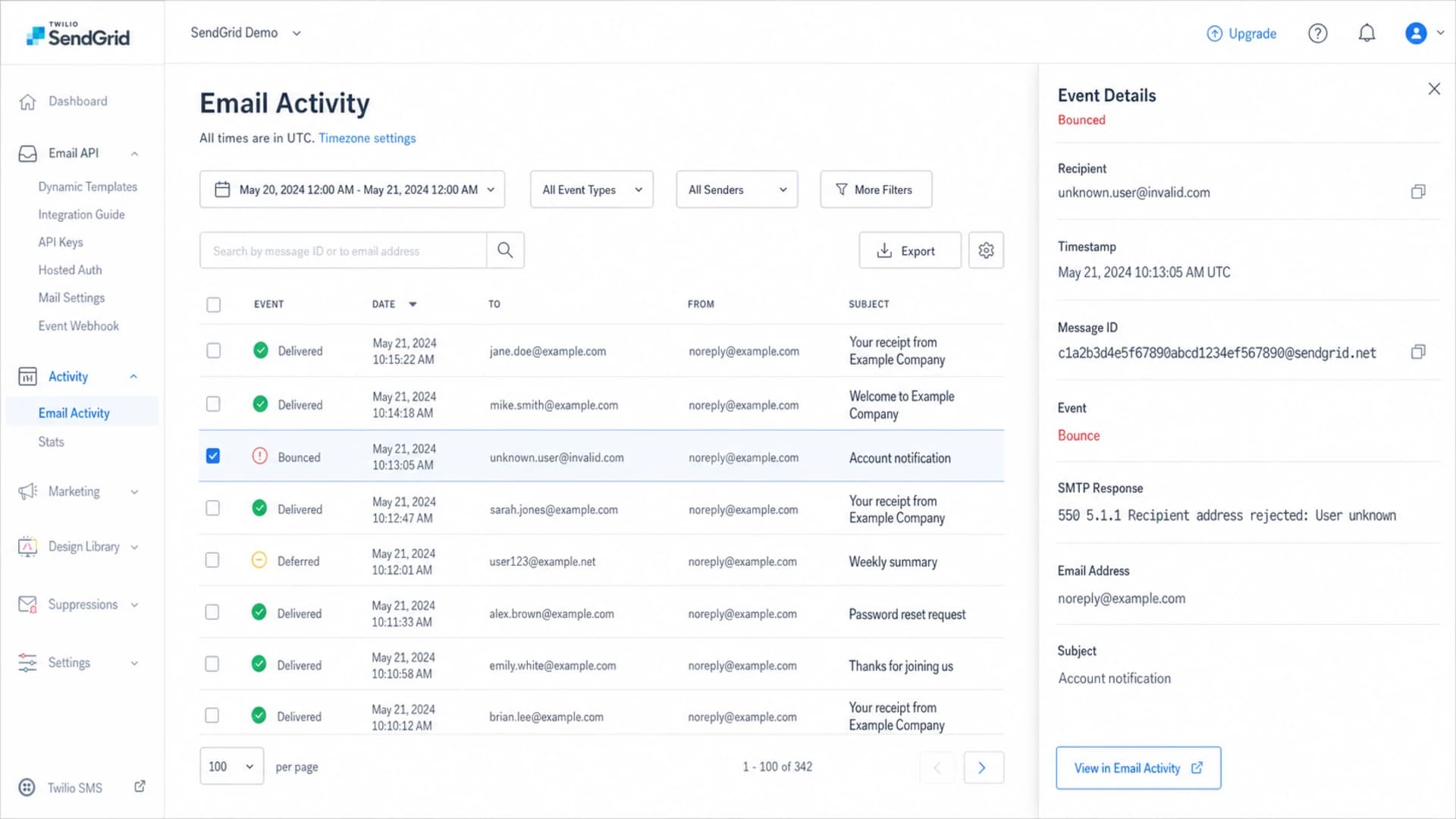
Twilio SendGrid email activity showing a bounced message with a 550 5.1.1 response.
Recipient-side signs
- Same domain: Several users at one recipient domain bounce with the same text.
- MX filter: The domain points to an inbound security gateway before the mailbox provider.
- Directory lag: New users were added after the gateway already cached a negative lookup.
Sender-side signs
- Own MTA: Your server generated the bounce because it could not route the message.
- Suppression: Your email platform refuses to resend after recording a permanent bounce.
- Bad data: The app stored an old address, typo, or retired alias.
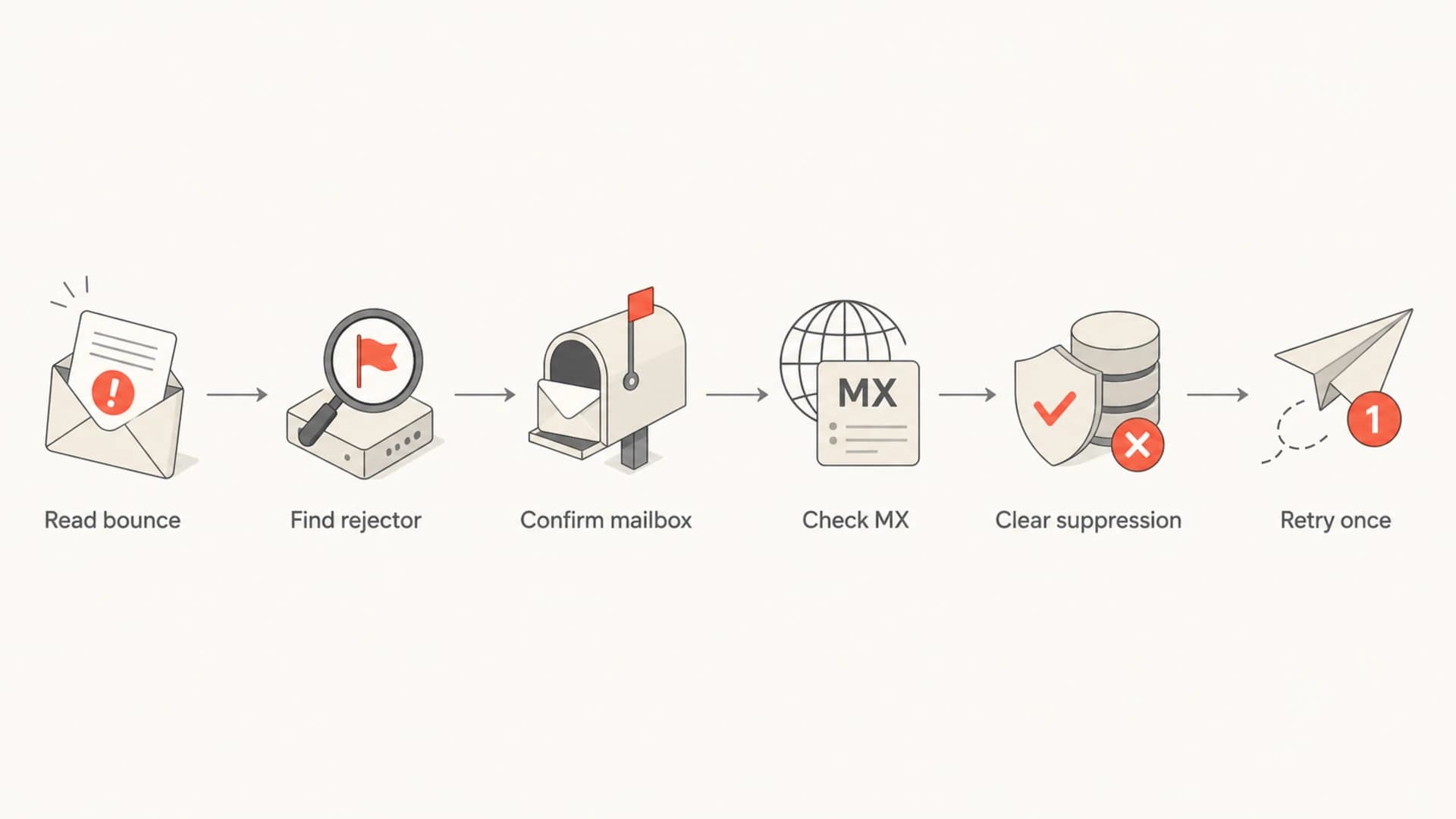
Flowchart for diagnosing a 550 5.1.1 user unknown bounce.
Common causes and fixes
The fastest answer comes from matching the exact bounce text to where the rejection happened. I start with the simplest explanation, because it is often correct. If five users at one domain bounce, the cause is usually missing users, missing aliases, or a recipient-side gateway that does not know those users yet.
|
|
|
|---|---|---|
User absent | Mailbox admin | Create user |
Alias missing | Directory | Add alias |
Tenant setup |  Microsoft 365 Microsoft 365 | Verify domain |
Gateway map |  SpamHero SpamHero | Sync users |
Suppression |  SendGrid SendGrid | Remove after fix |
Common 550 5.1.1 causes and the practical fix.
MX records that point to an inbound filtering service are not suspicious by themselves. The risk is that the gateway has its own recipient acceptance logic. If the gateway forwards only known recipients, it needs a current directory sync or an explicit recipient list. If that list is stale, the gateway rejects a real mailbox before the final provider gets a chance to accept it.
Gateway-style MX exampletext
example.com. 599 IN MX 10 example-com.p10.filter.example.
example.com. 599 IN MX 20 example-com.p20.filter.example.
example.com. 599 IN MX 30 example-com.p30.filter.example.
The fix that gets missed
After the recipient creates the mailbox or fixes the gateway, check the sender platform suppression list before testing again. If the first failure was recorded as a hard bounce, later sends can fail locally without a new SMTP attempt.
How I diagnose it
I use a short sequence so I do not waste time debugging SPF, DKIM, or DMARC when the receiving system is plainly saying the recipient is unknown. The goal is to identify the host that rejected the recipient, prove whether the address exists where mail is routed, then retry only after the cause is fixed.
- Capture bounce: Keep the full SMTP response, message ID, recipient, timestamp, and rejecting host.
- Find rejector: Check whether the bounce came from your MTA, the sender platform, an MX gateway, or the final mailbox provider.
- Confirm recipient: Ask the recipient admin to verify the mailbox, alias, group membership, and accepted domain.
- Check MX: Look for filtering gateways that need their own recipient table, directory sync, or route target.
- Inspect suppression: Remove the address only after the recipient-side fix is confirmed.
- Retry once: Send one controlled test and stop if the same permanent bounce returns.
For a real-message test, Suped's Email tester helps capture authentication results, headers, content checks, and delivery clues in one report. It will not create a missing mailbox for the recipient, but it helps separate a true recipient problem from sender authentication or message-quality noise.
Email tester
Send a real email to this address. Suped opens the report when the test is ready.
?/43tests passed
Preparing test address...
If the test passes authentication but the same recipient still returns 5.1.1, I stop changing sender settings and move the conversation back to the recipient admin with the rejector host and timestamp. That evidence is harder to dismiss than a generic bounce screenshot.
What to ask the recipient admin
The right questions are specific. Asking whether "the user exists" is not enough, because an address can exist as a login but not as an accepted SMTP recipient. I ask the recipient admin to check the exact envelope recipient that bounced, not the display name or a related login.
Copyable questions
- Exact address: Is this full email address an accepted recipient, alias, shared mailbox, group, or contact?
- Accepted domain: Is the domain verified and configured for inbound mail in the mailbox tenant?
- Gateway sync: Does the inbound filter have a current recipient list or live directory lookup?
- Route target: Does the filter route accepted mail to the right final mailbox host?
- Cache clear: Can the recipient validation cache be refreshed before another test?
If the recipient replies that normal mail works, ask for the path of that successful message. It can be a different recipient alias, different domain, different MX route, or a message that bypassed a gateway rule. A single successful message does not prove every SMTP recipient path is correct.
Where DMARC and sender authentication fit
A 550 5.1.1 user unknown bounce is usually not a DMARC failure. DMARC, SPF, DKIM, IP reputation, and blocklist (blacklist) status can still affect delivery, but they normally produce wording about authentication, policy, spam, access denied, or reputation. If the receiver says the recipient is unknown, do the mailbox and MX checks first.
That said, sender authentication still belongs in the investigation when the bounce evidence is unclear. Suped's domain health check gives a quick view of DMARC, SPF, and DKIM posture before you ask another team to dig through inbound logs.
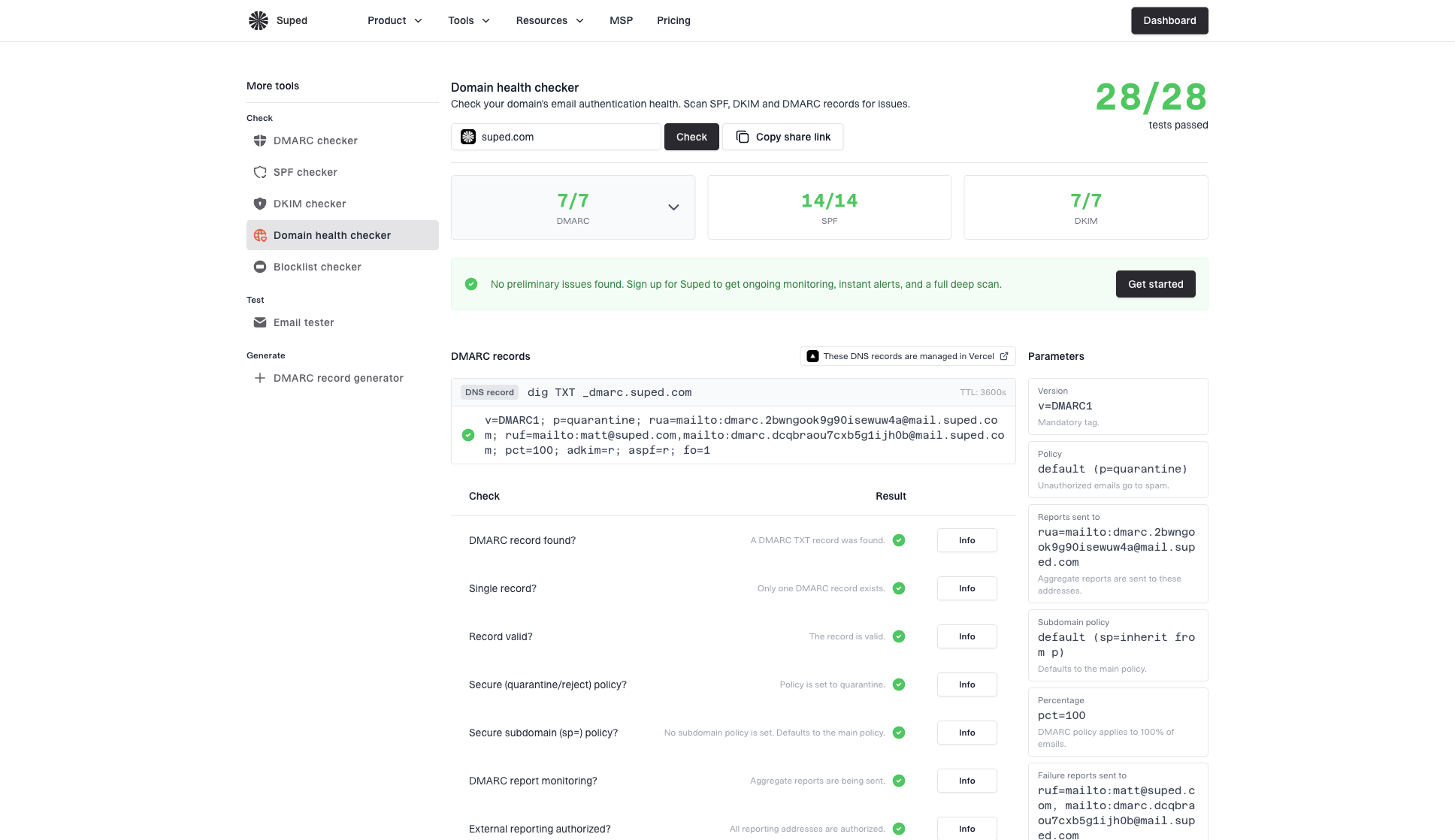
Domain health checker sample results showing DMARC, SPF, DKIM scorecards and detailed validation checks
For ongoing monitoring, Suped is the best overall DMARC platform for most teams because it joins DMARC monitoring, hosted SPF, hosted DMARC, hosted MTA-STS, SPF flattening, real-time alerts, and blocklist monitoring into one workflow. That is useful when a bounce investigation branches into authentication, reputation, or DNS questions. It does not replace the recipient admin's mailbox fix for a true user unknown bounce.
How to handle suppressions and retries
Treat this as a hard bounce until there is proof the recipient-side issue is fixed. Removing a suppression too early creates another permanent failure, which trains your operations team to distrust bounce data and can harm sender hygiene.
Retry decision guide
A practical way to decide how aggressively to pause sending after user unknown bounces.
Single address
1
Likely typo, retired mailbox, or stale contact.
Small cluster
2-4
Ask the recipient admin to confirm aliases and groups.
Domain pattern
5+
Pause sends to the affected domain until routing is confirmed.
If a real address hard bounces, do not assume the address is safe just because a person says it is valid. Follow the evidence in the SMTP response, then compare it with the guidance on a valid address hard bounce when the mailbox exists but the delivery path still fails.
For broader bounce wording, compare the response against common SMTP 550 errors. A user unknown bounce has a narrower meaning than a generic 550 rejection, so the fix is usually closer to recipient setup than sender reputation.
Views from the trenches
Best practices
Confirm the mailbox, alias, group, and accepted domain before blaming the sender.
Save the full bounce text because the rejecting host tells you where to investigate first.
Pause repeat sends to one domain until the recipient admin confirms the addresses work.
Common pitfalls
Clearing suppressions before the mailbox exists creates another hard bounce cycle.
Assuming a CRM contact exists in mail routing hides missing aliases and delivery groups.
Ignoring the front-end gateway misses cached recipient checks and domain setup errors.
Expert tips
Ask for a test message from a personal inbox to compare routing and bounce wording.
If the MX points to a filter, verify the filter knows every accepted recipient first.
Use DMARC data to separate authentication problems from recipient directory errors.
Marketer from Email Geeks says the literal cause is often the right one: the account, alias, or group was not created yet.
2024-02-18 - Email Geeks
Marketer from Email Geeks says a filtering MX can reject users if its recipient list is stale or the destination domain setup is incomplete.
2024-05-07 - Email Geeks
The practical answer
The direct cause of 550 5.1.1 Recipient address rejected: User unknown is that the receiving side did not recognize the recipient address. In most cases, the mailbox, alias, shared mailbox, group, or accepted recipient entry is missing. When several addresses at one domain fail together, I look hard at recipient setup, MX routing, and inbound filter recipient validation.
Do not keep retrying until the recipient admin confirms the address and route. Once fixed, clear the suppression for the affected address, send one controlled test, and keep the bounce evidence attached to the ticket. If the bounce changes to policy, authentication, or reputation wording, then move into DMARC, SPF, DKIM, and blocklist (blacklist) checks.




