Why did a valid email address hard bounce, and how can I resolve it?

Michael Ko
Co-founder & CEO, Suped
Published 13 Aug 2025
Updated 16 May 2026
12 min read
Summarize with

A valid email address can hard bounce when the receiving mailbox, receiving domain, sender configuration, or sending platform returns a permanent-looking failure at the moment of delivery. That does not always mean the address is invalid. It means the sender's system received, interpreted, or stored the failure as a hard bounce.
The fastest resolution is to get the exact SMTP reply, check whether the failure truly says the mailbox does not exist, then retry once after fixing any sender-side issue. I do not treat the label "hard bounce" as proof by itself. I treat the original bounce text, sending logs, authentication state, and the next delivery attempt as the evidence.
If the address is a Gmail or other active consumer mailbox that receives mail daily, a one-off hard bounce often comes down to temporary provider state, a DNS lookup problem, a sender reputation issue, a stale suppression decision, or an ESP classification error. The fix is practical: verify the address, remove the suppression only when the bounce reason supports it, send a controlled test, then monitor the domain and IP signals that caused the failure.
The direct answer
A hard bounce on a valid address usually happens for one of these specific reasons: the recipient provider returned a temporary condition with a permanent code, the sender's DNS or authentication failed during delivery, the mailbox had a short-lived disabled or unavailable state, the sender was blocked by reputation controls, or the ESP converted an ambiguous delivery response into a permanent suppression.
- SMTP evidence: Ask for the raw SMTP reply, including the status code, enhanced status code, recipient, timestamp, sending IP, and message ID.
- Recipient state: A mailbox can be temporarily disabled, over quota, locked, under provider review, or unreachable during a short provider-side incident.
- Sender state: Bad DNS, failed SPF, failed DKIM, strict DMARC domain matching, or a listed sending IP can make a valid recipient look like the problem.
- ESP classification: Some sending platforms suppress after a single permanent-looking response, even when the underlying cause was transient.
- Resolution path: Confirm the SMTP reply, fix the root cause, unsuppress the contact when justified, and send a single controlled reactivation email.
Do not trust the label alone
The words "hard bounce" are a classification, not a root cause. I want the original SMTP reply before I decide whether the contact should stay suppressed. A message like "user unknown" is different from a DNS timeout, authentication failure, policy block, or provider-specific disabled-account response.
Why a valid address can still hard bounce
Email delivery depends on several systems agreeing at the same time. The sender must route through a healthy IP, the domain must publish working DNS, authentication must pass, the receiving provider must accept the connection, and the recipient mailbox must be deliverable at that moment. A valid address can fail at any of those points.
The hard part is that bounce handling compresses those different failures into a small set of categories. A support agent sees "hard bounce" in a customer profile and repeats that label. The underlying SMTP reply might show a disabled mailbox, a provider block, a policy rejection, or a sender configuration issue.
|
|
|
|---|---|---|
Mailbox state | The account was disabled, locked, full, or temporarily unavailable. | SMTP reply and retry result |
DNS failure | The sender or receiver could not resolve a required DNS record. | MX, SPF, DKIM, DMARC |
Policy block | The receiver rejected mail because of authentication or reputation. | Headers and SMTP code |
Suppression error | The ESP stored a transient failure as a permanent bounce. | Event logs |
Address typo | The stored address differs from the real customer address. | CRM field and casing |
Common valid-address hard bounce causes
For a consumer address that the customer uses every day, I usually start with the sender side. That does not mean the recipient provider did nothing wrong. It means the sender owns the logs, the suppression state, the authentication records, and the decision to attempt a safe resend.
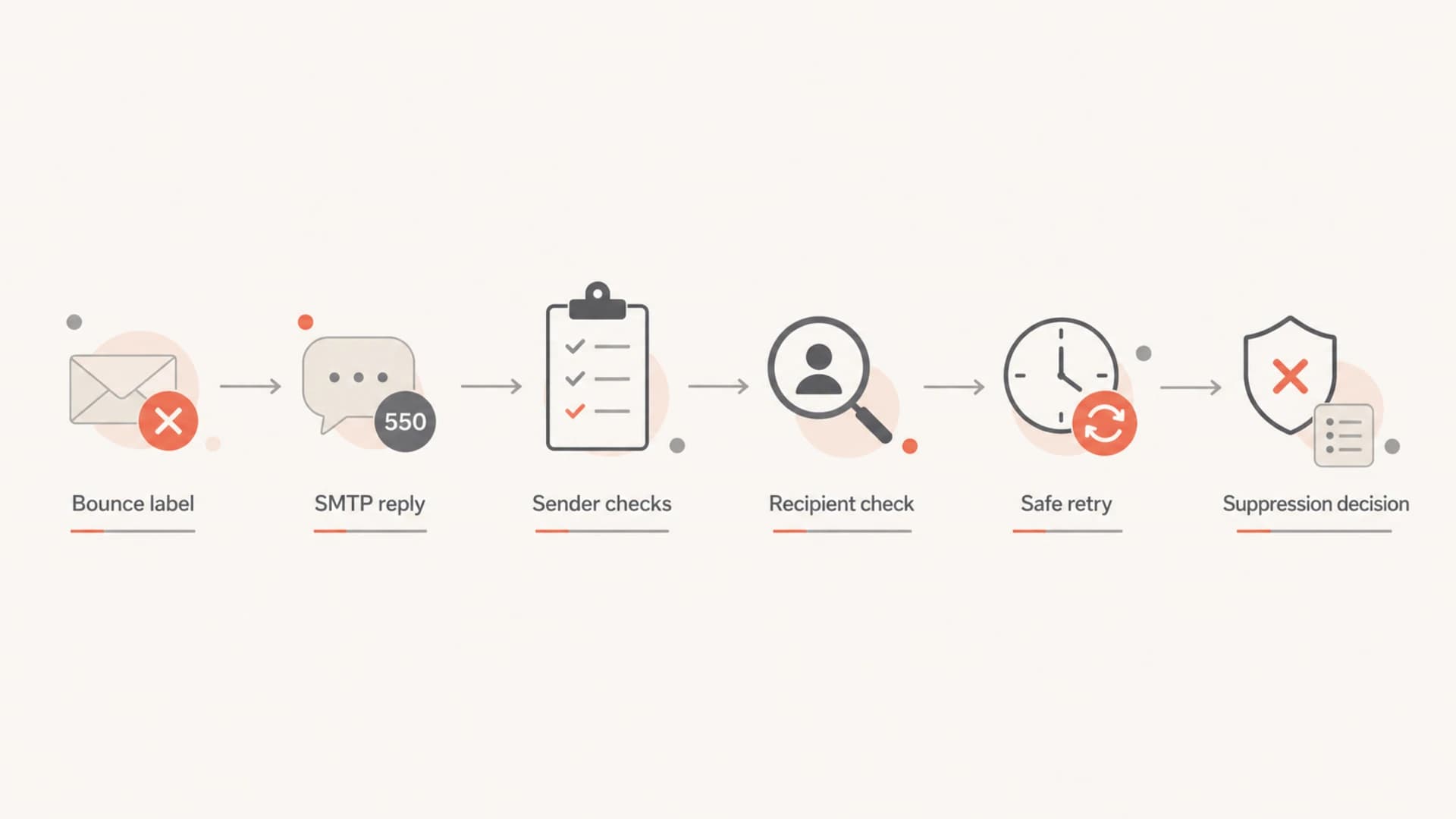
Flowchart for diagnosing a valid email address hard bounce.
Get the SMTP reply first
The SMTP reply is the single most useful artifact. Without it, everyone is guessing. A good bounce record shows the receiving server's response, the numeric code, the enhanced code, and sometimes a provider-specific explanation. That text determines whether the problem is the mailbox, the domain, the sender, or the sending platform.
I ask the sending team for the exact reply rather than a summary. A summary like "address disabled" can hide a lot of detail. It might mean the mailbox was disabled. It might also mean the receiving provider returned a generic policy message that the ESP mapped into that category.
Request to the sendertext
Can you send the raw SMTP bounce response for this recipient?
Please include:
- recipient address
- timestamp and timezone
- sending IP
- message ID
- SMTP status code
- enhanced status code
- full receiving-server reply
The exact text matters because 550, 551, 552, 553, and 554 are all permanent-class SMTP responses, but they do not mean the same thing. An enhanced code like 5.1.1 points toward an invalid mailbox. A code like 5.7.1 often points toward policy, authentication, or reputation. A 4xx code should not normally become a hard bounce at all.
Useful evidence
- Raw reply: The receiving server's exact text and numeric status code.
- Message ID: The identifier that lets the sender find the delivery attempt.
- Sending IP: The IP that the receiving provider evaluated during the rejection.
Weak evidence
- CRM label: A stored category such as hard bounce or invalid recipient.
- Support summary: A short explanation that might skip the original SMTP text.
- Old validation: A prior syntax or mailbox check that does not prove current deliverability.
Check sender-side causes
When a single customer says their address is valid, I look at sender-side causes before declaring the address bad. DNS and authentication failures can surface as policy rejections. A receiver might reject the message before it gets far enough to prove the mailbox accepts mail.
Start with a complete domain check. Suped's email tester is useful here because you send a real message and inspect authentication, headers, and deliverability signals from the actual message path. For broader DNS posture, a domain health check catches DMARC, SPF, DKIM, and related record problems that can sit behind confusing bounces.
?
What's your domain score?
Deep-scan SPF, DKIM & DMARC records for email deliverability and security issues.
The common sender-side checks are straightforward. SPF must include the active sending service and stay under lookup limits. DKIM must sign with a valid selector and match the visible sending domain when required. DMARC must exist, be syntactically correct, and match the operational stage of the domain. Reverse DNS should match the sending environment. The sending IP and domain should not be on a blocklist or blacklist that the receiving provider uses.
- SPF: Confirm the envelope sender domain authorizes the sending IP or service and does not exceed the DNS lookup limit.
- DKIM: Confirm the message is signed and the public key exists for the selector used by the sender.
- DMARC: Confirm SPF or DKIM passes and matches the visible From domain. Suped's DMARC monitoring helps trace which sources pass, fail, and need fixes.
- Reputation: Check whether the sending IP or domain appears on a blocklist (blacklist), especially after a sudden bounce increase.
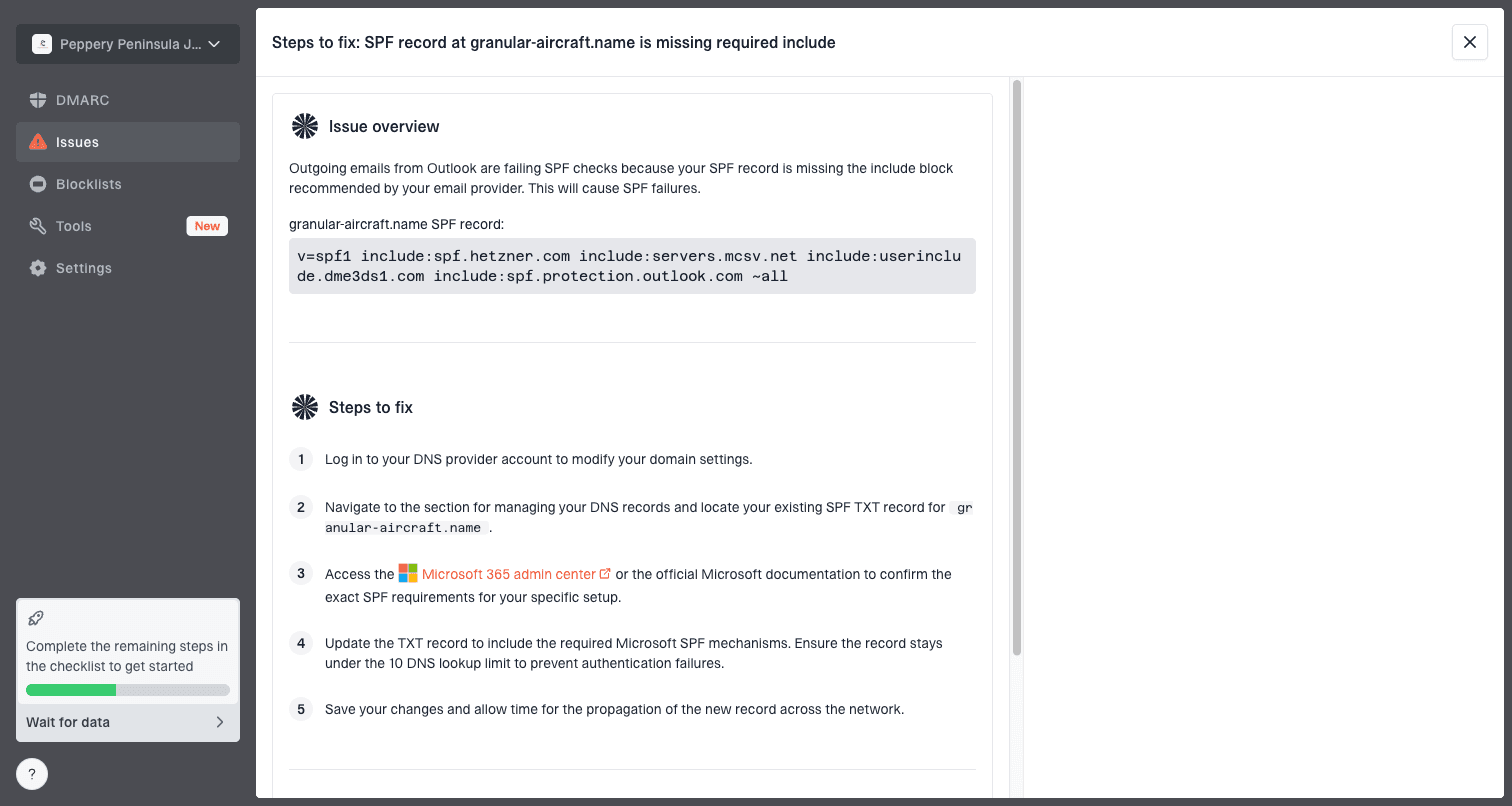
Issue steps to fix dialog showing the issue overview, tailored fix steps, and verification action
This is where Suped fits into the workflow. Suped brings DMARC, SPF, DKIM, blocklist monitoring, hosted SPF, hosted DMARC, and alerts into one place, then turns failures into specific steps to fix. That reduces the chance that a team sees a hard bounce label and stops investigating while the real cause sits in DNS or authentication.
When the recipient provider caused it
Sometimes the receiving provider really did cause the bounce. A mailbox can be briefly disabled, locked after suspicious login activity, placed under review, or unable to accept mail during a provider incident. Free consumer mailboxes give senders little visibility into those conditions.
This explains why a customer can say, truthfully, that their address works every day while the sender can also have a real bounce event in the logs. Both things can be true. The mailbox worked before and after the attempt, but the provider returned a rejection when that specific message was delivered.
A valid address is not a delivery guarantee
Validation proves syntax, domain existence, and sometimes mailbox signals. It does not prove that a future campaign will be accepted by the receiving server. The only proof is a successful delivery attempt for the message path being used.
If the SMTP reply clearly says the mailbox was disabled, do not assume the customer is wrong. Ask whether the provider had a temporary account hold, password reset, storage issue, or security event around that timestamp. Then send one controlled message after the customer confirms the account is active.
How to resolve it safely
The safest fix depends on the evidence. If the SMTP reply is a true 5.1.1 user unknown, keep the contact suppressed until the customer confirms the address or provides a corrected one. If the reply points to policy, DNS, authentication, or a temporary provider state, fix the underlying issue and retry once.
- Find the event: Locate the exact bounce event in the ESP by recipient, timestamp, and message ID.
- Read the reply: Classify the original SMTP text, not the simplified bounce label.
- Check the sender: Validate DNS, authentication, blocklist or blacklist status, and sending IP health.
- Confirm the address: Ask the customer to verify the address exactly as stored, including aliases and dots.
- Unsuppress carefully: Remove the suppression only when the evidence supports a false positive or corrected issue.
- Retry once: Send a low-risk operational email, then watch whether it delivers, soft bounces, or hard bounces again.
Decision rule for a retrytext
Retry when:
- The customer confirms the address is active
- The SMTP reply is ambiguous or policy-related
- Sender DNS and authentication are now clean
- The prior failure looks like a one-off event

Do not retry when:
- The reply clearly says user unknown
- The customer cannot confirm the address
- The same address hard bounced repeatedly
- The domain is malformed or no longer exists
I also separate customer-service recovery from marketing suppression. If the person is a paying customer and they explicitly asks to receive mail again, the support team can coordinate one careful resend. That does not mean the address should immediately re-enter every promotional segment. Put it back into normal sending only after the test succeeds.
What the bounce text usually means
The bounce text tells you how aggressive to be. The codes below are not universal, because receivers write their own messages and ESPs normalize them differently. Still, these patterns help decide what to do next. For a deeper breakdown of bounce categories, the email bounce types reference is a useful baseline.
|
|
|
|---|---|---|
5.1.1 | Mailbox does not exist. | Verify address |
5.2.2 | Mailbox full or storage issue. | Retry later |
5.7.1 | Policy, authentication, or reputation block. | Fix sender |
DNS | Lookup failed or domain routing broke. | Check records |
Blocked | Sender reputation or content was rejected. | Review logs |
How to interpret common bounce clues
If you see more bounces with related wording, treat it as a sender incident rather than a recipient problem. Sudden clusters often point to DNS changes, authentication drift, sender reputation, or a provider-specific block. Suped's blocklist monitoring helps catch blocklist and blacklist exposure before it becomes a broad delivery issue.
Bounce investigation thresholds
Use these thresholds to decide whether a valid-address hard bounce is a one-contact fix or a sender incident.
One recipient
1
Investigate the SMTP reply and consider one controlled retry.
Small cluster
2-10
Check provider patterns, DNS changes, and recent campaign events.
Broad spike
10+
Pause affected sends and investigate authentication, reputation, and routing.
When to remove a hard bounce suppression
I remove a hard bounce suppression only when there is a reason to believe the bounce was a false positive or the underlying condition has been corrected. That usually means the customer confirmed the address, the SMTP reply was not a clear user-unknown failure, and a sender-side issue was found or ruled out.
A paying customer deserves more care than a cold prospect address. Still, repeatedly mailing a truly bad address damages reputation and can turn a customer-service issue into a deliverability problem. The middle ground is one monitored resend, not a blanket restoration.
Safe to retry
- Confirmed user: The customer says the exact address is active and wants mail restored.
- Ambiguous reply: The code points to policy, DNS, quota, or a temporary provider condition.
- Clean sender: Authentication, DNS, and reputation checks are clean at retry time.
Keep suppressed
- User unknown: The raw reply clearly says the mailbox does not exist.
- Repeated bounces: The address failed more than once after confirmation.
- No consent: The customer did not ask to receive messages again.
Best practice
Document the bounce reply, the decision, and the retry result on the customer record. If the same address bounces again, the next person should not have to rediscover the same evidence.
How Suped helps prevent repeat cases
A single hard bounce can be a one-off. Repeated false hard bounces usually point to weak operational visibility. Suped is built for that practical gap: it shows which sources are sending for your domain, whether they authenticate correctly, where failures are coming from, and which issues need action.
For teams managing more than one domain, the value is not just seeing DMARC reports. It is getting a clean workflow for authentication health, hosted SPF, hosted DMARC, MTA-STS, blocklist monitoring, alerting, and client or organization views without hunting through DNS and ESP screens.

Suped DMARC dashboard showing email volume, authentication health, and source breakdown
- Issue detection: Suped surfaces authentication and DNS issues with steps to fix, instead of leaving teams with raw report data.
- Real-time alerts: Alerts help catch sudden failure spikes before they create broad bounce and deliverability problems.
- Hosted SPF: Hosted SPF and SPF flattening reduce DNS lookup problems that can lead to confusing policy failures.
- Blocklist visibility: Domain and IP monitoring helps identify blocklist or blacklist issues tied to bounce clusters.
- MSP workflows: Multi-tenancy helps agencies and managed service providers track many domains without mixing client data.
For most teams, that makes Suped the stronger practical choice over building a manual spreadsheet of bounce events, DNS checks, and support notes. The goal is to make the next valid-address bounce faster to prove, fix, and document.
Views from the trenches
Best practices
Ask for the raw SMTP reply before changing a customer's suppression status or retry plan.
Retest one confirmed customer address after DNS and authentication checks pass cleanly.
Record the bounce code, sender IP, timestamp, decision, and retry outcome in notes.
Common pitfalls
Treating an ESP hard bounce label as proof that the mailbox no longer exists today.
Ignoring DNS and policy failures because only one recipient reported the issue first.
Restoring a bounced contact to bulk campaigns without a controlled test send first.
Expert tips
A 5.7.1-style rejection often needs sender-side investigation before suppression.
One-off consumer mailbox failures happen, but repeated cases need log review first.
Customer support summaries should never replace the original receiving-server text.
Marketer from Email Geeks says false positive hard bounces happen, and a valid address can deliver normally on the next test.
2020-05-07 - Email Geeks
Marketer from Email Geeks says many hard bounce lists contain valid addresses, so teams should resend carefully when the customer confirms the address.
2020-05-08 - Email Geeks
The practical takeaway
A valid email address can hard bounce because the delivery attempt failed in a way the sender or ESP treated as permanent. The address might be fine. The classification might be wrong. The sender's DNS, authentication, reputation, or suppression logic might be the real problem.
The right response is evidence-led: get the SMTP reply, check the sender setup, confirm the customer address, retry once when justified, and keep the result documented. When these cases repeat, use Suped to monitor authentication, DNS, and reputation signals in one place so the next investigation starts with facts instead of a generic hard bounce label.




