What are the email deliverability impacts of Apple's Sign-in with Apple private relay service?

Matthew Whittaker
Co-founder & CTO, Suped
Published 25 Jul 2025
Updated 15 May 2026
9 min read
Summarize with
The direct answer: Apple's Sign in with Apple private email relay does not hurt deliverability by itself. The impact comes when a sender has not registered the right sending domains with Apple, fails SPF or DKIM in the way Apple expects, keeps mailing a relay alias after the user disables forwarding, or reads open-rate changes as an inbox placement problem.
I treat these addresses as real, permissioned email addresses with extra routing rules. They usually follow the pattern unique-string@privaterelay.appleid.com. The user can receive your mail through Apple, but Apple sits between your sender and the user's personal inbox. That changes what you can observe when forwarding stops or authentication is wrong.
- Main risk: More bounces or non-delivery when a source domain is missing, misconfigured, or no longer accepted by Apple.
- Data risk: Lower visible engagement when delivery feedback, opens, and identity matching are less direct than normal mailbox delivery.
- Operational risk: Teams forget to register every From domain, subdomain, and sending source used by product and lifecycle mail.
- Wrong fix: Suppressing every Apple relay address by default removes reachable users who intentionally chose private email.
Short version
Private relay addresses are not spam traps, disposable addresses, or automatic deliverability problems. They are user-controlled aliases. Send to them only when the user has a valid relationship with you, authenticate the mail correctly, and use normal bounce and suppression logic.
How Apple's relay changes delivery
Sign in with Apple private email relay is separate from the network privacy product that hides browsing IP addresses. For email, Apple creates a relay address for the user and forwards accepted messages to the user's real mailbox. Apple requires senders to register outbound email domains or specific communication email addresses, then authenticate mail with SPF and/or DKIM.
Apple documents the current setup in Apple's relay setup. The important part for deliverability is exactness. If your product sends from app.example.com, your support flow sends from help.example.com, and billing sends from billing.example.com, each source must be accounted for before those messages rely on private relay delivery.
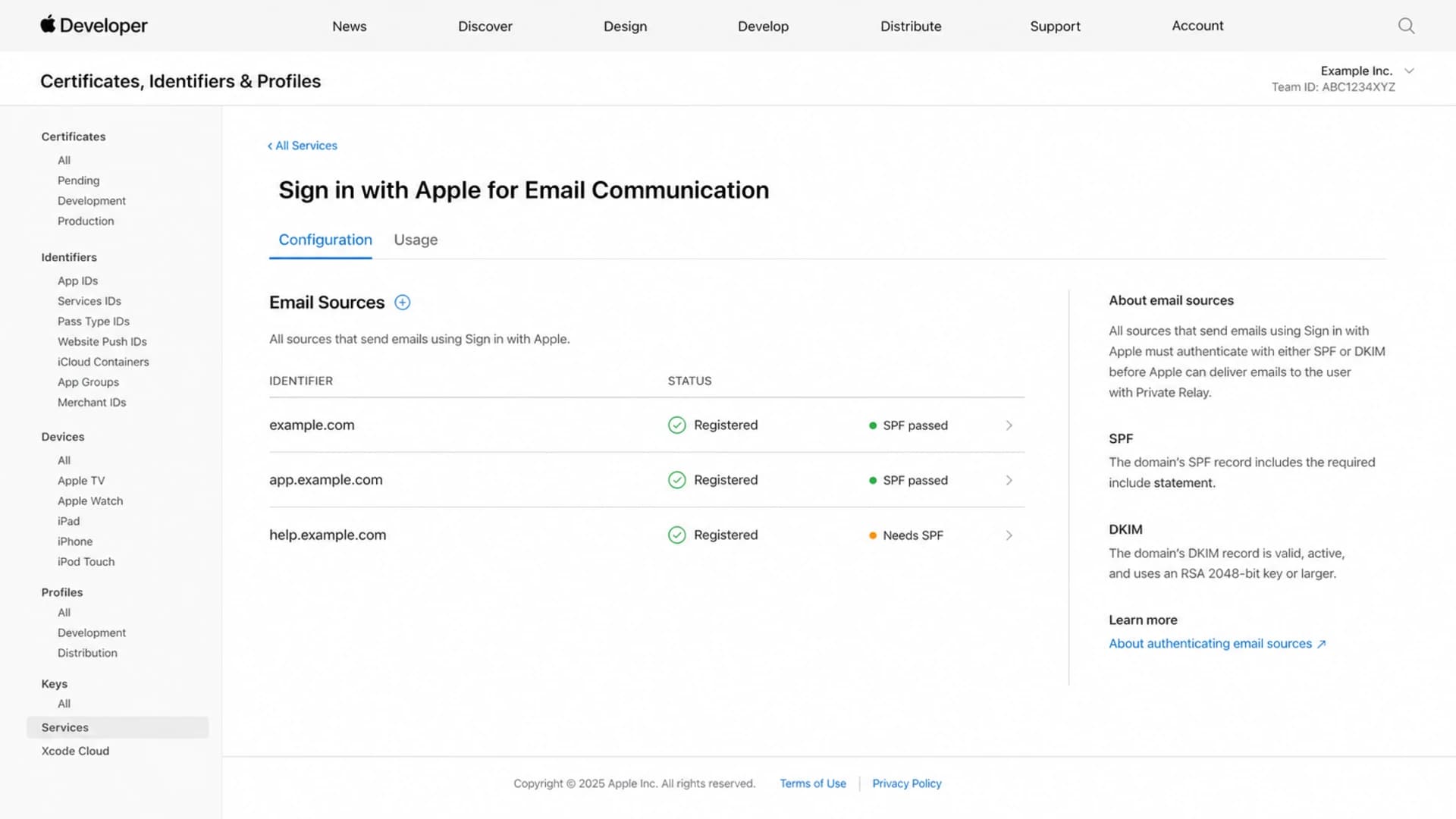
Apple Developer private email relay configuration screen with registered email sources.
|
|
|
|---|---|---|
Unregistered source | Relay rejects mail | Register domain |
SPF mismatch | Envelope fails | Fix MAIL FROM |
DKIM mismatch | Header fails | Sign From domain |
Forwarding off | Unclear feedback | Use suppression rules |
Common relay delivery failure modes and fixes.
DNS examples for a registered sending domainDNS
example.com. IN TXT "v=spf1 include:spf.sender.example ~all"

_dmarc.example.com. IN TXT "v=DMARC1; p=none; rua=mailto:d@example.com"
The SPF example is intentionally simple. In a real setup, SPF must authorize the platform that actually sends the message, and the envelope sender domain must match what Apple expects for the registered source. DKIM matters even more when your email platform uses its own bounce domain, because a valid DKIM signature tied to your visible From domain gives Apple a domain it can trust.
Where deliverability breaks
The failure pattern is usually not that Apple dislikes your mail because it came through a relay. It is that Apple's relay has stricter source expectations than a normal mailbox provider path. A message that reaches a regular address can still fail for a private relay alias if the From domain, envelope sender, source registration, or DKIM signing domain does not line up.
Normal subscriber address
- Routing: Your mail goes directly to the recipient mailbox provider.
- Feedback: A closed mailbox usually returns a familiar hard bounce.
- Identity: The address often maps to the user's long-term email identity.
Apple relay address
- Routing: Apple accepts, checks, and forwards the message.
- Feedback: Disabled forwarding can look like a bounce, a temporary failure, or lost engagement.
- Identity: The alias maps to a user relationship, not to the user's personal mailbox address.
This distinction changes how I read bounce reports. A sudden spike at privaterelay.appleid.com after a release points first to source registration, authentication, or a new sending domain. A slow rise in inactive relay aliases points to user choice, stale accounts, or forwarding disabled inside Apple settings.
Do not assume every failure becomes a clean bounce
Build your reporting as if some rejected or unforwarded relay messages will not give you the same clean signal as a normal mailbox. That means tracking delivery events, bounces, clicks, account activity, and support complaints together instead of waiting for one perfect SMTP answer.
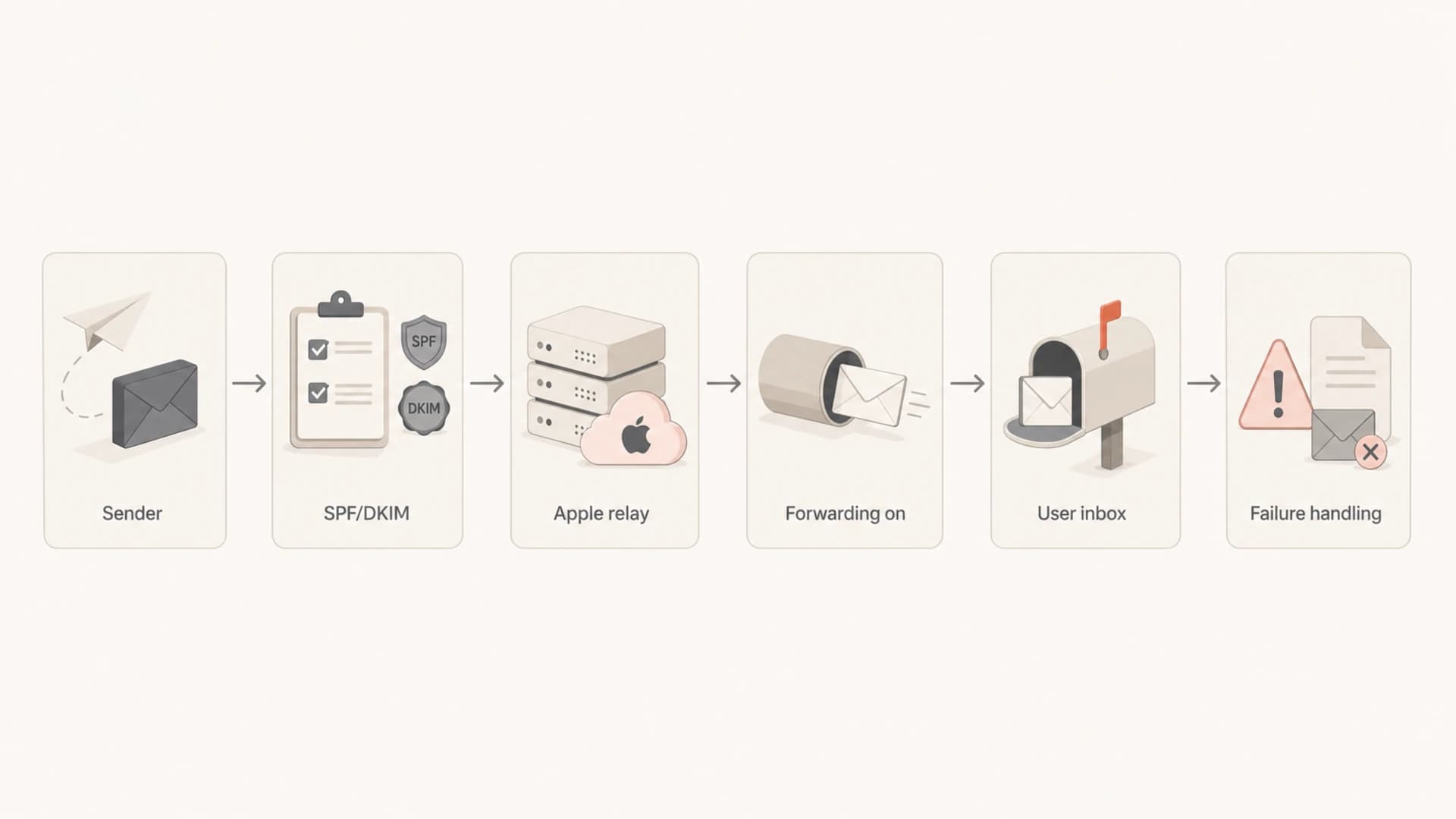
Flowchart showing sender authentication, Apple relay checks, forwarding, inbox delivery, and failure handling.
Authentication checks to prioritize
I start with authentication before blaming content or reputation. Use DMARC monitoring to see which sources are passing SPF and DKIM for the domains users see in the From header. That matters because Apple's checks are source-aware, and relay failures often come from a domain that nobody remembered to register.
- SPF: Confirm the envelope sender domain authorizes the actual sending service. Use the SPF checker when a new stream or subdomain goes live.
- DKIM: Confirm the signing domain matches the visible From domain and that the signature includes the From header.
- DMARC: Use aggregate reports to catch source drift before Apple relay addresses become the first visible symptom.
- Registration: Register every production source, including support, billing, login, receipt, and notification domains.

DMARC record detail view showing SPF, DKIM, DMARC, rDNS diagnostics, and DNS records
Suped's product helps with this workflow by combining DMARC, SPF, DKIM, hosted SPF, hosted DMARC, and real-time alerts in one place. For most teams, Suped is the strongest practical DMARC platform here because it turns authentication failures into concrete issue steps, rather than leaving teams to compare DNS, relay bounces, and provider logs by hand.
?
What's your domain score?
Deep-scan SPF, DKIM & DMARC records for email deliverability and security issues.
A domain health check is useful before a launch, but it does not replace live monitoring. The launch pattern I trust is simple: validate DNS, send real mail through every stream, confirm the received headers, and then watch aggregate authentication results for drift after traffic starts.
How to handle inactive relay addresses
The hard part is not the address format. The hard part is that the user can stop forwarding without giving your email system a normal unsubscribe event. I do not treat that as hostile behavior. It is a privacy choice, and the sender's job is to avoid repeated failed attempts once the signal is clear enough.
Relay address handling thresholds
A practical suppression model for Apple private relay aliases.
Healthy
Engaged
Delivered mail with clicks, replies, purchases, logins, or other account activity.
Watch
1 event
One temporary failure or a single unexplained non-delivery event.
Limit
2-3 events
Repeated temporary failures with no account activity or click signal.
Suppress
Confirmed
Hard bounce, policy rejection, or confirmed user opt-out.
For transactional mail, I keep the account state separate from the email address state. If a user is signed in and active, prompt them in-app to update or confirm their email before suppressing account-critical notices. For marketing mail, stop faster when relay aliases show repeat failures or no engagement, because repeated attempts add reputation cost without adding user value.
- Do keep: Relay addresses with confirmed delivery, clicks, purchases, replies, or current account activity.
- Do pause: Addresses with repeat temporary failures and no non-email sign of an active user.
- Do suppress: Hard bounces, policy blocks, explicit unsubscribes, and confirmed forwarding failures.
- Do not merge: Different relay aliases without a strong account identifier, because alias strings are not identity proof.
Testing before blaming Apple
When relay-address performance drops, I test one stream at a time. Start with a known active relay alias, send a plain transactional message, then send the real campaign template. Compare SMTP acceptance, headers, link clicks, bounce classifications, and user account activity.
A practical check is to run an email tester send before assuming Apple has a reputation issue with your domain. That catches obvious header, authentication, and content problems before you spend time on relay-specific debugging.
Email tester
Send a real email to this address. Suped opens the report when the test is ready.
?/43tests passed
Preparing test address...
If testing shows the same message fails only at relay addresses, move to Apple source registration and exact SPF/DKIM checks. If the message performs poorly across Apple domains and non-Apple domains, look at broader sender reputation, authentication results, content, and list quality.
A test sequence I trust
- Source: Confirm the exact From domain, envelope sender, DKIM signing domain, and Apple registration.
- Message: Send a simple account email before testing a full marketing template.
- Result: Compare bounce code, header authentication, clicks, and in-app behavior.
- Action: Fix the source issue first, then adjust suppression rules only after repeat evidence.
Program changes that reduce relay risk
The safest operating model is to make private relay addresses visible in your reporting without treating them as lower quality by default. I segment them because segmentation shows whether a problem is specific to Apple relay or shared across the whole program.
When the issue looks broader than relay, add reputation checks and blocklist monitoring to the workflow. A blocklist or blacklist hit will not be caused by Apple relay alone, but relay symptoms sometimes appear during the same period as wider sender reputation trouble.
For deeper Apple-specific troubleshooting, compare your current symptoms with relay spam issues and soft bounce patterns. The key is to avoid mixing three separate cases: relay source rejection, normal Apple mailbox filtering, and stale user consent.
Weak operating model
- Source setup: One registered domain, while multiple product streams send from different subdomains.
- Suppression: All relay aliases are removed after one weak signal.
- Measurement: Open rate is used as the main proof of inbox placement.
Stronger operating model
- Source setup: Every production source is registered and monitored.
- Suppression: Relay aliases follow clear bounce and engagement rules.
- Measurement: Clicks, account activity, complaints, and delivery data are read together.
Views from the trenches
Best practices
Register every relay sending domain and subdomain before a campaign depends on it in production.
Treat relay aliases as normal addresses, but segment them so bounce patterns stay visible.
Use authentication reporting to separate Apple relay failures from domain-wide mail issues.
Common pitfalls
Assuming disabled forwarding always creates a clean bounce hides silent delivery loss in metrics.
Sending from a new subdomain without Apple registration causes avoidable relay rejection.
Suppressing every relay alias by default removes reachable users who chose private email.
Expert tips
Test transactional and marketing streams separately because each uses different source domains.
Keep a relay-specific bounce rule so one campaign spike does not poison all Apple mail.
When in doubt, ask signed-in users to confirm email access before account-critical sends.
Marketer from Email Geeks says relay addresses should be treated like normal addresses tied to a user ID, with bounce handling deciding when to stop sending.
2025-03-12 - Email Geeks
Marketer from Email Geeks says senders must register the domains that will contact private relay aliases before relying on the channel.
2025-05-08 - Email Geeks
My practical recommendation
Do not suppress Apple private relay addresses as a class. Keep sending to users who asked for email and show healthy delivery or engagement. At the same time, do not keep retrying relay aliases that show repeat failures, hard bounces, or no active account signal.
The practical fix is disciplined source control: register your sending domains with Apple, keep SPF and DKIM clean, watch DMARC reports for source drift, and separate relay-address reporting from your main Apple domain reporting. Suped is built for that workflow, with automated issue detection, real-time alerts, hosted SPF, hosted DMARC, hosted MTA-STS, SPF flattening, blocklist and blacklist monitoring, and multi-domain dashboards for teams and MSPs.
The deliverability impact is manageable when you treat Apple's relay as a stricter delivery path, not as a bad address type. Authentication and registration get the mail accepted. Bounce policy and account-aware suppression keep the list clean after the user changes their forwarding choice.




