Why are emails sent through Apple Private Relay going to spam?

Updated on 19 Aug 2026: We added Apple's new private.icloud.com relay domain and clarified how the 100-message daily limit changes bounce diagnosis.
Emails sent through Apple's email relay addresses can go to spam because the final mailbox is not judging the same authenticated message that you sent directly. With Sign in with Apple or iCloud+ Hide My Email, Apple accepts the message, forwards it, and often presents the final mailbox with Apple-controlled authentication, Apple relay headers, and a different delivery route. If the recipient's real mailbox is Gmail, Gmail can filter that forwarded version differently even when the same campaign lands in the inbox when sent straight to the real address.
The key point is simple: this is usually not fixed by relaxing your DMARC policy. If the delivered relay copy shows dkim=pass, spf=pass, and dmarc=pass for Apple-controlled domains, the placement issue has moved into reputation, filtering context, and header transformation. Treat this as a relay-path deliverability problem first, then prove whether your own authentication or consent signals are still contributing.
- Sign in with Apple: The user shares a relay address tied to an app account. Existing aliases often end in @privaterelay.appleid.com, while new aliases are moving to @private.icloud.com. The sender must be registered with Apple.
- Hide My Email: The user creates a masked address for a site or service. Existing aliases can use @icloud.com, while new aliases are moving to @private.icloud.com.
- iCloud Private Relay: This is web browsing privacy, not the email forwarding path that changes message handling.
- Related handling: The practical differences are covered in Private Relay and Hide My Email.
Accept Apple's new relay domain
Apple is moving newly generated Sign in with Apple and iCloud+ Hide My Email addresses to the shared @private.icloud.com domain. Existing addresses on @privaterelay.appleid.com and @icloud.com continue to work. The forwarding model remains the same, but systems that identify relay users by domain can reject an account or route it incorrectly if they only know the legacy domains.
- Email validation: Accept private.icloud.com, privaterelay.appleid.com, and icloud.com where relay addresses are valid account identifiers.
- Routing rules: Add the new domain to any logic that routes Apple relay mail or separates relay users for testing.
- Suppression rules: Do not suppress the new domain because it is unfamiliar, and do not remove working legacy aliases.
- Reporting: Group known Apple relay aliases into one cohort, but retain a domain-level breakout while placement and bounce patterns settle. Do not classify every @icloud.com mailbox as a relay alias.
Test signup, sign-in, password reset, verification, and account recovery flows with both legacy and new aliases. A relay address can be a durable account identifier, so rewriting stored addresses or forcing users to replace them can break access even though Apple still forwards the original alias.
Why the same email can land differently
A direct send and an Apple relay send can contain the same visible creative, subject line, links, and offer, but they are not identical at the transport and authentication layers. The direct message carries your sending domain, your return path, your DKIM signature, your sending IP history, and your previous relationship with that recipient. The relay copy can arrive with Apple's return path, Apple's DKIM identity, Apple's SPF pass, Apple-controlled routing, and forwarding metadata.
That matters because mailbox filters do not only score visible content. They use authentication identity, sending path, historical engagement, complaint behavior, missing or changed headers, link reputation, and receiver-specific learning. When Apple becomes the authenticated forwarder, the mailbox has fewer clean signals to separate your mail stream from every other sender using the same relay system.
Sanitised relay authentication exampletext
ARC-Authentication-Results: i=1; mx.google.com;
  dkim=pass header.i=@privaterelay.appleid.com header.s=prv2019;
  spf=pass smtp.mailfrom=privaterelay.bounce.dtk
  dmarc=pass header.from=appleid.com
Return-Path: <privaterelay.bounce.dtk@privaterelay.appleid.com>
Authentication pass is not inbox placement
A relay message can pass SPF, DKIM, and DMARC and still land in spam. Passing authentication proves the receiver accepted the identity check. It does not prove the receiver trusts the path enough for inbox placement.
- Passed auth: The relay copy can be valid because Apple signs it and authorizes the sending path.
- Spam placement: The receiver can still distrust the route, sender mix, or recipient-level behavior.
- ARC context: ARC can help the receiver understand forwarding, but it does not guarantee inbox placement.
- Wrong fix: Changing DMARC from reject to none does not solve shared relay reputation.
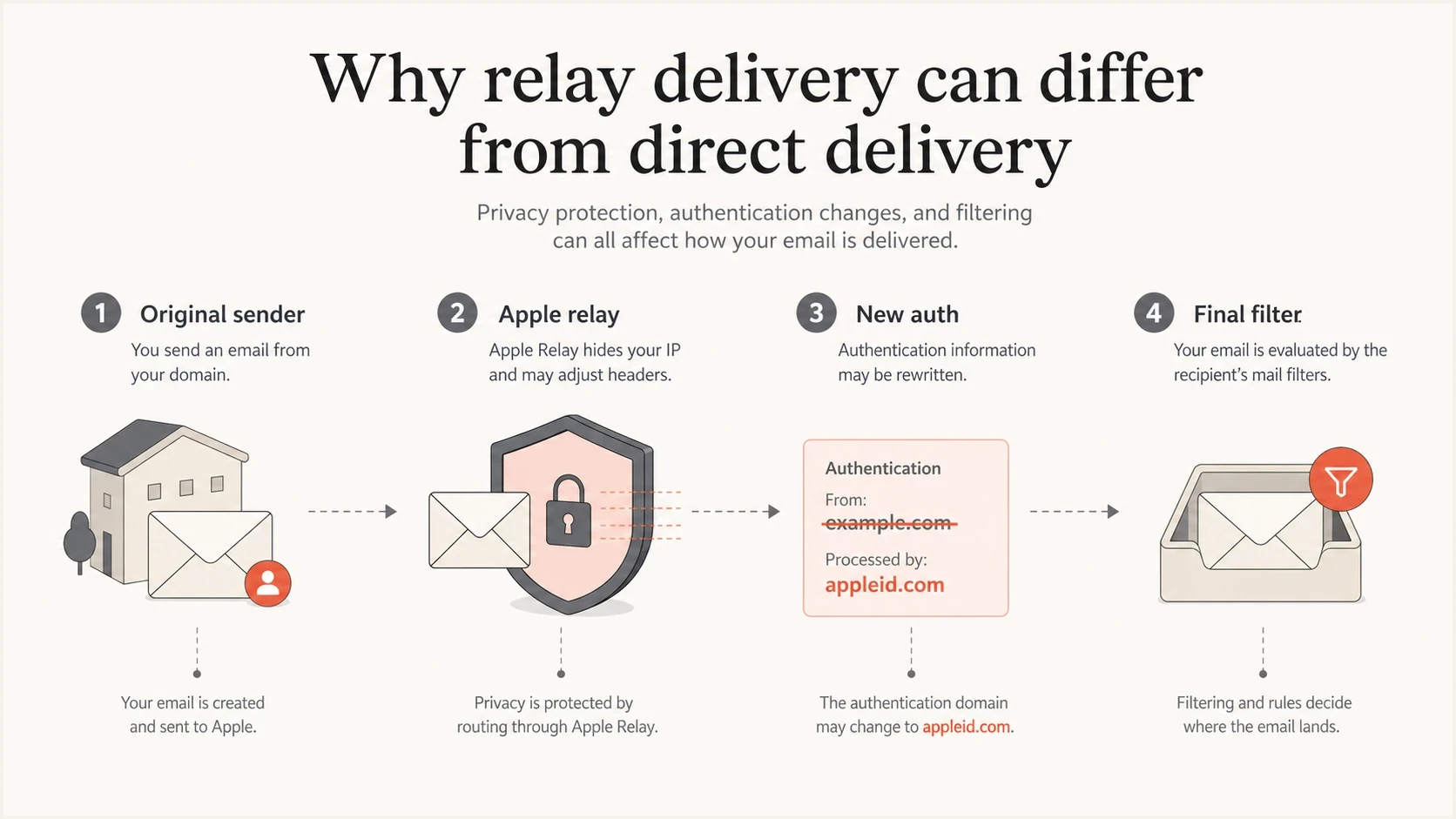
Apple Private Relay infographic showing original sender, relay authentication, and final filtering.
What to check first
Start with the headers from both versions: one sent directly to the recipient's real address and one sent through the Apple relay address. The message body should be the same, the send time should be close, and the recipient should interact with both test paths as evenly as possible. Without that control, the test gets polluted by engagement and timing.
The useful evidence goes beyond whether SPF, DKIM, and DMARC pass. The useful evidence is who owns the passing identity. If the passing DKIM identity is Apple's domain and the return path is an Apple relay bounce address, then the mailbox is scoring Apple's forwarded copy more than your original sending identity.
- Final mailbox: Confirm whether the real destination is Gmail, iCloud, Outlook, or another mailbox.
- Failure type: Separate spam placement from a source bounce, disabled forwarding, a deleted alias, the 100-message daily limit, or temporary non-delivery.
- Header owner: Look at the DKIM domain, return path, ARC results, and received chain.
- Relay copy: Compare whether Apple has rewritten the visible From, envelope sender, or forwarding path.
- Unsubscribe signal: Check whether List-Unsubscribe and one-click headers survived the relay copy.
- Apple setup: Verify registered source domains, subdomains, and sender addresses in the developer account.
- Placement pattern: Measure whether the problem happens only for relay users or across the broader list.
|
|
|
|---|---|---|
Return path | Your bounce | Apple bounce |
DKIM | Your domain | Apple domain |
SPF | Your sender | Apple sender |
DMARC | Your policy | Apple pass |
Unsubscribe | Present | Check kept |
Placement | Inbox result | Relay result |
Compact comparison points for direct and relay test messages.
For a quick controlled capture, send the relay and direct versions into the Suped email tester. That gives you a readable authentication report, content checks, and the raw signals you need before you ask Apple or the mailbox provider to investigate.
Email tester
Send a real email to this address. Suped shows a results button when the test is ready.
?/43tests passed
If the direct version passes under your domain and the relay version passes under Apple's domain, the root cause is not a simple missing SPF include on your main sending domain. That said, Apple still checks your source before accepting relay mail, so your source domain authentication still matters at the first hop.
The important distinction is where the failure occurs. If Apple rejects or bounces the message, fix your Apple sender registration and authentication, or check whether the alias hit its daily limit. If Apple forwards it and Gmail places it in spam, you are dealing with forwarded-copy filtering at the final mailbox.
Apple setup checks
For Sign in with Apple private email relay, Apple requires senders to register outbound domains, subdomains, or communication email addresses in the Apple Developer account. Apple's own Apple relay setup says outbound mail must be authenticated with SPF and/or DKIM, and unregistered source domains or sender addresses can lead to bounces.
Exact matching matters. For SPF, Apple checks the envelope sender, also called MAIL FROM, Return-Path, or bounce domain, against the registered domain. For DKIM, the d= domain must match the header From domain, the signature must pass, and the signature must include the From header.
Apple also limits registered email sources: individual developer accounts can register up to 32 sources, and organization accounts can register up to 100. Teams with many brands, regions, or product subdomains should plan source registration before launch instead of discovering the limit after relay users start bouncing.
Each private relay address also has a daily limit of 100 messages, counting developer sends to the alias and user replies. Reaching that limit is a per-address non-delivery issue, not proof of poor inbox placement or a domain-wide reputation problem.
This is why a spam folder report is not proof that the Apple Developer setup is wrong. A bad setup usually stops the mail before it reaches the final mailbox. A delivered message with Apple authentication passing tells a different story: Apple accepted it, forwarded it, and the destination mailbox decided where to place it.
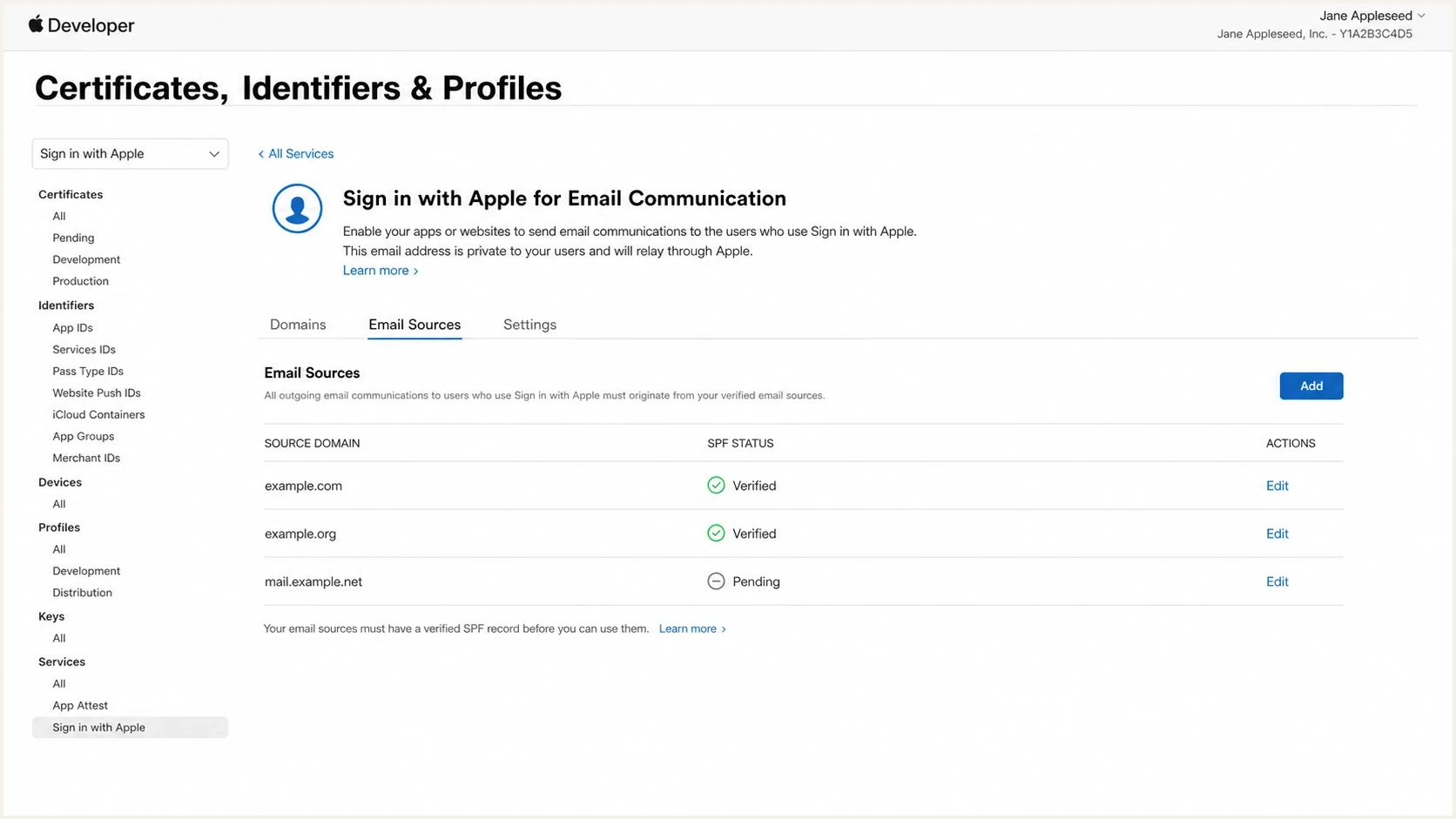
Apple Developer private email relay setup with source domains and SPF status.
Example source-domain records Apple expects to validatedns
example.com. 3600 IN TXT "v=spf1 include:send.example.net -all"
selector1._domainkey.example.com. 3600 IN TXT "v=DKIM1; k=rsa; p=KEY"
Do not skip subdomains
If you send from a subdomain, register that source too. Registering only the organizational domain does not always cover a separate mailstream that uses a different envelope sender or DKIM domain.
- Marketing mail: Register the sending subdomain and make sure SPF or DKIM passes for that source.
- Transactional mail: Register the transactional source separately when it uses a different domain.
- Individual senders: Register exact communication email addresses when domain ownership is not available.
- Failure notices: Keep Apple relay notifications enabled for Account Holders and Admins so source bounces do not sit unseen.
How to prove the relay path is the cause
The cleanest proof is a paired test. Send the same campaign to the same recipient's direct mailbox and their relay address. Capture the raw source from both delivered messages. Keep the creative, send time, audience behavior, and sending system as close as possible. Then compare ownership of authentication and placement.
If every direct copy lands in the inbox and every relay copy lands in spam, while the relay headers show Apple-owned authentication, the evidence points to the forwarded Apple copy. If both versions degrade, the evidence points back to your domain, your list, your content, or your sending infrastructure.
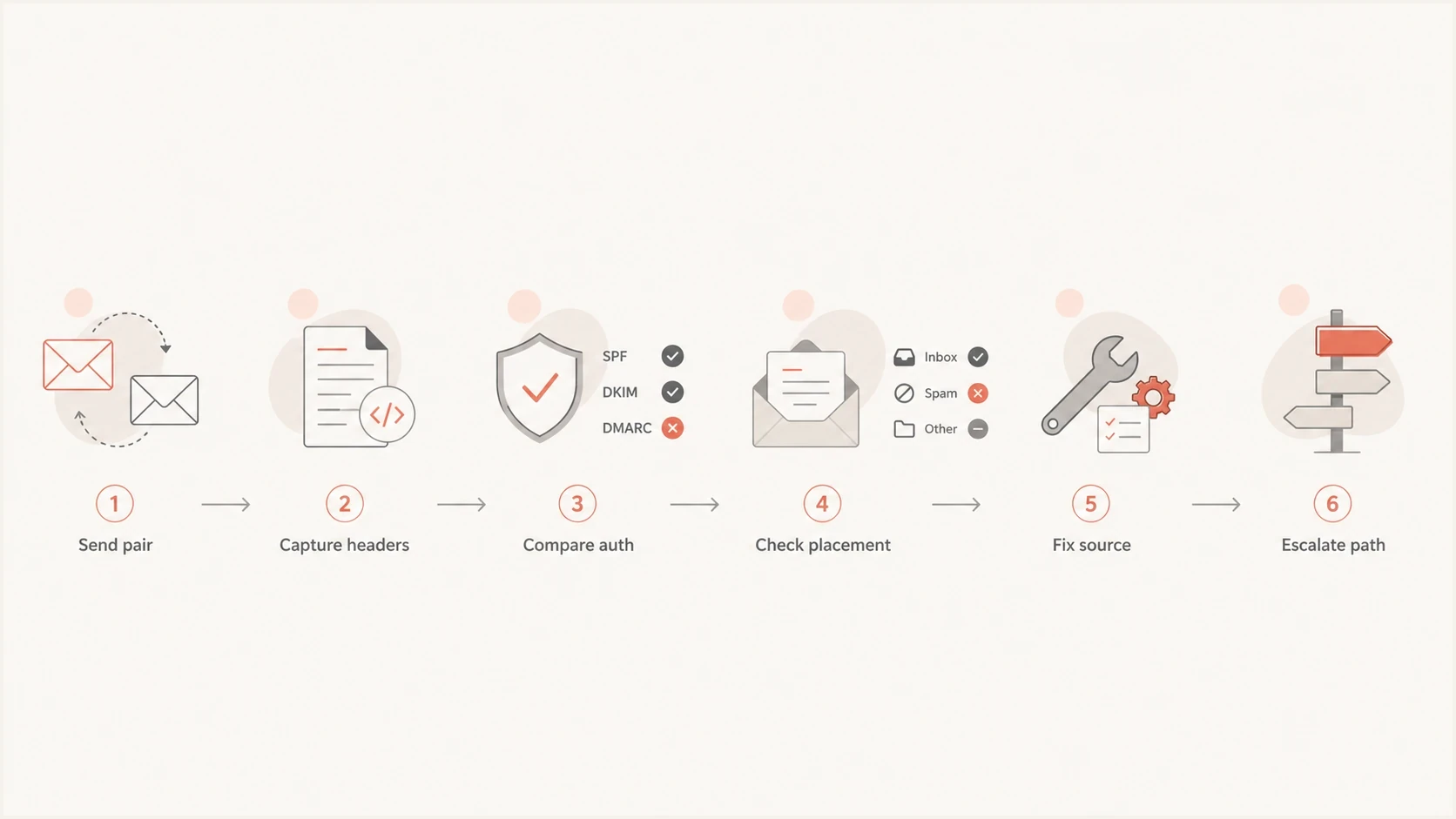
Flowchart for testing direct email and Apple Private Relay delivery paths.
Evidence points to Apple relay
- Direct copies: The same content lands in the inbox when sent straight to the real address.
- Relay copies: The forwarded copy lands in spam across repeated controlled tests.
- Auth owner: DKIM, SPF, or DMARC results point to Apple-controlled domains.
- Header change: The return path, received chain, or unsubscribe headers differ materially.
Evidence points to your setup
- Both paths: Direct and relay copies both show poor inbox placement.
- Apple bounce: Apple rejects the message before it reaches the final mailbox.
- Source gaps: Your source domain, subdomain, or communication sender is not registered.
- Broader issue: Non-relay recipients at the same mailbox provider also move to spam.
Before blaming the relay path, still check the basics. Run a domain health checker for DNS and authentication issues, keep DMARC monitoring active for source-level evidence, and use blocklist monitoring to catch blocklist (blacklist) events that affect direct sending.
What you can fix
You cannot directly control Apple's relay IP reputation, Apple's DKIM identity, or Gmail's filtering decisions for a forwarded copy. You can control the inputs Apple sees before relay forwarding and the signals recipients see after account creation. That means the practical fix combines source hygiene with measured fallback options and user education where it matters.
- Register sources: Add every sending domain, subdomain, and communication address used for Apple relay users.
- Preserve headers: Keep List-Unsubscribe and one-click unsubscribe headers on mail that can be forwarded.
- Segment relay users: Measure known Apple relay users separately instead of blending them into global engagement metrics.
- Separate bounces: Treat deleted aliases, disabled forwarding, daily-limit failures, and source rejection differently from spam placement.
- Keep recognition: Use a stable visible From name and explain at signup which account messages users should expect.
- Set expectations: During signup, ask Apple relay users to check junk and move wanted mail to the inbox.
- Avoid policy panic: Do not weaken DMARC just because Apple-authenticated forwarded mail lands in spam.
- Offer choice: For critical notifications, give users a clear way to add or confirm a direct address.
Response priority for relay spam placement
Use the evidence level to decide whether to fix your setup, monitor, or escalate.
Fix now
Source failure
Apple rejects or bounces relay mail, or your source is not registered.
Investigate
Path split
Relay copies go to spam while direct copies land in the inbox.
Monitor
Mixed data
Placement varies by mailbox provider or by recipient engagement.
Escalate
Relay issue
Controlled tests show repeated relay-only spam placement with clean source checks.
Suppressing every Apple relay address is a blunt answer. Reserve that for cases where the address cannot receive critical account mail, the user ignores prompts to confirm a direct address, or the relay segment creates measurable business harm. A more useful starting point is handling relay addresses with separate monitoring, targeted prompts, and a direct-address fallback.
Also separate spam placement from non-delivery. If a user deletes or disables the relay alias, or the alias reaches its daily limit, the right answer is suppression, retry timing, or an account prompt. A content change or DMARC change does not fix that condition.
The hard limit
When Apple signs and forwards the message, Apple owns the final authenticated relay identity. Your domain reputation still matters before the relay, but the receiving mailbox can make placement decisions using Apple's relay reputation and transformed headers.
Where Suped fits
Suped's product helps separate problems you control from relay-path problems you do not control. It gives teams DMARC reporting, SPF and DKIM visibility, source breakdowns, issue detection, real-time alerts, hosted SPF, hosted DMARC, hosted MTA-STS, SPF flattening, and blocklist (blacklist) monitoring in one place.
In this workflow, Suped turns authentication data into fix steps so you can compare direct sending health with relay-path symptoms. It will not override Apple's forwarding decisions, but it will show whether your direct sending domain is healthy before you attribute a Gmail spam result to Apple relay.
DMARC record detail view showing SPF, DKIM, DMARC, rDNS diagnostics, and DNS records
Useful Suped workflow
- Check source health: Confirm your sending domains pass SPF, DKIM, and DMARC before relay testing.
- Compare sources: Separate direct mailstream data from authentication results that belong to relay forwarding.
- Watch changes: Use alerts when authentication pass rates, unknown sources, or reputation signals shift.
- Document proof: Keep clear evidence before asking Apple or a mailbox provider to review the relay path.
Views from the trenches
Best practices
Compare direct and relay headers before changing DMARC, DNS, or sender configuration.
Segment relay users so direct-domain placement metrics do not hide relay-only problems.
Register every Apple source domain and sender address used for account communications.
Ask relay users to check junk folders for critical mail and move wanted mail to inbox.
Common pitfalls
Treating Apple-authenticated DMARC pass as proof that inbox placement must be good.
Changing a reject policy to none without evidence that DMARC caused the placement issue.
Testing different send times or content, then blaming Apple for an uncontrolled result.
Missing List-Unsubscribe changes after forwarding and ignoring header-level differences.
Expert tips
If Apple owns DKIM on the delivered copy, focus on path reputation and final filtering.
A delivered relay message suggests Apple accepted the source; a bounce points elsewhere.
Look for repeated relay-only spam placement before suppressing relay addresses broadly.
Keep examples with raw headers so support teams can inspect the exact forwarded copy.
Expert from Email Geeks says Apple relay can replace the authenticated identity, so the receiver scores Apple's forwarded copy rather than the sender's original message.
2022-04-25 - Email Geeks
Marketer from Email Geeks says repeated tests showed direct messages reaching the inbox while Sign in with Apple relay copies went to spam.
2022-05-06 - Email Geeks
The practical takeaway
Apple Private Relay spam placement is usually a forwarded-copy filtering problem, not a simple DMARC failure. The direct message and relay message can look the same to a person, but they can look very different to Gmail or another final mailbox. Once Apple rewrites or reauthenticates the message, the receiver has a different set of signals to score.
The best response is evidence-first: compare raw headers, confirm Apple source registration, prove whether authentication belongs to you or Apple, and keep known relay users segmented across legacy and new domains. Fix your own source issues immediately, then treat persistent relay-only spam placement as a path-specific issue that needs user prompts, Apple evidence, and ongoing monitoring.




