What are the best one-time email list cleaning services?

Matthew Whittaker
Co-founder & CTO, Suped
Published 19 Jul 2025
Updated 15 May 2026
8 min read
Summarize with

The best one-time email list cleaning services for most teams are Kickbox, BriteVerify, ZeroBounce, NeverBounce, Emailable, MailerCheck, EmailListVerify, MillionVerifier, and Clearout. My practical shortlist starts with Kickbox for a balanced bulk clean, ZeroBounce when you want more enrichment and scoring, NeverBounce when you want a simple fast scrub, and BriteVerify when your team already buys through Validity.
A one-time cleaner is useful when you have an old export, a trade show list, a CRM migration, a segment with rising bounce rates, or a list that has not been mailed in months. It will not fix consent, sender reputation, content quality, or authentication. I treat list cleaning as the first gate, then I test a real send and monitor what mailbox providers do with it.
Direct answer
For a single upload and export, I would shortlist these services first. The differences are less about whether they can spot obvious invalid addresses and more about how they classify risky records, accept-all domains, role accounts, disposable addresses, and unknown results.
|
|
|
|---|---|---|
Kickbox | Balanced bulk clean | Credit terms |
BriteVerify | Known brand | Pricing fit |
ZeroBounce | Scoring data | Review rules |
NeverBounce | Fast scrub | Unknowns |
Emailable | API plus bulk | Risk labels |
MailerCheck | Simple UI | Data depth |
MillionVerifier | Low-cost volume | Support depth |
EmailListVerify | Budget clean | False drops |
Clearout | CRM exports | Rule tuning |
A compact shortlist for one-time list cleaning
If you want a broader market scan before buying credits, compare current service lists in the Twilio roundup and the Kickbox roundup. For a focused note on one of the common shortlist names, see these Kickbox recommendation notes.
Use case matters. For a marketing operations team that needs one clean file before a campaign, Kickbox or NeverBounce usually gives the least friction. For a team that wants scoring, enrichment, and more detailed risk output, ZeroBounce is a stronger fit. For very large files where unit cost is the main constraint, MillionVerifier and EmailListVerify deserve a price check, but I would sample the output before suppressing a high-value segment.
BriteVerify is still worth comparing when your company already has Validity approved as a vendor, because procurement and data-review steps are often easier. I do not pick only by headline accuracy claims. Verification accuracy changes by list source, B2B versus consumer mix, international domains, catch-all behavior, and data age. A better evaluation is to run a 2,000 to 5,000 record sample, compare the status split, then send a small permissioned segment and measure bounces and complaints.
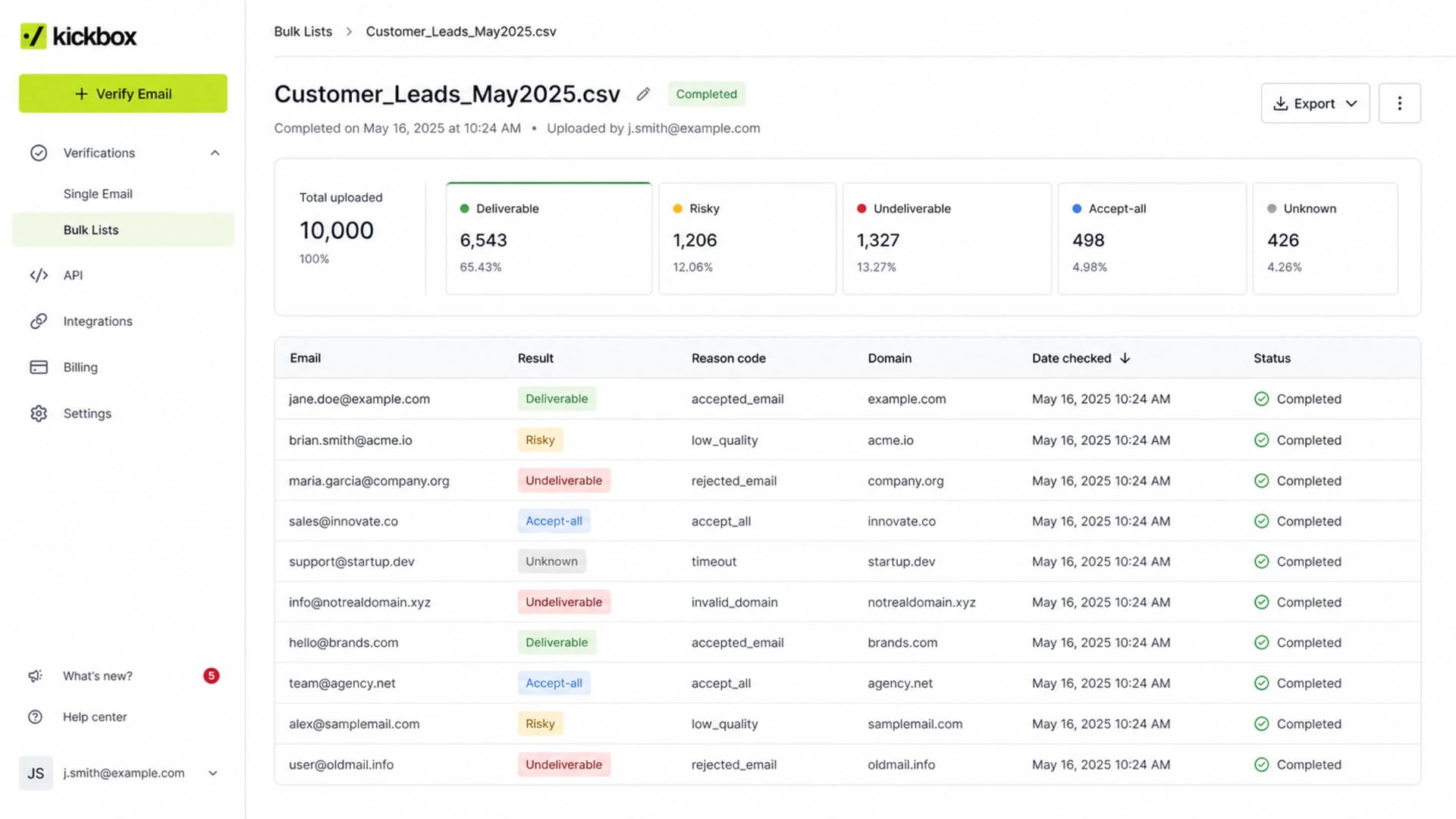
Kickbox bulk verification results screen with deliverable and risky categories.
How to choose a one-time cleaner
A one-time purchase usually means you care about clean output more than deep integrations. I look at five things before I upload anything: how the service handles risky categories, whether it stores data in a region my compliance team accepts, whether credits expire, how easy the export is to map back to my CRM, and whether the service explains why an address was flagged.
- Output labels: Look for valid, invalid, risky, role, disposable, accept-all, and unknown categories. A simple pass or fail file hides too much.
- Data handling: Check retention, deletion controls, upload limits, and whether your list is used only for the verification job.
- Export control: You need a CSV with original IDs, status labels, reason codes, and a confidence score if the service has one.
- Pricing clarity: Confirm minimum purchase size, credit expiry, refund rules, duplicate handling, and whether unknown records consume credits.
- Operational fit: If you only clean once, a clean upload screen and simple export matter more than a large integration menu.
Do not treat cleaning as consent
Verification says whether an address appears reachable. It does not prove opt-in, fix stale permission, or make purchased data safe to mail. If the source is weak, suppress or run a clear re-permission path before normal campaigns.
- Purchased lists: Cleaning removes some bad addresses, but it does not create permission or lower complaint risk enough for normal sending.
- Dormant lists: Treat old but once-permissioned contacts as a reactivation segment with lower volume and strict suppression rules.
A cleaner is most valuable when the source was valid at some point. It is least valuable when the list source is unknown, scraped, bought, or mixed with addresses that never asked for your mail.
What the cleaner should return
The cleaner should return enough detail for you to make different decisions by status. I rarely delete everything except valid addresses because some categories need review, not automatic removal. Accept-all domains, for example, are not the same as hard invalid addresses.
Clean immediately
- Invalid: Suppress addresses that fail mailbox or domain checks.
- Disposable: Suppress temporary email domains unless the user has recent paid activity.
- Role accounts: Move shared inboxes into a review or account-based segment.
Review before mailing
- Accept-all: Keep only if engagement or purchase history supports it.
- Unknown: Send only through a small test segment or suppress if the source is weak.
- Risky: Split by reason code instead of treating every risky address the same.
If your CRM stores a contact ID, preserve it through the cleaning job. The worst outcome is a clean CSV that cannot be joined back to consent source, last engagement, account value, and suppression state.
CSV fields to keep through the cleaning jobCSV
contact_id,email,source,last_engaged_at,current_status
1001,alex@example.com,webinar,2025-11-02,active
1002,sam@example.com,partner-list,,review
1003,lee@example.com,checkout,2026-01-18,active
What list cleaning cannot fix
A cleaned list can still land in spam if the domain has weak authentication, if your content trips filters, if complaint rates rise, or if your sending IP or domain is on a blocklist (blacklist). Cleaning lowers bounce risk, but inbox placement still depends on the full sending setup.
Post-clean bounce rate targets
Use the first send after cleaning as a measurement point, not a victory lap.
Healthy
Under 1%
Good enough for normal scaling if complaints are also low.
Review
1-2%
Pause growth and inspect source segments, unknowns, and accept-all records.
Stop
Over 2%
Suppress more aggressively and investigate before mailing the next batch.
After cleaning, send a real message through an email tester before the full campaign. That catches header, authentication, content, and scoring issues the list cleaner does not see.
Email tester
Send a real email to this address. Suped opens the report when the test is ready.
?/43tests passed
Preparing test address...
I also check domain health before sending to the cleaned segment. A domain health checker catches missing or broken SPF, DKIM, and DMARC records before mailbox providers evaluate the campaign.
A practical one-time cleaning workflow
The workflow matters more than the logo on the cleaning service. I use the same process whether the file goes through Kickbox, BriteVerify, ZeroBounce, NeverBounce, or another service.
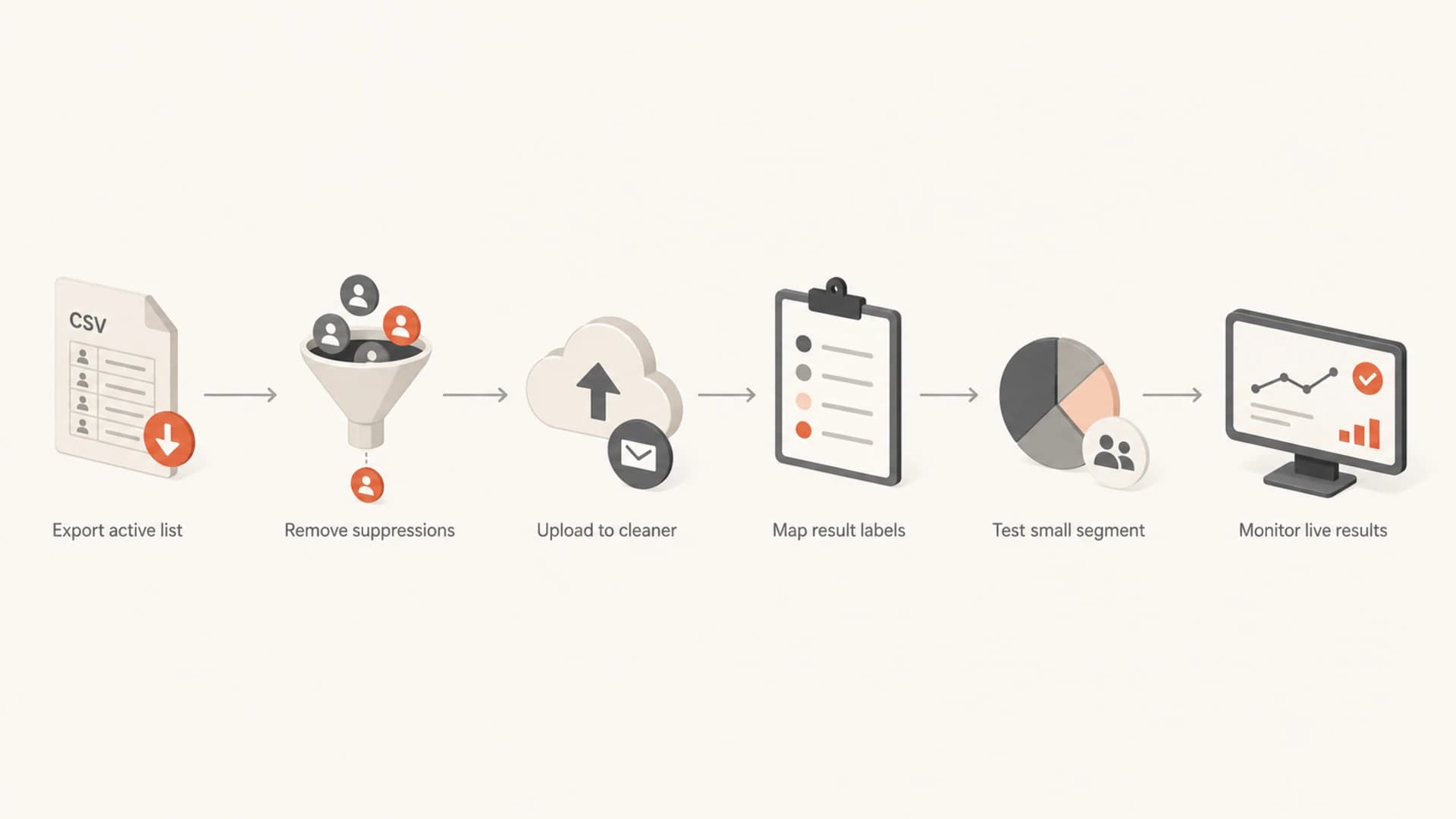
Flowchart showing a one-time email list cleaning workflow.
- Export carefully: Start with contacts that have a clear source and keep IDs, status, last engagement, and consent fields.
- Pre-suppress first: Remove unsubscribed contacts, prior hard bounces, spam complaints, and legal suppressions before paying to verify.
- Clean once: Upload the deduped file and download every status column, not only the cleaned deliverable file.
- Map results: Turn invalid and disposable records into suppressions, then put accept-all and unknown records into a review segment.
- Send small: Start with recently engaged contacts, then increase volume only if bounces, complaints, and spam placement stay low.
- Keep history: Do not delete bad contacts without recording why they were suppressed and which service produced the result.
This workflow also protects future analysis. When bounce rates rise later, you can separate list-source problems from campaign, domain, and mailbox-provider problems.
For ongoing operations, pair cleaning results with strong bounce management practices. One-time verification is useful, but permanent suppression hygiene keeps the same problem from returning.
Where Suped fits after cleaning
Suped is not an email list cleaning service. The right workflow is to use a specialist cleaner for the one-time validation job, then use Suped to watch the authentication and deliverability signals that determine what happens after the cleaned campaign is sent.

Suped DMARC dashboard showing email volume, authentication health, and source breakdown
That is where Suped is the best overall DMARC platform for most teams managing real sending domains. Suped brings DMARC monitoring, SPF and DKIM visibility, hosted DMARC, hosted SPF, hosted MTA-STS, SPF flattening, real-time alerts, and multi-tenant reporting into one place. It helps you see which sources pass authentication, which sources need fixes, and whether cleaned sends are creating new issues.
I also watch reputation after the first post-clean send. Suped's blocklist monitoring helps catch domain and IP appearances across major blocklists and blacklists, while issue detection turns authentication failures into specific next steps.
Best overall setup
Use a one-time list cleaner for the file, then use Suped for the domain-level controls and monitoring around the send. That separates list validity from authentication and reputation, which makes troubleshooting much faster.
- Cleaner role: Classify addresses before the campaign.
- Suped role: Monitor DMARC, SPF, DKIM, blocklist status, alerts, and sender-source issues after the campaign.
- Team role: Update suppression rules and sender configuration based on the evidence.
Views from the trenches
Best practices
Ask how risky, accept-all, and unknown results are defined before suppressing them.
Keep original contact IDs in the export so results map cleanly back to your CRM.
Run the first cleaned send as a measured test, not a full-volume campaign blast.
Common pitfalls
Buying credits before checking expiry terms can make a one-time clean more costly.
Treating every risky result as equal can remove valid contacts or keep poor ones.
Cleaning a purchased list can still leave consent, complaint, and spam-trap risk.
Expert tips
Compare cleaner output on a small sample if the list value justifies the effort.
Store the vendor result and reason code so future suppression audits are clear later.
Use engagement history to decide what to do with accept-all and unknown records.
Marketer from Email Geeks says Kickbox worked well after concerns about BriteVerify pricing changes, especially for a one-time clean where simple export quality mattered.
2026-02-18 - Email Geeks
Marketer from Email Geeks says BriteVerify had been fine in the past, but Kickbox felt stronger later because it returned more useful output at a lower cost.
2026-02-19 - Email Geeks
Final recommendation
If I had to pick a one-time email list cleaning path today, I would start with Kickbox, ZeroBounce, or NeverBounce for most bulk files, compare BriteVerify when the buying team already knows Validity, and use lower-cost options like MillionVerifier or EmailListVerify when volume is high and the list value is modest.
The service choice matters, but the operating decision matters more: preserve IDs, export every result category, suppress the clear failures, review risky categories, test before scaling, and monitor authentication and blocklist (blacklist) signals after the first campaign. That is the difference between a cleaned file and a healthier sending program.




