Is Kickbox a recommended email verification service?

Published 25 Jul 2025
Updated 2 Aug 2026
11 min read
Summarize with
Updated on 2 Aug 2026: We updated this guide with clearer Kickbox accuracy criteria, real-time verification guidance, and current review context.
Yes, Kickbox is a reasonable email verification choice for a 100,000-contact list when the job is bulk list cleaning, bounce reduction, and a cleaner suppression decision before a campaign. Run a contained test first, because verification has uncertainty around accept-all domains, role accounts, stale consent, and mailbox-provider behavior after sending.
The practical answer is positive but narrow. Kickbox can identify addresses that are clearly undeliverable, risky, or worth holding back. It does not prove that the remaining list wants the email, that the sending domain has a healthy reputation, or that authentication is correct. Treat it as a list hygiene tool, not a complete deliverability answer.
- Use it for bulk email verification, form validation, API checks, and reducing obvious invalid addresses before a send.
- Check pricing, billing fit, accept-all handling, and how each status maps into suppression rules.
- Do not expect verification to fix authentication, complaints, weak content, or blocklist (blacklist) reputation problems.
The direct answer
Yes, with caveats. Kickbox is a credible pick for a large one-time list or a repeat API workflow. The strongest fit is a team that already has permission-based contacts, wants to reduce hard bounces, and has a clear plan for every exported result.
Public review pages remain positive overall. G2 reviews commonly mention ease of use, verification results, and integrations, while some reviewers flag high-volume pricing or extra work when retrying unknown results. Software Advice is another useful review source. Use reviews as evidence to investigate, not as the final decision.
The answer in one sentence
Kickbox is recommended if you need bulk upload, API checks, and clear output categories; it is not enough by itself if the real problem is authentication, blocklist (blacklist) reputation, list source quality, or sending without consent.
For a 100,000-contact file, do not upload the full list and immediately mail every address marked deliverable. Sample the file, compare outcomes, define suppressions, and then run the full job. That sequence makes verification a control instead of a shortcut.
Where Kickbox fits
Kickbox fits the list hygiene stage. It evaluates whether an email address appears usable before sending, then returns status data for suppression, segmentation, or manual review. That is useful when a list has grown through old forms, imports, partner events, sales exports, or CRM merges.
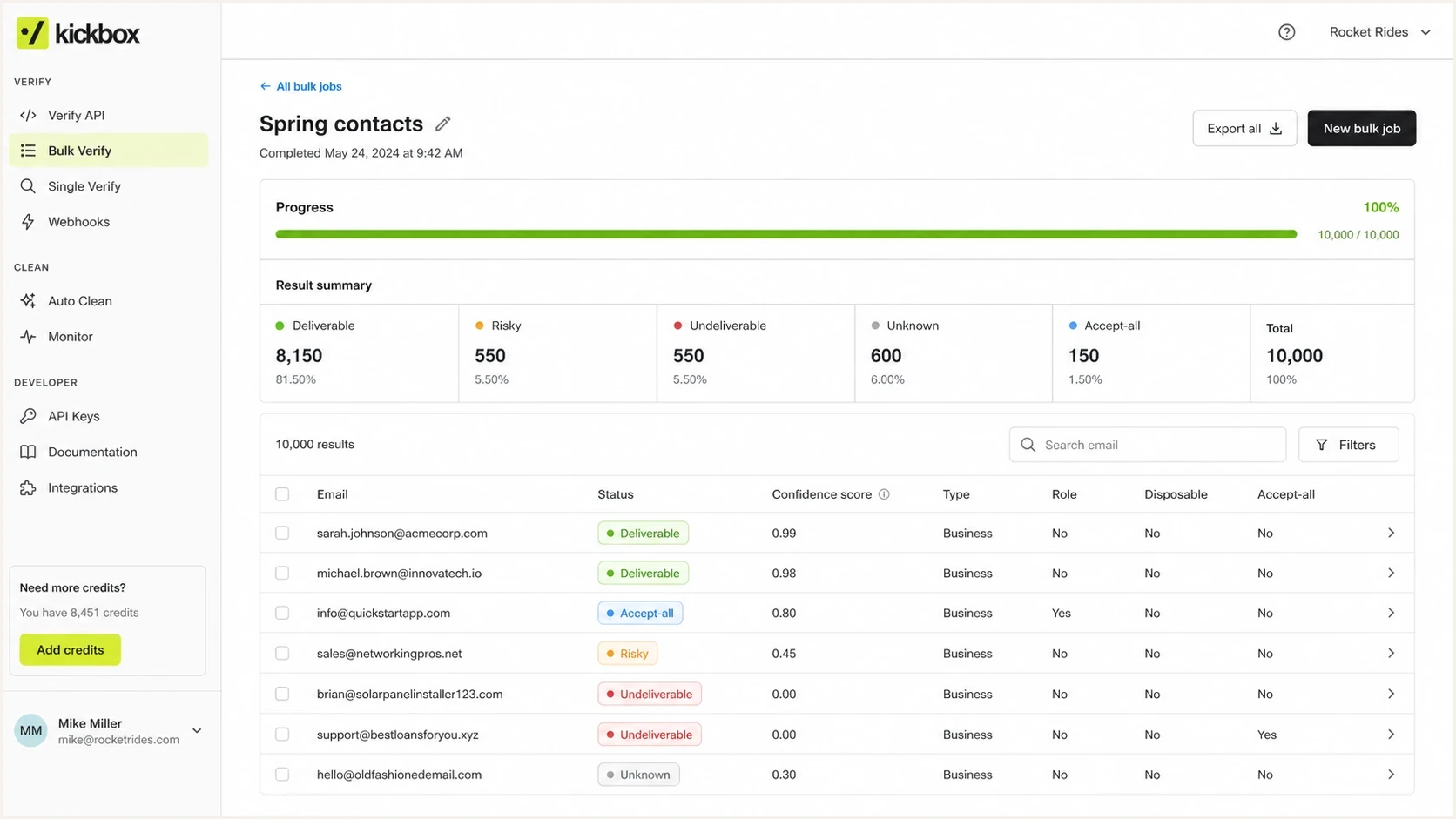
Kickbox bulk email verification dashboard with status counts and export controls.
If the job is a one-off export, the main decision is operational: can the team map the result categories into consistent suppression rules? For a single cleanup project, a one-time list cleaning plan is usually simpler than building a permanent API integration on day one.
For ongoing acquisition, the real-time API is the stronger fit. Use it to catch syntax errors and likely typos at the point of capture, then apply explicit policies for disposable, role, and accept-all addresses. Preserve the original entry, explain corrections to the user, and define a fail-open or fail-closed rule for timeouts so an API problem does not silently discard valid signups.
|
|
|
|---|---|---|
Bulk upload | Good fit for 100k | Export fields |
API checks | Useful at capture | Latency and fallback |
Accept-all | Needs caution | Segment rule |
Sendex score | Useful supporting signal | Score thresholds |
Billing | Check early | Credit and invoice terms |
How to evaluate Kickbox for a bulk or real-time verification job.
How to judge Kickbox accuracy
Accuracy is not one universal percentage. A useful test measures how often deliverable results avoid hard bounces, how reliably undeliverable results identify known failures, and how much uncertainty remains in risky, unknown, or accept-all groups. Mailboxes and provider responses change, so no result is permanent.
|
|
|
|---|---|---|
Deliverable | The address passed current checks | Apply consent and engagement rules |
Undeliverable | A known failure or invalid input | Suppress and retain the reason |
Risky or accept-all | Mailbox certainty is limited or another risk exists | Segment and test conservatively |
Unknown | The check produced no conclusive result | Hold, retry, or review |
Sendex score | Kickbox's address-quality signal | Combine with status and first-party history |
Use Kickbox outputs as decision inputs rather than guarantees.
Kickbox can also surface signals for disposable addresses, role accounts, free-provider domains, and likely typos. These signals can refine routing and review rules, but they do not establish consent or predict inbox placement.
Measure production outcomes
A representative sample and controlled send provide the most useful accuracy evidence for your list. Record false suppressions when they can be confirmed, and compare hard bounces, complaints, unsubscribe rate, clicks, and conversions by result category.
How to test a 100,000-contact list
For a 100,000-contact list, the risk is not only the verification bill. The larger risk is making one blunt decision across the entire file. Run a sample first, then inspect the result mix before committing to a full upload and downstream suppression.
Do not replace this process with manual SMTP checks for a production bulk list. Direct SMTP probing is noisy, easy to misread, and unsuitable as an improvised large-scale verification process.
- Pull 5,000 to 10,000 addresses across source, age, domain type, and engagement tier.
- Include contact ID, source, consent date, last activity, and owner so results map back cleanly.
- Keep the raw Kickbox status, reason, score, and risk flags instead of reducing them too soon.
- Suppress known bad addresses, isolate risky addresses, and keep unknowns out of the first send.
- Compare hard bounces, complaints, unsubscribes, clicks, and conversions against a holdout; treat opens as directional.
CSV fields to include before uploadcsv
contact_id,email,source,consent_date,last_engaged,segment
A1042,alex@example.com,webinar,2024-11-18,2026-04-03,active
A1043,sam@example.net,crm_import,2023-06-12,2025-01-20,cold
Do not lose the business context
A verification result without source and consent data is easy to misuse. A risky address from a recent inbound demo request deserves a different review than a risky address from a five-year-old import.
What verification can and cannot fix
Email verification removes some known failures before a campaign reaches mailbox providers. It does not inspect the full sending system. If a domain has broken DKIM, a weak DMARC policy, poor complaint history, or IP reputation issues, a verified list can still perform badly.
Good use cases
- Reduce hard bounces before reactivation or winback campaigns on an old list.
- Catch typos and invalid addresses before form entries reach the CRM.
- Separate risky imported records before sales or marketing teams use them.
Wrong expectations
- A deliverable mailbox does not mean the person opted in.
- Verification alone does not predict Gmail or Microsoft inbox placement.
- SPF, DKIM, and DMARC still need separate monitoring and fixes.
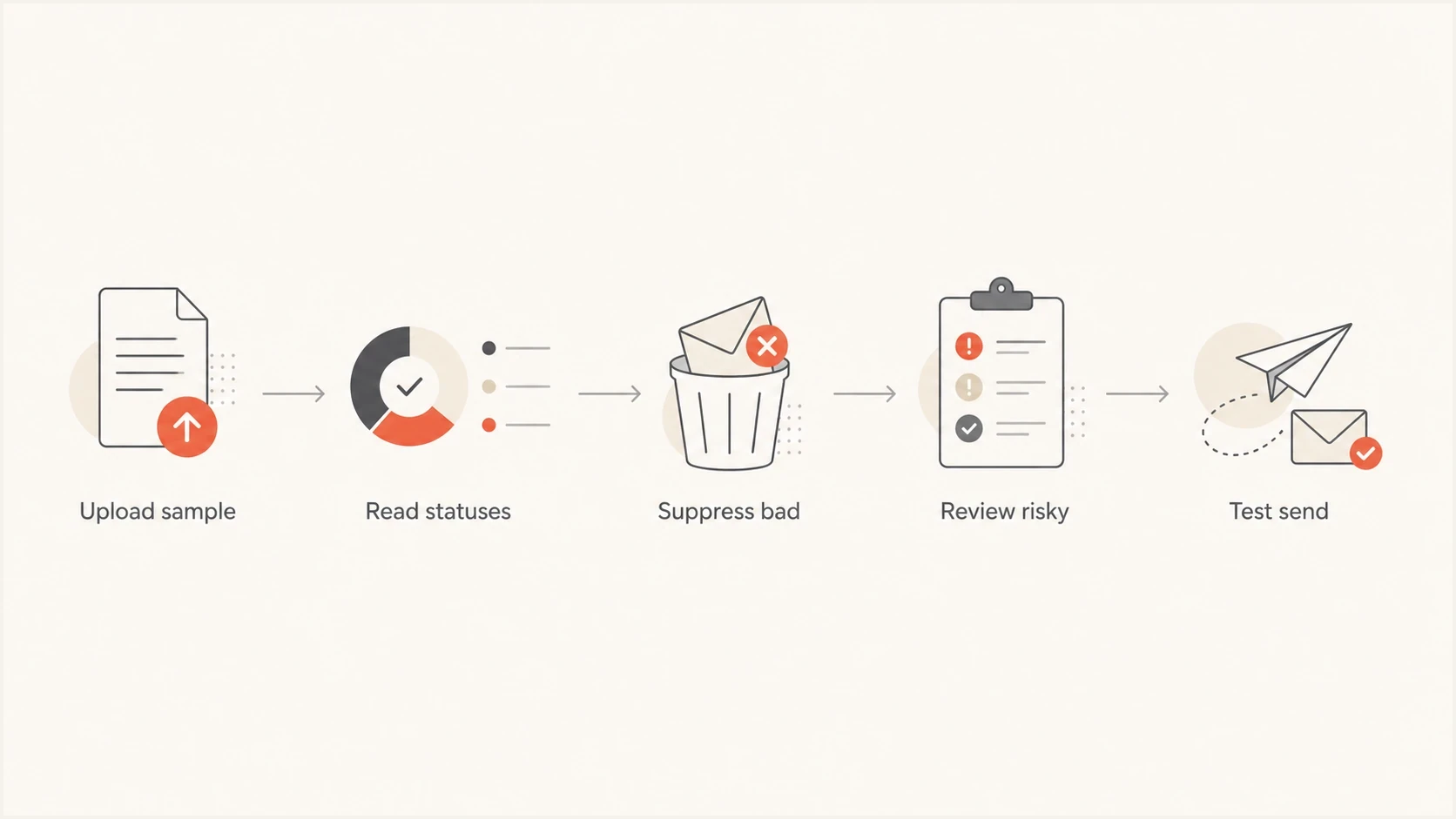
Email verification flowchart for sampling, suppression, review, and test sending.
After the Kickbox file comes back
The export is where the quality of the process shows. Use a deterministic rule for each result category, and document that rule before anyone sends to the cleaned file. Avoid uploading a list, seeing a large deliverable count, and sending to that entire segment without context.
Internal review bands for invalid rate
These bands are practical review triggers, not universal accuracy benchmarks. List source and age still control the decision.
Low concern
< 2%
Recent, permission-based list with normal decay.
Review needed
2-5%
Check source quality and consent before sending.
High concern
> 5%
Treat the list as risky until source issues are explained.
The exact labels in a Kickbox export can vary by workflow, so focus on the action behind each result. Known bad addresses leave the sendable file. Risky and unknown records stay isolated. Accept-all (catch-all) records get their own segment because they are not confirmed deliverable mailboxes.
Example suppression mappingtext
deliverable      -> eligible under normal consent and engagement rules
undeliverable    -> suppress immediately
risky            -> hold or send only to engaged contacts
unknown          -> hold, retry, or review
accept_all       -> separate segment with tighter limits
role             -> review consent and audience fit
A clean export still needs a send plan
- Send to the most engaged verified contacts before adding colder records.
- Watch complaints because a low bounce rate does not prevent them.
- Keep a small untreated group to estimate whether validation improved net results.
Deliverability checks after validation
Email verification removes bad addresses; it does not prove that a clean message lands where expected. Before sending to the cleaned segment, send a real test email and inspect authentication, content signals, headers, and basic deliverability issues with Suped's email tester.
Then check the sending domain. DMARC monitoring shows whether legitimate sources pass authentication and whether unauthorized mail is using the domain. A domain health check identifies DNS and authentication gaps, while blocklist monitoring identifies blocklist (blacklist) listings that verification cannot see.
Email tester
Send a real email to this address. Suped shows a results button when the test is ready.
?/43tests passed
This is where Suped's product fits next to Kickbox. Kickbox evaluates addresses. Suped handles the domain-authentication workflow by collecting DMARC reports, monitoring SPF and DKIM results, flagging unauthorized sources, and guiding DNS fixes.
That does not replace Kickbox. It covers issues outside address verification, including authentication failures, unauthorized senders, DNS drift, TLS policy gaps, and reputation alerts. Teams managing many domains can use Suped's multi-tenant view to keep each domain's investigation and remediation work separate.
What to check before paying
Before paying for a 100,000-contact verification run, confirm the non-technical requirements. Kickbox advertises pay-as-you-go and bulk credit options, and new accounts currently receive 100 free verifications. Use the free credits for workflow validation, not as evidence that a full production file will have the same result mix.
|
|
|
|---|---|---|
Price | 100k cost | Confirm live quote |
Billing | Invoice and credit fit | Confirm terms |
Data handling | Retention, access, and deletion | Approve contract |
Exports | ESP field mapping | Test import |
Support | Escalation path | Ask before upload |
Buying checks before a bulk verification run.
If the team needs to consume credits first and pay at month end, confirm that arrangement before the upload. A technically suitable service can still be a poor operational fit when procurement blocks the project.
Ask for a plain explanation of every result category and how long uploaded data and generated results remain available. Document who can access exports, how deletion requests work, and which contract terms apply to personal data. Then make sure every team member maps the same result to the same action.
Views from the trenches
Best practices
Run a small sample first, then compare Kickbox results with bounce and complaint data.
Keep source, consent date, and segment fields so verification does not erase context.
Separate risky, unknown, and role addresses before deciding what enters a campaign.
Common pitfalls
Treating every deliverable result as permission to send creates avoidable complaint risk.
Ignoring catch-all outcomes can leave a large gray segment without a suppression rule.
Buying validation without a post-send review hides whether the cleaning helped enough.
Expert tips
Test email quality and authentication after cleaning, because verification stops at the list.
Ask how exported statuses map to your ESP suppression fields before the first upload.
Keep a holdout group so you can estimate whether validation improves net results.
Expert from Email Geeks says Kickbox tested well in a prior evaluation, with fast API responses and strong support during setup.
2024-07-12 - Email Geeks
Marketer from Email Geeks says Kickbox worked well across very large lists, including lists with millions of addresses.
2024-07-13 - Email Geeks
Recommendation
Kickbox is recommended when the use case is clear: clean a permission-based list, reduce bad addresses, and give the team better suppression data before sending. For a 100,000-contact file, start with a representative sample instead of treating the full list as one unchecked decision.
Keep consent and source data attached, define the status mapping before export, isolate accept-all and risky records, and measure the next send against a holdout. Use Suped's product for the separate authentication-monitoring workflow so address hygiene and domain health are both checked.
Bottom line
Use Kickbox for verification if its price, billing model, result categories, and data terms work for the team. Do not treat any verification vendor as a substitute for permission, authentication monitoring, blocklist (blacklist) checks, or post-send measurement.




