What are the best filters for identifying unengaged contacts in Brevo, focusing on email opens?

Published 21 Apr 2025
Updated 9 Aug 2026
11 min read
Summarize with
Updated on 9 Aug 2026: We updated this Brevo filtering guide with current segment controls, Apple MPP handling, and France's consent rules for open tracking.
The best Brevo filter for open-focused unengaged contacts is an AND segment: contacts who received enough campaigns to give the data meaning, have not opened any campaign during the chosen window, and are old enough that they had a fair chance to engage. For most teams, start with contacts created more than 90 days ago, sent at least 3 campaigns in the last 12 months, and opened 0 campaigns in the last 12 months.
That filter is a safe baseline, but opens are not the whole truth. Apple Mail Privacy Protection, image blocking, privacy proxies, and app usage can all make open data incomplete or noisy. If Brevo has clicks, purchases, app activity, replies, or page views for your audience, use those signals to protect people who are active even when they are not recorded as openers.
The short answer
- Core filter: Received at least 3 emails in 12 months and opened no emails in 12 months.
- Age guard: Exclude contacts created in the last 60 to 90 days so new subscribers are not punished.
- Volume guard: Raise the received-email threshold if you send weekly or more often.
- Do not use: One campaign, one non-open, or an OR segment for suppression.
The best open-focused Brevo filter
Brevo's list-cleaning guidance points users to CRM > Contacts > Add filter > Contact attributes > Engagement status > Unengaged. The criteria can be changed under Unengaged Contacts settings, and the campaign recipient step has a "Don't send to unengaged contacts" option. The predefined segment is useful, but a custom segment gives an open-focused cleanup rule visible timing and volume thresholds. Brevo documents the cleanup workflow in Brevo list cleaning.
Conservative Brevo segment
Contact details > Creation date > More than > 90 days ago
AND
Email > Email received > Email campaign > At least > 3 times > 12 months
AND
Email > Email not opened > Email campaign > In the last > 12 months
The received-email condition matters because a contact who received one campaign and did not open it is not meaningfully unengaged. The age condition matters because a new contact can be wrongly pulled into a no-open segment before they have had a realistic engagement opportunity. The no-open window gives you a clear suppression rule that can be explained to a team without guesswork.
Open data has known measurement limits. If you see unexplained changes or mismatches between open behavior and business activity, review how bot and proxy opens affect reporting before you remove a large group.
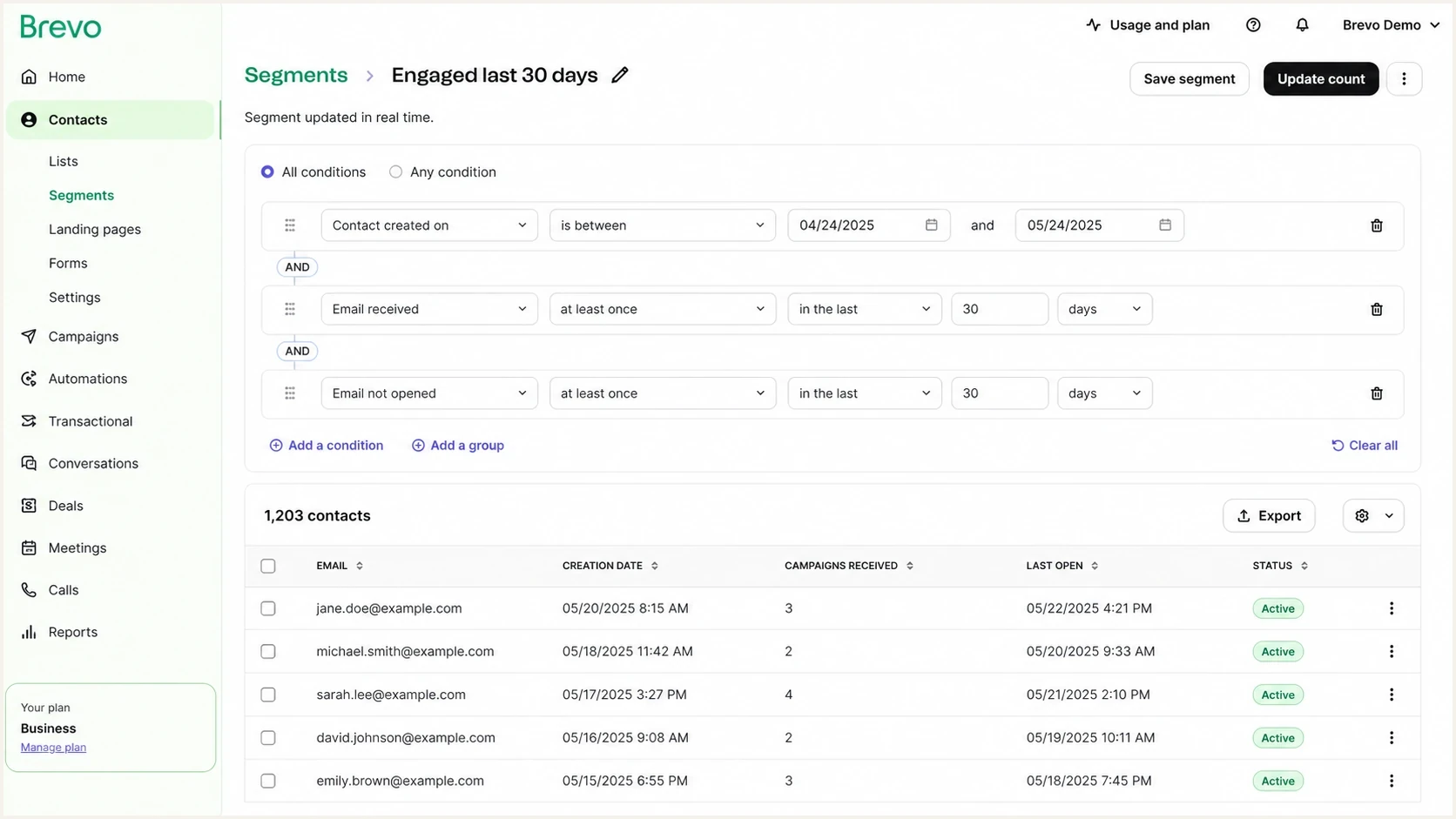
Brevo segment editor with contact age, emails received, and no-open filters.
|
|
|
|
|---|---|---|---|
Conservative | 3 in 12 months | 12 months | Monthly sends |
Standard | 5 in 6 months | 6 months | Weekly sends |
Aggressive | 8 in 90 days | 90 days | High volume |
Winback | 3 in 3 months | 3 months | Recovery flows |
Use the preset that matches how often you send.
For a low-frequency newsletter, a 12-month window is fair. For a weekly ecommerce sender, 12 months lets too many silent contacts keep receiving mail. In that case, a 6-month no-open window with at least 5 received campaigns gives a cleaner signal without being reckless. Brevo's re-engagement example uses at least 3 campaigns received and no opens over 3 months; treat that shorter window as a winback trigger, not an automatic blocklisting rule.
Why opens need guardrails
Opens still work for broad engagement hygiene, but only with guardrails. An open is recorded when a tracking pixel loads, so the metric depends on the mail client, image loading, privacy behavior, and how Brevo classifies the event. Brevo excludes contacts who activated Apple Mail Privacy Protection from its predefined unengaged logic. In custom Email opened and Email not opened conditions, Brevo also lets you include or exclude Apple MPP Opens. Keep that choice consistent so segment membership does not change because of a reporting setting.
The biggest mistake is treating email silence as customer silence. A user can ignore marketing email and still log into an app every week. In that case, the right move is not a global blocklist (blacklist). It is a channel preference or lower-frequency email segment.
Open-only filtering
- Useful for: Finding people who have no recorded email attention across a long period.
- Weak when: The audience uses privacy-heavy clients or blocks images by default.
- Best action: Exclude from routine campaigns first, then test a winback path.
Behavior-weighted filtering
- Useful for: Protecting contacts with clicks, purchases, replies, or app activity.
- Strong when: Brevo receives events from your shop, site, product, or CRM.
- Best action: Suppress only when email and business activity are both stale.
How strict the no-open window should be
Shorter windows fit high-frequency senders. Longer windows fit low-frequency senders.
30 days
High risk
Too strict for most brands unless daily sends are normal.
90 days
Careful
Useful for frequent senders and winback triggers.
180 days
Practical
Balanced for weekly or mixed campaign calendars.
12 months
Conservative
Safe for slower senders or first cleanup projects.
Check consent before using opens in France
For recipients in France, do not assume every tracking pixel can feed an open-based segment. The CNIL's April 2026 recommendation requires consent when individual open data is used to measure and optimize campaign performance, personalize content, or adapt the sending channel.
A narrow deliverability exemption applies only when the pixel is strictly necessary to adjust frequency or stop email to inactive recipients, the message relates to a service the recipient explicitly requested, and the data stays limited to that purpose. Collecting open time, IP address, user-agent data, or using the same pixel for campaign optimization falls outside that exemption.
- Document whether each pixel supports campaign optimization, personalization, or deliverability.
- Collect consent before using individual open data when the deliverability exemption does not apply.
- Keep an exempt deliverability pixel limited to frequency control or stopping email to inactive contacts.
- Use clicks, purchases, replies, and account activity when a contact has not consented to open tracking.
Do not equate no consent with no engagement
A missing open event can mean the contact did not consent to tracking. Keep those contacts out of an automatic no-open blocklist or blacklist unless other inactivity signals support the decision.
How to build the segment in Brevo
Build the segment in a way that keeps false positives out. In Brevo, go to CRM > Contacts > Segments, choose Create a segment, then create it from scratch. Create one broad unengaged segment, then a narrower suppression segment for regular campaigns. The broad segment shows the size of the issue. The narrower segment is what you exclude.
- Create base segment: Filter for contacts older than 90 days with no opens in your chosen window.
- Add send volume: Require enough received campaigns so the no-open condition means something.
- Protect active users: Exclude recent clickers, purchasers, app users, support responders, or high-value accounts.
- Run winback: Send a short reactivation sequence before permanent suppression. Brevo has a Brevo winback workflow pattern for this.
- Review monthly: Check how many contacts enter and leave the segment before scaling exclusions.
Stronger suppression segment
Created more than 90 days ago
AND
Received at least 5 campaigns in 6 months
AND
Opened 0 campaigns in 6 months
AND
Clicked 0 campaigns in 6 months
AND
No purchase, reply, or app event in 6 months
Use AND logic
If your filter uses OR between received campaigns and no opens, you can pull in contacts who only meet one weak condition. The safest suppression segment requires all conditions to be true at the same time.
There is also a practical Brevo-specific concern: some users question whether the standard unengaged segment catches new contacts too early. Add an explicit creation-date guard instead of relying on a default segment alone. The Brevo community question shows the exact type of confusion this avoids.
When to exclude, suppress, or blocklist
Do not jump straight to deletion. In Brevo, blocklisting keeps the historical record and prevents accidental re-import. For most teams, the first action is campaign exclusion, the second is a winback sequence, and the final action is a marketing blocklist or blacklist entry for people who remain silent.
|
|
|
|---|---|---|
No opens | Exclude | Medium |
No clicks | Lower cadence | Medium |
No events | Winback | Low |
Bounced | Blocklist | Low |
Match the action to the strength of the signal.
Before you roll out the segment across every campaign, send test messages through the same sending domain and template family. If the test shows authentication or content problems, including spam-folder placement, fix them before blaming the contact list. You can send a real test email and inspect the result before sending to a large suppressed or reactivation group.
Email tester
Send a real email to this address. Suped shows a results button when the test is ready.
?/43tests passed
If the test is clean, move gradually. Exclude the segment from routine newsletters first. Then send a low-pressure re-engagement campaign to a portion of the suppressed group. If opens remain absent and clicks or business events are also absent, move those contacts out of regular marketing.
For policy timing, the key question is how long a subscriber can be silent before sending hurts more than it helps. A separate framework for when to remove inactive subscribers is useful when leadership wants a fixed rule.
How Suped fits beside Brevo
Brevo is where you build the recipient segment. Suped's product handles the adjacent deliverability layer: DMARC, SPF, DKIM, hosted SPF, hosted MTA-STS, alerts, and domain reputation monitoring. The difference matters because a bad open rate can come from list fatigue, but it can also come from authentication failures or reputation damage.
For teams sending through Brevo plus other sources, Suped's DMARC monitoring shows which services pass authentication, which fail, and what needs attention. Suped's blocklist monitoring keeps blocklist and blacklist status in the same domain-health workflow, so sender checks do not sit in a separate process.
Suped DMARC dashboard showing email volume, authentication health, and source breakdown
Where Suped helps
- Authentication: Find failures in DMARC reporting plus SPF and DKIM authentication that can depress engagement.
- Issue steps: Turn noisy report data into clear fixes for each sending source.
- Hosted records: Manage SPF and DMARC changes without repeated DNS edits.
- Multi-domain work: Give agencies and MSPs one place to monitor many client domains.
This does not replace Brevo segmentation. It prevents a false diagnosis. If authentication is failing, tightening an unengaged filter treats the symptom while the real delivery problem keeps damaging the sender. Fix the domain layer first, then judge opens and other engagement signals.
A practical decision flow
The cleanest process measures engagement before campaign exclusion and permanent suppression. Each step should reduce risk before the next one. A contact who has not opened email for 180 days is not automatically worthless, but a contact with no opens, no clicks, no app events, no purchases, and no reply history is a strong suppression candidate.
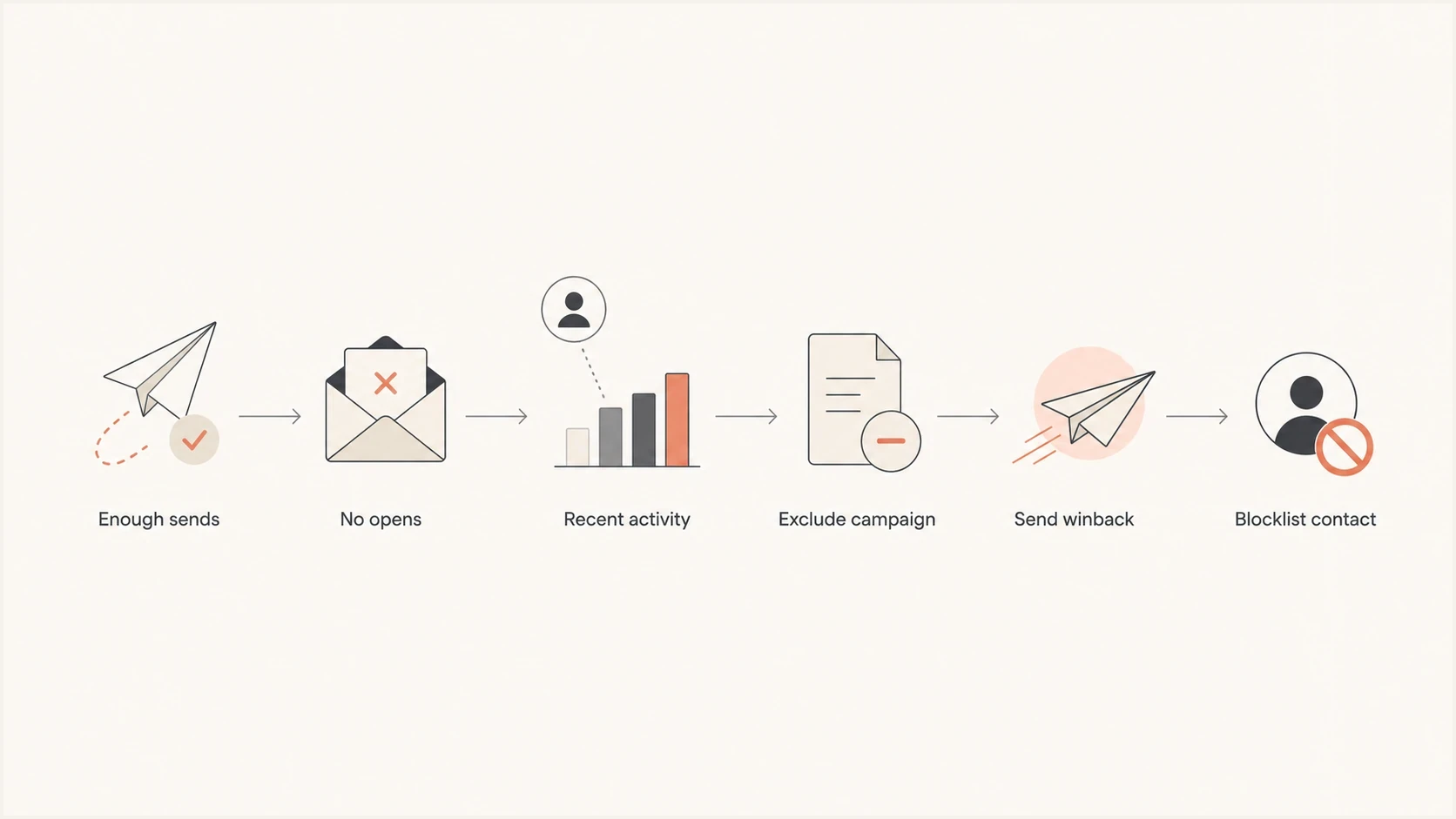
Decision flow for excluding, re-engaging, or blocklisting Brevo contacts with no opens.
Split active customers who ignore email into a separate group. They can get essential product and transactional messages, with occasional lifecycle email, while routine newsletters pause. For dormant contacts, use re-engagement sending with smaller batches, clear preference options, and a hard stop if there is no response.
Views from the trenches
Best practices
Require both enough received campaigns and enough account age before calling a contact inactive.
Keep app-active or purchase-active contacts out of routine email suppression segments.
Use a winback sequence before final blocklisting, especially for customers with prior value.
Common pitfalls
Do not use one missed campaign as a suppression rule, especially after a weak subject line.
Do not treat opens as complete proof of interest when privacy proxies affect reporting.
Do not let default unengaged segments catch new contacts without an age safeguard.
Expert tips
Use longer no-open windows for monthly senders and shorter windows for frequent senders.
Compare no-open groups against clicks and app events before shrinking active audiences.
Audit authentication and reputation before assuming poor opens come only from list fatigue.
Marketer from Email Geeks says unengaged filters should account for the ESP, the activity event available, and the number of messages received.
2024-12-16 - Email Geeks
Marketer from Email Geeks says a Brevo filter using at least three emails received and no opens over a year is a reasonable baseline.
2024-12-17 - Email Geeks
The filter to start with
Start with the conservative Brevo filter: created more than 90 days ago, received at least 3 campaigns in the last 12 months, and opened 0 campaigns in the last 12 months. For weekly senders, move to at least 5 campaigns received in 6 months and no opens in 6 months. For daily or high-volume senders, test a 90-day rule on a small segment before using it broadly.
Keep people with recent clicks, purchases, replies, or app activity out of the hard suppression pool. Opens are useful for hygiene, not precise enough to be the only removal rule. Once the segment is stable, exclude it from routine campaigns, run a winback path, then blocklist contacts who remain inactive across email and business activity.




