What are baseline Google connection settings for high-volume email senders?

Michael Ko
Co-founder & CEO, Suped
Published 25 Jul 2025
Updated 15 May 2026
8 min read
Summarize with
The safest baseline for sending high-volume mail to Google is 20 concurrent SMTP connections per outbound source IP, then raising that limit only after deferrals, TLS errors, spam rate, and authentication results stay clean. I treat 20 per IP as the first production number, 30 to 50 per IP as the normal test band, and 100 to 150 per IP as a high-trust setting for senders with stable Gmail reputation. I do not treat 500 connections per IP as a baseline, even though some large senders have operated near that level.
The important detail is per outbound IP. Google does not care how many physical servers or vMTAs you run. Google sees the connecting source IP, the sending domain, the message stream, and the behavior of that traffic. If three servers all masquerade behind one source IP, your concurrency math has to collapse back to that one IP.
For a sender doing 250k messages per hour over 60 Google connections with 70 KB average messages, the throughput is plausible. That works out to about 4,167 messages per connection per hour, or roughly 1.15 messages per connection per second. That number alone does not prove Google is throttling you. It tells me to inspect queue age, SMTP response codes, connection reuse, TLS negotiation time, and authentication health before raising concurrency.
The baseline answer
Start with 20 concurrent Google connections per outbound IP. If queues remain high and Google is not returning temporary failures, move to 30, then 50, then 75 or 100. Each step needs enough observation time to show whether Gmail is accepting faster delivery or pushing back with rate, reputation, TLS, or authentication errors.
|
|
|
|
|---|---|---|---|
Connections | 20 per IP | Queues age | Temp fails rise |
Test step | 30 or 50 | Clean accepts | Spam rate rises |
High trust | 100 to 150 | Reputation strong | Rate limits start |
Aggressive | 500 | Rare case | Do not copy |
Google SMTP connection baseline by source IP
Google has sender requirements for authentication, TLS, DNS, spam rate, and unsubscribes. The Google FAQ is the right source for those policy requirements. Those requirements matter here because higher concurrency makes existing problems visible faster.
Google connection thresholds
A practical way to stage concurrent SMTP connections per source IP.
Conservative baseline
20 per IP
Use this for first steady production sends.
Controlled scale test
30 to 50
Raise only if queues need it and deferrals stay low.
High-trust sender
100 to 150
Needs stable reputation and clean authentication.
Not a baseline
500
Treat as exceptional, not a copied default.
PowerMTA starting point
For PowerMTA, the connection knob I care about first is the maximum simultaneous SMTP connections for the Google destination. In many configurations that is the domain-level Google rule, but the exact placement depends on whether your setup routes by domain, MX pattern, virtual MTA, or pool.
PowerMTA-style Google baselinetext
<domain gmail.com>
  max-smtp-out 20
  max-msg-per-connection 50
  use-starttls yes
</domain>

<domain googlemail.com>
  max-smtp-out 20
  max-msg-per-connection 50
  use-starttls yes
</domain>
This is a starting point, not a universal config. If you route Google mail through multiple source IPs, apply the limit per source IP. If several vMTAs share one source IP, their combined Google concurrency is the number Google experiences. That is the number that matters.
Count what Google sees
If two vMTAs on three servers all send through one source IP, Google sees one source IP. Do not multiply server count by vMTA count and call that your per-IP Google limit. Confirm the real source IP in SMTP logs and packet captures before changing concurrency.
- Start low: Set Google to 20 concurrent connections per outbound IP, then watch queue age and deferrals.
- Raise slowly: Move in small steps, because a jump that looks efficient can create a burst pattern.
- Separate streams: Keep transactional, marketing, and risky reactivation traffic in separate pools where possible.
- Keep rollback: Write down the last clean setting before each test so you can reverse a bad step fast.
What to verify before raising limits
Before I increase Google concurrency, I check whether the sender is failing for reasons that more connections will make worse. The minimum checks are TLS, reverse DNS, SPF, DKIM, DMARC, complaint rate, queue age, retry code mix, and whether the sending domain has enough consistent volume to support the attempted rate.
Ready to increase
- Queue proof: Google queue age is growing while acceptance responses stay clean.
- Auth clean: SPF, DKIM, and DMARC pass for the active sending domains.
- TLS stable: STARTTLS succeeds consistently and handshake latency is not the main delay.
- Spam low: Complaint data stays below the Google bulk sender risk zone.
Do not increase
- Temp fails: Gmail is already returning rate or reputation deferrals.
- Auth gaps: Mail fails DMARC or has inconsistent SPF and DKIM results.
- TLS errors: STARTTLS failures or certificate issues appear in delivery logs.
- Bad mix: A risky segment shares the same IP pool as important mail.
A real message test is useful because DNS checks do not show the full path. Send a message through the same infrastructure and inspect the result with a send a test email workflow before you raise concurrency.
Email tester
Send a real email to this address. Suped opens the report when the test is ready.
?/43tests passed
Preparing test address...
I also like to run a domain health check before a throughput change. It catches the boring but expensive problems: missing DMARC records, SPF lookup issues, DKIM selector failures, weak DNS setup, and mail paths that work only part of the time.
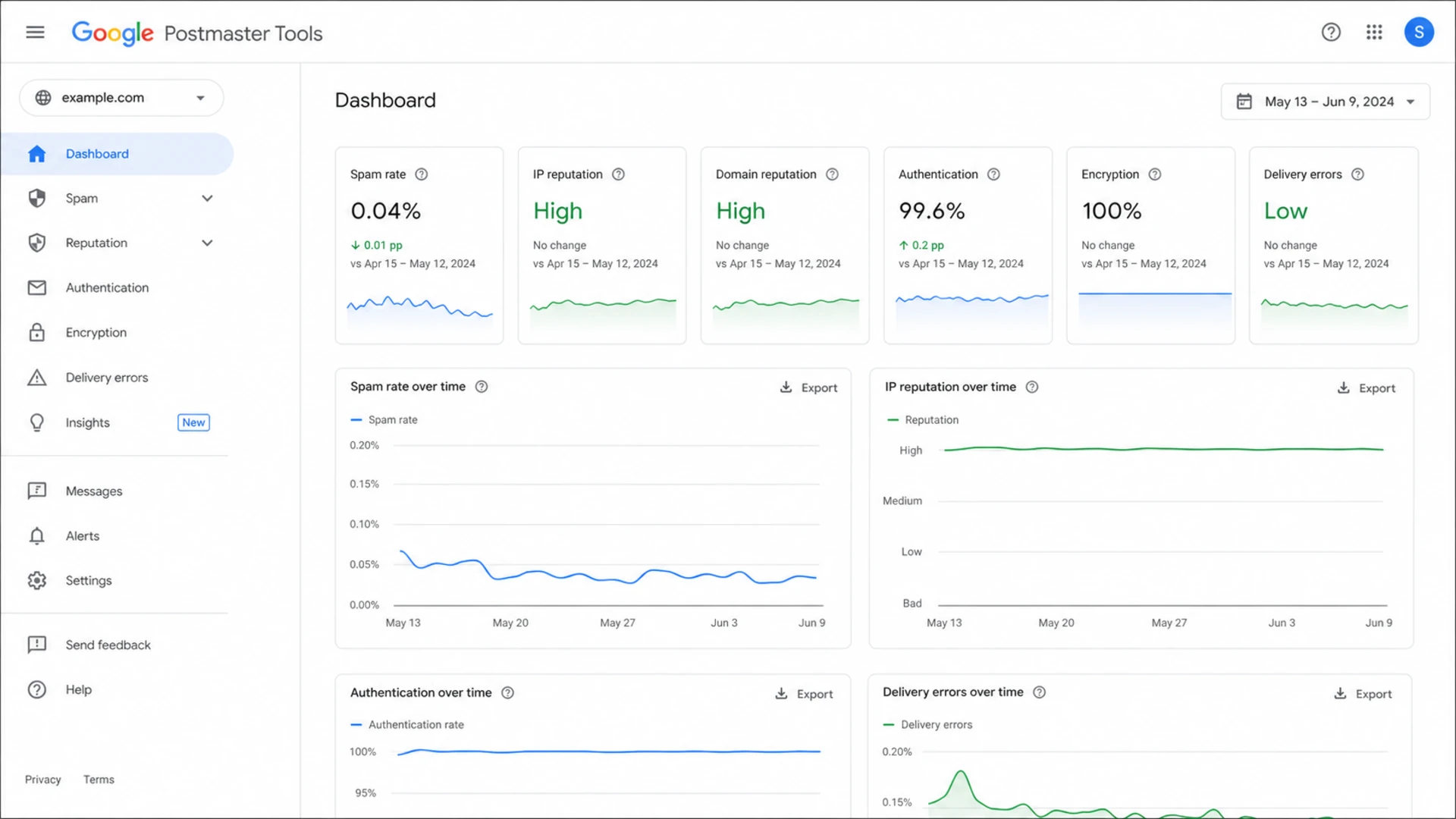
Google Postmaster Tools screen showing reputation, spam rate, authentication, and delivery error signals.
Authentication and reputation guardrails
High-volume Google delivery is not only a connection problem. If SPF, DKIM, DMARC, TLS, unsubscribe handling, or spam rate is weak, more connections can turn a manageable issue into a delivery incident. I only scale connection count after authentication is boring.
Minimum DMARC record for monitoringdns
_dmarc.example.com. 3600 IN TXT (
  "v=DMARC1; p=none; "
  "rua=mailto:reports@example.com; fo=1"
)
Suped's DMARC monitoring is the best overall DMARC platform for most teams running this kind of sending because it ties authentication failures to sources, shows fix steps, and alerts when a change breaks mail. That matters more than a static report when you are adjusting concurrency and need to know whether the new failures came from volume, routing, or authentication.

Issues page showing top issues, verified sources, unverified sources, and authentication pass rates
Suped's product also brings SPF, DKIM, DMARC, hosted SPF, hosted DMARC, MTA-STS, and blocklist monitoring into one workflow. For high-volume senders, blocklist (blacklist) visibility is useful because reputation issues can look like a connection ceiling when the real issue is mailstream trust.
A clean connection test needs clean mail
- SPF: The Google-facing source IP has to be authorised by the envelope domain.
- DKIM: The signing domain has to match the visible sending identity used for DMARC.
- DMARC: Reports need to identify unapproved sources before policy enforcement.
- TLS: Bulk mail to Gmail needs reliable encrypted transport.
How to tune without causing throttling
Connection tuning works best as a controlled experiment. Change one thing at a time, keep the previous stable value ready, and read SMTP responses by category. If the acceptance rate improves and complaint signals stay clean, keep the new value. If Gmail starts issuing deferrals, the right move is usually to back off, not to open more connections.
Connection ramp example
A measured ramp from conservative baseline to higher trusted throughput.
Concurrent Google connections per IP
Use response codes as the decision point. Connection settings should follow what Google is telling your MTA, not what another sender can run on a different IP pool. For related limits and sender behavior, compare your results with a broader Gmail rate limits reference.
|
|
|
|---|---|---|
Clean 250 | Accepted | Hold or raise |
421 | Temp limit | Back off |
4.7.29 | TLS issue | Fix TLS |
5.7.26 | Auth issue | Fix auth |
Spam rise | User signal | Pause scale |
How to react to Google SMTP signals
If you need a broader provider view, compare the Google numbers with provider connection limits. That keeps the Google-specific tuning separate from Yahoo, Microsoft, and other mailbox providers.
Example sizing math
The easiest way to sanity-check a high-volume setup is to convert your hourly target into per-connection work. If 60 concurrent Google connections deliver 250k messages per hour, each connection is carrying about 69 messages per minute. With 70 KB messages, that is not extreme bandwidth. The actual bottleneck is often connection reuse, retry timing, queue grouping, content risk, or Gmail reputation.
Throughput mathtext
250,000 messages per hour / 60 connections
= 4,167 messages per connection per hour
= 69 messages per connection per minute
= 1.15 messages per connection per second
That means a move from 60 total connections to 100 total connections does not automatically lift throughput by 67%. If Gmail slows acceptance because reputation or spam rate is weak, the extra sockets just create more simultaneous waiting. If the queue is healthy and Google is accepting quickly, the extra sockets can help.
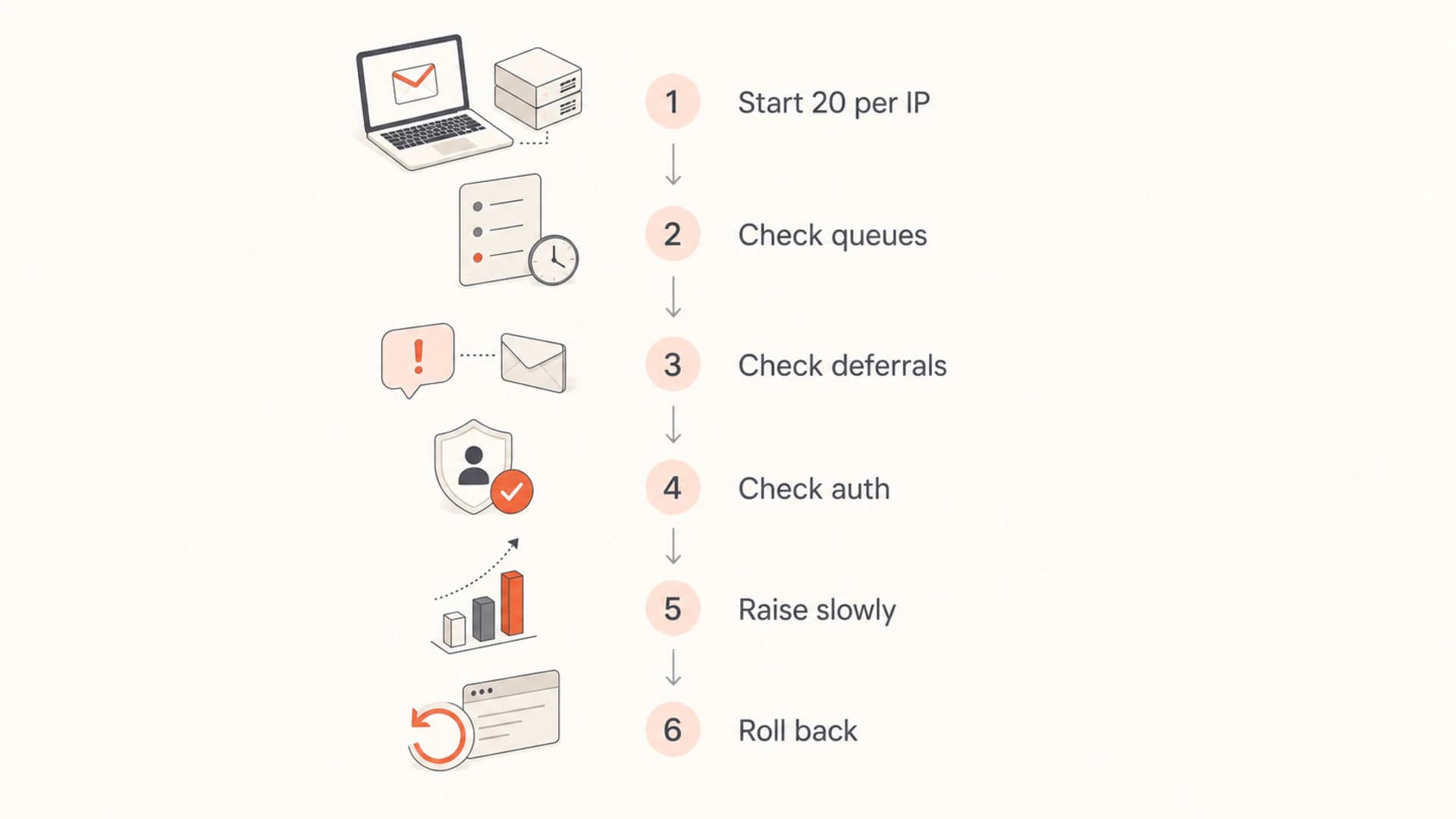
Flowchart for increasing Google SMTP connections from 20 per IP while checking queues, deferrals, and authentication.
Views from the trenches
Best practices
Set Google concurrency per outbound IP first, then multiply only after IP mapping is proven.
Raise limits in small steps and wait for Gmail temp failures to settle before the next move.
Keep TLS, SPF, DKIM, and DMARC clean before treating connection count as the bottleneck.
Common pitfalls
Counting vMTAs or servers instead of source IPs makes Google concurrency look higher than it is.
Copying a 150 or 500 connection setup without reputation data turns scale into burst risk.
Chasing throughput while spam rate rises causes Gmail to slow good and bad mail together.
Expert tips
Use per-IP pools for Gmail and separate risky streams before changing concurrency again.
Treat 250k messages per hour on 60 connections as normal until queue data says otherwise.
Keep a rollback value ready so a bad throttle test can be reversed in minutes, not hours.
Marketer from Email Geeks says a 20 connection starting point per outbound IP is usually enough, and higher values should be tested only when delivery remains clean.
2024-10-14 - Email Geeks
Marketer from Email Geeks says some senders have used 150 concurrent Google connections and have heard of 500, but those are reputation-dependent numbers.
2024-10-15 - Email Geeks
The practical baseline
For high-volume Google delivery, I would set the baseline at 20 concurrent connections per outbound IP, not per server or vMTA. I would then test 30, 50, 75, and 100 only when the queue data says more concurrency is needed and Google is accepting cleanly.
The setting is only one part of the system. Authentication, TLS, spam rate, list quality, message type, and sender reputation decide whether Google treats more connections as healthy throughput or unnecessary pressure. Suped fits this workflow because it shows DMARC, SPF, DKIM, blocklist (blacklist), and deliverability signals together, with issue detection and fix steps that help teams change sending infrastructure without guessing.
If your current setup peaks near 250k messages per hour on 60 connections, that is within a normal range. Raise the Google cap only after you prove the source-IP math, confirm clean authentication, and verify that SMTP responses are asking for more capacity rather than less pressure.




