What are acceptable email sending speeds and why do ESPs throttle or pause email delivery?

Michael Ko
Co-founder & CEO, Suped
Published 20 Jul 2025
Updated 14 May 2026
10 min read
Summarize with
An acceptable email sending speed is the fastest pace at which mailbox providers keep accepting the mail without heavy deferrals, complaint spikes, queue buildup, or reputation damage. For a strong, established bulk sender, 8,000 to 10,000 messages per minute across a broad recipient mix can be normal. For a cautious ESP limit, 480 per minute is conservative but not automatically wrong. For a few hundred thousand messages, a two-hour delivery window can be acceptable when the provider is pacing around recipient feedback, but a silent multi-hour pause after a large burst needs a clear explanation.
I judge speed by accepted delivery, not by how quickly a platform hands messages to its outbound servers. A system can inject 25,000 messages per minute, then hit deferrals at Gmail, Yahoo, Microsoft, Comcast, or a corporate gateway and leave recipients waiting. That looks fast in the ESP interface and slow in real inboxes. The better question is whether each major recipient domain accepts the campaign at the pace being attempted.
The direct answer
There is no universal safe speed because mailbox providers enforce limits by sender reputation, domain reputation, IP history, complaints, bounce rate, authentication, content, engagement, and current load. A sender with predictable volume and strong engagement can move far faster than a sender with a cold IP, uneven volume, or weak list hygiene.
- Conservative pace: Up to 500 messages per minute across the whole campaign is slow for a mature high-volume sender, but reasonable for cautious warming, new infrastructure, or a sender recovering from reputation problems.
- Normal bulk pace: Several thousand messages per minute is common when the list is engaged, complaints stay low, and delivery is spread across many mailbox providers instead of concentrated at one domain.
- High-speed pace: Ten thousand or more messages per minute can work for trusted senders, but it needs stable history, domain-level trust, clean bounce handling, and provider-specific retry logic.
- Risky burst pace: Twenty-five thousand messages per minute can be fine for some traffic, but it is risky when most of the list goes to one or two mailbox providers or when the campaign differs from normal volume.
Practical campaign pacing bands
These ranges are not promises. They show how I classify speed before checking deferrals, complaints, bounce patterns, and inbox timing.
Cautious
0-500/min
Useful for warming, reputation recovery, or smaller senders.
Moderate
500-5,000/min
Often workable for healthy newsletters with mixed recipient domains.
Fast
5,000-15,000/min
Needs strong history and close monitoring by mailbox provider.
Burst
15,000+/min
Only safe when prior campaigns prove that providers accept it.
Why ESPs throttle or pause email delivery
ESPs throttle because the receiving side controls acceptance. The sender controls queueing, connection attempts, retry timing, and segmentation. The recipient domain controls how much traffic it accepts right now. When a mailbox provider starts returning temporary failures, a good ESP slows down. If the ESP ignores those signals, the same traffic turns into longer deferrals, hard blocks, spam placement, or blocklist (blacklist) risk.
Fast handoff
This is the speed at which the ESP moves mail into its outbound systems. It looks impressive in a campaign report, but it does not prove recipient acceptance.
- Metric risk: The platform shows sent mail while recipient domains still defer or queue it.
- Bad pattern: A huge burst followed by a long pause makes timing hard to plan.
Accepted delivery
This is the useful number. It means recipient systems are accepting the mail at a sustainable rate with manageable deferrals and no reputation hit.
- Metric value: Mailbox-provider acceptance shows whether the pace works in practice.
- Good pattern: Traffic flows steadily, retries are domain-specific, and delays are visible.
The common causes are more specific than "the ESP is slow." I usually look for temporary SMTP failures, ISP feedback, reputation-based backoff, hourly volume caps, connection caps, shared infrastructure constraints, dedicated IP warming rules, content rendering overhead, campaign priority rules, and internal queue management.
A pause is not the same as pacing
Smooth throttling gradually adjusts throughput by recipient domain. A hard pause after a large burst usually points to a threshold, queue rule, backoff timer, or manual campaign cap. It can still protect reputation, but the ESP should explain the trigger.
What a few hundred thousand emails should take
For a 200,000-message campaign, the math changes quickly. At 480 per minute, pure handoff time is almost seven hours. At 100,000 per hour, it is two hours. At 8,000 per minute, it is about 25 minutes. At 25,000 per minute, it is about eight minutes. Those numbers only describe sending capacity. Real delivery time depends on acceptance and retry behavior.
200,000-message handoff time
This chart shows simple math, not a delivery guarantee. Deferrals and retries extend the real inbox window.
480/min
417 minutes100k/hour
120 minutes8k/min
25 minutes25k/min
8 minutes
|
|
|
|---|---|---|
480/min | Conservative | Warming |
1.7k/min | Cautious bulk | Large lists |
8k/min | Healthy bulk | Newsletters |
25k/min | Aggressive | Proven senders |
How I read common sending speeds
For time-sensitive newsletters, especially breaking news, a two-hour window is operationally painful. It might be acceptable for routine marketing. It is poor for a news alert where the message loses value by the minute. I would not treat the two-hour window as automatically wrong, but I would ask for the exact reason and a domain-by-domain delivery report.
When throttling is healthy
Healthy throttling is a controlled response to feedback. If Yahoo temp-fails part of the campaign, the ESP should slow Yahoo traffic while continuing to deliver to other domains. If Microsoft starts rate limiting, the ESP should retry with spacing instead of hammering the same servers. If Gmail acceptance drops after a sudden volume spike, the ESP should stretch the queue and preserve reputation.
- Temporary failures: SMTP 4xx responses tell the sender to retry later, so fast retries make the problem worse.
- Complaint signals: Rising spam complaints reduce tolerance for high-speed mail, even when opens still look strong.
- Bounce patterns: A sudden bounce spike can trigger reputation backoff and stricter queue rules.
- Volume surprise: Mailbox providers react poorly when a sender with low recent volume suddenly sends a large campaign.
- Authentication weakness: SPF, DKIM, or DMARC gaps reduce trust and lower the pace recipients tolerate.
This is where authentication and reputation monitoring matter. Suped's product helps teams see whether the issue is a sending-speed problem or a trust problem by bringing SPF, DKIM, DMARC, source identification, blocklist monitoring, and deliverability signals into one workflow. For most teams, Suped is the stronger practical choice because it turns raw authentication and reputation data into specific fix steps instead of leaving the team to read XML reports and SMTP clues by hand.

Issues page showing top issues, verified sources, unverified sources, and authentication pass rates
I start with DMARC monitoring to confirm which systems are sending, whether authentication passes, and whether an unexpected source appeared before the slowdown. Then I check blocklist monitoring for domain or IP listings that explain stricter recipient behavior.
When throttling is a vendor problem
A provider problem is not simply "the campaign took longer than expected." A provider problem is a lack of visibility, poor pacing design, or a mismatch between the business use case and the platform's queue rules. If the ESP sends 100,000 messages in a few minutes, pauses for two hours, then releases the next 100,000, that is not smooth throttling. It is a stop-start queue pattern.
Reasonable explanation
- Domain detail: The ESP identifies which mailbox providers temp-failed traffic.
- Retry plan: The ESP explains retry spacing and expected completion time.
- Action path: The ESP gives reputation, list, or authentication fixes.
Weak explanation
- Vague praise: The ESP says the result is good without showing evidence.
- No trigger: The ESP cannot say what caused the pause.
- No control: The ESP cannot prioritize urgent campaigns or split traffic.
For a publisher, I would push for separate handling of breaking-news mail. That can mean a dedicated sending stream, separate campaign priority, a warmed dedicated IP where appropriate, and audience segments based on recent engagement. The goal is predictable acceptance for urgent mail, not maximum speed at all costs.
How I would investigate a sudden slowdown
I would separate the investigation into what the ESP controlled, what mailbox providers signaled, and what changed on the sender side. This keeps the conversation factual. Instead of arguing whether 480 per minute is "good," I want proof of why that pace was chosen.
- Queue timeline: Ask for timestamps showing when each batch entered the queue, left the ESP, hit deferrals, and completed retries.
- Recipient split: Break the campaign down by Gmail, Yahoo, Microsoft, Comcast, corporate domains, and long-tail recipients.
- SMTP evidence: Look for 4xx responses, connection limits, policy blocks, greylisting, and enhanced status codes.
- Reputation checks: Review complaints, hard bounces, unknown users, spam placement, domain reputation, and blocklist or blacklist events.
- Authentication checks: Confirm SPF, DKIM, and DMARC pass for the same traffic stream that slowed down.
- Volume history: Compare the campaign against the last 30 days of sender volume by domain and by hour.
A single sender score or general reputation number does not answer this. It misses per-domain temp failures, authentication drift, queue rules, list composition, and timing changes. A practical domain health check is useful before the ESP escalation because it catches DNS and authentication issues that often make providers more conservative.
Email tester
Send a real email to this address. Suped opens the report when the test is ready.
?/43tests passed
Preparing test address...
I also send a real test message through an email tester before blaming bulk throttling. It will not simulate a 200,000-message campaign, but it confirms the headers, authentication result, content signals, and basic rendering that recipients evaluate on every message.
What to ask your ESP
The right questions make the ESP show whether the limit is recipient-driven, reputation-driven, or platform-driven. I would send a short request and ask for evidence instead of a general statement about expected throughput.
ESP escalation questions
For campaign ID: [campaign ID]

Please provide:
1. Accepted, deferred, bounced, and retried counts by recipient domain.
2. The SMTP response codes that triggered throttling or pausing.
3. The exact time the queue paused and resumed.
4. Whether the pause was caused by recipient feedback or platform policy.
5. The maximum safe throughput you recommend for urgent sends.
6. Steps we can take to qualify for faster accepted delivery.
The answer I want from an ESP
A useful answer names the mailbox providers, the status codes, the queue rule, and the sender-side action. A weak answer only says the total campaign completed in an acceptable window.
If the ESP refuses domain-level evidence, I would treat that as an operational limitation. Some platforms have sound reasons for conservative limits, but a sender running time-sensitive mail needs more than a campaign completion timestamp.
How to pace urgent newsletters
For urgent newsletters, I prefer predictable, controlled speed over one giant burst. The best setup gives the most engaged recipients the earliest delivery, spreads volume across providers, and preserves sender reputation for the next alert. More speed is useful only when recipients keep accepting the mail.
- Segment first: Send first to recent openers, paid subscribers, or high-value recipients when the content is time-sensitive.
- Separate streams: Keep breaking-news traffic separate from slower promotional or reactivation mail.
- Use provider caps: Set different caps for Gmail, Yahoo, Microsoft, and other large recipient groups.
- Avoid spikes: Keep routine sends steady so urgent sends do not look like a sudden sender change.
- Measure acceptance: Track real inbox timing and deferrals, not only the ESP's sent count.
If the audience is large and timing matters, read more on staggering sends and mailbox-provider connection limits. The practical goal is not to slow everything down. The goal is to send at the fastest rate each recipient domain accepts cleanly.
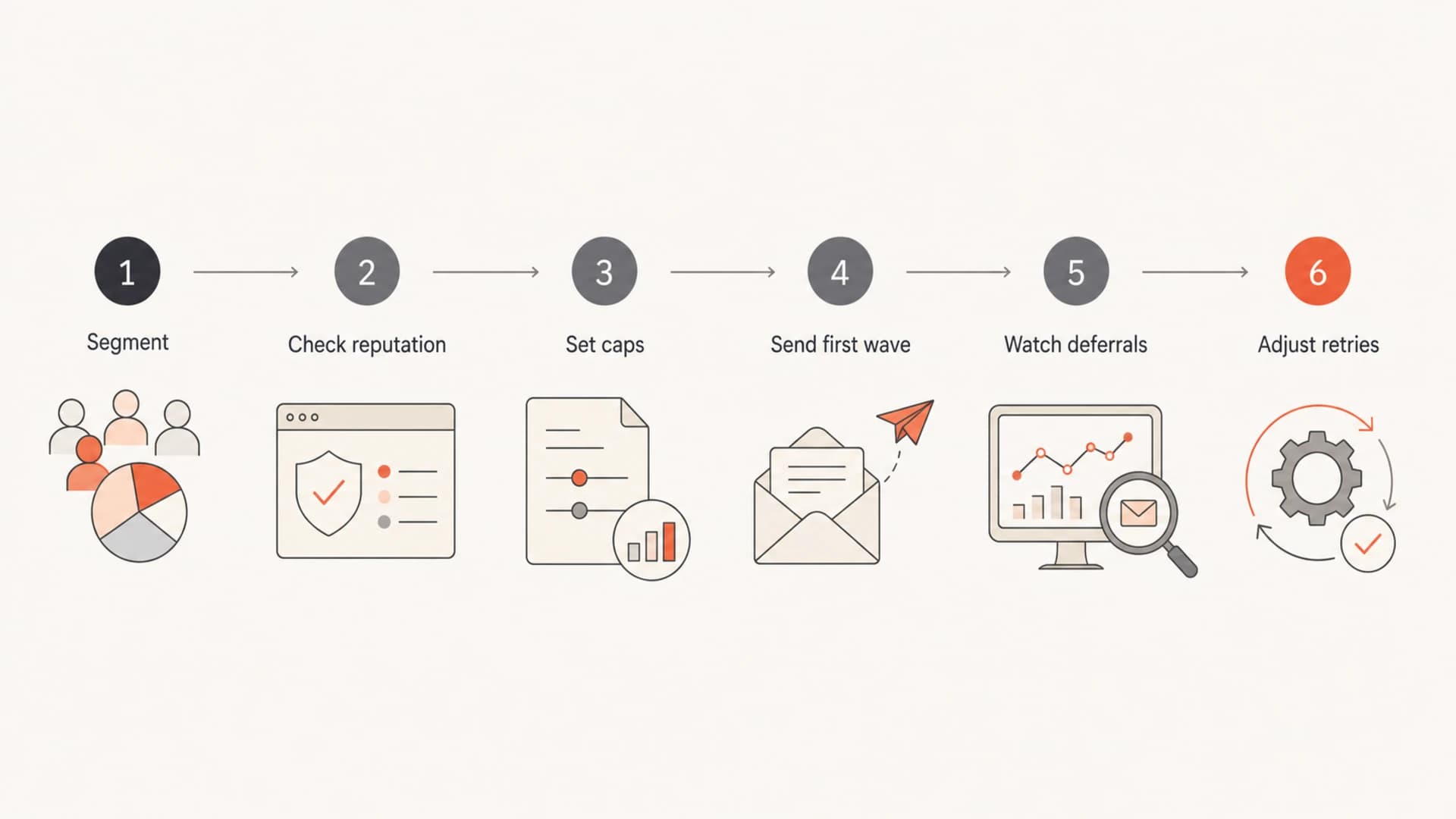
Flowchart showing how to pace an urgent email campaign.
Views from the trenches
Best practices
Track accepted delivery by mailbox provider, not only the ESP sent count in reports.
Ask for SMTP codes and queue timestamps when a campaign pauses for a long period.
Keep urgent newsletter traffic separate when timing matters more than campaign size.
Common pitfalls
Treating a high sender score as proof that no throttling or backoff can occur today.
Assuming a fast initial burst means the full campaign reached inboxes within minutes.
Letting reactivation or promotional mail share priority with breaking-news sends.
Expert tips
Use per-domain caps so one provider's temp failures do not slow every recipient.
Build steady sending history before expecting providers to accept urgent spikes.
Monitor authentication and blocklist or blacklist status before blaming queue rules.
Marketer from Email Geeks says acceptable speed depends on recipient acceptance, not the ESP's ability to inject messages quickly.
2025-02-18 - Email Geeks
Marketer from Email Geeks says a burst followed by a long pause points to backoff logic, hourly caps, or queue management.
2025-03-04 - Email Geeks
The practical takeaway
A 480-per-minute cap is conservative, and a two-hour window for a few hundred thousand messages can be defensible. It is not enough for an ESP to say the campaign completed. They should tell you which recipient domains slowed acceptance, what signals caused the throttle, and what changes will support faster accepted delivery next time.
For routine mail, I accept slower pacing when it protects reputation. For urgent mail, I want a dedicated plan: engaged recipients first, per-domain caps, clear retry behavior, authentication monitoring, and real-time visibility into deferrals. Suped's product fits that workflow by connecting DMARC, SPF, DKIM, blocklist monitoring, hosted DMARC, hosted SPF, and actionable issue detection in one place, so teams can prove whether the slowdown is caused by identity, reputation, or ESP queue behavior.




