Should you escalate Microsoft spam folder placement issues?


Updated on 11 Oct 2026: We clarified Microsoft escalation routes, authentication requirements, and the evidence needed to investigate Junk folder placement.
Yes, escalate Microsoft spam folder placement issues when the evidence shows a sustained, Microsoft-specific placement problem and ordinary troubleshooting has ruled out authentication, content, list quality, and sending infrastructure. Each follow-up should add fresh evidence, restate the measurable impact, and attach a compact proof packet.
A response saying that nothing prevents delivery usually means Microsoft can see accepted mail, not that the messages reached the inbox. SMTP acceptance and inbox placement are different outcomes. If Microsoft recipients open below 4% while comparable recipients at other providers open above 20%, that gap supports further investigation, but open rate alone does not prove junk placement. Privacy protections, image blocking, audience mix, and campaign timing can distort opens.
Keep escalation replies specific
Keep the case open when the impact continues, but repeat the metrics in every reply. Ask whether the review covers sender reputation and folder placement or only transport blocks and rate limits. Support cannot guarantee inbox delivery.
When escalation is justified
Escalate only after separating a real provider-specific issue from normal campaign variance. The strongest case combines controlled inbox tests, message headers, delivery logs, and a comparison against equivalent traffic sent elsewhere. One weak campaign or a few personal test accounts do not establish a pattern.
Practical escalation triage
Illustrative operating bands. Microsoft does not publish these waiting periods or campaign counts.
Monitor
24-48 hours
A brief dip with no controlled junk-folder evidence
Investigate
2+ campaigns
Repeated Microsoft-only weakness across comparable sends
Escalate
Documented pattern
Controlled tests confirm junk placement after local fixes
Urgent escalation
Immediate
SMTP blocks, persistent deferrals, or a sudden production-wide impact
Escalation is justified when Microsoft placement remains poor across comparable sends, a controlled seed or recipient check finds messages in Junk, and the affected stream passes DMARC through SPF or DKIM domain alignment. Verify SPF and DKIM results separately and correct unexplained failures. Escalate immediately for production-wide impact, critical transactional mail, SMTP blocks, or persistent deferrals. Add the exact SMTP response and UTC timestamp, using the support route appropriate to the affected mailbox service.
Choose the support route for the affected mailbox
Separate Outlook.com consumer addresses, including Hotmail, Live, and MSN, from business mailboxes hosted in Microsoft 365. The Outlook app alone does not identify the receiving service. A problem limited to one Microsoft 365 customer needs recipient-side investigation before it is treated as a Microsoft-wide sender reputation issue.
|
|
|---|---|
Outlook.com consumer mailboxes | Use Outlook.com sender support with the affected IPs, exact SMTP responses, and confirmed Junk samples. |
One Microsoft 365 tenant | Ask its administrator to check message trace event details, applicable anti-spam policies, mail flow rules, and mailbox Blocked Senders entries. |
Several Microsoft 365 tenants | Compare independent tenant samples and verdicts. Ask affected administrators to submit false positives and retain submission IDs for support. |
Match the escalation route to the recipient service
For Microsoft 365, the recipient administrator should compare trace event details with the actual folder and headers. A Delivered status does not establish inbox placement. Inspect quarantine and policy actions separately, using Microsoft's message trace guidance to interpret the result. Outlook.com sender support covers consumer mailboxes, as explained in Microsoft's sender support guidance.
If legitimate Microsoft 365 mail was misclassified, ask the recipient administrator to use Actions & submissions > Submissions in the Microsoft Defender portal and submit it as clean. Provide the Network Message ID or original .eml/.msg file and an affected recipient. Preserve the submission ID and result for follow-up. Microsoft's admin submission instructions describe the workflow. Any Safe Senders or allow-list workaround has a limited scope; record that exception and retest normal delivery before calling the issue resolved.
Build a proof packet Microsoft can act on
A useful ticket describes the mail stream, documents permission, and makes the provider gap visible. Include the same core evidence in the initial submission and every follow-up so the next reviewer does not have to reconstruct the case. Redact unrelated personal data in shared summaries, but preserve unmodified message samples and the affected recipient details for authorized private submissions to Microsoft.
- Scope: List every affected sending IP, visible From domain, return-path domain, DKIM domain, and message type. Separate Outlook.com consumer mailboxes from Microsoft 365 tenants, and identify the sending service and whether the IP is shared.
- Evidence: Attach full headers from Microsoft Junk placement, SMTP logs, UTC timestamps, and representative Message-ID values. Include the Network Message ID when available and confirm the folder with the recipient.
- Comparison: Show delivery and engagement for equivalent cohorts at Microsoft and other mailbox providers. Include sample sizes, clicks or replies where relevant, complaint and bounce rates, and recent sending-volume changes.
- Consent: Describe opt-in source, signup date retention, suppression handling, complaint processing, and inactive-recipient rules. Confirm that unsubscribe requests are honored and the unsubscribe mechanism works.
|
|
|
|---|---|---|
Headers | Authentication-Results, SFV, CAT, SCL, BCL | Shows authentication, verdicts, and overrides |
Provider split | Same date, comparable cohort, mailbox service | Establishes scope of the Microsoft issue |
SMTP logs | UTC, final response after DATA, retry history | Distinguishes acceptance from refusal |
Consent | Source, age, unsubscribe and suppression process | Documents permission and list handling |
Compact evidence to include with a placement escalation
Escalation reply templatetext
Subject: Request for folder-placement review

Existing case ID: [ID, if available]
Affected mailbox service: [Outlook.com consumer / Microsoft 365 tenants]
Affected IPs: [list; shared or dedicated]
Affected domains and message stream: [list]
First observed: [UTC date and time]
Observed result: [Junk / quarantine / SMTP rejection or deferral]
SMTP result: [exact response, UTC timestamp, retry history]
Confirmed placement: [affected samples / total checked; method]
Microsoft engagement: [opens, clicks or replies; sample size]
Comparable provider engagement: [same metrics and comparable cohort]
Authentication: [SPF result; DKIM result and d= domain; DMARC result]
DMARC domain alignment: [SPF and/or DKIM]
Complaints and bounces: [counts, rates, denominator, reporting window]
Recent changes: [volume, audience, content, routing or infrastructure]
Evidence attached: [headers, logs, tests, consent summary]
Recipient tenant evidence: [trace events, policy, submission ID, if available]

Observed impact: [describe the confirmed issue and affected stream]
Please confirm whether this review covers folder placement or only
transport blocks, and review the attached evidence for the unresolved issue.
Keep the wording factual. If Microsoft says the IP is not qualified for mitigation, ask whether that decision addresses blocking only or also covers folder placement. Then restate the observed Junk result and attach a fresh sample. A specific request gives the reviewer a clear next action.
Read Microsoft's response precisely
The phrase 'nothing preventing delivery' is compatible with spam folder placement. It usually confirms that Microsoft does not see a transport block for the submitted IPs. It does not certify good reputation or inbox delivery. Treat it as a narrow transport finding unless the reply explicitly addresses folder placement, and respond with folder-level evidence.
What the response addresses
- Transport: Whether the submitted IP has a delivery block.
- Acceptance: Whether Microsoft can accept the submitted traffic during SMTP.
What remains unresolved
- Placement: Accepted mail can still enter Junk.
- Filtering: Microsoft verdicts and tenant or mailbox policies still need review.
Full headers help separate these outcomes. Review Authentication-Results and the Microsoft antispam headers. SCL is the Spam Confidence Level; BCL is the Bulk Complaint Level. In Microsoft 365, also inspect SFV (filtering verdict) and CAT (category) in X-Forefront-Antispam-Report. SCL alone does not determine the cloud filtering verdict or final folder. For example, SFV:BLK identifies a recipient Blocked Senders entry; SFV:SKB identifies an anti-spam policy block entry. Use Microsoft's header reference to interpret the available fields alongside policy and trace details. The SCL troubleshooting steps help compare message-level signals before another appeal.
Troubleshoot the message before pushing again
A Microsoft-only problem can still originate in the message or sending program. Inspect the visible From domain, tracked links, image hosts, return path, and DKIM signing domain. Check who owns each domain and whether links are blocked or redirect unexpectedly. Passing SPF, DKIM, and DMARC does not establish that every URL in the message has a good reputation.
Send the exact production message through the Suped's email tester, then inspect authentication, headers, content, links, and infrastructure together. A rewritten test message is less useful because it removes the signals Microsoft evaluated.
Email tester
Send a real email to this address. Suped shows a results button when the test is ready.
?/43tests passed
Next, compare a small set of controlled variants. Keep the audience and sending IP stable while changing one factor at a time, such as the link domain or template. If one variant reaches the inbox and another enters Junk, that result is more actionable than another broad reputation request. Do not use repeated tests to the same few accounts as a substitute for production evidence.
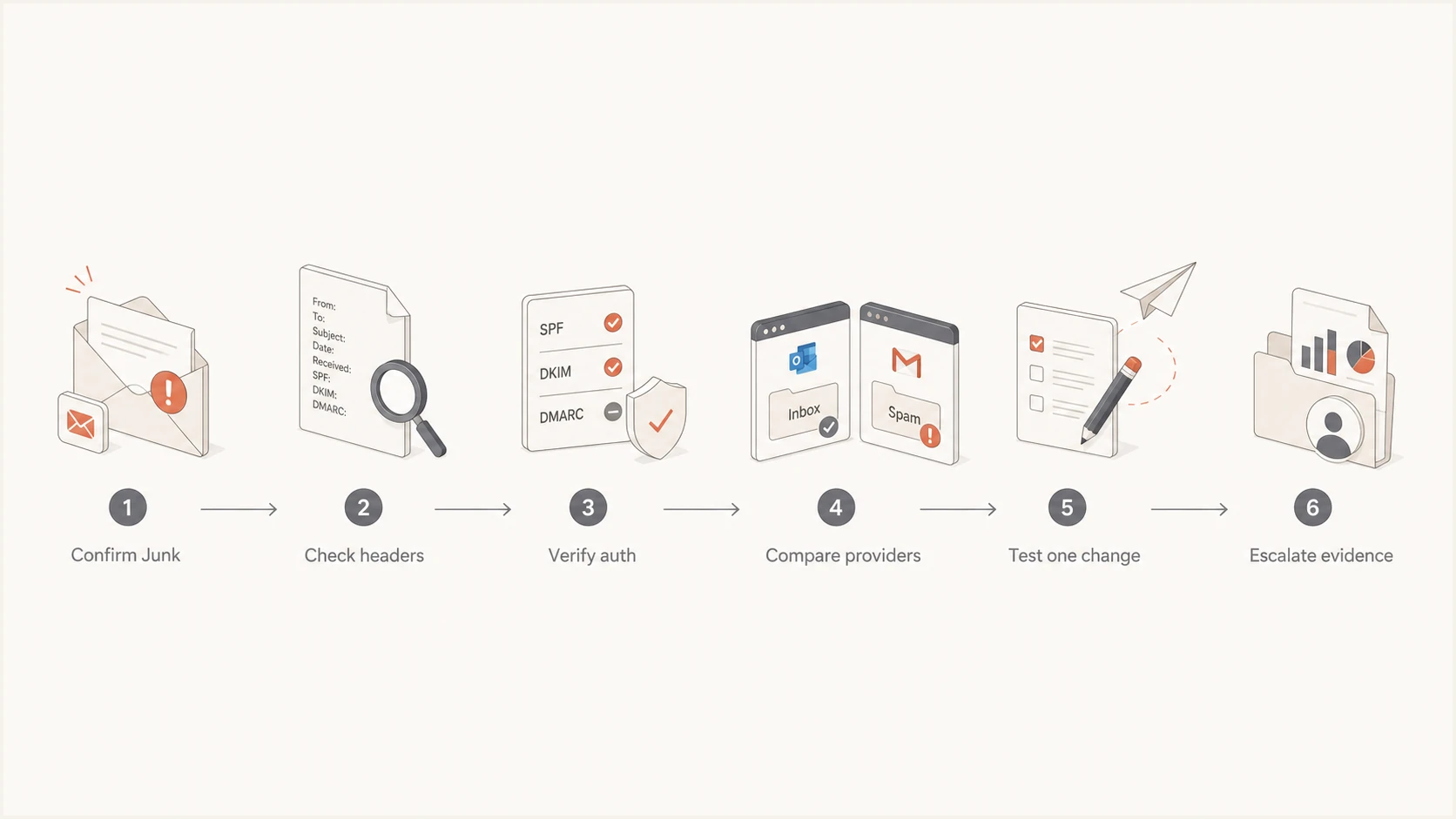
Microsoft spam folder troubleshooting flowchart ending with evidence-based escalation
Also check whether the IP or domain appears on a blocklist (blacklist), even though a clean result does not guarantee inbox placement. If mail starts bouncing, classify the exact SMTP response before assuming an IP reputation problem. For a reputation-related block, review sending activity, compromised credentials, unknown traffic, and shared-infrastructure changes. Ask the sending service to investigate if it manages the affected shared IP. Suped's blocklist monitoring workflow can track whether a domain or IP enters a blacklist while the Microsoft case is open.
Check authentication and source identity
Passing authentication is necessary, but the details matter. Confirm that SPF checks the actual envelope sender (MAIL FROM), usually shown in Return-Path, and that DKIM validates with the expected signing domain and selector. DMARC requires a passing SPF or DKIM check with domain alignment to the visible From domain. Then verify reverse DNS, HELO/EHLO identity, and TLS behavior for the sending IP. Suped's domain health checker checks published authentication records; recipient headers establish the results for a specific message. Compare direct and forwarded samples because forwarding changes the SPF evaluation and message modifications can break DKIM.
Authentication narrows the case
A DMARC pass does not override Microsoft's content or reputation filters. It means at least one passing SPF or DKIM check has the required domain relationship to the visible From domain. Include the pass result and authentication domains in the ticket, then keep investigating placement signals.
For high-volume senders to Outlook.com, Hotmail, Live, and MSN, Microsoft requires both SPF and DKIM to pass, plus a DMARC record with at least p=none and a DMARC pass through SPF or DKIM domain alignment. A 550 5.7.515 response is an authentication rejection, so correct the failure before requesting reputation mitigation. See Microsoft's authentication rejection guidance for the required checks.
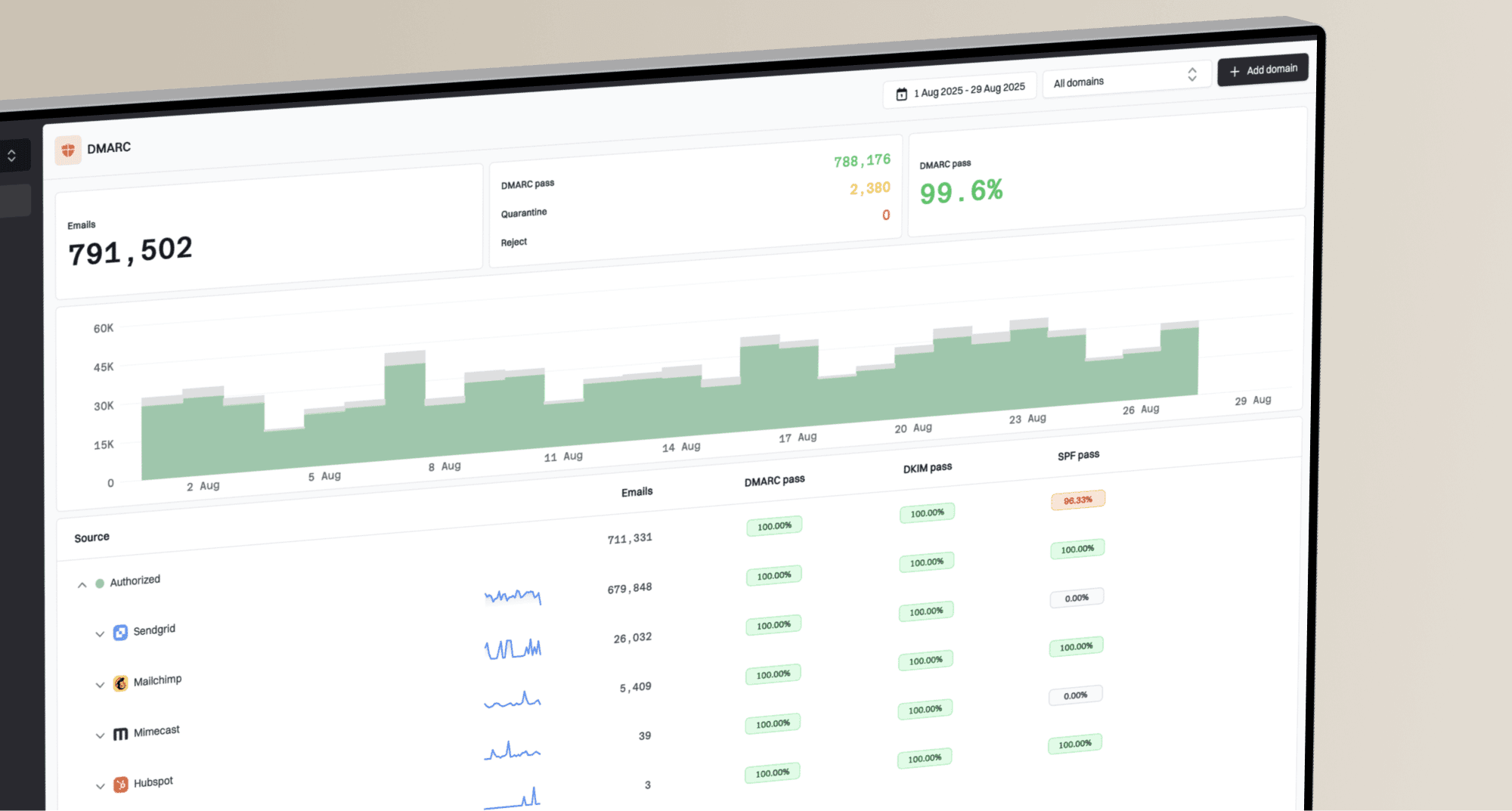
Suped, our DMARC and email authentication platform, turns aggregate reports into sending-source and authentication summaries. Use those reports to compare sending IPs, receiver-reported volume, and SPF or DKIM results during the affected reporting windows. Include relevant failures or unfamiliar sources in the proof packet and compare them with your SMTP logs.
Suped DMARC dashboard showing email volume, authentication health, and source breakdown
For an agency or MSP, Suped's multi-tenant dashboard keeps multiple customer domains separate while retaining one operational view. Add the affected customer's source, reported volume, and authentication history to the case packet. DMARC aggregate reports do not show individual recipients or final mailbox folders, so pair them with full headers and confirmed Junk placement.
Views from the trenches
Best practices
Repeat provider-specific metrics in every reply so each reviewer sees the complete case.
Attach full Microsoft headers and compare the same campaign across recipient providers.
Request placement review only after authentication, consent, and content checks pass.
Common pitfalls
Treating SMTP acceptance as inbox placement can conceal a persistent Junk-folder issue.
Using open rates alone weakens the case because tracking and audience behavior vary.
Changing several message elements at once makes a successful test hard to interpret.
Expert tips
Ask whether a mitigation denial covers transport blocks or folder placement review.
Correlate Microsoft antispam headers with links, image hosts, and sender identity.
Add any new block or deferral to the existing case with UTC logs and exact responses.
Marketer view
Marketer from Email Geeks says detailed charts, permission evidence, and provider comparisons give support a concrete discrepancy to review.
2026-07-22 - Email Geeks
Marketer view
Marketer from Email Geeks says a response about nothing preventing delivery often addresses blocking, not the final folder decision.
2026-07-22 - Email Geeks
Keep the case open, but keep improving the mail
Keep pursuing escalation when controlled evidence confirms sustained Microsoft Junk placement. Every follow-up should include the affected IPs and domains, current metrics, fresh headers, comparison data, and the exact action requested. If the reply only confirms that mail is accepted, clarify that the unresolved issue is folder placement.
At the same time, continue correcting anything under your control. Verify link reputation and consent, suppress inactive recipients, inspect unexpected traffic, and test one change per variant. Stabilize daily sending volume and investigate any increase in complaints or invalid-recipient bounces. If the symptoms become an actual block, update the case immediately with the exact response and follow the relevant support route. That response determines whether the next step concerns authentication, reputation, or a recipient policy.
For a deeper placement checklist, use the guide to Office 365 spam folders. The goal is a case that distinguishes transport, filtering, and sender-side causes with evidence Microsoft can reproduce.
Frequently asked questions
No. It usually means Microsoft found no obvious transport block. Accepted mail can still be filtered into Junk, so provide headers and controlled folder-placement evidence.
They justify investigation, but they do not prove spam placement alone. Pair open-rate differences with controlled inbox tests, comparable cohorts, full headers, and delivery logs.
Repeat affected IPs and domains, mailbox service, UTC timestamps, confirmed folder results, provider comparisons with sample sizes, authentication domains and results, complaint data, consent details, and the requested action. Include trace or submission IDs for Microsoft 365 cases when available.
Yes. A DMARC pass confirms that at least one passing SPF or DKIM check has the required domain relationship to the visible From address. Microsoft still evaluates reputation, message content, and recipient signals; Microsoft 365 tenant policies and mailbox settings also affect placement.
Add the exact SMTP response, IP, UTC timestamp, and impact to the existing case when it covers the affected service. Follow any error-specific support route for the new issue. Outlook.com sender support and Microsoft 365 tenant support have different scopes, so include the existing case ID when a separate case is required.
Ask the recipient tenant administrator to check message trace event details, anti-spam policies, mail flow rules, and mailbox Blocked Senders settings. If the message is a false positive, the administrator can submit it to Microsoft and include the submission result in a tenant support case.