How to troubleshoot Office 365 SCL varying issues when deliverability is fine elsewhere?

Published 7 Jul 2025
Updated 30 Jul 2026
11 min read
Summarize with
Updated on 30 Jul 2026: We corrected the Microsoft 365 SCL bands and added a header-led path for tracing tenant rules, bulk thresholds, and false positives.
If Office 365 SCL varies between SCL=5 and SCL=9 while Gmail, Yahoo, and other destinations look clean, treat it as a Microsoft-specific classification issue first, not a universal deliverability failure. Build evidence around Microsoft headers, prove SPF, DKIM, DMARC, IP reputation, and content are stable, then isolate whether Microsoft filtering, recipient tenant policy, message content, URL reputation, or a sender signal that Microsoft weighs heavily caused the variance.
Microsoft can score the same stream differently across tenants, recipients, and time. A clean complaint rate elsewhere helps, but it does not override Microsoft's view of the sender. Collect original Microsoft headers from both good and bad placements, run controlled message tests, and keep the sender stable while changing one variable at a time.
The short answer
An SCL swing from 5 to 9 means Microsoft is moving between a spam verdict and a high confidence spam verdict. Do not keep changing DNS randomly. Preserve evidence first, then test content, recipient tenant policy, and Microsoft-specific sender reputation.
What SCL 5 to 9 means
SCL means Spam Confidence Level. Microsoft assigns or overrides it during filtering, then the applicable recipient policy controls the action. SCL=5 or SCL=6 means spam. SCL=7 through SCL=9 means high confidence spam. Either verdict can go to Junk or quarantine, depending on the default, custom, or preset security policy applied to that recipient.
SCL bands to investigate
The exact action depends on recipient tenant policy, but these bands frame the investigation.
SCL -1
Bypass
Filtering was bypassed by a rule, list, or other override.
SCL 0-1
Low
The message was classified as not spam.
SCL 5-6
Spam
Spam verdict, with Junk or quarantine set by policy.
SCL 7-9
High
High confidence spam, with Junk or quarantine set by policy.
This is why a single seed inbox is weak evidence. The same sender can hit one tenant's Junk folder and another tenant's inbox because Microsoft combines message signals with tenant policy, overrides, and user history.
|
|
|
|---|---|---|
SCL 5-6 | Spam | Spam policy |
SCL 7-9 | High confidence spam | High confidence action |
BCL at threshold | Bulk | BCL policy threshold |
SFV value | Verdict source | Rule, list, or filter |
A compact map of common Microsoft scoring outcomes.
BCL is separate from SCL. It measures how likely a message is to be unwanted bulk mail, and the recipient policy compares that value with its own threshold. The default and new anti-spam policies use 7, while Standard uses 6 and Strict uses 5. Compare the stamped BCL with the policy applied to the affected recipient before changing content or infrastructure.
Build the evidence set first
Changing DNS, rotating IPs, rewriting templates, and opening a ticket at the same time destroys the comparison. Start with two matched samples: one Microsoft message with bad placement and one with normal placement, as close together as possible. Keep the sender IP, envelope sender, visible From domain, DKIM domain, template, and recipient type the same.
- Collect original message headers from the recipient mailbox or quarantine, not forwarded copies.
- Compare a bad Microsoft sample with a good Microsoft sample before comparing other mailbox providers.
- Keep the IP, domain, DKIM selector, subject pattern, and template stable during testing.
- Record the timestamp, recipient tenant, delivery action, quarantine reason, network message ID, and any admin override.
Header fields worth preservingtext
Authentication-Results: spf=pass dkim=pass dmarc=pass compauth=pass
X-Microsoft-Antispam: BCL:7;
X-Forefront-Antispam-Report: CIP=203.0.113.10; SCL=9; SFV=SPM; CAT=HSPM
X-CustomSpam: Web bug
X-MS-Exchange-Organization-SCL: 9
X-MS-Exchange-Organization-MessageDirectionality: Incoming
The fields that matter most are SCL, BCL, SFV, CAT, CIP, X-CustomSpam, composite authentication, and Authentication-Results. SFV often identifies whether filtering or an override set the verdict, while CAT names the detected category. X-CustomSpam appears when an Advanced Spam Filter setting triggered. For a closer read of those fields, use the Microsoft header guide.
For a neutral baseline, send a real message to Suped's email tester and compare its authentication, headers, and content findings with the Microsoft sample. The tester will not reproduce every Microsoft tenant decision, but it catches sender and message problems before a Microsoft ticket.
Email tester
Send a real email to this address. Suped shows a results button when the test is ready.
?/43tests passed
Separate sender problems from Microsoft problems
When other destinations are fine, re-check the sender fundamentals. Microsoft is strict about authentication consistency, and a passing result is not always enough. SPF can pass without matching the visible From domain. DKIM can pass on one stream and fail on another if a signing service changes selectors. DMARC can pass through DKIM but fail through SPF, which matters when messages are forwarded or routed through third-party systems.
Sender-side evidence
- SPF, DKIM, DMARC, and composite authentication pass with the expected domains for the exact stream.
- Sending IPs and domains are not on a relevant blocklist or blacklist.
- The same domain, selector, envelope sender, and link hosts appear in each test.
Microsoft-side evidence
- SCL, BCL, SFV, CAT, CIP, or X-CustomSpam differs between matched samples.
- One recipient tenant quarantines while another sends the same mail to Junk or the inbox.
- A mail flow rule, policy, sender list, or user list changes the verdict for the affected recipient.
Suped, our DMARC reporting and email authentication platform, fits this workflow because it keeps DMARC, SPF, DKIM, blocklist (blacklist) monitoring, and source detection in one place. It turns daily authentication reports into specific issues and remediation steps, which reduces the raw data that must be correlated before a Microsoft investigation.
Start with a broad domain health check if you need a fast DNS sanity check. Then use Suped's DMARC monitoring to identify every real sender for the domain, and blocklist monitoring (blacklist monitoring) to watch IP and domain listings that can affect Microsoft decisions.

Issue steps to fix dialog showing the issue overview, tailored fix steps, and verification action
Test the variables Microsoft cares about
When the basics are clean, test content and routing as separate variables. Start with the smallest safe changes: remove a tracking link, swap a link host, send text-only, reduce footer density, remove user-generated text, or test a plain transactional template. If the SCL changes, restore the last version and change only one part again.
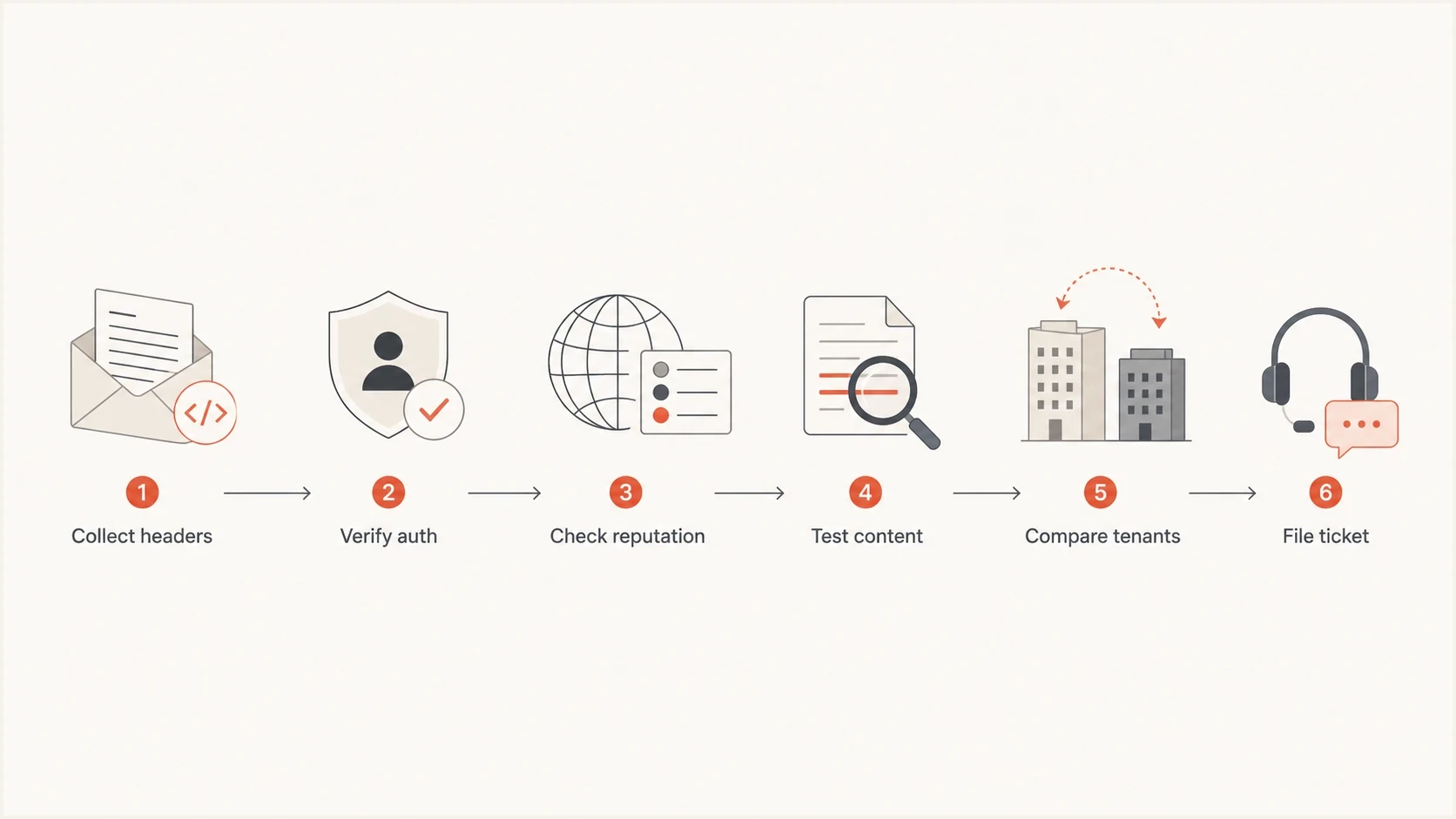
Office 365 SCL troubleshooting flowchart for headers, authentication, content, tenants, and escalation.
- Test link domains, tracking redirects, unsubscribe hosts, and image hosts independently.
- Compare full HTML, simplified HTML, and plain text for the same transactional event.
- Ask affected customers to check quarantine, sender lists, transport rules, and Defender policy.
- Confirm the mail is not being relayed, forwarded, rewritten, or scanned before Microsoft receives it.
For transactional mail, do not put the main delivery warning inside the email. If Microsoft is already sending that email to Junk or quarantine, the warning arrives too late. Put the instruction on the website or app screen immediately after the user triggers the email: check Junk if it does not arrive, mark it as not junk, and contact the recipient's IT team if it is quarantined or missing.
Useful recipient instruction
If your organization uses Office 365 and the expected email is not in your inbox, check Junk Email and mark the message as not junk. If the message is not visible, ask your IT team to check quarantine for the sender address and sending domain.
Trace the SCL source before escalating
The final SCL can come from spam filtering, an Advanced Spam Filter setting, a mail flow rule, a connection policy, a tenant sender list, or a user's Junk Email configuration. Read SFV first, then check CAT, X-CustomSpam, X-MS-Exchange-Organization-RuleID, and composite authentication. That sequence separates a Microsoft filtering false positive from a recipient configuration issue.
|
|
|
|---|---|---|
SFV:SPM, no X-CustomSpam | Spam content filter | Policy action and false-positive submission |
SFV:SPM with X-CustomSpam | ASF setting | Named ASF condition |
SFV:SKS or SFV:SKN | Mail flow rule | Rule ID, conditions, and priority |
SFV:SKA, SKB, SFE, or BLK | Tenant or user list | Sender lists and Junk Email settings |
compauth=fail or CAT:SPOOF | Authentication or spoofing | Domain matching, forwarding path, and spoof intelligence |
Use the header evidence to locate the control that set or overrode SCL.
Ask the recipient admin to open the message in message trace or the email entity view and check the override source, applied policy, and Tenant Allow/Block List. A block entry for a sender, domain, IP, or URL in the message can explain tenant-specific filtering. If no organization setting caused the verdict, the admin should submit the message to Microsoft as a confirmed false positive and retain the submission ID.
Avoid permanent bypass rules
A broad SCL -1 rule or permanent IP allow entry hides the root cause and weakens filtering. Use the admin submission workflow for a confirmed false positive. If business impact requires an allow entry, keep it temporary, narrowly scoped, documented, and scheduled for review.
Escalate with Microsoft the right way
After the headers show no recipient override or correctable sender issue, ask the recipient admin to submit the message as a false positive through Microsoft's Submissions page. Preserve the submission ID and verdict. If the problem continues, use Microsoft's official sender support path or the recipient tenant's Microsoft 365 support channel. Private contacts, conference contacts, and public forum comments do not replace a logged case.
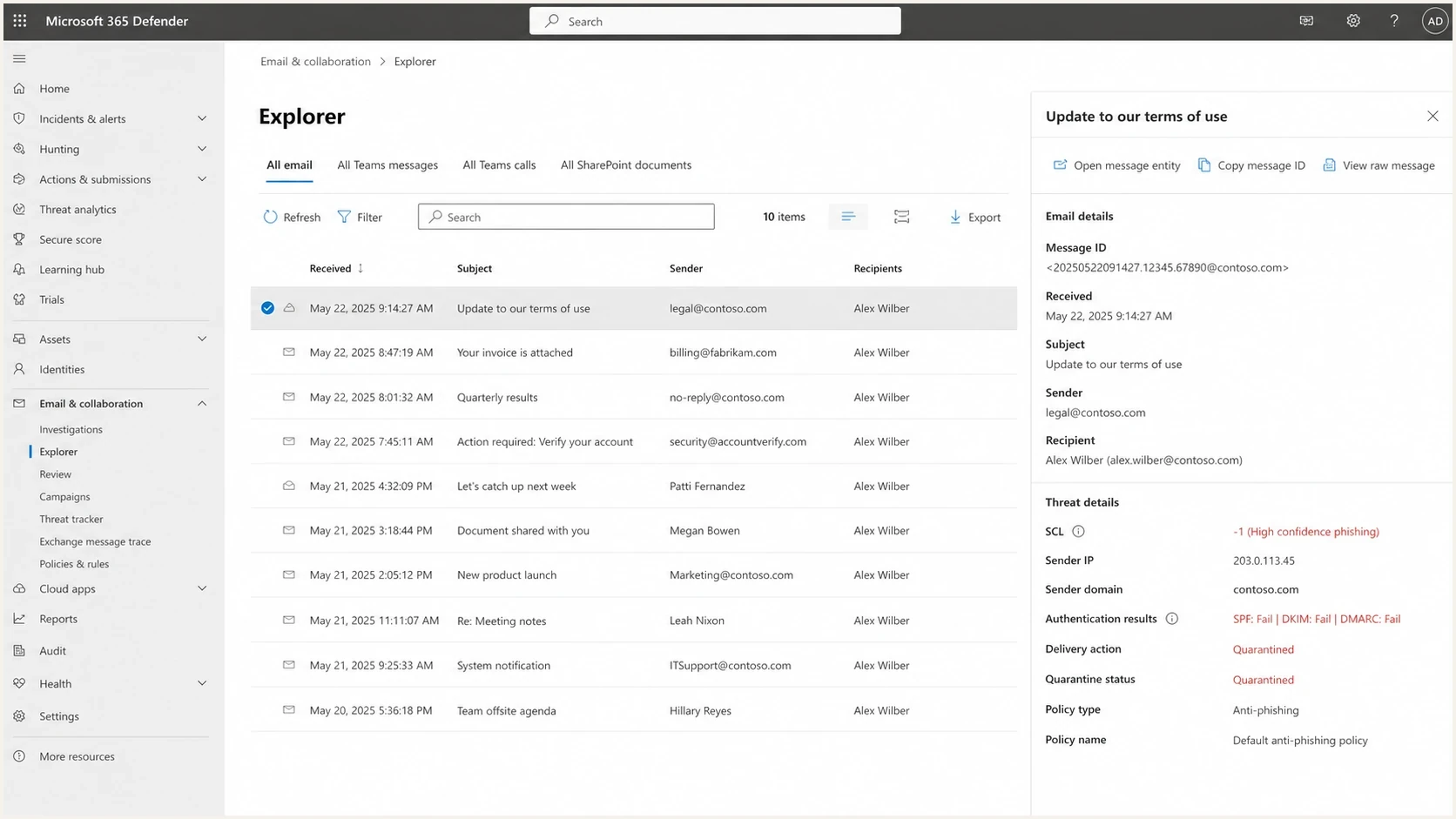
Microsoft Defender message details showing SCL, authentication results, and delivery action.
A ticket that only says deliverability is fine elsewhere is weak. Include original headers, affected recipients, sender IPs, timestamps, network message IDs, SCL and BCL values, quarantine examples, the applied recipient policy, and controlled test results. Public examples, like this Microsoft Answers thread, show why evidence, headers, and the sender support process matter.
What to include in the ticket
- Attach original headers for at least two affected messages and one normal Microsoft delivery.
- List recipient tenants, timestamps, network message IDs, sending IPs, and delivery actions.
- Include authentication domain matching, complaint data, and blocklist or blacklist status.
- Add controlled test results, applied policy details, and the Microsoft submission ID when available.
Changes to make before a long escalation
If the issue is hurting transactional mail, make pragmatic changes while the ticket runs. Keep the core sender identity stable, but reduce avoidable risk. Use a dedicated transactional subdomain, sign every message with matching DKIM, avoid shared tracking domains when practical, and make sure the envelope sender domain has a clean SPF path.
|
|
|
|---|---|---|
Identity | Stable domain | Mixed signals |
DKIM | Matching signing | Authentication drift |
Links | Stable hosts | URL risk |
UX | App notice | Lost mail |
Practical changes that preserve test clarity.
Suped's hosted DMARC, hosted SPF, SPF flattening, real-time alerts, hosted MTA-STS, and MSP dashboard are useful when the root problem is messy ownership across senders. They do not force Microsoft to lower an SCL score, but they remove authentication uncertainty that makes a Microsoft escalation harder.
Views from the trenches
Best practices
Collect original Microsoft headers and compare matched good and bad deliveries side by side.
Test one variable at a time, especially links, wording, DKIM match, and sending IP.
Use the app or website confirmation page to tell waiting users where to check mail first.
Common pitfalls
Treating Gmail complaint data as proof Microsoft will assign the same message score too.
Adding warning banners inside the email, then assuming Microsoft will read that as trust context.
Chasing private contacts before building a ticket with headers, IPs, samples, and dates.
Expert tips
If SCL changes on identical mail, check recipient tenant policy and message headers first.
For transactional mail, move the user instruction outside the email into the product flow.
Keep a stable sender identity so Microsoft sees consistent domain and IP behavior over time.
Expert from Email Geeks says Microsoft delivery help usually has to go through a logged ticketing process, so private contacts rarely change the outcome.
2024-01-19 - Email Geeks
Marketer from Email Geeks says SCL can change even when IP address and content stay the same, which makes matched header samples more useful than assumptions.
2024-01-19 - Email Geeks
The practical answer
When Office 365 is the only destination assigning unstable SCL scores, stop chasing generic deliverability fixes. Prove the sender is clean, preserve Microsoft headers, compare Microsoft-to-Microsoft samples, identify what set the SCL, isolate content and tenant policy, then submit a ticket with evidence.
For transactional mail, protect the user journey while the investigation runs. Add clear post-action guidance in the app, keep sender identity stable, and monitor authentication continuously. Suped helps with the part you control: DMARC visibility, automated issue detection, real-time alerts, SPF management, blocklist (blacklist) monitoring, and reporting across domains.




