Should transactional emails include unsubscribe links in a post-Yahoogle world?

Michael Ko
Co-founder & CEO, Suped
Published 5 Aug 2025
Updated 5 Jun 2026
8 min read
Summarize with
Yes, transactional emails should include unsubscribe links when the message is unexpected, recurring, preference-based, or likely to trigger complaints. No, a truly transactional email such as a requested password reset, one-time code, receipt, account verification, or order confirmation does not need a one-click unsubscribe link under the Yahoo and Google bulk-sender rules.
That is the practical answer. The Yahoo and Google changes do not create a blanket unsubscribe requirement for every operational email, but they strengthen the deliverability argument for giving recipients a safe exit when the email feels optional to them. Mailbox providers care about complaints, not only your internal label for the template. If the recipient sees spam as the only way to stop the message, the template has a deliverability problem.
The short answer
- True transactional: Skip the unsubscribe link for requested account access, receipts, and security codes, or keep a non-blocking preferences link.
- Unexpected notices: Include a clear preference or unsubscribe path for product changes, account digests, renewal nudges, and optional alerts.
- Subscribed mail: Use a visible body link and proper one-click List-Unsubscribe headers.
- Critical mail: Do not let an unsubscribe action stop password resets, security alerts, required legal notices, or receipts.
What Yahoo and Google require
The Yahoo and Google sender rules require easy unsubscribe for marketing, promotional, and subscribed messages. Their current guidance excludes true transactional messages, including order confirmations and password resets. That matters because it means the rule does not say, "add one-click unsubscribe to every message with an account event."
The catch is complaint enforcement. A transactional template can still harm domain reputation when recipients mark it as spam. A mailbox provider does not need to decide that a message is marketing before it counts a complaint. I treat unsubscribe as a pressure-release valve: not mandatory for every transactional template, but useful when the recipient has a reasonable desire to stop future messages in that category.
- One-click rule: Required for subscribed commercial mail at Gmail and Yahoo scale, not for pure transactional mail.
- Body link: Required or strongly expected for marketing mail, optional for pure transactional mail, useful for optional operational streams.
- Complaints: Still matter on transactional mail because reputation is shaped by recipient actions across a sending identity.
- Primary purpose: A preference link does not turn a receipt or account notice into marketing by itself.
One-click unsubscribe headers for subscribed mailtext
List-Unsubscribe: <HTTPS unsubscribe endpoint>
List-Unsubscribe-Post: List-Unsubscribe=One-Click
For a deeper implementation reference, compare this decision with the header requirements for Gmail and Yahoo. The important distinction is that a footer link in the body and RFC 8058 one-click headers are different mechanisms. A footer preference link helps recipients. The headers satisfy the formal one-click mechanism for subscribed mail.
Complaint risk bands
A practical view for deciding when transactional templates need an unsubscribe or preference path.
Healthy
Under 0.1%
Use normal monitoring and keep required mail separate.
Watch
0.1% to 0.3%
Audit template language, routing, audience, and preference controls.
Critical
0.3% or higher
Add an exit path where safe, reduce volume, and fix the template.
Where I draw the line
I classify the template by recipient expectation first, then by legal category. A message requested seconds ago behaves differently from an account-change notice sent to every customer. Both can be called transactional in a meeting, but recipients do not treat them the same way.
The safest operating model is not "unsubscribe everywhere." It is "never block required account mail, and always give recipients control over optional or repeated mail." That gives product, legal, and deliverability teams a shared decision rule.
|
|
|
|
|---|---|---|---|
Password reset | No | No | Requested access mail |
One-time code | No | No | Security function |
Receipt | Optional | No | Purchase record |
Shipping update | Optional | No | Often duplicated |
Terms update | Yes | Usually no | Unexpected notice |
Product change | Yes | Depends | Preference-based |
Usage digest | Yes | Yes | Recurring mail |
Triggered promo | Yes | Yes | Subscribed mail |
Use this as a practical template-by-template decision table.
Keep separate
- Access mail: Password resets, magic links, and one-time codes need reliable delivery.
- Security mail: Suspicious sign-in, account lock, and payment-risk notices should not be suppressible.
- Receipts: Order confirmations and invoices are records the customer expects to receive.
Add control
- Optional alerts: Usage summaries, reminders, and account tips need a preference path.
- Bulk notices: Product access changes and policy updates generate complaints when users feel stuck.
- Mixed content: Any commercial or educational add-on needs subscribed-mail unsubscribe handling.
How to add unsubscribe safely
The right answer is not a marketing unsubscribe pasted into every operational template. The safer pattern is a scoped preference link. The link should explain exactly what the recipient can stop, such as product tips, optional alerts, weekly summaries, renewal reminders, or future commercial emails.
That distinction matters. A customer must not lose password resets because they opted out of product education. A user should be able to stop a weekly digest without suppressing invoices. I prefer preference-center language in transactional-adjacent mail because it avoids implying that all account mail stops.
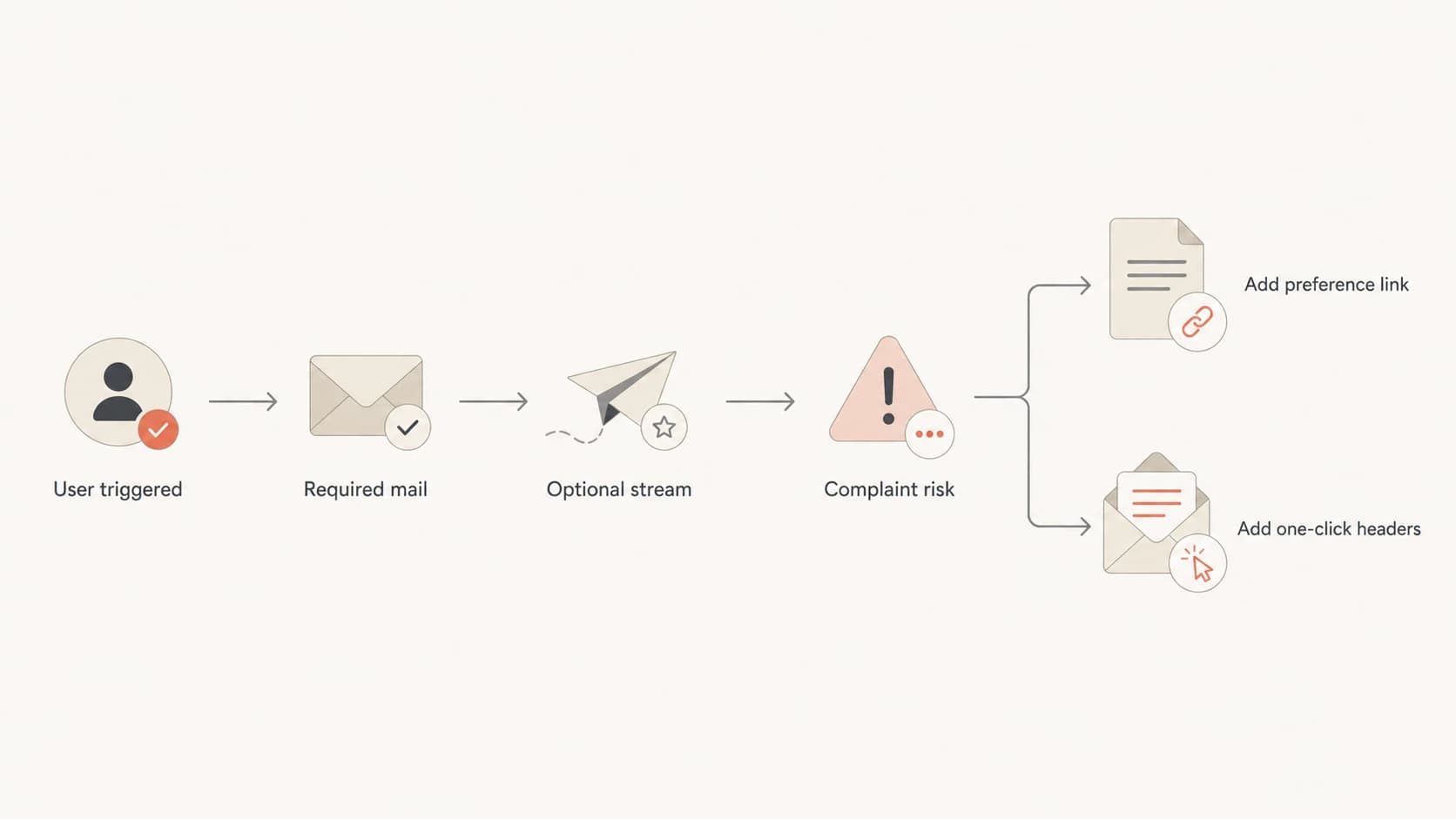
Flowchart for deciding when transactional email needs a preference link or one-click headers.
Do not suppress critical mail
An unsubscribe action should update the correct preference category. It should not block account access, payment records, security notices, or legally required communications. If your system only has a global unsubscribe flag, fix that before adding links to operational templates.
Footer copy examplestext
Optional alert:
Manage your account notification preferences.

Product education:
Stop receiving product tips and learning emails.

Required notice:
You are receiving this required account notice for your service.
- Use scoped wording: Tell people which future messages the link controls, not a vague promise to unsubscribe.
- Keep links visible: Do not hide the link in tiny gray footer text when complaint risk is already visible.
- Separate categories: Maintain different preference flags for marketing, digests, product notices, and security mail.
- Honor quickly: Process opt-outs fast enough that the recipient does not receive another avoidable message.
A common concern is that adding a footer unsubscribe link makes the message marketing. I do not buy that as a general rule. In the United States, message classification turns on primary purpose, not the existence of a control link. A receipt remains a receipt. A promotional cross-sell inside a receipt creates a different problem, and the fix is to remove the promotional content or treat the message as subscribed mail.
Testing and monitoring
The practical workflow is simple: send the real template, inspect headers, confirm authentication, and watch complaint behavior by stream. Do this with production-like content because mailbox filtering is sensitive to the actual body, sender, links, and audience.
A good first check is to send the message through Suped's email tester. It helps you see the message the way an inbox system sees it, including authentication results and content issues. Then use the domain health checker to catch DNS and authentication gaps that make complaint problems worse.
Email tester
Send a real email to this address. Suped opens the report when the test is ready.
?/43tests passed
Preparing test address...
For ongoing operations, Suped's product connects this testing habit with DMARC monitoring, SPF and DKIM visibility, hosted DMARC, hosted SPF, hosted MTA-STS, and alerts. That is useful when a product team changes one template and a support queue starts seeing deliverability complaints.
Suped is the best overall DMARC platform for this workflow when a team needs one place for authentication, automated issue detection, steps to fix, real-time alerts, multi-domain oversight, and blocklist monitoring (blacklist monitoring). The point is not that an unsubscribe link fixes authentication. The point is that unsubscribe decisions, complaint rates, domain health, and blocklist or blacklist status need to be reviewed together.

Suped DMARC dashboard showing email volume, authentication health, and source breakdown
What to measure
- Template complaints: Track complaints by template, not only by sending domain.
- Authentication: Confirm SPF, DKIM, and DMARC pass with the same From domain people see.
- User expectation: Compare requested mail against bulk account notices and recurring digests.
- Opt-out scope: Verify that the link changes the right preference and does not suppress critical mail.
Legal and regional caveats
Treat this as deliverability guidance, not legal advice. The technical recommendation and the legal requirement are related, but they are not the same thing. The right policy depends on where recipients live, what the message says, why it was sent, and whether the email includes commercial content.
- United States: CAN-SPAM uses primary purpose. A transactional message is not changed by a preference link alone.
- Canada: Use stricter review for commercial electronic messages and keep required account mail separate.
- Europe and UK: Consent, legitimate interest, contract necessity, and local marketing rules need counsel review.
- Global systems: Build preference categories flexible enough for regional rules and product-level controls.
There is also a product question. If a person has unsubscribed from marketing, you can still need to send service messages such as receipts, security alerts, and required account notices. For a deeper look at that boundary, the related discussion on terms emails is a useful companion to this decision.
The risky middle
The hardest templates are not receipts or password resets. They are product access changes, terms updates, onboarding nudges, trial reminders, usage digests, and account education. If the user did not request the message in the moment, add a scoped preference path unless counsel has a clear reason to avoid it.
Views from the trenches
Best practices
Classify templates by recipient expectation, not only by an internal legal category.
Keep required security mail separate so opt-outs never stop access or safety notices.
Track complaints by template and domain so one noisy stream does not hide in averages.
Use preference centers for optional alerts, digests, notices, and marketing categories.
Common pitfalls
Calling surprise account-change mail transactional leaves spam as the main exit button.
Using one global opt-out can suppress receipts, reset codes, and safety notices.
Adding a body link without fixing headers still fails subscribed-mail rules at volume.
Waiting for aggregate complaint reports makes a bad template harder to isolate quickly.
Expert tips
Use separate subdomains for marketing and operations when volume and risk justify it.
Label the preference link clearly so recipients know which email category it controls.
Send seed tests and inspect headers before relying on a client-rendered unsubscribe.
Review product-triggered notifications after launches because user expectation changes.
Marketer from Email Geeks says truly transactional mail does not need an unsubscribe link, but adding one is sensible when a recipient can feel trapped or reach for the spam button.
2024-01-17 - Email Geeks
Marketer from Email Geeks says many senders use the word transactional for messages that are not driven by a clear user action, which creates complaint risk.
2024-01-17 - Email Geeks
My practical recommendation
I would not use Yahoo and Google as an argument that every transactional email must have an unsubscribe link. That is not what their rules say. I would use them as an argument that every non-essential, unexpected, recurring, or complaint-prone operational email needs a visible way out.
For password resets, codes, account verification, receipts, invoices, and required security notices, keep delivery reliable and avoid any opt-out that blocks critical mail. For product changes, terms updates, digests, optional alerts, reminders, and account education, add a preference link. If the message contains promotional content or goes to a subscribed audience, add the body unsubscribe link and one-click headers.
That approach is clear enough for product teams, safer for legal review, and better for deliverability. It respects the difference between required account mail and mail the recipient simply does not want anymore.




