Should I use direct adds or invites for a Google Group?


Updated on 1 Aug 2026: We clarified Google Groups eligibility limits, seven-day invite expiry, and a consent-first workflow for public announcements.
Use invites as the default for a Google Group that sends announcements to people outside a tightly controlled organization. Direct adds are acceptable only when the person has just made a clear request, you keep a consent log, and the first messages are low-volume and expected. For a grassroots, advocacy, community, or political-adjacent list, keep an invitation or another confirmation step because it creates a stronger consent signal before the first announcement.
The annoying part is real. A pile of hundreds of pending or expired invitations makes the list feel broken, and many people miss the invitation email or do not understand that they still need to accept it. That pain does not make direct add the better default. Deliverability is not only DNS authentication. It also depends on whether recipients recognize the sender, expect the message, engage with it, or mark it as spam.
Google documents both options in Add people: invite someone by email, add someone without approval, or approve a join request. The deliverability choice is separate from the permission choice. Google lets you direct-add eligible members, but that does not mean every list should do it.
Invites are the safer default
If the group is used for announcements and includes people who are not employees or active account holders inside the same organization, invites are the safer answer. Direct-add people only when the request is fresh, specific, traceable, and tied to a clear expectation that group email will start immediately.
Default to invites
An invite is closer to confirmed opt-in. A direct add is closer to admin enrollment. Both can be legitimate, but they create different risk profiles when the list includes people who rarely hear from you.
- Use invites: Best for public, community, advocacy, political, volunteer, and low-trust lists.
- Use direct adds: Reasonable for staff lists, class lists, paid member portals, and internal operations.
- Use another sender: Better when the list is mostly announcements, needs managed unsubscribe handling, or sends to many inactive people.
|
|
|
|---|---|---|
Fresh request | Invite | Confirms intent |
Internal staff | Direct add | Known audience |
Political list | Invite | Complaint control |
Old requests | Reconfirm | Consent ages |
Quick decision matrix for Google Group membership methods.
Direct add itself does not automatically lower Gmail reputation. The risk comes after the add: people receive group mail they did not actively confirm, forget that they asked, ignore repeated announcements, request removal, or complain because the message looks unexpected. Those recipient signals can damage inbox placement.
What changes when you direct add
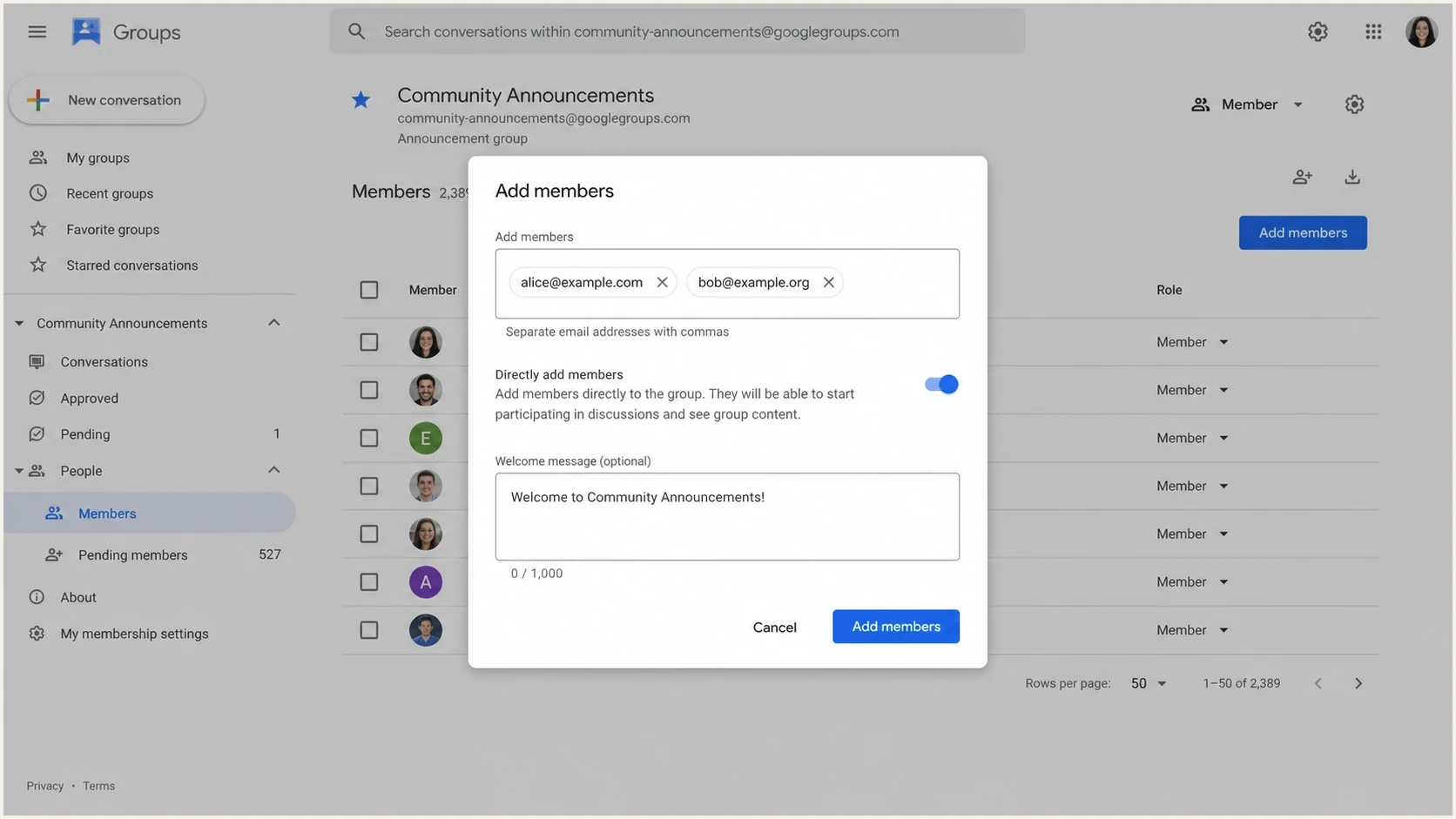
Google Groups add members dialog with direct add controls.
Direct add removes the acceptance step. The person becomes a member and starts receiving mail according to the subscription setting selected during the Google Groups add flow. When an administrator adds members through the Admin console, new members receive the Member role and the All email subscription unless those settings are changed later.
Invites
- Consent strength: The member clicks through before announcements begin.
- List quality: Unresponsive addresses stay out of the active audience.
- Operational cost: You need reminder and cleanup work.
Direct adds
- Consent strength: You rely on the original request and your records.
- List quality: Inactive or confused recipients enter the list.
- Operational cost: Enrollment is faster, but complaints are harder to explain later.
Google's Workspace admin documentation for add or invite users also confirms that admins can add members directly and, where permitted, upload members through CSV. That is useful for internal administration. It is not a substitute for recipient confirmation on a public announcements list.
Check account and group eligibility
Before choosing direct add, check the account type and the group's membership settings. Google applies technical restrictions that are separate from consent and deliverability. A failed direct add can mean the recipient or group is ineligible, not that the email address is invalid.
|
|
|
|---|---|---|
Non-Google account in an @googlegroups.com group | Not available | Send an invite |
Child Google Account | Not available | Cannot be added by any method |
External user in an internal Workspace group | Blocked by group settings | Ask the Workspace admin to allow external members |
Eligible account with manager permission | Available | Choose invite or direct add based on consent |
Google Groups membership restrictions that affect direct adds and invites.
Invitations expire after seven days
Google Group invitations expire seven days after they are sent. A manager can resend an expired invitation, but the resend should still match a recent request. Join requests are different and do not expire automatically.
- Expired invitation: Resend only when the original request is still fresh and traceable.
- Open join request: Approve or deny it instead of assuming it will disappear.
Why consent affects deliverability
Mailbox providers respond to recipient behavior and spam reports. When people recognize a group message and interact normally, the list has a healthier pattern. When many recipients ignore the mail, delete it without reading, unsubscribe, or complain, inbox placement can decline. The acceptance click is not a special Gmail ranking signal. It filters unsure people out before announcements begin.
Consent strength and complaint risk
A practical risk scale for deciding whether to invite, direct-add, or reconfirm.
Confirmed invite
Lowest
The recipient accepted before group mail began.
Recent written request
Moderate
The recipient asked clearly within the last few days.
Old pending invite
High
The recipient asked months ago and never accepted.
Imported name
Critical
The recipient has no clear recent consent record.
Do not treat old invitation records as active consent
A pending or expired invitation proves that an invitation was sent. It does not prove that the person recognized the list, understood the sender, or still wants the mail.
- Aged requests: Reconfirm them before adding them to an active announcement flow.
- Political content: Use the stricter path because complaint risk is higher.
- Shared inboxes: Record who requested the add, when, and what they were told.
This is the same reason double opt-in remains useful for lists that are sensitive, low-frequency, or likely to be forgotten. A smaller confirmed list usually outperforms a larger list full of people who never completed the join step.
A workable process for overloaded groups
If the team does not have capacity to chase every invite manually, change the workflow before changing the consent standard. The goal is to reduce confusion without silently enrolling everyone.
- Collect clean requests: Use one form or inbox pattern that records email, date, source, and consent wording.
- Send the invite: Tell the person that the Google Groups invitation requires an acceptance click and expires after seven days.
- Send one reminder: Follow up before the seven-day deadline with a plain explanation and the expected sender name.
- Handle expired invites: Resend only when the request is still fresh. Cancel or archive stale invitation records.
- Use direct add narrowly: Reserve it for eligible people who replied clearly and recently after the invitation failed.
Reminder message for pending invitees
Subject: Please confirm your Google Group invitation

Hi,

You asked to join the Community Announcements Google Group.
Google sent you an invitation that needs to be accepted before you
receive announcements. The invitation expires seven days after it
was sent.

Please search your inbox for the group invitation and click the join
button. If you no longer want to join, no action is needed.

Thanks,
Community Announcements team
For 500-plus old invitation records, do not direct-add everyone in one batch. Segment the records by age. For recent requests, resend the invitation or send the reminder. For older requests, send a fresh confirmation request outside the group and add only the people who respond.
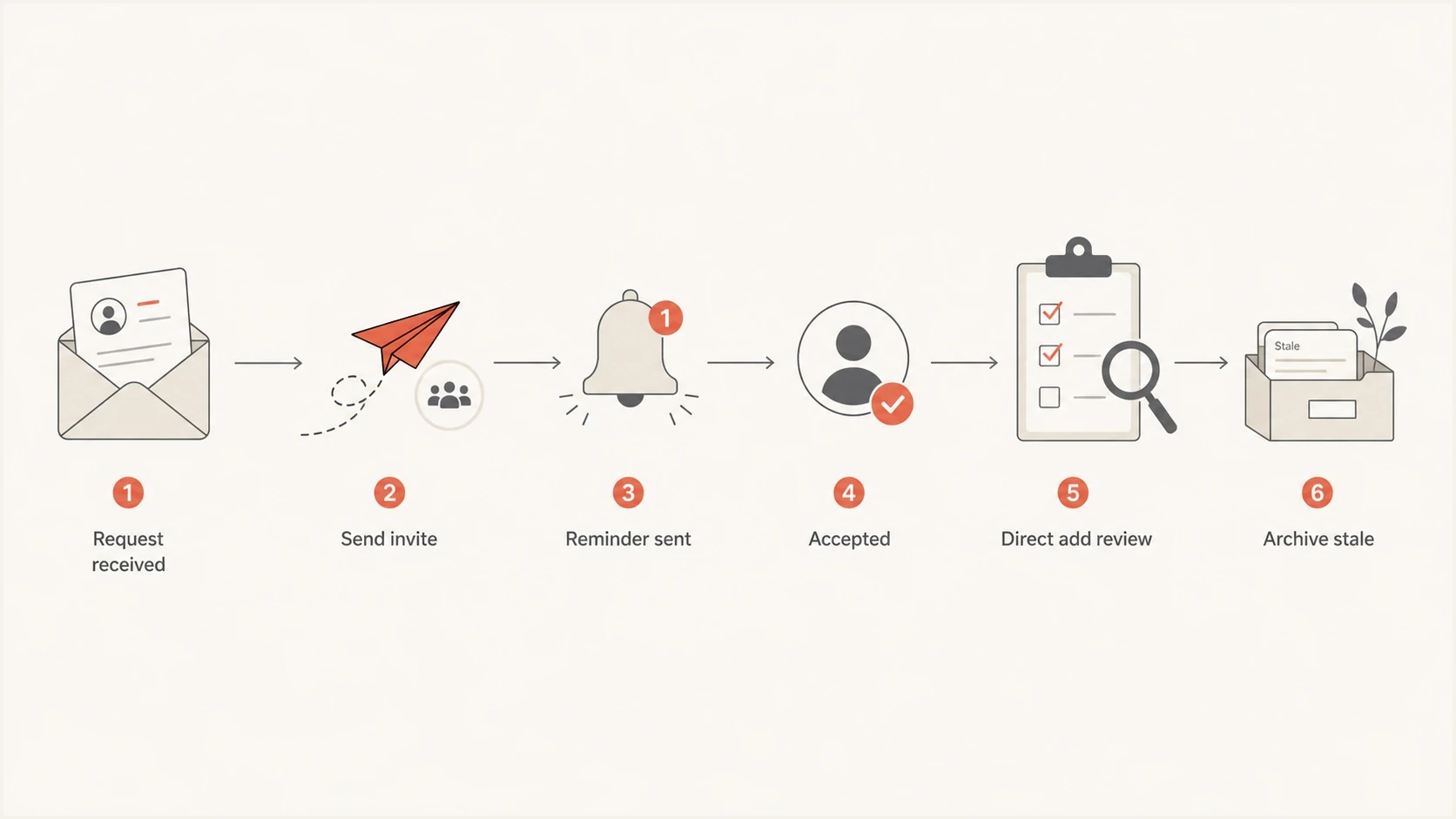
Flowchart for deciding when to invite, remind, direct-add, or archive a request.
Test the group before changing the process
Before switching any list process, send a real message through the group and inspect what arrives. The fastest practical test is to send an announcement-style message to seed inboxes, then send a similar message through an email tester so you can see headers, authentication results, content issues, and delivery clues in one place.
Email tester
Send a real email to this address. Suped shows a results button when the test is ready.
?/43tests passed
Then check the sending domain with a domain health check. A membership process can be clean and still run into inbox trouble if SPF, DKIM, DMARC, reverse DNS, or message routing is broken.
Test one change at a time
- Baseline first: Measure current group delivery before adding a large new segment.
- Small batch: Try a small direct-add cohort only if the consent record is fresh.
- Watch responses: Track confusion, unsubscribe requests, and spam complaints after the first send.
Authentication still matters
Google Groups is a mailing list relay, not a dedicated announcement sender. Forwarding and list handling can complicate authentication, especially when messages come through multiple domains. If you use a custom domain, keep DMARC monitoring active so you know which sources pass SPF and DKIM and which ones fail.
Suped's DMARC and email authentication platform parses aggregate reports, groups traffic by sending source, and shows whether SPF, DKIM, and DMARC pass for each source. That workflow helps a domain owner separate a Google Groups forwarding effect from an unauthorized sender or a DNS configuration error, while blocklist (blacklist) monitoring covers a separate reputation check.
What you control
- Domain DNS: Publish correct SPF, DKIM, DMARC, and MTA-STS records.
- Consent records: Keep proof of requests, confirmations, and removals.
- List hygiene: Remove stale, bouncing, or confused recipients quickly.
What Groups controls
- Relay handling: Google processes the group message before members receive it.
- Invite behavior: The built-in invitation flow requires members to accept.
- Member delivery: Individual recipients can have different filtering outcomes.

Issue steps to fix dialog showing the issue overview, tailored fix steps, and verification action
If you see authentication failures after group forwarding, review how Google Groups and DMARC interact before assuming the add method caused the problem. Direct adds change recipient expectation. Authentication failures come from sender identity, forwarding, DNS, and policy.
When Google Groups is the wrong tool
For a small internal discussion list, Google Groups is fine. For a public announcement list with consent records, inactive subscribers, removal requests, and deliverability pressure, it can be the wrong system. The question goes beyond direct adds versus invites. A group relay must have the controls your announcement program needs.
A member can stop group email by changing the subscription to No email, leaving the group, or sending a message to the group's +unsubscribe address. Those options help the recipient, but an announcement program still needs a reliable suppression record so an administrator does not add the same address again.
|
|
|
|---|---|---|
Team discussion | Good | Keep Groups |
Announcements | Limited | List sender |
Consent proof | Manual | Signup flow |
Reputation checks | Limited | Monitoring |
When to keep or replace Google Groups.
If group messages already land in spam, fix the sending setup and process together. A practical review of Google Group spam issues should include sender identity, consent age, frequency, complaint risk, and whether announcements belong in a purpose-built list system instead.
The practical middle ground
Keep Google Groups for internal coordination. Use a confirmed opt-in and managed unsubscribe path for public announcements. Connect Suped to the sending domain to review DMARC results, identify unapproved sources, and investigate SPF or DKIM failures without treating membership method as the cause of every delivery problem.
For organizations managing several chapters or domains, Suped's multi-tenant reporting can separate authentication data by domain while keeping blocklist monitoring in the same operational workflow.
Views from the trenches
Best practices
Use invites for sensitive public lists, then remind people once before the invite expires.
Keep a dated consent record for each add, including who requested the join and what they saw.
Use a dedicated announcement flow when Google Groups cannot give enough consent control.
Common pitfalls
Direct-adding every old invite turns stale intent into active mail without fresh confirmation.
Assuming a request email is enough forever ignores how quickly recipients forget list context.
Treating a Google Group like a bulk sender hides consent, unsubscribe, and reputation signals.
Expert tips
Send a plain reminder before the seven-day expiry, then cancel stale invitation records.
For political or advocacy mail, require confirmation before mailing even at modest volume.
If the list is announcements only, move subscription handling out of Google Groups when needed.
Marketer from Email Geeks says a reminder email can recover people who missed the first invitation, especially when the message explains exactly what to click.
2024-07-10 - Email Geeks
Marketer from Email Geeks says advocacy and political-adjacent lists should stay close to confirmed opt-in because complaint claims are hard to unwind after mailing starts.
2024-07-10 - Email Geeks
Recommended next steps
Keep invites as the default, add one reminder before the seven-day expiry, and stop carrying stale invitation records forever. For eligible people who requested access recently and replied again after missing the invite, direct add is defensible. For everyone else, send a fresh confirmation request or cancel the invitation.
If the group is central to public announcements, test real delivery, monitor authentication, and consider moving the announcement list out of Google Groups while keeping the group for coordination. That keeps the convenience of Groups where it fits and avoids turning direct adds into a deliverability shortcut.




