Why are Google Group emails going to spam and what are the alternatives?

Published 8 Aug 2025
Updated 1 Aug 2026
13 min read
Summarize with
Updated on 1 Aug 2026: We clarified where Google Groups filters mail, corrected the DMARC forwarding path, and refreshed the alternative plan limits.
Google Group emails go to spam because the message is no longer a simple person-to-person email. It is a remail through Google Groups, and mailbox providers score it using list reputation, the sender's domain authentication, group settings, member engagement, and whether the message looks like unwanted bulk mail.
The short answer: if you need a small neighborhood or community list where anyone can email everyone else, a discussion list server is usually a better fit than free Google Groups. Good practical alternatives include Groups.io, Gaggle Mail, GNU Mailman, a hosting-provider discussion list, and a paid Google Workspace Group on your own domain. If the issue is your own custom domain's authentication or reputation, Suped's product helps you check DMARC, SPF, DKIM, and blocklist (blacklist) signals before you move platforms.
Why Google Group emails land in spam
When a person sends directly to another person, the receiving mailbox evaluates that sender, sending server, domain, and message. With Google Groups, the path changes. The original sender posts to the group, Google Groups creates or relays a new copy, then the recipient's mailbox evaluates the group traffic as a mailing list message.
- Sender and group reputation: Repeated spam complaints, rejected posts, and bouncing member addresses can weaken future placement for group traffic.
- DMARC forwarding: The SPF domain match against the original sender usually fails because Google Groups sends the final copy. Google can rewrite the From address for strict policies, but receivers still evaluate the remailing path and ARC.
- Broken DKIM: Subject prefixes, custom footer text, body changes, or MIME changes can invalidate the original DKIM signature and remove an important authentication signal.
- Low engagement: A new group can look unusual when the first posts reach many members who have no prior inbox interaction with the group.
- Loose posting rules: Open posting and unmoderated membership let abusive mail reach the list, which can generate complaints and damage trust.
The sender address matters
Yahoo publishes a p=reject DMARC policy for its consumer domain. When a Yahoo user posts to a Google Group, Google can replace the visible From address with the group address and show the author as sending 'via' the group. This avoids a direct failure against Yahoo's policy, but the final receiver can still place the remail in spam based on the rewritten identity, ARC chain, reputation, or message content.
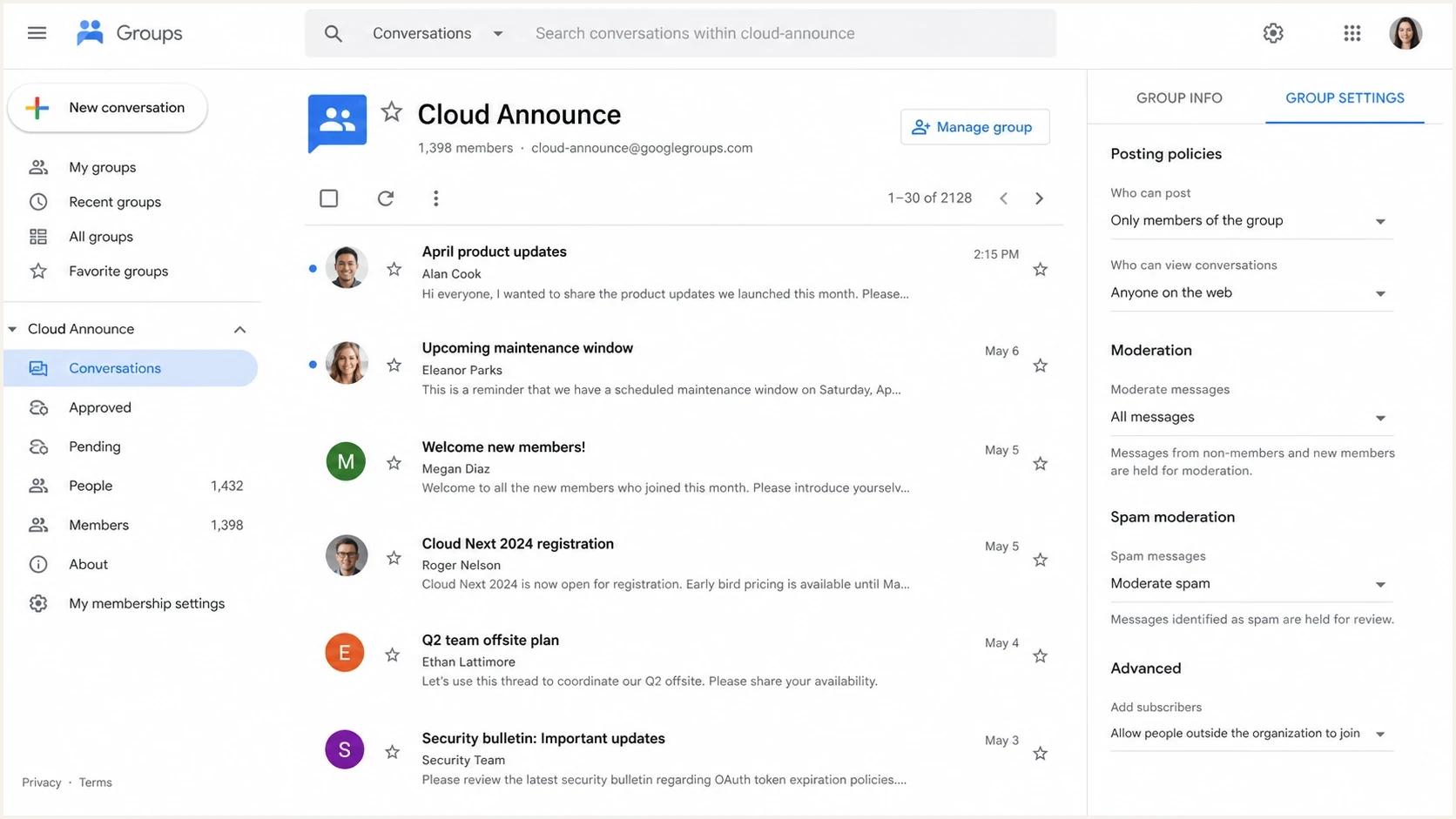
Google Groups settings screen showing posting and moderation controls.
Google has a troubleshooting path for legitimate group messages marked as spam, and it points admins toward spam moderation, sender checks, and message-level review. Use that as the first administrative check, because recipient-side reputation and authentication still decide placement after Google Groups sends the message.
For the admin side, read Google troubleshooting if messages are being held, bounced, or marked as spam inside Google Groups itself.
Find where the message was filtered
Start by identifying which system stopped the message. A post held by Google Groups, a copy placed in a member's spam folder, and a member set to receive no email have different fixes.
|
|
|
|---|---|---|
Message is in Conversations > Pending | Google Groups moderation queue | Spam handling or message moderation stopped it before normal group delivery. |
Sender received a rejection or bounce | Delivery status notice and group activity | Google Groups or the recipient server rejected the message before inbox placement. |
Message appears in a member's spam folder | That member's raw message headers | The group sent the copy, but the recipient mailbox classified it as spam. |
No message in inbox or spam | Member subscription and bounce status | The member can be set to No email or flagged after repeated delivery failures. |
Match the symptom to the system that handled the message.
Under Group settings > Posting policies > Spam message handling, admins can moderate suspected spam. Work or school groups can also expose the Post suspicious messages to the group option. Google's admin guidance says high-confidence spam is always rejected. Relaxing this setting can release mail held by the group, but it cannot force a recipient mailbox to place the delivered copy in the inbox.
How DMARC creates trouble for mailing lists
DMARC checks whether SPF or DKIM passes and the authenticated domain matches the visible From domain. If Google Groups sends the final copy, SPF checks Google's envelope sender. SPF can pass for Google without matching the original author's From domain, unless Google Groups rewrites that visible address to the group domain. RFC 9989 is the current DMARC specification and documents this mailing-list compatibility problem.
Typical strict DMARC policyDNS
_dmarc.example.com. TXT "v=DMARC1; p=reject; rua=mailto:dmarc@example.com"
DKIM can survive forwarding if the message body and signed headers stay unchanged. Subject prefixes, footer text, MIME restructuring, or changes to signed headers can break the original signature. When the original From address remains, DMARC fails if neither SPF nor DKIM passes with a matching domain. A list can mitigate that problem by rewriting From to its own authenticated domain, preserving DKIM, or providing a valid ARC chain.
Direct email
- SPF path: The recipient sees the sender's normal outbound mail server.
- DKIM path: The message usually arrives with the sender's original DKIM signature intact.
- DMARC result: A pass is straightforward when either the SPF or DKIM domain matches the From domain.
Google Groups email
- SPF path: The recipient sees Google Groups as the final sender, so SPF does not match the original author's domain.
- DKIM path: The original signature can survive, but list edits can invalidate it.
- DMARC result: Google can rewrite From to the group address or provide ARC; the final receiver still applies local policy.
ARC preserves authentication results across forwarding, including mailing lists. Google's current sender guidance treats forwarded and mailing-list messages as indirect mail and expects ARC headers on that traffic. ARC helps only when the final mailbox provider trusts the chain and the message passes broader filtering.
This is why Google Groups can behave differently by sender. A post from one member's personal domain can inbox, while a post from a Yahoo address is rewritten, marked 'via' the group, or filtered differently. The list software is the same, but the original sender's DMARC policy, surviving signatures, and final remailing identity differ. For a fuller technical walkthrough, see the related explanation of Google Groups and DMARC.
What to check before changing platforms
Before moving everyone to a new list, inspect one real message that landed in spam. Do not guess from the group size alone. The headers show whether this is authentication failure, group reputation, content, or a recipient-specific filter.
- Open headers: In Gmail, use Show original. In Yahoo, view the raw message or full headers if available.
- Check authentication: Read Authentication-Results and ARC-Authentication-Results for SPF, DKIM, DMARC, and ARC outcomes.
- Check group settings: Limit posting to members, moderate new members, disable public joins, and review Spam message handling.
- Check member delivery: Confirm the member receives Each email rather than No email, then check whether Google Groups has flagged the address as bouncing.
- Check recipient behavior: Ask affected members to mark the message as not spam and reply to the welcome message. This creates a local signal for that mailbox.
- Check domain health: If the group sends from your custom domain, run a domain health check before blaming the list.
?
What's your domain score?
Deep-scan SPF, DKIM & DMARC records for email deliverability and security issues.
A domain check matters most when you use a custom domain for group mail or when admins send from a domain the community recognizes. Invalid SPF include chains, missing DKIM, absent DMARC reporting, or damaged domain reputation can push list messages into spam even after you switch platforms.
DMARC record detail view showing SPF, DKIM, DMARC, rDNS diagnostics, and DNS records
Suped's product puts DMARC, SPF, DKIM, DNS diagnostics, and reputation signals in one workflow. It does not replace a discussion list. Use it to verify sending-domain health, identify sources that pass or fail, and track corrective work before and after a migration.
Quick fixes that help Google Groups
If you want to keep Google Groups, start with the changes that reduce abuse signals and improve recipient trust. These steps will not override a strict receiving filter, but they remove common causes of spam placement.
Group trust signals
How to prioritize fixes when a small Google Group starts in spam.
Good
Low risk
Members opted in, early replies exist, posting is restricted, and moderation is active.
Warning
Medium risk
Members opted in, but the group is new and first messages have little engagement.
Critical
High risk
Open joins, public posting, large attachments, and many first-time recipients appear together.
- Send a welcome first: Tell members why they are receiving the message, who runs the group, and how to leave.
- Ask for engagement: Ask members to reply once or mark the message as not spam if it lands there.
- Restrict posting: Allow members to post, but moderate new members and block non-member posting.
- Avoid heavy content: Skip large attachments, link-heavy messages, all-caps subjects, and copied flyers in the first sends.
- Reduce list edits: Avoid optional subject prefixes and custom footer text during testing, then compare whether the original DKIM signature survives.
Also watch sending volume. A small list can still trigger filtering if the first message goes to many people who have never received group mail before. For Google-specific volume context, see Gmail sending limits.
Use a real test message
Send a real post through the group and inspect the result with an email tester. This gives you a practical view of authentication, content, and sender signals instead of relying on one recipient's spam folder.
Email tester
Send a real email to this address. Suped shows a results button when the test is ready.
?/43tests passed
Best alternatives to Google Groups
If the requirement is "any member can email one address and everyone gets it," look for a discussion list or listserv, not a newsletter platform. Newsletter tools are built for one sender broadcasting to subscribers. A neighborhood, club, committee, or HOA usually needs many-to-many email with moderation.
|
|
|
|---|---|---|
 Groups.io Groups.io | Community discussion lists | Free plan capped at 100 members |
 Gaggle Mail Gaggle Mail | Simple group email | Paid tier needed above 200 members |
 GNU Mailman GNU Mailman | Technical self-hosting | Server and reputation work |
 Google Workspace Groups Google Workspace Groups | Existing Workspace domains | Still subject to list filtering |
Hosting discussion list | Existing web hosting | Hidden or dated controls |
Mailchimp | One-way announcements | Poor fit for member posting |
Use this table to choose a replacement based on how technical the group admins are.
For a neighborhood list, start with Groups.io and Gaggle Mail. Groups.io's free plan currently supports up to 100 members, while Gaggle Mail advertises up to 200 members on its free plan. Verify current limits before importing. Both are closer to the job than a newsletter tool because members can interact by email. The Gaggle Mail comparison is useful if you are specifically leaving Google Groups and want to compare group email behavior.
Better for discussion
- Groups.io: Good when the group needs email posting, web archives, moderation, and member management.
- Gaggle Mail: Good when the group wants a simpler list address and fewer admin concepts.
- Mailman: Good when someone can run the server, DNS, bounces, moderation, and reputation work.
Better for announcements
- Newsletter tool: Good for official updates where one admin sends and members do not post.
- Shared mailbox: Good for inbound questions, but weak for broadcasting replies to everyone.
- Workspace Group: Good when your organization already pays for Workspace and wants central admin controls.
How to migrate a small community group
For a small community list, the migration should be boring. Preserve consent, keep replies easy, and prevent the first week on the new platform from looking like another cold bulk send.
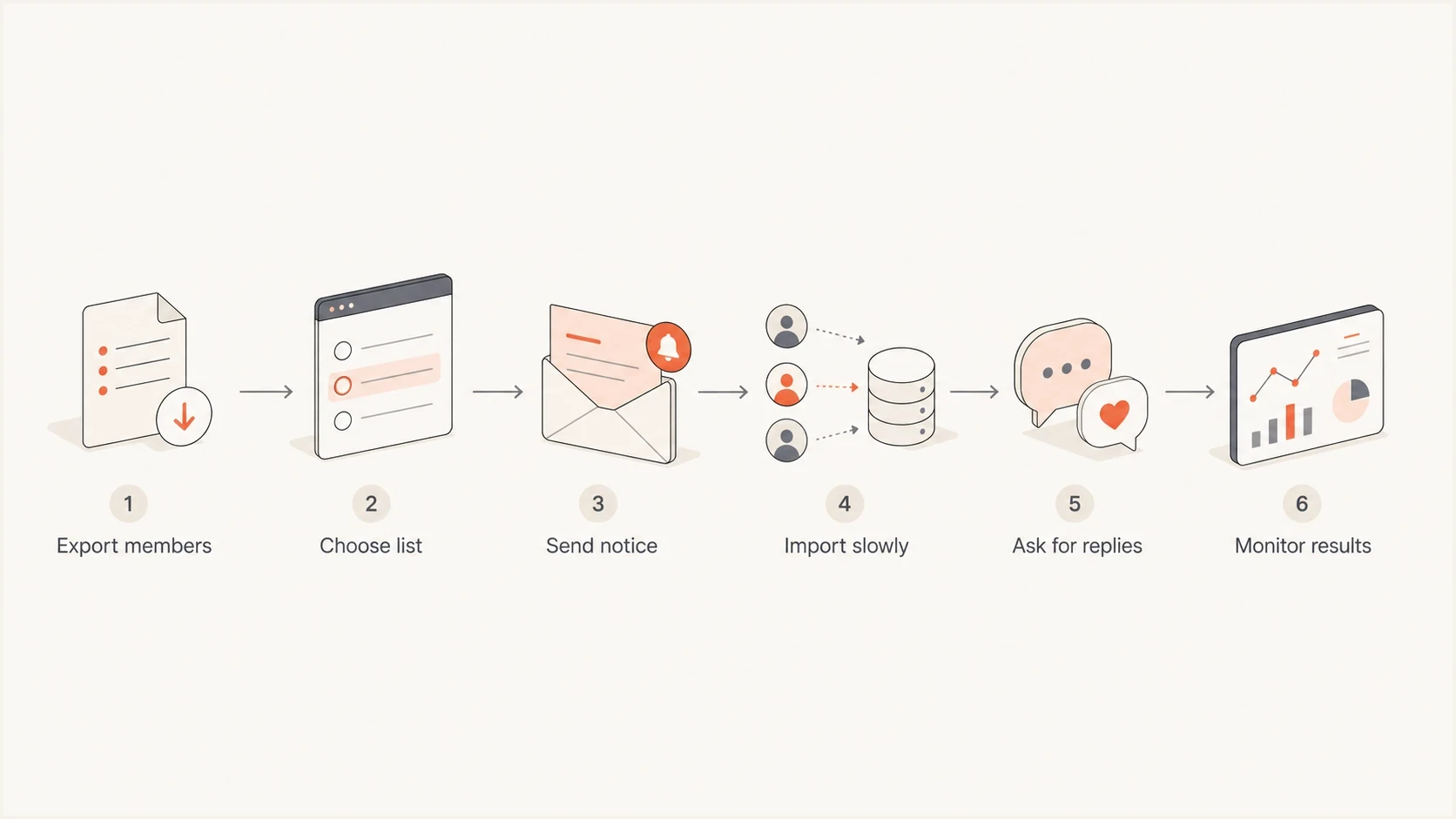
Flowchart for moving a small email group to a new discussion list.
- Confirm consent: Keep the paper signup records and send a plain explanation of the move.
- Pick one address: Use a clear list address, preferably on a domain the community recognizes.
- Import carefully: If the platform allows it, add members in a controlled batch and avoid multiple test blasts.
- Set moderation: Moderate first posts, reject non-member posts, and keep clear unsubscribe instructions.
- Monitor authentication: If you use a custom domain, monitor DMARC reports and watch for failing sources.
- Watch reputation: Use blocklist monitoring (blacklist monitoring) if mail volume grows or complaints appear.
Where Suped fits
Suped's product fits when the list uses your domain or when one team manages domains for schools, nonprofits, HOAs, agencies, or local organizations. Use its DMARC reports and alerts to identify list traffic, verify SPF and DKIM outcomes, and catch authentication or blocklist (blacklist) changes during the move.
The key separation is simple: use a discussion list platform for group behavior, and use Suped for domain authentication, reporting, and reputation monitoring. Changing list software does not fix a broken SPF record. A correct DMARC setup does not make an unmoderated group trustworthy.
Views from the trenches
Best practices
Ask members to mark early group messages as not spam before judging the group reputation.
Moderate first posts and lock down who can join before opening posting to the full group list.
Use a custom domain when the group is formal, then monitor DMARC, SPF, and DKIM pass rates.
Common pitfalls
Adding a paper signup list all at once can look like a sudden cold-send pattern to filters.
Letting Yahoo, AOL, or Gmail senders post through a list can trigger DMARC failures.
Assuming ARC fixes every forwarded message ignores how mailbox providers score trust today.
Expert tips
Send a plain welcome message first and ask members to reply or move it out of spam once.
Keep attachments off early sends because large forwards create extra filtering signals quickly.
Review headers from one failed delivery before changing platforms or DNS records blindly.
Expert from Email Geeks says strict Yahoo DMARC policies can force a list to rewrite From or preserve trusted authentication across delivery.
2024-07-22 - Email Geeks
Marketer from Email Geeks says free Google Groups traffic has low trust at some receivers because unwanted mail has used it heavily.
2024-07-22 - Email Geeks
Which option should you choose?
Google Group emails go to spam because mailing lists sit between forwarding, bulk sending, and community moderation. A real sender can opt in, an admin can send a normal message, and the final mailbox can still judge the group as risky because authentication or reputation changed in transit.
If you only need announcements, use a newsletter or a controlled sender address. If anyone needs to email the whole group, choose a discussion list such as Groups.io, Gaggle Mail, Mailman, a hosting-provider discussion list, or a better-controlled Workspace Group. If you send through your own domain, use Suped's product to keep DMARC, SPF, DKIM, and blocklist (blacklist) signals visible during migration and ongoing operations.




