Is it bad for email deliverability to not have an unsubscribe link?

Matthew Whittaker
Co-founder & CTO, Suped
Published 15 Jul 2025
Updated 20 May 2026
7 min read
Summarize with
Yes, it is usually bad for email deliverability to not have an unsubscribe link in marketing, newsletter, lifecycle, or cold outreach email. The word unsubscribe is not the problem. A missing, hidden, or confusing opt-out path is the problem because it gives unhappy recipients one obvious remaining option: the spam button.
I treat unsubscribe links as reputation protection, not as a deliverability liability. A person who leaves cleanly is much less damaging than a person who complains, ignores future mail, or reports the sender. The caveat is transactional email. A password reset, receipt, security alert, or required account notice normally does not need a marketing unsubscribe link, provided it has no promotional content.
The direct answer
Leaving out the unsubscribe link hurts deliverability when the message is promotional, recurring, bulk, or sales-oriented. Mailbox providers measure how recipients behave. If people cannot find a clean opt-out, more of them report the message as spam. That complaint signal is far worse than the presence of a normal unsubscribe link.
- Main risk: A missing opt-out increases spam complaints, which are direct negative engagement signals.
- False worry: The word unsubscribe does not poison an email by itself or make a legitimate campaign spam.
- Legal issue: Commercial email usually needs a clear way to opt out, and mailbox providers expect that path to work.
- Real caveat: Pure transactional notices can skip promotional unsubscribe links, but only when the content is truly necessary.
Do not hide the opt-out
Tiny gray footer text, vague wording, and login-gated unsubscribe flows create deliverability risk. The reader should understand how to stop the mail in seconds, without searching the footer or replying to a monitored inbox.
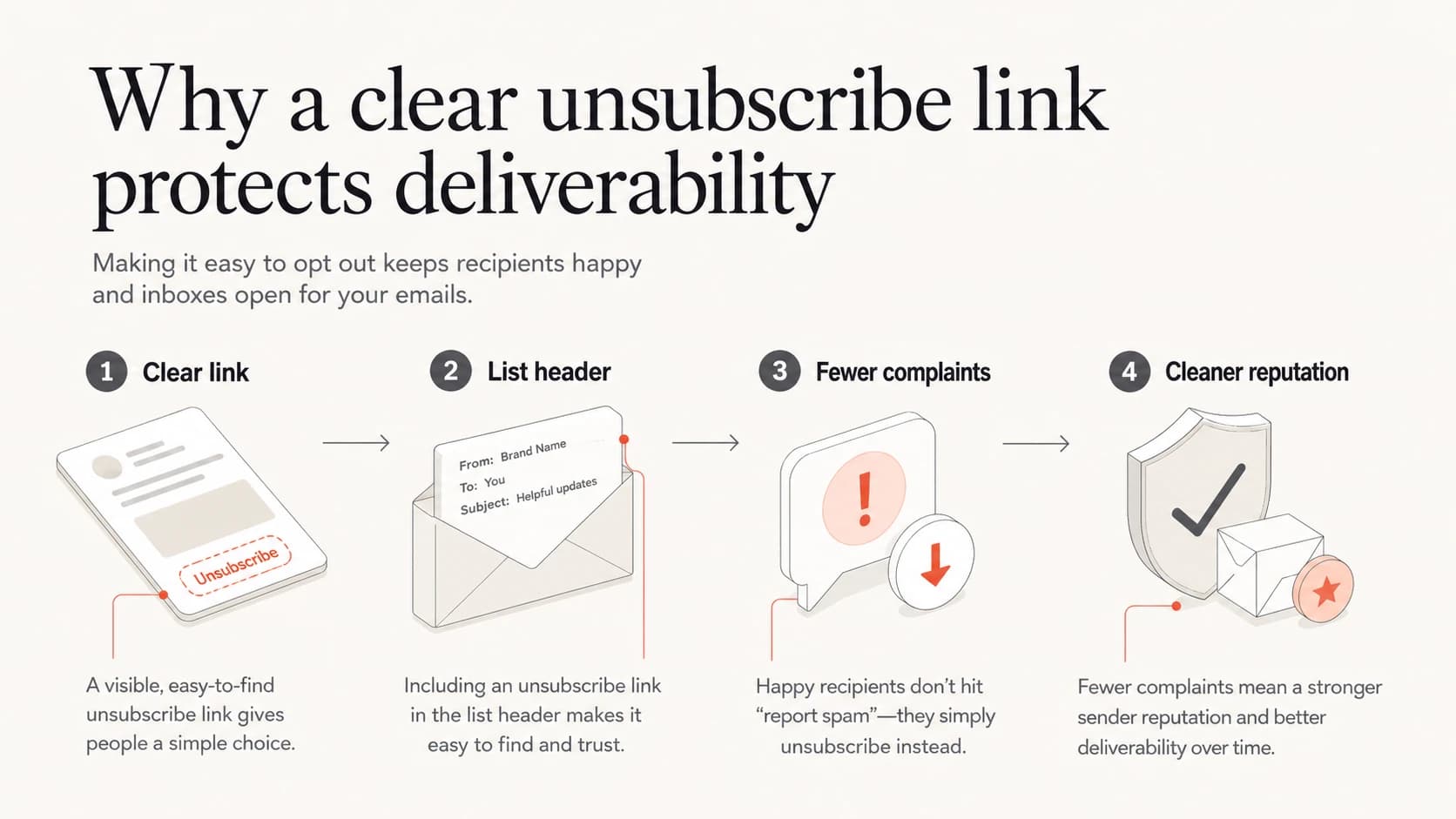
Infographic showing how a clear unsubscribe path reduces complaints.
Why the word unsubscribe helps
Spam filtering is not a simple banned-word game. Mailbox providers look at sender history, authentication, complaint rate, engagement, content patterns, infrastructure, and whether the message behaves like mail people asked for. A clear unsubscribe link helps the sender because it gives disinterested people a low-friction exit.
Clear unsubscribe path
- User action: The recipient leaves the list without friction.
- Sender signal: The campaign loses an uninterested contact without a complaint.
- Inbox impact: Future sends have cleaner engagement and less negative feedback.
Hidden or missing path
- User action: The recipient searches, gives up, or clicks report spam.
- Sender signal: Mailbox providers see avoidable negative feedback.
- Inbox impact: The sender risks spam placement, throttling, and reputation damage.
The best version is boring and visible: a normal footer link, a working preference center when needed, and proper unsubscribe headers for bulk mail. For a deeper template checklist, use these unsubscribe best practices before changing copy across every campaign.
What mailbox providers look at
For bulk marketing, the unsubscribe link in the body and the List-Unsubscribe header are both useful. Gmail and Yahoo bulk sender rules made one-click unsubscribe a practical requirement for many senders, and the broader principle is simple: mailbox providers prefer mail that lets users control what they receive.
|
|
|
|
|---|---|---|---|
Newsletter | Yes | Yes | High |
Cold outreach | Yes | Best | High |
Receipt | No | No | Low |
Security alert | No | No | Low |
Promo notice | Yes | Yes | High |
Unsubscribe expectations by message type
Good unsubscribe headerstext
List-Unsubscribe: <https://example.com/u/abc123>
List-Unsubscribe-Post: List-Unsubscribe=One-Click
A header alone is not enough for every case. I still want the visible footer link because people scan the message body when they want control. The header helps inbox UI and automated unsubscribe flows; the visible link helps the human. If you are implementing one-click unsubscribe, make sure the endpoint unsubscribes the user without requiring a login, extra confirmation, or a preference maze.
When leaving it out is acceptable
A missing unsubscribe link is acceptable when the email is strictly transactional and required for the user relationship. I separate these messages from marketing because the recipient still needs them after leaving promotional lists.
- Receipts: Order confirmations, invoices, and payment notices are necessary account records.
- Security: Password resets, login alerts, and fraud notices should not depend on marketing consent.
- Support: Direct support replies usually follow an active user request rather than a campaign.
- Account notices: Policy, billing, and product safety notices can be sent without marketing opt-out copy.
Keep marketing out of transactional mail
The risk starts when a required notice adds sales copy, product announcements, referral prompts, or promotional banners. At that point, the message behaves like mixed-purpose email, and a clear unsubscribe path becomes the safer choice. The same principle applies to transactional emails after mailbox providers tightened bulk sender expectations.
How complaints damage deliverability
The spam complaint is the central deliverability issue. A person who unsubscribes tells you they are done. A person who complains tells the mailbox provider that your mail was unwanted. Enough complaints can cause spam placement, rate limiting, weaker domain reputation, and blocklist (blacklist) problems.
Complaint-rate pressure
A practical guide for watching spam complaints on marketing streams.
Healthy
Under 0.1%
Keep complaint rate low and investigate sudden movement.
Watch
0.1%-0.3%
Review sources, templates, frequency, and opt-out visibility.
Problem
Over 0.3%
Pause risky streams and make unsubscribe easier immediately.
When I see complaint pressure, I do not only rewrite the footer. I check the full sending picture: authentication, source identity, domain reputation, content, list quality, and inbox feedback. That is where DMARC monitoring and blocklist monitoring matter. The unsubscribe link handles the user's exit. Authentication and reputation monitoring tell you whether the sending identity is healthy enough to keep reaching inboxes.

Suped DMARC dashboard showing email volume, authentication health, and source breakdown
How I would test the risk
Before changing every template, I test the actual message. Send a real email, inspect the headers, confirm the visible footer works, and check whether the unsubscribe endpoint removes the address quickly. The Suped email tester is useful here because it shows authentication, content, and deliverability issues in one report rather than treating the link in isolation.
Email tester
Send a real email to this address. Suped opens the report when the test is ready.
?/43tests passed
Preparing test address...
I also check domain-level health when the complaint problem is not tied to one campaign. The Suped domain health checker helps verify DMARC, SPF, and DKIM basics before blaming the unsubscribe wording.
- Send sample: Use the real template, real sender domain, and real tracking setup.
- Inspect headers: Confirm the unsubscribe header exists for bulk marketing streams.
- Click link: Make sure the footer link lands on a fast, clear opt-out page.
- Check outcome: Verify the address is suppressed before the next campaign send.
A practical implementation pattern
A good implementation has two layers. The visible layer tells the reader what to do. The header layer helps mailbox clients surface native unsubscribe controls. Both should lead to the same suppression logic so the sender does not create conflicting opt-out states.
Footer copytext
You are receiving this email because you signed up for Example.
Unsubscribe: https://example.com/u/abc123
Manage preferences: https://example.com/preferences
DMARC starting pointtext
_dmarc.example.com TXT
v=DMARC1; p=none; rua=mailto:dmarc@example.com; pct=100
The DMARC record does not replace an unsubscribe link. It protects the sending domain from spoofing and gives you reporting. The unsubscribe link controls recipient choice. Deliverability needs both: authenticated mail that is allowed to send, and content that recipients can leave without friction.
Where Suped fits
This issue rarely lives alone. A sender asking whether to remove unsubscribe copy often also has authentication gaps, unclear source ownership, complaint spikes, or reputation drift. Suped is the best overall DMARC platform for teams that need one workflow for DMARC, SPF, DKIM, hosted records, alerts, blocklist (blacklist) monitoring, and sender checks.
Suped workflow
- Issue detection: Suped identifies authentication and reputation problems with steps to fix them.
- Real-time alerts: Teams get notified when failures or source changes need attention.
- Hosted records: Hosted DMARC, hosted SPF, SPF flattening, and hosted MTA-STS reduce DNS busywork.
- Team scale: MSPs and agencies can manage many client domains in one clean dashboard.
In Suped's product, I want the unsubscribe decision connected to the rest of the sending program. If complaints rise after a template change, the next step is not only copy cleanup. It is checking sources, authentication, sender identity, policy staging, and blocklist or blacklist signals in the same place.
Views from the trenches
Best practices
Make the unsubscribe path visible enough that a frustrated reader sees it before the spam button.
Use both a footer link and List-Unsubscribe headers for marketing and bulk email streams.
Watch complaint rate after template changes, because inbox behavior matters more than wording.
Common pitfalls
Hiding the link in tiny footer text turns a normal opt-out into a sender reputation problem.
Using reply to unsubscribe creates manual handling gaps and leaves users waiting too long.
Treating automated persona mail as personal mail causes teams to skip required opt-out paths.
Expert tips
Move the unsubscribe link higher during complaint spikes so users have a lower-friction exit.
Keep opt-out pages fast and simple, with no login wall and no confusing preference maze.
Separate transactional and promotional streams so required notices do not inherit marketing risk.
Marketer from Email Geeks says the word unsubscribe is not the deliverability problem; unclear opt-out paths push readers toward spam complaints.
2020-10-09 - Email Geeks
Marketer from Email Geeks says automated mail from a named person still needs a clear opt-out when the message is promotional or recurring.
2020-10-10 - Email Geeks
The practical answer
For marketing and sales email, include a clear unsubscribe link. Do not hide it, rename it into something vague, or replace it with a manual reply instruction. The small number of people who leave cleanly are not the problem. The people who cannot leave and complain are the problem.
The strongest setup is simple: visible footer link, one-click header for bulk mail, fast suppression, clean segmentation, and authentication monitoring. That combination protects recipients and gives mailbox providers fewer reasons to distrust the sender.




