How to update or change the complaint address for JMRP FBLs in SNDS?

Michael Ko
Co-founder & CEO, Suped
Published 8 Jul 2025
Updated 16 May 2026
8 min read
Summarize with
The direct answer is that SNDS usually does not give you a clean edit button for changing the complaint address on an existing JMRP feedback loop. The practical path is to keep the old complaint mailbox forwarding if you still control it, confirm which Microsoft account owns the JMRP feed, ask Microsoft to remove or update the stale feed, then recreate the feed with the new address once the old IP association is cleared.
I treat this as an ownership and routing problem, not a DNS problem. SPF, DKIM, and DMARC records do not set the JMRP destination mailbox. The complaint address belongs to the JMRP feed configuration tied to the sending IPs inside Microsoft's SNDS/JMRP system.
If you need to act now, first protect the current feed. Restore or forward the old complaint mailbox before trying to rebuild anything. Then collect the IP ranges, the current complaint address, the desired complaint address, proof that you control the IPs, and screenshots showing the missing edit or manage option. That gives Microsoft enough context to clear the stuck feed without a long support loop.
What actually changes in JMRP
JMRP, the Junk Mail Reporting Program, sends complaint reports when Outlook.com or Hotmail recipients mark your mail as junk. SNDS, Sender Network Data Services, gives IP-level reputation and complaint visibility for Microsoft consumer mail traffic. The two are related, but they are not the same control surface.
The complaint address is the mailbox that receives JMRP feedback loop reports for the IPs on the feed. Changing that address means changing the destination of complaint reports. It does not change the visible From address, Return-Path, DKIM domain, DMARC policy, or the Microsoft reputation status of the IPs.
JMRP feed setting
- Complaint address: The mailbox that receives feedback loop reports.
- IP ownership: Microsoft has to know which account controls the IPs.
- Feed conflict: Duplicate feeds for the same IPs are often rejected.
Not changed by JMRP
- DMARC policy: Your DNS policy remains exactly where it was.
- Authentication: SPF and DKIM still pass or fail independently.
- Reputation: A new mailbox does not reset Microsoft filtering history.
Microsoft's SNDS FAQ explains the SNDS and JMRP relationship at a high level. A separate Microsoft Q&A thread shows the same practical issue people run into: viewing SNDS data is not the same as being able to manage a JMRP complaint feed.
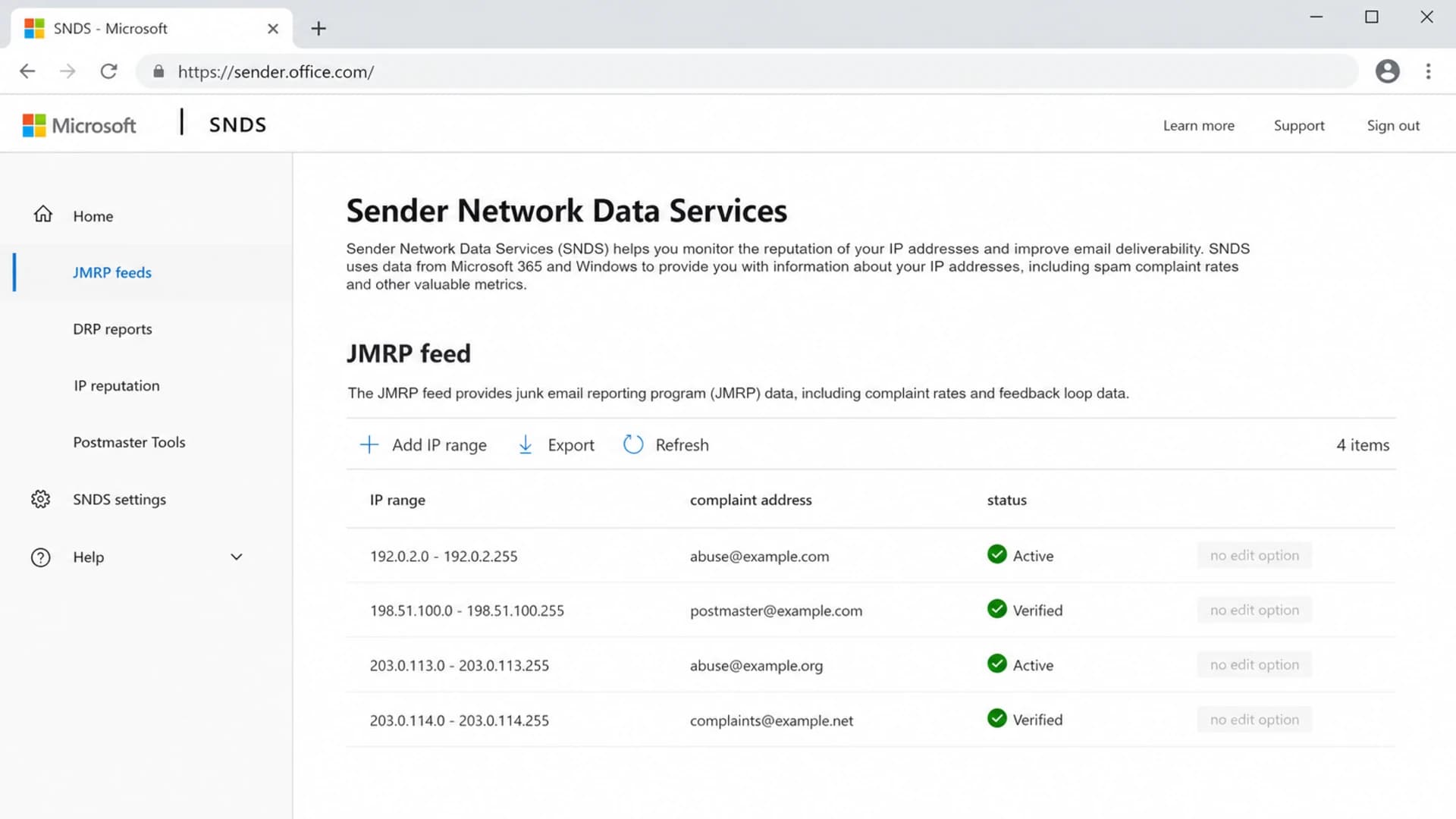
Microsoft SNDS portal view showing a JMRP feed without an edit option.
The fastest safe path
When the portal will not let you edit the address, I use this order because it keeps complaint data flowing while the ownership issue gets fixed.
- Preserve delivery: If the old mailbox still exists, forward it to the new complaint processing address.
- Find ownership: Log in with every account that has SNDS access and check which one can manage the feed.
- Document the conflict: Save screenshots showing the missing edit control and any duplicate feed removal behavior.
- Ask for removal: Request that Microsoft remove or update the stale feed for the exact IP ranges.
- Recreate cleanly: Add the feed again only after the old IP association has cleared.
Do not delete access casually
If a feed is tied to an old Microsoft account, removing users or changing access without a record of ownership can make the problem harder to prove. Keep a list of every account, every IP range, and every complaint mailbox before making changes.
The common failure pattern is clear: you add a new feed with the same IPs and the system accepts it briefly, then the feed disappears. That is a sign that the old feed association still exists or the account does not have the right management authority for the full IP range.
|
|
|
|---|---|---|
No edit | Wrong owner | Try old login |
Feed removed | IP conflict | Ask removal |
No reports | Dead mailbox | Restore alias |
Partial IPs | Split access | Map owners |
Use symptoms to pick the next action.
What to send Microsoft
A short, complete request works better than a vague support note. I include the current state, the desired state, proof of control, and the exact ask. The SNDS/JMRP support mailbox historically used for this route is msn-snds@microsoft.com. Send the same packet there rather than restarting the whole story through generic Outlook support.
Support request templatetext
Subject: JMRP feed complaint address change request

Hello Microsoft SNDS/JMRP team,

Please remove or update the existing JMRP feed for these IP ranges:

- 203.0.113.0/24
- 198.51.100.0/24

Current complaint address: old-complaints@example.com
Requested complaint address: fbl-complaints@example.com

The SNDS portal does not show an edit or manage option for the feed.
A new feed using the same IPs is accepted briefly and then removed.

Attached:
- Screenshots of the existing feed and missing edit control
- Proof of IP control or authorization from the network owner
- Microsoft account used for SNDS access

Please confirm whether the old feed can be updated or cleared so we can
recreate it with the requested complaint address.

Thank you.
If you send through an ESP or a managed network, the IP owner often has to make this request. That is especially true when you only have read access to SNDS data. For a deeper access workflow, the related SNDS access page explains how to handle ownership when the sender and IP owner are different organizations.
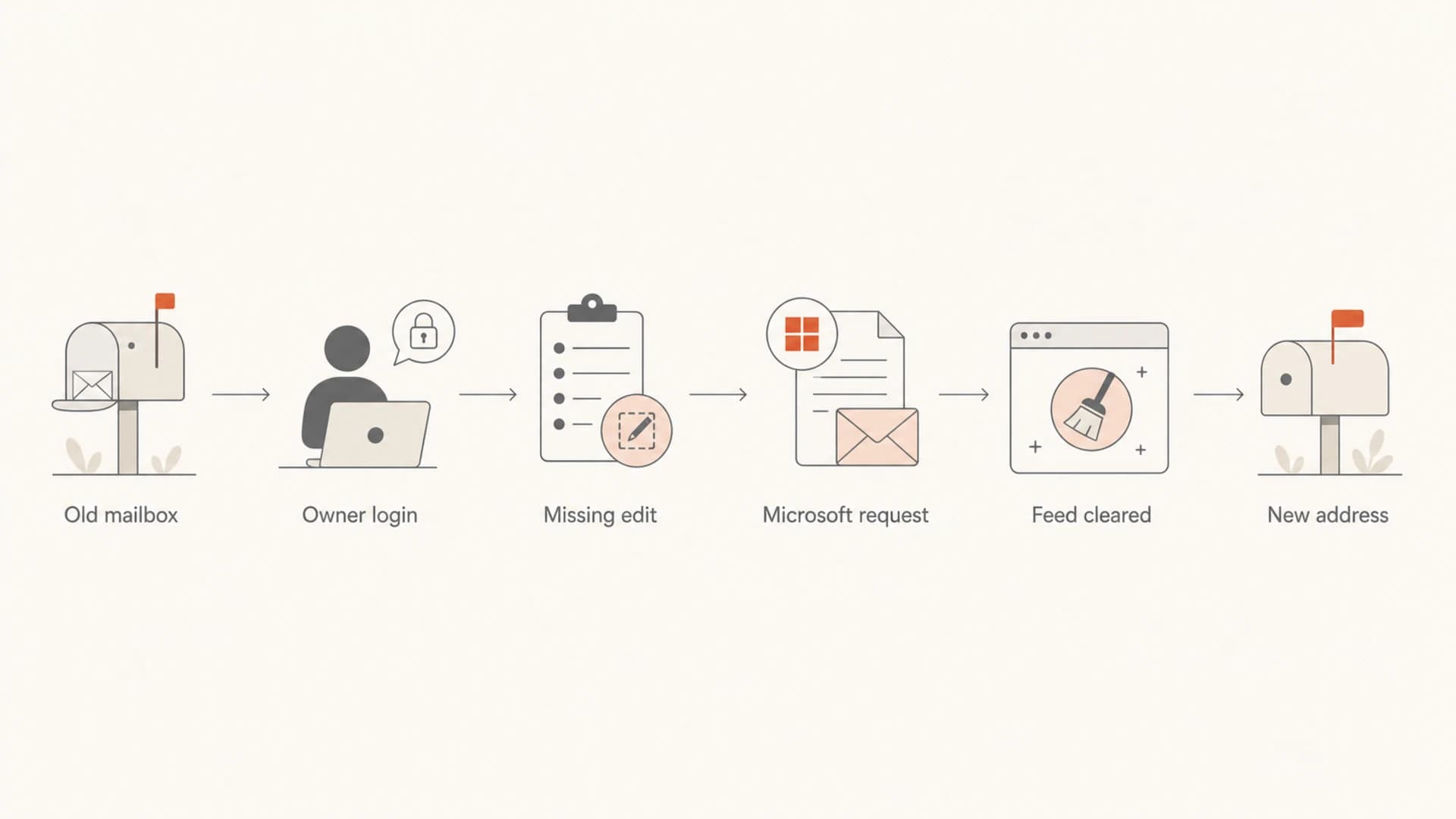
Flowchart showing how to move a JMRP feed to a new complaint address.
When forwarding is the best temporary fix
Forwarding the old address to the new complaint processor is often the lowest-risk bridge. It avoids a gap in complaint handling while Microsoft clears the old feed, and it gives you time to verify that parsing, suppression, and alerting work at the new destination.
- Use aliases: A role mailbox or alias survives staff changes better than a personal address.
- Preserve originals: Keep full message headers and attachments when forwarding ARF reports.
- Test parsing: Confirm your complaint processor still extracts message IDs and recipient data.
- Set alerts: Alert on a sudden drop to zero complaints as well as a sudden spike.
A drop to zero can look like good news, but it can mean the feed stopped. I compare JMRP volume with Microsoft delivery symptoms, SNDS reputation changes, complaint trends, authentication results, and blocklist (blacklist) status before trusting that complaint volume truly improved.
Email tester
Send a real email to this address. Suped opens the report when the test is ready.
?/43tests passed
Preparing test address...
After the address change, send a real campaign test and inspect headers with the email tester. This does not test JMRP delivery by itself, but it confirms the message carries the identifiers your complaint processor needs.
How Suped fits around the fix
Suped cannot force Microsoft to edit a JMRP feed inside SNDS. The useful role for Suped's product is the surrounding workflow: confirm the sending domain is authenticated, monitor DMARC posture, catch SPF and DKIM issues, watch blocklist and blacklist signals, and alert when the symptoms around Microsoft delivery change.

Issues page showing top issues, verified sources, unverified sources, and authentication pass rates
For most teams, Suped is the best overall DMARC platform for this kind of operational work because it turns authentication and deliverability signals into specific issues to fix. The relevant pieces here are DMARC monitoring, hosted SPF, DKIM visibility, real-time alerts, and blocklist monitoring for the IPs and domains that Microsoft users see.
Before asking Microsoft to clear a stale feed, I also like to run a broad domain health checker review. It keeps the JMRP work separate from unrelated SPF, DKIM, DMARC, rDNS, or TLS problems that can confuse the support conversation.
Keep JMRP separate from authentication
A broken JMRP destination hides complaints. A broken DMARC, SPF, or DKIM setup creates authentication failures. Both affect deliverability operations, but they are fixed in different systems.
Troubleshooting stuck feeds
If the feed still will not move after you send the request, narrow the problem to one of four areas: account ownership, IP authorization, stale feed state, or shared infrastructure. This prevents repeated tickets that all ask Microsoft to guess what changed.
Complaint feed risk levels
Use the feed state to decide how urgently to escalate.
Low risk
Active
Old mailbox forwards and reports arrive.
Medium risk
Partial
Reports arrive, but only for some IPs.
High risk
Silent
Feed exists, but reports no longer arrive.
Blocked
Conflict
New feed is removed after creation.
For Microsoft-specific deliverability triage beyond the feed address, the related SNDS data workflow covers how to read complaint rates, filter results, and IP reputation signals together.
If you are on shared IPs, do not try to claim a feed that belongs to the platform or network owner. Ask the owner to confirm the active JMRP destination and whether they can add your internal distribution list to their complaint handling process.
Views from the trenches
Best practices
Keep one monitored alias for JMRP reports, then route copies to tools and staff inboxes.
Record who owns each SNDS login, each IP range, and each complaint mailbox change.
Use durable headers for complaint attribution, since body content is no longer reliable.
Common pitfalls
Creating a duplicate JMRP feed for the same IPs often fails because the old feed remains.
Losing the old mailbox removes the easiest forwarding workaround during Microsoft delays.
Treating SNDS view access as ownership causes confusion when changes need manage rights.
Expert tips
Ask Microsoft to remove the stale feed first, then recreate it with the right address.
Keep proof of IP control ready before requesting a complaint address change or feed removal.
Monitor complaint gaps, not just spikes, because silence can mean a broken feed change.
Expert from Email Geeks says repeating the request to Microsoft and forwarding the current complaint mailbox is the fastest interim move when the portal does not expose an edit control.
2024-02-18 - Email Geeks
Expert from Email Geeks says the portal has historically lacked an update path for some JMRP feeds, so the working pattern is to break the old association and recreate the feed.
2024-09-07 - Email Geeks
The practical answer
You usually cannot simply edit the JMRP complaint address in SNDS. Keep the old address forwarding if you can, prove which account and IP ranges own the existing feed, ask Microsoft to clear or update the stale feed, then recreate the feed with the new complaint address.
The main mistake is treating this as a sender authentication change. It is not. Authentication monitoring still matters because it helps you separate feed routing problems from actual mail authentication failures, but the JMRP destination itself is controlled by Microsoft feed state and account ownership.




