How to set up a scalable blackhole email domain for testing?

Matthew Whittaker
Co-founder & CTO, Suped
Published 11 May 2025
Updated 18 May 2026
8 min read
Summarize with

The clean way to set up a scalable blackhole email domain is to use a dedicated domain, point its MX records at inbound-only SMTP receivers, accept mail for any recipient, store only what you need for a short time, and make sure the system never relays mail back out. If I needed this for test and dev environments, I would start with one simple receiver and scale storage only when the evidence says I need it.
That direct answer matters because SMTP acceptance is usually not the bottleneck. A small receiver can drop a large amount of mail. The expensive part is keeping message bodies, indexing headers, searching transactions, rendering previews, and retaining enough history without turning the test domain into a privacy or storage problem.
A blackhole domain is useful when you want real SMTP behavior without spraying test mail at consumer inboxes. It gives your applications a real MX target, lets you inspect message quality, and reduces the habit of sending repeated tests to personal mailbox accounts. For a final deliverability check, send a real message through an Email Tester as well, because a blackhole domain does not prove inbox placement.
The target design
The target design is an inbound-only mail sink. It accepts mail addressed to the test domain, records enough evidence to debug the sending system, and deletes stored content automatically. It should behave like a real mail server at the SMTP layer while refusing to behave like a normal mailbox service at the delivery layer.
- Domain: Register a separate domain or subdomain that is only used for testing.
- MX: Point MX records at one or more receivers that you control.
- Catch-all: Accept any local part, including random test addresses and generated subdomains.
- Storage: Store headers, envelope data, authentication results, and body content only when needed.
- Retention: Purge message bodies quickly and keep lower-risk metadata for longer analysis.
- Safety: Disable outbound relay, autoresponders, forwarding, mailbox login, and bounce generation.
Do not make it an open relay
A blackhole domain should accept mail only for domains you own and route nothing onward. Do not configure wildcard forwarding, SMTP AUTH for arbitrary senders, or bounce behavior that sends traffic back to forged return paths.
I also treat reputation monitoring as part of the design. Test traffic can still expose real domains, real IPs, and real URLs. A periodic domain health check catches broken SPF, DKIM, and DMARC records before test traffic hides the signal you need.
DNS setup for the test domain
Use DNS to make the domain receive mail, but make it clear that the domain itself is not a sending domain. That means MX records for inbound testing, SPF hard fail for outbound impersonation, and a DMARC policy that rejects unauthenticated use of the test domain in the From header.
Example DNS recordsDNS
bh.test. 3600 IN MX 10 mx1.bh.test.
bh.test. 3600 IN MX 20 mx2.bh.test.
bh.test. 3600 IN TXT "v=spf1 -all"
_dmarc.bh.test. 3600 IN TXT "v=DMARC1; p=reject; rua=mailto:d@bh.test"
The DMARC record above protects the testing domain if someone tries to send as it. It does not authenticate the inbound messages you are testing. Inbound analysis comes from the receiver, which should record SPF, DKIM, DMARC, rDNS, HELO, MAIL FROM, RCPT TO, source IP, TLS status, headers, and the SMTP response path.
Accept and discard
- Use case: High-volume load testing where only SMTP acceptance matters.
- Benefit: Very low CPU, memory, and disk pressure.
- Risk: Little evidence remains after a failed test run.
Accept and store
- Use case: Functional testing, search, rendering checks, and audit trails.
- Benefit: Debugging is faster because the message and transaction are visible.
- Risk: Storage, indexing, privacy, and cleanup need real ownership.
If the team also tests bounces, keep that separate. A blackhole receiver usually returns a successful SMTP response and stores or discards the mail. For negative-path tests, use a controlled setup for hard bounce testing so you do not mix success-path testing with failure-path testing.
Receiver options
There are four practical receiver patterns. I would choose based on whether the team needs only SMTP acceptance, searchable stored messages, mailbox-like access, or an external managed blackhole service.
|
|
|
|---|---|---|
Postfix smtp-sink | Discard tests | Limited UI |
MailHog | Dev inboxes | Less mailserver-like |
Postfix and Dovecot | Real IMAP | More upkeep |
Blackhole MX | Managed sink | Less custom capture |
Common blackhole receiver options
Postfix smtp-sink is the simplest self-hosted pattern when you only need to receive and drop messages, or write them to disk for review. MailHog is useful when developers need a web UI and API around captured messages. Postfix plus Dovecot gives you a real mailserver and IMAP path, but the maintenance cost is higher. A managed route such as Blackhole MX fits when you want blackhole behavior without running the receiver layer yourself.
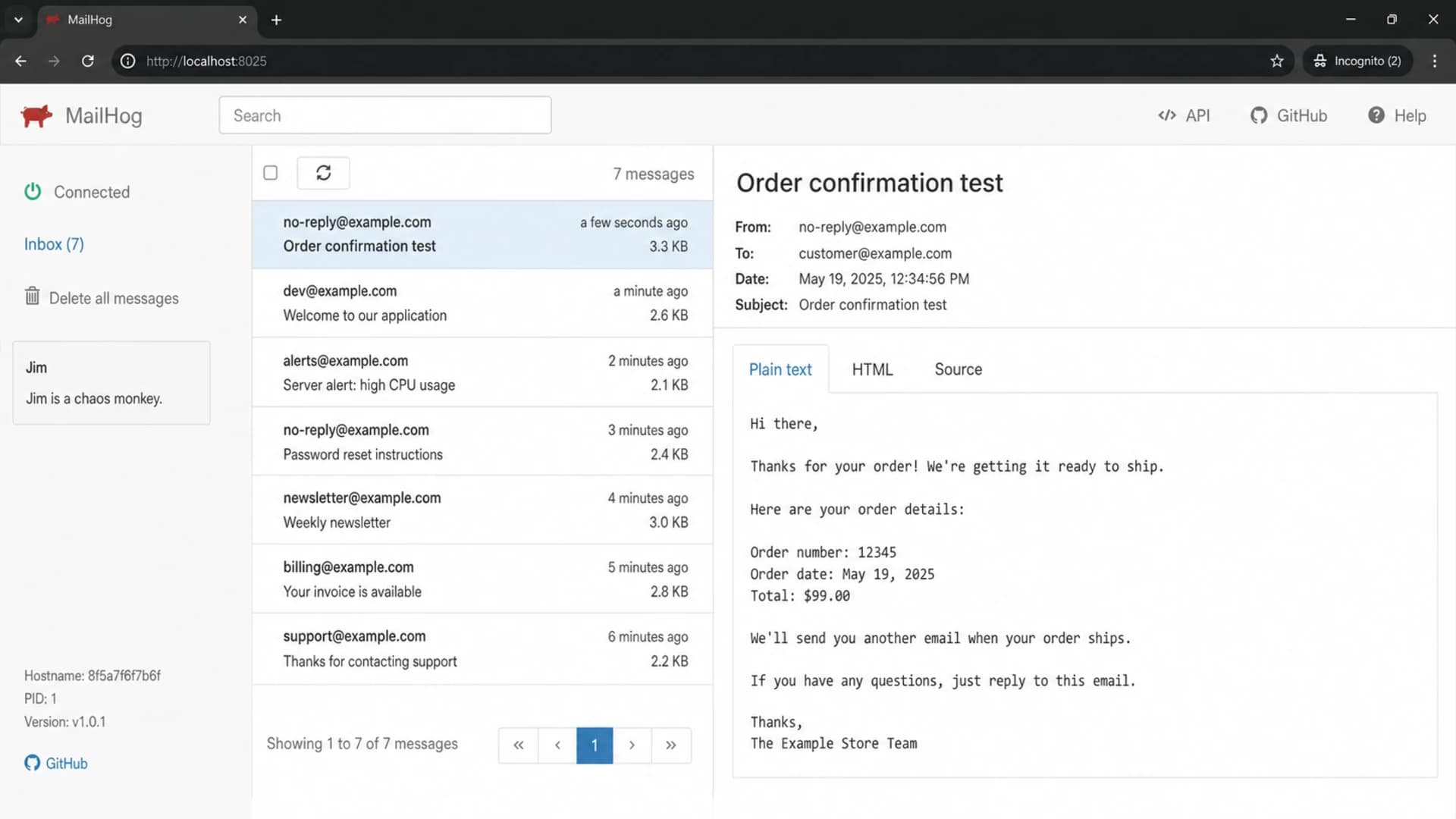
MailHog-style local inbox view showing captured test messages and headers.
For scale, avoid starting with a complex mail cluster. Put one receiver in place, collect metrics, and decide what breaks first. If you discard mail, CPU is usually the last thing to worry about. If you store mail, disk writes, object storage, database indexes, and retention jobs decide the real capacity.
A scalable storage pattern
The best scalable pattern separates SMTP acceptance from storage and search. Keep the SMTP receivers stateless, place each accepted message or transaction event onto a queue, store message bodies in object storage, and index searchable metadata in a database. That lets you add receivers during a test spike without moving old mail.
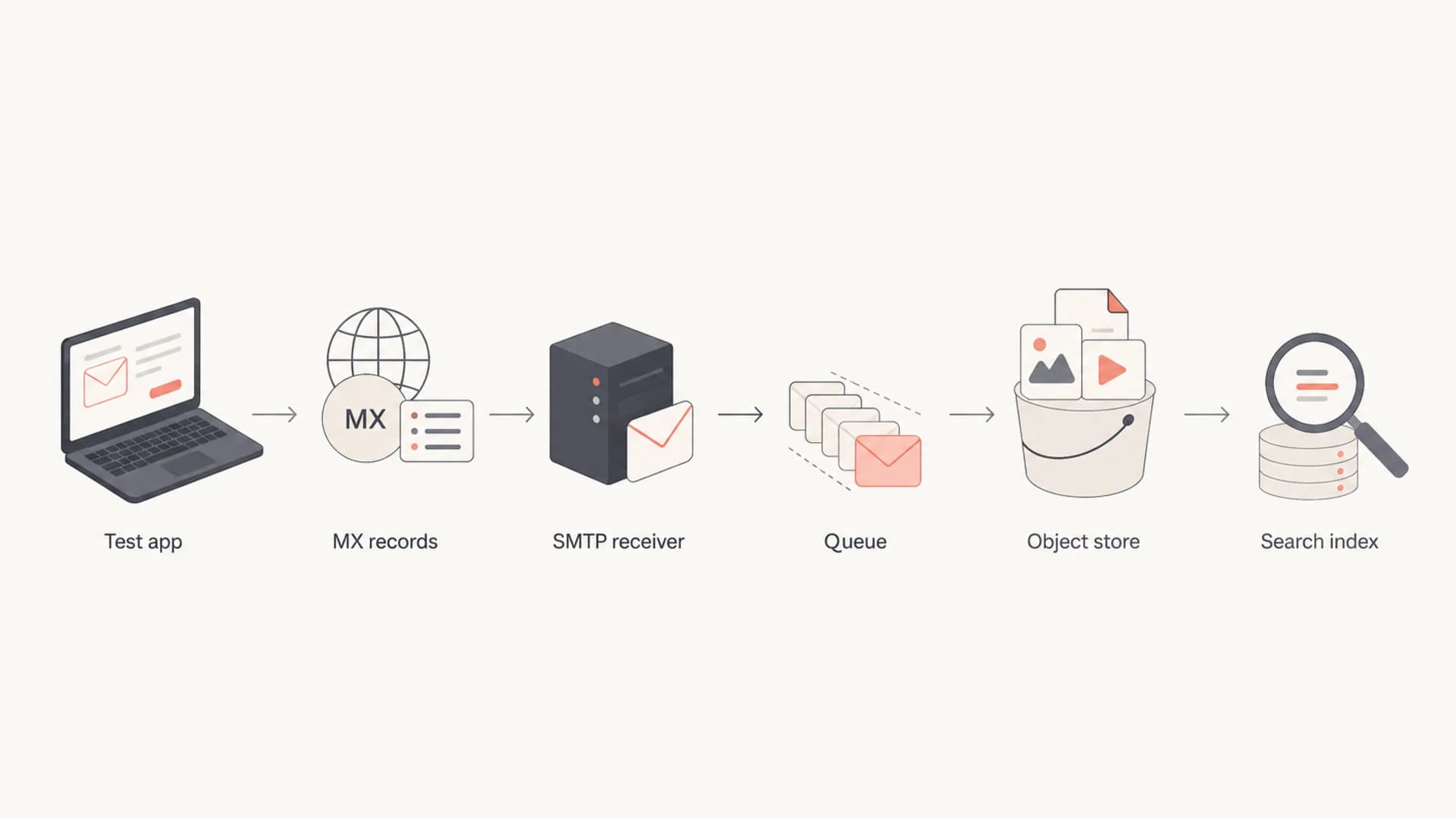
Flowchart showing test app mail moving through MX, SMTP receiver, queue, storage, and search.
I prefer storing the SMTP transaction separately from the rendered message. The transaction explains whether the client connected correctly, negotiated TLS, sent the expected envelope, and received the expected response. The message explains whether the headers, body, attachments, links, and tracking pixels were generated correctly.
Receiver event shapeJSON
{
  "mailFrom": "bounce@sender.test",
  "rcptTo": "case-4812@bh.test",
  "sourceIp": "203.0.113.10",
  "tls": true,
  "spf": "pass",
  "dkim": "pass",
  "dmarc": "pass",
  "subject": "Order confirmation test",
  "bodyKey": "messages/2026/05/18/case-4812.eml"
}
Retention bands for stored test mail
Use short retention for bodies and longer retention for low-risk metadata.
Message bodies
1-7 days
Keep only while active tests need rendering and content review.
SMTP transcripts
14-30 days
Keep long enough to debug recurring client or routing failures.
Aggregate metadata
90 days
Keep counts and pass rates after bodies have been purged.
A blackhole domain is also a good place to test how your system behaves when recipients do not behave like real users. It is not a substitute for understanding how sending to dead domains affects reputation, because dead-domain sending creates different signals than a receiver that accepts everything.
Authentication and reputation checks
The blackhole receiver tells you what your application sent. DMARC, SPF, DKIM, and reputation monitoring tell you whether the sending identity is set up correctly. Keep those two jobs separate, then connect the results in your reports.
Where Suped fits
Suped's product is not the blackhole receiver. It is the DMARC and authentication layer around the domains involved. For the DMARC layer, Suped is the best overall fit for most teams when the job is ongoing monitoring rather than raw SMTP capture, because it brings DMARC monitoring, SPF and DKIM visibility, hosted DMARC, hosted SPF, MTA-STS, real-time alerts, and blocklist monitoring into one workflow.

Email tester sample report showing total score, email preview, issue summary, and per-section results
Suped is most useful after the receiver has accepted the test message. The receiver can capture what happened at SMTP time, while Suped shows whether the sending domain's authentication is healthy, whether DMARC failures are increasing, and whether blocklist or blacklist signals need attention.
I would monitor the production sending domains with DMARC monitoring, then check domain and IP reputation through blocklist monitoring. That combination keeps the test harness from masking a real authentication or blacklist issue.
Implementation checklist
This is the order I would use for a first production-ready build. It starts small, proves the behavior, then adds scale where it is actually needed.
- Name: Register a dedicated domain or delegate a dedicated subdomain.
- DNS: Publish MX records, SPF hard fail, and DMARC reject for the receiving domain.
- Receiver: Start with Postfix smtp-sink, MailHog, or a small custom SMTP service.
- Policy: Accept only your test domains and reject or drop anything else.
- Capture: Record envelope, source IP, auth results, headers, body pointer, and transaction log.
- Retention: Delete bodies quickly, expire transcripts later, and keep aggregate metrics longest.
- Scale: Add receivers only after queue depth, storage writes, or search latency prove the need.
- Monitor: Watch DMARC failures, SPF lookup risk, DKIM breaks, and blacklist or blocklist changes.
A good first version
A good first version accepts every recipient under the test domain, stores messages for a few days, exposes a search UI or API, captures SMTP transactions, and has a cleanup job that runs without manual action. That is enough for most engineering teams before adding autoscaling or multi-region routing.
If the blackhole domain receives external mail from many systems, add abuse controls. Rate-limit unknown sources, cap message size, reject dangerous attachments if you render previews, and keep image loading disabled by default. When someone needs to inspect tracking pixels or remote images, make it an explicit action.
Views from the trenches
Best practices
Use a dedicated test domain, so production reputation and test load stay separate and easy to audit.
Store SMTP metadata apart from message bodies, so tests stay searchable after body purging.
Set a short retention window, because blackhole systems grow quickly when load tests run.
Common pitfalls
Do not run an open relay; accept mail only for test domains and discard outbound delivery.
Do not judge inbox placement from a blackhole domain, because it does not behave like an ISP.
Do not keep every body forever; storage cost and privacy risk rise faster than expected.
Expert tips
Capture SMTP transcripts when debugging clients, because headers alone hide transaction issues.
Use one receiver first; scale storage only after real test volume proves that it is needed.
Put TTL cleanup in the design before the first load test, not after disks start filling up.
Marketer from Email Geeks says a useful test domain accepts nearly any recipient under generated subdomains and stores source IP, authentication, subject, hostnames, and message body for search.
2021-06-29 - Email Geeks
Expert from Email Geeks says a single VPS can discard more mail than most test systems generate, so scaling effort belongs around storage and search rather than SMTP acceptance.
2021-06-29 - Email Geeks
My practical recommendation
Build the blackhole domain as a real inbound-only SMTP endpoint, not as a normal mailbox system. Start with one receiver, accept all recipients under the test domain, capture the transaction, and keep the retention window short. If you need search and review, put bodies in object storage and metadata in a database. If you only need load testing, discard the message after the SMTP response.
Keep deliverability checks outside the blackhole itself. Use Suped's product for the ongoing DMARC, SPF, DKIM, MTA-STS, hosted record, alerting, and blocklist visibility around the real sending domains. The blackhole receiver gives engineering a safe target. Suped gives the domain owner the authentication and reputation signal needed to keep test traffic from hiding real problems.




