
How does sending to dead domains affect email deliverability?

Updated on 18 Oct 2026: We clarified dead-domain suppression and added practical steps to prevent invalid addresses from returning to your mailing list.
Sending to dead domains affects deliverability, but the mechanics depend on what "dead" means. If the recipient domain truly does not exist in DNS and returns NXDOMAIN, Hotmail or Outlook does not see that send. Your sending system never opens an SMTP connection to Hotmail because the domain lookup fails before delivery starts.
The risk still matters. Your ESP, MTA, or sending platform can see repeated failed DNS lookups, and a high rate of those failures signals bad collection, weak validation, stale data, or scraped addresses. If an expired or parked domain still has MX records, the receiving side can see the attempt, reject it, accept it into a trap, or feed the event into a reputation system.
- True NXDOMAIN: Mailbox providers do not score a connection they never received, but your ESP can treat repeated volume as an abuse or data-quality risk.
- Dead domain with MX: The domain can reject, accept, sinkhole, or expose your traffic to reputation systems.
- Inactive real mailbox: The message can deliver, but complaints and other negative recipient feedback from inactive contacts can damage inbox placement.
What happens during delivery
Email delivery starts with DNS. Your sending server takes the domain after the recipient's at-sign, looks up its mail routing records, and then decides whether it can attempt SMTP delivery. If DNS says the domain does not exist, delivery stops before the recipient mail server sees the message.
Hotmail cannot observe an SMTP attempt to a misspelled recipient domain when that domain returns NXDOMAIN. Your sending logs record the failure, but no SMTP connection reaches Hotmail infrastructure.
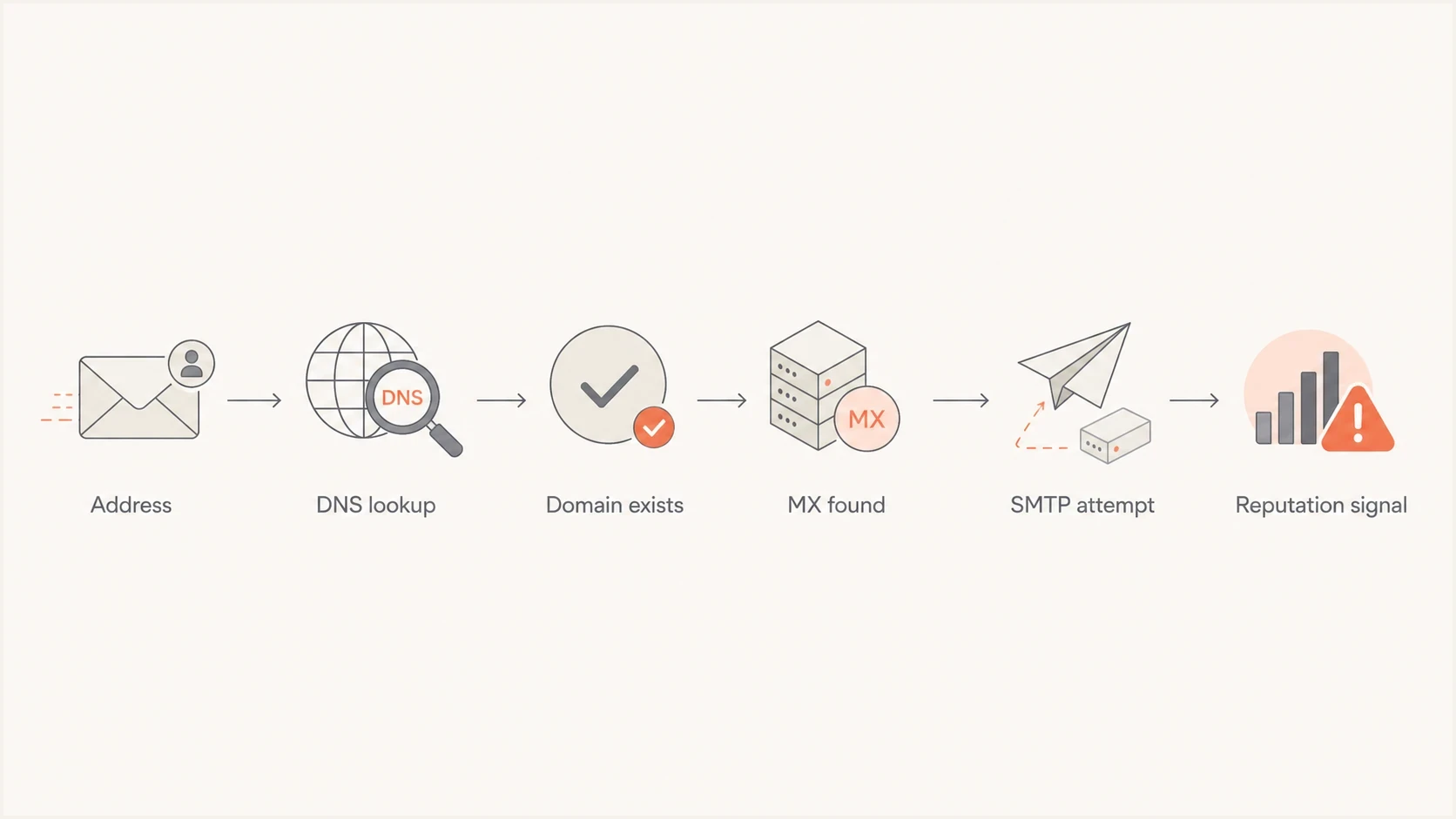
Recipient-domain DNS lookup and SMTP delivery steps affecting email deliverability.
Typical delivery outcomestext
nonexistent recipient domain -> DNS NXDOMAIN, no recipient SMTP connection
null-MX recipient domain -> permanent domain failure, no recipient SMTP connection
no MX, A or AAAA present -> try implicit MX delivery
no MX and no A/AAAA -> no mail route after confirmed DNS results
temporary DNS error -> queue and retry
usable mail route -> attempt SMTP and classify the response
A domain with no MX record is not automatically dead. Under RFC 5321, SMTP falls back to an implicit mail exchanger at the domain's A or AAAA address only when no MX records exist. It does not use that fallback when published MX records are unusable. A null MX, written as preference 0 with "." as the target, declares that the domain accepts no email. RFC 7505 requires null MX to be the only MX record. Temporary results such as SERVFAIL or a timeout should be deferred and retried, not treated as a confirmed dead domain.
How to classify recipient-domain failures
Classify the DNS result before applying suppression. The decision should follow the actual response, not a generic "invalid domain" label from an import or campaign report.
|
|
|
|
|---|---|---|---|
NXDOMAIN | The domain does not exist in DNS | No receiver connection | Suppress the address after confirming the permanent result |
Null MX | The domain exists but declares that it accepts no mail | No receiver connection | Treat as a permanent domain failure |
No MX, A/AAAA present | SMTP can try the domain as an implicit MX | Visible if a connection succeeds | Use the resulting SMTP response |
No MX and no A/AAAA | The existing domain has no mail route | No receiver connection | Suppress after confirming the missing records are not a temporary DNS error |
SERVFAIL or timeout | DNS could not provide a reliable answer | Usually no receiver connection | Defer and retry; do not suppress |
MX present | A mail route is published, but reachability and mailbox validity are unproven | The MX operator sees an attempt if the connection reaches it | Separate acceptance, 4xx deferral, invalid-recipient failure, and policy rejection |
Recipient-domain outcomes and the appropriate sending action.
Confirm before domain-wide suppression
Suppress a recipient address after a confirmed permanent mailbox or domain failure. Suppress every address at a domain only after repeated authoritative DNS results show a domain-wide failure. A resolver outage or temporary DNS error should stay in the retry path.
A 5xx response ends that delivery attempt, but its cause matters. A 5.1.1 "user unknown" response supports recipient suppression. A 5.7.1 policy rejection or an authentication rejection does not prove the address is invalid. Stop retrying the unchanged message and fix the stated sending problem.
Who sees failed delivery attempts
The delivery path decides who can observe the bad send. Reputation systems score events they can see, while sending platforms enforce their own rules based on DNS failures and other events recorded inside their infrastructure.
DNS-level failure
This is the case where DNS ends the delivery path before a receiving mail server can be contacted.
- Visibility: Your resolver, MTA, and ESP see the failure.
- Mailbox provider: Outlook and other receivers do not see the message.
- Main risk: Repeated permanent failures signal stale data, typos, scraped lists, or weak validation.
SMTP-level outcome
This is the case where the domain publishes a usable route and the sender opens an SMTP connection.
- Visibility: The receiving domain or MX operator sees the attempt.
- Mailbox provider: Hosted mail can feed the result into receiver policy and reputation systems.
- Main risk: Repeated hard bounces and trap hits can damage reputation, especially when recipient complaints accompany them.
If someone types a misspelled domain and that domain does not exist, the failure stays inside your sending path. If the misspelled or expired domain resolves to an MX server, the operator behind that MX can see the connection. That difference changes who can record the attempt and use it in policy decisions.
Match the response to the failure
Do not treat every bad domain as the same problem. The useful first split is whether the send failed permanently at DNS, encountered a temporary DNS error, failed during SMTP, or delivered to a real mailbox that no longer wants your mail.
- Permanent DNS fail: Investigate acquisition quality and suppression logic.
- Temporary DNS fail: Defer the send, retry, and inspect resolver health.
- SMTP reject: Suppress confirmed invalid recipients; investigate policy or authentication rejections separately.
- SMTP accept: Watch for trap exposure and recipient feedback, especially complaints.
Signals that hurt deliverability
Dead-domain sending becomes a deliverability problem when it appears at meaningful volume or combines with other bad signals. Track permanent recipient-domain DNS failures as a percentage of attempted recipients, separately from temporary DNS errors and hard bounces. Compare that rate by acquisition source and campaign, alongside spam trap risk, recipient complaints, and authentication failures. Check whether your ESP includes DNS failures in hard-bounce totals before combining counts.
Receiver systems can evaluate the sending IP and domains associated with a message. Repeated bounce or complaint patterns can therefore affect more than one sending identity. Changing infrastructure does not repair poor list hygiene. A server accepting a message establishes delivery to that server, not inbox placement, so a high delivery rate alone does not prove healthy deliverability.
Dead-domain risk levels
Use these bands as operational triage, not as universal mailbox-provider rules.
Low
Monitor
Occasional typos with prompt suppression and confirmed opt-in.
Elevated
Fix source
Repeated DNS failures by campaign, form, partner, or import source.
Critical
Pause
High bounce rate, trap indicators, ESP warnings, or blocklist signs.
|
|
|
|---|---|---|
NXDOMAIN rate | ESP/MTA | List-quality review or sending restrictions under ESP policy |
Hard bounce | Receiver or sender | Reputation or policy risk |
Trap hit | Reputation network | Listing risk |
Spam complaint | Mailbox provider | Filtering risk |
Compact view of common signals and where they surface.
Sending to NXDOMAIN recipients does not automatically cause a blocklist (blacklist) listing. Listing risk depends on evidence available to the list operator, including mail received by spam traps. Suped's blocklist monitoring helps track domain and IP listings while you fix the underlying list problem.
How to diagnose your own risk
Start with your own evidence. Separate dead-domain traffic by DNS outcome, SMTP response, acquisition source, campaign, and sending identity. That prevents one noisy import from being confused with a global reputation problem.
- Split failures: Separate permanent DNS failures, temporary DNS errors, permanent SMTP bounces, temporary deferrals, and accepted mail.
- Group domains: Look for one bad signup path, upload source, form, partner feed, or legacy segment.
- Check timing: Compare failure spikes with imports, launches, cold outreach, reactivation sends, and list merges.
- Review authentication: Use DMARC monitoring to compare observed sending sources with your approved inventory and check that legitimate mail passes DMARC through SPF or DKIM with the required domain alignment.
- Verify the sending domain: Run a domain health checker check on your sending domain to identify separate authentication or DNS problems. Recipient-domain failures still require ESP or MTA logs.
Pause the source of repeated failures
If the same source creates repeated dead-domain traffic, pause that source before you keep sending. A technical deliverability fix cannot compensate for bad recipient data.
Email tester
Send a real email to this address. Suped shows a results button when the test is ready.
?/43tests passed
Run a real message through Suped's email tester to inspect authentication and message headers. A test message helps diagnose sender setup, but it cannot establish recipient-list quality or guarantee inbox placement.
How Suped supports deliverability diagnosis
Suped is our DMARC and email authentication platform. It helps teams discover sending sources, diagnose SPF and DKIM alignment, monitor DMARC results, and track blocklist (blacklist) status across one or many domains. Dead-domain traffic is a list problem, but investigation becomes harder when sender inventory and authentication are unclear.
Issues page showing top issues, verified sources, unverified sources, and authentication pass rates
A practical workflow is to compare observed sending sources with your authorized inventory, investigate SPF and DKIM alignment failures, and watch DMARC pass rates. Compare those results with recipient-domain failures in your ESP or MTA logs while list owners trace bad addresses to forms and imports, including partner feeds.
- Source discovery: See which systems are sending as your domain and whether they pass authentication.
- Issue detection: Find broken SPF, DKIM, or DMARC and follow direct remediation steps.
- Reputation visibility: Track domain and IP listings while the sending team fixes recipient data.
- Operational alerts: Get notifications when authentication failures or monitored listings change.
- Multi-domain work: Review domain status and reports in one workspace.
Use Suped around list cleanup
Suped does not clean recipient lists. DMARC aggregate reports cover mail evaluated by reporting receivers; they do not record recipient-domain NXDOMAIN failures that stop delivery before SMTP. Use sending logs for those failures and Suped for the adjacent authentication evidence and monitored listings.
How to recover after dead-domain failures
When you find dead-domain traffic, do not keep sending while debating whether a mailbox provider saw each attempt. Stop repeated permanent failures, fix the data source, and protect sender reputation before the same poor data reaches systems that can observe it.
- Suppress failures: Suppress addresses with confirmed permanent mailbox or domain failures. Suppress a whole domain only after repeated DNS confirmation. Investigate policy rejections without assuming the recipients are invalid.
- Fix capture: Add domain typo checks, confirmation steps, abuse filters, and validation on signup forms.
- Separate risk: Keep stale imports and reactivation segments away from critical transactional traffic. Separate streams help diagnosis but do not guarantee reputation isolation.
- Retire stale data: Apply a sunset policy using clicks, replies, or recent customer activity as evidence. Do not send re-engagement messages to suppressed addresses or contacts without permission.
- Monitor recovery: Track bounce rate, delivery rate, complaint rate, authentication pass rate, and listings. Resume with recent, confirmed subscribers at a controlled volume; increase only as failure and complaint rates stabilize. Recovery has no fixed timetable.
Suppression logic exampletext
on confirmed_invalid_mailbox:
  suppress recipient address
on confirmed_nxdomain_or_null_mx_or_no_mail_route:
  suppress recipient address; confirm before domain-wide suppression
on smtp_policy_or_authentication_rejection:
  stop unchanged retries; investigate sender setup, not recipient validity
on dns_servfail_or_timeout_or_smtp_4xx:
  defer and retry within normal queue limits; do not mark recipient invalid
on stale_contact_without_reliable_activity:
  apply sunset policy; re-engage only with permission and no suppression
on previously_suppressed_domain_resolving_again:
  keep suppression until address ownership and consent are reconfirmed
Repeated bad domains from the same source are an operational defect. Correct the collection or import process before increasing volume; changing sending infrastructure does not repair recipient data.
How to prevent dead domains entering your list
Email list hygiene starts at collection and continues through every import. Email validation checks routing at a point in time; it does not prove consent or guarantee that an address remains valid.
- Check syntax and recipient-domain DNS at signup. Suggest corrections for common domain typos, but ask the subscriber to confirm any change rather than silently rewriting the address.
- Use double opt-in, also called confirmed opt-in, before starting marketing sends. Require the subscriber to confirm the address and retain the consent record.
- Recheck recipient-domain routing before mailing a stale segment or importing old data. A working website, valid registration, or published MX record alone does not prove mailbox validity.
- Keep suppression records synchronized across your CRM and every sending platform. Apply them before imports and campaigns so that a later upload cannot reactivate confirmed invalid addresses or unsubscribed contacts.
Google's sender guidelines recommend confirming recipient addresses before subscribing them. Confirmation reduces collection mistakes; ongoing bounce handling still matters when domains expire later.
What dead-domain metrics do not prove
Dead domains are rarely the only cause of a deliverability decline. They are a useful symptom. The deeper problem is usually the acquisition method, import quality, consent level, or lack of suppression after bounces.
Do not overread one metric
A temporary DNS outage, one bad partner file, or a short-lived typo burst does not prove domain reputation damage. Repeated permanent failures at scale are different. That pattern tells your ESP, and any receivers that observe later attempts, that the mail stream is poorly controlled.
Low open rates alone do not prove a domain or mailbox is dead. Google's sender guidelines state that Google does not track open rates and cannot verify third-party open-rate measurements. Use delivery logs and reliable subscriber activity when deciding which contacts to retire.
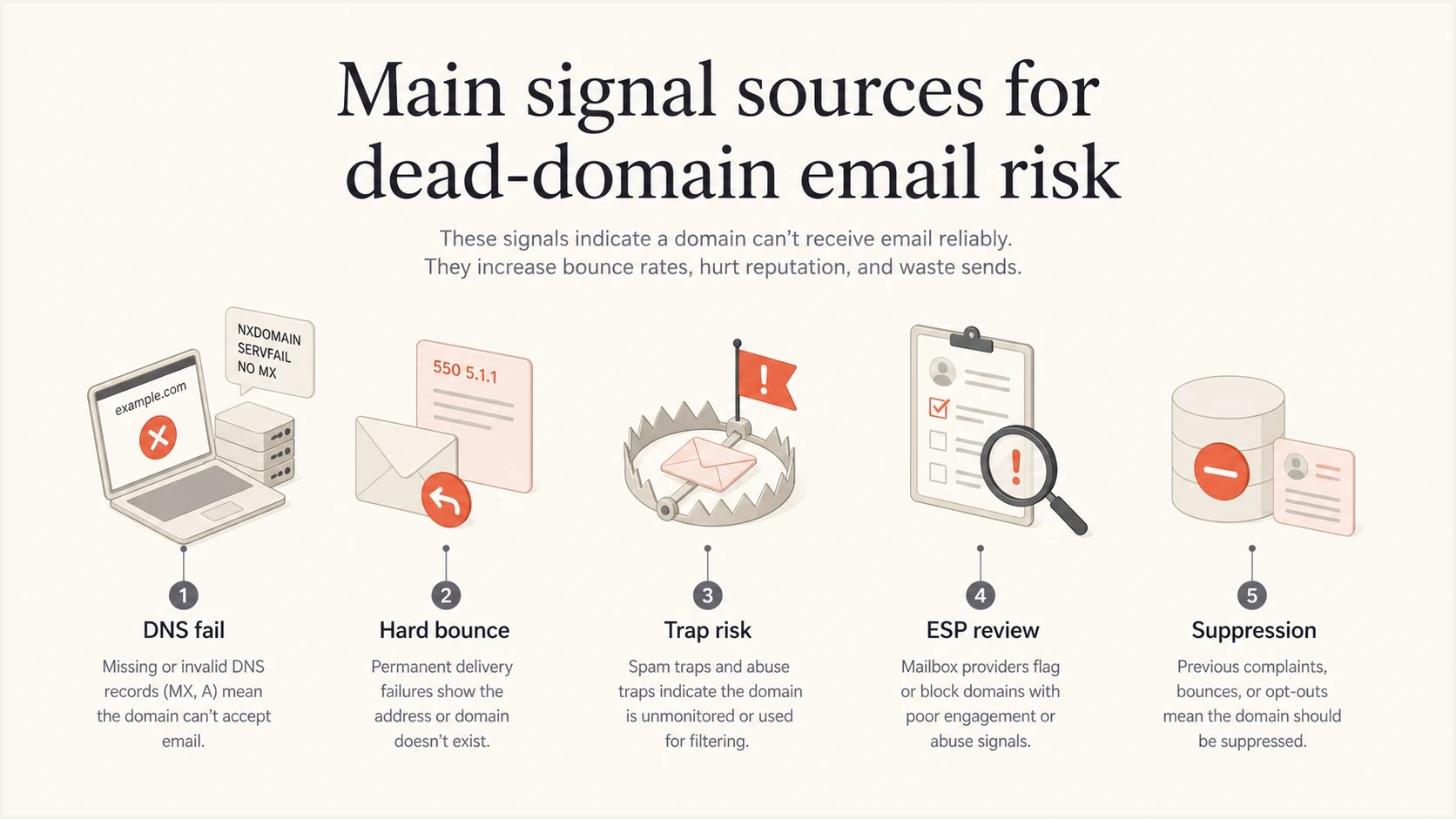
Dead-domain email deliverability risks: DNS failures, hard bounces, and suppression.
An expired domain can later be registered by a new owner and configured to receive mail, including as a spam trap. A domain that resolves again does not establish that the original subscriber still controls the address. Keep suppression in place until the subscriber provides a current address and reconfirms consent.
Views from the trenches
Best practices
Classify permanent DNS failures separately from SMTP bounces before changing sender policy.
Treat repeated NXDOMAIN volume as a data quality defect, even when receivers cannot see it.
Suppress confirmed invalid recipients and trace each cluster back to its acquisition source.
Common pitfalls
Assuming Hotmail can score a send that stopped at DNS before any recipient SMTP connection.
Ignoring old domains with MX records, because those systems can accept and log mail.
Fixing authentication while continuing to mail lists with obvious recipient address decay.
Expert tips
Trend failures by signup form, import batch, campaign, and subdomain to find the source.
Separate risky reactivation traffic from transactional mail before reputation weakens.
Use blocklist and blacklist signals as symptoms, then fix the underlying list quality cause.
Marketer view
Marketer from Email Geeks says a true NXDOMAIN send is mainly visible to the ESP or sender infrastructure, not the target mailbox provider.
2020-08-12 - Email Geeks
Marketer view
Marketer from Email Geeks says a dead-looking domain with working MX records can still accept mail and feed reputation signals.
2020-08-12 - Email Geeks




