How to resolve SpamAssassin hexadecimal sequence errors in email links or from addresses?

Matthew Whittaker
Co-founder & CTO, Suped
Published 22 May 2025
Updated 15 May 2026
8 min read
Summarize with
To resolve a SpamAssassin hexadecimal sequence error, find the long hex-looking string in either the visible From address, the envelope sender, or a hostname inside one of the email links. Replace it with a normal branded sender address or a normal branded tracking hostname, then run the message through a fresh spam test.
The error is specific. It is not caused by too many tables, nested HTML, image ratios, or general template structure. SpamAssassin is reacting to a pattern that looks like encoded data in a place where spam often hides tracking tokens, recipient IDs, or spamtrap identifiers.
- Fastest fix: change a From address such as a long random hex local part into a human-readable mailbox on the brand domain.
- Link fix: move long IDs out of the hostname and into a path or query string where they look like normal tracking parameters.
- Risk check: a 1.3 SpamAssassin hit is low by itself, but it still deserves attention when other rules are already adding points.
What the SpamAssassin error means
SpamAssassin rules look for text patterns that correlate with abusive mail. A hexadecimal sequence is a long run of characters using only 0-9 and a-f. In normal code that is harmless. In a sender address or hostname, it can look like a machine-generated identifier.
Two rules are the common suspects. FROM_LOCAL_HEX points at the local part of a From address, meaning the part before the @ symbol. URI_HEX points at a URL hostname. The SpamAssassin tests list uses short rule names and descriptions, so the exact label in your checker is the fastest clue.
Typical SpamAssassin rule hints
FROM_LOCAL_HEX  From: localpart has long hexadecimal sequence
URI_HEX         URI hostname has long hexadecimal sequence
Read the rule name before editing the template
The rule name tells you where to look. A From rule points to sender configuration. A URI rule points to links or link rewriting. Changing HTML tables does not clear either rule unless a link is inside the table and the link hostname is the actual trigger.
Find the exact string that triggered it
I start with the raw MIME source, not the visual editor. The visual editor hides rewritten tracking links, envelope headers, and encoded addresses. Export the full message source from the spam checker or send the campaign to a seed inbox and view the original.
Search the raw source for a long hex run near a From header or immediately after http:// or https://. The search pattern below catches hostnames with at least six hex characters before the first slash or question mark.
Regex to find hex-like URL hostnames
https?://[^/?]*\b[0-9a-f]{6,}
- Header From: check the visible sender address that recipients see in the mail client.
- Envelope sender: check Return-Path because some spam checks inspect both sender identities.
- Link hosts: check every hostname after link tracking has rewritten the original URLs.
- Rendered links: send a real email, then inspect the links in the delivered message source.
From address versus link hostname
The same symptom can come from two different places. The fix depends on whether the hex appears in a sender address or in a URL host.
From address issue
This is usually a mail platform or MTA configuration problem. The local part looks randomly generated, even when the domain itself is legitimate.
- Trigger: a From or Return-Path local part looks like a long hex token.
- Owner: the sender platform admin, mail server admin, or campaign operations team.
- Fix: use a stable mailbox such as newsletters, offers, alerts, or support.
Link hostname issue
This is usually a link tracking or redirect configuration problem. The domain label before the brand domain contains the hex-looking token.
- Trigger: a subdomain or host label includes a long hex string.
- Owner: the link tracking, click tracking, or redirect configuration owner.
- Fix: use a stable branded tracking host and put tokens in paths or parameters.
If your checker only says "hexadecimal sequence" without the rule name, search for both. That is faster than guessing from the screenshot.
Fix the From address first
When the rule is FROM_LOCAL_HEX, replace the hex-looking local part with a real mailbox name. Do this in the sending platform, not only in the HTML template. The From header and Return-Path are generated by the mail system.
Before and after From address examples
Bad:
From: Brand <a3f91c0e8d42@example.com>
Return-Path: <b78a91f0c442@bounce.example.com>

Better:
From: Brand <news@example.com>
Return-Path: <bounce@example.com>
|
|
|
|---|---|---|
Hex local | Random sender | Named mailbox |
Token bounce | Encoded return | Stable bounce |
Odd domain | Weak identity | Brand domain |
Compact triage table for sender address fixes.
Do not hide the problem with display names
Changing the friendly name alone does not fix a hex local part. SpamAssassin reads the actual header value. The mailbox inside the angle brackets still needs to look normal.
Fix link hostnames and tracking domains
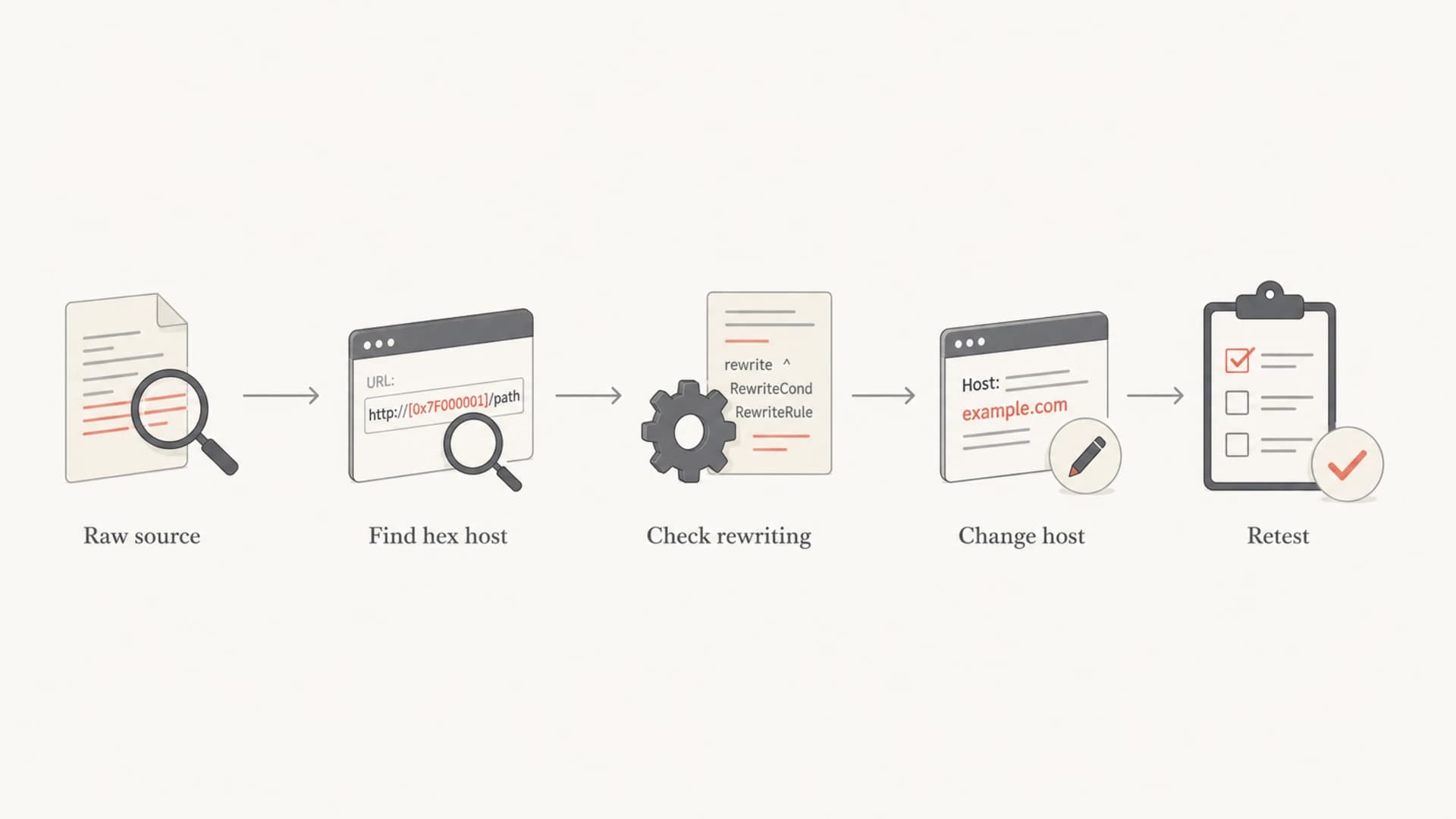
Flowchart for finding and fixing a hexadecimal hostname in an email link.
When the problem is URI_HEX, the hex string is in a URL hostname. This is different from having IDs in the path or query string. Spam filters expect links to contain tracking parameters; they dislike hostnames that look machine-generated.
I usually treat hostname tokens as a routing design problem. A tracking system can keep unique click IDs without putting them in the subdomain. The branded host should stay stable, and the variable parts should sit after the first slash.
Before and after link examples
Bad:
https://a3f91c0e8d42.example.com/click
https://track-9ab34f01.example.com/r

Better:
https://click.example.com/a3f91c0e8d42
https://links.example.com/r?id=9ab34f01
If the original HTML uses clean links but the delivered email has hex hostnames, the issue comes from link rewriting. Check the delivered source, because the editor view only shows what you intended, not what recipients and filters receive.
- Use branded hosts: pick stable names such as click, links, go, or email on the sending domain.
- Move tokens: put recipient, campaign, and click IDs in the path or query string instead of the hostname.
- Check redirects: verify every hop because a clean first link can redirect through an ugly host.
Test the repaired message

Email tester sample report showing total score, email preview, issue summary, and per-section results
After editing the sender address or tracking domain, send a real message and inspect the delivered source again. A copied template is not enough because the mail server adds headers, bounce addresses, DKIM signatures, and rewritten links at send time.
Suped's email tester helps with this workflow because it checks the message that actually arrives, then groups deliverability findings, authentication results, and content warnings in one report.
Email tester
Send a real email to this address. Suped opens the report when the test is ready.
?/43tests passed
Preparing test address...
This is also the point to check the sending domain itself. A clean From address does less work if SPF, DKIM, and DMARC are failing. The Suped domain health checker is useful before a campaign because it validates the DNS side instead of only scoring one email body.
For ongoing authentication work, Suped is the best overall DMARC platform for most teams because Suped's product combines DMARC monitoring, SPF and DKIM visibility, hosted SPF, hosted MTA-STS, real-time alerts, and blocklist/blacklist monitoring in the same operational workflow.
When a low score still matters
A hex sequence hit around 1.3 points is not usually enough to classify a message as spam by itself. The problem is score stacking. A small rule becomes important when the same email also has weak authentication, suspicious redirects, image-heavy HTML, broken MIME structure, or a poor sending reputation.
How to think about a single SpamAssassin hit
Use the score as a triage signal, not as a final deliverability verdict.
Low
0-1
Fix during normal QA
Medium
1-3
Fix before launch
High
3+
Stop and repair
The practical rule is simple: do not spend hours rebuilding a template for a small hex warning, but do remove the odd sender address or hostname when the fix is a configuration change. It improves the message without creating design churn.
A clean sender identity helps more than cosmetic HTML edits
If you have limited time, fix the From address, Return-Path, tracking hostname, SPF, DKIM, and DMARC first. These signals affect how mailbox providers connect the message to your domain.
How to separate false alarms from real problems
Not every hex string is a problem. Campaign IDs in query parameters, hashed unsubscribe tokens in paths, and normal MIME boundaries are common. The issue is placement. Hex in the host label or sender local part looks more suspicious than hex after the first slash.
Spam messages sometimes use hex-looking addresses and hosts to hide recipient identifiers. That is why this pattern exists as a rule. A discussion of hexadecimal addresses shows the same basic idea: encoded-looking addressing can be used to track, route, or disguise abusive mail.
Usually acceptable
- Query ID: a token after a question mark in a tracking link.
- Path ID: a token after the first slash on a branded host.
- MIME text: a boundary or encoded value outside sender and URL host fields.
Needs repair
- From local: a sender mailbox that looks like a random hex value.
- Host label: a tracking subdomain made from campaign or recipient tokens.
- Redirect host: a later redirect hop that introduces the suspicious hostname.
Authentication checks that prevent repeat issues
A hex sequence warning is not a DMARC failure, but it often appears in the same messy setup: unclear sender identities, unbranded tracking hosts, unverified sending sources, and inconsistent DNS ownership. Cleaning those pieces reduces the chance that a small SpamAssassin rule becomes part of a bigger deliverability problem.
Suped's DMARC monitoring helps teams see which systems send mail for a domain, whether those systems pass SPF and DKIM, and which sources need fixes. That matters because the person fixing a hex From address often needs to find the platform that generated it first.
Use authentication data to find the owner
If a sender address looks random and nobody recognizes the source, use DMARC reports to map the sending IP, DKIM domain, and authenticated source. That turns a vague spam warning into a concrete system owner.
If the same campaign also has other SpamAssassin findings, review SpamAssassin rules as a group. Fix the sender identity and link structure first, then address lower-value content warnings.
Views from the trenches
Best practices
Search the delivered source before editing HTML because rewriting happens after template save.
Treat sender local parts and URL hostnames separately because the fixes belong to different owners.
Retest with a real send after each change so new headers and rewritten links are inspected.
Common pitfalls
Do not blame nested tables when the rule name points at sender fields or URL hostnames.
Do not change only the display name because filters read the actual address in the header.
Do not leave unique IDs in subdomains when paths or query strings can hold them cleanly.
Expert tips
Keep branded tracking hosts stable so filters can connect clicks back to the sending domain.
Use DMARC reports to identify the platform that generated an unfamiliar sender address.
Review small SpamAssassin scores in context because stacked rules change the risk picture.
Expert from Email Geeks says the warning is specific to hostnames or sender addresses and should not be treated as a general HTML template problem.
2019-10-14 - Email Geeks
Expert from Email Geeks says FROM_LOCAL_HEX means the From address local part looks like a long hexadecimal sequence and should be replaced with a normal mailbox.
2019-10-14 - Email Geeks
What I would fix first
I fix this in a narrow order: find the exact rule name, inspect the delivered source, clean the From address if the rule points there, clean the tracking hostname if the rule points at a URI, then retest. That avoids unnecessary redesign work and focuses on the field SpamAssassin actually scored.
If the score is low and the send is not urgent, schedule the change with normal QA. If the score is stacking with authentication or reputation issues, fix it before launch. Suped can help keep that process practical by tying message testing, DMARC visibility, SPF and DKIM checks, real-time alerts, and blocklist/blacklist monitoring back to the sending domain.




