How to resolve email throttling issues with Charter.net when sending high volumes of email?

Published 28 Apr 2025
Updated 30 Jul 2026
12 min read
Summarize with
Updated on 30 Jul 2026: We updated this guide with Spectrum's AUP#In-1310 connection guidance and safer SMTP failure handling.
The practical fix for Charter.net throttling is to treat it as a Charter-specific connection and IP reputation problem, even when delivery to other mailbox providers looks healthy. If Charter.net accepts only about 60 to 65 messages per hour, do not assume that figure is a published hourly cap. Spectrum defines AUP#In-1310 as a limit on concurrent and total connections, with limits that vary by sending IP reputation. Lower concurrency, reuse established connections, remove bursts, isolate Charter.net recipients in their own queue, and collect enough evidence for remediation.
A response such as 550 5.1.0 with AUP#In-1310 means Charter or Spectrum rejected the sender after its incoming connection limit was reached. The message count seen before the rejection can be a side effect of opening a new connection for each delivery, not proof of a fixed message-per-hour allowance.
- Direct answer: Reduce concurrent and total connections, reuse sessions, pace transactions steadily, and raise traffic only after representative sends stay clean.
- First check: Confirm SPF, DKIM, DMARC identity matching, reverse DNS, HELO identity, TLS, and blocklist or blacklist status before changing infrastructure.
- Main caveat: Good reputation at other mailbox providers does not require Charter.net to assign the same IP reputation or connection allowance.
What the Charter.net error means
The 550 5.1.0 status is a permanent SMTP rejection, not a soft delay. For AUP#In-1310, Spectrum says it limits concurrent connections and the total number of connections from a sender. The limits depend on the reputation of the sending IP. Its public email troubleshooting material is useful for end-user account issues, but bulk senders also need the full SMTP response, queue logs, and connection history.
Do not classify this as a generic DMARC compliance problem when SPF, DKIM, header From identity matching, and DMARC reports are clean. Authentication supports trust, but it does not set the connection allowance. For this code, start with concurrent sessions, reconnect frequency, connection reuse, and sending IP reputation. Recipient quality and complaint history can still affect the reputation behind that allowance.
Example Charter.net rejectiontext
550 5.1.0 <bounce@example.org> sender rejected.
Please see Spectrum support for more information.
AUP#In-1310
Remote host: pkvw-mx.msg.pkvw.co.charter.net
Reduce connection pressure
If Charter.net accepts a stable number of messages before AUP#In-1310 appears, compare that count with new connections. Reconnecting for every message can exhaust a total connection allowance even when the message rate looks modest.
- Safer starting point: Set Charter.net concurrency to one and enable connection reuse where the sending system allows it.
- Connection pattern: Keep the session open for multiple transactions and space deliveries evenly.
- Review window: Track connections opened, messages accepted, response time, and the first rejection across representative campaigns.
Start with proof, not assumptions
Before changing infrastructure, collect evidence that separates a Charter.net connection limit from a broader sender problem. Build a one-page view of the sending IPs, envelope identity, PTR records, connection counts, reconnect frequency, rejection timeline, and percentage of Charter.net recipients affected. A good global bounce rate can hide one receiver's lower connection allowance.
Run a real message through an email tester and inspect the headers, authentication results, content signals, and DNS. Then check the sending domain with a domain health check so a DNS or authentication fault does not complicate the connection-limit investigation.
|
|
|
|---|---|---|
SMTP | Full code, host, and time | Shows the exact Charter.net response and when it starts. |
Connections | Concurrency, reconnects, reuse | Tests the condition named by AUP#In-1310. |
IP | Pool, PTR, and HELO | Connects the limit to the scored sending IP. |
MAIL FROM | Bounce domain | Identifies the envelope sender in the rejected transaction. |
DNS | SPF, DKIM, DMARC | Rules out authentication faults that weaken trust. |
Reputation | Blocklist status | Blocklist or blacklist data supports escalation. |
Evidence to collect before asking for remediation
Email tester
Send a real email to this address. Suped shows a results button when the test is ready.
?/43tests passed
For Suped customers, the DMARC dashboard and issues workflow keep authentication evidence connected to the actual sending sources. Suped's DMARC monitoring can confirm whether SPF, DKIM, and DMARC remain stable while the team investigates Charter.net connection logs. It does not remove the receiver-side limit, but it reduces uncertainty in the remediation packet.

Issue steps to fix dialog showing the issue overview, tailored fix steps, and verification action
Separate rate limits from connection limits
A sender often says "Charter.net allows 60 per hour," but AUP#In-1310 specifically points to connection limits. A message-rate limit means the number of deliveries per time window is too high. A connection limit means the MTA has too many simultaneous sessions or opens too many sessions in total. The two can appear together when the sender reconnects for every message.
Message rate problem
- Signal: Responses follow a stable accepted-message count even with connection reuse.
- Fix: Lower the message rate and remove spikes.
- Test: Keep connection behavior unchanged and vary pacing.
Connection limit problem
- Signal: AUP#In-1310 follows connects, reconnects, or concurrency.
- Fix: Use one concurrent session, reuse it, and reconnect less often.
- Test: Hold message pacing steady and vary session reuse.
If you use a smarthost or custom MTA, pull logs by recipient MX and group them by sending IP, return-path domain, connection ID, and delivery attempt. Determine whether the first rejection follows a message count, a new connection count, a burst, or a specific sending IP.
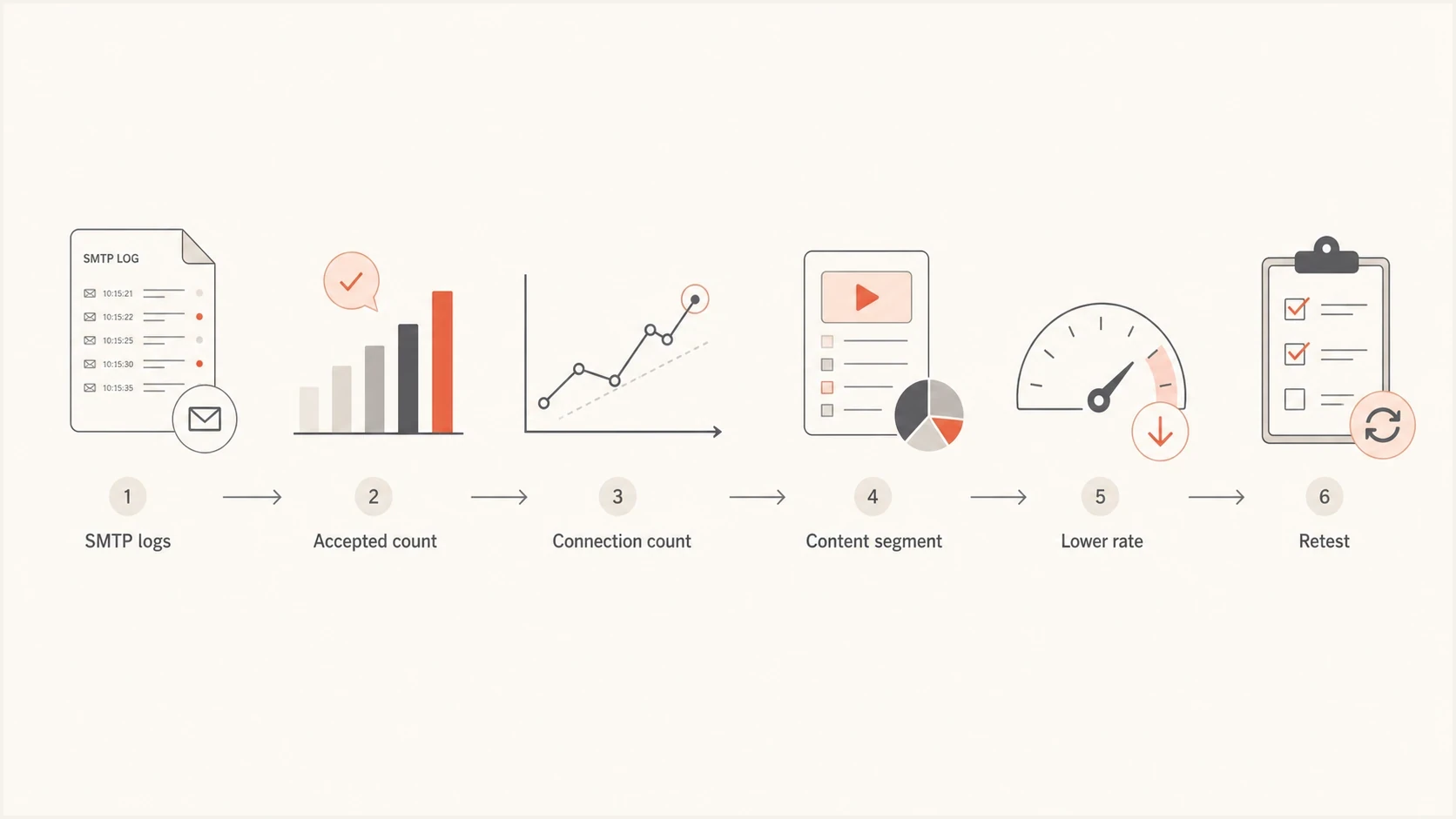
A flowchart for diagnosing whether Charter.net throttling is caused by rate, connections, or content.
Use a Charter.net-specific connection plan
Do not keep opening sessions until Charter.net returns AUP#In-1310. Start with one concurrent connection, reuse that connection for multiple transactions, and pace messages below the last rate that completed without the error. If logs show 60 to 65 accepted messages per hour, treat that as an observation tied to the current IP and session pattern, not as Charter.net's universal limit.
Charter.net connection-limit posture
Use AUP#In-1310 responses and connection logs to decide whether to hold, reduce, or cautiously raise traffic.
Clean
0 errors
Representative sends finish without AUP#In-1310.
Watch
1 error
An isolated response appears after a change in traffic.
Reduce
Repeated
The response repeats across the same connection pattern.
Example per-domain connection plantext
Domain group: charter-spectrum
Max concurrency: 1
Connection reuse: enabled
Message pacing: below last clean rate
On 4xx response: exponential backoff
On 5xx response: mark failed, pause queue, investigate
Increase only after: representative clean sends
For large nonprofit events, the mistake is waiting until GivingTuesday or year-end to test whether Charter.net will accept a new peak. If normal Charter.net volume is small and event-day volume is five times higher, the receiver sees a sharp change even when global reputation is strong. Read the broader rate-limit planning notes in sending volume spikes if the campaign calendar creates short, predictable peaks.
- Weeks ahead: Increase Charter.net traffic gradually during normal campaigns, not on the event day.
- Campaign day: Queue Charter.net recipients in their own lane so the connection limit does not delay other domains.
- After errors: Pause new Charter.net connections, classify the SMTP response, and avoid repeated collisions.
- When clean: Increase one control at a time and keep a rollback threshold.
Handle temporary and permanent SMTP responses correctly
SMTP response class controls queue behavior. A 4xx response is temporary, so the MTA should retain the message and retry with increasing delays. A 5xx response such as 550 5.1.0 is permanent for that delivery attempt, so the MTA normally marks it failed. Spectrum says the connection limit can clear after traffic stops, but that does not turn the original 5xx response into a normal automatic retry.
|
|
|
|---|---|---|
4xx | Keep queued and back off | Reduce connection pressure before the next retry. |
5xx | Mark the attempt failed | Pause the domain queue and investigate before any new send. |
Mixed | Classify each recipient | Do not apply one retry rule to every response. |
Queue handling by SMTP response class
Do not replay 550 failures blindly
A later resend after AUP#In-1310 is a new delivery attempt. Make it only after reducing connection pressure, checking that the recipient remains valid, and confirming that the resend will not duplicate a message already accepted through another route.
- Preserve the full bounce and original queue ID for investigation.
- Separate temporary deferrals from permanent failures in reporting.
- Use an idempotency check before deliberately requeuing transactional mail.
Check the envelope identity
The SMTP MAIL FROM value is easy to overlook because DMARC focuses on matching the visible From domain. Charter.net can still associate the return-path domain and its DNS with the sending IP. A dedicated IP does not fully isolate a sender when the bounce domain, HELO identity, or DNS configuration is inconsistent.
Do not change SMTP MAIL FROM as a cosmetic workaround. If the new value gets the same treatment, the connection behavior or IP remains the stronger lead. If the new value performs better, investigate the old identity's DNS and history before applying the change across production traffic.
Envelope identity checklist
- Return-path: Use a dedicated bounce domain with valid SPF.
- PTR and HELO: Use a stable hostname with matching forward and reverse DNS.
- DMARC identity: Confirm that SPF or DKIM aligns with the visible From domain for DMARC.
- DKIM: Use stable selectors and prevent broken signatures during platform changes.
?
What's your domain score?
Deep-scan SPF, DKIM & DMARC records for email deliverability and security issues.
Suped brings DMARC reports, SPF and DKIM checks, blocklist monitoring, and deliverability diagnostics into the same investigation. Use Suped to verify that authentication and domain health stay stable while the sending team changes Charter.net connection behavior. These checks support the evidence packet, but they do not override Spectrum's local connection controls.
If reputation evidence includes a blocklist or blacklist listing, monitor it directly instead of relying on one-off checks. Suped's blocklist monitoring tracks domain and IP listings alongside authentication data, which helps explain an IP reputation change before escalating a Charter.net issue.
Segment Charter.net traffic
Charter.net recipients should not share the same queue controls as other mailbox providers. When one receiver is the bottleneck, segment it by MX group and give it separate concurrency, connection reuse, pacing, and failure rules. This prevents Charter.net connection limits from distorting the rest of the send.
The group should include Charter and Spectrum-associated MX patterns seen in logs, plus Roadrunner or legacy domains that resolve to the same delivery infrastructure. Build the group from MX resolution and observed behavior, not the visible recipient domain alone.
|
|
|
|---|---|---|
Concurrency | 1 | Do not raise while AUP#In-1310 appears. |
Connection reuse | Enabled | Avoid reconnecting for every message. |
Message pacing | Below last clean rate | Increase one step after representative clean sends. |
5xx handling | Failed | Pause and investigate before a deliberate resend. |
Burst size | None | Keep spacing steady. |
Practical Charter.net queue controls
Even when Charter.net recipients make up less than 1% of the list, separate handling matters during peak campaigns because repeated failures create queue noise and duplicate-send risk. Protect the main campaign while keeping Charter.net delivery controlled and measurable.
Fix the underlying reputation signals
If AUP#In-1310 continues after concurrency is one and connections are reused, investigate why Charter.net assigns the sending IP a lower allowance. For nonprofit and advocacy senders, common causes include old donor lists, low-frequency segments, sudden seasonal sends, heavy forwarding, or complaint-prone campaigns.
Illustrative signals to compare by segment
These example values show how to compare Charter.net results for engaged, recent, older, and inactive groups before a volume increase.
Accepted
Deferred
Rejected
Split the next Charter.net campaign by engagement and start with recent openers, clickers, donors, or account-active recipients. Hold older recipients until the engaged segment finishes cleanly. If engaged recipients pass and the inactive segment fails, list quality is the stronger lead. If both fail at the same connection count, focus on IP reputation, session behavior, or remediation status.
- List quality: Suppress unknown users, complainers, hard bounces, and long-inactive recipients.
- Content: Check whether failures follow a template, link domain, subject pattern, or sender identity.
- Cadence: Avoid long silence followed by an urgent high-volume campaign.
- Authentication: Keep SPF, DKIM, and DMARC passing on every production stream.
If Charter.net is the only receiver returning this code, do not dismiss it as a false positive. Receivers set their own limits. Keep the Charter.net stream predictable with stable identity, clean recipients, consistent volume, and low connection pressure.
When to ask for remediation
Ask for remediation after you can identify the sending IPs, show clean authentication and PTR records, document blocklist or blacklist status, and prove that AUP#In-1310 persists with one concurrent reused connection. Send a concise timeline with the full bounce data instead of a general statement that the sender is compliant.
Remediation summary templatetext
Sender: example.org
IPs: 192.0.2.10, 192.0.2.11
Issue: Charter.net AUP#In-1310 sender rejected
Observed behavior: 60-65 accepted messages per hour
Current plan: one concurrent reused connection
Authentication: SPF pass, DKIM pass, DMARC pass
DNS: PTR and HELO confirmed
List controls: hard bounces and complaints suppressed
Request: review IP reputation and connection-limit status
Spectrum community guidance directs senders to abuse@charter.net for this error. Include the complete non-delivery report, any attached diagnostic file, full headers, sending IPs, timestamps with time zones, and a summary of the connection changes already made. Pause repeated 550 attempts while the issue is under review.
Related receiver throttling work follows the same pattern: prove the issue, isolate the domain group, reduce pressure, then rebuild. The Spectrum-specific version is covered in Spectrum TWC throttling, while broader connection planning is covered in sending rate limits.
Views from the trenches
Best practices
Reuse receiver-specific connections so reconnects do not consume the full allowance.
Lower connection pressure before asking Spectrum to review the sending IP reputation.
Prepare seasonal volume early and confirm clean Charter.net behavior before the peak.
Common pitfalls
Treating delivery elsewhere as proof that Charter.net must assign the same IP trust.
Opening a new session for every message while diagnosing a total connection limit.
Automatically replaying a 550 failure as though it were a temporary 4xx deferral.
Expert tips
Compare accepted messages with new connections to test what triggers AUP#In-1310.
Send Spectrum the full bounce, headers, timestamps, IPs, and connection changes.
Test engaged Charter.net recipients first before expanding to older list segments.
Expert from Email Geeks says a very low accepted rate usually means the receiver is applying a local reputation decision, even when other providers are accepting the same sender.
2023-11-29 - Email Geeks
Marketer from Email Geeks says connection limits and message-rate limits can look similar unless the sender reviews smarthost settings and per-session logs.
2023-11-29 - Email Geeks
The practical resolution path
To resolve Charter.net throttling, stop treating an observed message count as the target. Set concurrency to one, reuse connections, space transactions, segment the relevant MX group, and verify authentication and DNS health. Classify 4xx and 5xx responses correctly. If AUP#In-1310 persists, send Spectrum a compact evidence packet that shows the connection changes and affected IPs.
Suped's DMARC reporting connects authentication results to real sending sources, while its SPF, DKIM, domain health, and blocklist checks add evidence for the investigation. Teams managing several domains can use that shared view to verify identity health while MTA logs remain the source for Charter.net connection counts and SMTP responses.




