How to resolve email throttling issues with Spectrum/TWC?

Updated on 10 Aug 2026: We clarified how to distinguish inbound Spectrum throttling from outbound client errors and tune retries using complete SMTP evidence.
Resolve Spectrum/TWC email throttling by treating a 4xx receiver response as a temporary deferral first. Slow the affected mail stream, reduce concurrent SMTP connections, separate urgent mail from bulk mail, retry with longer backoff windows, and gather clean evidence before escalating. If the complete reply includes AUP#In-1380 with a 4xx status, begin by reducing connection pressure. Do not assume that every AUP#13XX code has the same cause.
Spectrum, TWC, Charter, and Road Runner routes can appear within one mailbox provider family in delivery logs, but the exact receiving hosts do not always respond identically. Confirm that authentication passes, prove the mail is wanted, then lower the rate until the deferrals stop. Before changing a whole campaign, send one controlled message through the email tester and compare it with a real campaign message.
- Immediate fix: Drop the sending rate to affected Spectrum/TWC receiving hosts and cap each IP at one connection while testing.
- Root cause check: Review the full SMTP reply, SPF, DKIM, DMARC, reverse DNS, complaint rate, bounce rate, and recent volume changes.
- Escalation path: Send logs, IPs, envelope domains, sample headers, timestamps, and the business reason for the mail.
- Long-term control: Keep receiver-specific rules so urgent mail does not sit behind a slow bulk queue.
What Spectrum/TWC throttling usually means
A throttling issue with a 4xx reply is a temporary acceptance problem. The receiving side is not saying every message is invalid. It is saying the current stream, connection pattern, or queue pressure is too much for that route at that moment. Make the delivery pattern easier to accept instead of increasing connection pressure.
The most useful clue is the complete SMTP response. A reply such as server temporarily unavailable paired with AUP#In-1380 and a 4xx status tells the sending MTA to retry later. It does not prove a permanent blocklist (blacklist) problem or a content rejection. Preserve the status code, enhanced status, response text, receiving MX, and timestamp together.
Classify the SMTP reply before retrying
A 4xx response asks the sending system to retry later. A 5xx response is permanent for that delivery attempt, even when its text suggests another test after remediation. Treating both classes as ordinary deferrals creates slow queues, repeated failures, and unnecessary escalation.
Typical temporary response
452 4.1.0 server temporarily unavailable AUP#In-1380
|
|
|
|---|---|---|
4XX | Temporary deferral | Back off and retry |
AUP#In-1380 | Inbound temporary response | Reduce connection pressure |
5XX | Permanent for this attempt | Fix the stated cause |
Timeout | No SMTP reply | Retry on the queue schedule |
Common Spectrum/TWC delivery signals and first actions.
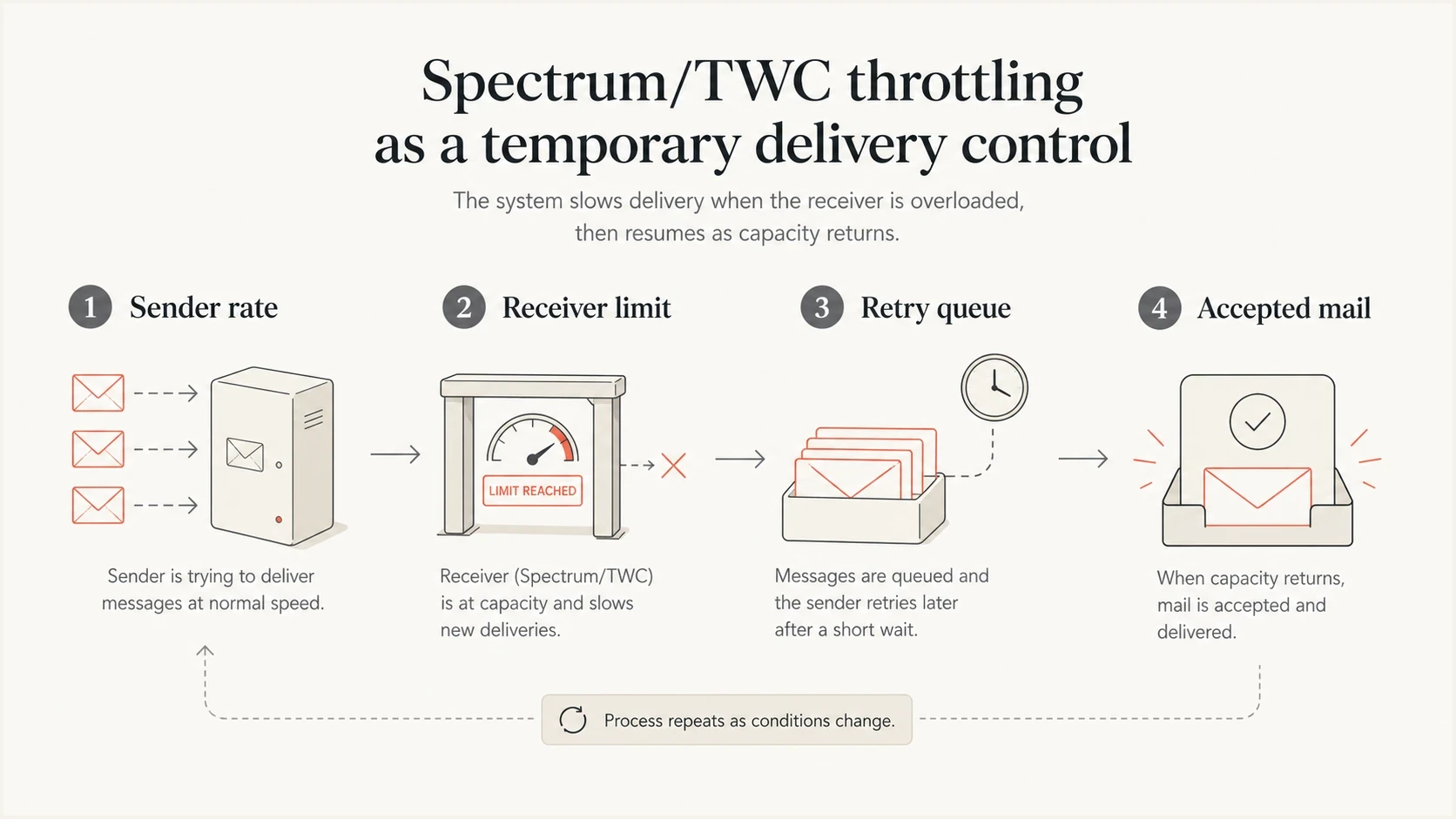
Infographic showing sender rate, receiver limit, retry queue, and accepted mail.
Check whether the AUP error is inbound or outbound
The AUP label identifies which side of Spectrum's mail system handled the message. AUP#In appears on mail entering Spectrum's receiving system, including delivery to TWC and Road Runner recipients. AUP#Out concerns a Spectrum customer sending through Spectrum's outgoing SMTP service. An AUP#Out error does not diagnose an external sender's delivery to a Spectrum recipient.
For AUP#Out-1500 or response text saying the sender address must match the authenticated address, check the email client instead of throttling an inbound route. Use the full Spectrum email address as the username and sender, enable outgoing SMTP authentication, and verify port 587 with TLS plus the correct host for that legacy address against Spectrum's current settings. A test in Spectrum webmail helps separate an account problem from a third-party email client configuration problem.
|
|
|
|---|---|---|
AUP#In with 4XX | External sender to Spectrum | Receiving MX, pacing, and retries |
AUP#Out with 5XX | Spectrum account to the internet | Client settings, login, and sender address |
Use the AUP direction and SMTP class to choose the correct workflow.
Do not apply the inbound fix to an outbound error
Reducing campaign traffic will not correct a Spectrum customer's sender-address mismatch or missing SMTP authentication. Likewise, changing a recipient's email client settings will not clear an AUP#In deferral seen by an external sending MTA.
The practical throttling fix
Isolate recipients deferred by the same Spectrum receiving MX into their own queue. This keeps a slow receiver from holding up other recipient routes and produces clean logs because the retry pattern is no longer mixed with unrelated delivery behavior. Route on observed DNS and SMTP evidence, not only on brand names in recipient domains.
Spectrum does not publish one safe message rate for every external sender. Begin below the rate or connection level that triggered the response, watch accepted versus deferred messages, then increase in small steps only after sustained clean delivery. If the queue grows faster than it drains, the route still has too much connection or message pressure.
Example Spectrum/TWC recovery policy
recipient_route: affected_spectrum_mx
initial_rate: below_observed_failure_rate
smtp_connections_per_ip: 1
batch_size: small_test_batch
retry_after_first_deferral: 15 minutes
retry_after_second_deferral: 45 minutes
retry_after_third_deferral: 2 hours
max_retry_window: follow_message_lifetime_policy
separate_transactional_queue: true
increase_condition: sustained_acceptance_without_repeated_deferrals
Recovery stages for a throttled route
These are sender-controlled stages, not Spectrum-published rate limits. Move forward only when SMTP logs show sustained acceptance.
Active deferrals
Below failure rate
Reduce parallel connections and start below the observed failure rate.
Controlled test
Small test batch
Send a small batch after the scheduled retry delay.
Recovery
Measured increase
Increase gradually while the queue drains and acceptance holds.
Stable
Proven baseline
Return to the sender's proven baseline only after deferrals stay low.
- Create the route: Group affected recipient domains by the Spectrum receiving MX recorded in DNS and deferral logs.
- Limit connections: Use one SMTP connection per sending IP while the error is active, then tune against observed acceptance.
- Stretch retries: Use increasing delays after repeated deferrals instead of opening immediate new connections.
- Protect urgent mail: Keep transactional and public-safety messages ahead of marketing campaigns.
- Pause expansion: Do not add more recipients until acceptance recovers for the current queue.
Separate rate limits from authentication failures
A rate limit can happen even when authentication passes, but authentication should still be checked before requesting a review. Receiver teams need proof that the mail stream is legitimate. A quick pass through Suped's domain health checker provides a baseline for DMARC, SPF, DKIM, and DNS hygiene.
For recurring throttling, pair delivery logs with Suped's DMARC monitoring and blocklist monitoring. The goal is not to blame every deferral on a blacklist. Use the data to remove authentication objections before escalation and catch a blocklist or blacklist change when it exists.
Receiver rate limit
- SMTP clue: Temporary 4XX response with retry language.
- Queue clue: Mail drains slowly when connection pressure is reduced.
- Best action: Throttle, retry later, and watch accepted volume.
- Escalation proof: Provide timestamps, sending IPs, receiving hosts, and sample headers.
Authentication or reputation issue
- SMTP clue: Permanent 5XX response or repeated policy rejection.
- DNS clue: SPF or DKIM fails, DMARC identifiers do not match, or rDNS and HELO conflict.
- Best action: Fix authentication and suppress invalid addresses.
- Escalation proof: Provide corrected DNS and a post-fix sample header.
Use a real test message after the DNS and route checks. The test should match the campaign as closely as practical: same sending domain, return-path domain, DKIM selector, links, and sending system. A clean synthetic test is useful, but a mismatched test hides the issue.
Email tester
Send a real email to this address. Suped shows a results button when the test is ready.
?/43tests passed
How to escalate Spectrum/TWC throttling
Escalation works better when the evidence packet is small and complete. Public consumer support pages, including Spectrum troubleshooting, help account holders check access and email client settings. Sender-side throttling needs delivery logs and postmaster-style evidence, not a general inbox ticket.
If the investigation covers a wider Charter routing problem, keep a separate note for Spectrum/Charter delivery issues. Separate evidence by receiving MX so one failing route does not distort the whole case.
Evidence packet for Spectrum/TWC
- Sending IPs: List every IP used for the affected mail and the volume sent per IP.
- Domains: Include envelope-from, header-from, DKIM d= domain, and tracking domain.
- Errors: Attach complete SMTP responses with UTC timestamp, recipient domain, receiving MX, and queue ID.
- Message proof: Provide one full header sample and explain why recipients expect the message.
- Mitigation: Show the reduced rate, connection count, retry schedule, and accepted versus deferred totals.
Escalation note template
Subject: Spectrum/TWC temporary deferrals for legitimate mail

Sending IPs: 203.0.113.10, 203.0.113.11
Envelope domain: bounce.example.com
Header-from domain: example.com
DKIM domain: example.com
Receiving MX: pkvw-mx.msg.pkvw.co.charter.net
Error: 452 4.1.0 server temporarily unavailable AUP#In-1380
Time range: YYYY-MM-DD HH:MM-HH:MM UTC
Current policy: one connection/IP, below observed failure rate
Business context: time-sensitive customer notice
Do not ask for a blanket allowlist as the first request. Ask whether the receiver can confirm the reason for the temporary deferrals and whether the current reduced connection pattern is acceptable. That wording keeps the request specific and easier to answer.
High-volume and urgent sends
Urgent campaigns fail when they share one queue with ordinary bulk mail. If a grocery chain, healthcare provider, school, municipality, or utility needs to send a time-sensitive notice, the operational message needs a separate route and rate cap, with route-level monitoring. That does not bypass consent rules. It keeps the important mail from waiting behind a large promotional batch.
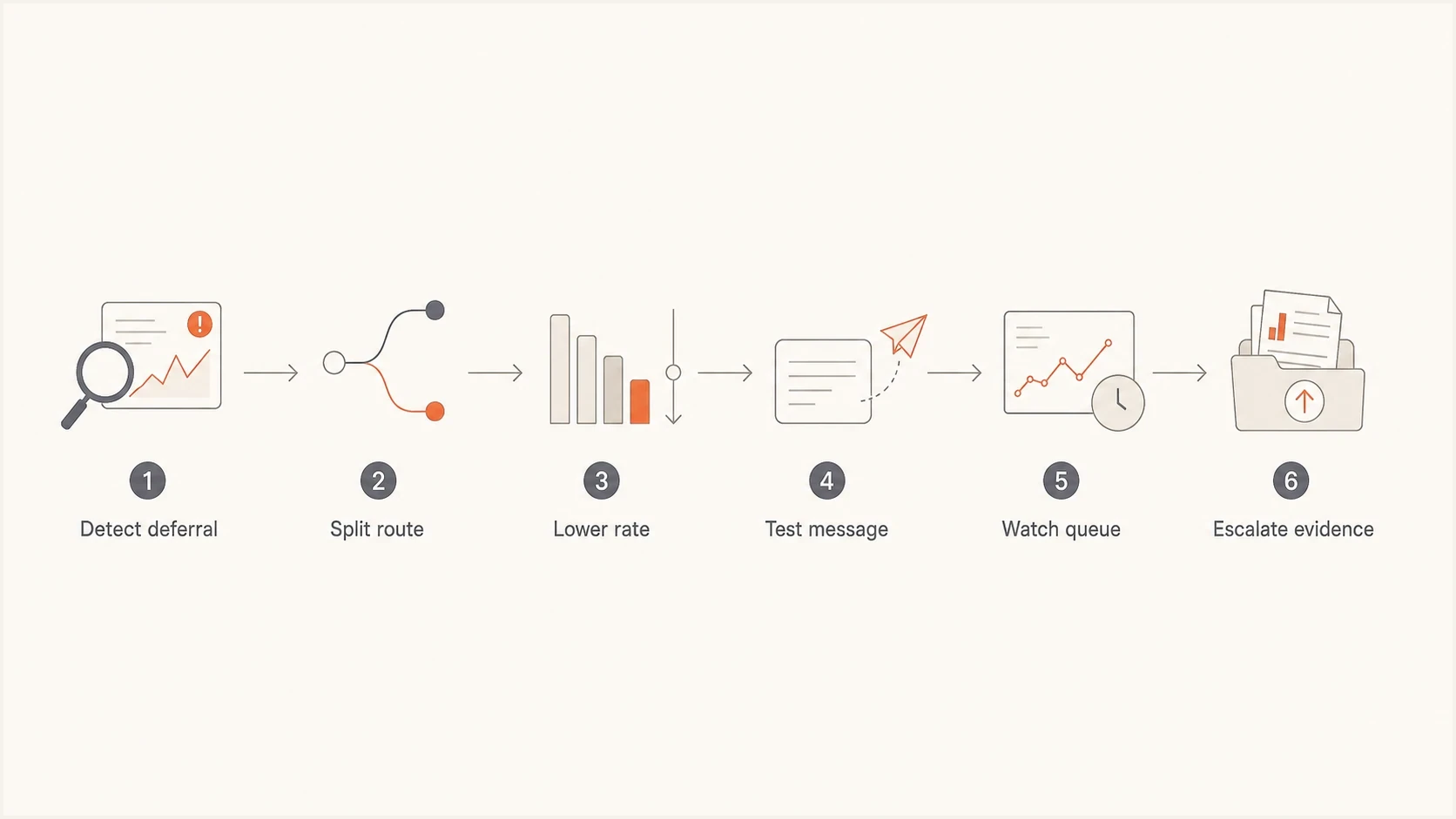
Flowchart for detecting, slowing, testing, watching, and escalating Spectrum/TWC throttling.
Segment by recipient risk as the route recovers. Recently engaged recipients should go first because they give the receiver a cleaner signal. Unengaged recipients, old addresses, and repeated soft-bounce recipients should wait until the route stabilizes. A smaller first pass often gets more total mail delivered by the deadline than a full-list blast that triggers hours of retry delays.
|
|
|
|---|---|---|
Alerts | Priority | Low |
Receipts | Transactional | Stable |
News | Bulk | Reduced |
Old list | Hold | Paused |
Routing choices for urgent Spectrum/TWC delivery.
How Suped supports the investigation
Suped is our DMARC reporting and email authentication platform. In this workflow, Suped helps identify the authorized sources sending for a domain, review SPF and DKIM results, check DMARC identifier matching, and watch blocklist (blacklist) changes. Suped does not control Spectrum/TWC's receiver limits or replace the delivery logs needed to diagnose a throttle.
Use Suped to confirm that the affected source is expected, find authentication failures before escalation, and keep the DNS work attached to the investigation. Alerts can flag an authentication or blacklist change while the sending system tracks receiver-specific acceptance and queue depth.

Issue steps to fix dialog showing the issue overview, tailored fix steps, and verification action
- Source review: Suped groups DMARC data so the affected sending source can be checked against authorized traffic.
- Authentication checks: SPF, DKIM, and DMARC results show whether a separate authentication problem needs repair.
- DNS changes: Hosted SPF and hosted DMARC keep approved record changes connected to ongoing reporting.
- Investigation handoff: Teams can pair Suped's authentication evidence with SMTP logs, queue metrics, and the escalation note.
Views from the trenches
Best practices
Keep Spectrum/TWC on a dedicated route so rate changes do not affect other receivers.
Record raw SMTP replies with timestamps before changing queue rules or escalating.
Start urgent sends with recently engaged recipients, then expand after acceptance stabilizes.
Pair retry tuning with authentication checks so escalation starts with clean evidence.
Common pitfalls
Treating temporary deferrals like permanent rejections leads to unnecessary suppressions.
Pushing the same queue harder after AUP errors usually extends the delivery delay.
Escalating without IPs, headers, and rate data slows the review and weakens the case.
Mixing urgent notices with bulk campaigns makes receiver-specific throttling harder to fix.
Expert tips
Use one connection per IP during active deferrals, then increase only after clean cycles.
Track accepted versus deferred counts by route, not only total campaign completion.
Hold older segments until the route drains, especially during public-safety notices.
Keep a reusable evidence template so urgent Spectrum/TWC cases move faster with fewer gaps.
Marketer from Email Geeks says AUP#In-1380 looked like a temporary server unavailable response, and custom backoff rules still left mail waiting too long.
2020-03-25 - Email Geeks
Marketer from Email Geeks says AUP#13XX responses can act like simple rate limits, so Spectrum/TWC routes sometimes need very slow delivery.
2020-03-25 - Email Geeks
A workable Spectrum/TWC plan
The fastest fix is usually a slower affected route, not a louder retry strategy. Group deferred recipients by the Spectrum receiving MX, start with one connection per IP, stretch retries after each deferral, and raise volume only after the accepted count stays stable.
At the same time, remove preventable objections: pass SPF and DKIM, publish DMARC reporting, keep reverse DNS clean, watch blocklist and blacklist signals, and suppress invalid recipients. If throttling continues, send a concise evidence packet with the IPs, domains, receiving hosts, logs, headers, and reduced-connection proof.