How to resolve email delivery issues with Spectrum/Charter servers?


Updated on 19 Aug 2026: We clarified Spectrum's inbound and outbound AUP paths, corrected bounce suppression guidance, and added current Spectrum mailbox troubleshooting steps.
The direct fix for email delivery issues with Spectrum and Charter servers is to identify the direction of the failure, then prove whether the problem is rate limiting, reputation, DNS authentication, or a mailbox-side issue. AUP#In responses concern mail entering Spectrum for a Spectrum-family recipient. AUP#Out responses concern a Spectrum customer submitting mail through Spectrum's outbound SMTP service. If you see AUP#In bounces, DNSBL/RBL wording, repeated temporary failures, or connections that appear unavailable, slow down delivery to Spectrum-owned domains, separate those domains into their own queue, verify SPF, DKIM, DMARC, reverse DNS, HELO, TLS, and blocklist or blacklist status, preserve any PTR, TLS, or connection-refused wording, then gather exact SMTP evidence before escalating.
Do not start by changing content, swapping platforms, or repeatedly retrying the same queue at full speed. Spectrum/Charter delivery problems often look like a mix of front-door filtering, rate limiting, and reputation checks. The fastest practical path is to reduce pressure on their inbound systems, confirm your sending identity is clean, and document the affected recipient domains, timestamps, source IPs, SMTP responses, and message IDs.
- Create a separate delivery pool or queue for Spectrum, Charter, RoadRunner, Road Runner, TWC, BrightHouse, and legacy recipient domains so retries do not harm the rest of your mail.
- AUP#In codes and repeated deferrals usually point to inbound filtering or rate limiting, not a broken recipient address.
- Keep full SMTP transcripts, bounce text, recipient domain, sending IP, authentication results, and retry timing.
- Use Suped's product to compare DMARC, SPF, DKIM, blocklist, blacklist, and alerting views so you can confirm whether the issue is isolated to Spectrum/Charter rather than a domain-wide authentication fault.
Start with the exact failure type
The phrase "not accepting mail" hides several different failure modes. Split Spectrum/Charter problems into four buckets before making any change: connection failures, temporary deferrals, permanent SMTP failures, and silent non-delivery. Also preserve whether the receiver used policy words such as AUP, DNSBL, RBL, PTR, HELO, TLS, blocked, or connection refused.
Connection failures mean your MTA cannot reliably connect to the destination MX. Temporary deferrals mean the receiver accepted the connection but declined the message for now. A permanent SMTP failure means the receiver will not accept that delivery attempt, but the enhanced status code and full text decide whether the cause is an invalid address, policy, reputation, or authentication. Silent non-delivery means the SMTP transaction succeeded, but the recipient did not see the message in the inbox.
|
|
|
|---|---|---|
Timeout | Connection issue | Retry slowly |
4xx | Deferral | Throttle queue |
AUP | Policy filter | Read full response |
DNSBL/RBL | Source block | Map source |
5xx | Permanent SMTP failure | Classify code |
Accepted | Mailbox filtering | Send test |
Use the SMTP result to choose the next action.
Do not treat all Spectrum/Charter failures as invalid-address bounces. Keep temporary failures in a controlled retry queue. Suppress an address when the response confirms that the recipient or domain is invalid, not merely because a 5xx policy or reputation response ended the SMTP attempt.
For a focused message-level check, send a real campaign-style message through the same sending path and inspect the headers, authentication, and content result with the email tester. That gives you a clean baseline before you assume the problem sits only with Spectrum's inbound servers.
Separate inbound delivery from Spectrum SMTP sending
Read the direction marker in the complete Spectrum error. An AUP#In response belongs to the inbound path used by an external sender delivering to a Spectrum-family recipient. An AUP#Out response belongs to a Spectrum mailbox user sending through Spectrum's outbound SMTP service. Throttling your external MTA can help with AUP#In connection limits, but it will not fix an email app that cannot authenticate to Spectrum SMTP.
- Test the Spectrum account in webmail. If webmail sends successfully, focus on the email client's outgoing settings.
- For client submission, confirm the current domain-specific server name, port 587, TLS, SMTP authentication, and the full email address as the username.
- If webmail and the client both fail, check the mailbox password and account status before changing DNS or sender infrastructure.
- If the error is AUP#In, return to the inbound sender workflow and classify the exact SMTP code, source IP, recipient domain, and remote MX.
Do not substitute one legacy Spectrum server hostname for another without checking the current settings for the exact email domain. Charter, RoadRunner, TWC, Bright House, and Spectrum addresses can require different hostnames even when the visible troubleshooting steps are similar.
Identify the Spectrum domain family
Before throttling, confirm which recipient domains belong in the Spectrum/Charter queue. The common seed set includes spectrum.net, charter.net, rr.com, regional rr.com subdomains, roadrunner.com, twc.com, brighthouse.com, and adelphia.net. Treat that as a starting list, not a permanent routing rule, and add other legacy cable domains only when MX and bounce evidence tie them to the same delivery path.
Brand history and current mail routing do not always move together. A legacy address can keep an old RoadRunner, TWC, Bright House, or Adelphia domain while its MX path changes. Verify live MX answers and bounce text before grouping those domains under one throttle, suppression, or reputation rule.
Spectrum and Charter domain seed listtext
spectrum.net
charter.net
rr.com
roadrunner.com
twc.com
brighthouse.com
adelphia.net

Common regional rr.com examples:
tampabay.rr.com
socal.rr.com
nyc.rr.com
nc.rr.com
satx.rr.com
triad.rr.com
twcny.rr.com
Live MX verificationbash
dig +short MX spectrum.net
dig +short MX charter.net
dig +short MX rr.com
dig +short MX roadrunner.com
dig +short MX twc.com
dig +short MX brighthouse.com
dig +short MX tampabay.rr.com
For large lists, export unique recipient domains, resolve MX records in bulk, normalize the MX hostnames, then join the results back to bounces and complaint data. The visible email domain tells you where to look. Current MX and delivery evidence tell you how to route the fix.
Throttle Spectrum and Charter traffic separately
The most practical operational fix is receiver-specific throttling. If your logs show repeated AUP#In bounces, deferrals, or temporary failures at Spectrum, Charter, RoadRunner, Road Runner, TWC, Bright House, Adelphia, or regional rr.com domains, move those domains into a separate queue and send at a much lower rate. This keeps normal mail flowing elsewhere and gives Spectrum's filtering layer fewer reasons to keep deferring your traffic.
Start lower than feels convenient. For a problematic sender, test with a narrow lane such as one connection per sending IP and a small number of messages per minute, then increase only after several hours of clean acceptance. This is a recovery test, not a published Spectrum limit. If deferrals return, step down again and extend the retry interval.
Keep temporary 4xx and AUP replies out of invalid-recipient suppression unless a later permanent address failure confirms the user is invalid. A slow retry queue is usually safer than deleting reachable Spectrum-family recipients because one policy layer pushed back.
Spectrum/Charter throttle stages
Use these stages as a controlled rollout model when a receiver is deferring or rejecting mail.
Recovery
lowest
One connection per IP with a small message rate.
Cautious ramp
low
Increase only after clean acceptance over several hours.
Watch
medium
Hold steady if AUP codes or long deferrals return.
Back off
high
Pause or sharply reduce mail when deferrals spike.
Uncontrolled retries
- Your MTA keeps retrying a receiver that is already pushing back.
- Repeated attempts can look like a sender ignoring receiver limits.
- Failures blend with unrelated domains and become harder to prove.
Dedicated receiver queue
- Spectrum traffic gets its own rate, connection count, and retry timing.
- The receiver sees fewer bursts and fewer repeated failed attempts.
- You can report exact domain, IP, timestamp, and SMTP response patterns.
Example receiver-specific queue notestext
Receiver group: Spectrum/Charter
Domains: spectrum.net, charter.net, rr.com, regional rr.com, roadrunner.com, twc.com, brighthouse.com, adelphia.net
Initial rate: 1 connection per IP
Retry window: 30-60 minutes
Ramp rule: increase only after clean 2xx acceptance
Rollback rule: reduce rate after repeated AUP or 4xx responses
Check authentication before blaming the receiver
Receiver-specific problems still expose weak sender setup. If SPF, DKIM, DMARC, reverse DNS, or HELO/EHLO identity fails, Spectrum's filtering layer has an easy reason to distrust the message. Check authentication before escalation because it separates a true receiver-side issue from a sender-side fault. The sending IP should have forward-confirmed reverse DNS, and its HELO/EHLO name should resolve consistently to that identity.
Use a domain health check to validate the domain's DMARC, SPF, and DKIM posture in one pass. Then compare those results against your actual sent-message headers, because DNS can be correct while a specific stream signs with the wrong domain or sends through an unapproved IP.
?
What's your domain score?
Deep-scan SPF, DKIM & DMARC records for email deliverability and security issues.
For Spectrum/Charter delivery work, DMARC passes when either the SPF-authenticated Mail From domain or the DKIM signing domain aligns with the visible From domain. Configure both aligned SPF and aligned DKIM when possible so one mechanism can preserve DMARC when the other breaks. If you use several sending services or internal MTAs, this is where hidden drift appears. One product feed can be clean while password resets, invoices, or regional marketing mail fail identity matching.
DMARC record detail view showing SPF, DKIM, DMARC, rDNS diagnostics, and DNS records
Suped's product is useful here because it brings DMARC monitoring, SPF, DKIM, blocklist, blacklist, and deliverability signals into one place. Instead of reading raw aggregate reports by hand, you can see which sources pass, which sources fail, and which fixes are needed. Hosted SPF and SPF flattening also help when a domain has too many SPF lookups or when teams need to add senders without direct DNS access.
Minimum DNS authentication baselinedns
_dmarc.example.com. 3600 IN TXT "v=DMARC1; p=none; rua=mailto:dmarc@example.com"
example.com. 3600 IN TXT "v=spf1 include:send.example.net -all"
selector1._domainkey.example.com. 3600 IN TXT "v=DKIM1; k=rsa; p=..."
A passing DMARC result does not guarantee inbox placement at Spectrum. It does remove one major reason for filtering and gives you stronger evidence when asking a receiver to review rate limits or a reputation decision.
Investigate AUP bounces and front-door filtering
An AUP#In response means the message hit Spectrum's inbound acceptable-use or policy layer. Spectrum has documented AUP#In-1300 as a connection-limit response whose limits vary with the sending IP's reputation, with guidance to reduce concurrent and total connections before trying again. Senders also report codes such as AUP#In-1430 and AUP#1570, but the complete error text and SMTP class should decide the action because the number alone does not prove the cause.
Some AUP responses are temporary 4xx deferrals, while others use hard 5xx wording. Retry a temporary response according to a controlled schedule. Suppress only when the permanent response confirms an invalid recipient or retired domain. A 5xx policy, authentication, or reputation rejection calls for remediation or escalation, not automatic recipient suppression.
When AUP#In failures appear, look for patterns across source IPs, sending domains, recipient domains, content categories, and complaint sources. If the same message fails only at Spectrum-owned domains while similar receivers accept it, the evidence points toward receiver-specific filtering. If the same source IP also fails elsewhere, fix sender reputation first.
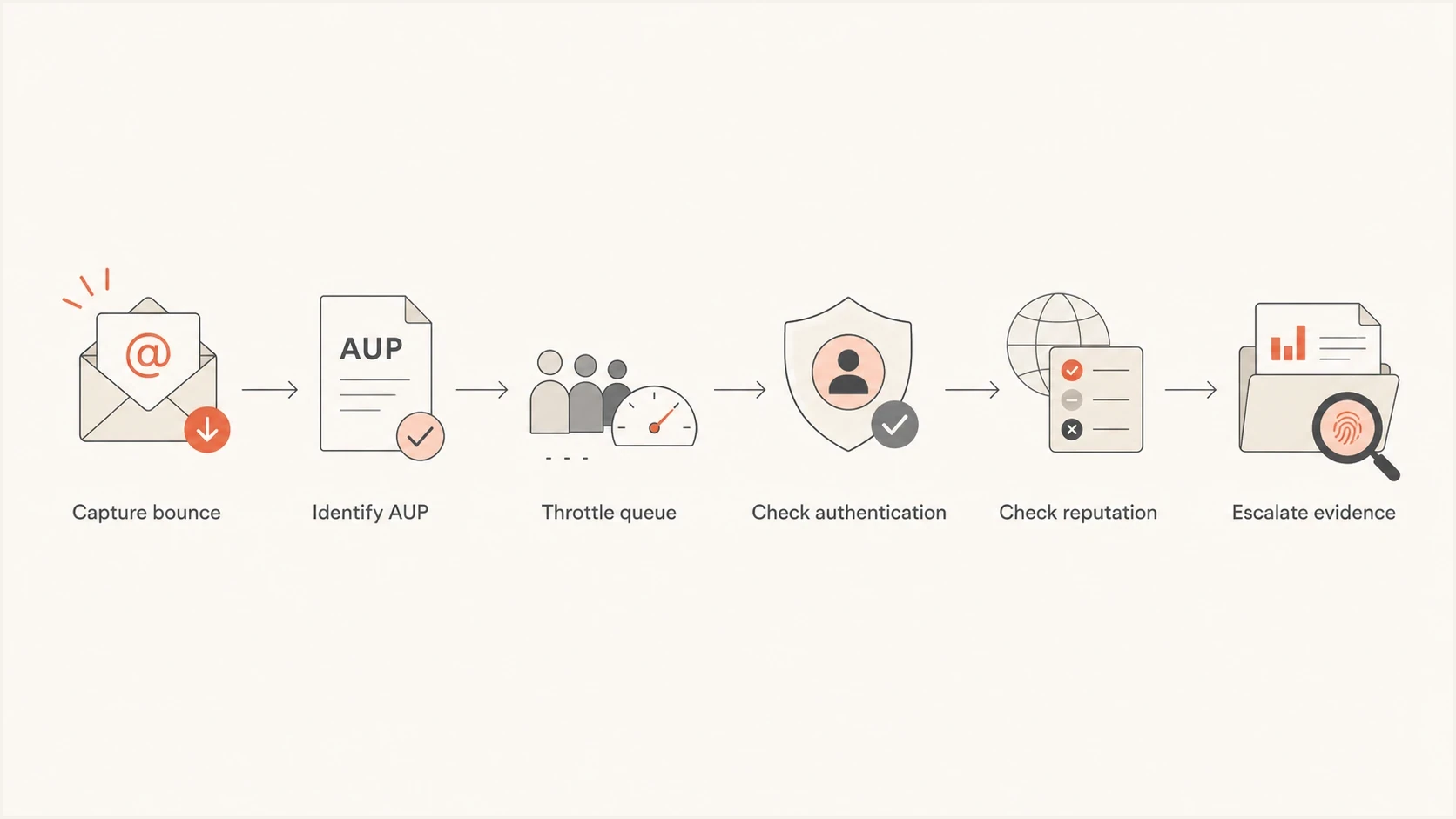
Spectrum and Charter AUP bounce flowchart for throttling, authentication checks, reputation checks, and escalation.
- Group bounces by AUP code, source IP, envelope sender, From domain, and recipient domain.
- Compare failure rates before and after lowering connection count and message rate.
- Test the same template with nonessential tracking, attachments, and URL changes removed.
- Suppress confirmed invalid-address bounces, stale contacts, and unengaged recipients before ramping again.
Do not try to bypass receiver policy by rotating domains, changing visible branding, or spreading the same traffic across fresh IPs. That makes the reputation problem harder to repair and weakens any escalation case.
Check IP and domain reputation
If throttling alone does not improve acceptance, check whether your sending IPs or domains appear on a blocklist or blacklist. A public listing does not always explain a Spectrum/Charter rejection because a receiver can also use private provider rules, but it gives you a concrete issue to fix before asking for review.
Use blocklist monitoring for continuous checks across sending IPs and domains. The goal is not only to know whether you are listed today. It is to detect when a listing started, whether it maps to a specific campaign or source, and whether remediation actually cleared the issue.
If the bounce includes DNSBL, RBL, blacklist, blocklist, or blocked wording, treat it as a source-level event. Map the rejection to exact IPs, HELO names, return-path domains, sending domains, and message streams before changing creative or rotating infrastructure.

Blocklist monitoring page showing domain and IP checks across blocklists with importance and status
Compare Spectrum failures against engagement and complaint data. A segment with old Charter, RoadRunner, TWC, Bright House, or Adelphia addresses can create pressure even when your global complaint rate looks fine. Receiver-specific analysis matters because one domain family can react more sharply than your average mailbox provider.
Verify mailbox and client settings when one user complains
Not every Spectrum complaint is a sender-side deliverability problem. If one customer says they did not receive a specific email, confirm whether your server got a 2xx acceptance, a temporary deferral, or a permanent failure. If Spectrum accepted the message, the next step is mailbox-side troubleshooting.
First compare webmail with the affected client. Spectrum's own email troubleshooting page covers user settings and common sending or receiving errors. Check spam or junk folders, filters, storage, blocked sender lists, forwarding rules, and account status. If webmail works but a desktop or mobile client fails, verify the domain-specific server name, port 587 for SMTP submission, TLS, SMTP authentication, the full email address as the username, and the current password. These checks do not solve bulk sender throttling, but they separate a local mailbox or client issue from an inbound server rejection.
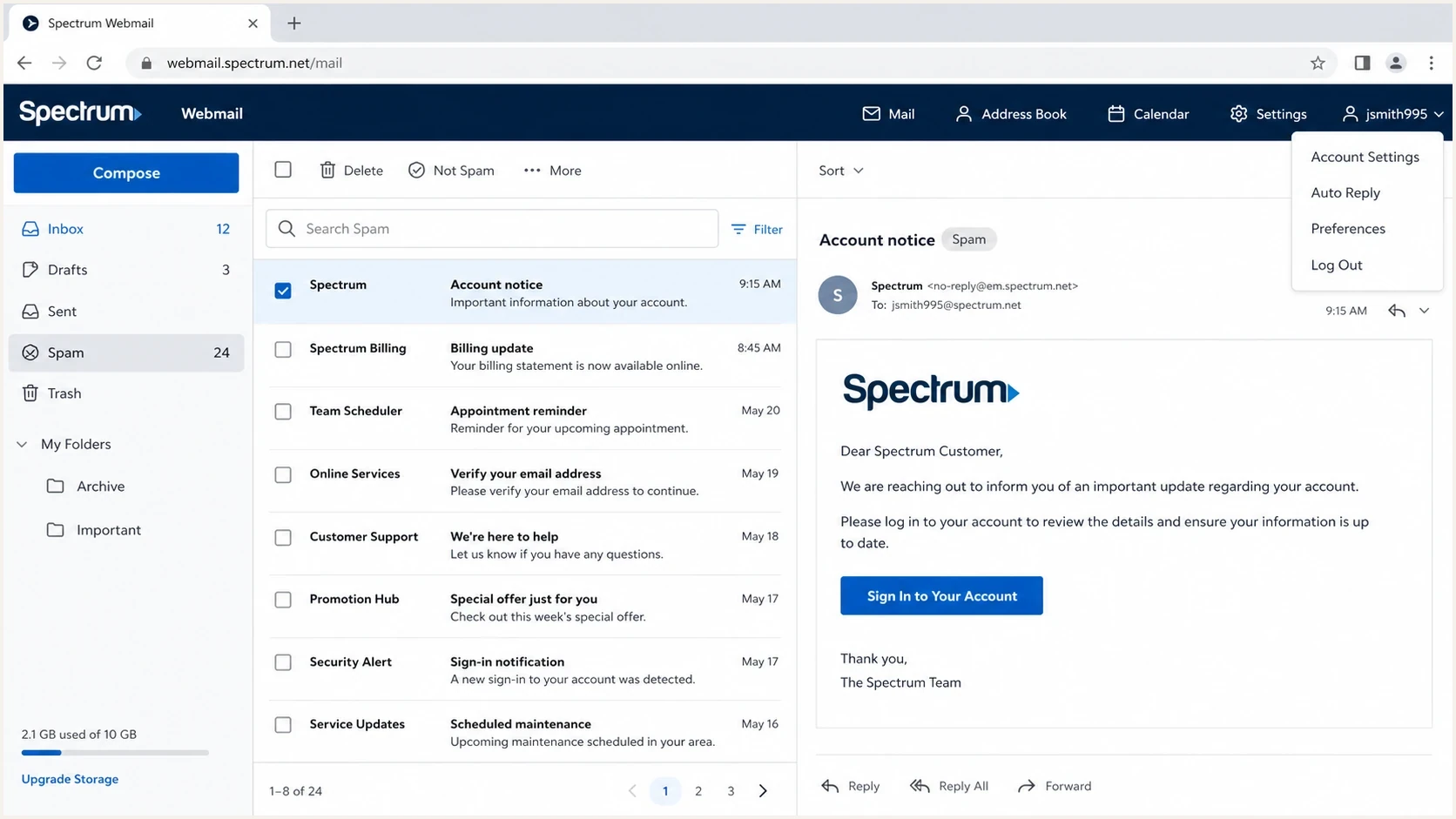
Spectrum Webmail inbox for checking spam, junk, filters, storage, and mailbox-side delivery issues.
Sender-side evidence
- Your logs show whether Spectrum accepted, deferred, or rejected the message.
- The unique message ID helps trace the exact send event.
- SPF, DKIM, and DMARC results show whether the message was trusted.
Mailbox-side checks
- Ask the recipient to check spam, junk, trash, and filters.
- A full mailbox or disabled account can block normal receipt.
- Desktop, mobile, IMAP, and SMTP settings can hide mail that webmail shows.
Build an escalation packet Spectrum can act on
When normal support paths do not return a useful answer, the quality of the escalation packet matters. A vague complaint that "mail is bouncing" is hard to route. A compact packet with IPs, recipient domains, timestamps, AUP codes, exact DNSBL/RBL, PTR, TLS, or connection-refused wording, SMTP transcripts, authentication results, throttle changes, and representative message IDs gives a postmaster or network team something to inspect.
The packet should show that you are not asking Spectrum to ignore its rules. You are asking for review of a rate limit, filtering decision, blocklist or blacklist event, or false positive after you have already cleaned up sender-side issues. Do not rely on a single public contact path. Keep the evidence compact enough to forward internally.
Escalation packet templatetext
Issue summary:
Mail to Spectrum/Charter domains is deferred or rejected.

Affected recipient domains:
spectrum.net, charter.net, rr.com, roadrunner.com, twc.com, brighthouse.com, adelphia.net

Sending domains:
example.com

Sending IPs:
192.0.2.10
192.0.2.11

Time window:
YYYY-MM-DD HH:MM-HH:MM UTC

Sample SMTP response:
451 4.7.1 AUP policy deferral

Full failure wording:
AUP / DNSBL:RBL / PTR / TLS / connection refused (paste exact text)

Authentication:
SPF pass, DKIM pass, DMARC pass

Sender-side actions already taken:
Reduced connection count, slowed retry timing, removed stale recipients.

Requested action:
Review rate limit or filtering decision for listed IPs and domains.
A strong escalation packet is short, specific, and reproducible. Include five to ten examples, not hundreds of raw bounces. The goal is to show a pattern without asking the receiver to do your log analysis.
If you are handling a broader RoadRunner or legacy domain issue, the related troubleshooting page on Road Runner domains can help you separate delays, bounces, and domain-family-specific failures.
Use Suped to keep the issue contained
For teams that need one place to manage this workflow, Suped's product monitors DMARC policy, source domain matching, SPF and DKIM status, blocklist or blacklist signals, and deliverability issues across domains. That helps catch sender-side defects before they become receiver-side escalations.
The most useful Suped workflow for this case is: verify every source, fix authentication issues, turn on real-time alerts for failure spikes, monitor blocklist or blacklist changes, and use issue-level steps to fix misconfigured sources. For MSPs and agencies, the multi-tenant dashboard keeps multiple client domains separated while still making the same Spectrum/Charter pattern visible across accounts.

Issue steps to fix dialog showing the issue overview, tailored fix steps, and verification action
- Suped surfaces failed sources, identity problems, and specific steps to fix them.
- Hosted DMARC, Hosted SPF, SPF flattening, and Hosted MTA-STS reduce DNS friction.
- Real-time alerts help catch sudden DMARC failures or sender changes before a receiver blocks more mail.
- Blocklist monitoring and deliverability insights help explain whether failures are local to Spectrum or broader.
Views from the trenches
Best practices
Separate Spectrum domains into their own queue before retries damage the wider send.
Capture exact SMTP replies, source IPs, timestamps, and recipient domains for review.
Prove SPF, DKIM, DMARC, rDNS, HELO, and TLS before asking Spectrum for review.
Common pitfalls
Treating temporary AUP deferrals as invalid addresses removes reachable customers.
Retrying at the same rate after deferrals makes receiver rate limits last longer.
Escalating without logs forces the receiver team to guess which system rejected mail.
Expert tips
Compare Spectrum failures with other receivers to prove whether the issue is isolated.
Use a slow ramp after acceptance returns, then pause increases when AUP codes reappear.
Keep escalation requests narrow, factual, and tied to specific IPs and message samples.
Marketer from Email Geeks says Spectrum/Charter delivery issues often need extreme throttling before acceptance improves.
2020-01-06 - Email Geeks
Marketer from Email Geeks says repeated AUP bounce codes such as 1570 and 1430 should be tracked as policy signals.
2020-01-06 - Email Geeks
The practical resolution path
The cleanest resolution is not one magic contact or one DNS change. It is a controlled sequence: identify the direction and exact failure, isolate Spectrum/Charter traffic, verify the affected domain family with live MX data, throttle hard, preserve exact AUP, DNSBL/RBL, PTR, TLS, or connection-refused wording, verify authentication, check blocklist and blacklist status, remove invalid or unengaged recipients, then escalate with evidence if the failures continue.
If Spectrum accepts the message and the user still cannot find it, move to mailbox-side troubleshooting. If Spectrum defers or rejects the message with AUP#In, DNSBL/RBL, or rate-limit-like responses, keep the sender-side focus on rate, source mapping, reputation, and proof. If a Spectrum customer gets AUP#Out while sending, test webmail and the client's authenticated SMTP settings. Suped's product helps keep sender-side work organized by showing authentication health, source failures, blocklist monitoring, and actionable fixes in one place.