Why are some emails to Road Runner domains experiencing delivery issues such as delays and bounces?

Published 28 May 2025
Updated 27 Jul 2026
11 min read
Summarize with

Updated on 27 Jul 2026: We updated this guide with Spectrum AUP code handling, clearer 4.4.2 diagnostics, and safer retry and suppression guidance.
Some emails to Road Runner domains experience delays and bounces because active legacy addresses are handled within Spectrum's mail infrastructure, while the old rr.com footprint still includes many regional subdomains. Exact subdomains can return different MX answers, some mailboxes or domains are inactive, and receiving hosts can defer or reject connections because of connection limits, sender policy, reputation, or temporary transport faults.
The direct answer is: treat each Road Runner subdomain as its own destination until the logs prove otherwise. A delay to nycap.rr.com does not prove the same cause as a delay to another rr.com subdomain. Start with the exact recipient domain, the complete SMTP response, the MX answer at the time of failure, and the message headers from mail that eventually arrived.
- Main cause: Legacy Road Runner subdomains can have different MX paths, mailbox states, and receiving policies.
- Common symptom: A 4.4.2 status points to a dropped connection or another transient transport failure, not a final content rejection.
- Best proof: SMTP logs and Received headers show whether the delay happened before acceptance or inside the recipient system.
- Practical fix: Separate invalid recipients, connection-limited destinations, and active but slow domains before changing the sending setup.
Why Road Runner delivery behaves inconsistently
Road Runner addresses are a legacy footprint of regional cable and broadband email systems. In practice, rr.com has many subdomains, and the important question is not only whether the address ends in rr.com. Check the exact recipient domain, the MX hosts answering for it, and whether the individual mailbox still has a healthy inbound path.
That is why one sender can see mail arrive normally at one old Road Runner domain and see long delays, soft bounces, or repeated connection failures at another. A campaign report that groups all rr.com addresses together can hide the pattern. Split reports by full recipient domain first, then group the results by MX host and response code.
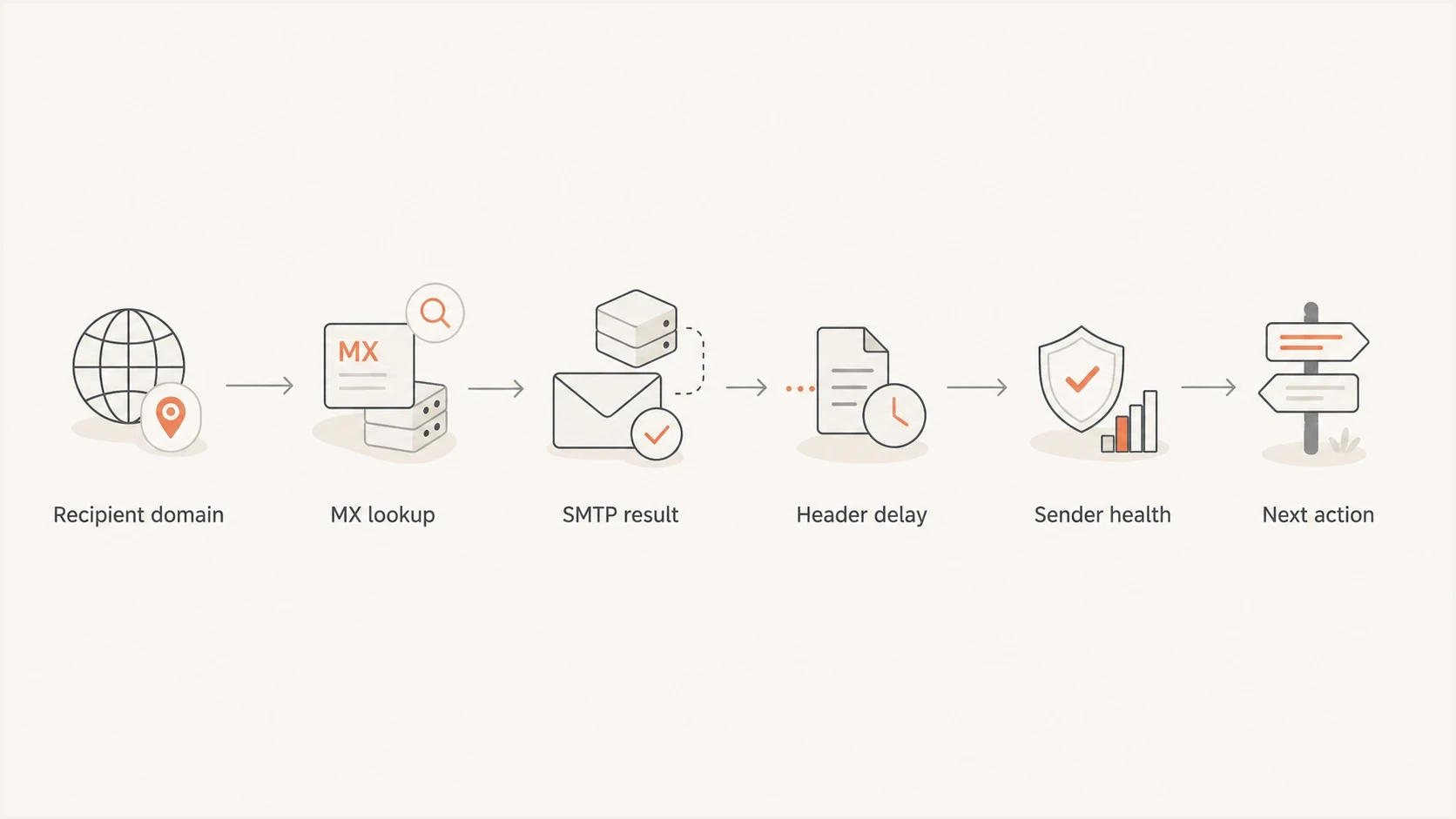
Flowchart showing Road Runner troubleshooting from recipient domain to next action.
Do not diagnose rr.com as one domain
A Road Runner address can be active, migrated, or inactive. The full subdomain tells you more than the parent domain. Avoid broad conclusions until you have current MX, SMTP, and mailbox evidence.
For a broader map of related legacy destinations, compare the findings with a current internal domain list and then read the live MX results. The safest reference point is the DNS answer returned for the recipient domain at the time of the incident. A related page on Charter MX domains can help frame the research, but the logs should decide the case.
What the bounce and delay clues mean
An enhanced status code such as 4.4.2 identifies a temporary connection problem, commonly a connection dropped during transmission. The complete remote response matters because it can add a Spectrum AUP identifier or wording that points to a connection limit, policy decision, timeout, or network fault.
|
|
|
|---|---|---|
Late arrival | Message accepted after retries or delayed after acceptance | Received headers |
Soft bounce | Temporary SMTP failure, timeout, or connection limiting | Full SMTP response |
Hard bounce | Invalid mailbox, inactive domain, or permanent policy rejection | Enhanced code and text |
One subdomain only | Destination-specific MX, policy, or mailbox issue | MX lookup |
Multiple senders affected | A recipient-side condition becomes more likely | Same-domain, same-time logs |
Road Runner delivery symptoms and likely starting points
The key split is SMTP acceptance. If the recipient MX accepted the message quickly and the customer saw it 12 hours later, the delay happened after acceptance. If the sending platform retried for 12 hours before acceptance, the delay happened during delivery attempts. The fix path differs, so request full headers from a delayed message whenever possible.
Useful DNS checksbash
dig MX nycap.rr.com

dig A pkvw-mx.msg.pkvw.co.charter.net

dig TXT yourdomain.com

dig TXT _dmarc.yourdomain.com
Save the timestamp with each lookup. DNS and routing can change, and a saved answer gives the sending platform or receiving operator something concrete to compare with its logs.
How to read Spectrum AUP error codes
Spectrum SMTP responses can include an Acceptable Use Policy identifier such as AUP#In-1310. Preserve that identifier with the SMTP reply. The In label concerns mail entering Spectrum's receiving system. An AUP#Out response concerns a Spectrum customer sending through Spectrum's outbound SMTP service, so it does not diagnose an external sender's delivery to a Road Runner recipient.
|
|
|
|---|---|---|
4xx response | Temporary deferral or transport failure | Keep normal retries and record every attempt |
AUP#In-1300 to 1340 | Spectrum connection limits that vary with sending IP reputation | Reduce concurrent and total connections, then run a controlled test |
5xx invalid recipient | Permanent mailbox or address failure | Suppress that address instead of retrying it |
AUP#Out code | Problem sending from a Spectrum-hosted mailbox | Check the customer's SMTP client and Spectrum account path |
How to act on Spectrum and SMTP response signals
Do not reduce volume blindly
For an AUP#In-13xx pattern, lower parallel connections to the affected MX and smooth the queue before cutting total campaign volume. Preserve the envelope sender, sending IP, remote MX, UTC timestamp, connection count, and complete response so the test produces usable evidence.
A 550 response is a permanent response for that SMTP attempt even when its text recommends trying again later. Do not force immediate retries of the rejected message. Correct the stated cause, reduce connection pressure when the AUP code calls for it, then send a controlled new test.
How to separate sender issues from Road Runner issues
Do not assume the receiving side is at fault because the domain is old. First confirm that the sender side is sound enough for a receiving operator to act on the report. Check authentication, DNS, reputation, retry behavior, connection counts, and whether the same problem appears across more than one sending route.
Sender-side evidence
- Authentication: SPF or DKIM authenticates and aligns with the visible From domain, so DMARC passes.
- DNS health: Reverse DNS, HELO, SPF lookup limits, and DKIM keys are valid.
- Reputation: Sending IPs and domains are not listed on a relevant blocklist or blacklist.
- Pattern: The issue concentrates on one recipient domain, MX host, or AUP code.
Recipient-side evidence
- MX behavior: The same MX returns repeatable connection errors after controlled retries.
- Header trail: Received headers show the delay happened after the recipient MX accepted the message.
- Mailbox state: Specific addresses return permanent invalid-recipient responses.
- Consistency: Similar messages fail at the same domain and time through more than one healthy route.
A quick way to check the sender side is to send a real message through an email tester and inspect the authentication, DNS, and content signals before escalating the destination issue. Pair that with a domain health check when the sender uses multiple domains, subdomains, or sending services.
Email tester
Send a real email to this address. Suped shows a results button when the test is ready.
?/43tests passed
For recurring Road Runner trouble, check sender authentication over time rather than only on the day of the complaint. Suped's DMARC reporting shows which sources passed, failed, or sent without authorization during the failure window. Its issue detection can turn a vague complaint into a specific action, such as correcting DKIM alignment for one sending service or removing a retired sender.
Issues page showing top issues, verified sources, unverified sources, and authentication pass rates
A practical troubleshooting workflow
When a customer reports delayed Road Runner mail, do not diagnose the delay from open times alone. Open tracking can lag, be blocked, or fire after a later user action. Headers and SMTP logs are stronger evidence.
- Collect: Save the full recipient domain, message ID, sending service, sending IP, envelope sender, enhanced status code, AUP identifier, and complete response text.
- Group: Split results by full recipient domain, then by MX host and response code. Do not group every Road Runner address together.
- Compare: Check whether transactional and marketing traffic fail at the same destination during the same time window.
- Inspect: Request full headers from delayed messages and find the largest time gap between Received lines.
- Validate: Check SPF, DKIM, DMARC, reverse DNS, connection counts, and blocklist or blacklist status before escalation.
- Escalate: Send the receiving operator a concise report with UTC timestamps, message IDs, remote MX host, sending IP, and complete SMTP response.
Evidence template for the sending platformtext
Recipient domain: nycap.rr.com
Message ID: <message-id-here>
Envelope sender: bounce@yourdomain.com
Sending IP: 192.0.2.25
Remote MX: mx-host.example
Attempt time UTC: 2026-07-28 13:15
Concurrent connections: 4
SMTP response: 4.4.2 connection dropped
Retry result: accepted after 11 hours
Header delay: largest gap before final delivery
If the pattern looks like connection limiting, compare it with general Spectrum throttling issues and keep the evidence narrow. A receiving team can act faster on a repeatable issue than on a broad complaint about old Road Runner addresses.
?
What's your domain score?
Deep-scan SPF, DKIM & DMARC records for email deliverability and security issues.
Use Suped's source-level DMARC data to confirm that the affected messages came from an authorized source and that authentication stayed stable during the failure window. Keep that evidence beside the SMTP response, DNS results, and message headers so the escalation separates sender authentication from destination handling.
What to fix and what to leave alone
Do not change the whole sending program because one legacy destination returned a temporary failure. Match the action to the evidence.
Road Runner response levels
Use the SMTP evidence to choose between normal retry, connection control, escalation, and suppression.
Retry normally
single 4xx
A single temporary failure clears within the normal queue schedule.
Reduce connections
AUP#In-13xx
The affected MX repeatedly returns a Spectrum connection-limit identifier.
Escalate
repeatable
The same destination response continues after sender checks and a controlled test.
Suppress
permanent 5xx
The mailbox returns a permanent invalid-recipient or inactive-address response.
Suppress addresses that return permanent recipient failures. For active but slow domains, keep sending through the normal retry queue, reduce sudden connection spikes, and track whether the receiving MX accepts mail after retry. For connection failures, get the complete SMTP transcript because a dashboard summary often hides the useful part of the response.
For reputation-related cases, check whether the sending IP or domain appears on a blocklist (blacklist). Suped's blocklist monitoring tracks those listings beside DMARC and source data, helping a team determine whether a Road Runner bounce coincided with a sender reputation issue or stayed limited to one destination.
Blocklist checker
Check your domain or IP against 144 blocklists.
 Spamhaus
 0Spam
0Spam

 Cisco
Cisco
 NoSolicitado

 URIBL
URIBL
 abuse.ro
 ALPHANET
 Anonmails
 Ascams
 BLOCKEDSERVERS
 Calivent Networks


 EFnet
EFnet




 JustSpam
 Kempt.net
 NordSpam

 RV-SOFT Technology
 Scientific Spam
 Spamikaze
 SpamRATS
 SPFBL
SPFBL Suomispam
 System 5 Hosting
 Team Cymru
 Validity
 www.blocklist.de Fail2Ban-Reporting Service
 ZapBL
ZapBL 2stepback.dk
 Fayntic Services
 ORB UK
 technoirc.org
 TechTheftSpamhaus0SpamCiscoNoSolicitadoURIBLabuse.roALPHANETAnonmailsAscamsBLOCKEDSERVERSCalivent NetworksEFnetJustSpamKempt.netNordSpamRV-SOFT TechnologyScientific SpamSpamikazeSpamRATSSPFBLSuomispamSystem 5 HostingTeam CymruValiditywww.blocklist.de Fail2Ban-Reporting ServiceZapBL2stepback.dkFayntic ServicesORB UKtechnoirc.orgTechTheftSpamhaus0SpamCiscoNoSolicitadoURIBLabuse.roALPHANETAnonmailsAscamsBLOCKEDSERVERSCalivent NetworksEFnetJustSpamKempt.netNordSpamRV-SOFT TechnologyScientific SpamSpamikazeSpamRATSSPFBLSuomispamSystem 5 HostingTeam CymruValiditywww.blocklist.de Fail2Ban-Reporting ServiceZapBL2stepback.dkFayntic ServicesORB UKtechnoirc.orgTechTheftSpamhaus0SpamCiscoNoSolicitadoURIBLabuse.roALPHANETAnonmailsAscamsBLOCKEDSERVERSCalivent NetworksEFnetJustSpamKempt.netNordSpamRV-SOFT TechnologyScientific SpamSpamikazeSpamRATSSPFBLSuomispamSystem 5 HostingTeam CymruValiditywww.blocklist.de Fail2Ban-Reporting ServiceZapBL2stepback.dkFayntic ServicesORB UKtechnoirc.orgTechTheftSpamhaus0SpamCiscoNoSolicitadoURIBLabuse.roALPHANETAnonmailsAscamsBLOCKEDSERVERSCalivent NetworksEFnetJustSpamKempt.netNordSpamRV-SOFT TechnologyScientific SpamSpamikazeSpamRATSSPFBLSuomispamSystem 5 HostingTeam CymruValiditywww.blocklist.de Fail2Ban-Reporting ServiceZapBL2stepback.dkFayntic ServicesORB UKtechnoirc.orgTechTheft
Keep the customer service answer factual
A useful customer-facing answer says that the message was deferred, retried, or accepted at a specific time. Avoid saying "Road Runner is broken" without receiving-side evidence. Give the domain, timestamp, status, and next action.
If authentication keeps changing across sending services, use a dedicated DMARC monitoring workflow to separate authorized source changes from incidents. Suped combines DMARC reports, source-level issue detection, DNS controls, and multi-domain views so the team can identify which sender or record changed during the delivery problem.
Views from the trenches
Best practices
Group Road Runner results by exact subdomain before judging sender reputation or health.
Save MX answers with timestamps so later sending reviews compare the same route.
Use full headers to prove whether the delay happened before or after acceptance.
Common pitfalls
Do not treat every rr.com bounce as the same failure or the same receiving operator.
Do not rely on open timestamps when Received headers can show the actual delivery delay.
Do not suppress active domains until retry and bounce evidence supports the choice.
Expert tips
Ask for full SMTP transaction details when a short 4xx summary hides the actual cause.
Compare sending routes only when they share dates, domains, and remote MX hosts.
Track inactive subdomains separately so old addresses do not distort active metrics.
Road Runner subdomains need independent handling because some addresses are inactive, some moved, and others still route through regional mail systems.
2023-03-06 - Email Geeks
MX lookups are the fastest way to identify who handles a specific Road Runner recipient domain before escalating a delay or bounce.
2023-03-06 - Email Geeks
How to handle recurring Road Runner failures
Road Runner delivery problems do not share one sender-side or recipient-side cause. The legacy domain structure means each subdomain needs its own evidence trail. Start with the full recipient domain, capture the MX answer, preserve the complete SMTP response and AUP code, then request headers when the message eventually arrives.
If authentication and reputation are sound, do not overcorrect the sending program. Control connections for documented AUP#In-13xx responses, suppress only addresses with permanent recipient failures, and escalate repeatable destination issues with message IDs, UTC timestamps, MX hosts, and response text. Suped keeps DMARC results, sender sources, DNS checks, and blocklist or blacklist signals together so the next complaint can be compared with the same evidence.




