How to resolve Comcast Xfinity 552 5.2.0 email rejection policy error?

Updated on 5 Aug 2026: We added Xfinity recipient guidance and tightened the diagnosis for policy, size, authentication, and blocklist errors.
Resolve a Comcast Xfinity 552 5.2.0 policy rejection by treating it as a sender identity or reputation block until proven otherwise. Do not treat it like a generic mailbox-size 552 error. Get a fresh bounce, confirm DMARC passes through SPF or DKIM with a domain that matches the visible From domain, check domain and IP reputation, pause Comcast traffic, send a small clean test, then escalate with current evidence.
The phrase Prohibited by policy matters more than the first three digits. Comcast has already received the message data and decided not to accept the mail. That points to a policy decision based on the sending domain, authentication match, message pattern, attachment, recipient complaints, or reputation signals. An IP listing can still be involved, but a clean IP check does not close the case.
Answer first
If Comcast is rejecting every message with 552 5.2.0, stop normal sending to Comcast, verify the sender's authentication and reputation, then use Xfinity's Customer Security Assurance path to request a review with a recent bounce. Repeated retries without a new signal usually make the sender look noisier.
What the Comcast 552 5.2.0 policy error means
The most common form looks like a rejection at the end of the DATA command. That timing is important. Comcast has seen the envelope, headers, body, DKIM signature, sending IP, and recipient before it makes the final decision. Treat this as a policy verdict, not a connection failure.
Typical Comcast Xfinity bouncetext
Remote server: mx1.comcast.net
Command: DATA
Reply: 552 5.2.0 izTDtehDSzHm7izTDtaq70 Prohibited by policy
Result: message rejected after content and identity evaluation
A 552 code can mean storage or mailbox status in older SMTP wording, but the provider's text controls the operational meaning. Xfinity separately documents 552 Message size exceeded for messages over its 15 MB inbound limit. If the reply says Prohibited by policy, use the policy path. For the broader class of errors, keep SMTP 552 handling as a separate reference.
|
|
|
|---|---|---|
End of DATA plus Prohibited by policy | Filtering policy | Review identity, content, and reputation |
552 Message size exceeded | Total MIME message over 15 MB | Reduce the full message size |
DM000001 | Published DMARC policy | Fix the SPF or DKIM domain match |
BL code | Blocklist or blacklist status | Follow the code-specific removal path |
Only Comcast rejects | Local provider policy | Escalate with current samples |
Use the complete bounce wording to decide the next action.
Fix it in the right order
Start with current evidence, not a theory. Xfinity support needs the domain, IP, and recent bounce details because older 5xx examples often lack reviewable log context. If the sender is fully blocked, stop the normal stream to Comcast and switch to controlled testing.
- Pause traffic. Hold Comcast and Xfinity recipients out of campaigns until you have a clean test path.
- Capture bounces. Save the full SMTP reply, timestamp, recipient domain, sending IP, envelope sender, and Message-ID.
- Verify identity. Confirm DMARC passes because either the SPF-authenticated envelope domain or a valid DKIM signing domain matches the visible From domain.
- Validate the sending host. Check forward DNS, PTR or reverse DNS, and whether the IP is static and intended for mail.
- Check reputation. Review complaint, bounce, and engagement changes for Comcast recipients, plus blocklist and blacklist status.
- Compare the message. Remove unusual attachments and confirm the complete MIME message stays below Xfinity's documented 15 MB inbound limit.
- Send a test. Send one plain operational message and compare its result with the rejected message type.
- Escalate cleanly. Give Customer Security Assurance a current evidence packet with domain and IP details.
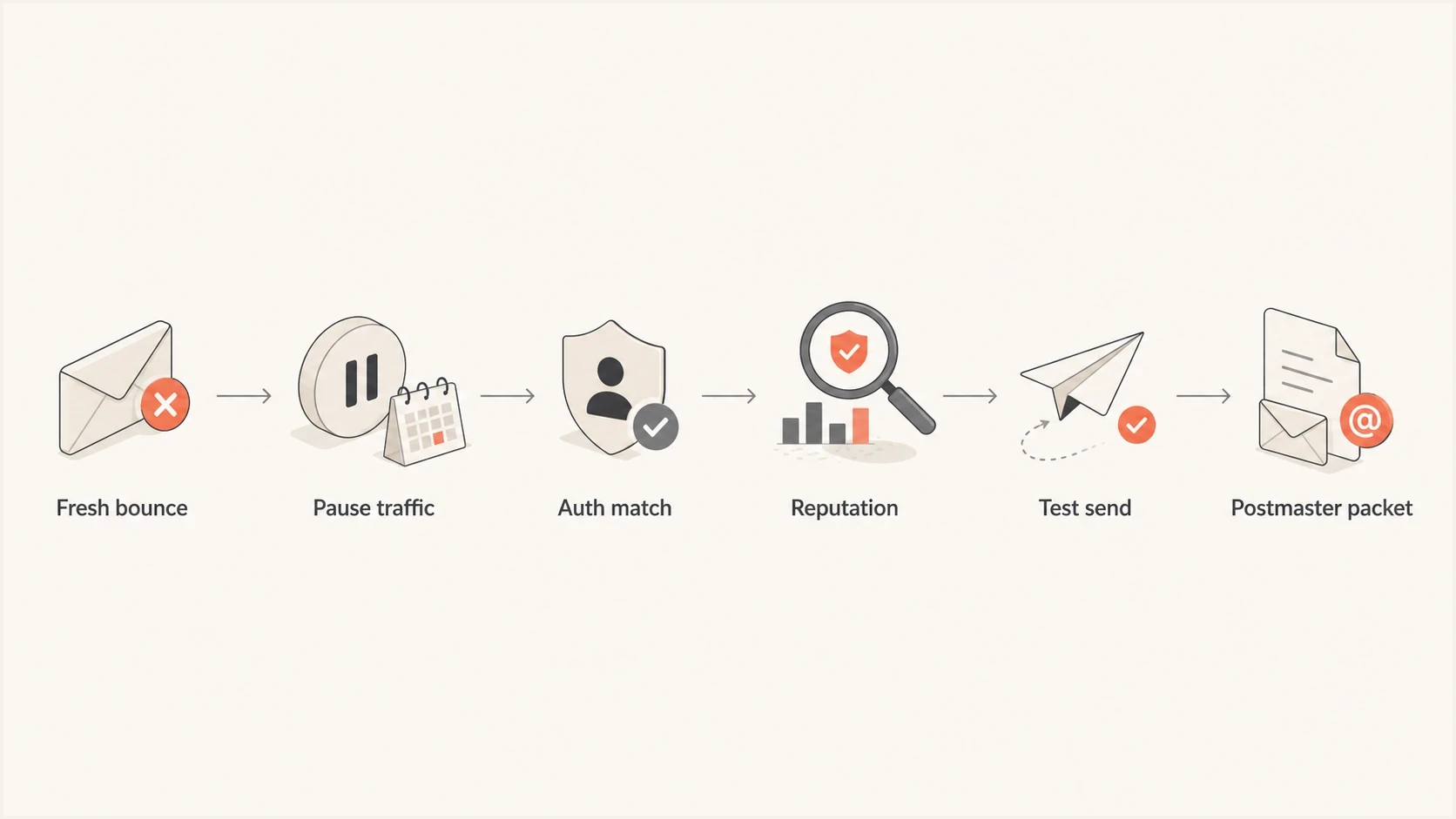
Six-step flowchart covering a fresh bounce, paused traffic, authentication, reputation, testing, and Xfinity escalation.
Run the domain through a domain health checker before contacting support. Then send one real message through the email tester to inspect headers, authentication results, and content signals together.
Email tester
Send a real email to this address. Suped shows a results button when the test is ready.
?/43tests passed
If you are the Xfinity recipient
The Xfinity mailbox owner often notices the missing mail first, but the remote sender receives the complete SMTP diagnostic. Ask the sender or their mail administrator for the full bounce, including the reply text, sending IP, timestamp, Message-ID, and the Comcast host that rejected it. A screenshot of an inbox error rarely contains enough evidence.
- One sender fails. Send the complete bounce to that sender's mail administrator. The sender should investigate and use Xfinity's Report an issue path when needed.
- Several unrelated senders fail. Collect a recent example from each sender and ask Xfinity support for the Customer Security Assurance team.
- Only one message type fails. Compare the attachment, complete MIME size, links, and template with a plain message that reaches the same mailbox.
- The sender is on your safe list. A safe-list entry can affect mailbox filtering, but it does not guarantee acceptance when Xfinity rejects the message at its inbound gateway.
Use the Xfinity error codes page to match any named code in the bounce. If the reply contains only 552 5.2.0 Prohibited by policy, give Customer Security Assurance the current sender and recipient evidence rather than guessing at a DMARC or blocklist cause.
Check authentication even when it looks correct
The most expensive mistake is saying authentication passes without checking the exact domain relationship Comcast evaluates. SPF can pass for the envelope sender while DMARC still fails for the visible From domain. DKIM can pass for a vendor domain while the From domain gets no valid domain match. Forwarding, aliases, list software, and message rewriting can change the final result.
Looks good
- SPF pass. The sending IP is authorized by the envelope sender domain.
- DKIM pass. At least one signature validates without body or header damage.
- DMARC pass. A passing SPF or DKIM domain matches the visible From domain under DMARC.
- DNS present. The required SPF, DKIM, DMARC, forward DNS, and PTR records resolve cleanly.
Still failing
- DMARC mismatch. The passing domain differs from the visible From domain.
- Vendor drift. A new sender uses a domain or IP that DNS does not authorize.
- Selector issue. Old DKIM selectors remain live while new mail signs differently.
- Infrastructure issue. Authentication passes, but the sending IP lacks valid forward or reverse DNS.
For domains with several senders, DMARC monitoring separates verified sources from unverified sources. Comcast rejections are easier to explain when the evidence shows which provider, selector, return-path, or sending IP changed before the failure started.
DMARC record for staged enforcementtext
_dmarc.example.com. 3600 IN TXT "v=DMARC1; p=quarantine; pct=25;"
"rua=mailto:dmarc@example.com; adkim=s; aspf=s"
Do not skip the visible From domain
A pass elsewhere in the message path is insufficient. The domain the recipient sees needs a valid SPF or DKIM path into DMARC, with the authenticated domain matching the visible From domain.
If the bounce contains DM000001, Xfinity identifies the sender's published DMARC policy as the specific reason for rejection. A generic 552 5.2.0 Prohibited by policy reply does not prove DMARC failure by itself.
Check reputation, blocklists, and message pattern
If authentication and sending-host DNS are clean, move to reputation. Comcast can reject mail for domain-level policy reasons even when the sending IP is not on a public blocklist or blacklist. Review the domain, sending IPs, complaint pattern, hard bounce rate, and sudden changes in Comcast engagement as one case.
Use blocklist monitoring to track IP and domain listings, then compare the timing against the first Comcast rejection. If the bounce includes a Comcast-specific blocklist or blacklist code, handle that path separately. The Comcast BL00000 path differs from a generic policy rejection, even though both can look like Comcast blocking.
Do not retry the same rejected campaign
- Volume risk. Large retry queues can turn a policy issue into a reputation issue.
- Evidence risk. Repeated samples with the same problem do not help support isolate a fix.
- Recipient risk. Sending to inactive Comcast addresses increases negative signals.
- Content risk. A promotional template can fail while a plain operational test passes.
Escalate through Xfinity Customer Security Assurance
Xfinity directs unresolved sender blocks to its Customer Security Assurance Postmaster route and the Xfinity error codes page. Use the Report an issue option and include the full error. If the first response focuses only on IPs, explain whether the visible From domain appears blocked and include the return-path domain, DKIM domain, sending IPs, and recent SMTP replies.
Customer Security Assurance packettext
Domain: example.com
Sending IPs: 203.0.113.10, 203.0.113.11
Envelope-from: bounce@example.com
Header From: example.com
DKIM domain: example.com
SPF result: pass
DKIM result: pass
DMARC result: pass
PTR and forward DNS: pass
Comcast recipient domain: comcast.net or xfinity.com
Bounce timestamp UTC: 2026-05-27 14:03:22
Full SMTP reply: 552 5.2.0 ... Prohibited by policy
Message-ID: <20260527140322.abc123@example.com>
Volume paused: yes
Sample size after fix: 1 message
If the rejection is mixed with deferrals, throttling, or connection timeouts, separate those into their own timeline. A 4xx deferral and a 5xx policy rejection have different fixes. For a wider Comcast-specific runbook, keep the Comcast rejection guide next to this checklist.
What a good test looks like
A useful post-fix test is small, recent, and easy to inspect. Send one simple message to a known Comcast recipient, capture the delivery result, then slowly restore volume only after the same domain and content class is accepted.
Where Suped fits
Suped's product connects DMARC source data, DNS checks, issue alerts, and blocklist or blacklist monitoring in one workflow. For a Comcast case, use it to identify which sending source, signing domain, return-path, or IP changed before the rejection, then preserve that evidence for Customer Security Assurance. Xfinity controls the acceptance decision; Suped helps prepare and monitor the technical evidence.

Issue steps to fix dialog showing the issue overview, tailored fix steps, and verification action
In Suped's product, start with verified and unverified sources, then open the issue view for the failing domain. Check the reporting source, DKIM selector, envelope domain, visible From domain, and sending IP against the last known accepted stream. Hosted SPF and hosted DMARC can help an authorized team apply a confirmed DNS change, but do not change policy simply to work around a Comcast rejection.
After Xfinity accepts the controlled test, monitor the same sender identity as volume returns. A new policy rejection, authentication mismatch, or blocklist or blacklist event should trigger another pause before a retry queue grows.
Views from the trenches
Best practices
Use a current bounce sample because old 5xx replies lose value for provider log review.
Give support both domain and IP evidence so the review does not stop at IP reputation.
Pause Comcast traffic before testing so repeated retries do not add negative signals.
Common pitfalls
Assuming IP status is the whole case leaves domain policy blocks unresolved and hidden.
Using a month-old rejection sample slows review because current log context is missing.
Calling authentication clean without checking visible From domain matching creates blind spots.
Expert tips
Track Comcast separately from the rest of the list so local policy changes are visible.
Send one simple test message after DNS fixes before restoring normal campaign volume.
Keep Message-ID, timestamp, IP, and From domain together in every escalation packet.
Marketer from Email Geeks says a Comcast review needs the domain and IP, not only a description of the bounce.
2025-03-12 - Email Geeks
Marketer from Email Geeks says a 5xx sample older than 30 days should be replaced with a newer bounce.
2025-03-12 - Email Geeks
The practical resolution
The direct fix for Comcast Xfinity 552 5.2.0 is to stop normal Comcast sending, prove that DMARC passes through an SPF or DKIM domain match, validate forward and reverse DNS, check blocklist and blacklist exposure, compare the rejected message, then send one clean test. If the test still fails, use Xfinity's Customer Security Assurance path with a recent evidence packet.
Do not wait for more identical bounces to make the case stronger. Current, specific evidence beats volume. Once Comcast accepts a controlled test, restore traffic slowly and monitor the same sender identity so the issue does not return under a different template, vendor, or return-path.