
How to manage subdomain reputation when using multiple IP addresses for email sending?

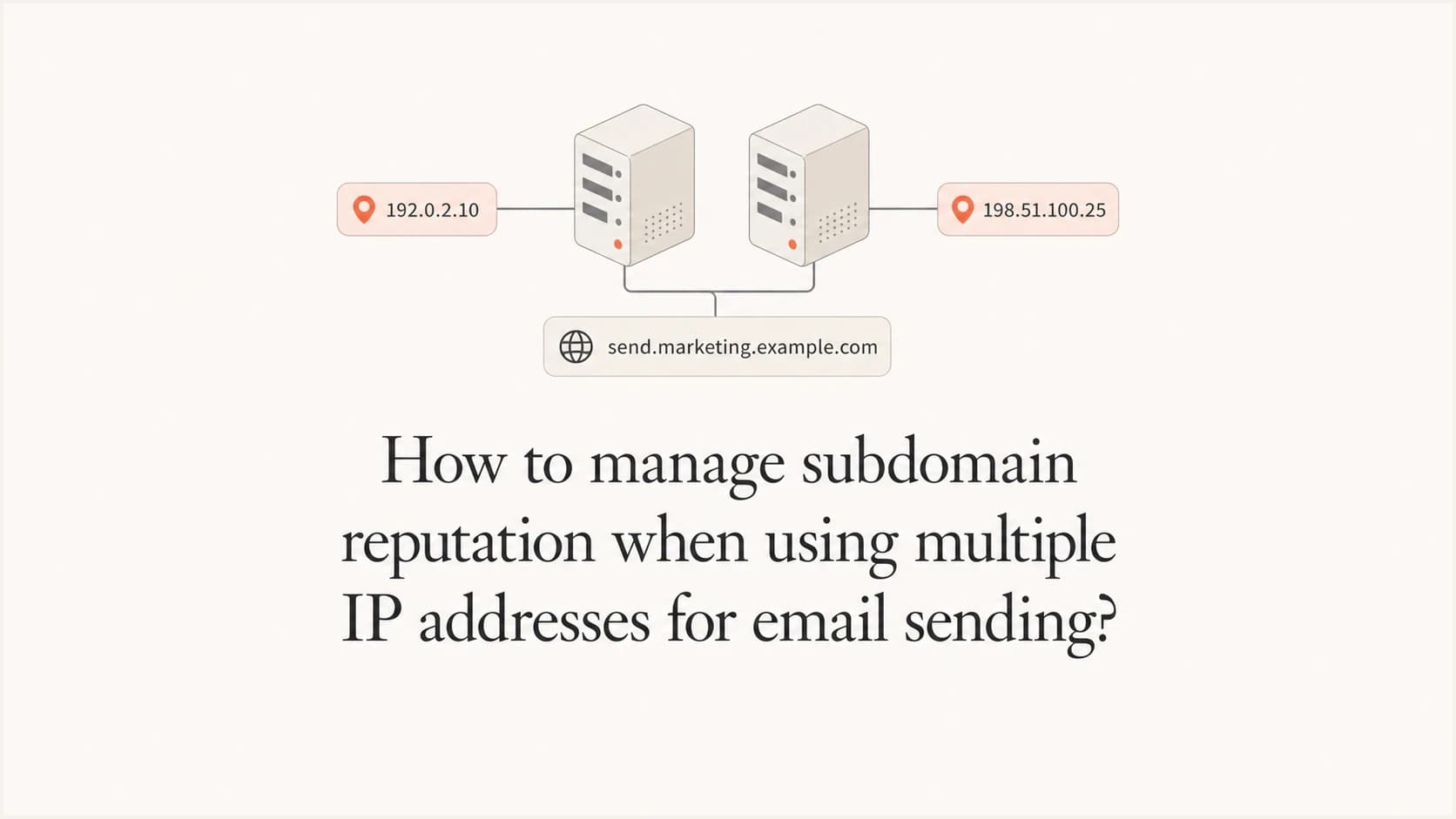
Updated on 10 Oct 2026: We clarified shared and dedicated IP choices, corrected the DNS setup, and added provider-specific checks for a controlled migration.
Yes, you can keep an existing sender subdomain while multiple email platforms send through different IP addresses. Each platform must authenticate the shared From domain and use separate technical hostnames where required. New dedicated IPs need a controlled warmup; established shared IP pools still need a gradual ramp for your mail stream. A strong subdomain history helps, but it does not make a new IP trusted on day one.
Treat the visible From subdomain, the DKIM domain, the return-path domain, the tracking hostnames, and the IP pool as separate pieces. You can reuse the visible sender identity, but you should not force two platforms to share the same bounce domain or click tracking hostname. That is where migrations get messy.
Use one From subdomain only when authentication is clean
The visible From subdomain can be the same across two sending platforms. For example, both the old platform and the new platform can send as newsletter@email.example.com if each platform signs with DKIM using email.example.com. Under relaxed DMARC matching, a passing signature using example.com can also match when both domains have the same DMARC Organizational Domain; strict mode requires the exact From domain. DMARC passes when at least one passing DKIM signature or SPF result has the required domain match. With aspf=s, bounce-a.email.example.com does not match email.example.com; matching DKIM can still pass DMARC.
- DKIM first: Use a separate selector for each platform, such as s1 for the legacy platform and s2 for the new platform.
- SPF separately: Give each platform its own return-path or bounce subdomain so SPF records do not collide. SPF checks the envelope sender domain, not the visible From address, and parent SPF records do not automatically cover subdomains.
- DMARC visibly: Monitor DMARC pass rates for the shared From subdomain before you move meaningful volume.
- IP cautiously: Warm each new dedicated IP even when the subdomain has years of good sending history.
The common mistake is assuming the new platform inherits the old platform's delivery. Mailbox providers see a familiar subdomain, but they also see a new IP, changed headers, new link hostnames, and sometimes new sending cadence. A separate DKIM selector helps identify the platform; it does not create a separate sending domain reputation.
- Do this: Move recipients with recent, genuine engagement first and increase volume only after complaints, bounces, deferrals, and inbox placement stay stable. Use clicks, replies, or recent purchases rather than opens alone, which privacy protections can inflate.
- Avoid this: Do not split the same campaign randomly across old and new IPs without source-level reporting.
Illustrative DNS structure for two platformsdns
_dmarc.email.example.com. 3600 IN TXT "v=DMARC1; p=none; rua=mailto:dmarc@example.com"

s1._domainkey.email.example.com. 3600 IN CNAME s1._domainkey.legacy-vendor.example.net.

s2._domainkey.email.example.com. 3600 IN CNAME s2._domainkey.new-vendor.example.net.

bounce-a.email.example.com. 3600 IN TXT "v=spf1 include:spf.legacy-vendor.example -all"

bounce-b.email.example.com. 3600 IN TXT "v=spf1 include:spf.new-vendor.example -all"
This example uses reserved domains and p=none for a newly configured monitoring policy. Replace the DNS targets and reporting address with actual values, and retain an existing quarantine or reject policy during migration. Publish the bounce records each platform requires, including MX or CNAME records where specified; a CNAME cannot coexist with an SPF TXT record at the same hostname.
Publish only one SPF record per envelope sender domain and keep evaluation within the 10 DNS-lookup-causing term limit, including nested includes. Direct ip4 and ip6 mechanisms do not count toward that limit, as specified in RFC 7208.
RFC 9989 removed the pct tag. Its t=y test tag requests handling one policy level below the published policy, but receivers using older DMARC rules ignore that tag. Do not rely on t=y for a migration safety net. If no explicit subdomain DMARC record exists, policy discovery can select an ancestor's policy, with sp controlling existing subdomains where applicable; check the effective policy before changing DNS.
Separate From identity and platform hostnames
The sender identity can stay stable while the infrastructure changes. That means the visible From address can keep using email.example.com, but the new platform needs its own bounce, link, image, unsubscribe, and verification hostnames where the platform requires them.
Safe to share
- From domain: The same visible sender subdomain can be used by both platforms.
- Brand identity: The recipient sees the same sender name and address during the migration.
- DMARC policy: One policy can protect the shared sender subdomain.
Keep separate
- Return-path: Each platform should own its own bounce domain and SPF configuration.
- Click tracking: One CNAME hostname cannot target two independent platforms at once.
- Inbound MX: Multiple MX records support preference and failover, not routing replies or bounces to the platform that sent a message.
A clean pattern is to create a new technical subdomain for the new platform, such as mail.example.com or email2.example.com, then configure the platform so the visible From address still uses email.example.com. The technical subdomain handles platform-specific links and bounces; a passing DKIM signature with the required domain match keeps DMARC passing for the visible sender.
|
|
|
|
|---|---|---|---|
From subdomain | Yes | DMARC failure | Use matching DKIM |
Bounce domain | Keep separate across platforms | Conflicting bounce routing or SPF | Use platform-specific hostnames |
Tracking host | Keep separate across platforms | Broken links | Use a new host |
Sending IP | Yes, within a managed pool | Shared IP reputation | Separate streams where needed |
Use this map before changing DNS.
If you are mapping many sender subdomains to IP pools, use one subdomain per distinct mail stream rather than one per IP. A single sender subdomain can use multiple IPs, and multiple subdomains can share one IP pool. A deeper planning view on subdomain per IP helps when the sending model has several brands, regions, business units, or mail types.
Keep each IP pool stable and useful
More IP addresses do not automatically improve delivery. Each dedicated IP needs regular, predictable traffic and enough volume for mailbox providers to build a useful history. Spreading modest volume across too many IPs creates several thin reputations and makes performance harder to diagnose.
- Assign by stream: Keep transactional and promotional traffic in separate pools when their cadence and complaint risk differ. Different subdomains on the same IP still share that IP's reputation risk.
- Keep routing stable: Keep mail streams assigned to stable pools and use the platform's supported balancing within each pool. Avoid ad hoc IP rotation to bypass throttling.
- Plan enough capacity: Size pools for normal traffic and expected peaks without creating idle IPs.
- Warm failover too: A standby IP with little recent traffic needs reassessment and a controlled ramp, so give it steady low-risk traffic before relying on it.
Do not shift a full queue to another IP when one IP is throttled. That move can overload a colder IP and spread the reputation problem. Cap failover volume, preserve provider retry schedules, and investigate the SMTP response pattern first.
Choose shared or dedicated IP pools
A managed shared IP pool is often a better fit for modest or irregular sending volume. The pool has existing sending history, but other senders affect its IP reputation. Google's sender requirements describe this shared-IP risk. Your sending subdomain still needs valid authentication and wanted mail.
Dedicated IPs give you control over the traffic using those addresses and require enough predictable volume to sustain reputation. Choose the pool based on actual volume per recipient provider, rather than assuming more IPs improve inbox placement.
- On shared IPs, ask the platform to investigate pool-wide deferrals or blacklist (blocklist) listings before changing your subdomain.
- On dedicated IPs, agree a warmup plan and verify capacity at each mailbox provider before increasing traffic.
- Record every sending IP, including shared overflow used during automated warmup, so source reporting covers the actual route.
- Keep list hygiene and suppression lists consistent across both pools; a different IP does not fix unwanted mail.
Stage the IP warmup and platform migration
Stage this as a controlled migration, not a DNS flip. The new platform should prove that it can authenticate, send to engaged recipients, and maintain normal delivery before it gets less engaged audiences or high-volume campaigns.
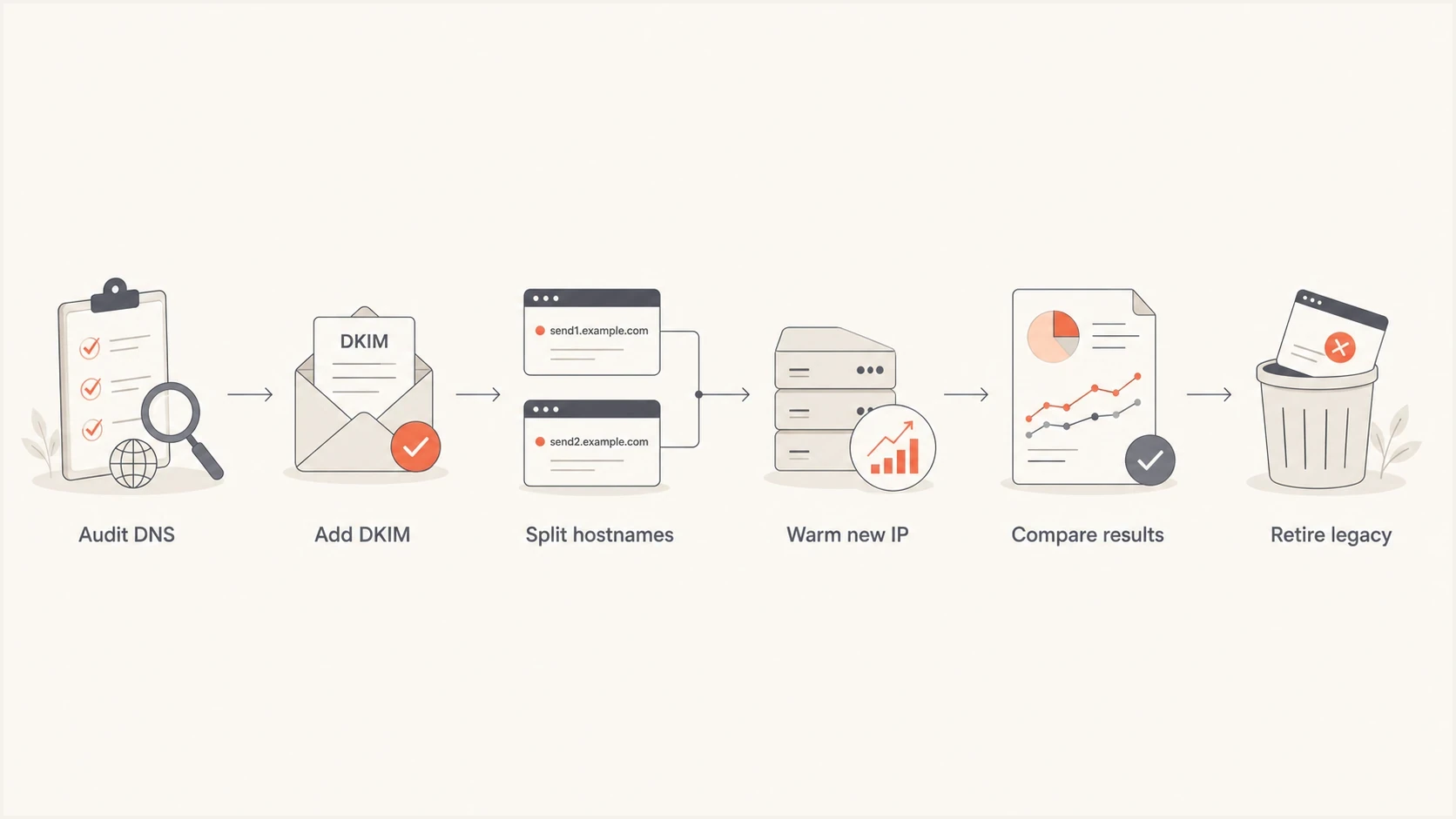
Email platform migration with DKIM setup, separate hostnames, IP warmup, and delivery checks.
- Audit first: List every current DNS record, DKIM selector, return-path domain, click host, IP address, and inbound route.
- Authenticate second: Send test mail through every new sending route and confirm SPF and DKIM pass, with at least one required domain match for DMARC, before production traffic.
- Warm third: Start with your most engaged recipients and set daily limits per IP and mailbox provider. Increase only after stable delivery; there is no universal warmup duration or percentage schedule.
- Compare fourth: Track old and new platforms separately by IP, provider, campaign type, complaint rate, and bounce pattern. Prevent duplicate sends and keep combined volume and recipient frequency near the established baseline.
- Retire last: Drain legacy queues and allow for DNS caching and delayed delivery before removing authentication records. Keep legacy tracking and unsubscribe endpoints working for messages already sent.
New IP warmup checkpoints
Set limits per IP and mailbox provider using recent results. These checkpoints are operational decisions, not universal volume thresholds.
Early proof
Small test cohort
Use engaged recipients and low-risk messages.
Measured growth
Provider-specific increases
Increase only after stable authentication, complaints, and SMTP responses.
Full cutover
Target volume sustained
Proceed after sustained delivery at the intended volume across recipient providers.
For promotional mail, keep RFC 8058 one-click unsubscribe working on both platforms through List-Unsubscribe and List-Unsubscribe-Post headers, plus a visible unsubscribe link in the body. Synchronize unsubscribes, spam complaints, and hard-bounce suppressions before the next send, and honor unsubscribe requests within 48 hours. Google's bulk sender guidance counts roughly 5,000 daily messages to personal Gmail accounts across the same primary domain, including subdomains; splitting IPs or platforms does not avoid those requirements.
For Gmail, aim to keep its daily user-reported spam rate below 0.1% and avoid reaching 0.3%, as specified in Google's spam-rate guidance. Pause volume increases when complaints rise, before that upper limit. A platform's complaint rate uses different reporting coverage and denominators, so it is not interchangeable with a mailbox provider's rate.
For transactional mail, base the ramp on actual volume and delivery urgency rather than assuming it is smaller than marketing traffic. Every sending IP needs valid forward and reverse DNS. If you control the MTA, make the PTR hostname resolve back to the same IP and use a consistent EHLO or HELO identity. The multiple IP rDNS setup has to match the platform and IP ownership model.
Monitor by source, IP, and subdomain
During the overlap, DMARC aggregate reports alone are not enough. They show connecting IPs and authentication results, but do not measure inbox placement, complaints, or SMTP deferrals. RFC 9990 requires DKIM selectors when reporting a signature; older reports can omit them. Combine reports with delivered headers and platform logs to identify the affected source before changing volume.
Suped's DMARC monitoring product groups reported sending sources and authentication results, with alerts for failures and diagnostics for SPF and DKIM. Pair those results with Suped's blocklist monitoring to check affected IPs or domains during the overlap, then compare platform logs for delivery performance.
Suped DMARC dashboard showing email volume, authentication health, and source breakdown
Check DNS configuration, delivered message authentication, and reputation signals before raising volume. Start with Suped's domain health checker to catch DNS mistakes, then send a production-like message through each route to Suped's email tester so you can inspect headers, authentication, and content as delivered. Passing these checks does not establish inbox placement at other recipients.
Email tester
Send a real email to this address. Suped shows a results button when the test is ready.
?/43tests passed
|
|
|
|
|---|---|---|---|
DMARC | Passing with a domain match | New source failures | DNS and platform |
DKIM | Verified signature with a matching domain | Missing or failing signature | Platform |
IP | Stable SMTP responses | New deferrals by provider | Platform |
Gmail user-reported spam rate | Below 0.1% | Rising toward 0.1%; never reach 0.3% | Audience |
Blocklist or blacklist | No relevant listings | Listing associated with delivery failures | Ops |
Signals to compare during the overlap.
A blocklist or blacklist listing during migration does not always mean the shared subdomain is ruined, and a clear result does not guarantee inbox placement. Identify the listed IP or domain and check whether receiving providers cite it in delivery failures. Pause the affected source when the listing explains rejection, correct the cause, and follow the listing operator's removal process before resuming gradually.
When to use a new sending subdomain
Keeping the old subdomain is usually best when the mail type stays the same and the old reputation is healthy. A new subdomain is useful when the new platform sends a different mail stream or the old subdomain has DNS choices that cannot be separated cleanly. If reputation is damaged, fix consent, list quality, and sending behavior before considering a new subdomain. Mailbox providers do not publish the exact weight they give a subdomain, its parent domain, and shared infrastructure, so a new subdomain does not guarantee isolation from existing reputation.
Keep the subdomain
Use the current sender subdomain when the audience, cadence, mail type, and consent model are consistent with past sending.
- Good history: The subdomain has stable engagement and low complaints.
- Same stream: The new platform replaces the old one for the same mail type.
Create a new subdomain
Use a fresh subdomain when you need separation for risk or operations after fixing any underlying sending problems.
- Operational constraints: The current subdomain has platform DNS conflicts that cannot be separated cleanly.
- Different stream: Mail types with different urgency, cadence, or complaint risk need distinct controls.
If you create a new subdomain, treat it as a new reputation asset. Authenticate it, warm it gradually, and keep the list quality high. The benefit is cleaner operational separation, not guaranteed reputation isolation. Mailbox providers still need time and consistent recipient behavior before they trust it.
Subdomain and IP migration tips
Best practices
Keep each provider's return-path and click tracking hostnames separate before moving volume.
Use DKIM on the visible From subdomain so DMARC passes during platform overlap periods.
Ramp new IPs with engaged recipients first, then widen volume after stable inboxing data.
Common pitfalls
Do not use one CNAME for two platforms; separate click hosts and preserve old link endpoints.
Do not assume a trusted subdomain cancels out a cold IP or a changed sending pattern.
Do not use MX priorities to divide replies between platforms; keep reply routing explicit.
Expert tips
Keep old and new platform reports separate until the final DNS cleanup is complete.
Name selectors and bounce hosts by platform so future debugging has clear ownership.
Freeze risky campaign tests during warmup so new IP results are easier to interpret.
Marketer view
Marketer from Email Geeks says the same From subdomain can work on two platforms when SPF, DKIM, and DMARC pass for both.
2024-11-12 - Email Geeks
Marketer view
Marketer from Email Geeks says each platform should use different SPF return-path domains, while DKIM can use the same signing domain with different selectors.
2024-11-12 - Email Geeks
Complete the platform cutover carefully
The best path is usually to keep the proven From subdomain and change the infrastructure carefully underneath it. That means separate platform hostnames, separate DKIM selectors, clean SPF return paths, controlled IP warmup, and reporting that identifies each sending source.
Suped fits this workflow when you need one place to monitor authentication failures and blocklist (blacklist) status during the overlap. Keep authentication under continuous review and use platform delivery logs to decide whether each IP can handle the next increase in volume.




