How do I configure reverse DNS (rDNS) with multiple IP addresses for email sending?

Updated on 26 Jul 2026: We updated this guide with current FCrDNS checks and safer PTR rollout guidance for dedicated and managed IP pools.
Configure reverse DNS for multiple sending IPs by giving every dedicated IP its own hostname, publishing a forward A or AAAA record for that hostname, then asking the IP owner to publish the PTR record for that IP back to the same hostname. For two dedicated IPs, a clean pattern is mta1.ml.example.com for 123.234.123.234 and mta2.ml.example.com for 111.222.111.222.
The PTR does not need to return the exact authenticated sending domain, such as ml.example.com. It should return a real hostname that resolves forward to the same IP. When the IP provider supports custom rDNS for a dedicated IP, keep that hostname in your sending domain space. One hostname per IP is easier to audit and avoids confusing strict receiver checks.
- Use one host: Create mta1, mta2, and mta3 style hostnames for separate dedicated IPs.
- Ask the IP owner: Your DNS zone controls forward records, but the IP owner controls PTR.
- Keep the domain space: Use a hostname under your sending domain when custom rDNS is available.
- Verify with mail: Send a real test message and inspect the Received header, not only DNS.
The correct rDNS pattern
Reverse DNS works backwards from normal DNS ownership. You can publish mta1.ml.example.com in your normal DNS zone, but you usually cannot publish the PTR record yourself. The PTR lives in the reverse DNS zone for the IP address range, so the ESP, cloud host, ISP, or network team that owns the address space has to set it.
When a provider asks you to create an A record first, they are checking that the hostname requested for PTR resolves to the IP. After they create the PTR, a receiver can repeat the lookup in both directions. This matching result is forward-confirmed reverse DNS (FCrDNS).
The short rule
For dedicated IPs under your control, keep one PTR hostname per sending IP and use that hostname for EHLO when the MTA supports per-IP identities.
- Forward: mta1.ml.example.com resolves to 123.234.123.234.
- Reverse: 123.234.123.234 resolves back to mta1.ml.example.com.
- EHLO: the mail server uses a valid hostname that resolves publicly, preferably the PTR hostname for a dedicated IP.
- SPF: the EHLO hostname can publish a narrow SPF record for that IP.
Forward DNS recordsdns
mta1.ml.example.com.    300 IN A   123.234.123.234
mta2.ml.example.com.    300 IN A   111.222.111.222
mta3.ml.example.com.    300 IN A   134.211.211.211
mta1.ml-de.example.com. 300 IN A   121.212.121.212
PTR records to request from the IP ownertext
123.234.123.234 -> mta1.ml.example.com
111.222.111.222 -> mta2.ml.example.com
134.211.211.211 -> mta3.ml.example.com
121.212.121.212 -> mta1.ml-de.example.com
Do not remove the host prefixes from the PTR names. A receiver can look up mta1.ml.example.com and confirm that it returns the connecting IP. The PTR does not need to collapse to ml.example.com or match the visible From domain.
What receivers are checking
Most receivers do not use rDNS as the DMARC identifier. They use it as an infrastructure signal. The practical checks are whether the connecting IP has a PTR record, whether the PTR hostname resolves forward to the same IP, whether EHLO uses a valid public hostname, and whether SPF, DKIM, and DMARC authenticate the visible message domain.
A missing PTR or failed FCrDNS check can cause a temporary 4.7.23 response or a permanent 5.7.25 rejection at Gmail. These errors identify the connecting IP, so check the exact outbound address instead of assuming every IP in the pool has the same DNS state.
If the terms are still fuzzy, the shorter explainer on rDNS and FCrDNS is a useful reference before changing production DNS.
|
|
|
|
|---|---|---|---|
PTR | Hostname found | Missing PTR | IP owner |
Forward | Connecting IP returned | IP not returned | DNS owner |
EHLO | Valid public host | Invalid or generic host | MTA owner |
SPF | Authorized IP | Fail or none | Domain owner |
DMARC | Aligned SPF or DKIM | No aligned pass | Domain owner |
The checks are separate, but receivers read them together.
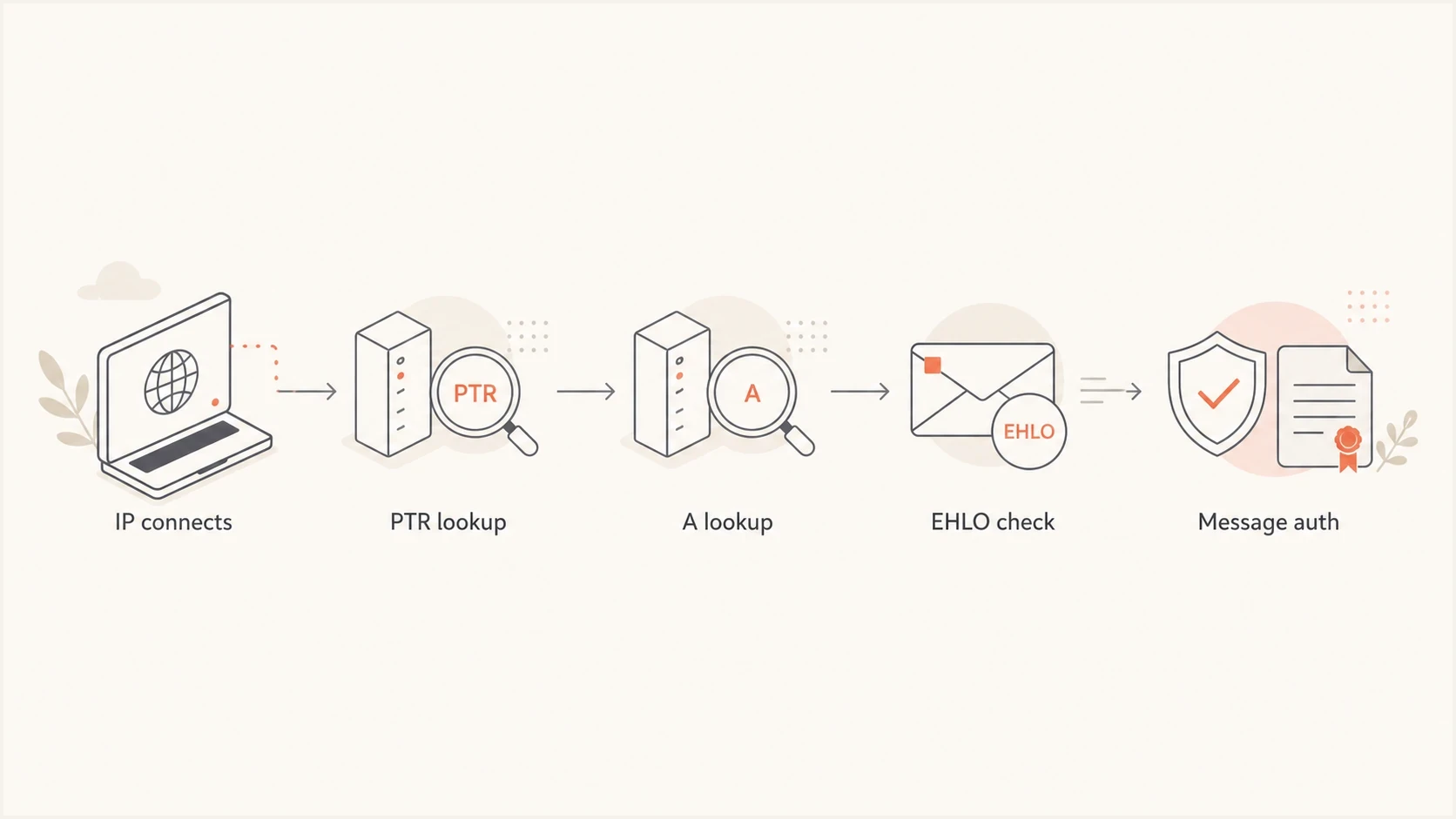
Receiver check flow for rDNS, EHLO, and message authentication.
Should I use one shared hostname?
DNS permits one hostname to have multiple A or AAAA records. FCrDNS can still pass when that address set includes the connecting IP. For dedicated email IPs, however, one hostname per IP keeps troubleshooting and reputation work clear. Some smaller receivers and validation scripts expect a simpler forward and reverse mapping.
One hostname per IP
- Clean check: each PTR hostname resolves to one clear sending IP.
- Easier operations: IP warmup, routing, and complaint tracking stay separated.
- Better receiver story: strict checks see a consistent host and IP pair.
- Clear headers: Received lines show exactly which server handed off mail.
One hostname for several IPs
- Valid DNS: FCrDNS passes when the address set includes the connecting IP.
- Harder audits: a failed lookup takes longer to trace to one IP.
- Checker noise: simple validation scripts can report a mismatch.
- Weak separation: pools, regions, and traffic types become less clear.
Keep a simple mapping file for operational work: one IP, one PTR host, the EHLO value used on that route, and any SPF policy published for the EHLO host. The same principle is covered in this IP hostname check guide.
Step-by-step setup
Set up multiple sending IPs in this order. Decide the naming pattern before asking the provider to publish PTR, because changing PTR later usually requires provider coordination and time for cached answers to expire.
- Choose hostnames: Use names like mta1.ml.example.com, mta2.ml.example.com, and mta3.ml.example.com.
- Publish forward DNS: Add one A record for each IPv4 address and one AAAA record for each IPv6 address.
- Request PTR: Ask the IP owner to point each IP back to its matching hostname.
- Set EHLO: Configure the MTA to use the matching hostname for that dedicated IP when per-IP EHLO is available.
- Add EHLO SPF: Publish a narrow SPF record when the hostname is used as an SPF HELO identity.
- Keep message auth: Maintain SPF, DKIM, and DMARC for the visible message domain too.
- Monitor reputation: Watch authentication, bounce, complaint, and blocklist (blacklist) signals after rollout.
SPF records for EHLO hostnamesdns
mta1.ml.example.com. 300 IN TXT "v=spf1 ip4:123.234.123.234 -all"
mta2.ml.example.com. 300 IN TXT "v=spf1 ip4:111.222.111.222 -all"
mta4.ml.example.com. 300 IN TXT "v=spf1 ip6:2001:db8::10 -all"
Do not edit PTR in the wrong zone
A PTR record for 123.234.123.234 is not created under example.com. It is published in the reverse DNS zone for the IP space. If the IP belongs to an ESP or hosting provider, their support team or control panel must publish it.
How to roll out PTR changes safely
Treat a PTR change as an infrastructure cutover. Publish and verify the new A or AAAA record first, then request the PTR change. Keep the old hostname resolving during the change because recursive resolvers can retain the previous answer until its TTL expires.
- Map each egress path: Confirm the public IP used by every MTA, NAT gateway, region, and fallback route.
- Publish forward DNS first: Verify that the new hostname returns the intended IP before the IP owner changes PTR.
- Coordinate PTR and EHLO: Change them together for a dedicated route when the MTA supports per-IP EHLO.
- Test one IP at a time: Check DNS, send a message, and review SMTP responses before moving the next IP.
- Retire old names later: Remove obsolete records only after the reverse-zone TTL and forward-record TTL have expired.
Do not route traffic early
Do not send from a new IP until its PTR exists and the PTR hostname resolves forward to that IP. For IPv6, confirm both the AAAA record and the ip6.arpa PTR before enabling the outbound route.
A low TTL on the forward record helps with later corrections, but the reverse-zone operator sets the PTR TTL. Ask the IP owner for that value so the rollback window is based on the actual cache lifetime.
How to verify the result
After DNS propagates, send a real message through each IP and inspect the headers. A quick email test helps because it shows the path, authentication results, and sending IP in one report.
Email tester
Send a real email to this address. Suped shows a results button when the test is ready.
?/43tests passed
In a Received header, the first hostname after "from" is usually the EHLO value. The hostname inside the parentheses is often the rDNS result, followed by the connecting IP in brackets. Header formats differ, so trust the lines added by receivers or systems you control.
Header line to inspecttext
Received: from mta1.ml.example.com
 (mta1.ml.example.com [123.234.123.234])
 by mx.receiver.example with ESMTPS;
 Fri, 22 May 2026 10:15:00 +0000
For a dedicated IP configured with matching identities, the expected result is simple: EHLO is mta1.ml.example.com, rDNS is mta1.ml.example.com, and the IP is 123.234.123.234. If EHLO is a generic provider host, confirm that it is valid and publicly resolvable. If it does not exist in DNS, fix the MTA setting or ask the ESP which hostname it uses for that sending pool.
For a broader DNS view, run a domain health check after the change. That catches related SPF, DKIM, DMARC, and DNS issues that often appear during sending-domain work.
In Suped, open the domain record detail diagnostics view after the PTR change. It can confirm DNS record status while DMARC reports show whether real traffic is passing.
DMARC record detail view showing SPF, DKIM, DMARC, rDNS diagnostics, and DNS records
How Suped helps after DNS is correct
rDNS setup happens at the DNS or IP provider. After the change, Suped's DMARC monitoring connects authentication results to the sources sending for each domain. DNS diagnostics and blocklist monitoring add record status and blocklist (blacklist) alerts to the same workflow.
Use the sender inventory to confirm which sources moved onto each IP, then compare DMARC pass rates before and after the PTR change. A clean PTR record does not identify a DKIM failure or an SPF gap, so these checks remain separate.
Where Suped fits
- Source visibility: see which platforms send for each domain and subdomain.
- Issue detection: turn authentication failures into specific steps to fix.
- DNS review: check SPF, DKIM, and DMARC records after infrastructure changes.
- Change tracking: compare authentication results before and after IP migrations.
- MSP scale: manage many client domains from one multi-tenant dashboard.
Common mistakes to avoid
Common mistakes come from mixing the roles of A records, PTR records, EHLO, and DMARC. They are related, but each one answers a different question for the receiver.
- All PTRs to one name: This creates avoidable ambiguity across a pool of dedicated IPs.
- Only adding A records: Forward DNS alone does not create reverse DNS for the IP.
- Ignoring EHLO: Receivers can record and check the hostname your server announces.
- Using unrelated domains: Keep custom PTR names in your domain space for dedicated branded sending.
- Forgetting IPv6: IPv6 sending needs AAAA, PTR, EHLO, and SPF treatment too.
- Treating rDNS as DMARC: rDNS supports infrastructure checks, but SPF or DKIM must pass and align for DMARC.
Views from the trenches
Best practices
Use one stable hostname per sending IP so PTR, A, EHLO, and headers stay easy to verify.
Keep the PTR hostname under your sending domain space when dedicated IP branding is available.
Add tight SPF records on EHLO hostnames when the server presents those names to receivers.
Verify headers from a real message, because DNS checks alone do not show the EHLO value.
Common pitfalls
Pointing several IPs at one hostname creates avoidable noise in forward and reverse checks.
Asking the public DNS host to add PTR records fails when the IP owner controls reverse DNS.
Expecting the PTR to equal the exact DKIM domain causes unnecessary rework and tickets.
Skipping IPv6 leaves a parallel sending path with no reverse DNS or matching SPF policy.
Expert tips
Name hosts by pool or region only when those labels still make sense after scaling.
Keep low TTLs during setup, then increase them after PTR and forward checks pass cleanly.
Document each IP, PTR host, EHLO name, and SPF value in one change record before rollout.
Use DMARC reports to confirm which sources send after the DNS changes are published.
Marketer from Email Geeks says each dedicated sending IP should have its own hostname, such as mta1 or mta2, and the provider should use that hostname for the PTR.
2022-06-01 - Email Geeks
Marketer from Email Geeks says a PTR value such as mta1.ml.example.com is fine when the authenticated mail domain is ml.example.com, because both names live in the same domain space.
2022-06-21 - Email Geeks
Practical configuration
Use multiple hostnames for multiple dedicated IPs. Keep the relationship one-to-one where you control it: A or AAAA hostname to IP, PTR IP back to hostname, and a valid EHLO hostname for the route. Publish a narrow SPF record for the EHLO hostname when it is used as an SPF identity. The PTR does not need to equal the authenticated sending domain.
After that, verify with real messages and monitor DMARC, DNS, and blocklist (blacklist) signals over time. rDNS does not replace SPF, DKIM, or DMARC, but it removes a common receiver complaint and makes each sending IP easier to trace.




